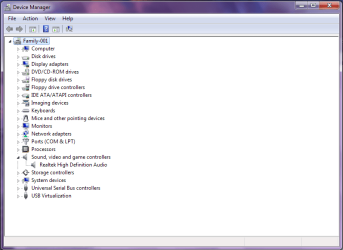
Realtek HD Audio No Rear Sound

From Soundmax do you mean the speakers? If that, then no...I don't have those speakers.

I've installed Realtek again.
 

Attachments

  • Sound.png
    Sound.png
    22.9 KB · Views: 309

My Computer My Computer

At a glance

Windows 7Intel Core 2 Duo E7400 2.80 Ghz1GBNvidia GeForce 9500GT
OS
Windows 7
CPU
Intel Core 2 Duo E7400 2.80 Ghz
Motherboard
Asus P5SD2-VM
Memory
1GB
Graphics Card(s)
Nvidia GeForce 9500GT
Sound Card
Onboard
Monitor(s) Displays
LG Flatron L1510M
Screen Resolution
1024 x 768
Hard Drives
Western Digital 160GB 7200RPM
PSU
400W
Internet Speed
1Mbps
You might need to enable Dolby Prologic in order to get 2 channel audio to make use of the surround speakers.

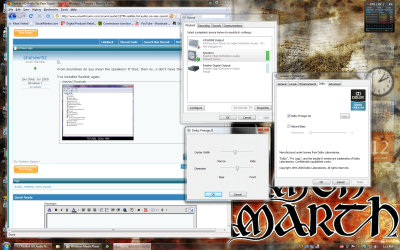
Try right-clicking on your volume icon and selecting playback devices. Highlight speakers and click on properties. From there, open the Dolby tab and check Dolby Prologic IIx. Clicking the box beside it will bring up the width and depth adjustments.

dolbysetup.png
 

My Computer My Computer

At a glance

Windows 7 RCIntel Q6600 @3.52ghz (440x8)4 GB G-SkillSaphire Radeon HD4870 1GB
OS
Windows 7 RC
CPU
Intel Q6600 @3.52ghz (440x8)
Motherboard
Gigabyte EP45-DS3R
Memory
4 GB G-Skill
Graphics Card(s)
Saphire Radeon HD4870 1GB
Sound Card
Onboard
Monitor(s) Displays
Acer 22" LCD
Screen Resolution
1680x1050
Hard Drives
Samsung Spinpoint F1 750GB
PSU
OCZ 750 watt
Cooling
Arctic Cooling Freezer 7 Pro
You might need to enable Dolby Prologic in order to get 2 channel audio to make use of the surround speakers.

Try right-clicking on your volume icon and selecting playback devices. Highlight speakers and click on properties. From there, open the Dolby tab and check Dolby Prologic IIx. Clicking the box beside it will bring up the width and depth adjustments.

View attachment 14145

I don't have a Dolby Tab.
The thing is, my speakers are 4.1 surround, not 5.1. But the SPEAKER fill doesn't work when I select the Quadraphonic Speaker option, I have to select 5.1.
 

My Computer My Computer

At a glance

Windows 7Intel Core 2 Duo E7400 2.80 Ghz1GBNvidia GeForce 9500GT
OS
Windows 7
CPU
Intel Core 2 Duo E7400 2.80 Ghz
Motherboard
Asus P5SD2-VM
Memory
1GB
Graphics Card(s)
Nvidia GeForce 9500GT
Sound Card
Onboard
Monitor(s) Displays
LG Flatron L1510M
Screen Resolution
1024 x 768
Hard Drives
Western Digital 160GB 7200RPM
PSU
400W
Internet Speed
1Mbps
Hi,

I had exactly the same problem with my sound (Win7 RC 64-bit, 4.1 Speaker, Realtek AC 97). I tried the also the "Speaker Fill", but first I didn't hear anything. I skipped through the song, only my rear speakers active (front speakers were muted). And one part I did hear something, but it was very low. Next I checked "Loudness Equalization" and had normal sound! :)
 

My Computer My Computer

At a glance

Windows 7 RC (64-bit)
OS
Windows 7 RC (64-bit)
Message to thread starter: were you able to fix the problem? Coz I had a similar problem with you, just that my MONITOR sound didn't work.. and the headset and mic and speakers were all messed up.. lol. The only stable thing was the speakers..

So I was reading and everything didn't work out for me (although when I came here, I alr installed the newest Realtek driver from the site the realtek site, anyway..) so I tried experimenting..

And now, my speakers, mic + headset, and monitor sound all works simultaneously.. ^^~

If you haven't solved your problem, I will try to help.. coz my rear panel also works..
 

My Computer My Computer

At a glance

Windows 7Intel(R) Pentium(R) 4 CPU1 GbNVidia 7300 SE/7200 GS
Computer Manufacturer/Model Number
Intel(R)
OS
Windows 7
CPU
Intel(R) Pentium(R) 4 CPU
Motherboard
Intel
Memory
1 Gb
Graphics Card(s)
NVidia 7300 SE/7200 GS
Sound Card
Realtek HD Audio
Monitor(s) Displays
Philips 170B6CB
hey chiichan!
Sorry for replying so late. I read your post on the thread.

No, my problem is still not solved. I'd be glad if you can help me with the audio!
 

My Computer My Computer

At a glance

Windows 7Intel Core 2 Duo E7400 2.80 Ghz1GBNvidia GeForce 9500GT
OS
Windows 7
CPU
Intel Core 2 Duo E7400 2.80 Ghz
Motherboard
Asus P5SD2-VM
Memory
1GB
Graphics Card(s)
Nvidia GeForce 9500GT
Sound Card
Onboard
Monitor(s) Displays
LG Flatron L1510M
Screen Resolution
1024 x 768
Hard Drives
Western Digital 160GB 7200RPM
PSU
400W
Internet Speed
1Mbps
No / poor quality Rear Sound

I resolved this issue by downloading the latest drivers from Realtek http://www.realtek.com.tw/downloads/downloadsView.aspx?Langid=1&PNid=24&PFid=24&Level=4&Conn=3&DownTypeID=3&GetDown=false

Having installed the latest drivers I then launched the Realtek HD Audio Manager.
Changed speaker configuration to Quadraphonic (check both Full - range speaker boxes are ticked)
Then Select Sound effects tab. I have found that by selecting the environment "room" it has resolved the problem on my PC.

(With some of the sound effect options I still get no rear sound)
 

My Computer My Computer

At a glance

Windows 7
OS
Windows 7
I realize the last entry in this thread has already been a while ago. However, I have been able to solve my problem, partly thanks to this thread.
I also want two pairs of speakers getting delivered the same signal from one soundcard.
Under WinXP, I used to have a Creative Labs Soundblaster Live! where I just had to activate "Quadrophonics" in the included software.
However, it wasn's that simple with the Realtek onboard sound adapter.

First, I downloaded the Realtek HD Audio-Manager on this German site: Realtek HD Audio-Treiber Download - ComputerBase

I installed it, but the start menu was missing. I found the necessary .exe in C:\Programme\Realtek\Audio\HDA\RAVCpl64.exe

The Audio Manager opened and I clicked numerous times here and there, even in the "Erweiterte Geräteeinstellungen" [Advanced Settings] in the upper right corner.
While testing some settings, I found out, what Realteks idea was:
Having another stereo jack at the FRONT of the computer case.
Luckily, my case has one. I plugged the second pair of speakers to the front panel and instantly had, what I wanted: Twice the identical stereo signal.

The solution is to attach a second sound panel to the mainboard. Mine has two USB jacks, one for speakers and one mic-in.

Good luck, I hope I could give you guys some hints.


-budman

 

My Computer My Computer

At a glance

Windows 7 x64AMD Phenom II X4 955 BE4 GBRadeon HD5750
OS
Windows 7 x64
CPU
AMD Phenom II X4 955 BE
Memory
4 GB
Graphics Card(s)
Radeon HD5750
Sound Card
Realtek Onboard
Conclusion!?

Hi, I went through this discussion what I tried and worked:

1) One stereo plugged in front green output and one stereo plugged in rear green output - now under stereo settings you have two simulataneous stereo streams - four speakers in total.
If this doesn't work try to change settings in "Device advanced settings" in upper right corner of Realtec HD Audio Manager (mine is strange the options there work quite opposite way they should)

2) Plug the speakers as quadraphonic (black and green rear outputs). In Realtec HD Audio Manager go for quadraphonic settings. Don't go for "Speaker fill" it sounds awful! If you run the speaker test, it has to work for all four speakers.
And now all you have to do is to choose any sound effect from the "Sound Effects" menu. I went for "room". To my ears it sounds as 2 identical stereo streams then.
 

My Computer My Computer

At a glance

Windows 7 Ultimate x64
OS
Windows 7 Ultimate x64
Closest thing to a solution as we're going to get tonight.

I know this thread is old as f***, but unfortunately we still have this problem in 2014. Reading through this thread i played around with some of the suggestions and found a solution not exactly mentioned on here. A huge part of my solution is made up of previously suggested solutions though.

What worked for me, as mentioned before:

1) In Realtek HD Audio Manager go to Sound Effects -> Environment -> change to "Room"
2) In Realtek HD Audio Manager go to Speaker Configurations -> set to "5.1 Speaker" (produces better bass then Quadraphonic, also do not enable "bass management")

This may have been mentioned as well, but not about to read these 5 pages over again to verify:

3) Go into Playback Devices -> Right click "Speakers" -> Properties -> Levels Tab -> Bring the "Front" volume down to 50%

This set up is working pretty nicely for me right now. Getting even sound from my 2 front speakers and my 2 back ones, bass is okay, only center speaker isn't working, but i can live with that for now. I was using iTunes music while playing with these settings, so im not sure how these settings translate to movies or games.
May not be the ultimate fix, but defiantly better then before, and until something better comes up.
 

My Computer My Computer

At a glance

Windows 8 Pro x64Intel i7 4930kCORSAIR Vengeance Pro 16GB (2 x 8GB) 1866MHzEVGA GeForce GTX 770 4GB Dual Classified w/ E...
Computer type
PC/Desktop
OS
Windows 8 Pro x64
CPU
Intel i7 4930k
Motherboard
Asus Sabertooth x79
Memory
CORSAIR Vengeance Pro 16GB (2 x 8GB) 1866MHz
Graphics Card(s)
EVGA GeForce GTX 770 4GB Dual Classified w/ EVGA ACX Cooler
Monitor(s) Displays
HP w1907 -defiantly need to upgrade
Hard Drives
SSD: Seagate 600 Pro 240GB
HHD: WD Black 1TB
PSU
CORSAIR AX860i
Case
Corsair 540 Silver
Cooling
Corsair H100i
Keyboard
Logitech MX5500
Mouse
Logitech MX Performance
Back
Top