Recover data from a diskpart > clean command

My Computer

Computer type
Laptop
Computer Manufacturer/Model Number
ACER ASPIRE 5742G
OS
Microsoft Windows 7 Home Premium 64-bits 7601 Multiprocessor Free Service Pack 1
CPU
Intel(R) Core(TM) i3 CPU M 370 @ 2.40GHz
Motherboard
Acer Aspire 5742G
Memory
4,00 GB
Graphics Card(s)
ATI Mobility Radeon HD 5400 Series
Sound Card
(1) AMD High Definition Audio Device (2) Realtek High Defi
Screen Resolution
1366 x 768 x 32 bits (4294967296 colors) @ 60 Hz
Hard Drives
WDC WD5000BEVT-22ZAT0
yes I did a deeper search it almost took like 6 to 7 hours
 

My Computer

Computer type
PC/Desktop
Computer Manufacturer/Model Number
Custom build
OS
Windows 10 Pro (64-bit)
CPU
Intel Core i7 - 4790K (4.0 GHz)
Motherboard
ASUS Z97 Sabertooth Mark 1
Memory
32GB Corsair Vengeance Pro 1600 MHz DDR3 RAM (Dual Channel)
Graphics Card(s)
ASUS 1GB DDR5 450GTS
Screen Resolution
2048x1152
Hard Drives
480GB OCZ Vector 150 SSD (Internal) -Primary OS Drive
160GB Segate x 2 (Internal)
2TB Seagate External USB 2.0
PSU
Corsair 850W
Case
Corsair Obsidian 900D
Cooling
Fan cooling
Keyboard
Logitech Flat Keyboard
Mouse
Razer Ouroboros Lazer Mouse
Antivirus
BitDefender Total Security 2015
Browser
All browsers
Other Info
Razer Kraken 7.1 Headset
Creative 7.1 Speaker System
Actually easeus partition recovery also showed me the same partitions I think
 

My Computer

Computer type
PC/Desktop
Computer Manufacturer/Model Number
Custom build
OS
Windows 10 Pro (64-bit)
CPU
Intel Core i7 - 4790K (4.0 GHz)
Motherboard
ASUS Z97 Sabertooth Mark 1
Memory
32GB Corsair Vengeance Pro 1600 MHz DDR3 RAM (Dual Channel)
Graphics Card(s)
ASUS 1GB DDR5 450GTS
Screen Resolution
2048x1152
Hard Drives
480GB OCZ Vector 150 SSD (Internal) -Primary OS Drive
160GB Segate x 2 (Internal)
2TB Seagate External USB 2.0
PSU
Corsair 850W
Case
Corsair Obsidian 900D
Cooling
Fan cooling
Keyboard
Logitech Flat Keyboard
Mouse
Razer Ouroboros Lazer Mouse
Antivirus
BitDefender Total Security 2015
Browser
All browsers
Other Info
Razer Kraken 7.1 Headset
Creative 7.1 Speaker System
Ah no haven't done the deeper search how do i get to do that i was doing the quick search till now
 

My Computer

Computer type
PC/Desktop
Computer Manufacturer/Model Number
Custom build
OS
Windows 10 Pro (64-bit)
CPU
Intel Core i7 - 4790K (4.0 GHz)
Motherboard
ASUS Z97 Sabertooth Mark 1
Memory
32GB Corsair Vengeance Pro 1600 MHz DDR3 RAM (Dual Channel)
Graphics Card(s)
ASUS 1GB DDR5 450GTS
Screen Resolution
2048x1152
Hard Drives
480GB OCZ Vector 150 SSD (Internal) -Primary OS Drive
160GB Segate x 2 (Internal)
2TB Seagate External USB 2.0
PSU
Corsair 850W
Case
Corsair Obsidian 900D
Cooling
Fan cooling
Keyboard
Logitech Flat Keyboard
Mouse
Razer Ouroboros Lazer Mouse
Antivirus
BitDefender Total Security 2015
Browser
All browsers
Other Info
Razer Kraken 7.1 Headset
Creative 7.1 Speaker System

My Computer

Computer type
Laptop
Computer Manufacturer/Model Number
ACER ASPIRE 5742G
OS
Microsoft Windows 7 Home Premium 64-bits 7601 Multiprocessor Free Service Pack 1
CPU
Intel(R) Core(TM) i3 CPU M 370 @ 2.40GHz
Motherboard
Acer Aspire 5742G
Memory
4,00 GB
Graphics Card(s)
ATI Mobility Radeon HD 5400 Series
Sound Card
(1) AMD High Definition Audio Device (2) Realtek High Defi
Screen Resolution
1366 x 768 x 32 bits (4294967296 colors) @ 60 Hz
Hard Drives
WDC WD5000BEVT-22ZAT0
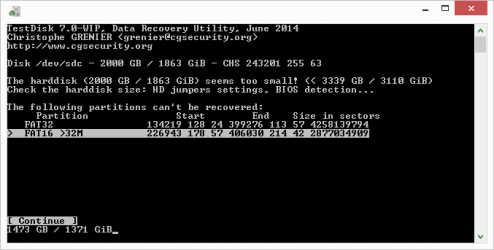
Well the scan finished and this is the result what should I do now

View attachment 320330
The partitions in your screenshot cannot be recovered: Reason they are larger than the physical disk. The 2 partitions overlap btw. Just click "continue" there (no other options available)
 

My Computer

Computer type
Laptop
Computer Manufacturer/Model Number
ACER ASPIRE 5742G
OS
Microsoft Windows 7 Home Premium 64-bits 7601 Multiprocessor Free Service Pack 1
CPU
Intel(R) Core(TM) i3 CPU M 370 @ 2.40GHz
Motherboard
Acer Aspire 5742G
Memory
4,00 GB
Graphics Card(s)
ATI Mobility Radeon HD 5400 Series
Sound Card
(1) AMD High Definition Audio Device (2) Realtek High Defi
Screen Resolution
1366 x 768 x 32 bits (4294967296 colors) @ 60 Hz
Hard Drives
WDC WD5000BEVT-22ZAT0
I don't see anywhere in the thread where it specifies it is a GPT formatted drive. Am I missing that?


If it's MBR then it should be partition recoverable after Clean command as we've done here repeatedly. Again, have you completed the Quick Scan with PW?


What does the color legend say that a Yellow disk means in your PW screenshot, since it is cropped so tightly that much information is hidden.
 
Only the MBR partitioning information and hidden sector information are overwritten
=>Now I know what you mean Greg. I thought the first 1MB of physical disk (not only if GPT) will be overwritten by "diskpart clean".

I interpreted the explanation totally wrong a few times!
Indeed if only MBR and partition table (total 1 sector = 512 bytes) is deleted ... recovery is simple. Just do Partition Wizard and a partition recovery->quick scan. But that should take a few seconds to complete ... very strange it didn't work.


My Computer

Computer type
Laptop
Computer Manufacturer/Model Number
ACER ASPIRE 5742G
OS
Microsoft Windows 7 Home Premium 64-bits 7601 Multiprocessor Free Service Pack 1
CPU
Intel(R) Core(TM) i3 CPU M 370 @ 2.40GHz
Motherboard
Acer Aspire 5742G
Memory
4,00 GB
Graphics Card(s)
ATI Mobility Radeon HD 5400 Series
Sound Card
(1) AMD High Definition Audio Device (2) Realtek High Defi
Screen Resolution
1366 x 768 x 32 bits (4294967296 colors) @ 60 Hz
Hard Drives
WDC WD5000BEVT-22ZAT0
I think he might have run the Full Scan and then interrupted it - which is why I spoke up. I'd run the Quick Scan again to be sure.
 
No i didn't finish the PW's quick scan as it was taking hours to find the partition almost like a deep scan so I jumped to testdisk. I'd run it again and post a snap here.

How long should the PW's quick scan take to finish the scan on a drive like mine?
 

My Computer

Computer type
PC/Desktop
Computer Manufacturer/Model Number
Custom build
OS
Windows 10 Pro (64-bit)
CPU
Intel Core i7 - 4790K (4.0 GHz)
Motherboard
ASUS Z97 Sabertooth Mark 1
Memory
32GB Corsair Vengeance Pro 1600 MHz DDR3 RAM (Dual Channel)
Graphics Card(s)
ASUS 1GB DDR5 450GTS
Screen Resolution
2048x1152
Hard Drives
480GB OCZ Vector 150 SSD (Internal) -Primary OS Drive
160GB Segate x 2 (Internal)
2TB Seagate External USB 2.0
PSU
Corsair 850W
Case
Corsair Obsidian 900D
Cooling
Fan cooling
Keyboard
Logitech Flat Keyboard
Mouse
Razer Ouroboros Lazer Mouse
Antivirus
BitDefender Total Security 2015
Browser
All browsers
Other Info
Razer Kraken 7.1 Headset
Creative 7.1 Speaker System
No i didn't finish the PW's quick scan as it was taking hours to find the partition almost like a deep scan so I jumped to testdisk. I'd run it again and post a snap here.

How long should the PW's quick scan take to finish the scan on a drive like mine?
PW Quick scan tries ty find a partition. It starts from beginning of disk. If PW finds one.... PW knows the size and proceeds with searching and the end of already found partitions.

Are you 100% sure you did "quick scan"? Are you sure you did "clean" and not "clean all"? Other recovery tools didn't find the partition as well. So there's really nothing written to that disk after the "clean" command?
 

My Computer

Computer type
Laptop
Computer Manufacturer/Model Number
ACER ASPIRE 5742G
OS
Microsoft Windows 7 Home Premium 64-bits 7601 Multiprocessor Free Service Pack 1
CPU
Intel(R) Core(TM) i3 CPU M 370 @ 2.40GHz
Motherboard
Acer Aspire 5742G
Memory
4,00 GB
Graphics Card(s)
ATI Mobility Radeon HD 5400 Series
Sound Card
(1) AMD High Definition Audio Device (2) Realtek High Defi
Screen Resolution
1366 x 768 x 32 bits (4294967296 colors) @ 60 Hz
Hard Drives
WDC WD5000BEVT-22ZAT0
No i didn't finish the PW's quick scan as it was taking hours to find the partition almost like a deep scan so I jumped to testdisk. I'd run it again and post a snap here.

How long should the PW's quick scan take to finish the scan on a drive like mine?
PW Quick scan tries ty find a partition. It starts from beginning of disk. If PW finds one.... PW knows the size and proceeds with searching and the end of already found partitions.

Are you 100% sure you did "quick scan"? Are you sure you did "clean" and not "clean all"? Other recovery tools didn't find the partition as well. So there's really nothing written to that disk after the "clean" command?

Yes i did a quick scan only. And I did clean only as I was not aware of the clean all command at that time. So there's no way i could have run the clean all command and yes I did absolutely nothing to the disk after I did that as I knew that would completely destroy my data

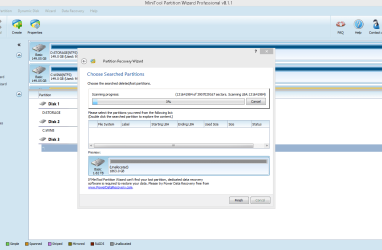
As of now i am back to MiniTool Partition Wizard and I am running quick scan. This is the screen so far

scan.png
 

My Computer

Computer type
PC/Desktop
Computer Manufacturer/Model Number
Custom build
OS
Windows 10 Pro (64-bit)
CPU
Intel Core i7 - 4790K (4.0 GHz)
Motherboard
ASUS Z97 Sabertooth Mark 1
Memory
32GB Corsair Vengeance Pro 1600 MHz DDR3 RAM (Dual Channel)
Graphics Card(s)
ASUS 1GB DDR5 450GTS
Screen Resolution
2048x1152
Hard Drives
480GB OCZ Vector 150 SSD (Internal) -Primary OS Drive
160GB Segate x 2 (Internal)
2TB Seagate External USB 2.0
PSU
Corsair 850W
Case
Corsair Obsidian 900D
Cooling
Fan cooling
Keyboard
Logitech Flat Keyboard
Mouse
Razer Ouroboros Lazer Mouse
Antivirus
BitDefender Total Security 2015
Browser
All browsers
Other Info
Razer Kraken 7.1 Headset
Creative 7.1 Speaker System
What happens is impossible. At least if you only did "clean", it was a MBR disk and the documentation is correct and you didn't write to the unallocated space afterwards.

PW quick scan should fix it.... at least normally.
you can try deep scan but that takes maybe days.

testdisk is very good tool for this and is use for forensic analysis as well. If "deeper search" doesn't work.... I am out of options to recover the partition.

But I think I CAN rescue the files!! What type of files are on that disk?
 

My Computer

Computer type
Laptop
Computer Manufacturer/Model Number
ACER ASPIRE 5742G
OS
Microsoft Windows 7 Home Premium 64-bits 7601 Multiprocessor Free Service Pack 1
CPU
Intel(R) Core(TM) i3 CPU M 370 @ 2.40GHz
Motherboard
Acer Aspire 5742G
Memory
4,00 GB
Graphics Card(s)
ATI Mobility Radeon HD 5400 Series
Sound Card
(1) AMD High Definition Audio Device (2) Realtek High Defi
Screen Resolution
1366 x 768 x 32 bits (4294967296 colors) @ 60 Hz
Hard Drives
WDC WD5000BEVT-22ZAT0
It was MBR disk for sure. And also i ran only clean command but I guess i am out of those 1% who are out of luck :) I am running Minitool Partition Wizards Quick scan now which is taking ages but ill put the screen here when done. If it doesn't fix ill run TestDisk Deep Scan once more before I give up.
There were a lot of files of various formats like videos, photographs, archives(zip, rar), executables(program setups), and iso's.

Out of which the iso's are most important to me. But still its like 2 to 3 years of data I am not sure what exactly I lost. But a lot of "user data" that accumulates in one's pc you can say.
 

My Computer

Computer type
PC/Desktop
Computer Manufacturer/Model Number
Custom build
OS
Windows 10 Pro (64-bit)
CPU
Intel Core i7 - 4790K (4.0 GHz)
Motherboard
ASUS Z97 Sabertooth Mark 1
Memory
32GB Corsair Vengeance Pro 1600 MHz DDR3 RAM (Dual Channel)
Graphics Card(s)
ASUS 1GB DDR5 450GTS
Screen Resolution
2048x1152
Hard Drives
480GB OCZ Vector 150 SSD (Internal) -Primary OS Drive
160GB Segate x 2 (Internal)
2TB Seagate External USB 2.0
PSU
Corsair 850W
Case
Corsair Obsidian 900D
Cooling
Fan cooling
Keyboard
Logitech Flat Keyboard
Mouse
Razer Ouroboros Lazer Mouse
Antivirus
BitDefender Total Security 2015
Browser
All browsers
Other Info
Razer Kraken 7.1 Headset
Creative 7.1 Speaker System
Do all the things I advised you to do. And post results.
No partition recovered at all.... it's time to try to recover a lot of files.

Please read PhotoRec - CGSecurity
Did you defrag the disk drive recently, so files are (almost) contiguous? This helps PhotoRec
 

My Computer

Computer type
Laptop
Computer Manufacturer/Model Number
ACER ASPIRE 5742G
OS
Microsoft Windows 7 Home Premium 64-bits 7601 Multiprocessor Free Service Pack 1
CPU
Intel(R) Core(TM) i3 CPU M 370 @ 2.40GHz
Motherboard
Acer Aspire 5742G
Memory
4,00 GB
Graphics Card(s)
ATI Mobility Radeon HD 5400 Series
Sound Card
(1) AMD High Definition Audio Device (2) Realtek High Defi
Screen Resolution
1366 x 768 x 32 bits (4294967296 colors) @ 60 Hz
Hard Drives
WDC WD5000BEVT-22ZAT0
I recovered my lost partition with minitool partition wizard, and it did a good job.
With "quick scan"?? How long did it take approximately?
 

My Computer

Computer type
Laptop
Computer Manufacturer/Model Number
ACER ASPIRE 5742G
OS
Microsoft Windows 7 Home Premium 64-bits 7601 Multiprocessor Free Service Pack 1
CPU
Intel(R) Core(TM) i3 CPU M 370 @ 2.40GHz
Motherboard
Acer Aspire 5742G
Memory
4,00 GB
Graphics Card(s)
ATI Mobility Radeon HD 5400 Series
Sound Card
(1) AMD High Definition Audio Device (2) Realtek High Defi
Screen Resolution
1366 x 768 x 32 bits (4294967296 colors) @ 60 Hz
Hard Drives
WDC WD5000BEVT-22ZAT0
Deep Scan Results - Testdisk

These are the results of my deep scan from Testdisk

Doesn't look like it recovered anything. I'd run a full scan by Partition Wizard now and see if it finds anything then i'd fall back to file recovery

deep_scan.png
 

My Computer

Computer type
PC/Desktop
Computer Manufacturer/Model Number
Custom build
OS
Windows 10 Pro (64-bit)
CPU
Intel Core i7 - 4790K (4.0 GHz)
Motherboard
ASUS Z97 Sabertooth Mark 1
Memory
32GB Corsair Vengeance Pro 1600 MHz DDR3 RAM (Dual Channel)
Graphics Card(s)
ASUS 1GB DDR5 450GTS
Screen Resolution
2048x1152
Hard Drives
480GB OCZ Vector 150 SSD (Internal) -Primary OS Drive
160GB Segate x 2 (Internal)
2TB Seagate External USB 2.0
PSU
Corsair 850W
Case
Corsair Obsidian 900D
Cooling
Fan cooling
Keyboard
Logitech Flat Keyboard
Mouse
Razer Ouroboros Lazer Mouse
Antivirus
BitDefender Total Security 2015
Browser
All browsers
Other Info
Razer Kraken 7.1 Headset
Creative 7.1 Speaker System
Download and install sector inspector as explained on Tools for MBR/Boot Records and References

Open an http://www.sevenforums.com/tutorials/783-elevated-command-prompt.html
then do
Code:
c:\path\to\secinspect -backup PhysicalDrive0 mbrsect.txt 0 2048

replace path\to with the real path. Replace PhysicalDrive0 with PhysicalDrive1 I assume. See disk management for actual drive number. mbrsect.txt will be created in the current folder and has the first 2048 sectors. File size is 1MB. Please post the file as attachment.
 
Last edited:

My Computer

Computer type
Laptop
Computer Manufacturer/Model Number
ACER ASPIRE 5742G
OS
Microsoft Windows 7 Home Premium 64-bits 7601 Multiprocessor Free Service Pack 1
CPU
Intel(R) Core(TM) i3 CPU M 370 @ 2.40GHz
Motherboard
Acer Aspire 5742G
Memory
4,00 GB
Graphics Card(s)
ATI Mobility Radeon HD 5400 Series
Sound Card
(1) AMD High Definition Audio Device (2) Realtek High Defi
Screen Resolution
1366 x 768 x 32 bits (4294967296 colors) @ 60 Hz
Hard Drives
WDC WD5000BEVT-22ZAT0

My Computer

Computer type
PC/Desktop
Computer Manufacturer/Model Number
Custom build
OS
Windows 10 Pro (64-bit)
CPU
Intel Core i7 - 4790K (4.0 GHz)
Motherboard
ASUS Z97 Sabertooth Mark 1
Memory
32GB Corsair Vengeance Pro 1600 MHz DDR3 RAM (Dual Channel)
Graphics Card(s)
ASUS 1GB DDR5 450GTS
Screen Resolution
2048x1152
Hard Drives
480GB OCZ Vector 150 SSD (Internal) -Primary OS Drive
160GB Segate x 2 (Internal)
2TB Seagate External USB 2.0
PSU
Corsair 850W
Case
Corsair Obsidian 900D
Cooling
Fan cooling
Keyboard
Logitech Flat Keyboard
Mouse
Razer Ouroboros Lazer Mouse
Antivirus
BitDefender Total Security 2015
Browser
All browsers
Other Info
Razer Kraken 7.1 Headset
Creative 7.1 Speaker System
Back
Top