Recover data from a diskpart > clean command

Would you want to theorize why Clean command works to overcome about half or more of all installation failures? I assume it's because it wipes boot sector and the partition table, one or both of which interferes with attempts to install Win7.

Likewise on multiple occasions we've had drives which failed to boot that traced to a hard drive where the solution was to wipe the drive with Clean command.

If one suspects boot sector related problems or Windows booting related problems and diskpart clean is recommended, as Kaktussoft mentioned in the previous post it zeroes LBA 0 that contains both MBR Code and Partition Table - in an MBR disk.

However, if it is an already existing HDD with a single volume or multiple volumes, it shall be prudent to examine the start sector of the first volume ( this I would presume can be done in many ways. Even by running a partitioning utility from a boot device. The properties of the volume may show the start sector) and recommend diskpart clean only if the start sector is LBA 2048. If it is LBA 63 it is a no no as it will zero it and make the disk inaccessible. This may perhaps increase the success rate from the present estimate you had indicated by eliminating one cause of failure of recommended action.

In the case of start sector LBA 2048 drives - Many alien OS like Linux may write data in Sector 64 to 2047 and any dirty data left behind may be a potential source of Windows booting related problems. So wiping it with diskpart clean may be advantageous. (E & O.E. - Errors and Omissions Excepted. :D)
 

My Computer

OS
Windows 7 Home Premium 32 bit
In the case of start sector LBA 2048 drives - Many alien OS like Linux may write data in Sector 64 to 2047 and any dirty data left behind may be a potential source of Windows booting related problems. So wiping it with diskpart clean may be advantageous. (E & O.E. - Errors and Omissions Excepted. :D)
Boot process reads "MBR bootcode" in sector 0. When it runs it most likely instructs computer to read "volume boot sector" of active partition. etc etc. Partition table is in MBR (sector 0) as well.

Whatever info is in sector 1 - 2047 is irrelevant (assuming first partition doesn't start in that range).
 
Last edited:

My Computer

Computer type
Laptop
Computer Manufacturer/Model Number
ACER ASPIRE 5742G
OS
Microsoft Windows 7 Home Premium 64-bits 7601 Multiprocessor Free Service Pack 1
CPU
Intel(R) Core(TM) i3 CPU M 370 @ 2.40GHz
Motherboard
Acer Aspire 5742G
Memory
4,00 GB
Graphics Card(s)
ATI Mobility Radeon HD 5400 Series
Sound Card
(1) AMD High Definition Audio Device (2) Realtek High Defi
Screen Resolution
1366 x 768 x 32 bits (4294967296 colors) @ 60 Hz
Hard Drives
WDC WD5000BEVT-22ZAT0
Whatever info is in sector 1 - 2047 is irrelevant (assuming first partition doesn't start in that range).

Right but wrong. To Windows and Microsoft those sectors are "hidden". But there is no hard rule for not to use this sectors. For example, obsolete Linux loader "LiLO" is known to save some extended code which can't be fitted on the MBR on these sectors. GRUB may also use these sectors depending on the scenario.

Example : [SOLVED] Sector 32 FlexNet Problem -- Grub

Grub has 440 bytes available to it in the MBR to store its bootable code, but it wants more space than that, so it uses the space between the MBR and the 1st partition. But Grub isn't the only program that wants to use that space, a thing called FlexNet does too. FlexNet is some sort of software license manager, and according to the warning issued by Grub, it likes to store data in Sector 32.


http://www.chiark.greenend.org.uk/u...ows-applications-making-grub2-unbootable.html


This is a bug in which some proprietary Windows-based software overwrites particular sectors in the gap between the master boot record and the first partition, sometimes called the "embedding area". GRUB Legacy and GRUB 2 both normally use this part of the disk to store one of their key components: GRUB Legacy calls this component Stage 1.5, while GRUB 2 calls it the core image (comparison). However, Stage 1.5 is less useful than the core image (for example, the latter provides a rescue shell which can be used to recover from some problems), and is therefore rather smaller: somewhere around 10KB vs. 24KB for the common case of ext[234] on plain block devices.
 

My Computer

Computer type
PC/Desktop
OS
Windows 7 Ultimate x64
Hi,

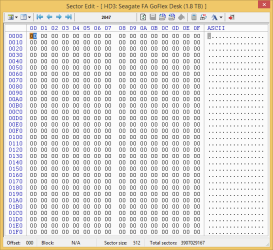
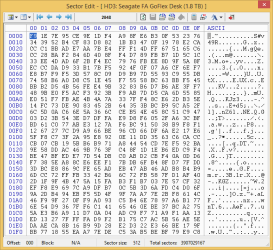
I checked sector 2047 and 2048 and the former is 0'd but data starts at 2048. I am posting the screens below.

2047.png

2048.png
 

My Computer

Computer type
PC/Desktop
Computer Manufacturer/Model Number
Custom build
OS
Windows 10 Pro (64-bit)
CPU
Intel Core i7 - 4790K (4.0 GHz)
Motherboard
ASUS Z97 Sabertooth Mark 1
Memory
32GB Corsair Vengeance Pro 1600 MHz DDR3 RAM (Dual Channel)
Graphics Card(s)
ASUS 1GB DDR5 450GTS
Screen Resolution
2048x1152
Hard Drives
480GB OCZ Vector 150 SSD (Internal) -Primary OS Drive
160GB Segate x 2 (Internal)
2TB Seagate External USB 2.0
PSU
Corsair 850W
Case
Corsair Obsidian 900D
Cooling
Fan cooling
Keyboard
Logitech Flat Keyboard
Mouse
Razer Ouroboros Lazer Mouse
Antivirus
BitDefender Total Security 2015
Browser
All browsers
Other Info
Razer Kraken 7.1 Headset
Creative 7.1 Speaker System
Read #7 . It looks like partition start sector was 63 by default(?) Now sectors 0-2047 are zeroed. Sector 63-2047 did belong to partition 1. Sector didn't start on sector 2028 for sure! It has no "readable strings" whatsoever. PW and testdisk couldn't recover the partition as well.

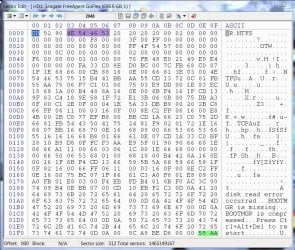
This is an example of a normal NTFS boot sector NTFS. Partition Boot Sector

What kind of files were on the disk? mp3, jpg, doc.... please explain
 

My Computer

Computer type
Laptop
Computer Manufacturer/Model Number
ACER ASPIRE 5742G
OS
Microsoft Windows 7 Home Premium 64-bits 7601 Multiprocessor Free Service Pack 1
CPU
Intel(R) Core(TM) i3 CPU M 370 @ 2.40GHz
Motherboard
Acer Aspire 5742G
Memory
4,00 GB
Graphics Card(s)
ATI Mobility Radeon HD 5400 Series
Sound Card
(1) AMD High Definition Audio Device (2) Realtek High Defi
Screen Resolution
1366 x 768 x 32 bits (4294967296 colors) @ 60 Hz
Hard Drives
WDC WD5000BEVT-22ZAT0
There were all type of files on the disk. mp3, jpg, txt, mkv, mp4, code files like, php, aspx, java, exe, rar, iso, nrg... basically it had everything.

I kept all my user data on that drive keeping the boot drive clean.
 

My Computer

Computer type
PC/Desktop
Computer Manufacturer/Model Number
Custom build
OS
Windows 10 Pro (64-bit)
CPU
Intel Core i7 - 4790K (4.0 GHz)
Motherboard
ASUS Z97 Sabertooth Mark 1
Memory
32GB Corsair Vengeance Pro 1600 MHz DDR3 RAM (Dual Channel)
Graphics Card(s)
ASUS 1GB DDR5 450GTS
Screen Resolution
2048x1152
Hard Drives
480GB OCZ Vector 150 SSD (Internal) -Primary OS Drive
160GB Segate x 2 (Internal)
2TB Seagate External USB 2.0
PSU
Corsair 850W
Case
Corsair Obsidian 900D
Cooling
Fan cooling
Keyboard
Logitech Flat Keyboard
Mouse
Razer Ouroboros Lazer Mouse
Antivirus
BitDefender Total Security 2015
Browser
All browsers
Other Info
Razer Kraken 7.1 Headset
Creative 7.1 Speaker System
Yes, sector 2048 seems to be a data sector. So the first partition might be started at sector 63 as "kaktussoft" said. There is still a chance for backup boot sector to be alive. If DISKPART wiped out the last MB also, then backup boot sector might also damaged. However it may worth a try to locate it.
 

My Computer

Computer type
PC/Desktop
OS
Windows 7 Ultimate x64
I will post the steps to inspect the presence of "backup boot sector" shortly.
 

My Computer

Computer type
PC/Desktop
OS
Windows 7 Ultimate x64
Please follow the below steps.

1. Download DMDE from http://dmde.com/download/dmde-free-2.9.2.554-beta-win32-gui.zip

2. After accepting the licence, a disk selection window will appear. On the left pane, make sure Physical Devices is selected and then on the right pane choose your slave disk (model name will be showed ). Then press OK.

x4qi4y.png


3. Now DMDE will scan for the presence of boot sectors or backup boot sectors and will present a partition info box like the one in the below example.

34phqg7.png


The time to complete the search will vary with disk size. When the partition selection screen is displayed, use "Windows snipping tool" to capture the window and upload the screenshot with next reply.
 

My Computer

Computer type
PC/Desktop
OS
Windows 7 Ultimate x64
One more thing to remember - whether DMDE finds or not finds the partition, make sure to not press any other button/use any option than the one in my instruction. DMDE is a pretty powerful tool so care should be taken when using it.
 

My Computer

Computer type
PC/Desktop
OS
Windows 7 Ultimate x64
I'll do it and ill be careful :)
 

My Computer

Computer type
PC/Desktop
Computer Manufacturer/Model Number
Custom build
OS
Windows 10 Pro (64-bit)
CPU
Intel Core i7 - 4790K (4.0 GHz)
Motherboard
ASUS Z97 Sabertooth Mark 1
Memory
32GB Corsair Vengeance Pro 1600 MHz DDR3 RAM (Dual Channel)
Graphics Card(s)
ASUS 1GB DDR5 450GTS
Screen Resolution
2048x1152
Hard Drives
480GB OCZ Vector 150 SSD (Internal) -Primary OS Drive
160GB Segate x 2 (Internal)
2TB Seagate External USB 2.0
PSU
Corsair 850W
Case
Corsair Obsidian 900D
Cooling
Fan cooling
Keyboard
Logitech Flat Keyboard
Mouse
Razer Ouroboros Lazer Mouse
Antivirus
BitDefender Total Security 2015
Browser
All browsers
Other Info
Razer Kraken 7.1 Headset
Creative 7.1 Speaker System
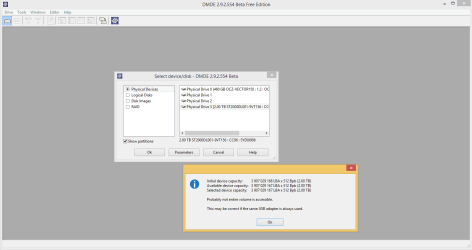
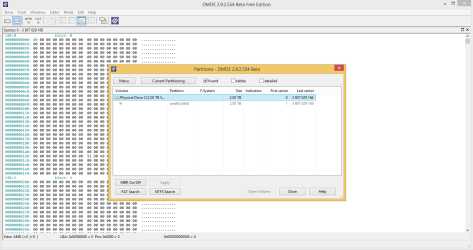
First it gave me an error which I suppose is due to my disk being USB connected. Then it showed the results almost within seconds. Pasting the screens below.

error.png

snap.png
 

My Computer

Computer type
PC/Desktop
Computer Manufacturer/Model Number
Custom build
OS
Windows 10 Pro (64-bit)
CPU
Intel Core i7 - 4790K (4.0 GHz)
Motherboard
ASUS Z97 Sabertooth Mark 1
Memory
32GB Corsair Vengeance Pro 1600 MHz DDR3 RAM (Dual Channel)
Graphics Card(s)
ASUS 1GB DDR5 450GTS
Screen Resolution
2048x1152
Hard Drives
480GB OCZ Vector 150 SSD (Internal) -Primary OS Drive
160GB Segate x 2 (Internal)
2TB Seagate External USB 2.0
PSU
Corsair 850W
Case
Corsair Obsidian 900D
Cooling
Fan cooling
Keyboard
Logitech Flat Keyboard
Mouse
Razer Ouroboros Lazer Mouse
Antivirus
BitDefender Total Security 2015
Browser
All browsers
Other Info
Razer Kraken 7.1 Headset
Creative 7.1 Speaker System
That is bad news. Backup boot sector is also seems to be wiped and that is why "TestDisk" and "Partition Wizard" deep scans failed to detect a partition. To my knowledge, undeleting the partition is impossible at this point. However the NTFS MFT will be hopefully there without damage. Most of the data recovery tools will be able to recover files with original names and folder structure.

Let's examine whether DMDE can reconstruct the file system. Please follow the below steps.

1. Press the NTFS search button. On the next window, choose "Search".

2j6wkp.png


2. DMDE will now search for a valid NTFS file system. You will see a a window similar to the below example with progress shown in the bottom.

jq6nf7.png


This will be a sector by sector search so will take time to complete. After it completes, take a screenshot and upload with the next reply. Also use the "Save" button and save the search result in a local folder with a name of your choice.
 

My Computer

Computer type
PC/Desktop
OS
Windows 7 Ultimate x64
If it finds the $MFT mirror it can reconstruct the original $MFT. Afterwards you can regenerate the boot sector and backup bootsector from the MFT. Testdisk can do that!
 

My Computer

Computer type
Laptop
Computer Manufacturer/Model Number
ACER ASPIRE 5742G
OS
Microsoft Windows 7 Home Premium 64-bits 7601 Multiprocessor Free Service Pack 1
CPU
Intel(R) Core(TM) i3 CPU M 370 @ 2.40GHz
Motherboard
Acer Aspire 5742G
Memory
4,00 GB
Graphics Card(s)
ATI Mobility Radeon HD 5400 Series
Sound Card
(1) AMD High Definition Audio Device (2) Realtek High Defi
Screen Resolution
1366 x 768 x 32 bits (4294967296 colors) @ 60 Hz
Hard Drives
WDC WD5000BEVT-22ZAT0
To add to what has already been decided (that the screenshot of Sector 2048 in post #85 is not a NTFS/Volume Boot Record/Partition Boot Record) here is how a normal NTFS record will show in Bootice . This is just by way of information to all those interested and following this thread.Supplements Kaktussoft's post#86 with a real life sector map.

24-06-2014 13-40-35.jpg

NTFS Flag 4E 54 46 53 MBR Boot Record Signature: 55 AA
 

My Computer

OS
Windows 7 Home Premium 32 bit
If it finds the $MFT mirror it can reconstruct the original $MFT. Afterwards you can regenerate the boot sector and backup bootsector from the MFT. Testdisk can do that!

Theoretically it is possible but for this to work a partition entry with correct values is required. I am still experimenting all possibilities by virtually recreating a damaged partition. Let's check whether DMDE can find the MFT entries and recreate the partition structure.

@lonewolfs

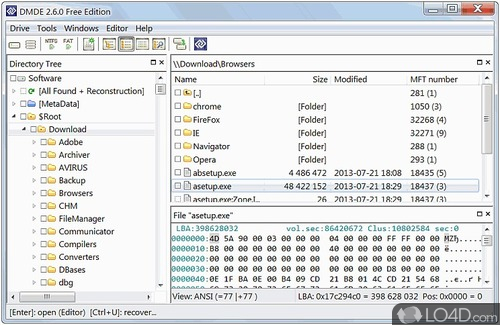
If DMDE found a valid entry after search completes, first save the search result, take snapshot and then click on "Open Volume". Then check whether your original folder structure can be seen like in the below example.

dmde-3.jpg


Make sure to not open the volume until the search finishes.
 
Last edited:

My Computer

Computer type
PC/Desktop
OS
Windows 7 Ultimate x64
Hi Anshad, Jumanji and everyone

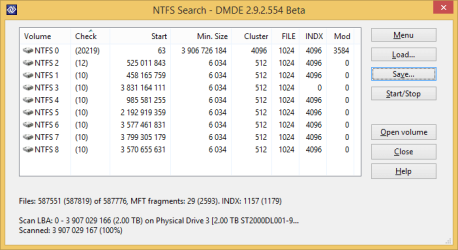
Sorry it took sometime for me to finish the scan but here it is ...

Please advice me on how to go ahead

dmde_final.png
 

My Computer

Computer type
PC/Desktop
Computer Manufacturer/Model Number
Custom build
OS
Windows 10 Pro (64-bit)
CPU
Intel Core i7 - 4790K (4.0 GHz)
Motherboard
ASUS Z97 Sabertooth Mark 1
Memory
32GB Corsair Vengeance Pro 1600 MHz DDR3 RAM (Dual Channel)
Graphics Card(s)
ASUS 1GB DDR5 450GTS
Screen Resolution
2048x1152
Hard Drives
480GB OCZ Vector 150 SSD (Internal) -Primary OS Drive
160GB Segate x 2 (Internal)
2TB Seagate External USB 2.0
PSU
Corsair 850W
Case
Corsair Obsidian 900D
Cooling
Fan cooling
Keyboard
Logitech Flat Keyboard
Mouse
Razer Ouroboros Lazer Mouse
Antivirus
BitDefender Total Security 2015
Browser
All browsers
Other Info
Razer Kraken 7.1 Headset
Creative 7.1 Speaker System
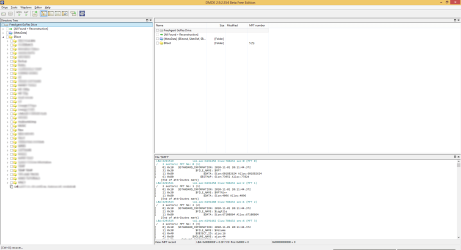
I opened the volume as it said the first one NTFS 0 in my previous post and this one exactly has my the directory structure I intend to recover. Also having kept a lot of patience I am really glad to see the directory structure back :)

Once more sorry for the late response and I won't do anything in haste right now and wait for your instructions. This is very important that I recover this data :)

Pasting a snapshot below... and thanks a lot for all the help.

dmde_filesystem_c.png
 

My Computer

Computer type
PC/Desktop
Computer Manufacturer/Model Number
Custom build
OS
Windows 10 Pro (64-bit)
CPU
Intel Core i7 - 4790K (4.0 GHz)
Motherboard
ASUS Z97 Sabertooth Mark 1
Memory
32GB Corsair Vengeance Pro 1600 MHz DDR3 RAM (Dual Channel)
Graphics Card(s)
ASUS 1GB DDR5 450GTS
Screen Resolution
2048x1152
Hard Drives
480GB OCZ Vector 150 SSD (Internal) -Primary OS Drive
160GB Segate x 2 (Internal)
2TB Seagate External USB 2.0
PSU
Corsair 850W
Case
Corsair Obsidian 900D
Cooling
Fan cooling
Keyboard
Logitech Flat Keyboard
Mouse
Razer Ouroboros Lazer Mouse
Antivirus
BitDefender Total Security 2015
Browser
All browsers
Other Info
Razer Kraken 7.1 Headset
Creative 7.1 Speaker System
Great. I really appreciate your patience and willingness to follow instructions :).

Yes, it is possible to recover the partition as DMDE confirmed the start sector as 63. Basically what we are going to do is ;

1. Rebuild partition table with found values.

2. Rebuild NTFS Boot sector and backup boot sector.

3. Use CHKDSK to fix the damage caused by DISKPART ( zeroed 1985 sectors between LBA63 and LBA2048 - these sectors may probably contain Index allocation info ).

I would say 90% chance for success and 10% chance for partiality data corruption. If you are ready to take the risk, i will post step by step instructions.
 

My Computer

Computer type
PC/Desktop
OS
Windows 7 Ultimate x64
Great. I really appreciate your patience and willingness to follow instructions :).

Yes, it is possible to recover the partition as DMDE confirmed the start sector as 63. Basically what we are going to do is ;

1. Rebuild partition table with found values.

2. Rebuild NTFS Boot sector and backup boot sector.

3. Use CHKDSK to fix the damage caused by DISKPART ( zeroed 1985 sectors between LBA63 and LBA2048 - these sectors may probably contain Index allocation info ).

I would say 90% chance for success and 10% chance for partiality data corruption. If you are ready to take the risk, i will post step by step instructions.

It did find the $MFT. NTFS bootsector and backup boot sector can be reconstructed with that information. 1985 sectors are overwritten.... less than 1MB.

Step 1 and 2 won't hurt at all. Step 3 fixes the problems. It doesn't make things worse in my opinion.
 
Last edited:

My Computer

Computer type
Laptop
Computer Manufacturer/Model Number
ACER ASPIRE 5742G
OS
Microsoft Windows 7 Home Premium 64-bits 7601 Multiprocessor Free Service Pack 1
CPU
Intel(R) Core(TM) i3 CPU M 370 @ 2.40GHz
Motherboard
Acer Aspire 5742G
Memory
4,00 GB
Graphics Card(s)
ATI Mobility Radeon HD 5400 Series
Sound Card
(1) AMD High Definition Audio Device (2) Realtek High Defi
Screen Resolution
1366 x 768 x 32 bits (4294967296 colors) @ 60 Hz
Hard Drives
WDC WD5000BEVT-22ZAT0
Back
Top