Solved Recurring Boot Failure

Unvector

New member
Local time
11:17 PM
Messages
12
For a month or two I've been plagued by an issue that leaves my computer unbootable. I've reinstalled Windows several times during this time and always eventually run into the same problem.

The typical sequence of events has been: Reinstall Windows. Update Windows. Install Drivers. Reinstall all applications. Move user data from old installation. Use the computer without issues for a few days without installing any new drivers or software. Try to boot computer one morning and go straight into Startup Repair which fails, forcing a System Restore. In the following days the problem returns, and eventually System Restore fails and I'm forced to reinstall Windows.

An observation throughout all of this is that reboots from a working Windows never have failed. All the failed boots have occurred immediately after the system has been powered down for several hours.

Before the most recent Windows reinstall, I tried to perform the bootrec commands. /fixmbr and /fixboot worked. However, /Rebuildbcd failed as it couldn't identify any Windows installations. This was done from the command prompt in the WindowsRE on the Windows 7 installation dvd which did recognize the Windows installation upon launching.

The Startup Repair log from my most recent un-System Restorable boot failure:
0 StartupRepairOffline
1 6.1.7600.16385
2 6.1.7600.16385
3 unknown
4 21199546
5 AutoFailover
6 3
7 BadDriver
OS Version 6.1.7600.2.0.0.256.1
Locale ID 1033

Things I've tried:
sfc /scannow Ran several times at different times. Never any issues.
chkdsk Ran several times at different times. Never any issues.
bootrec /fixmbr /fixboot
Reset BIOS settings
Full scan with Security Essentials

I've attached my results from the SF Diagnostic Tool as per the posting instructions of the BSOD subforum, in-case it would be helpful to anyone willing to try to help me with this. I'm all out of ideas myself. Any help would be greatly appreciated.


Extra. Don't know if relevant or interesting.
Background:
I built my computer myself, and it's been running fine for about three years. About one year ago I added an SSD which I from then on ran Windows from. A month or two ago I decided to get rid of the defunct Windows installation on the old hard drive. I formatted the partition, and this is where all the problems began. First I had messages about a missing bootmgr which I took care of by reinstalling Windows on the SSD.

A week or two ago I thought I'd found the solution when I realized the old Windows partition (now D:\) still held the Active flag, which was a bad thing. I removed the flag, and have since reinstalled Windows on C:\, but the problems persist.

Freak happenings:
One three separate occasions I've had symptoms which haven't since returned.
I once booted into Windows to a Device Manager filled with several malfunctioning "WAN miniport" entries. Internet connection wasn't working. I ended up performing a System Restore.
Another time I came into Windows and the keyboard and mouse weren't working. I tried different USB ports to no avail. On a reboot, I ended up in Startup Repair and had to perform a System Restore.
Finally on one occasion during boot the "Welcome" screen that usually only stays for a couple of seconds remained for a couple of minutes. Once in Windows, many things loaded incredibly slowly, such as System Restore, which I eventually ran.
 

Attachments

My Computer

Computer type
PC/Desktop
Computer Manufacturer/Model Number
Custom build
OS
Windows 7 Ultimate x64
CPU
Intel Core™ i5 Quad Processor i5-760
Motherboard
ASUS P7P55D-E LX
Memory
4x Corsair XMS3 DDR3 1600MHz 2GB
Graphics Card(s)
XFX HD6950 2GB
Hard Drives
Samsung 840 Basic SSD 250GB
Western Digital Caviar Green 1TB
Antivirus
Microsoft Security Essentials
Browser
Firefox, Chrome
You can run into trouble replacing drivers Win7 wants. Drivers should arrive via Windows Update after enabling Automatically deliver drivers via Windows Update (Step 3). Install all Important and Optional as there will be valuable patches too. Try only importing those drivers which are missing after all Updates are done and no more are offered.

I would start over using the same steps compiiled in Clean Reinstall - Factory OEM Windows 7 which are what has worked best in tens of thousands of installs we've helped with here.

First however I'd test the hardware from the Troubleshooting Steps for Windows 7.
Look for patches and important bulletins or updates on your mobo or other hardware websites.
 
Hi gregrocker and thank you for the quick response.

I've enabled the "Do you want Windows to download driver software and realistic icons for your devices?". Afterwards I checked for updates with Windows Update but didn't find anything new.

I've installed everything offered from Windows Update save for Internet Explorer and translation packages. Do you by "Try only importing those drivers which are missing ..." mean I shouldn't install, say, the chipset drivers offered on the official site of my motherboard manufacturer unless something chipset-related shows up in Device Manager as missing a driver?

I ran Malwarebytes without any hits
I ran Belarc Advisor but I'm not sure what I'm looking for. Nothing stood out. Virus Protection and Security Updates were Up-to-date
Action Center has no problems awaiting solutions.
I'll do some work with the Event Viewer to see if I can find anything interesting.

Regarding patches and bulletins for my motherboard. Latest chipset drivers are installed. Latest BIOS is flashed. Latest USB 3.0 driver is installed. I'm not using any of the utilities offered, like ASUS Turbo.
There is a Marvell Controller Driver from 2010 offered on the official website. The SSD system drive is connected to the Marvell controller on the motherboard, but there's nothing in Device Manager about it missing a driver and I'm pretty sure I didn't use this driver before all this started. Would it be worth installing?

Reading your 'Troubleshooting Windows 7 Failure to Start' guide you mention rebuilding MBR at point 9. Like I wrote in my original post, this was something I tried to do with bootrec.exe before my most recent reinstall but it failed saying it couldn't find any Windows installations. Would it be a good idea to boot into WindowsRE right now while Windows is booting properly to try it again?

I'm considering purchasing more storage so that I can wipe the two drives I have completely and start over with a clean installation like you suggested. I'd like to try troubleshooting a little more first though.
 

My Computer

Computer type
PC/Desktop
Computer Manufacturer/Model Number
Custom build
OS
Windows 7 Ultimate x64
CPU
Intel Core™ i5 Quad Processor i5-760
Motherboard
ASUS P7P55D-E LX
Memory
4x Corsair XMS3 DDR3 1600MHz 2GB
Graphics Card(s)
XFX HD6950 2GB
Hard Drives
Samsung 840 Basic SSD 250GB
Western Digital Caviar Green 1TB
Antivirus
Microsoft Security Essentials
Browser
Firefox, Chrome
I've enabled the "Do you want Windows to download driver software and realistic icons for your devices?".
I don't think that's a question that Windows asks. Do you have a third party updater? I've never seen Windows ask about updating realistic icons before...
 

My Computer

Computer type
PC/Desktop
Computer Manufacturer/Model Number
Mellon Labs (custom build)
OS
Win 7 Pro x64/Win 10 Pro x64 dual boot
CPU
AMD FX 8350 Vishera @ 4200
Motherboard
ASUS M5A97 R2.0
Memory
16 GB Mushkin Blackline DDR3-2400 @ 1866 (9-10-10-10-31)
Graphics Card(s)
XFX Radeon R9 280 Double D Black Edition
Sound Card
Realtek HD Audio on MB. Sounds great.
Monitor(s) Displays
Acer 24", Acer 22"
Screen Resolution
3840 x 1080
Hard Drives
1 x Mushkin Chronos 120 GB SSD (Win 10)
1 x Samsung 850 EVO 250 GB SSD (Win 7)
1 x WD 1TB SATA Blue
1 x WD 1TB SATA Green
PSU
Corsair TX-750
Case
CoolerMaster HAF 912+
Cooling
Coolermaster Seidon 240M Liquid AIO. 6 case fans
Keyboard
Logitech G710+
Mouse
Logitech G500s
Internet Speed
Much better since I got fiber, but still way overpriced.
Antivirus
MSE, Malware Bytes for scanning
Browser
Firefox
Other Info
Corsair VOID USB headphones.

A Mellon Labs X-1 - LCD Smartie driven system status display.

Brought to you by the letter E

My Computer

Computer type
PC/Desktop
Computer Manufacturer/Model Number
Custom build
OS
Windows 7 Ultimate x64
CPU
Intel Core™ i5 Quad Processor i5-760
Motherboard
ASUS P7P55D-E LX
Memory
4x Corsair XMS3 DDR3 1600MHz 2GB
Graphics Card(s)
XFX HD6950 2GB
Hard Drives
Samsung 840 Basic SSD 250GB
Western Digital Caviar Green 1TB
Antivirus
Microsoft Security Essentials
Browser
Firefox, Chrome
Well, I'll be... I didn't know that. Thank you.
 

My Computer

Computer type
PC/Desktop
Computer Manufacturer/Model Number
Mellon Labs (custom build)
OS
Win 7 Pro x64/Win 10 Pro x64 dual boot
CPU
AMD FX 8350 Vishera @ 4200
Motherboard
ASUS M5A97 R2.0
Memory
16 GB Mushkin Blackline DDR3-2400 @ 1866 (9-10-10-10-31)
Graphics Card(s)
XFX Radeon R9 280 Double D Black Edition
Sound Card
Realtek HD Audio on MB. Sounds great.
Monitor(s) Displays
Acer 24", Acer 22"
Screen Resolution
3840 x 1080
Hard Drives
1 x Mushkin Chronos 120 GB SSD (Win 10)
1 x Samsung 850 EVO 250 GB SSD (Win 7)
1 x WD 1TB SATA Blue
1 x WD 1TB SATA Green
PSU
Corsair TX-750
Case
CoolerMaster HAF 912+
Cooling
Coolermaster Seidon 240M Liquid AIO. 6 case fans
Keyboard
Logitech G710+
Mouse
Logitech G500s
Internet Speed
Much better since I got fiber, but still way overpriced.
Antivirus
MSE, Malware Bytes for scanning
Browser
Firefox
Other Info
Corsair VOID USB headphones.

A Mellon Labs X-1 - LCD Smartie driven system status display.

Brought to you by the letter E
You have both Marvel and Intel controllers on the board? Have you tried booting off the Intel?
 
This morning when booting up I got into Windows just fine, only to discover that neither mouse nor keyboard were responding. I reset the computer and predictably ended up in Startup Repair. I ran it three times with reboots in between. All repairs failed as usual. Here's two of the results. I forgot to get the third:
Code:
Event name   Startup Repair
1            6.1.7600.16385        6.1.7600.16385
2            6.1.7600.16385        6.1.7600.16385
3            unknown               unknown
4            3                     21199525
5            AutoFailover          AutoFailover
6            1                     2
7            NoRootCause           NoRootCause
Diagnostic and repair details mention nothing interesting except "Unspecified changes to system configuration might have caused the problem"

I made another attempt at the bootrec commands. Fixboot and fixmbr worked as before. Rebuildbcd surprisingly found one Windows installation this time: My previous, not-booting, defunct Windows installation Windows.old. Needless to say I didn't go through with the command. I have no idea what is going on here.

At this point I would typically try to run System Restore, but I decided to try something different: http://www.sevenforums.com/tutorials/139576-startup-repair-infinite-loop-recovery.html
This got me into a fully working Windows. Thank you Dzomlija!

Once in Windows, however, I received a dialogue box I never saw before with the title "An unauthorized change was made to Windows" directing me to this website: Genuine Microsoft Software
I followed the instructions and seem to have passed the verification.
 

My Computer

Computer type
PC/Desktop
Computer Manufacturer/Model Number
Custom build
OS
Windows 7 Ultimate x64
CPU
Intel Core™ i5 Quad Processor i5-760
Motherboard
ASUS P7P55D-E LX
Memory
4x Corsair XMS3 DDR3 1600MHz 2GB
Graphics Card(s)
XFX HD6950 2GB
Hard Drives
Samsung 840 Basic SSD 250GB
Western Digital Caviar Green 1TB
Antivirus
Microsoft Security Essentials
Browser
Firefox, Chrome
Since the problems began I have only been booting from the Marvell controller. Previously I guess I was technically dual-booting two Windows 7 installations: SSD (C:\) on the Marvell controller was the one I was using; but old harddrive partition D:\ on the Intel still had a working installation. Like I wrote in the original post, I formatted D:\, had the bootmgr missing error and then reinstalled Windows on C:\. I guess it is fair to say that the computer ran fine as long as I was booting from the Intel controller So what would this mean? Booting from a Marvell controller somehow eventually corrupts the registry or messes with drivers for some reason? I'm not arguing the find. I just don't understand.

Would installing that Marvell driver I mentioned in a previous post make any potential difference?
 

My Computer

Computer type
PC/Desktop
Computer Manufacturer/Model Number
Custom build
OS
Windows 7 Ultimate x64
CPU
Intel Core™ i5 Quad Processor i5-760
Motherboard
ASUS P7P55D-E LX
Memory
4x Corsair XMS3 DDR3 1600MHz 2GB
Graphics Card(s)
XFX HD6950 2GB
Hard Drives
Samsung 840 Basic SSD 250GB
Western Digital Caviar Green 1TB
Antivirus
Microsoft Security Essentials
Browser
Firefox, Chrome
Hi there jec1955. It doesn't look to me like this is relevant to the thread. As per the posting rules:
Do not hijack other peoples threads asking for help with similar problems to your own, you need to create a new thread of your own.
I hope you find the help you're looking for.
 

My Computer

Computer type
PC/Desktop
Computer Manufacturer/Model Number
Custom build
OS
Windows 7 Ultimate x64
CPU
Intel Core™ i5 Quad Processor i5-760
Motherboard
ASUS P7P55D-E LX
Memory
4x Corsair XMS3 DDR3 1600MHz 2GB
Graphics Card(s)
XFX HD6950 2GB
Hard Drives
Samsung 840 Basic SSD 250GB
Western Digital Caviar Green 1TB
Antivirus
Microsoft Security Essentials
Browser
Firefox, Chrome
Yes you'd want the latest drivers for the controlller you're using. I only was suggesting to try booting via the Intel controller since it worked on the previous install. We solve problems here by replacing the Marvel with Intel for boot device.

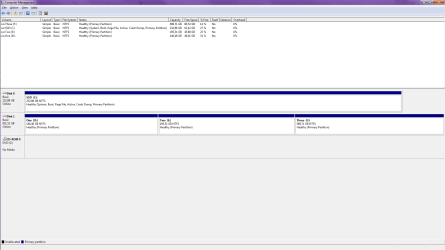
Please post back a screenshot of Disk Management - Post a Screen Capture Image
 
When you say "We solve problems here by replacing the Marvel with Intel for boot device", is that 'here' as in this thread. Meaning, you think switching from Marvell to Intel in this case will fix the problem. Or is it 'here' as in on this forum. Meaning you often solve problems by advising people to boot from Intel rather than Marvell?

I just now installed the Marvell driver. Honestly I don't know why I didn't before. I won't be able to tell if it makes any difference until I fail another boot, or, I don't know, several weeks pass without boot failure.
 

Attachments

  • Unvector_Disk_Management.png
    Unvector_Disk_Management.png
    27.1 KB · Views: 4

My Computer

Computer type
PC/Desktop
Computer Manufacturer/Model Number
Custom build
OS
Windows 7 Ultimate x64
CPU
Intel Core™ i5 Quad Processor i5-760
Motherboard
ASUS P7P55D-E LX
Memory
4x Corsair XMS3 DDR3 1600MHz 2GB
Graphics Card(s)
XFX HD6950 2GB
Hard Drives
Samsung 840 Basic SSD 250GB
Western Digital Caviar Green 1TB
Antivirus
Microsoft Security Essentials
Browser
Firefox, Chrome
It looks correc.

Yes I did mean here in the forums. But try running with the correct driver for awhile to see how it performs. Keep us posted.
 
So Marvell SATA controllers are known troublemakers? I wish I'd known about this when I bought my motherboard
 

My Computer

Computer type
PC/Desktop
Computer Manufacturer/Model Number
Custom build
OS
Windows 7 Ultimate x64
CPU
Intel Core™ i5 Quad Processor i5-760
Motherboard
ASUS P7P55D-E LX
Memory
4x Corsair XMS3 DDR3 1600MHz 2GB
Graphics Card(s)
XFX HD6950 2GB
Hard Drives
Samsung 840 Basic SSD 250GB
Western Digital Caviar Green 1TB
Antivirus
Microsoft Security Essentials
Browser
Firefox, Chrome
I'll ask someone more knowledgeable on Marvel vs. Intel to stop by. I've only seen the advice given repeatedly to default to Intel.
 
Thank you gregrocker. I appreciate the help
 

My Computer

Computer type
PC/Desktop
Computer Manufacturer/Model Number
Custom build
OS
Windows 7 Ultimate x64
CPU
Intel Core™ i5 Quad Processor i5-760
Motherboard
ASUS P7P55D-E LX
Memory
4x Corsair XMS3 DDR3 1600MHz 2GB
Graphics Card(s)
XFX HD6950 2GB
Hard Drives
Samsung 840 Basic SSD 250GB
Western Digital Caviar Green 1TB
Antivirus
Microsoft Security Essentials
Browser
Firefox, Chrome
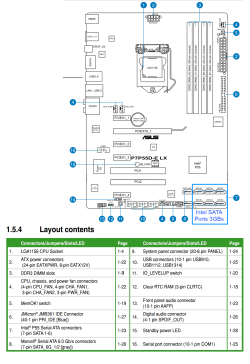
Yes I agree on using the Intel SATA ports on your board. Since you have a SSD you get much better performance than with Marvel even thought the Marvel controller is 6GBs. Here is a link to your board drivers page. Download them and save on a USB stick or place on a CD/DVD to install, or to your desktop if the problem machine is working.

Drivers: https://www.asus.com/Motherboards/P7P55DE_LX/#support The Intel SATA will be the Intel Rapid Storage Technology. This also has a BIOS 1701, check your to see if you have that installed.

Attach the SSD to the BLUE port labeled SATA1.

board 1.PNG
 

My Computer

Computer type
PC/Desktop
Computer Manufacturer/Model Number
Home Built Desktop By DataTech
OS
Windows 7 Ultimate X64 SP1
CPU
Intel i5-2550K, Differing ~4.4-4.8GHz No built in GPU
Motherboard
ASUS P8Z68-V PRO/GEN3
Memory
16GB G.Skill Sniper 1866MHz @ 2133MHz 2x8GB
Graphics Card(s)
ASUS GTX650TIB-DC2OC-2GD5, (650TI Boost)
Sound Card
Onboard Realtek 5-1
Monitor(s) Displays
Samsung P2570HD
Screen Resolution
1920x1080
Hard Drives
Samsung 840 Pro 256GB SSD for OS, 500GB Seagate Constellation (Enterprise drive) for Data
PSU
Corsair HX650W
Case
Inwin Dragon Rider
Cooling
Hyper 212 EVO w/two Noctua fans, push-pull, @1300 RPM
Keyboard
E-Z Eyes, bright yellow keys with large characters
Mouse
steelseries SENSEI Laser Pro Gaming
Internet Speed
48-51Mbs Mbs down, 11 Mbs up Xfinity Cable
Antivirus
Norton Internet Security 2013
Browser
IE 10, Opera, Pale Moon if needed
Other Info
4 case fans, LG BluRay-RE, ASUS DVD-RW, Mr. Fusion power supply, 1.21 gigawatts.
There's not a problem with the Marvel controllers - they are not 'troublemakers'. My understanding is that it is a potential problem due to the architecture of the machine itself.

The reason is because the Marvel controller is most often a secondary controller, added to a motherboard to give the user more SATA connectors than is possible with the core chipset, or to add next generation SATA connectors, or to use for a dedicated RAID array.
On an Intel chipset there might be only 6 SATA ports. Because these ports are native to the core chipset it is typical for the system to default to those ports when looking for a bootable device. Because the add on controller is a separate device and not native to the chipset there can be problems. The problem will be worst if that controller can't function at the system level, needing a driver loaded by the OS before it can work.

All these problems can be accounted for and corrected so that the add on controller can function seamlessly at the system level but that is up to the motherboard manufacturer and the available technology. So it is not a hard and fast rule to avoid the secondary controller for a boot device, but it is best practice. Some folks can do it, some can't.

The newer motherboards with true UEFI BIOS can now have drivers function at the System level, even before an OS is started. So if the installed BIOS has those drivers then devices can work at the system level, so it does not hurt to try it and see.

That's my understanding anyway.
 

My Computer

Computer type
PC/Desktop
Computer Manufacturer/Model Number
Home Built - Jan 2013
OS
Windows 7 64 Bit Home Premium SP1
CPU
i7-3820
Motherboard
Asus P9X79-PRO - Bios 4608
Memory
GSkill F3-14900CL9Q - 16GB
Graphics Card(s)
EVGA GeForce GTX660 - Driver 352.86
Sound Card
On board Realtek ALC898
Monitor(s) Displays
Acer S271HL
Screen Resolution
1920 x 1080
Hard Drives
#1- Samsung 840 Pro Series
#2- Western Digital WD1002FAEX Sata3 Black
#3- Western Digital WD1002FAEX Sata3 Black
PSU
Corsair CMPSU-850TX-V2 - 850 watt (by Seasonic)
Case
Corsair Obsidian 550D
Cooling
Standard 3 120mm case fans, Cooler Master Hyper 212 EVO
Keyboard
MS KC-0405
Mouse
Intellimouse 5-button
Internet Speed
56 Mbits/Sec (on a good day)
Antivirus
Avast & Malwarebytes
Browser
Firefox
Other Info
Asus DVD - DRW-24B1ST 24X
Welcome to the thread, Britton30 and TVeblen, and thanks for the advice!

I do have the 1701 BIOS installed.

The only Intel SATA driver offered is 'Intel(R) Matrix Storage Manager Driver V8.9.0.1023' from 2009. Is this what I need?
I guess I'm reluctant because of how old it is. Is this the wrong way to think and should I always get drivers from the manufacturer regardless of their age?

I will promptly switch over to using the Intel SATA ports again. The only reason I used Marvell was because I thought it would give me better performance.

Not debating anything, just out of curiosity: Why would using the Intel ports give better performance despite their lower speed?

Interesting read, TVeblen. This is my first motherboard with a secondary controller like this. I'll keep this in mind when I pick out motherboards in the future.
 

My Computer

Computer type
PC/Desktop
Computer Manufacturer/Model Number
Custom build
OS
Windows 7 Ultimate x64
CPU
Intel Core™ i5 Quad Processor i5-760
Motherboard
ASUS P7P55D-E LX
Memory
4x Corsair XMS3 DDR3 1600MHz 2GB
Graphics Card(s)
XFX HD6950 2GB
Hard Drives
Samsung 840 Basic SSD 250GB
Western Digital Caviar Green 1TB
Antivirus
Microsoft Security Essentials
Browser
Firefox, Chrome
OK, BIOS, check.

Yes use the 'Intel(R) Matrix Storage Manager Driver V8.9.0.1023' It is the latest one ASUS supports for your board. Intel also supplies drivers from their own page but are sometimes buggy.

I don't know why the Intel ports perform better, it may be that they are more specifically suited to the Intel chipsets.

I think you'll find all motherboards will have a secondary SATA (and USB) controllers because the built-in ones in the chipset can only support a limited number of either, and as TVeblen explained.
 

My Computer

Computer type
PC/Desktop
Computer Manufacturer/Model Number
Home Built Desktop By DataTech
OS
Windows 7 Ultimate X64 SP1
CPU
Intel i5-2550K, Differing ~4.4-4.8GHz No built in GPU
Motherboard
ASUS P8Z68-V PRO/GEN3
Memory
16GB G.Skill Sniper 1866MHz @ 2133MHz 2x8GB
Graphics Card(s)
ASUS GTX650TIB-DC2OC-2GD5, (650TI Boost)
Sound Card
Onboard Realtek 5-1
Monitor(s) Displays
Samsung P2570HD
Screen Resolution
1920x1080
Hard Drives
Samsung 840 Pro 256GB SSD for OS, 500GB Seagate Constellation (Enterprise drive) for Data
PSU
Corsair HX650W
Case
Inwin Dragon Rider
Cooling
Hyper 212 EVO w/two Noctua fans, push-pull, @1300 RPM
Keyboard
E-Z Eyes, bright yellow keys with large characters
Mouse
steelseries SENSEI Laser Pro Gaming
Internet Speed
48-51Mbs Mbs down, 11 Mbs up Xfinity Cable
Antivirus
Norton Internet Security 2013
Browser
IE 10, Opera, Pale Moon if needed
Other Info
4 case fans, LG BluRay-RE, ASUS DVD-RW, Mr. Fusion power supply, 1.21 gigawatts.
Back
Top