Solved Reinstalled Windows 7 Multi-Partition Drive (Basic Disk now Dynamic)

cloves

New member
Member
Local time
10:48 PM
Messages
51
Hi everyone,

I have a multi-partitioned hard drive. 4 Partitions in total (C: OS, D: Programs, E: docs, F: docs). After 2 years Windows 7 began having shut down problems, so I decided to reinstall the OS. Booted from the Windows 7 DVD and picked the first partition and formatted it and then installed the OS instead of just installing the OS over the old OS. I did this because in my mind I figured if I didn't format the C: drive, I would have left over files on the C: drive (Not sure if that is true or not). All other partitions were fine mind you.

Anyways the install went fine. I then went and booted off the Acronis Media Rescue CD to make a full backup of the install. Acronis would not see the disc because it was now dynamic.

This is where I noticed that Windows had converted the disc from basic to dynamic.

Now I am trying to figure out why would Windows 7 convert the disk to dynamic just because I deleted the first partition?
 

My Computer

OS
Windows XP
CPU
Q9550
Motherboard
Gigabyte UD3P
Memory
8GB
Graphics Card(s)
ATI 3850
Sound Card
Audigy

My Computer

Computer type
PC/Desktop
Computer Manufacturer/Model Number
Skylake Special #666
OS
Windows 10 Pro x64
CPU
Intel Core i7 6700K
Motherboard
Asus Sabertooth Z170 Mark 1
Memory
GSkill TridentZ RGB 16GB 3600 16-16-16-36
Graphics Card(s)
EVGA GTX 980 Ti SC x2
Sound Card
Realtek High Definition
Monitor(s) Displays
AOC G2460PG
Screen Resolution
1920 x 1080 144Hz
Hard Drives
Samsung 860 Pro 256GB, Seagate Barracuda 4TB x2
PSU
EVGA 1000 P2, EVGA White Custom Braided Cables
Case
Corsair Vengeance C70 Gunmetal Black
Cooling
Corsair H100i v2, Corsair ML120 x2, Thermal Grizzly Kryonaut
Keyboard
Logitech G910 Orion Spectrum
Mouse
Logitech G700s
Internet Speed
Verizon Fios Quantum Gateway 75/75
Antivirus
Windows Defender, Malwarebytes Free 3.8.3
Browser
Chrome
Other Info
Corsair SP120 x4, LG Blu-ray Drive, Durabrand HT-395 100 Watt Dolby Digital Amp, Corsair H2100 Wireless 7.1 Headset
The installer probably added the 100MB system partition.
 

My Computer

Computer type
PC/Desktop
Computer Manufacturer/Model Number
Home Built Desktop By DataTech
OS
Windows 7 Ultimate X64 SP1
CPU
Intel i5-2550K, Differing ~4.4-4.8GHz No built in GPU
Motherboard
ASUS P8Z68-V PRO/GEN3
Memory
16GB G.Skill Sniper 1866MHz @ 2133MHz 2x8GB
Graphics Card(s)
ASUS GTX650TIB-DC2OC-2GD5, (650TI Boost)
Sound Card
Onboard Realtek 5-1
Monitor(s) Displays
Samsung P2570HD
Screen Resolution
1920x1080
Hard Drives
Samsung 840 Pro 256GB SSD for OS, 500GB Seagate Constellation (Enterprise drive) for Data
PSU
Corsair HX650W
Case
Inwin Dragon Rider
Cooling
Hyper 212 EVO w/two Noctua fans, push-pull, @1300 RPM
Keyboard
E-Z Eyes, bright yellow keys with large characters
Mouse
steelseries SENSEI Laser Pro Gaming
Internet Speed
48-51Mbs Mbs down, 11 Mbs up Xfinity Cable
Antivirus
Norton Internet Security 2013
Browser
IE 10, Opera, Pale Moon if needed
Other Info
4 case fans, LG BluRay-RE, ASUS DVD-RW, Mr. Fusion power supply, 1.21 gigawatts.
It shouldn`t have, as he said he only formatted, not deleted. But you could be right.:)
 

My Computer

Computer type
PC/Desktop
Computer Manufacturer/Model Number
Skylake Special #666
OS
Windows 10 Pro x64
CPU
Intel Core i7 6700K
Motherboard
Asus Sabertooth Z170 Mark 1
Memory
GSkill TridentZ RGB 16GB 3600 16-16-16-36
Graphics Card(s)
EVGA GTX 980 Ti SC x2
Sound Card
Realtek High Definition
Monitor(s) Displays
AOC G2460PG
Screen Resolution
1920 x 1080 144Hz
Hard Drives
Samsung 860 Pro 256GB, Seagate Barracuda 4TB x2
PSU
EVGA 1000 P2, EVGA White Custom Braided Cables
Case
Corsair Vengeance C70 Gunmetal Black
Cooling
Corsair H100i v2, Corsair ML120 x2, Thermal Grizzly Kryonaut
Keyboard
Logitech G910 Orion Spectrum
Mouse
Logitech G700s
Internet Speed
Verizon Fios Quantum Gateway 75/75
Antivirus
Windows Defender, Malwarebytes Free 3.8.3
Browser
Chrome
Other Info
Corsair SP120 x4, LG Blu-ray Drive, Durabrand HT-395 100 Watt Dolby Digital Amp, Corsair H2100 Wireless 7.1 Headset

My Computer

Computer type
PC/Desktop
Computer Manufacturer/Model Number
Home Built Desktop By DataTech
OS
Windows 7 Ultimate X64 SP1
CPU
Intel i5-2550K, Differing ~4.4-4.8GHz No built in GPU
Motherboard
ASUS P8Z68-V PRO/GEN3
Memory
16GB G.Skill Sniper 1866MHz @ 2133MHz 2x8GB
Graphics Card(s)
ASUS GTX650TIB-DC2OC-2GD5, (650TI Boost)
Sound Card
Onboard Realtek 5-1
Monitor(s) Displays
Samsung P2570HD
Screen Resolution
1920x1080
Hard Drives
Samsung 840 Pro 256GB SSD for OS, 500GB Seagate Constellation (Enterprise drive) for Data
PSU
Corsair HX650W
Case
Inwin Dragon Rider
Cooling
Hyper 212 EVO w/two Noctua fans, push-pull, @1300 RPM
Keyboard
E-Z Eyes, bright yellow keys with large characters
Mouse
steelseries SENSEI Laser Pro Gaming
Internet Speed
48-51Mbs Mbs down, 11 Mbs up Xfinity Cable
Antivirus
Norton Internet Security 2013
Browser
IE 10, Opera, Pale Moon if needed
Other Info
4 case fans, LG BluRay-RE, ASUS DVD-RW, Mr. Fusion power supply, 1.21 gigawatts.
The problem is that you converted your HD to Dynamic which is only meant to be used to span a partition across multiple HD's. Apparently you didn't see the warning message.

The solution to solve this non-destructively is to boot free Partition Wizard CD version 4.2 which is the last one which offers this as a free feature: pw422.zip ISO - Windows Live.

Download the ISO, rightclick to burn it to CD using Windows Image Burner, or use ImgBurn.

Boot CD. You will need to delete the extra partition(s) you created which tipped it to convert to Dynamic before it will convert back to Basic.

Then follow these video steps: How to convert dynamic disk to basic disk with Partition Wizard?

After conversion if you want help adding a partition post back a screenshot of your maximized Disk Mgmt drive map with listings, using the Snipping Tool in Start Menu, attached using paper clip in Reply Box.
 
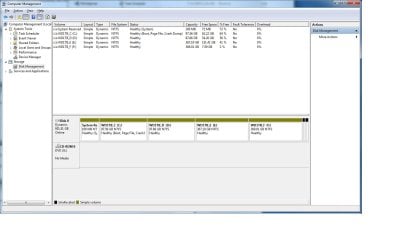
Thanks for the reply guys. Here is the screen cap.

Didn't see any warning. Again booted from windows 7 picked new install and then it took me to my hard drive with 4 partitions showing. Then i hit format on C. Looking at the Disk Management I am seeing 2 little black sections on the drive. I am going to try to delete them and then convert to basic. Well that didn't work. I guess its unallocated space and can't be deleted.

In the screen cap I see 2 black little unalocated blocks showing. Originally they were not there.

PS I tried Partition Wizard 4.2 Free and rebooted to use it. The convert to "Basic" gave me an error. I then went with EaseUS Partition Master Home Edition inside Windows and it gave me an error.

Poorly stated but the error reads "Find some partition error, continue this operation might cause boot failure and data loss, are you sure to proceed?"
 

Attachments

  • ComputerManagement.jpg
    ComputerManagement.jpg
    92.9 KB · Views: 20

My Computer

OS
Windows XP
CPU
Q9550
Motherboard
Gigabyte UD3P
Memory
8GB
Graphics Card(s)
ATI 3850
Sound Card
Audigy
To convert to Basic, you'll need to delete all but four partitions since it was attempting to add a fifth Primary that tipped it to Dynamic.

So I would move the data off D and delete it since it has the least data. After conversion create a new Logical partition there: How to Create Partition with partition manager? Partition Wizard Create Partition Video Help

Then I would convert E and F to Logical also so you can resize amongst them easily as you please: How to Move/Resize Partition with partition manager? Partition Wizard Move/Resize Partition Video Help.. It's safest to have Logical data partitions anyway, as you found. And with PW, you can even resize D to the right to extend C into its space without extra steps required in Disk Mgmt.
 
Last edited:
Well, it turns out Britton was right, and windows created the system reserve partition. You must have deleted the last partition down to unallocated space. Then when you did the install on that space it made the sys res partition and the install partition , for a total of 5 partitions which were turned Dynanic.

You needed to simply format your install partition.

Get rid of the system reserved partition, then get windows booting by running a stsrtup repair with you windows 7 disc up to 3X

You can then use the methods given to change it back to basic.
 
Last edited:

My Computer

Computer type
PC/Desktop
Computer Manufacturer/Model Number
Skylake Special #666
OS
Windows 10 Pro x64
CPU
Intel Core i7 6700K
Motherboard
Asus Sabertooth Z170 Mark 1
Memory
GSkill TridentZ RGB 16GB 3600 16-16-16-36
Graphics Card(s)
EVGA GTX 980 Ti SC x2
Sound Card
Realtek High Definition
Monitor(s) Displays
AOC G2460PG
Screen Resolution
1920 x 1080 144Hz
Hard Drives
Samsung 860 Pro 256GB, Seagate Barracuda 4TB x2
PSU
EVGA 1000 P2, EVGA White Custom Braided Cables
Case
Corsair Vengeance C70 Gunmetal Black
Cooling
Corsair H100i v2, Corsair ML120 x2, Thermal Grizzly Kryonaut
Keyboard
Logitech G910 Orion Spectrum
Mouse
Logitech G700s
Internet Speed
Verizon Fios Quantum Gateway 75/75
Antivirus
Windows Defender, Malwarebytes Free 3.8.3
Browser
Chrome
Other Info
Corsair SP120 x4, LG Blu-ray Drive, Durabrand HT-395 100 Watt Dolby Digital Amp, Corsair H2100 Wireless 7.1 Headset
I'd be surprised if the Win7 installer allowed it to convert to Dynamic. I've seen these weekly since Win7 release and never seen it happen other than when the warning is ignored during a partitioning operation.

You up for another simulation Brian? ;)
 
Whattaya got man :p
 

My Computer

Computer type
PC/Desktop
Computer Manufacturer/Model Number
Skylake Special #666
OS
Windows 10 Pro x64
CPU
Intel Core i7 6700K
Motherboard
Asus Sabertooth Z170 Mark 1
Memory
GSkill TridentZ RGB 16GB 3600 16-16-16-36
Graphics Card(s)
EVGA GTX 980 Ti SC x2
Sound Card
Realtek High Definition
Monitor(s) Displays
AOC G2460PG
Screen Resolution
1920 x 1080 144Hz
Hard Drives
Samsung 860 Pro 256GB, Seagate Barracuda 4TB x2
PSU
EVGA 1000 P2, EVGA White Custom Braided Cables
Case
Corsair Vengeance C70 Gunmetal Black
Cooling
Corsair H100i v2, Corsair ML120 x2, Thermal Grizzly Kryonaut
Keyboard
Logitech G910 Orion Spectrum
Mouse
Logitech G700s
Internet Speed
Verizon Fios Quantum Gateway 75/75
Antivirus
Windows Defender, Malwarebytes Free 3.8.3
Browser
Chrome
Other Info
Corsair SP120 x4, LG Blu-ray Drive, Durabrand HT-395 100 Watt Dolby Digital Amp, Corsair H2100 Wireless 7.1 Headset
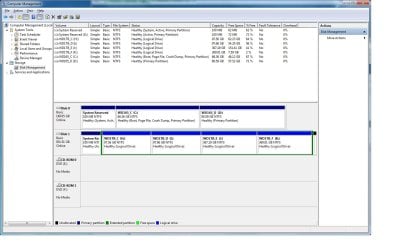
Well just to post a follow up. I booted off my other Windows 7 hard drive, so now i have my 2 drives connected. I then ran EaseUS Partition Master Home Edition and it was able this time to convert the disk to basic. However, looks like they are all logical drives now :D. (screen cap attached)

Ok guys so I already backed up the drive before I did the above. Looks like I am going to have to reinstall everything.

How should I setup the four partitions? I find that keeping 4 (OS, Programs, 400GB, 400GB) makes it easy for me to backup my drives to my 500 externals when need be.

I would like to use the Windows 7 built in "disk management" to get this all to work when I redo the install rather then use partition wizard if possible. Normally thats how I setup my towers. I can run Disk Management from the other drive without a problem.
 

Attachments

  • ComputerManagement.jpg
    ComputerManagement.jpg
    131.6 KB · Views: 20

My Computer

OS
Windows XP
CPU
Q9550
Motherboard
Gigabyte UD3P
Memory
8GB
Graphics Card(s)
ATI 3850
Sound Card
Audigy
Using the partition wizard boot cd to make your partitions is just soooooooooooo easy.

Why do you still have 2 system reserved partitions ? Delete the 1 on drive 1

Then extend H to take up the space.
 

My Computer

Computer type
PC/Desktop
Computer Manufacturer/Model Number
Skylake Special #666
OS
Windows 10 Pro x64
CPU
Intel Core i7 6700K
Motherboard
Asus Sabertooth Z170 Mark 1
Memory
GSkill TridentZ RGB 16GB 3600 16-16-16-36
Graphics Card(s)
EVGA GTX 980 Ti SC x2
Sound Card
Realtek High Definition
Monitor(s) Displays
AOC G2460PG
Screen Resolution
1920 x 1080 144Hz
Hard Drives
Samsung 860 Pro 256GB, Seagate Barracuda 4TB x2
PSU
EVGA 1000 P2, EVGA White Custom Braided Cables
Case
Corsair Vengeance C70 Gunmetal Black
Cooling
Corsair H100i v2, Corsair ML120 x2, Thermal Grizzly Kryonaut
Keyboard
Logitech G910 Orion Spectrum
Mouse
Logitech G700s
Internet Speed
Verizon Fios Quantum Gateway 75/75
Antivirus
Windows Defender, Malwarebytes Free 3.8.3
Browser
Chrome
Other Info
Corsair SP120 x4, LG Blu-ray Drive, Durabrand HT-395 100 Watt Dolby Digital Amp, Corsair H2100 Wireless 7.1 Headset
Is there some reason you couldn't use the bootable PW CD so you wouldn't have had to run Easeus from another OS, causing the System flag to somehow disappear from the System Reserved partition. It would have started and booted on its own even with Logical partitions as long as SysReserved is Primary.

To make the drive bootable on its own, mark System Reserved Active, unplug the other HD and run http://www.sevenforums.com/tutorials/105541-startup-repair-run-3-separate-times.html until Win7 starts and SysReserved again holds the System active flags.

But feel free to continue to ignore our help and act as recklessly as you want if that's how you like to spend your Saturday night. It's not as if we've seen these 3-4 times per week for four years and could help any.
 
Guys thanks for the help so far. I actually have been following the advice so far from this site.

gregrocker, I actually did burn PW 4.2 to cd and booted off of it. I then followed the instructions from this site.
http://www.sevenforums.com/tutorials/26829-convert-dynamic-disk-basic-disk.html

PW 4.2 didn't work when I went to convert to basic disk. So at that point I went over to EaseUS Partition Master Home Edition. EaseUS didn't work when I only had that hard drive plugged in. So I figured it might have to do with the drive being locked and that is why I booted with my other drive.

I appreciate all the feedback I have been getting. I have spent all my day doing this so the lag with posts and replies is also a challenge.
 

My Computer

OS
Windows XP
CPU
Q9550
Motherboard
Gigabyte UD3P
Memory
8GB
Graphics Card(s)
ATI 3850
Sound Card
Audigy
Now just install Partition Wizard and fix Disk 1, it`s a mess. Delete the system partition and extend H to the left and extend K to the right and your fixed.
 

My Computer

Computer type
PC/Desktop
Computer Manufacturer/Model Number
Skylake Special #666
OS
Windows 10 Pro x64
CPU
Intel Core i7 6700K
Motherboard
Asus Sabertooth Z170 Mark 1
Memory
GSkill TridentZ RGB 16GB 3600 16-16-16-36
Graphics Card(s)
EVGA GTX 980 Ti SC x2
Sound Card
Realtek High Definition
Monitor(s) Displays
AOC G2460PG
Screen Resolution
1920 x 1080 144Hz
Hard Drives
Samsung 860 Pro 256GB, Seagate Barracuda 4TB x2
PSU
EVGA 1000 P2, EVGA White Custom Braided Cables
Case
Corsair Vengeance C70 Gunmetal Black
Cooling
Corsair H100i v2, Corsair ML120 x2, Thermal Grizzly Kryonaut
Keyboard
Logitech G910 Orion Spectrum
Mouse
Logitech G700s
Internet Speed
Verizon Fios Quantum Gateway 75/75
Antivirus
Windows Defender, Malwarebytes Free 3.8.3
Browser
Chrome
Other Info
Corsair SP120 x4, LG Blu-ray Drive, Durabrand HT-395 100 Watt Dolby Digital Amp, Corsair H2100 Wireless 7.1 Headset
What is it you would like to do now? I gave you the steps to make Disk1 bootable on its own, since the System flag has disappeared off it's System Reserved partition since you first posted the screenshot of it.

If you follow the steps given in my last post you should be able to boot Disk1. It's possible it still has the System flag but it just isn't showing so unplug Disk0, set Disk1 first to boot in BIOS setup and try to boot it now. If it won't boot then run http://www.sevenforums.com/tutorials/105541-startup-repair-run-3-separate-times.html

Do you want to keep Disk0 on that System? Nothing was ever said about it. It just suddenly appeared in your last screenshot and had apparently taken over the System boot files for Disk1.
 
Disc 1 doesn`t have an operating system on it, it`s just 4 logical drives.

That`s it I`m gonna watch War Games, again for the 200th time :rolleyes:
 

My Computer

Computer type
PC/Desktop
Computer Manufacturer/Model Number
Skylake Special #666
OS
Windows 10 Pro x64
CPU
Intel Core i7 6700K
Motherboard
Asus Sabertooth Z170 Mark 1
Memory
GSkill TridentZ RGB 16GB 3600 16-16-16-36
Graphics Card(s)
EVGA GTX 980 Ti SC x2
Sound Card
Realtek High Definition
Monitor(s) Displays
AOC G2460PG
Screen Resolution
1920 x 1080 144Hz
Hard Drives
Samsung 860 Pro 256GB, Seagate Barracuda 4TB x2
PSU
EVGA 1000 P2, EVGA White Custom Braided Cables
Case
Corsair Vengeance C70 Gunmetal Black
Cooling
Corsair H100i v2, Corsair ML120 x2, Thermal Grizzly Kryonaut
Keyboard
Logitech G910 Orion Spectrum
Mouse
Logitech G700s
Internet Speed
Verizon Fios Quantum Gateway 75/75
Antivirus
Windows Defender, Malwarebytes Free 3.8.3
Browser
Chrome
Other Info
Corsair SP120 x4, LG Blu-ray Drive, Durabrand HT-395 100 Watt Dolby Digital Amp, Corsair H2100 Wireless 7.1 Headset
Is this correct? Does the disk you converted back from Dynamic not have an OS on it?

I had no way of knowing this though since then you had disconnected your OS drive before posting the screenshot, and Disk1 had a System Reserved that was System and a C drive that anyone would assume contained the OS.

252267d1359250485-reinstalled-windows-7-multi-partition-drive-basic-disk-now-dynamic-computermanagement.jpg
 
Where did you get that pic ? His last shot of disc mangt is up there .
 

My Computer

Computer type
PC/Desktop
Computer Manufacturer/Model Number
Skylake Special #666
OS
Windows 10 Pro x64
CPU
Intel Core i7 6700K
Motherboard
Asus Sabertooth Z170 Mark 1
Memory
GSkill TridentZ RGB 16GB 3600 16-16-16-36
Graphics Card(s)
EVGA GTX 980 Ti SC x2
Sound Card
Realtek High Definition
Monitor(s) Displays
AOC G2460PG
Screen Resolution
1920 x 1080 144Hz
Hard Drives
Samsung 860 Pro 256GB, Seagate Barracuda 4TB x2
PSU
EVGA 1000 P2, EVGA White Custom Braided Cables
Case
Corsair Vengeance C70 Gunmetal Black
Cooling
Corsair H100i v2, Corsair ML120 x2, Thermal Grizzly Kryonaut
Keyboard
Logitech G910 Orion Spectrum
Mouse
Logitech G700s
Internet Speed
Verizon Fios Quantum Gateway 75/75
Antivirus
Windows Defender, Malwarebytes Free 3.8.3
Browser
Chrome
Other Info
Corsair SP120 x4, LG Blu-ray Drive, Durabrand HT-395 100 Watt Dolby Digital Amp, Corsair H2100 Wireless 7.1 Headset
Back
Top