Reinstalling GRUB Menu

TGSoldier

¬('.'¬)
Guru
VIP
Local time
6:16 PM
Messages
1,161
Location
Trinidad and Tobago
This is not the right section, or the right forum, but i feel so at home here I decided to post my question.

Had a problem with Windows XP boot. Fixed that. After fixing that, the GRUB menu does not show up again to prompt either Linux or Windows. It goes straight to windows.

I have very little knowledge of Linux. All I have is a knoppix cd and I need to get this menu reinstalled.

Step by step assistance would be appreciated. Thanks :D

Edit: Prob have some Redhat cd's around the office here somewhere >.>
 

My Computer

Computer type
PC/Desktop
Computer Manufacturer/Model Number
DELL VOSTRO 3650
OS
Windows 8.1 PRO
CPU
3rd Generation Intel Core i7‐3612QM CPU @ 2.10GHZ
Memory
8GB DDR3
Graphics Card(s)
NVIDIA GeForce GT 525M (128 bit), 1GB Grpahics
Screen Resolution
1920X1080
Hard Drives
750GB 5400RPM
I do not know much about Linux, but do know if there is a startup repair you can run, like the Windows one? Lame reply, I know, but you never know.
 

My Computer

Computer Manufacturer/Model Number
Custom
OS
Windows 7 Professional x64
CPU
Intel i7 2600K OC'd @ 4620 MHz
Motherboard
Asus P8Z68-V Pro
Memory
16GB GSkill Sniper 2133 Mhz (4x4GB)
Graphics Card(s)
EVGA GeForce GTX 480 SuperClocked+
Sound Card
Realtek High Definition Audio
Monitor(s) Displays
2x Acer S273HLbmii 27"
Screen Resolution
2 x 1920x1080
Hard Drives
64GB Crucial M4 SSD

Storage: Hitachi 1TB 5400RPM, Samsung 1.5TB 5400RPM
PSU
Corsair HW Series 750w (modular)
Case
Cooler Master HAF 932 Advanced Blue Edition
Cooling
CM Hyper 212+ CPU cooler, 3x 230mm + 1x 140mm case fans
Keyboard
Logitech MK320 (wireless)
Mouse
Logitech MK320 (wireless)
Internet Speed
30 Mb/s : 2 Mb/s
Maybe somewhere in Linux >.>
 

My Computer

Computer type
PC/Desktop
Computer Manufacturer/Model Number
DELL VOSTRO 3650
OS
Windows 8.1 PRO
CPU
3rd Generation Intel Core i7‐3612QM CPU @ 2.10GHZ
Memory
8GB DDR3
Graphics Card(s)
NVIDIA GeForce GT 525M (128 bit), 1GB Grpahics
Screen Resolution
1920X1080
Hard Drives
750GB 5400RPM

My Computer

Computer Manufacturer/Model Number
Custom
OS
Windows 7 Professional x64
CPU
Intel i7 2600K OC'd @ 4620 MHz
Motherboard
Asus P8Z68-V Pro
Memory
16GB GSkill Sniper 2133 Mhz (4x4GB)
Graphics Card(s)
EVGA GeForce GTX 480 SuperClocked+
Sound Card
Realtek High Definition Audio
Monitor(s) Displays
2x Acer S273HLbmii 27"
Screen Resolution
2 x 1920x1080
Hard Drives
64GB Crucial M4 SSD

Storage: Hitachi 1TB 5400RPM, Samsung 1.5TB 5400RPM
PSU
Corsair HW Series 750w (modular)
Case
Cooler Master HAF 932 Advanced Blue Edition
Cooling
CM Hyper 212+ CPU cooler, 3x 230mm + 1x 140mm case fans
Keyboard
Logitech MK320 (wireless)
Mouse
Logitech MK320 (wireless)
Internet Speed
30 Mb/s : 2 Mb/s
I followed those steps prior to posting.. But.. I think I'm doing something wrong..

xD
 

My Computer

Computer type
PC/Desktop
Computer Manufacturer/Model Number
DELL VOSTRO 3650
OS
Windows 8.1 PRO
CPU
3rd Generation Intel Core i7‐3612QM CPU @ 2.10GHZ
Memory
8GB DDR3
Graphics Card(s)
NVIDIA GeForce GT 525M (128 bit), 1GB Grpahics
Screen Resolution
1920X1080
Hard Drives
750GB 5400RPM
I followed those steps prior to posting.. But.. I think I'm doing something wrong..

xD
TG, I have not used Knoppix but the other flavors of Linux I have used will allow me to use the install CD. You do not want to do a complete install, but you should be allowed to do a repair or custom. Usually the Grub install is at or near the end of the process so you just skip the other stuff and go to "Install Grub".

Question: if XP overwrote Grub, won't installing Grub again overwrite the XP boot loader? If that is what you want, OK. But you can also add your Linux to the XP boot menu and use it instead of the Grub boot menu?

Cheers!
Robert
 

My Computer

OS
...
I followed those steps prior to posting.. But.. I think I'm doing something wrong..

xD
TG, I have not used Knoppix but the other flavors of Linux I have used will allow me to use the install CD. You do not want to do a complete install, but you should be allowed to do a repair or custom. Usually the Grub install is at or near the end of the process so you just skip the other stuff and go to "Install Grub".

Question: if XP overwrote Grub, won't installing Grub again overwrite the XP boot loader? If that is what you want, OK. But you can also add your Linux to the XP boot menu and use it instead of the Grub boot menu?

Cheers!
Robert
I wouldn't think that installing GRUB would overwrite the boot loader. MBR, definitely.
 

My Computer

Computer Manufacturer/Model Number
Custom
OS
Windows 7 Professional x64
CPU
Intel i7 2600K OC'd @ 4620 MHz
Motherboard
Asus P8Z68-V Pro
Memory
16GB GSkill Sniper 2133 Mhz (4x4GB)
Graphics Card(s)
EVGA GeForce GTX 480 SuperClocked+
Sound Card
Realtek High Definition Audio
Monitor(s) Displays
2x Acer S273HLbmii 27"
Screen Resolution
2 x 1920x1080
Hard Drives
64GB Crucial M4 SSD

Storage: Hitachi 1TB 5400RPM, Samsung 1.5TB 5400RPM
PSU
Corsair HW Series 750w (modular)
Case
Cooler Master HAF 932 Advanced Blue Edition
Cooling
CM Hyper 212+ CPU cooler, 3x 230mm + 1x 140mm case fans
Keyboard
Logitech MK320 (wireless)
Mouse
Logitech MK320 (wireless)
Internet Speed
30 Mb/s : 2 Mb/s
I followed those steps prior to posting.. But.. I think I'm doing something wrong..

xD
TG, I have not used Knoppix but the other flavors of Linux I have used will allow me to use the install CD. You do not want to do a complete install, but you should be allowed to do a repair or custom. Usually the Grub install is at or near the end of the process so you just skip the other stuff and go to "Install Grub".

Question: if XP overwrote Grub, won't installing Grub again overwrite the XP boot loader? If that is what you want, OK. But you can also add your Linux to the XP boot menu and use it instead of the Grub boot menu?

Cheers!
Robert

Whichever one is easier... I'm guessing it's just to edit the Boot.Ini file. But edit it with what exactly

Not sure a bout rewriting the MBR. I thought the grub was just a menu to choose between XP and Linux.


Thanks to both of you!
 

My Computer

Computer type
PC/Desktop
Computer Manufacturer/Model Number
DELL VOSTRO 3650
OS
Windows 8.1 PRO
CPU
3rd Generation Intel Core i7‐3612QM CPU @ 2.10GHZ
Memory
8GB DDR3
Graphics Card(s)
NVIDIA GeForce GT 525M (128 bit), 1GB Grpahics
Screen Resolution
1920X1080
Hard Drives
750GB 5400RPM

My Computer

Computer type
PC/Desktop
Computer Manufacturer/Model Number
Dwarf Dwf/11/2012 r09/2013
OS
Windows 8.1 Pro RTM x64
CPU
Intel Core-i5-3570K 4-core @ 3.4GHz (Ivy Bridge) (OC 4.4GHz)
Motherboard
ASRock Z77 Extreme4-M
Memory
4 x 4GB DDR3-1600 Corsair Vengeance CMZ8GX3M2A1600C9B (16GB)
Graphics Card(s)
MSI GeForce GTX770 Gaming OC 2GB
Sound Card
Realtek High Definition on board solution (ALC 898)
Monitor(s) Displays
ViewSonic VA1912w Widescreen (VGA)
Screen Resolution
1440x900
Hard Drives
OCZ Agility 3 SSD 120GB SATA III x2 (RAID 0)
Samsung HD501LJ 500GB SATA II x2
Hitachi HDS721010CLA332 1TB SATA II
Iomega 1.5TB Ext USB 2.0
WD 2.0TB Ext USB 3.0
PSU
XFX Pro Series 850W Semi-Modular
Case
Gigabyte IF233
Cooling
1 x 120mm Front Inlet 1 x 120mm Rear Exhaust
Keyboard
Microsoft Comfort Curve Keyboard 3000 (USB)
Mouse
Microsoft Comfort Mouse 3000 for Business (USB)
Internet Speed
NetGear DG834Gv3 ADSL Modem/Router (Ethernet) ~4.0 Mb/s (O2)
Antivirus
Avast! 8.0.1497
Browser
IE 11
Other Info
Optical Drive: HL-DT-ST BD-RE BH10LS30 SATA Bluray
Lexmark S305 Printer/Scanner/Copier (USB)
WEI Score: 8.1/8.1/8.5/8.5/8.25
Asus Eee PC 1011PX Netbook (Windows 7 x86 Starter)

My Computer

Computer Manufacturer/Model Number
Dell (and various others)
OS
Win7(x64)
CPU
intel c2 duo 2.13g/2.5gig
Motherboard
Dell
Memory
Hitachi DDR3
Graphics Card(s)
ATI 4570/4850
Sound Card
SB Fatality
Cooling
Air

My Computer

Computer type
PC/Desktop
Computer Manufacturer/Model Number
DELL VOSTRO 3650
OS
Windows 8.1 PRO
CPU
3rd Generation Intel Core i7‐3612QM CPU @ 2.10GHZ
Memory
8GB DDR3
Graphics Card(s)
NVIDIA GeForce GT 525M (128 bit), 1GB Grpahics
Screen Resolution
1920X1080
Hard Drives
750GB 5400RPM
Whichever one is easier... I'm guessing it's just to edit the Boot.Ini file. But edit it with what exactly

Not sure a bout rewriting the MBR. I thought the grub was just a menu to choose between XP and Linux.

Thanks to both of you!
JK, Linux is flexible and if it is the only OS on the hard drive, it can be written into the MBR. It can also be written into the Linux partition. Since I do not know how TG's OSs are setup, I can't really give specific recommendations.

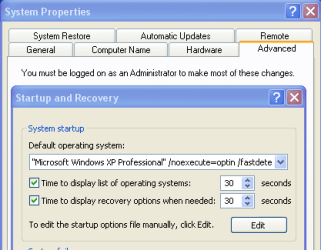
In XP, open "System Properties", Advanced, and Startup. Click "Edit" to add Linux to the boot loader. I am sure the Knoppix support web site can tell you exactly what to put in there.

xp_boot_loader.png

Cheers!
Robert
 

My Computer

OS
...
I don't believe Windows is able to see the ext file systems in Linux. So using the nt boot loader may not work.
 

My Computer

Computer Manufacturer/Model Number
Dell (and various others)
OS
Win7(x64)
CPU
intel c2 duo 2.13g/2.5gig
Motherboard
Dell
Memory
Hitachi DDR3
Graphics Card(s)
ATI 4570/4850
Sound Card
SB Fatality
Cooling
Air
I don't believe Windows is able to see the ext file systems in Linux. So using the nt boot loader may not work.
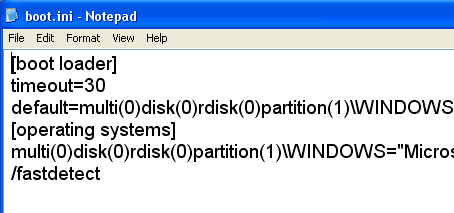
I believe the important part is to point to the partition:
xp_boot_ini.png

multi(0)disk(0)rdisk(0)partition(2)

But further googling should confirm/deny that.

If one cannot use the XP boot loader, then Grub must be installed.
 

My Computer

OS
...

My Computer

Computer Manufacturer/Model Number
Dell (and various others)
OS
Win7(x64)
CPU
intel c2 duo 2.13g/2.5gig
Motherboard
Dell
Memory
Hitachi DDR3
Graphics Card(s)
ATI 4570/4850
Sound Card
SB Fatality
Cooling
Air
Heh another potential solution...

Use VMware or Virtual box and run your Linux on that. As long as you aren't needing 100% of your System capability in Linux, I've find that pretty much everything I need from Linux works 100% inthe viurtual machine. In fact the instances of getting video and audio working on first boot is far higher under virtual box than run natively in my experience. They are super fast to setup, snapshot, install 6 distros and switch between them, back them up. It's pretty freaking sweet. Speed is amazingly fast.

In short, I don't ever plan on "dual booting" linux again, it's a giant PITA in comparison.

(Ok if you really are into Linux gaming or doing something aith a specific piece of non-generic hardware then you may still have to install a native bootable partition. But for my use, development, the VMs are a ghodsend.)
 

My Computer

Computer Manufacturer/Model Number
Scratch built
OS
Windows 7 x64 Ultimate
CPU
i7 960
Motherboard
Asus P6X58D
Memory
12 Gig Corsair Dominator
Graphics Card(s)
Nvidia 480
Sound Card
Maudio Delta 44 + breakout box
Monitor(s) Displays
Dell UltraSharp U2410 24in and Samsung 21 dual monitors
Screen Resolution
1920x1200 and 1280x1024
Hard Drives
Primary: Intel X-25M G2 160G SSD
Secondary: Segate baracuda 1.0 TB
HDs in AHCI mode.
PSU
Corasair TX850
Case
Cooler Master HAF
Cooling
Corsair H50
Keyboard
Logitech G15 + N52 game pad
Mouse
Logitech MX518
Internet Speed
15kbs down 4.5kbps up
Other Info
WEI 7.6
CPU & RAM 7.6
Graphics 7.9
Hard disk 7.7
GRUB needs to be removed before Windows is intalled, then reinstalled afterwards.

Good luck with that.
 
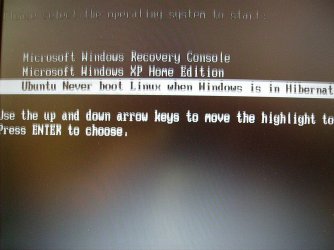
My laptop dual-boots WindowsXp and Ubuntu 8.04 using Windows bootloader. It's not that difficult to do.
 

Attachments

  • bootscreen.jpg
    bootscreen.jpg
    273.2 KB · Views: 68

My Computer

Computer type
PC/Desktop
Computer Manufacturer/Model Number
Gateway GM5470E Desktop Computer
OS
Windows 7 32bit
CPU
AMD Athlon™ 64 X2 dual core 4000+ processor
Motherboard
ECS MCP61P-AM motherboard(micro_atx)
Memory
2048 MB DDR2, 667 MHz, (PC2-5300)
Graphics Card(s)
Pny NVIDIA GeForce gt610 1024mb ddr3
Sound Card
on-board integrated
Monitor(s) Displays
Vizio 24 inch 1920x1080 hd Tv
Screen Resolution
1920x1080
Hard Drives
Intel 3500 series 120gb
PSU
Corsair 430
Keyboard
Gateway wireless
Mouse
Gateway wireless
Internet Speed
2.2 .868
Browser
Seamonkey
I really am still stuck with this.... sigh.

XP was isntalled first. Then linux.

XP got messed up and was repaired. The grub menu no longer shows up.

I've been trying things i've seen online

sudo grub to get to the grub menu so I can..


/find /boot/grub/stage1

and

steup (hd0)

etc. So linux is on the 2nd partition but I am making no progress what so ever....
 

My Computer

Computer type
PC/Desktop
Computer Manufacturer/Model Number
DELL VOSTRO 3650
OS
Windows 8.1 PRO
CPU
3rd Generation Intel Core i7‐3612QM CPU @ 2.10GHZ
Memory
8GB DDR3
Graphics Card(s)
NVIDIA GeForce GT 525M (128 bit), 1GB Grpahics
Screen Resolution
1920X1080
Hard Drives
750GB 5400RPM
I really am still stuck with this.... sigh.
XP was isntalled first. Then linux.
XP got messed up and was repaired. The grub menu no longer shows up.
I've been trying things i've seen online
sudo grub to get to the grub menu so I can..
/find /boot/grub/stage1
and
steup (hd0)
etc. So linux is on the 2nd partition but I am making no progress what so ever....
TG; you are using XP, right? Can you follow my earlier post to open the boot ini file? Can you use paint to crop a screen shot of boot.ini and attach it to a post? If you haven't done this before, let us know so we can show you how?

Cheers!
Robert
 

My Computer

OS
...
Back
Top