Remove logoff & shutdown gpedit BUG?

Marcus Aurelius

New member
Local time
8:09 PM
Messages
13
Hello,

I have followed various tutorials on how to remove the shutdown button in the start menu via gpedit.msc I have done this successfully.

I have also been able to remove the start > arrow next to shut down > log off button which greys out.

gpedit.msc > user configuration > administrative templates > start menu and task bar > "remove and prevent access to the shutdown, restart, sleep and hibernate commands" > change to enabled

I did the same with "remove logoff on the start menu"

What I am calling the bug, and need a work around for is that EITHER the "logoff" button is greyed out, and the shut down button is available to use..

OR

the shut down button is removed, but instead it now says "logoff."

Therefore, I can not seem to get rid of both the logoff AND the shutdown buttons.

I am trying to set public computers so that the users can not click logoff, or shutdown, or for that matter switch user.

Any help on how to set this configuration is greatly appreciated.
I am using Windows 7 professional 32-bit.

Thank you.
 
Last edited:

My Computer

OS
32-bit windows 7 professional SP1

My Computer

Computer type
PC/Desktop
Computer Manufacturer/Model Number
Lenovo IdeaCenter 450
OS
Windows 10 Pro X64
CPU
Intel Quad Core i7-4770 @ 3.4Ghz
Memory
16.0GB PC3-12800 DDR3 SDRAM 1600 MHz
Graphics Card(s)
Intel Integrated HD Graphics
Sound Card
Realtek HD Audio
Monitor(s) Displays
HP 22" LCD
Screen Resolution
1680 x 1050
Hard Drives
250GB Samsung EVO SATA-3 SSD
2TB Seagate ST2000DM001 SATA-2
1.5TB Seagate ST3150041AS SATA
Keyboard
Dell USB
Mouse
Lenovo USB
Internet Speed
Cable via Road Runner 3MB Upload, 30MB Download
Antivirus
Windows Defender, MBAM Pro, MBAE
Browser
Seamonkey
Other Info
UEFI/GPT
PLDS DVD-RW DH16AERSH
Hello Marcus, and welcome to Seven Forums.


In addition, you could use the specific users or groups option in step 1 of OPTION TWO in the tutorials below to have the group policy applied to all users except administrators. This way you can have the public users as standard or guest users without being able to log off, shut down, or switch users from the locations below, but the administrators will be able to.
These may also be helpful.
Hope this helps,
Shawn
 

My Computer

Computer type
PC/Desktop
Computer Manufacturer/Model Number
Self built custom
OS
64-bit Windows 11 Pro for Workstations
CPU
Intel i7-8700K OC'd to 5 GHz
Motherboard
ASUS ROG Maximus XI Formula Z390
Memory
64 GB (4x16GB) G.SKILL TridentZ RGB DDR4 3600 MHz
Graphics Card(s)
ASUS ROG-STRIX-GTX1080TI-O11G-GAMING
Sound Card
Integrated
Monitor(s) Displays
2 x Samsung Odyssey G7 27"
Screen Resolution
2560x1440
Hard Drives
1TB Samsung 990 PRO M.2,
4TB Samsung 990 PRO PRO M.2,
TerraMaster F8 SSD Plus NAS
PSU
Seasonic Prime Titanium 850W
Case
Thermaltake Core P3
Cooling
Corsair Hydro H115i
Keyboard
Logitech wireless K800
Mouse
Logitech MX Master 4
Internet Speed
2 Gb/s Download and 100 Mb/s Upload
Antivirus
Malwarebyte Anti-Malware Premium
Browser
Google Chrome
Other Info
Logitech Z625 speaker system,
Logitech BRIO 4K Pro webcam,
HP Color LaserJet Pro MFP M477fdn,
APC SMART-UPS RT 1000 XL - SURT1000XLI,
Galaxy S23 Plus phone
Thank you for the replies. But unless I missed something while reading through the responses, the same bug still applies. Even using security policy and the admin accounts, and the other suggestions, once the "shut down" button is removed, a "log off" button takes its place. It is this "log off" button which I can not remove using any method.

I need to remove the "log off" button as well as the "shutdown" button.

Thank you
 

My Computer

OS
32-bit windows 7 professional SP1
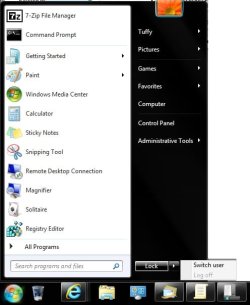
For me "Log off" is grayed out and disabled after applying the tutorials above. I think you are referring to the Start Menu power button being changed. If so, you can use the tutorial below to change it to say "Lock" instead of "Log out" to have the Start Menu look like this below but without Switch User as well. :)

http://www.sevenforums.com/tutorials/850-power-button-start-menu.html

Start_Menu.jpg
 

My Computer

Computer type
PC/Desktop
Computer Manufacturer/Model Number
Self built custom
OS
64-bit Windows 11 Pro for Workstations
CPU
Intel i7-8700K OC'd to 5 GHz
Motherboard
ASUS ROG Maximus XI Formula Z390
Memory
64 GB (4x16GB) G.SKILL TridentZ RGB DDR4 3600 MHz
Graphics Card(s)
ASUS ROG-STRIX-GTX1080TI-O11G-GAMING
Sound Card
Integrated
Monitor(s) Displays
2 x Samsung Odyssey G7 27"
Screen Resolution
2560x1440
Hard Drives
1TB Samsung 990 PRO M.2,
4TB Samsung 990 PRO PRO M.2,
TerraMaster F8 SSD Plus NAS
PSU
Seasonic Prime Titanium 850W
Case
Thermaltake Core P3
Cooling
Corsair Hydro H115i
Keyboard
Logitech wireless K800
Mouse
Logitech MX Master 4
Internet Speed
2 Gb/s Download and 100 Mb/s Upload
Antivirus
Malwarebyte Anti-Malware Premium
Browser
Google Chrome
Other Info
Logitech Z625 speaker system,
Logitech BRIO 4K Pro webcam,
HP Color LaserJet Pro MFP M477fdn,
APC SMART-UPS RT 1000 XL - SURT1000XLI,
Galaxy S23 Plus phone
For me "Log off" is grayed out and disabled after applying the tutorials above. I think you are referring to the Start Menu power button being changed. If so, you can use the tutorial below to change it to say "Lock" instead of "Log out" to have the Start Menu look like this below but without Switch User as well. :)

http://www.sevenforums.com/tutorials/850-power-button-start-menu.html

View attachment 163812


OK, I have seen what is going on with these tutorials, but the problems still remains. In the photo you can see one is able to still switch user or lock. If they switch user it takes them to the Welcome Screen and on the bottom right there is still the option to shutdown or restart. Can I either prevent them from logging off all together. Ideally it would be nice if I could remove the power button and its options altogether. Then use winkey+r "logoff" to logoff. I would like it set so whoever uses the computer can not shut down, logoff, lock or anything. Just stay on the desktop except for winkey+r. Any more ideas?
 

My Computer

OS
32-bit windows 7 professional SP1
Back
Top