Removing Windows Vista from Dual Boot with Windows 7

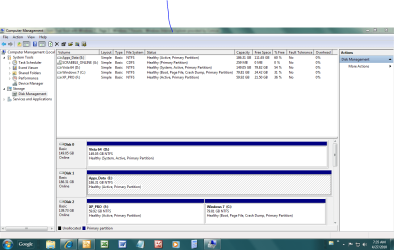
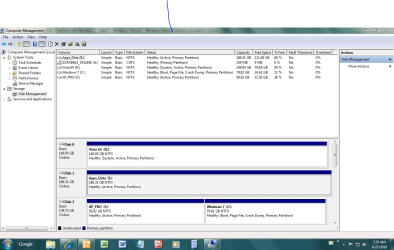
Can you post back a screenshot of your full Disk management drive map with listings, using Snipping Tool in Start menu and attaching file using paper clip in reply box.

It may be as simple as removing Vista HD, plugging it's cable into Win7 or setting Win7 HD as first HD to boot in BIOS (after DVD drive), then marking Win7 active while removing incorrectly-marked active from the data drive, then booting the Win7 DVD Repair console or Repair CD to run Startup Repair up to 3 separate times to write the MBR to Win7.

However this will remove the System MBR from XP so it will likely be cut out of the dual boot until it is added back in from Win7 using EasyBCD 2.0 beta.

Disk Management snip will help determine this for certain so we can give you the correct DISKPART commands to use from Win7 DVD/Repair CD.
 
Remove Vista fom tri boot setup

Snip is attached. Also want to mention when I viewed disks with Partition Manager it gave me the following status:

Vista disk - Active and Boot
Windows 7 - System

Thanks for your help, Ralph
 

Attachments

  • disk management snip.PNG
    disk management snip.PNG
    51.9 KB · Views: 14

My Computer My Computer

At a glance

xp,vista and win7Intel quad4gbGt8800
OS
xp,vista and win7
CPU
Intel quad
Motherboard
asus
Memory
4gb
Graphics Card(s)
Gt8800
Sound Card
GT8800
Monitor(s) Displays
Sony 32" HD TV
Hard Drives
3 WD
PSU
corsair 850
Case
cooler Master
Cooling
Fans
I just noticed on document I sent you that boot status has moved from the vista disk to windows7 disk. I don't know how that happened other than I tried to delete the vista disk (which recovered) and played around with Easy bcd beta. I just set bios to boot from win7 disk and I get a file missing error:
<Windows root> system32\hal.dll. Just some more info
 

My Computer My Computer

At a glance

xp,vista and win7Intel quad4gbGt8800
OS
xp,vista and win7
CPU
Intel quad
Motherboard
asus
Memory
4gb
Graphics Card(s)
Gt8800
Sound Card
GT8800
Monitor(s) Displays
Sony 32" HD TV
Hard Drives
3 WD
PSU
corsair 850
Case
cooler Master
Cooling
Fans
Looking at your screenshot,your Apps are installed to Disk1,any change to your Tri boot will mean reinstalling all apps.
 

My Computer My Computer

At a glance

ME/XP/Vista/Win7
OS
ME/XP/Vista/Win7
Is DISK1 used for app storage, or did you actually install your program files there for XP/Win7?

It isn't advisable to install Program Files on another HD anyway (data is ok) so I would reinstall them if so.

What I would do here is unplug Vista HD, plug XP/Win7 HD into its cable, then deactivate all partitions except Win7, mark Win7 active, recover the System MBR into Win7, then recreate the XP dual boot using EasyBCD 2.0 beta.

Boot Win7 DVD Repair console or Repair CD, click through to Recovery Tools list to open a Command Line, type:

DISKPART
LIST DISK
SELECT DISK 0 (confirm from list this is XP/Win7 HD #)
LIST PARTITION
SELECT PARTITION 1 (confirm from list this is XP partition #)
INACTIVE
SELECT PARTITION 2 (confirm from lsit this is Win7 partition #)
ACTIVE
SELECT DISK 1 (confirm from earlier list this is Apps/Data HD #)
LIST PARTITION
SELECT PARTITION 1 (confirm from list this is Apps/Data partition #)
INACTIVE
EXIT

Now return to DVD Repair console/Repair CD Recovery Tools list to run Startup Repair up to 3 separate times with reboots to write MBR to Win7, which will work as long as it is marked Active first.

Finally install EasyBCD 2.0 beta (after doing quick registration to use beta) to Add XP for Dual Boot, accept offered boot files, Save after autocomplete, restart.

If you need to change paths to files on data HD, use this tutorial: http://www.sevenforums.com/tutorials/18629-user-folders-change-default-location.html
 
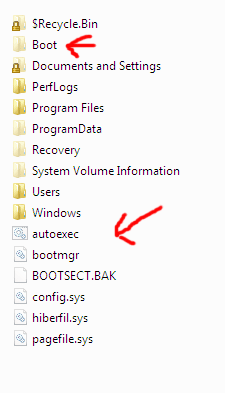
Before removing the Vista Hd, copy the boot files to Win XP partition.
 

Attachments

  • Capture.PNG
    Capture.PNG
    14.8 KB · Views: 1
  • Capture2.PNG
    Capture2.PNG
    18.5 KB · Views: 0
  • Capture22.PNG
    Capture22.PNG
    5.3 KB · Views: 0

My Computer My Computer

At a glance

ME/XP/Vista/Win7
OS
ME/XP/Vista/Win7
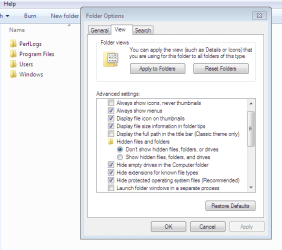
I believe EasyBCD will autoconfigure the boot files between both OS's, however the goal should be to make sure boot.ini, ntldr, and ntdetect.com are in the roots of both OS drives after unhiding System and Hidden files as theog shows above.
 
Remove vista from triple boot

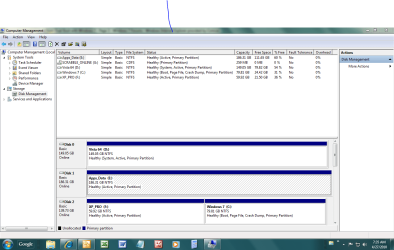
Greg, I can't seem to get this attachment to you. I'm trying again. Hope you get this
 

Attachments

  • disk management snip.PNG
    disk management snip.PNG
    51.9 KB · Views: 5

My Computer My Computer

At a glance

xp,vista and win7Intel quad4gbGt8800
OS
xp,vista and win7
CPU
Intel quad
Motherboard
asus
Memory
4gb
Graphics Card(s)
Gt8800
Sound Card
GT8800
Monitor(s) Displays
Sony 32" HD TV
Hard Drives
3 WD
PSU
corsair 850
Case
cooler Master
Cooling
Fans
Remove vista

Here' the attachment again
 

Attachments

  • disk management snip.PNG
    disk management snip.PNG
    51.9 KB · Views: 2

My Computer My Computer

At a glance

xp,vista and win7Intel quad4gbGt8800
OS
xp,vista and win7
CPU
Intel quad
Motherboard
asus
Memory
4gb
Graphics Card(s)
Gt8800
Sound Card
GT8800
Monitor(s) Displays
Sony 32" HD TV
Hard Drives
3 WD
PSU
corsair 850
Case
cooler Master
Cooling
Fans
Yes, I read the screenshot earlier today and posted the steps above for you to mark Win7 active and recover the System MBR into it.
 
Hi Ralph,

If you want to try an easier way, from within win 7, d/l this zip, rt click it >properties>unblock>apply>ok.

Rt click and RUN AS ADMIN on sispar.cmd.

View attachment sisparV5.zip
 

My Computers My Computers

  • At a glance

    7 X64i5 84002x8gb 3200mhz
    Computer type
    PC/Desktop
    OS
    7 X64
    CPU
    i5 8400
    Motherboard
    gigabyte b365m ds3h
    Memory
    2x8gb 3200mhz
    Hard Drives
    various
    PSU
    pure power 11 400w cm
    Case
    Coolermaster
    Cooling
    cryorig m9i
  • At a glance

    7x64g54008gb ddr4 2400
    Computer type
    PC/Desktop
    OS
    7x64
    CPU
    g5400
    Motherboard
    ga b365m ds3h
    Memory
    8gb ddr4 2400
    PSU
    xfx pro 450w
Hi Ralph,

If you want to try an easier way, from within win 7, d/l this zip, rt click it >properties>unblock>apply>ok.

Rt click and RUN AS ADMIN on sispar.cmd.

View attachment 69863

Hi SIW2

I was playing round with your app today,looks good.

How about a nice Tutorial.

Ray.
 

My Computer My Computer

At a glance

ME/XP/Vista/Win7
OS
ME/XP/Vista/Win7
when i try to run deom ein 7 i get message that bootsect.exe file is missing
 

My Computer My Computer

At a glance

xp,vista and win7Intel quad4gbGt8800
OS
xp,vista and win7
CPU
Intel quad
Motherboard
asus
Memory
4gb
Graphics Card(s)
Gt8800
Sound Card
GT8800
Monitor(s) Displays
Sony 32" HD TV
Hard Drives
3 WD
PSU
corsair 850
Case
cooler Master
Cooling
Fans
Did you try running the extracted file which SIW2 uploaded for you, and what was the exact result?

Did you try following exactly the steps I posted up earlier to do the operations needed manually, and if so what were the results of those?

You need to do one or the other, and post back readable results.
 
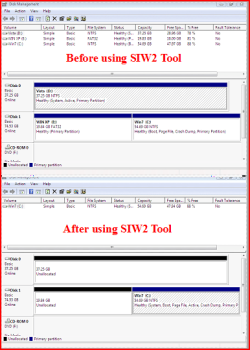
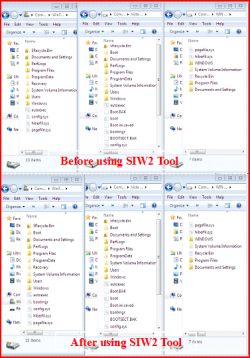
theog, did the syspar file uploaded by SIW2 designed to recover MBR into Win7 also delete the XP partition? The reason I ask is because the former Vista and XP partitions are showing unallocated space in your screenie.

If so, then OP may not want to use it since he wants to retain XP Dual Boot,

Especially if he needs to run Startup Repair from DVD/Repair CD anyway, since that is essentially the manual method after marking Win7 active.
 
1) No, I delete partitions after reboot.

2) SIW2 tool will copy all boot files need over to the Win 7 HD/partition, NO need for any manual method.

Nice tool.
 

My Computer My Computer

At a glance

ME/XP/Vista/Win7
OS
ME/XP/Vista/Win7
Hi greg

Hope this screenshot will help.
 

Attachments

  • Capture7.PNG
    Capture7.PNG
    50.3 KB · Views: 6

My Computer My Computer

At a glance

ME/XP/Vista/Win7
OS
ME/XP/Vista/Win7
2) SIW2 tool will copy all boot files need over to the Win 7 HD/partition, NO need for any manual method.

Nice tool.

I think Si said it will only work in certain configs. But it just worked for triple boot so it looks good to go.

Maybe we can get him to wrap it in a tutorial so Dual Boot removal becomes cake.

Of course, there is then deleting partitions with space recovery into Win7 or elsewhere, so Partition Wizard is still needed as is our help with that.
 
Back
Top