Resolution probleme , Stuck at 640x480

AloneNVD

New member
Local time
6:56 AM
Messages
10
Hi guys!
i just installed windows 7 and drivers for my pc , when i restart my pc resolution STUCK at 680x480 Why ? i can't change it .... , my video card : nvidia geforce 210 1gb ddr3 , i tried to stop windows update + delete old video card update and install the new update and nothing happened , can you please help me ? , i have some DOTA2 Giveaway if you want :) , so please help me if you found the solution i will pray for you all the rest of my sad life , thank you , Alone.
 

My Computer My Computer

Computer type
PC/Desktop
Computer Manufacturer/Model Number
biostar
OS
windows 7 édition intégrale 32 bit
CPU
intel pentuim dual core E5500 2.8 ghz (2cpu)
Memory
2gb ddr2
Graphics Card(s)
Nvidia geforce 210 1gb ddr3
please help me guys
 

My Computer My Computer

Computer type
PC/Desktop
Computer Manufacturer/Model Number
biostar
OS
windows 7 édition intégrale 32 bit
CPU
intel pentuim dual core E5500 2.8 ghz (2cpu)
Memory
2gb ddr2
Graphics Card(s)
Nvidia geforce 210 1gb ddr3
pleaaase help me
 

My Computer My Computer

Computer type
PC/Desktop
Computer Manufacturer/Model Number
biostar
OS
windows 7 édition intégrale 32 bit
CPU
intel pentuim dual core E5500 2.8 ghz (2cpu)
Memory
2gb ddr2
Graphics Card(s)
Nvidia geforce 210 1gb ddr3
.....
 

My Computer My Computer

Computer type
PC/Desktop
Computer Manufacturer/Model Number
biostar
OS
windows 7 édition intégrale 32 bit
CPU
intel pentuim dual core E5500 2.8 ghz (2cpu)
Memory
2gb ddr2
Graphics Card(s)
Nvidia geforce 210 1gb ddr3
.... please help me
 

My Computer My Computer

Computer type
PC/Desktop
Computer Manufacturer/Model Number
biostar
OS
windows 7 édition intégrale 32 bit
CPU
intel pentuim dual core E5500 2.8 ghz (2cpu)
Memory
2gb ddr2
Graphics Card(s)
Nvidia geforce 210 1gb ddr3
Hello, Welcome to sevenforums!

640 by 480 is the default with no video driver, the lowest resolution.

Here is a driver to download and run, forget about windows update, going to the source:

NVIDIA DRIVERS 320.18WHQL

Reboot after it's complete.

Report here if more trouble/resolved.

Right click on the desktop and go to Resolution and adjust there, save a screen shot of it if still not fixed and attach it.

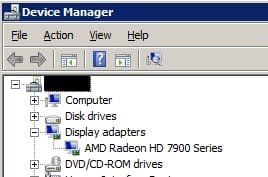
Should look at Device Manager and make sure it has Nvidia 210 listed for your video under Display Adaptors.

What kind of cable is being used and have you tried a 2nd one?

What other troubleshooting have you done?
 
Last edited:

My Computer My Computer

Computer type
PC/Desktop
Computer Manufacturer/Model Number
Self Built Custom
OS
Windows 7 Ultimate Retail Box (64-bit installed) + Service Pack 1
CPU
AMD FX-8350 CPU v1.15 (or 1.0F) BIOS was required!
Motherboard
MSI 890FXA-GD70
Memory
8G CAS-7 G-Skill DDR3 @1333 (2 fours) [mobo nonOC max rec'd]
Graphics Card(s)
Radeon HD 7950 [3 gigs of GDDR5] MSI Twin Frozr model
Sound Card
Realtek High Definition Audio (onboard mobo, ALC-889 chip)
Monitor(s) Displays
2 WS LED Monitors: One LG One Viewsonic
Screen Resolution
1920 by 1080
Hard Drives
SSD for OS: Samsung 840 Pro
SSD for VM and utilities: Adata SX900
7200 RPM SATA HDs for the rest: Hitachi and Seagate
PSU
Corsair TX850 - 850W max, in service since August 2010.
Case
Thermaltake Armor A90
Cooling
Thermaltake Spin Q CPU Cooler, in service since August 2010
Keyboard
Logitech G11
Mouse
Logitech M310 Wireless
Internet Speed
100 Megabit broadband supposedly upgraded from 50 (Cable)
Antivirus
Bitdefender Internet Security 2014 suite
Browser
Pale Moon 64-bit main, also IceDragon, Opera, and Maxthon.
Other Info
CompTIA A+ certified (220-800 series) in July 2013.
Hi Faladu!
thank you for youre replie but i did everything that you said and nothing happened , i tried to install vista driver from the CD i restart and it's work but when i restart again .... 640*480 back .....
 

My Computer My Computer

Computer type
PC/Desktop
Computer Manufacturer/Model Number
biostar
OS
windows 7 édition intégrale 32 bit
CPU
intel pentuim dual core E5500 2.8 ghz (2cpu)
Memory
2gb ddr2
Graphics Card(s)
Nvidia geforce 210 1gb ddr3
Vista driver? Should be using Windows 7 driver and I linked you one.

What's the video listed as in Device Manager?

Swapped out the cable?

....and post the screenshot I asked for please, & one looking like this would be good too:


Cut and paste from another thread maybe this is it: [I tried to do that and ran a game config for me]
-------------------------------------------------------------------------------
Wait..one more thing I'd the same problem a while ago two months or so. I was stuck just like you did with 640x480 resolution. It happened to me again yesterday :cry: Lucky for me and probably you, I figured out the cause :)

Click"Start">Type "Config" and then press enter>Choose "Boot" tap> Under Boot options, uncheck "Base video" option :geek:

Base video could've been configured manually or through any software -driver included- you may have installed :rolleyes:

Let me know if it did work :sarc:
 

Attachments

  • dm1.jpg
    dm1.jpg
    9 KB · Views: 26

My Computer My Computer

Computer type
PC/Desktop
Computer Manufacturer/Model Number
Self Built Custom
OS
Windows 7 Ultimate Retail Box (64-bit installed) + Service Pack 1
CPU
AMD FX-8350 CPU v1.15 (or 1.0F) BIOS was required!
Motherboard
MSI 890FXA-GD70
Memory
8G CAS-7 G-Skill DDR3 @1333 (2 fours) [mobo nonOC max rec'd]
Graphics Card(s)
Radeon HD 7950 [3 gigs of GDDR5] MSI Twin Frozr model
Sound Card
Realtek High Definition Audio (onboard mobo, ALC-889 chip)
Monitor(s) Displays
2 WS LED Monitors: One LG One Viewsonic
Screen Resolution
1920 by 1080
Hard Drives
SSD for OS: Samsung 840 Pro
SSD for VM and utilities: Adata SX900
7200 RPM SATA HDs for the rest: Hitachi and Seagate
PSU
Corsair TX850 - 850W max, in service since August 2010.
Case
Thermaltake Armor A90
Cooling
Thermaltake Spin Q CPU Cooler, in service since August 2010
Keyboard
Logitech G11
Mouse
Logitech M310 Wireless
Internet Speed
100 Megabit broadband supposedly upgraded from 50 (Cable)
Antivirus
Bitdefender Internet Security 2014 suite
Browser
Pale Moon 64-bit main, also IceDragon, Opera, and Maxthon.
Other Info
CompTIA A+ certified (220-800 series) in July 2013.
Help

Okay, here the screenshot + i said that i installed your driver already and it doesn't work so i tried vista driver ,
screenshots :

mrj54171.jpg


lde54171.jpg
 

My Computer My Computer

Computer type
PC/Desktop
Computer Manufacturer/Model Number
biostar
OS
windows 7 édition intégrale 32 bit
CPU
intel pentuim dual core E5500 2.8 ghz (2cpu)
Memory
2gb ddr2
Graphics Card(s)
Nvidia geforce 210 1gb ddr3
Hi AloneNVD

Press :orb: + R and type in desk.cpl. I asume you have tried to change your resolution in here, right? Are there any other resolutions to chose here on the scale except "680x480"? Are they greyed out or do you just see that one resolution 680x480?
Have you tried to change the resolution through the NVIDIA-Driver?

Here's what I would try:

- uninstall your current display driver in Device Manager (devmgmt.msc)

- Download and install Driver Sweeper (Link) and follow the instructions:

  • Use the official uninstaller(s) of the driver(s) you want to uninstall.
  • Reboot your PC in Safe Mode.
  • Run Driver Sweeper and select what to clean --> (NVIDIA)
- reboot and then install the newest driver from here: (Link)


Otherwhise try changing your connection cable (HDMI, DVI, VGA, Display-Port) or even try it on another monitor.

Good luck! :thumbsup:
 

My Computer My Computer

Computer type
PC/Desktop
OS
Windows 7 Ultimate x64
CPU
Intel Core i7 2600K
Motherboard
Asus P8Z68-V PRO (B3)
Memory
Corsair Vengeance, 16GB
Graphics Card(s)
Asus HD 6970 DirectCU II
Monitor(s) Displays
ASUS VE276Q 27"
Screen Resolution
1920x1080
Hard Drives
(c:\) Crucial m4 SSD 128GB
(d:\) Samsung 830 Series 256GB
(e:\) Hitachi Deskstar 2TB
PSU
Seasonic X-560W Gold
Case
Corsair Obsidian 650D bl.
Cooling
archon thermalright cpu cooler
okay, i will try i hope it work ...
 

My Computer My Computer

Computer type
PC/Desktop
Computer Manufacturer/Model Number
biostar
OS
windows 7 édition intégrale 32 bit
CPU
intel pentuim dual core E5500 2.8 ghz (2cpu)
Memory
2gb ddr2
Graphics Card(s)
Nvidia geforce 210 1gb ddr3
no it didn't work pff :'( , can you tell me how to change resolution from the nvidia control panel?
 

My Computer My Computer

Computer type
PC/Desktop
Computer Manufacturer/Model Number
biostar
OS
windows 7 édition intégrale 32 bit
CPU
intel pentuim dual core E5500 2.8 ghz (2cpu)
Memory
2gb ddr2
Graphics Card(s)
Nvidia geforce 210 1gb ddr3
hi guys thanks for no helping , i m won using xp
 

My Computer My Computer

Computer type
PC/Desktop
Computer Manufacturer/Model Number
biostar
OS
windows 7 édition intégrale 32 bit
CPU
intel pentuim dual core E5500 2.8 ghz (2cpu)
Memory
2gb ddr2
Graphics Card(s)
Nvidia geforce 210 1gb ddr3
Not sure what your last post meant, care to try again?

Resolution changing in the Nvidia app should be obvious or easy to find, a slider or drop down box, can't recall I am AMD guy at the moment.

If using Windows XP, you are on the wrong site entirely.
 

My Computer My Computer

Computer type
PC/Desktop
Computer Manufacturer/Model Number
Self Built Custom
OS
Windows 7 Ultimate Retail Box (64-bit installed) + Service Pack 1
CPU
AMD FX-8350 CPU v1.15 (or 1.0F) BIOS was required!
Motherboard
MSI 890FXA-GD70
Memory
8G CAS-7 G-Skill DDR3 @1333 (2 fours) [mobo nonOC max rec'd]
Graphics Card(s)
Radeon HD 7950 [3 gigs of GDDR5] MSI Twin Frozr model
Sound Card
Realtek High Definition Audio (onboard mobo, ALC-889 chip)
Monitor(s) Displays
2 WS LED Monitors: One LG One Viewsonic
Screen Resolution
1920 by 1080
Hard Drives
SSD for OS: Samsung 840 Pro
SSD for VM and utilities: Adata SX900
7200 RPM SATA HDs for the rest: Hitachi and Seagate
PSU
Corsair TX850 - 850W max, in service since August 2010.
Case
Thermaltake Armor A90
Cooling
Thermaltake Spin Q CPU Cooler, in service since August 2010
Keyboard
Logitech G11
Mouse
Logitech M310 Wireless
Internet Speed
100 Megabit broadband supposedly upgraded from 50 (Cable)
Antivirus
Bitdefender Internet Security 2014 suite
Browser
Pale Moon 64-bit main, also IceDragon, Opera, and Maxthon.
Other Info
CompTIA A+ certified (220-800 series) in July 2013.
i had the exact same problem all i did was
Right Click - screen resolution - advanced settings - list all modes - then select resolution - finally press apply
there you go! hope this elped:p
 

My Computer My Computer

Computer type
PC/Desktop
Computer Manufacturer/Model Number
AMD
OS
64
Motherboard
hd
Graphics Card(s)
amd raedon a8-7600
Back
Top