
Running out of physical memory

biswajit216

New member
Local time
6:22 AM
Messages
2
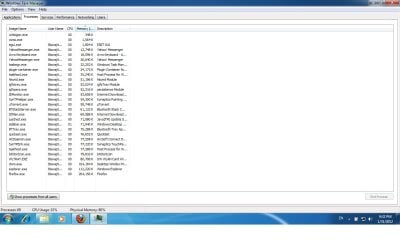
Inspite of writing a lot of text let me post a screenshot to describe it in a better and easier way......
the screenshot of my Windows Task Manager is being attached, from that you can see ordinary system processes are consuming so much of my physical memory.That makes my system a lot slower.
I set up a my windows just yesterday,so the system is fresh.
Please help to get rid of this problem.
Thanks.
 

Attachments
  • Untitled.jpg
    Untitled.jpg
    95.9 KB · Views: 140

My Computer

Computer Manufacturer/Model Number
Dell
OS
Windows 7 Ultimate 32bit
CPU
Intel
Motherboard
Intel
Memory
Intel
Graphics Card(s)
Built in
Sound Card
Built in
Monitor(s) Displays
Dell
Hard Drives
Western Digital
I can't see the heading for the memory column. Is that memory (working set)? If not, add Working Set to your task manager memory display. Working set is "likely being currently used" memory and is essential for a given process/task. Total memory can be misleading as to the essential memory needed for your PC.
 

My Computer

Computer type
PC/Desktop
Computer Manufacturer/Model Number
Custom
OS
Windows 7
CPU
AMD Phenom II X2 (dual-core)
Motherboard
GA-MA785GM-US2H
Memory
4G
Graphics Card(s)
integrated ATI HD 4200
Sound Card
integrated
Monitor(s) Displays
Samsung 24"
Screen Resolution
1920x1080
Hard Drives
1 SSD - Samsung 840 - 500 GB - OS and DATA partitions
1 SSD - Intel 320 - 120 GB (used for backups) - Misc/BACKUP
1 SATA HD - WD, 500 GB - BACKUP
PSU
Ultra X4 500W
Case
Ultra X-blaster
Keyboard
Microsoft Digital Media Pro
Mouse
Logitech WIRED!
Internet Speed
15 Mbps FIOS
Welcome
This looks like a simple solve.
Your memory is being used by many appl and programs being used at the same time.
This can happen if you use software and do not close it, but yet open another.
or
It can happen by having too many programs in startup.
Lets try to disable startup programs and see if it helps
http://www.sevenforums.com/tutorials/1401-startup-programs-change.html
 

My Computer

Computer type
PC/Desktop
Computer Manufacturer/Model Number
Dell XPS 420
OS
Windows 10, Home Clean Install
CPU
Intel Core2 processsor Q8200(2.33Ghz 1333FSB) Quad Core Tech
Motherboard
Dell
Memory
6 gb
Graphics Card(s)
ATI Radeon 256MB HD3650
Sound Card
Intergrated 7.1 Channel Audio
Monitor(s) Displays
Dell SP2009W 20"
Hard Drives
640 GB Serial ATA Hard drive
Cooling
Fan
Keyboard
Dell USB Keyboard
Mouse
Dell Premium Optical USB
Internet Speed
DSL 2.85
Also update your system specs and let us know how much RAM your laptop/desktop has.
 

My Computer

Computer Manufacturer/Model Number
DELL
OS
Windows 8 Pro
CPU
intel i3 2.40 Ghz
Motherboard
DELL inc
Memory
6 GB RAM
Graphics Card(s)
Integrated Intel HD
Sound Card
Realtek high definition SRS surround sound
Screen Resolution
1366*768
Hard Drives
320 GB
Internet Speed
1Mbps
Agreed - and secondly (or thirdly, or... I lost count while posting!) don't use task manager to monitor resources. Resource Monitor was designed for that, so using that will help give you more accurate data.
 

My Computer

Computer type
PC/Desktop
Computer Manufacturer/Model Number
Custom
OS
Windows 10 Pro x64
CPU
Intel Core i7 4790K @ 4.5GHz
Motherboard
Asus Maximus Hero VII
Memory
32GB DDR3
Graphics Card(s)
Nvidia GeForce GTX970
Sound Card
Realtek HD Audio
Screen Resolution
1920x1200
Hard Drives
1x Samsung 250GB SSD
4x WD RE 2TB (RAIDZ)
PSU
Corsair AX760i
Case
Fractal Design Define R4
Cooling
Noctua NH-D15
Seems to me you got 2GB memory and the services listed use about 1.6GB, but that's why virtual memory is there, it should work just fine, it will just run slower when memory is swapped from HDD. Either add memory as 2GB is bare minimum for Win7, spend some time shutting down nonessential services and you need to figure out which one since everybody is different, or switch back to XP or some less demanding OS. I would probably use it the way it is, try to run 1 program at the time and if that didn't meet my expectations, I would probably get new computer, since CPU, HHD and graphics could be outdated as well. It really depends how you use your computer, but there is not much you can do about low memory, you could spend whole day optimizing services etc and at the end of day maybe gain 5-10%, just load some new program and watch it all disappear.
 

My Computer

OS
win7hp64
but that's why virtual memory is there, it should work just fine, it will just run slower when memory is swapped from HDD
A LOT slower.

Suggest you cleanup your startups as was already said and then post a pic of your Resource Monitor.
 

My Computer

Computer Manufacturer/Model Number
HP, Dell, Gateway, Toshiba - 4 laptops and 2 desktops
OS
Vista, Windows7, Mint Mate, Zorin, Windows 8
CPU
from 1.6GHz Duo to i7
Monitor(s) Displays
2x HP w2207
Hard Drives
5x HDD, 7x SSD, 12x Externals
Keyboard
with trackball - no mices
Mouse
Trackball mice
Internet Speed
DSL 6000
10 microseconds versus 10 milliseconds for seek is a big deal to a CPU, and a few hundred microseconds for read/write versus a few hundred milliseconds is even more of a difference. Also, if you start paging to disk with any regularity, you're probably already in a situation where the fact that your paging file being used is not the largest of your performance problems anyway :).
 

My Computer

Computer type
PC/Desktop
Computer Manufacturer/Model Number
Custom
OS
Windows 10 Pro x64
CPU
Intel Core i7 4790K @ 4.5GHz
Motherboard
Asus Maximus Hero VII
Memory
32GB DDR3
Graphics Card(s)
Nvidia GeForce GTX970
Sound Card
Realtek HD Audio
Screen Resolution
1920x1200
Hard Drives
1x Samsung 250GB SSD
4x WD RE 2TB (RAIDZ)
PSU
Corsair AX760i
Case
Fractal Design Define R4
Cooling
Noctua NH-D15
Back
Top