Seagate external

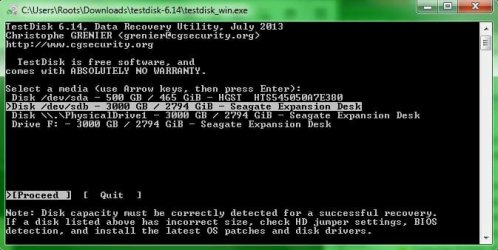
why does it list the seagate 3 times? im going to click on the highlighted one
 

Attachments

  • y.JPG
    y.JPG
    43.2 KB · Views: 25

My Computer

Computer type
PC/Desktop
Computer Manufacturer/Model Number
Custom Build (First built from scratch in 2010 by someone else.. then I rebuilt it in 2015).
OS
Windows 7 Home Premium 64bit
CPU
i7 4790k processor
Motherboard
Z97 Sabertooth Mark 1
Memory
Patriot 16gb
Graphics Card(s)
EVGA GeForce GTX 980 Ti FTW
Monitor(s) Displays
19" Monitor
Screen Resolution
1920 x 1080
Hard Drives
Samsung 850 Evo 120gb ssd
PSU
Corsair Cx600
Case
Haf 922
Cooling
Hydro Series H60 High Performance 120 mm
Keyboard
Microsoft
Mouse
Logitech
Browser
Firefox 37.0.4
Other Info
*Computer Manufacturer/Model Number: HP 15-d002tx Notebook* /

OS: Windows 7 Home Premium 64-bit / CPU: Intel Core i3-3110M / Memory: DDR3 4GB / Graphics Card: Intel HD Graphics 4000, GeForce 820M / Keyboard: Microsoft / Browser: Firefox 37.0
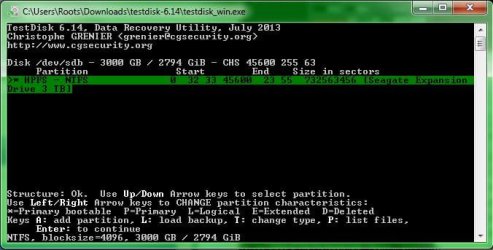
this is what i see after quick search... this is where you want me to list files
 

Attachments

  • after quick search.JPG
    after quick search.JPG
    43.6 KB · Views: 25

My Computer

Computer type
PC/Desktop
Computer Manufacturer/Model Number
Custom Build (First built from scratch in 2010 by someone else.. then I rebuilt it in 2015).
OS
Windows 7 Home Premium 64bit
CPU
i7 4790k processor
Motherboard
Z97 Sabertooth Mark 1
Memory
Patriot 16gb
Graphics Card(s)
EVGA GeForce GTX 980 Ti FTW
Monitor(s) Displays
19" Monitor
Screen Resolution
1920 x 1080
Hard Drives
Samsung 850 Evo 120gb ssd
PSU
Corsair Cx600
Case
Haf 922
Cooling
Hydro Series H60 High Performance 120 mm
Keyboard
Microsoft
Mouse
Logitech
Browser
Firefox 37.0.4
Other Info
*Computer Manufacturer/Model Number: HP 15-d002tx Notebook* /

OS: Windows 7 Home Premium 64-bit / CPU: Intel Core i3-3110M / Memory: DDR3 4GB / Graphics Card: Intel HD Graphics 4000, GeForce 820M / Keyboard: Microsoft / Browser: Firefox 37.0
i think we are getting to the copying stage and i dont have another back up external connected. i have another external but the powerlead is missing. its the same powerlead as the faulty seagate drive.
 

My Computer

Computer type
PC/Desktop
Computer Manufacturer/Model Number
Custom Build (First built from scratch in 2010 by someone else.. then I rebuilt it in 2015).
OS
Windows 7 Home Premium 64bit
CPU
i7 4790k processor
Motherboard
Z97 Sabertooth Mark 1
Memory
Patriot 16gb
Graphics Card(s)
EVGA GeForce GTX 980 Ti FTW
Monitor(s) Displays
19" Monitor
Screen Resolution
1920 x 1080
Hard Drives
Samsung 850 Evo 120gb ssd
PSU
Corsair Cx600
Case
Haf 922
Cooling
Hydro Series H60 High Performance 120 mm
Keyboard
Microsoft
Mouse
Logitech
Browser
Firefox 37.0.4
Other Info
*Computer Manufacturer/Model Number: HP 15-d002tx Notebook* /

OS: Windows 7 Home Premium 64-bit / CPU: Intel Core i3-3110M / Memory: DDR3 4GB / Graphics Card: Intel HD Graphics 4000, GeForce 820M / Keyboard: Microsoft / Browser: Firefox 37.0
Not sure why. May be because your partition is still visible with a drive label F, though RAW.

My perception is that selecting any of the three should yield the results.

But first Proceed with whatever is highlighted by default, sdb.

We can try the second and third if it does not yield the expected results.Absolutely no harm since we are not going to write anything to the drive.
 

My Computer

OS
Windows 7 Home Premium 32 bit
Ok, i pressed shift + p. Do i press enter after that? I think its just loading the list so im going to wait
 

My Computer

Computer type
PC/Desktop
Computer Manufacturer/Model Number
Custom Build (First built from scratch in 2010 by someone else.. then I rebuilt it in 2015).
OS
Windows 7 Home Premium 64bit
CPU
i7 4790k processor
Motherboard
Z97 Sabertooth Mark 1
Memory
Patriot 16gb
Graphics Card(s)
EVGA GeForce GTX 980 Ti FTW
Monitor(s) Displays
19" Monitor
Screen Resolution
1920 x 1080
Hard Drives
Samsung 850 Evo 120gb ssd
PSU
Corsair Cx600
Case
Haf 922
Cooling
Hydro Series H60 High Performance 120 mm
Keyboard
Microsoft
Mouse
Logitech
Browser
Firefox 37.0.4
Other Info
*Computer Manufacturer/Model Number: HP 15-d002tx Notebook* /

OS: Windows 7 Home Premium 64-bit / CPU: Intel Core i3-3110M / Memory: DDR3 4GB / Graphics Card: Intel HD Graphics 4000, GeForce 820M / Keyboard: Microsoft / Browser: Firefox 37.0
No need to press enter. Just Shift+P as you did. Wait for the complete list to load . When completed just check that you have all the folders/files.
 

My Computer

OS
Windows 7 Home Premium 32 bit
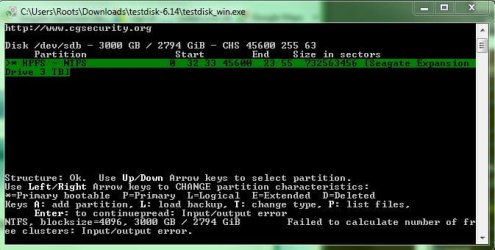
Oh wow... first i see what is displayed in the prtscn pic. Now i see a list of the folders listed:).

But i have no other external connected jumanji. Only this laptop with about 144gb free space.
 

Attachments

  • uhoh.JPG
    uhoh.JPG
    42.5 KB · Views: 23

My Computer

Computer type
PC/Desktop
Computer Manufacturer/Model Number
Custom Build (First built from scratch in 2010 by someone else.. then I rebuilt it in 2015).
OS
Windows 7 Home Premium 64bit
CPU
i7 4790k processor
Motherboard
Z97 Sabertooth Mark 1
Memory
Patriot 16gb
Graphics Card(s)
EVGA GeForce GTX 980 Ti FTW
Monitor(s) Displays
19" Monitor
Screen Resolution
1920 x 1080
Hard Drives
Samsung 850 Evo 120gb ssd
PSU
Corsair Cx600
Case
Haf 922
Cooling
Hydro Series H60 High Performance 120 mm
Keyboard
Microsoft
Mouse
Logitech
Browser
Firefox 37.0.4
Other Info
*Computer Manufacturer/Model Number: HP 15-d002tx Notebook* /

OS: Windows 7 Home Premium 64-bit / CPU: Intel Core i3-3110M / Memory: DDR3 4GB / Graphics Card: Intel HD Graphics 4000, GeForce 820M / Keyboard: Microsoft / Browser: Firefox 37.0
this is what i see now.

it feels good to see the list appear jumanji:)
 

Attachments

  • latest.jpg
    latest.jpg
    54.3 KB · Views: 23

My Computer

Computer type
PC/Desktop
Computer Manufacturer/Model Number
Custom Build (First built from scratch in 2010 by someone else.. then I rebuilt it in 2015).
OS
Windows 7 Home Premium 64bit
CPU
i7 4790k processor
Motherboard
Z97 Sabertooth Mark 1
Memory
Patriot 16gb
Graphics Card(s)
EVGA GeForce GTX 980 Ti FTW
Monitor(s) Displays
19" Monitor
Screen Resolution
1920 x 1080
Hard Drives
Samsung 850 Evo 120gb ssd
PSU
Corsair Cx600
Case
Haf 922
Cooling
Hydro Series H60 High Performance 120 mm
Keyboard
Microsoft
Mouse
Logitech
Browser
Firefox 37.0.4
Other Info
*Computer Manufacturer/Model Number: HP 15-d002tx Notebook* /

OS: Windows 7 Home Premium 64-bit / CPU: Intel Core i3-3110M / Memory: DDR3 4GB / Graphics Card: Intel HD Graphics 4000, GeForce 820M / Keyboard: Microsoft / Browser: Firefox 37.0
Yes, I noticed that you haven't connected another external drive.

As I said earlier nothing to be copied to the internal drive. We don't want to grapple with any other problem that may arise with your system- past experience :)

You have now become an expert in running TestDisk. You can close TestDisk and run it again after connecting another external drive.

( I still see some problem in your faulty drive " Failed to calculate the number of free clusters: Input/output error." We will not worry about it now..)

Just copy as much data as possible and in whatever form to another external drive when you are ready.

No need to do anything in a hurry. You now know that all your data is there. Do it at your leisure. But till such time you are ready to copy, give your faulty drive a rest and do not use it repeatedly.Read the reference I had given on how to copy

As for the drives, I can give you only one recommendation : Do not buy any Western Digital HDD with built-in hardware encryption. If something goes wrong with the drive, data recovery as a DIY is impossible.
I would prefer Seagate drives. ( I have stopped buying any HDDs. I want to buy one Seagate 3TB drive now for my experiments. I don't have a >2TB drive now. May be I will buy it next month when I am in USA. I bought all my Seagate drives last time in Office Max/ Depot.)

I am now retiring early since I was awake for long yesterday night.

 

My Computer

OS
Windows 7 Home Premium 32 bit
You want to get seagate? hmmmm im not so sure about getting another seagate now as of this current experience im having lol.

Thanks for todays help. I have few more questions id like to ask. But it can wait. I will post here later.
 

My Computer

Computer type
PC/Desktop
Computer Manufacturer/Model Number
Custom Build (First built from scratch in 2010 by someone else.. then I rebuilt it in 2015).
OS
Windows 7 Home Premium 64bit
CPU
i7 4790k processor
Motherboard
Z97 Sabertooth Mark 1
Memory
Patriot 16gb
Graphics Card(s)
EVGA GeForce GTX 980 Ti FTW
Monitor(s) Displays
19" Monitor
Screen Resolution
1920 x 1080
Hard Drives
Samsung 850 Evo 120gb ssd
PSU
Corsair Cx600
Case
Haf 922
Cooling
Hydro Series H60 High Performance 120 mm
Keyboard
Microsoft
Mouse
Logitech
Browser
Firefox 37.0.4
Other Info
*Computer Manufacturer/Model Number: HP 15-d002tx Notebook* /

OS: Windows 7 Home Premium 64-bit / CPU: Intel Core i3-3110M / Memory: DDR3 4GB / Graphics Card: Intel HD Graphics 4000, GeForce 820M / Keyboard: Microsoft / Browser: Firefox 37.0
hmmmm...... any HDD whether Seagate or WD can develop problems. With Seagates however you can recover the data most of the time.. If you knowingly or unknowingly ( most of the time) buy a Western Digital with hardware encryption, if it comes to data recovery stage because of a failed electronics in it, as I said a DIY is not possible. You have send it only to Western Digital supported Data Recovery agencies to whom only WD has shared the decryption key and those agencies will squeeze your wallet knowing fully well that only they could do it and you have no other go. Among the Western Digital portables only Elements comes without hardware encryption.

Further I have seen that majority of failures/problems reported here are WD as compared to Seagate.

In any case that is my personal take.:)

Have a good day.

( Once you have copied all data we shall try to fix your faulty drive which may or may not work. So the copy first policy)
 

My Computer

OS
Windows 7 Home Premium 32 bit
Im not sure i know how to copythe data. Will it copy at kbps speed like the rare chances that were given to me to save data? I will try and get another external to connect and then i will try copy.


Sleep well jumanji:)
 

My Computer

Computer type
PC/Desktop
Computer Manufacturer/Model Number
Custom Build (First built from scratch in 2010 by someone else.. then I rebuilt it in 2015).
OS
Windows 7 Home Premium 64bit
CPU
i7 4790k processor
Motherboard
Z97 Sabertooth Mark 1
Memory
Patriot 16gb
Graphics Card(s)
EVGA GeForce GTX 980 Ti FTW
Monitor(s) Displays
19" Monitor
Screen Resolution
1920 x 1080
Hard Drives
Samsung 850 Evo 120gb ssd
PSU
Corsair Cx600
Case
Haf 922
Cooling
Hydro Series H60 High Performance 120 mm
Keyboard
Microsoft
Mouse
Logitech
Browser
Firefox 37.0.4
Other Info
*Computer Manufacturer/Model Number: HP 15-d002tx Notebook* /

OS: Windows 7 Home Premium 64-bit / CPU: Intel Core i3-3110M / Memory: DDR3 4GB / Graphics Card: Intel HD Graphics 4000, GeForce 820M / Keyboard: Microsoft / Browser: Firefox 37.0
I think i know....was looking at the guide.

I wonder if copying the data through testdisk is quicker or a better way then copying it from the normal way when you can access files and folders?
 

My Computer

Computer type
PC/Desktop
Computer Manufacturer/Model Number
Custom Build (First built from scratch in 2010 by someone else.. then I rebuilt it in 2015).
OS
Windows 7 Home Premium 64bit
CPU
i7 4790k processor
Motherboard
Z97 Sabertooth Mark 1
Memory
Patriot 16gb
Graphics Card(s)
EVGA GeForce GTX 980 Ti FTW
Monitor(s) Displays
19" Monitor
Screen Resolution
1920 x 1080
Hard Drives
Samsung 850 Evo 120gb ssd
PSU
Corsair Cx600
Case
Haf 922
Cooling
Hydro Series H60 High Performance 120 mm
Keyboard
Microsoft
Mouse
Logitech
Browser
Firefox 37.0.4
Other Info
*Computer Manufacturer/Model Number: HP 15-d002tx Notebook* /

OS: Windows 7 Home Premium 64-bit / CPU: Intel Core i3-3110M / Memory: DDR3 4GB / Graphics Card: Intel HD Graphics 4000, GeForce 820M / Keyboard: Microsoft / Browser: Firefox 37.0

My Computer

Computer type
PC/Desktop
Computer Manufacturer/Model Number
Custom Build (First built from scratch in 2010 by someone else.. then I rebuilt it in 2015).
OS
Windows 7 Home Premium 64bit
CPU
i7 4790k processor
Motherboard
Z97 Sabertooth Mark 1
Memory
Patriot 16gb
Graphics Card(s)
EVGA GeForce GTX 980 Ti FTW
Monitor(s) Displays
19" Monitor
Screen Resolution
1920 x 1080
Hard Drives
Samsung 850 Evo 120gb ssd
PSU
Corsair Cx600
Case
Haf 922
Cooling
Hydro Series H60 High Performance 120 mm
Keyboard
Microsoft
Mouse
Logitech
Browser
Firefox 37.0.4
Other Info
*Computer Manufacturer/Model Number: HP 15-d002tx Notebook* /

OS: Windows 7 Home Premium 64-bit / CPU: Intel Core i3-3110M / Memory: DDR3 4GB / Graphics Card: Intel HD Graphics 4000, GeForce 820M / Keyboard: Microsoft / Browser: Firefox 37.0
Who told you this?
 

My Computer

OS
Windows 7 Home Premium 32 bit
Have you started copying the files listed by TestDisk? Yes/No

I am afraid you are not following the correct procedure to copy the files.

Copying files listed by TestDisk during Recovery: http://www.sevenforums.com/hardware-devices/286181-my-external-hard-drive-suddenly-became-unllocated-3.html#post2395385

To copy all folders/files: Press [A] You will be typing lowercase a

To copy only selected folder/files:
Highlight the folder/file using Up/Down arrow.
Press [Shift + :] The selection will turn green.
Repeat above to highlight and select other folders/files. Once selection is over
Press [Shift+C] (you will be typing capital c)
On the other hand if you press just , you will be typing lower case c which will copy only the highlighted file at that time. Most probably you are doing this. PhotoRec is used if the file system is damaged and could not be read. It uses the file signature and attributes for the selected file format and reconstructs the file even when a file system is damaged. You will get all the files but the folder structure, file names will be lost.
 

My Computer

OS
Windows 7 Home Premium 32 bit
no i havnt started yet. i was just reading about testdisk thats all. i will try buy a new external maybe within the next few days jumanji. Should i buy another 3tb seagate like the one that is corrupt?
 

My Computer

Computer type
PC/Desktop
Computer Manufacturer/Model Number
Custom Build (First built from scratch in 2010 by someone else.. then I rebuilt it in 2015).
OS
Windows 7 Home Premium 64bit
CPU
i7 4790k processor
Motherboard
Z97 Sabertooth Mark 1
Memory
Patriot 16gb
Graphics Card(s)
EVGA GeForce GTX 980 Ti FTW
Monitor(s) Displays
19" Monitor
Screen Resolution
1920 x 1080
Hard Drives
Samsung 850 Evo 120gb ssd
PSU
Corsair Cx600
Case
Haf 922
Cooling
Hydro Series H60 High Performance 120 mm
Keyboard
Microsoft
Mouse
Logitech
Browser
Firefox 37.0.4
Other Info
*Computer Manufacturer/Model Number: HP 15-d002tx Notebook* /

OS: Windows 7 Home Premium 64-bit / CPU: Intel Core i3-3110M / Memory: DDR3 4GB / Graphics Card: Intel HD Graphics 4000, GeForce 820M / Keyboard: Microsoft / Browser: Firefox 37.0
That depends upon how much data you have on the faulty drive, whether you want to copy all that data or You want to select only the important data leaving aside the non-essentials and how much that would be.

So that means I cannot be the one to decide it. You are on your own.:)
 

My Computer

OS
Windows 7 Home Premium 32 bit
im going to buy a 3tb external.

but what i meant was incase a new external goes RAW format, and need to recover ... is seagate a good idea to buy. I know now not to buy a WD external as you mentioned only there company can recover.
 

My Computer

Computer type
PC/Desktop
Computer Manufacturer/Model Number
Custom Build (First built from scratch in 2010 by someone else.. then I rebuilt it in 2015).
OS
Windows 7 Home Premium 64bit
CPU
i7 4790k processor
Motherboard
Z97 Sabertooth Mark 1
Memory
Patriot 16gb
Graphics Card(s)
EVGA GeForce GTX 980 Ti FTW
Monitor(s) Displays
19" Monitor
Screen Resolution
1920 x 1080
Hard Drives
Samsung 850 Evo 120gb ssd
PSU
Corsair Cx600
Case
Haf 922
Cooling
Hydro Series H60 High Performance 120 mm
Keyboard
Microsoft
Mouse
Logitech
Browser
Firefox 37.0.4
Other Info
*Computer Manufacturer/Model Number: HP 15-d002tx Notebook* /

OS: Windows 7 Home Premium 64-bit / CPU: Intel Core i3-3110M / Memory: DDR3 4GB / Graphics Card: Intel HD Graphics 4000, GeForce 820M / Keyboard: Microsoft / Browser: Firefox 37.0
Your first priority is that you should have a.) to backup of your system drive/partition - to restore the OS when it becomes inevitable and b.)to backup all your data that you consider important and can ill-afford or be grieved to lose. Data Backup means that that data should be available in atleast two distinct devices/media. If one fails you always have it on another.

In such a case you will not be calling be upon us for help in recovering data or paying a Data Recovery Agency through your nose.

You can then concentrate on fixing the HDD if that is possible without diverting your attention to Data Recovery. ( Hardware failures cannot be fixed normally by users and data recovery will definitely has to be done by professionals with clean room facility.)

Without elaborating further, I would say saving the important sectors of your HDD whether MBR or GPT may help a lot in fixing the drive turning RAW cases and recovering data if need be..

You may read my posts #22 and 29 here: http://www.sevenforums.com/performa...-vs-mbr-primary-mbr-logical-partitions-3.html

How to save the sectors here : http://www.sevenforums.com/hardware-devices/310295-lost-partitions.html#post2584426

So when you get the HDD whether an MBR drive or GPT drive examine the sectors with Bootice and save the important sectors with their sector Numberr for easy identification if a restore operationbecomes necessary.

Here is what Rod Smith, the author of GPT fdisk - a software to repair GPT disk says " If you take the simple precaution of backing up your GPT data, and keeping this backup current with any changes you make, you should find data recovery much easier." ( By GPT data he means the GPT Structure data - the important sectors - and not the user data)
 
Last edited:

My Computer

OS
Windows 7 Home Premium 32 bit
Back
Top