Hello, I hope someone can help me with an issue I've just come across.
I bought an LG BH14 Blu Ray DVD drive to replace my old LG drive. I unplugged my pc, pulled out the old unit, disconnected the two wires, connected them to my new unit, and popped it back in. Too easy, right?
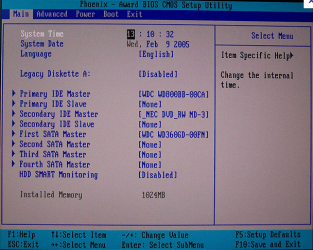
After startup, I went to install the software that came with the new blu ray drive, and noticed that my secondary hard drive was missing from 'My Computer'
I have a WD drive as 'C', and a Seagate that is partitioned into E,F,G, etc.... all that was showing and accessible was the 'C' drive.
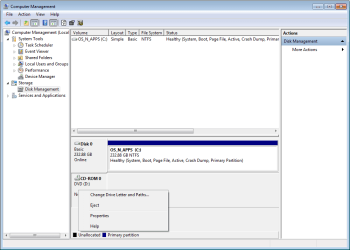
I checked Disk Management, and only 'C' and the blu ray drive are there.
I tried System Restore to no avail.... nowhere on my pc can I find, access, or even prove that my other drive even exists, even after reboot.
So, again I unplugged and popped off the cover to see if any other wires came loose, but everything is as it should be.
I've scanned the forums and seen similar problems, but not the same. This is an existing drive that has worked well for over a year, not a new install.....
I'm not the brightest bulb on the tree, so any help would be most appreciated. Thanks.
oh, I'm running Windows 7 Home Premium 32 bit...... whatever that means
I bought an LG BH14 Blu Ray DVD drive to replace my old LG drive. I unplugged my pc, pulled out the old unit, disconnected the two wires, connected them to my new unit, and popped it back in. Too easy, right?
After startup, I went to install the software that came with the new blu ray drive, and noticed that my secondary hard drive was missing from 'My Computer'
I have a WD drive as 'C', and a Seagate that is partitioned into E,F,G, etc.... all that was showing and accessible was the 'C' drive.
I checked Disk Management, and only 'C' and the blu ray drive are there.
I tried System Restore to no avail.... nowhere on my pc can I find, access, or even prove that my other drive even exists, even after reboot.
So, again I unplugged and popped off the cover to see if any other wires came loose, but everything is as it should be.
I've scanned the forums and seen similar problems, but not the same. This is an existing drive that has worked well for over a year, not a new install.....
I'm not the brightest bulb on the tree, so any help would be most appreciated. Thanks.
oh, I'm running Windows 7 Home Premium 32 bit...... whatever that means
My Computer
At a glance
Windows 7 Home Premium 32 bitIntel(R) Core(TM)2 Duo CPU E6750 @ 2.66GHz4.00 GB with 3.25 GB available(1) Radeon X1950 Series (Microsoft Corporatio...
- OS
- Windows 7 Home Premium 32 bit
- CPU
- Intel(R) Core(TM)2 Duo CPU E6750 @ 2.66GHz
- Motherboard
- ASUSTeK Computer INC. P5E
- Memory
- 4.00 GB with 3.25 GB available
- Graphics Card(s)
- (1) Radeon X1950 Series (Microsoft Corporation - WDDM) (
- Sound Card
- High Definition Audio Device
- Hard Drives
- (1) WDC WD7501AALS-00J7B0 ATA Device