
Security Essentials is giving error when trying to update

TheGreyWizard

New member
I've been trying to update Security Essentials now for a couple weeks and I keep getting the following error message:
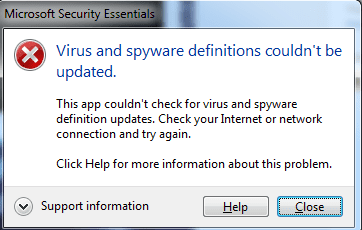
Untitled.png

I am running Win7 64. What is causing this error and how do I fix it?

I haven't updated Win7 in quite some time, perhaps that's it?

I didn't want to do all of the updates to keep getting notifications/pushes to upgrade to Win10 - I don't want it and want to stay on Win7.

Thanks.
 

My Computer

Computer type
PC/Desktop
Computer Manufacturer/Model Number
Custom
OS
Windows 7 64
CPU
Intel 5820k
Motherboard
Asrock x99m Extreme4
Memory
16gb
Graphics Card(s)
EVGA 970 GTX
Monitor(s) Displays
Dell U3415W
Hard Drives
Samsung 256g 850 Pro
Samsung 128g 850 Pro
PSU
EVGA 1000 P2
Hi:

Yes, the fact that you have not updated Windows with important security patches for "quite some time" may be contributing to your problem.

The free upgrade offer from Win7 to Win10 ended months ago.
There are no more "GWX" reminders.
So there is currently no solid reason to refuse important security patches for Windows and your other MS software (e.g. MS Office).
If you are missing one or more months worth of security updates, your system is vulnerable.

As a general principle (with rare exceptions), one should install at least ALL "critical" and "important" SECURITY updates.
The decision to install "Recommended" and "Optional" patches, especially those that are not security-related, is up to the user. You'll need to read the descriptions of each available patch to determine if it applies to or might be needed for your system.

I do not use MSE.
So I cannot help specifically with the error message you report.
But, for starters, I would suggest running Windows Update manual checks and installing ALL available "Critical" and "Important" SECURITY updates.
It may have to be done in batches, depending on how many of them you are missing.
In other words, do not try to install 20 or 30 security patches all at once.
I suggest leaving ".NET framework" patches for last.

And you will need to reboot several times during the process, when prompted.
It's a good idea NOT to use the computer for other chores during the update process.
And one needs a lot of patience -- making sure KB 3020369 and KB 3172605 are installed (manually, if necessary) may expedite the process.

Please report back and let us know how it goes, so that we can all learn.

Thanks,
MM
 
Last edited:

My Computer

Computer type
PC/Desktop
Computer Manufacturer/Model Number
Dell Studio XPS 8500
OS
OEM Windows 7 Ult (x64) SP1
CPU
Intel Core-i7 3770 @ 3.4 GHz
Motherboard
"Dell" branded
Memory
16 GB DDR3 SDRAM @ 1333 MHz
Graphics Card(s)
NVidia GeForce GT620 1 GB
Sound Card
THX TruStudio PC
Monitor(s) Displays
Dell U2410 Full HD
Hard Drives
2.0 TB SATA2 @ 7200 RPM
PSU
350W
Keyboard
MS 4000 Ergon - Wired
Mouse
Logitech Anywhere MX
Internet Speed
Cable HSI w/Turbo (router)
Antivirus
KIS-MBAM Premium-MBAE Premium
Browser
Fx (current version); IE
Other Info
And a Win7/64 Pro laptop; And a Win10/64 Pro desktop.
Ok great, thanks for the advice.

I have 194 updates to do :shock:

It's been stuck at 0% for a few hours now... does that sound normal for a situation like this? I just canceled and restarted it - should I just do a few of them at a time? It's gonna take forever if I do it that way since I have so many...
 

My Computer

Computer type
PC/Desktop
Computer Manufacturer/Model Number
Custom
OS
Windows 7 64
CPU
Intel 5820k
Motherboard
Asrock x99m Extreme4
Memory
16gb
Graphics Card(s)
EVGA 970 GTX
Monitor(s) Displays
Dell U3415W
Hard Drives
Samsung 256g 850 Pro
Samsung 128g 850 Pro
PSU
EVGA 1000 P2

My Computer

Computer type
PC/Desktop
Computer Manufacturer/Model Number
Skylake Special #666
OS
Windows 10 Pro x64
CPU
Intel Core i7 6700K
Motherboard
Asus Sabertooth Z170 Mark 1
Memory
GSkill TridentZ RGB 16GB 3600 16-16-16-36
Graphics Card(s)
EVGA GTX 980 Ti SC x2
Sound Card
Realtek High Definition
Monitor(s) Displays
AOC G2460PG
Screen Resolution
1920 x 1080 144Hz
Hard Drives
Samsung 860 Pro 256GB, Seagate Barracuda 4TB x2
PSU
EVGA 1000 P2, EVGA White Custom Braided Cables
Case
Corsair Vengeance C70 Gunmetal Black
Cooling
Corsair H100i v2, Corsair ML120 x2, Thermal Grizzly Kryonaut
Keyboard
Logitech G910 Orion Spectrum
Mouse
Logitech G700s
Internet Speed
Verizon Fios Quantum Gateway 75/75
Antivirus
Windows Defender, Malwarebytes Free 3.8.3
Browser
Chrome
Other Info
Corsair SP120 x4, LG Blu-ray Drive, Durabrand HT-395 100 Watt Dolby Digital Amp, Corsair H2100 Wireless 7.1 Headset
Back
Top