Services - Start or Disable

How to Start or Disable Services in Windows 7

   Information
Services are a computer program or process that runs in the background and provides support to other programs in Windows 7. This will show you how to start or disable a Windows 7 service of your choice.

For more information on each service, see: Standard Windows 7 Services Svchost.exe

You must be logged in as an administrator to start or disable Servces.

   Note
If you want to cut down the overhead of what is running in the background and speed Windows 7 up some, then only disable the services you do not use. If you disable a service that you need or use, then it could actually lower your computer's performance. The Services apply to all users on the computer.
   Warning
It is highly recommended that you create a restore point before making changes to the services. This way if you make a mistake that cripples your computer, you can do a System Restore using the restore point to undo the changes.


Adjusting service settings requires you to have a deep understanding of what the service is for, what it affects, and what your needs are. If you don't fully understand all of this, then playing with services can really mess up your Windows installation, and possibly your day.

If you disabled the wrong service and lost access to the computer, then try booting into Safe Mode from Advanced Boot Options to change the service back.


CONTENTS:
  • Option One: To Start, Stop, and Disable Services in "Services" Window
  • Option Two: To Start and Stop Services using "net" Commands
  • Option Three: To Start, Stop, and Disable Services using "Sc" Commands
  • Option Four: To Start, Stop, and Disable Services in Registry Editor


OPTION ONE

To Start, Stop, and Disable Services in "Services" Window

1. Open the Control Panel (icons view), click on the Administrative Tools icon, click on Services, and go to step 3 below.

OR

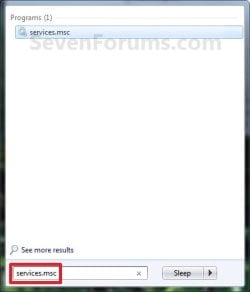
2. Open the Start Menu, type services.msc in the search box, press Enter, and go to step 3 below. (See screenshot below)Start_Menu.jpg

3. If prompted by UAC, then click on Yes.

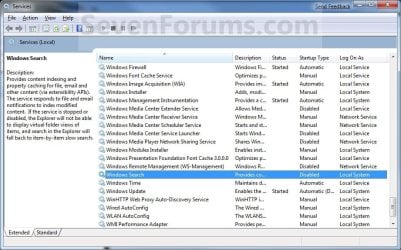
4. Right click on the service you want to disable or start and click on Properties. (See screenshot below)Services.jpg

5. To Disable a Service
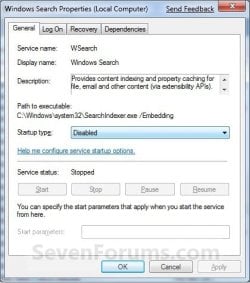
NOTE: See the guide in the TIP box at the top of the tutorial to help decide.A) Click on the Stop button and wait a sec for the service to stop. (See screenshots below step 7)

B) Next to Startup type, click on the drop down menu and select Disable. (See screenshots below step 7)

C) Click on the Apply button. (See screenshots below step 7)
NOTE: If the service will not stop and gives a error, then you will need to restart the computer to stop it after you set it to Disabled and clicked on OK.

D) Go to step 7.

6. To Start a Service
NOTE: See the guide in the TIP box at the top of the tutorial to help decide.A) Next to Startup type, click on the drop down menu and select Automatic or Manual and click Apply. (See screenshots below step 7)

B) Click on the Start button. (See screenshots below step 7)
NOTE: If the Start option is grayed out and will not start, then you will need to restart the computer to start it after you set it to Automatic and clicked OK.

7. Click on OK. (See screenshots below)Properties-1.jpgProperties-2.jpg

8. Close the Services window.
NOTE: You may need to restart the computer for the changes to the services to take affect.


OPTION TWO

To Start and Stop Services using "net" Commands

1. Open an elevated command prompt, and do step 2 or 3 below for what you would like to do.

2. To Stop a Service using "Net Stop" Command in Command Prompt

A) In the elevated command prompt, type the command below, press Enter, and go to step 4 below.
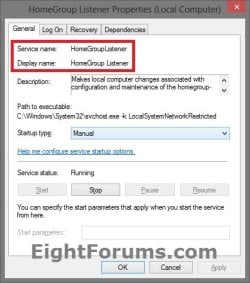
NOTE: The Display name of a service is the name displayed in the Services snap-in window, and in the service's properties.

net stop "service name"

OR

net stop "display name of service"

Name.jpg


For example:
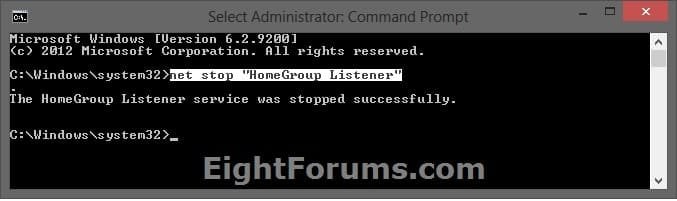
If I wanted to stop the HomeGroup Listener (display name) or HomeGroupListener (service name) service, I would type either command below exactly in the command prompt, and press Enter.

net stop "HomeGroup Listener"

OR

net stop "HomeGroupListener"

CMD_Stop.jpg


3. To Start a Service using "Net Start" Command in Command PromptA) In the elevated command prompt, type the command below, press Enter, and go to step 4 below.
NOTE: The Display name of a service is the name displayed in the Services snap-in window, and in the service's properties.

net start "service name"

OR

net start "display name of service"


For example:
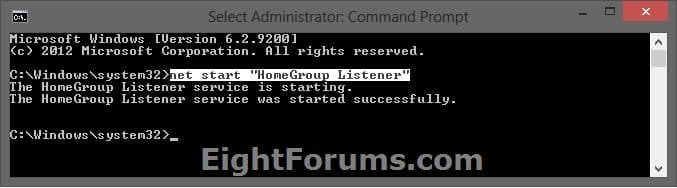
If I wanted to start the HomeGroup Listener (display name) or HomeGroupListener (service name) service, I would type either command below exactly in the command prompt, and press Enter.

net start "HomeGroup Listener"

OR


net start "HomeGroupListener"

CMD_Start.jpg


4. When finished, you can close the elevated command prompt.


OPTION THREE

To Start, Stop, and Disable Services using "Sc" Commands

1. Open an elevated command prompt, and do step 2, 3, or 4 below for what you would like to do.

2. To Stop a Service using "Sc Stop" Command in Command Prompt

A) In the elevated command prompt, type the command below, press Enter, and go to step 5 below.
NOTE: The Service name of a service is displayed in the service's properties.

sc stop "service name"


Name.jpg


For example:
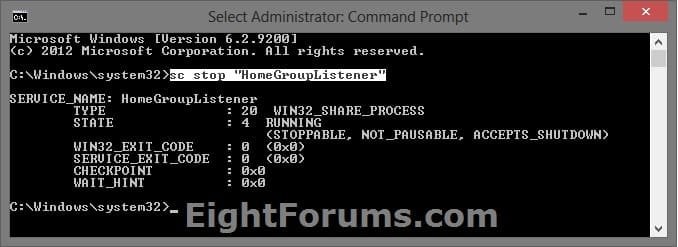
If I wanted to stop the HomeGroup Listener service, I would type the command below using the HomeGroupListener (service name) exactly in the command prompt, and press Enter.


sc stop "HomeGroupListener"

SC_Stop.jpg


3. To Disable a Service using "Sc Config" Command in Command Prompt

A) Do step 2 above to stop the service.

B) In the elevated command prompt, type the command below, press Enter, and go to step 5 below.
NOTE: The Service name of a service is displayed in the service's properties.

sc config "service name" start=disabled


For example:
If I wanted to disable the HomeGroup Listener service, I would type the command below using the HomeGroupListener (service name) exactly in the command prompt, and press Enter.


sc config "HomeGroupListener" start=disabled


SC_Disabled.jpg


4. To Start/Enable a Service using "Sc Start" & "Sc Config" Commands

A) If the Startup type of the service is set to Disabled, then in the elevated command prompt, type the command below using the startup type you want to set instead, and press Enter.
NOTE: The Service name of a service is displayed in the service's properties.

sc config "service name" start=demand

or

sc config "service name" start=auto

or

sc config "service name" start=delayed-auto


   Note
"Startup Type" for Service

  • Manual (demand) - Manual mode allows Windows to start a service when needed. However, very few services will start up when required in Manual mode. If you find you need a service, place it into Automatic.
  • Automatic (auto) - With a service in this state, it will start at boot time. Some services, when no longer required, will also automatically stop when not needed. If you find you do not need a service, place it into Manual or Disabled.
  • Automatic (Delayed Start) (delayed-auto) - With a service in this state, it will start just after boot time. Some services, when no longer required, will also automatically stop when not needed. If you find you do not need a service, place it into Manual or Disabled.


For example:
If I wanted to set the startup type for the HomeGroup Listener service to Manual, I would type the command below using the HomeGroupListener (service name) exactly in the command prompt, and press Enter.


sc config "HomeGroupListener" start=demand


SC_Config.jpg


B) In the elevated command prompt, type the command below using the same service name from step 4A above, press Enter, and go to step 5 below.

sc stop "service name"


For example:
If I wanted to start the HomeGroup Listener service, I would type the command below using the HomeGroupListener (service name) exactly in the command prompt, and press Enter.


sc start "HomeGroupListener"
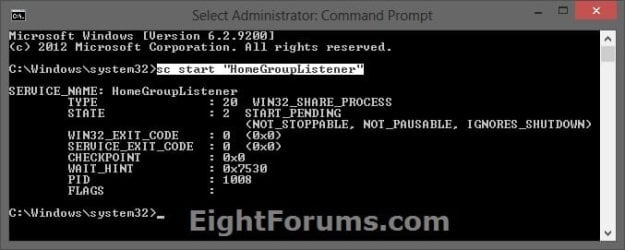

SC_Start.jpg


5. When finished, you can close the elevated command prompt.


OPTION FOUR

To Start, Stop, and Disable Services in Registry Editor

1. First, open services.msc and double click/tap on the service to see what the "Service name" is for the service. This will be the name of the registry key for the service in step 4 below.Name.jpg

2. Press the Windows + R keys to open the Run dialog, type regedit, and press Enter.

3. If prompted by UAC, then click/tap on Yes.

4. In Registry Editor, go to the location below: (see screenshot below)
NOTE: Substitute Service name in the location below with the actual service name from step 1 above.HKEY_LOCAL_MACHINE\SYSTEM\CurrentControlSet\Services\Service name


For example: The "Service name" for the HomeGroup Listener service is HomeGroupListener, so I would go to this location in the registry.

HKEY_LOCAL_MACHINE\SYSTEM\CurrentControlSet\Services\HomeGroupListener
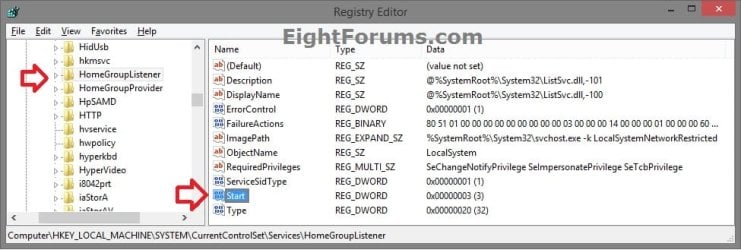

Services_Registry-1.jpg

5. In the left pane of the Service name (ex: HomeGroupListener), double click on the Start DWORD to modify it. (see screenshot below)

6. Type in a data value from the table below for what you would like to do, then click/tap on OK. (see screenshot below)Services_Registry-2.jpg

Startup TypeDWORD "Data" Value
Automatic (Delayed Start)DelayedAutostart = 1
Start = 2
AutomaticDelayedAutostart = 0
Start = 2
ManualDelayedAutostart = 0
Start = 3
DisabledDelayedAutostart = 0
Start = 4


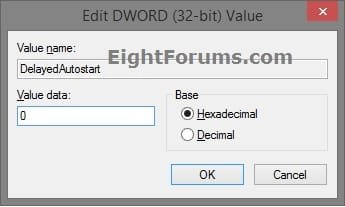
7. If needed, double click on the DelayedAutostart DWORD to modify it's data value (0 or 1) to what's in the table above for what you want set, and click/tap on OK. (see screenshot below)
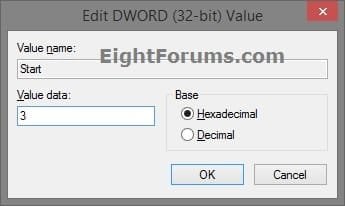
NOTE: If the DelatedAutostart DWORD is not there, then you can right click on an empty area in the right pane, click on New and DWORD (32-bit) Value, type DelatedAutostart, and press Enter to add it. If DelatedAutostart is not there, then it will be the same as it being set to 0 (zero).Services_Registry-3.jpg

8. When finished, close Registry Editor, and restart PC to apply.


That's it,
Shawn Brink


Last edited:
can you see the homepage? or get to the site through google?
 

My Computer

Computer Manufacturer/Model Number
mickey megabyte 1234
OS
ultimate 64 sp1
CPU
i5 2500K [email protected]
Motherboard
MSI P67A-GD53
Memory
8 gigs GSkill Ripjaws 1600
Graphics Card(s)
amd hd6950
Sound Card
creative x-fi gamer
Monitor(s) Displays
samsung 24"
Screen Resolution
1920x1080
Hard Drives
ocz vertex 2e 60 gig, samsung f3 1tb, buffalo 2tb ext
PSU
antec 550
Case
antec three hundred
Cooling
i'm a cooling fan
Keyboard
saitek eclipse ii
Mouse
logitech g3
Internet Speed
about 4 Mbps
Other Info
i love win7
Hi,
I'm trying to access this link but just keep getting 'page not available' anyone any ideas?:cry:
Cheers

Hello Sneaker,

It may be a temporary issue with your ISP's (AOL) DNS servers. You might try using a OpenDNS as a test to see if you can access it afterwards.

Hope this helps,
Shawn
 

My Computer

Computer type
PC/Desktop
Computer Manufacturer/Model Number
Self built custom
OS
64-bit Windows 11 Pro for Workstations
CPU
Intel i7-8700K OC'd to 5 GHz
Motherboard
ASUS ROG Maximus XI Formula Z390
Memory
64 GB (4x16GB) G.SKILL TridentZ RGB DDR4 3600 MHz
Graphics Card(s)
ASUS ROG-STRIX-GTX1080TI-O11G-GAMING
Sound Card
Integrated
Monitor(s) Displays
2 x Samsung Odyssey G7 27"
Screen Resolution
2560x1440
Hard Drives
1TB Samsung 990 PRO M.2,
4TB Samsung 990 PRO PRO M.2,
TerraMaster F8 SSD Plus NAS
PSU
Seasonic Prime Titanium 850W
Case
Thermaltake Core P3
Cooling
Corsair Hydro H115i
Keyboard
Logitech wireless K800
Mouse
Logitech MX Master 4
Internet Speed
2 Gb/s Download and 100 Mb/s Upload
Antivirus
Malwarebyte Anti-Malware Premium
Browser
Google Chrome
Other Info
Logitech Z625 speaker system,
Logitech BRIO 4K Pro webcam,
HP Color LaserJet Pro MFP M477fdn,
APC SMART-UPS RT 1000 XL - SURT1000XLI,
Galaxy S23 Plus phone
A list with services enabled/disabled after a fresh install will be helpful!
 

My Computer

Computer Manufacturer/Model Number
Fujitsu Siemens
OS
XP SP2
CPU
Intel Celeron D 3.07 GHz
Motherboard
/
Memory
1GB
Graphics Card(s)
Nvidia GeForce 6200 SE 256mb
Sound Card
Realtek
Monitor(s) Displays
17 "
Screen Resolution
1280x1024
Hard Drives
160GB
Internet Speed
2mb
A list with services enabled/disabled after a fresh install will be helpful!

Hello Visy,

See yellow TIP box at the top of the tutorial. ;)
 

My Computer

Computer type
PC/Desktop
Computer Manufacturer/Model Number
Self built custom
OS
64-bit Windows 11 Pro for Workstations
CPU
Intel i7-8700K OC'd to 5 GHz
Motherboard
ASUS ROG Maximus XI Formula Z390
Memory
64 GB (4x16GB) G.SKILL TridentZ RGB DDR4 3600 MHz
Graphics Card(s)
ASUS ROG-STRIX-GTX1080TI-O11G-GAMING
Sound Card
Integrated
Monitor(s) Displays
2 x Samsung Odyssey G7 27"
Screen Resolution
2560x1440
Hard Drives
1TB Samsung 990 PRO M.2,
4TB Samsung 990 PRO PRO M.2,
TerraMaster F8 SSD Plus NAS
PSU
Seasonic Prime Titanium 850W
Case
Thermaltake Core P3
Cooling
Corsair Hydro H115i
Keyboard
Logitech wireless K800
Mouse
Logitech MX Master 4
Internet Speed
2 Gb/s Download and 100 Mb/s Upload
Antivirus
Malwarebyte Anti-Malware Premium
Browser
Google Chrome
Other Info
Logitech Z625 speaker system,
Logitech BRIO 4K Pro webcam,
HP Color LaserJet Pro MFP M477fdn,
APC SMART-UPS RT 1000 XL - SURT1000XLI,
Galaxy S23 Plus phone

My Computer

Computer Manufacturer/Model Number
Fujitsu Siemens
OS
XP SP2
CPU
Intel Celeron D 3.07 GHz
Motherboard
/
Memory
1GB
Graphics Card(s)
Nvidia GeForce 6200 SE 256mb
Sound Card
Realtek
Monitor(s) Displays
17 "
Screen Resolution
1280x1024
Hard Drives
160GB
Internet Speed
2mb
No problem Visy. :)
 

My Computer

Computer type
PC/Desktop
Computer Manufacturer/Model Number
Self built custom
OS
64-bit Windows 11 Pro for Workstations
CPU
Intel i7-8700K OC'd to 5 GHz
Motherboard
ASUS ROG Maximus XI Formula Z390
Memory
64 GB (4x16GB) G.SKILL TridentZ RGB DDR4 3600 MHz
Graphics Card(s)
ASUS ROG-STRIX-GTX1080TI-O11G-GAMING
Sound Card
Integrated
Monitor(s) Displays
2 x Samsung Odyssey G7 27"
Screen Resolution
2560x1440
Hard Drives
1TB Samsung 990 PRO M.2,
4TB Samsung 990 PRO PRO M.2,
TerraMaster F8 SSD Plus NAS
PSU
Seasonic Prime Titanium 850W
Case
Thermaltake Core P3
Cooling
Corsair Hydro H115i
Keyboard
Logitech wireless K800
Mouse
Logitech MX Master 4
Internet Speed
2 Gb/s Download and 100 Mb/s Upload
Antivirus
Malwarebyte Anti-Malware Premium
Browser
Google Chrome
Other Info
Logitech Z625 speaker system,
Logitech BRIO 4K Pro webcam,
HP Color LaserJet Pro MFP M477fdn,
APC SMART-UPS RT 1000 XL - SURT1000XLI,
Galaxy S23 Plus phone
Last edited:

My Computer

Computer Manufacturer/Model Number
Self Build
OS
Windows 7 Pro 64-bit
CPU
AMD ADA5600CZBOX Dual-Core 2.8GHz
Motherboard
Gigabyte GA-MA77
Memory
8 Gig OCZ
Graphics Card(s)
Asus Geforce 8600GT PCIe
Sound Card
Onboard & MIA
Monitor(s) Displays
Dell 19"
Screen Resolution
1440 x 900
Hard Drives
3 160 Gig Western Digital (2 SATA/1 IDE)
PSU
Corsair CMPSU-550VX
Case
Antec (Server Case)
Cooling
Thermaltake on the CPU, Cooler Master case fans
Keyboard
MS Comfort Curve 2000
Mouse
Logitech LX3
Internet Speed
6-meg (if I'm lucky)
Other Info
AT&T ADSL - Westell 6100 modem, MSE, Defender, MS Office 2003, Paintshop Pro 11, Browsers: IE8, Opera, Safari
Will i gain alot of performance for doing all this tweaking is it really worth it..?
 

My Computer

Computer Manufacturer/Model Number
home build/gigabyte mobo
OS
windows 7 64 bit premium
CPU
q6600 2.4 overclocked to 3.2 ghz
Motherboard
gigabyte ga_73pvm.s2h rev 1.0
Memory
4 gb 800 mhz corsair
Graphics Card(s)
gtx 480 mbfg o/c
Sound Card
onboard realtek hd audio
Monitor(s) Displays
benq 24 inch (led)
Screen Resolution
1920x1080p
Hard Drives
barracuda 7200rpm 320gb
PSU
jeantech 900watts
Case
Novatech prowler midi tower v2 gaming case
Cooling
artic cooling 7 pro rev 2.0, 120mm front,rear and side
Keyboard
saitek eclipse 2
Mouse
mad catz mw2 laser mouse
Internet Speed
50mb virgin
Other Info
Adding a raptor hdd for gaming use only.
Hello Sinbin,

Tweaking the services by stopping and disabling the services that you do not use can help improve your computer's performance some by not having them running as background processes when you have a low powered system. If you have a higher end system, then you will probably not notice much if any difference in performance.

It is important to realize that you disabling or stopping services that you do need can decrease your computer's performance, and cause issues with some features to no longer work in Windows 7. If you are unsure, then it would be best to leave them as is at default to be safe.

Hope this helps,
Shawn
 

My Computer

Computer type
PC/Desktop
Computer Manufacturer/Model Number
Self built custom
OS
64-bit Windows 11 Pro for Workstations
CPU
Intel i7-8700K OC'd to 5 GHz
Motherboard
ASUS ROG Maximus XI Formula Z390
Memory
64 GB (4x16GB) G.SKILL TridentZ RGB DDR4 3600 MHz
Graphics Card(s)
ASUS ROG-STRIX-GTX1080TI-O11G-GAMING
Sound Card
Integrated
Monitor(s) Displays
2 x Samsung Odyssey G7 27"
Screen Resolution
2560x1440
Hard Drives
1TB Samsung 990 PRO M.2,
4TB Samsung 990 PRO PRO M.2,
TerraMaster F8 SSD Plus NAS
PSU
Seasonic Prime Titanium 850W
Case
Thermaltake Core P3
Cooling
Corsair Hydro H115i
Keyboard
Logitech wireless K800
Mouse
Logitech MX Master 4
Internet Speed
2 Gb/s Download and 100 Mb/s Upload
Antivirus
Malwarebyte Anti-Malware Premium
Browser
Google Chrome
Other Info
Logitech Z625 speaker system,
Logitech BRIO 4K Pro webcam,
HP Color LaserJet Pro MFP M477fdn,
APC SMART-UPS RT 1000 XL - SURT1000XLI,
Galaxy S23 Plus phone
You're most welcome Narsing, and welcome to Seven Forums. :)
 

My Computer

Computer type
PC/Desktop
Computer Manufacturer/Model Number
Self built custom
OS
64-bit Windows 11 Pro for Workstations
CPU
Intel i7-8700K OC'd to 5 GHz
Motherboard
ASUS ROG Maximus XI Formula Z390
Memory
64 GB (4x16GB) G.SKILL TridentZ RGB DDR4 3600 MHz
Graphics Card(s)
ASUS ROG-STRIX-GTX1080TI-O11G-GAMING
Sound Card
Integrated
Monitor(s) Displays
2 x Samsung Odyssey G7 27"
Screen Resolution
2560x1440
Hard Drives
1TB Samsung 990 PRO M.2,
4TB Samsung 990 PRO PRO M.2,
TerraMaster F8 SSD Plus NAS
PSU
Seasonic Prime Titanium 850W
Case
Thermaltake Core P3
Cooling
Corsair Hydro H115i
Keyboard
Logitech wireless K800
Mouse
Logitech MX Master 4
Internet Speed
2 Gb/s Download and 100 Mb/s Upload
Antivirus
Malwarebyte Anti-Malware Premium
Browser
Google Chrome
Other Info
Logitech Z625 speaker system,
Logitech BRIO 4K Pro webcam,
HP Color LaserJet Pro MFP M477fdn,
APC SMART-UPS RT 1000 XL - SURT1000XLI,
Galaxy S23 Plus phone
You have great Knowledge about windows 7 man I really appreciate .

It help me today to understand windows 7 very well thanks once again...
 

My Computer

OS
Windows 7 Ultimate x64
Hello Brink

Which services can i disable ??????

BTW Awesome Tutorial :)
 

My Computer

Computer Manufacturer/Model Number
ASUS
OS
Windows 7 Professional X64 SP1, Windows 7 Ultimate X64 SP1
CPU
Intel Core i7 3.2 GHz Processor
Motherboard
ASUS LGA 1366 Intel X58 Republic of Gamers ATX Motherboard R
Memory
8 GB
Graphics Card(s)
ATI Radeon HD 5770
Monitor(s) Displays
HP 2009m
Hard Drives
OCZ Vertex Series 60 GB Internal hard drive - 300 MBps
PSU
Kingwin Lazer Power Supply 1000 Watts w/ 3 Ways Universal Mo
Cooling
Fan
Keyboard
Logitech Wireless Keyboard
Mouse
Logitech Wireless Mouse
Hello Kevin,

That depends on what you use and do not use on your computer. The guide from Black Viper in the yellow TIP box at the top of the tutorial can help show you the usual safe sevices to disable. If you do not know if a service you want to disable is needed or not, then it's best to leave it set to it's default settings to avoid causing issues. I would also recommend to create a restore point before doing this as well to be extra safe. This way you could just do a system restore to that restore point if you disable the wrong one and send Windows 7 crashing.
 

My Computer

Computer type
PC/Desktop
Computer Manufacturer/Model Number
Self built custom
OS
64-bit Windows 11 Pro for Workstations
CPU
Intel i7-8700K OC'd to 5 GHz
Motherboard
ASUS ROG Maximus XI Formula Z390
Memory
64 GB (4x16GB) G.SKILL TridentZ RGB DDR4 3600 MHz
Graphics Card(s)
ASUS ROG-STRIX-GTX1080TI-O11G-GAMING
Sound Card
Integrated
Monitor(s) Displays
2 x Samsung Odyssey G7 27"
Screen Resolution
2560x1440
Hard Drives
1TB Samsung 990 PRO M.2,
4TB Samsung 990 PRO PRO M.2,
TerraMaster F8 SSD Plus NAS
PSU
Seasonic Prime Titanium 850W
Case
Thermaltake Core P3
Cooling
Corsair Hydro H115i
Keyboard
Logitech wireless K800
Mouse
Logitech MX Master 4
Internet Speed
2 Gb/s Download and 100 Mb/s Upload
Antivirus
Malwarebyte Anti-Malware Premium
Browser
Google Chrome
Other Info
Logitech Z625 speaker system,
Logitech BRIO 4K Pro webcam,
HP Color LaserJet Pro MFP M477fdn,
APC SMART-UPS RT 1000 XL - SURT1000XLI,
Galaxy S23 Plus phone
Alright
Thank you for your help
 

My Computer

Computer Manufacturer/Model Number
ASUS
OS
Windows 7 Professional X64 SP1, Windows 7 Ultimate X64 SP1
CPU
Intel Core i7 3.2 GHz Processor
Motherboard
ASUS LGA 1366 Intel X58 Republic of Gamers ATX Motherboard R
Memory
8 GB
Graphics Card(s)
ATI Radeon HD 5770
Monitor(s) Displays
HP 2009m
Hard Drives
OCZ Vertex Series 60 GB Internal hard drive - 300 MBps
PSU
Kingwin Lazer Power Supply 1000 Watts w/ 3 Ways Universal Mo
Cooling
Fan
Keyboard
Logitech Wireless Keyboard
Mouse
Logitech Wireless Mouse
You're most welcome Kevin. Please let us know how it went. :)
 

My Computer

Computer type
PC/Desktop
Computer Manufacturer/Model Number
Self built custom
OS
64-bit Windows 11 Pro for Workstations
CPU
Intel i7-8700K OC'd to 5 GHz
Motherboard
ASUS ROG Maximus XI Formula Z390
Memory
64 GB (4x16GB) G.SKILL TridentZ RGB DDR4 3600 MHz
Graphics Card(s)
ASUS ROG-STRIX-GTX1080TI-O11G-GAMING
Sound Card
Integrated
Monitor(s) Displays
2 x Samsung Odyssey G7 27"
Screen Resolution
2560x1440
Hard Drives
1TB Samsung 990 PRO M.2,
4TB Samsung 990 PRO PRO M.2,
TerraMaster F8 SSD Plus NAS
PSU
Seasonic Prime Titanium 850W
Case
Thermaltake Core P3
Cooling
Corsair Hydro H115i
Keyboard
Logitech wireless K800
Mouse
Logitech MX Master 4
Internet Speed
2 Gb/s Download and 100 Mb/s Upload
Antivirus
Malwarebyte Anti-Malware Premium
Browser
Google Chrome
Other Info
Logitech Z625 speaker system,
Logitech BRIO 4K Pro webcam,
HP Color LaserJet Pro MFP M477fdn,
APC SMART-UPS RT 1000 XL - SURT1000XLI,
Galaxy S23 Plus phone
also note that it's safer to set unwanted services to 'manual' rather than 'disabled'.

that way they won't run each time you start your computer, but should only run if they are aked to by whatever software needs them at the time.
 

My Computer

Computer Manufacturer/Model Number
mickey megabyte 1234
OS
ultimate 64 sp1
CPU
i5 2500K [email protected]
Motherboard
MSI P67A-GD53
Memory
8 gigs GSkill Ripjaws 1600
Graphics Card(s)
amd hd6950
Sound Card
creative x-fi gamer
Monitor(s) Displays
samsung 24"
Screen Resolution
1920x1080
Hard Drives
ocz vertex 2e 60 gig, samsung f3 1tb, buffalo 2tb ext
PSU
antec 550
Case
antec three hundred
Cooling
i'm a cooling fan
Keyboard
saitek eclipse ii
Mouse
logitech g3
Internet Speed
about 4 Mbps
Other Info
i love win7
Need help!

Even when I'm login as the administrator and try to stop/start/disable a service, it comes back as access denied. Now on the upper right side of the screen where it displays "services" (local)

I've check the system with malware and everything is a-ok but still do not have the right to change the setting.

Help.

Running WIN7 Ultimate Pro 64 Bit
 

My Computer

OS
Ultimate x64
CPU
AMD A8-3850
Motherboard
ASUS F1A75
Memory
16 Gig DDR3
Graphics Card(s)
Internal Radeon Graphics HD
Monitor(s) Displays
LG 22"
Hard Drives
Samsung SSD 256
Samsung 1T SATA
Case
ThermalTake
Hello Nash, and welcome to Seven Forums.

You might see if doing a system restore at boot using a restore point (if available) dated before this started may be able to fix this for you.

Hope this helps,
Shawn
 

My Computer

Computer type
PC/Desktop
Computer Manufacturer/Model Number
Self built custom
OS
64-bit Windows 11 Pro for Workstations
CPU
Intel i7-8700K OC'd to 5 GHz
Motherboard
ASUS ROG Maximus XI Formula Z390
Memory
64 GB (4x16GB) G.SKILL TridentZ RGB DDR4 3600 MHz
Graphics Card(s)
ASUS ROG-STRIX-GTX1080TI-O11G-GAMING
Sound Card
Integrated
Monitor(s) Displays
2 x Samsung Odyssey G7 27"
Screen Resolution
2560x1440
Hard Drives
1TB Samsung 990 PRO M.2,
4TB Samsung 990 PRO PRO M.2,
TerraMaster F8 SSD Plus NAS
PSU
Seasonic Prime Titanium 850W
Case
Thermaltake Core P3
Cooling
Corsair Hydro H115i
Keyboard
Logitech wireless K800
Mouse
Logitech MX Master 4
Internet Speed
2 Gb/s Download and 100 Mb/s Upload
Antivirus
Malwarebyte Anti-Malware Premium
Browser
Google Chrome
Other Info
Logitech Z625 speaker system,
Logitech BRIO 4K Pro webcam,
HP Color LaserJet Pro MFP M477fdn,
APC SMART-UPS RT 1000 XL - SURT1000XLI,
Galaxy S23 Plus phone
Sorry Brink but this is a brand new machine which I built and installed the OS from scratch. The issue has been there since the get go and even if I login as the admin, still persist. The OS DVD came from Windows which is call Backup Disc Windows 7 which includes Windows anytime upgrade. I would imagine it's the whole OS, right?
 

My Computer

OS
Ultimate x64
CPU
AMD A8-3850
Motherboard
ASUS F1A75
Memory
16 Gig DDR3
Graphics Card(s)
Internal Radeon Graphics HD
Monitor(s) Displays
LG 22"
Hard Drives
Samsung SSD 256
Samsung 1T SATA
Case
ThermalTake
Back
Top