Services - Start or Disable

How to Start or Disable Services in Windows 7

   Information
Services are a computer program or process that runs in the background and provides support to other programs in Windows 7. This will show you how to start or disable a Windows 7 service of your choice.

For more information on each service, see: Standard Windows 7 Services Svchost.exe

You must be logged in as an administrator to start or disable Servces.

   Note
If you want to cut down the overhead of what is running in the background and speed Windows 7 up some, then only disable the services you do not use. If you disable a service that you need or use, then it could actually lower your computer's performance. The Services apply to all users on the computer.
   Warning
It is highly recommended that you create a restore point before making changes to the services. This way if you make a mistake that cripples your computer, you can do a System Restore using the restore point to undo the changes.


Adjusting service settings requires you to have a deep understanding of what the service is for, what it affects, and what your needs are. If you don't fully understand all of this, then playing with services can really mess up your Windows installation, and possibly your day.

If you disabled the wrong service and lost access to the computer, then try booting into Safe Mode from Advanced Boot Options to change the service back.


CONTENTS:
  • Option One: To Start, Stop, and Disable Services in "Services" Window
  • Option Two: To Start and Stop Services using "net" Commands
  • Option Three: To Start, Stop, and Disable Services using "Sc" Commands
  • Option Four: To Start, Stop, and Disable Services in Registry Editor


OPTION ONE

To Start, Stop, and Disable Services in "Services" Window

1. Open the Control Panel (icons view), click on the Administrative Tools icon, click on Services, and go to step 3 below.

OR

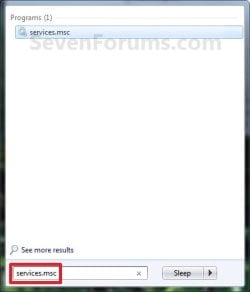
2. Open the Start Menu, type services.msc in the search box, press Enter, and go to step 3 below. (See screenshot below)Start_Menu.jpg

3. If prompted by UAC, then click on Yes.

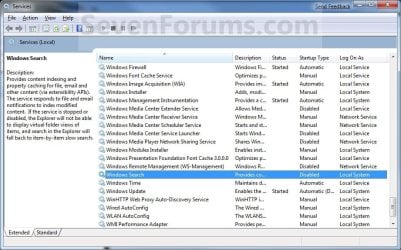
4. Right click on the service you want to disable or start and click on Properties. (See screenshot below)Services.jpg

5. To Disable a Service
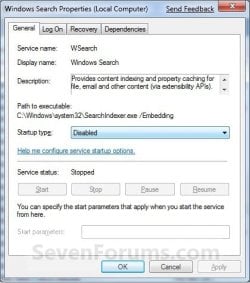
NOTE: See the guide in the TIP box at the top of the tutorial to help decide.A) Click on the Stop button and wait a sec for the service to stop. (See screenshots below step 7)

B) Next to Startup type, click on the drop down menu and select Disable. (See screenshots below step 7)

C) Click on the Apply button. (See screenshots below step 7)
NOTE: If the service will not stop and gives a error, then you will need to restart the computer to stop it after you set it to Disabled and clicked on OK.

D) Go to step 7.

6. To Start a Service
NOTE: See the guide in the TIP box at the top of the tutorial to help decide.A) Next to Startup type, click on the drop down menu and select Automatic or Manual and click Apply. (See screenshots below step 7)

B) Click on the Start button. (See screenshots below step 7)
NOTE: If the Start option is grayed out and will not start, then you will need to restart the computer to start it after you set it to Automatic and clicked OK.

7. Click on OK. (See screenshots below)Properties-1.jpgProperties-2.jpg

8. Close the Services window.
NOTE: You may need to restart the computer for the changes to the services to take affect.


OPTION TWO

To Start and Stop Services using "net" Commands

1. Open an elevated command prompt, and do step 2 or 3 below for what you would like to do.

2. To Stop a Service using "Net Stop" Command in Command Prompt

A) In the elevated command prompt, type the command below, press Enter, and go to step 4 below.
NOTE: The Display name of a service is the name displayed in the Services snap-in window, and in the service's properties.

net stop "service name"

OR

net stop "display name of service"
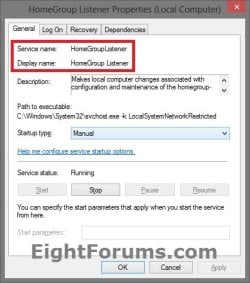

Name.jpg


For example:
If I wanted to stop the HomeGroup Listener (display name) or HomeGroupListener (service name) service, I would type either command below exactly in the command prompt, and press Enter.

net stop "HomeGroup Listener"

OR

net stop "HomeGroupListener"
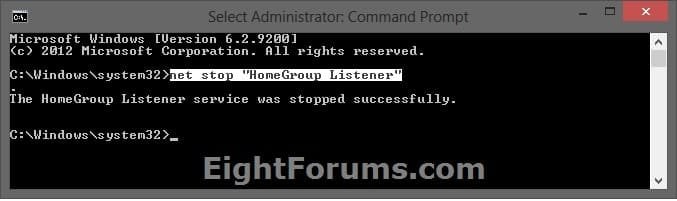

CMD_Stop.jpg


3. To Start a Service using "Net Start" Command in Command PromptA) In the elevated command prompt, type the command below, press Enter, and go to step 4 below.
NOTE: The Display name of a service is the name displayed in the Services snap-in window, and in the service's properties.

net start "service name"

OR

net start "display name of service"


For example:
If I wanted to start the HomeGroup Listener (display name) or HomeGroupListener (service name) service, I would type either command below exactly in the command prompt, and press Enter.

net start "HomeGroup Listener"

OR


net start "HomeGroupListener"
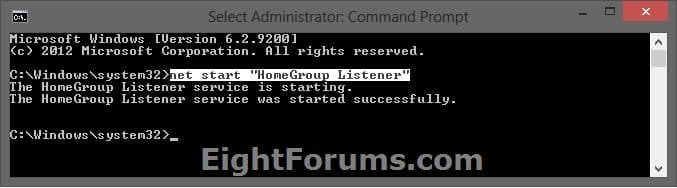

CMD_Start.jpg


4. When finished, you can close the elevated command prompt.


OPTION THREE

To Start, Stop, and Disable Services using "Sc" Commands

1. Open an elevated command prompt, and do step 2, 3, or 4 below for what you would like to do.

2. To Stop a Service using "Sc Stop" Command in Command Prompt

A) In the elevated command prompt, type the command below, press Enter, and go to step 5 below.
NOTE: The Service name of a service is displayed in the service's properties.

sc stop "service name"


Name.jpg


For example:
If I wanted to stop the HomeGroup Listener service, I would type the command below using the HomeGroupListener (service name) exactly in the command prompt, and press Enter.


sc stop "HomeGroupListener"
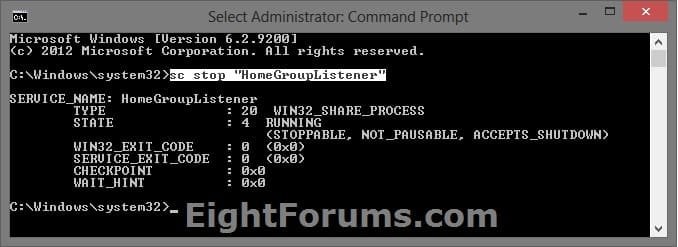

SC_Stop.jpg


3. To Disable a Service using "Sc Config" Command in Command Prompt

A) Do step 2 above to stop the service.

B) In the elevated command prompt, type the command below, press Enter, and go to step 5 below.
NOTE: The Service name of a service is displayed in the service's properties.

sc config "service name" start=disabled


For example:
If I wanted to disable the HomeGroup Listener service, I would type the command below using the HomeGroupListener (service name) exactly in the command prompt, and press Enter.


sc config "HomeGroupListener" start=disabled


SC_Disabled.jpg


4. To Start/Enable a Service using "Sc Start" & "Sc Config" Commands

A) If the Startup type of the service is set to Disabled, then in the elevated command prompt, type the command below using the startup type you want to set instead, and press Enter.
NOTE: The Service name of a service is displayed in the service's properties.

sc config "service name" start=demand

or

sc config "service name" start=auto

or

sc config "service name" start=delayed-auto


   Note
"Startup Type" for Service

  • Manual (demand) - Manual mode allows Windows to start a service when needed. However, very few services will start up when required in Manual mode. If you find you need a service, place it into Automatic.
  • Automatic (auto) - With a service in this state, it will start at boot time. Some services, when no longer required, will also automatically stop when not needed. If you find you do not need a service, place it into Manual or Disabled.
  • Automatic (Delayed Start) (delayed-auto) - With a service in this state, it will start just after boot time. Some services, when no longer required, will also automatically stop when not needed. If you find you do not need a service, place it into Manual or Disabled.


For example:
If I wanted to set the startup type for the HomeGroup Listener service to Manual, I would type the command below using the HomeGroupListener (service name) exactly in the command prompt, and press Enter.


sc config "HomeGroupListener" start=demand


SC_Config.jpg


B) In the elevated command prompt, type the command below using the same service name from step 4A above, press Enter, and go to step 5 below.

sc stop "service name"


For example:
If I wanted to start the HomeGroup Listener service, I would type the command below using the HomeGroupListener (service name) exactly in the command prompt, and press Enter.


sc start "HomeGroupListener"
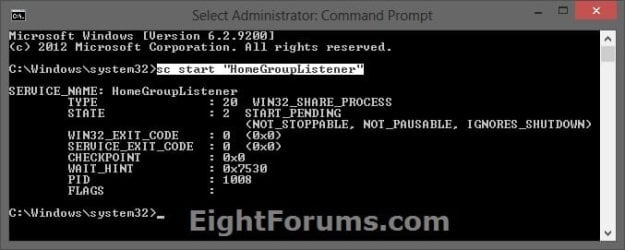

SC_Start.jpg


5. When finished, you can close the elevated command prompt.


OPTION FOUR

To Start, Stop, and Disable Services in Registry Editor

1. First, open services.msc and double click/tap on the service to see what the "Service name" is for the service. This will be the name of the registry key for the service in step 4 below.Name.jpg

2. Press the Windows + R keys to open the Run dialog, type regedit, and press Enter.

3. If prompted by UAC, then click/tap on Yes.

4. In Registry Editor, go to the location below: (see screenshot below)
NOTE: Substitute Service name in the location below with the actual service name from step 1 above.HKEY_LOCAL_MACHINE\SYSTEM\CurrentControlSet\Services\Service name


For example: The "Service name" for the HomeGroup Listener service is HomeGroupListener, so I would go to this location in the registry.

HKEY_LOCAL_MACHINE\SYSTEM\CurrentControlSet\Services\HomeGroupListener
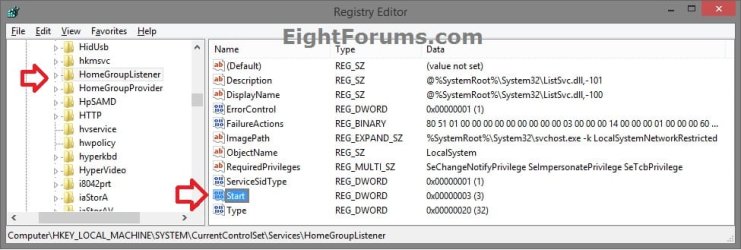

Services_Registry-1.jpg

5. In the left pane of the Service name (ex: HomeGroupListener), double click on the Start DWORD to modify it. (see screenshot below)

6. Type in a data value from the table below for what you would like to do, then click/tap on OK. (see screenshot below)Services_Registry-2.jpg

Startup TypeDWORD "Data" Value
Automatic (Delayed Start)DelayedAutostart = 1
Start = 2
AutomaticDelayedAutostart = 0
Start = 2
ManualDelayedAutostart = 0
Start = 3
DisabledDelayedAutostart = 0
Start = 4


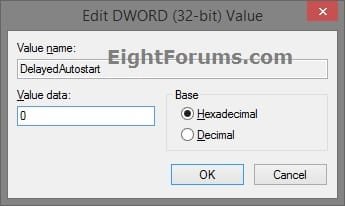
7. If needed, double click on the DelayedAutostart DWORD to modify it's data value (0 or 1) to what's in the table above for what you want set, and click/tap on OK. (see screenshot below)
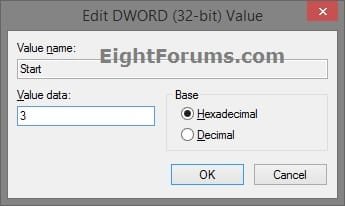
NOTE: If the DelatedAutostart DWORD is not there, then you can right click on an empty area in the right pane, click on New and DWORD (32-bit) Value, type DelatedAutostart, and press Enter to add it. If DelatedAutostart is not there, then it will be the same as it being set to 0 (zero).Services_Registry-3.jpg

8. When finished, close Registry Editor, and restart PC to apply.


That's it,
Shawn Brink


Last edited:
Sorry Brink but this is a brand new machine which I built and installed the OS from scratch. The issue has been there since the get go and even if I login as the admin, still persist. The OS DVD came from Windows which is call Backup Disc Windows 7 which includes Windows anytime upgrade. I would imagine it's the whole OS, right?

It sounds like you may have a bad installation or copy of Windows 7 if it's like that right after a clean install. Where did you get your Windows 7 installation disc from?
 
Last edited:

My Computer

Computer type
PC/Desktop
Computer Manufacturer/Model Number
Self built custom
OS
64-bit Windows 11 Pro for Workstations
CPU
Intel i7-8700K OC'd to 5 GHz
Motherboard
ASUS ROG Maximus XI Formula Z390
Memory
64 GB (4x16GB) G.SKILL TridentZ RGB DDR4 3600 MHz
Graphics Card(s)
ASUS ROG-STRIX-GTX1080TI-O11G-GAMING
Sound Card
Integrated
Monitor(s) Displays
2 x Samsung Odyssey G7 27"
Screen Resolution
2560x1440
Hard Drives
1TB Samsung 990 PRO M.2,
4TB Samsung 990 PRO PRO M.2,
TerraMaster F8 SSD Plus NAS
PSU
Seasonic Prime Titanium 850W
Case
Thermaltake Core P3
Cooling
Corsair Hydro H115i
Keyboard
Logitech wireless K800
Mouse
Logitech MX Master 4
Internet Speed
2 Gb/s Download and 100 Mb/s Upload
Antivirus
Malwarebyte Anti-Malware Premium
Browser
Google Chrome
Other Info
Logitech Z625 speaker system,
Logitech BRIO 4K Pro webcam,
HP Color LaserJet Pro MFP M477fdn,
APC SMART-UPS RT 1000 XL - SURT1000XLI,
Galaxy S23 Plus phone
Got it from Microsoft, I downloaded the upgrade then requested them to send me a hard copy which they did. Wonder if I could ask them to send me another one without having to pay for it?
 

My Computer

OS
Ultimate x64
CPU
AMD A8-3850
Motherboard
ASUS F1A75
Memory
16 Gig DDR3
Graphics Card(s)
Internal Radeon Graphics HD
Monitor(s) Displays
LG 22"
Hard Drives
Samsung SSD 256
Samsung 1T SATA
Case
ThermalTake
You might do a clean install of Windows 7 again to see if it may just be a bad install.
 

My Computer

Computer type
PC/Desktop
Computer Manufacturer/Model Number
Self built custom
OS
64-bit Windows 11 Pro for Workstations
CPU
Intel i7-8700K OC'd to 5 GHz
Motherboard
ASUS ROG Maximus XI Formula Z390
Memory
64 GB (4x16GB) G.SKILL TridentZ RGB DDR4 3600 MHz
Graphics Card(s)
ASUS ROG-STRIX-GTX1080TI-O11G-GAMING
Sound Card
Integrated
Monitor(s) Displays
2 x Samsung Odyssey G7 27"
Screen Resolution
2560x1440
Hard Drives
1TB Samsung 990 PRO M.2,
4TB Samsung 990 PRO PRO M.2,
TerraMaster F8 SSD Plus NAS
PSU
Seasonic Prime Titanium 850W
Case
Thermaltake Core P3
Cooling
Corsair Hydro H115i
Keyboard
Logitech wireless K800
Mouse
Logitech MX Master 4
Internet Speed
2 Gb/s Download and 100 Mb/s Upload
Antivirus
Malwarebyte Anti-Malware Premium
Browser
Google Chrome
Other Info
Logitech Z625 speaker system,
Logitech BRIO 4K Pro webcam,
HP Color LaserJet Pro MFP M477fdn,
APC SMART-UPS RT 1000 XL - SURT1000XLI,
Galaxy S23 Plus phone
LOL! Tried that at least times. Think that I'll call Microsoft and see what they have to say, hopefully good news.

Thanks for the help
 

My Computer

OS
Ultimate x64
CPU
AMD A8-3850
Motherboard
ASUS F1A75
Memory
16 Gig DDR3
Graphics Card(s)
Internal Radeon Graphics HD
Monitor(s) Displays
LG 22"
Hard Drives
Samsung SSD 256
Samsung 1T SATA
Case
ThermalTake
Great info,thanks Happy Holidays
 

My Computer

Computer type
PC/Desktop
Computer Manufacturer/Model Number
custom build
OS
win7 Ultimate 64
CPU
icore5
Motherboard
Gigabyte P67
Memory
4 Gig
Graphics Card(s)
ATI Radeon HD5700
Sound Card
envy24
Monitor(s) Displays
Samsung SyncMaster T22HD/HP F1905
Screen Resolution
1680x1050
Hard Drives
Samsung
WDC
PSU
650
Case
GMC
Cooling
corsair
Keyboard
Dell
Mouse
MS3000
Internet Speed
slow
Antivirus
Microsoft
Browser
IE
You're welcome DJ, and I hope that you have a happy holidays as well. :)
 

My Computer

Computer type
PC/Desktop
Computer Manufacturer/Model Number
Self built custom
OS
64-bit Windows 11 Pro for Workstations
CPU
Intel i7-8700K OC'd to 5 GHz
Motherboard
ASUS ROG Maximus XI Formula Z390
Memory
64 GB (4x16GB) G.SKILL TridentZ RGB DDR4 3600 MHz
Graphics Card(s)
ASUS ROG-STRIX-GTX1080TI-O11G-GAMING
Sound Card
Integrated
Monitor(s) Displays
2 x Samsung Odyssey G7 27"
Screen Resolution
2560x1440
Hard Drives
1TB Samsung 990 PRO M.2,
4TB Samsung 990 PRO PRO M.2,
TerraMaster F8 SSD Plus NAS
PSU
Seasonic Prime Titanium 850W
Case
Thermaltake Core P3
Cooling
Corsair Hydro H115i
Keyboard
Logitech wireless K800
Mouse
Logitech MX Master 4
Internet Speed
2 Gb/s Download and 100 Mb/s Upload
Antivirus
Malwarebyte Anti-Malware Premium
Browser
Google Chrome
Other Info
Logitech Z625 speaker system,
Logitech BRIO 4K Pro webcam,
HP Color LaserJet Pro MFP M477fdn,
APC SMART-UPS RT 1000 XL - SURT1000XLI,
Galaxy S23 Plus phone
Great thread although it would have been handy if there was a list of what certain services do/main ones to disable. Thanks! :)
 

My Computer

Computer type
PC/Desktop
Computer Manufacturer/Model Number
HP
OS
Windows 7 Ultimate
CPU
DualCore Intel Pentium D 930, 3000 MHz (15 x 200)
Motherboard
Asus P5LP-LE (Emery)
Memory
3x512mb 1x1GB
Graphics Card(s)
NVIDIA GeForce 7800 GTX
Sound Card
Realtek ALC882/D/M @ Intel 82801GB ICH7
Monitor(s) Displays
Iiyama ProLite E2407HDS
Screen Resolution
1920 x 1080 70 Hz
Hard Drives
1TB WD10EARS-00Y5B1 ATA Device
Keyboard
Hewlett Packard Wireless Ergo
Mouse
Logitech USB Wheel Mouse
Internet Speed
20mbps Download - 2mbps Upload
Antivirus
Windows Defender - Malwarebytes Anti Malware
Browser
Google Chrome
Hello James,

The link in the yellow TIP box at the top of the tutorial will have all that and more for you. ;)
 

My Computer

Computer type
PC/Desktop
Computer Manufacturer/Model Number
Self built custom
OS
64-bit Windows 11 Pro for Workstations
CPU
Intel i7-8700K OC'd to 5 GHz
Motherboard
ASUS ROG Maximus XI Formula Z390
Memory
64 GB (4x16GB) G.SKILL TridentZ RGB DDR4 3600 MHz
Graphics Card(s)
ASUS ROG-STRIX-GTX1080TI-O11G-GAMING
Sound Card
Integrated
Monitor(s) Displays
2 x Samsung Odyssey G7 27"
Screen Resolution
2560x1440
Hard Drives
1TB Samsung 990 PRO M.2,
4TB Samsung 990 PRO PRO M.2,
TerraMaster F8 SSD Plus NAS
PSU
Seasonic Prime Titanium 850W
Case
Thermaltake Core P3
Cooling
Corsair Hydro H115i
Keyboard
Logitech wireless K800
Mouse
Logitech MX Master 4
Internet Speed
2 Gb/s Download and 100 Mb/s Upload
Antivirus
Malwarebyte Anti-Malware Premium
Browser
Google Chrome
Other Info
Logitech Z625 speaker system,
Logitech BRIO 4K Pro webcam,
HP Color LaserJet Pro MFP M477fdn,
APC SMART-UPS RT 1000 XL - SURT1000XLI,
Galaxy S23 Plus phone
the 'Tip' box in the first post offers a link to blackviper's site, where you can find a list of services which can be disabled (or better, set to manual).

it's difficult to recommend exactly which services you need to alter, as we all have different hardware and software on our machines, as well as different flavours of windows 7 - a service which i consider essential may not even exist on your system, for example.

common wisdom suggests that it's better if you don't tamper with the default settings, unless you're having difficulties with a particular service that you know you don't need (and never will).

*edit* Brink got there first.
 

My Computer

Computer Manufacturer/Model Number
mickey megabyte 1234
OS
ultimate 64 sp1
CPU
i5 2500K [email protected]
Motherboard
MSI P67A-GD53
Memory
8 gigs GSkill Ripjaws 1600
Graphics Card(s)
amd hd6950
Sound Card
creative x-fi gamer
Monitor(s) Displays
samsung 24"
Screen Resolution
1920x1080
Hard Drives
ocz vertex 2e 60 gig, samsung f3 1tb, buffalo 2tb ext
PSU
antec 550
Case
antec three hundred
Cooling
i'm a cooling fan
Keyboard
saitek eclipse ii
Mouse
logitech g3
Internet Speed
about 4 Mbps
Other Info
i love win7
Hello James,

The link in the yellow TIP box at the top of the tutorial will have all that and more for you. ;)

the 'Tip' box in the first post offers a link to blackviper's site, where you can find a list of services which can be disabled (or better, set to manual).

it's difficult to recommend exactly which services you need to alter, as we all have different hardware and software on our machines - a service which i consider essential may not even exist on your system, for example.

common wisdom suggests that it's better if you don't tamper with the default settings, unless you're having difficulties with a particular service that you know you don't need (and never will).

*edit* Brink got there first.

Thank you both for your replies, I can't believe I missed that :sleepy:
 

My Computer

Computer type
PC/Desktop
Computer Manufacturer/Model Number
HP
OS
Windows 7 Ultimate
CPU
DualCore Intel Pentium D 930, 3000 MHz (15 x 200)
Motherboard
Asus P5LP-LE (Emery)
Memory
3x512mb 1x1GB
Graphics Card(s)
NVIDIA GeForce 7800 GTX
Sound Card
Realtek ALC882/D/M @ Intel 82801GB ICH7
Monitor(s) Displays
Iiyama ProLite E2407HDS
Screen Resolution
1920 x 1080 70 Hz
Hard Drives
1TB WD10EARS-00Y5B1 ATA Device
Keyboard
Hewlett Packard Wireless Ergo
Mouse
Logitech USB Wheel Mouse
Internet Speed
20mbps Download - 2mbps Upload
Antivirus
Windows Defender - Malwarebytes Anti Malware
Browser
Google Chrome
Hello James,

The link in the yellow TIP box at the top of the tutorial will have all that and more for you. ;)

the 'Tip' box in the first post offers a link to blackviper's site, where you can find a list of services which can be disabled (or better, set to manual).

it's difficult to recommend exactly which services you need to alter, as we all have different hardware and software on our machines - a service which i consider essential may not even exist on your system, for example.

common wisdom suggests that it's better if you don't tamper with the default settings, unless you're having difficulties with a particular service that you know you don't need (and never will).

*edit* Brink got there first.

Thank you both for your replies, I can't believe I missed that :sleepy:


No problem. I'm glad that we could help. :)
 
Last edited:

My Computer

Computer type
PC/Desktop
Computer Manufacturer/Model Number
Self built custom
OS
64-bit Windows 11 Pro for Workstations
CPU
Intel i7-8700K OC'd to 5 GHz
Motherboard
ASUS ROG Maximus XI Formula Z390
Memory
64 GB (4x16GB) G.SKILL TridentZ RGB DDR4 3600 MHz
Graphics Card(s)
ASUS ROG-STRIX-GTX1080TI-O11G-GAMING
Sound Card
Integrated
Monitor(s) Displays
2 x Samsung Odyssey G7 27"
Screen Resolution
2560x1440
Hard Drives
1TB Samsung 990 PRO M.2,
4TB Samsung 990 PRO PRO M.2,
TerraMaster F8 SSD Plus NAS
PSU
Seasonic Prime Titanium 850W
Case
Thermaltake Core P3
Cooling
Corsair Hydro H115i
Keyboard
Logitech wireless K800
Mouse
Logitech MX Master 4
Internet Speed
2 Gb/s Download and 100 Mb/s Upload
Antivirus
Malwarebyte Anti-Malware Premium
Browser
Google Chrome
Other Info
Logitech Z625 speaker system,
Logitech BRIO 4K Pro webcam,
HP Color LaserJet Pro MFP M477fdn,
APC SMART-UPS RT 1000 XL - SURT1000XLI,
Galaxy S23 Plus phone
Hi Brink,

Have you tried the settings of Black Viper? I want my computer to boot fast, which of the three will do that? Thanks!
 

My Computer

OS
Windows 7 Home Premium x64
Hello Jan,

I find that before playing with services it requires you to have a deep understanding of what the service is for, what it affects, and what your needs are. If you don't fully understand all of this, then playing with services can really mess up your Windows installation, and possibly your day.

You might take a look at this instead to see it may help with your overall performance. I would only recommend to do what you are comfortable with and have knowledge about.

http://www.sevenforums.com/tutorials/11728-optimize-windows-7-a.html

Hope this helps. :)
 

My Computer

Computer type
PC/Desktop
Computer Manufacturer/Model Number
Self built custom
OS
64-bit Windows 11 Pro for Workstations
CPU
Intel i7-8700K OC'd to 5 GHz
Motherboard
ASUS ROG Maximus XI Formula Z390
Memory
64 GB (4x16GB) G.SKILL TridentZ RGB DDR4 3600 MHz
Graphics Card(s)
ASUS ROG-STRIX-GTX1080TI-O11G-GAMING
Sound Card
Integrated
Monitor(s) Displays
2 x Samsung Odyssey G7 27"
Screen Resolution
2560x1440
Hard Drives
1TB Samsung 990 PRO M.2,
4TB Samsung 990 PRO PRO M.2,
TerraMaster F8 SSD Plus NAS
PSU
Seasonic Prime Titanium 850W
Case
Thermaltake Core P3
Cooling
Corsair Hydro H115i
Keyboard
Logitech wireless K800
Mouse
Logitech MX Master 4
Internet Speed
2 Gb/s Download and 100 Mb/s Upload
Antivirus
Malwarebyte Anti-Malware Premium
Browser
Google Chrome
Other Info
Logitech Z625 speaker system,
Logitech BRIO 4K Pro webcam,
HP Color LaserJet Pro MFP M477fdn,
APC SMART-UPS RT 1000 XL - SURT1000XLI,
Galaxy S23 Plus phone
Hello Jan,

I find that before playing with services it requires you to have a deep understanding of what the service is for, what it affects, and what your needs are. If you don't fully understand all of this, then playing with services can really mess up your Windows installation, and possibly your day.

You might take a look at this instead to see it may help with your overall performance. I would only recommend to do what you are comfortable with and have knowledge about.

http://www.sevenforums.com/tutorials/11728-optimize-windows-7-a.html

Hope this helps. :)

Nice, thanks for the link that is exactly what i'm looking for. Thank you very much.
 

My Computer

OS
Windows 7 Home Premium x64
You're most welcome. Please let us know how it went. :)
 

My Computer

Computer type
PC/Desktop
Computer Manufacturer/Model Number
Self built custom
OS
64-bit Windows 11 Pro for Workstations
CPU
Intel i7-8700K OC'd to 5 GHz
Motherboard
ASUS ROG Maximus XI Formula Z390
Memory
64 GB (4x16GB) G.SKILL TridentZ RGB DDR4 3600 MHz
Graphics Card(s)
ASUS ROG-STRIX-GTX1080TI-O11G-GAMING
Sound Card
Integrated
Monitor(s) Displays
2 x Samsung Odyssey G7 27"
Screen Resolution
2560x1440
Hard Drives
1TB Samsung 990 PRO M.2,
4TB Samsung 990 PRO PRO M.2,
TerraMaster F8 SSD Plus NAS
PSU
Seasonic Prime Titanium 850W
Case
Thermaltake Core P3
Cooling
Corsair Hydro H115i
Keyboard
Logitech wireless K800
Mouse
Logitech MX Master 4
Internet Speed
2 Gb/s Download and 100 Mb/s Upload
Antivirus
Malwarebyte Anti-Malware Premium
Browser
Google Chrome
Other Info
Logitech Z625 speaker system,
Logitech BRIO 4K Pro webcam,
HP Color LaserJet Pro MFP M477fdn,
APC SMART-UPS RT 1000 XL - SURT1000XLI,
Galaxy S23 Plus phone
I got so many entries in "Services" and often I've no idea which one is safe to eliminate.
For example I can see "Remote Registry" is stopped, I guess I won't ever need it but there are many more that I have no idea so is there a list/software somewhere that tells more information?
 

My Computer

Computer type
PC/Desktop
Computer Manufacturer/Model Number
Custom build
OS
Windows 7 Ultimate x64
CPU
Intel i5-6600K 3.50GHz
Motherboard
Asus Pro Z170 Gaming
Memory
Corsair DDR4 2x8GB
Graphics Card(s)
MSI GeForce GTX1070 Gaming X
Sound Card
On board Realtek
Monitor(s) Displays
Dell SP2309W
Screen Resolution
1920x1080
Hard Drives
OS Samsung 850 EVO 500GB SATA III SSD
2x Hitachi Deskstar 1GB SATA data drives
1x Western Digital Caviar Black 1TB SATA data drive
PSU
Corsair HX650W
Case
CoolerMaster CM 690 III
Cooling
Coolermaster Hyper 212 EVO 1x200mm 1x140mm 2x120mm case fan
Keyboard
Logitech usb keyboard
Mouse
Logitech G500 $27 bargain :)
Internet Speed
ADSL2
Antivirus
Microsoft Security Essential, MalwareBytes
Browser
SRWare Iron, Internet Explorer
Other Info
Very happy with this buid.
I struggled a lot to find all compatible parts since I wanted an Intel 1151 based motherboard so to be able to install Windows 7.
I chose this case because it has amazing air flow, it's sturdy and looks good.
The case included 1x 200mm front and 1x 120mm back fans, I added 1x 200mm on the top and 1x120 bottom fans and modded the panels with black stockings for women s
Hello looked,

The yellow tip box at the top of a tutorial has a list that will help with services.

However, you should not mess with services if you do not know what they are for. Doing so could leave Windows crippled.
 

My Computer

Computer type
PC/Desktop
Computer Manufacturer/Model Number
Self built custom
OS
64-bit Windows 11 Pro for Workstations
CPU
Intel i7-8700K OC'd to 5 GHz
Motherboard
ASUS ROG Maximus XI Formula Z390
Memory
64 GB (4x16GB) G.SKILL TridentZ RGB DDR4 3600 MHz
Graphics Card(s)
ASUS ROG-STRIX-GTX1080TI-O11G-GAMING
Sound Card
Integrated
Monitor(s) Displays
2 x Samsung Odyssey G7 27"
Screen Resolution
2560x1440
Hard Drives
1TB Samsung 990 PRO M.2,
4TB Samsung 990 PRO PRO M.2,
TerraMaster F8 SSD Plus NAS
PSU
Seasonic Prime Titanium 850W
Case
Thermaltake Core P3
Cooling
Corsair Hydro H115i
Keyboard
Logitech wireless K800
Mouse
Logitech MX Master 4
Internet Speed
2 Gb/s Download and 100 Mb/s Upload
Antivirus
Malwarebyte Anti-Malware Premium
Browser
Google Chrome
Other Info
Logitech Z625 speaker system,
Logitech BRIO 4K Pro webcam,
HP Color LaserJet Pro MFP M477fdn,
APC SMART-UPS RT 1000 XL - SURT1000XLI,
Galaxy S23 Plus phone
Hello looked,

The yellow tip box at the top of a tutorial has a list that will help with services.

However, you should not mess with services if you do not know what they are for. Doing so could leave Windows crippled.
Thanks very much, I skipped reading everything because I was a bit late.
That web page with all services is fantastic!
I guess that I'll need to do a web research for any services not listed there.
Also I read somewhere that it's better to stop a service within "Services" rather than from Msconfig.
In fact in Msconfig startup I can see 2 double entries: Quicktime x2 and Realplayer x2.
How can I delete an entry from the list?
 

My Computer

Computer type
PC/Desktop
Computer Manufacturer/Model Number
Custom build
OS
Windows 7 Ultimate x64
CPU
Intel i5-6600K 3.50GHz
Motherboard
Asus Pro Z170 Gaming
Memory
Corsair DDR4 2x8GB
Graphics Card(s)
MSI GeForce GTX1070 Gaming X
Sound Card
On board Realtek
Monitor(s) Displays
Dell SP2309W
Screen Resolution
1920x1080
Hard Drives
OS Samsung 850 EVO 500GB SATA III SSD
2x Hitachi Deskstar 1GB SATA data drives
1x Western Digital Caviar Black 1TB SATA data drive
PSU
Corsair HX650W
Case
CoolerMaster CM 690 III
Cooling
Coolermaster Hyper 212 EVO 1x200mm 1x140mm 2x120mm case fan
Keyboard
Logitech usb keyboard
Mouse
Logitech G500 $27 bargain :)
Internet Speed
ADSL2
Antivirus
Microsoft Security Essential, MalwareBytes
Browser
SRWare Iron, Internet Explorer
Other Info
Very happy with this buid.
I struggled a lot to find all compatible parts since I wanted an Intel 1151 based motherboard so to be able to install Windows 7.
I chose this case because it has amazing air flow, it's sturdy and looks good.
The case included 1x 200mm front and 1x 120mm back fans, I added 1x 200mm on the top and 1x120 bottom fans and modded the panels with black stockings for women s

My Computer

Computer type
PC/Desktop
Computer Manufacturer/Model Number
Self built custom
OS
64-bit Windows 11 Pro for Workstations
CPU
Intel i7-8700K OC'd to 5 GHz
Motherboard
ASUS ROG Maximus XI Formula Z390
Memory
64 GB (4x16GB) G.SKILL TridentZ RGB DDR4 3600 MHz
Graphics Card(s)
ASUS ROG-STRIX-GTX1080TI-O11G-GAMING
Sound Card
Integrated
Monitor(s) Displays
2 x Samsung Odyssey G7 27"
Screen Resolution
2560x1440
Hard Drives
1TB Samsung 990 PRO M.2,
4TB Samsung 990 PRO PRO M.2,
TerraMaster F8 SSD Plus NAS
PSU
Seasonic Prime Titanium 850W
Case
Thermaltake Core P3
Cooling
Corsair Hydro H115i
Keyboard
Logitech wireless K800
Mouse
Logitech MX Master 4
Internet Speed
2 Gb/s Download and 100 Mb/s Upload
Antivirus
Malwarebyte Anti-Malware Premium
Browser
Google Chrome
Other Info
Logitech Z625 speaker system,
Logitech BRIO 4K Pro webcam,
HP Color LaserJet Pro MFP M477fdn,
APC SMART-UPS RT 1000 XL - SURT1000XLI,
Galaxy S23 Plus phone
Hello looked,
However, you should not mess with services if you do not know what they are for. Doing so could leave Windows crippled.
That's the problem because services have strange names and even if you search on internet you won't find any useful information about them.
 

My Computer

Computer type
PC/Desktop
Computer Manufacturer/Model Number
Custom build
OS
Windows 7 Ultimate x64
CPU
Intel i5-6600K 3.50GHz
Motherboard
Asus Pro Z170 Gaming
Memory
Corsair DDR4 2x8GB
Graphics Card(s)
MSI GeForce GTX1070 Gaming X
Sound Card
On board Realtek
Monitor(s) Displays
Dell SP2309W
Screen Resolution
1920x1080
Hard Drives
OS Samsung 850 EVO 500GB SATA III SSD
2x Hitachi Deskstar 1GB SATA data drives
1x Western Digital Caviar Black 1TB SATA data drive
PSU
Corsair HX650W
Case
CoolerMaster CM 690 III
Cooling
Coolermaster Hyper 212 EVO 1x200mm 1x140mm 2x120mm case fan
Keyboard
Logitech usb keyboard
Mouse
Logitech G500 $27 bargain :)
Internet Speed
ADSL2
Antivirus
Microsoft Security Essential, MalwareBytes
Browser
SRWare Iron, Internet Explorer
Other Info
Very happy with this buid.
I struggled a lot to find all compatible parts since I wanted an Intel 1151 based motherboard so to be able to install Windows 7.
I chose this case because it has amazing air flow, it's sturdy and looks good.
The case included 1x 200mm front and 1x 120mm back fans, I added 1x 200mm on the top and 1x120 bottom fans and modded the panels with black stockings for women s
Back
Top