Set boot order

PussEKatt

New member
Member
Local time
4:22 AM
Messages
99
I have Windows 7 and an Asus motherboard.How do I set the boot order on this mobo ? I have tried Deleat F2 and F8 but none of them let me select the CD/DVD/USB for startup.
Hope someone can help.
 

My Computer

OS
Windows home premium 64 bit
CPU
AMD Athlon II Dual Core 2.3Ghz
Memory
2048 MB DDR SD RAM
Graphics Card(s)
AMD M88OG with ATI Mobility Radeon HD 4250
Hard Drives
500 Gb
have you tried esc ?
 

My Computers

System One System Two

  • Computer type
    PC/Desktop
    OS
    7 X64
    CPU
    i5 8400
    Motherboard
    gigabyte b365m ds3h
    Memory
    2x8gb 3200mhz
    Hard Drives
    various
    PSU
    pure power 11 400w cm
    Case
    Coolermaster
    Cooling
    cryorig m9i
  • Computer type
    PC/Desktop
    OS
    7x64
    CPU
    g5400
    Motherboard
    ga b365m ds3h
    Memory
    8gb ddr4 2400
    PSU
    xfx pro 450w
You need to find the bios key normaly F2 or F9 for asus then enter the bios to set boot order
 

My Computer

Computer type
PC/Desktop
OS
win 8 32 bit
@S1W2 I tried escape and I got a menu saying something like."insert your instilation Cd,use the arrow keys to select option and restart the PC " All this is good,except the option to boot from the CD/DVD drive is not there.
Thank you for your help,anything else I could try ?

- - - Updated - - -

@ Samurai
I know which keys to use to get into the BIOS,they are Deleat/F2.They both take me to the BIOS,then I select "Boot" then "Advanced" then I am supposed to select the boot order,but there is no boot order there.Thank you for your reply though.
 

My Computer

OS
Windows home premium 64 bit
CPU
AMD Athlon II Dual Core 2.3Ghz
Memory
2048 MB DDR SD RAM
Graphics Card(s)
AMD M88OG with ATI Mobility Radeon HD 4250
Hard Drives
500 Gb
Did you try the keys I gave you if you have fast boot set you have to be very quick to get it
 

My Computer

Computer type
PC/Desktop
OS
win 8 32 bit
Hi

until you fix your malware issue thread at bleeping i wouldn't bother about this
 

My Computer

Computer type
PC/Desktop
Computer Manufacturer/Model Number
medionl/Aspire 6930G/acer x55a
OS
W7 home premium 32bit/W7HP 64bit/w10 tp insider ring
CPU
E5300 dual core
Motherboard
medion MS7366
Memory
3gb
Graphics Card(s)
Nvidia Geforce 7100 Nforce 630i
Monitor(s) Displays
avixc
Internet Speed
n (isp resticted to 72)
Antivirus
mse/pands
Browser
palemoon
Other Info
Belkin Fd7050 n USB using Railink RT2870 drivers, more upto date
@ torchwood, If you read my posts and the answers I have recieved you will see that the person helping me is telling me to "boot from the CD/DVD drive".....and that is what I am trying to find out,how to do.

- - - Updated - - -
Samurai, I tried Deleat,escape,F2 and F8.I can get into the BIOS with Deleat, then I go to advanced and that takes me to the boot order..... but there is no CD/DVD drive listed.That is why I am thinking there must be a seperate key,that is for booting from CD/DVD drive only.I have fast boot disabled.Thanks for helping.
 

My Computer

OS
Windows home premium 64 bit
CPU
AMD Athlon II Dual Core 2.3Ghz
Memory
2048 MB DDR SD RAM
Graphics Card(s)
AMD M88OG with ATI Mobility Radeon HD 4250
Hard Drives
500 Gb
Is there a bootable dvd in the dvdrom drive?
 

My Computers

System One System Two

  • Computer type
    PC/Desktop
    OS
    7 X64
    CPU
    i5 8400
    Motherboard
    gigabyte b365m ds3h
    Memory
    2x8gb 3200mhz
    Hard Drives
    various
    PSU
    pure power 11 400w cm
    Case
    Coolermaster
    Cooling
    cryorig m9i
  • Computer type
    PC/Desktop
    OS
    7x64
    CPU
    g5400
    Motherboard
    ga b365m ds3h
    Memory
    8gb ddr4 2400
    PSU
    xfx pro 450w
You have not said which ASUS motherboard you have. All we can do is give general answers or one for a specific motherboard we know about.

I have an ASUS M4N82 Deluxe motherboard. Here is how I select the boot drive.

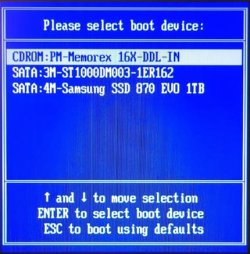
To make a temporary change:
Hit F8 key at bootup.
Select the drive you want to boot from this time only.
Boot1b.jpg

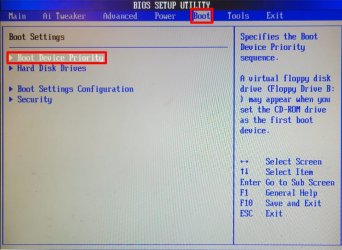
To make a permanent change
Hit ESC key at bootup to get to the BIOS menu.
Select the BOOT tab. The select Boot Device Priority.

Boot2b.jpg

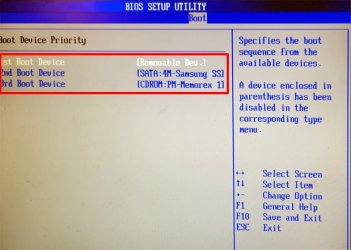
You can use the indicated keys to change the boot order for the devices shown.

Boot3c.jpg
 

My Computers

System One System Two

  • Computer type
    PC/Desktop
    Computer Manufacturer/Model Number
    Custom build
    OS
    Windows 7 Home Premium 64-bits
    CPU
    AMD FX-8350
    Motherboard
    Gigabyte GA-990FXA-UD3 (AM3+)
    Memory
    GSKILL Ripjaw-X PC3 12800 8GB (2x4GB)
    Graphics Card(s)
    ASUS ROG STRIX GTX 1060 6GB
    Sound Card
    Integrated
    Monitor(s) Displays
    Asus VE228H (21.5-in)
    Screen Resolution
    1920x1080 60Hz
    Hard Drives
    SAMSUNG 870 EVO 2.5 Inch SATA SSD (1TB)
    SAMSUNG 870 EVO 2.5 Inch SATA SSD (1TB)
    SAMSUNG 870 EVO 2.5 Inch SATA SSD (1TB)
    PSU
    Corsair RM750x (750 watts)
    Case
    Corsair Carbide Series 200R
    Cooling
    Corsair Hydro Series H60 (CWCH60)
    Keyboard
    Logitech Elite
    Mouse
    Logitech M510 Wireless Mouse
    Internet Speed
    Comcast Gigabit Extra (1200Mbps down / 35Mbps up)
    Antivirus
    Malwarebytes
    Browser
    Firefox, Edge, Chrome
    Other Info
    ASUS DRW-24B1ST DVD-RW (24X) optical drive
    Seagate Expansion Desk (5TB) external SATA/USB HDD
    Comcast XB8 Internet Gateway
  • Computer type
    PC/Desktop
    System Manufacturer/Model Number
    Custom
    OS
    Windows 7 Pro (64-bit)
    CPU
    AMD Phenom II 960T X4
    Motherboard
    ASUS M4N82 Deluxe
    Memory
    Corsair XMS2 DDR2-800 8GB (4x2GB)
    Graphics Card(s)
    ASUS ENGTX560 DCII OC/2DI/1GD5 1GB
    Monitor(s) Displays
    Samsung 930B 19-inch LCD
    Screen Resolution
    1280x1024
    Hard Drives
    Samsung SSD 870 EVO 1000 GB (Windows 10)
    Seagate ST1000DM003 1000 GB (Windows 7)
    PSU
    Antec TruePower (new) TP-650
    Case
    Antec Three Hundred
    Cooling
    AMD stock cooler from FX8350
    Mouse
    Logitech M100
    Internet Speed
    Xfinity Gigabit Extra 1200/35 Mbps
Thanks for your reply.My motherboard is an Asus Prime 250M-Plus.None of those pictures you posted look like the motherboard on my PC but I will see if your information can help me set my boot order.I shouldent be this hard to set boot order on any motherboard.
 

My Computer

OS
Windows home premium 64 bit
CPU
AMD Athlon II Dual Core 2.3Ghz
Memory
2048 MB DDR SD RAM
Graphics Card(s)
AMD M88OG with ATI Mobility Radeon HD 4250
Hard Drives
500 Gb
Thanks for your reply.My motherboard is an Asus Prime 250M-Plus.None of those pictures you posted look like the motherboard on my PC but I will see if your information can help me set my boot order.I shouldent be this hard to set boot order on any motherboard.
Now you know why people had such a hard time answering you question. They didn't know which ASUS motherboard you have.

The answer is in your motherboard manual. You can download that from the ASUS support site.

To enter BIOS Setup at startup:
Press <Delete> or <F2> during the Power-On Self Test (POST). If you do not press <Delete> or <F2>, POST continues with its routines.

To enter BIOS Setup after POST:
Press <Ctrl>+<Alt>+<Del> simultaneously.
Press the reset button on the system chassis.
Press the power button to turn the system off then back on. Do this option only if you failed to enter BIOS Setup using the first two options

The manual doesn't give all the details of what is in the BIOS. I don't have a motherboard like yours. I have an ASUS Prime X370-Pro that I bought in April 2017. It is not an Intel motherboard but an AMD one. However, since it is probably about the age its BIOS setup may be similar.

1. When you first boot your computer hit F8 multiple times to get to the Boot menu. This selection is one time only.

1. 20230731_071840b.jpg

2. When you first boot your computer hit ESC key multiple times to get to the BIOS menu.
The boot order is shown at the lower right. I think you might be able to change it there.
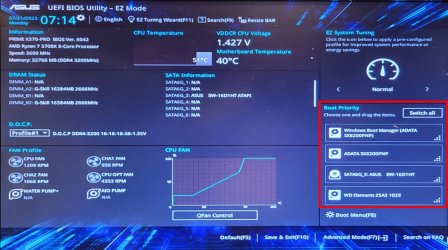
2 20230731_071449c.jpg

3. Below this menu is says you can hit F8 to get to the Boot menu.

3 20230731_071622.jpg

4. This is the same Boot menu shown in Step 1, i.e., changing it is one time only.
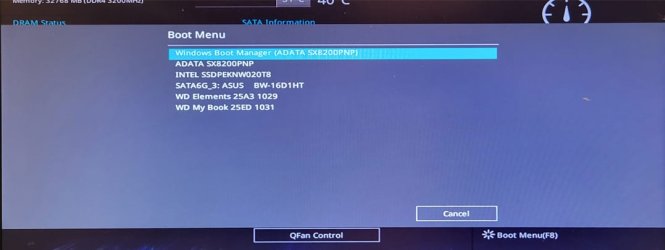
4 20230731_071545b.jpg

5. Hit F7 to get to the Advanced Menu.
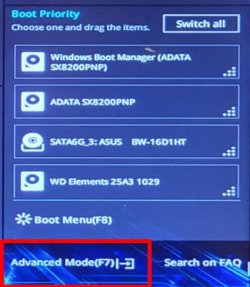
5 20230731_071622d.jpg

6. Select the Boot tab. You can change the boot priority. Be careful because any changes are permanent until you change it again. Note this option is only used when you first set up your computer.
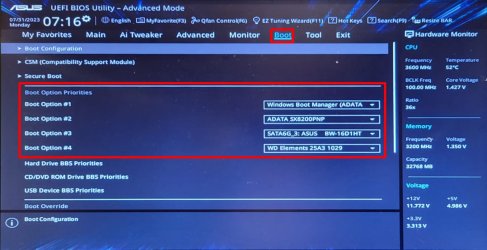

6 20230731_071622c.jpg
 

My Computers

System One System Two

  • Computer type
    PC/Desktop
    Computer Manufacturer/Model Number
    Custom build
    OS
    Windows 7 Home Premium 64-bits
    CPU
    AMD FX-8350
    Motherboard
    Gigabyte GA-990FXA-UD3 (AM3+)
    Memory
    GSKILL Ripjaw-X PC3 12800 8GB (2x4GB)
    Graphics Card(s)
    ASUS ROG STRIX GTX 1060 6GB
    Sound Card
    Integrated
    Monitor(s) Displays
    Asus VE228H (21.5-in)
    Screen Resolution
    1920x1080 60Hz
    Hard Drives
    SAMSUNG 870 EVO 2.5 Inch SATA SSD (1TB)
    SAMSUNG 870 EVO 2.5 Inch SATA SSD (1TB)
    SAMSUNG 870 EVO 2.5 Inch SATA SSD (1TB)
    PSU
    Corsair RM750x (750 watts)
    Case
    Corsair Carbide Series 200R
    Cooling
    Corsair Hydro Series H60 (CWCH60)
    Keyboard
    Logitech Elite
    Mouse
    Logitech M510 Wireless Mouse
    Internet Speed
    Comcast Gigabit Extra (1200Mbps down / 35Mbps up)
    Antivirus
    Malwarebytes
    Browser
    Firefox, Edge, Chrome
    Other Info
    ASUS DRW-24B1ST DVD-RW (24X) optical drive
    Seagate Expansion Desk (5TB) external SATA/USB HDD
    Comcast XB8 Internet Gateway
  • Computer type
    PC/Desktop
    System Manufacturer/Model Number
    Custom
    OS
    Windows 7 Pro (64-bit)
    CPU
    AMD Phenom II 960T X4
    Motherboard
    ASUS M4N82 Deluxe
    Memory
    Corsair XMS2 DDR2-800 8GB (4x2GB)
    Graphics Card(s)
    ASUS ENGTX560 DCII OC/2DI/1GD5 1GB
    Monitor(s) Displays
    Samsung 930B 19-inch LCD
    Screen Resolution
    1280x1024
    Hard Drives
    Samsung SSD 870 EVO 1000 GB (Windows 10)
    Seagate ST1000DM003 1000 GB (Windows 7)
    PSU
    Antec TruePower (new) TP-650
    Case
    Antec Three Hundred
    Cooling
    AMD stock cooler from FX8350
    Mouse
    Logitech M100
    Internet Speed
    Xfinity Gigabit Extra 1200/35 Mbps
Hi, and thank you for your quick and helpful reply.The pictures you have posted above look (almost exactly ) what I see in my BIOS screen.I cant try this until tomorrow,but I will definately try it then and get back to you.It looks very promising,thank you.
 

My Computer

OS
Windows home premium 64 bit
CPU
AMD Athlon II Dual Core 2.3Ghz
Memory
2048 MB DDR SD RAM
Graphics Card(s)
AMD M88OG with ATI Mobility Radeon HD 4250
Hard Drives
500 Gb
Hi again,
What you have posted above seems to work,and I am very pleased with this information.I am having some sort of corrupt sys file trouble and that is why I am not sure.I am bieng helped by a moderator over at bleepingcomputer and I have been trying to get my pc to boot from startup,but once I get one problem solved another crops up.Its acting like a virus but the moderator at BC is sure it is something to do with corrupt sys files,but what you have posted is very much apprecuiated because I have been trying to figure out how to alter the boot order for quite a while now.
Thank you very much.
 

My Computer

OS
Windows home premium 64 bit
CPU
AMD Athlon II Dual Core 2.3Ghz
Memory
2048 MB DDR SD RAM
Graphics Card(s)
AMD M88OG with ATI Mobility Radeon HD 4250
Hard Drives
500 Gb
Back
Top