Solved Sfc scannow error

Kumaranil1918

New member
Member
VIP
Local time
3:55 PM
Messages
153
Location
Cuttack,Orissa
Today i tried sfc /scannow by running cmd prompt in administrator mode but after 15% of scanning it showed some error.I've uploaded the screenshot.Help me..
 

Attachments

  • sfc scannow error.PNG
    sfc scannow error.PNG
    12.5 KB · Views: 273

My Computer

Computer Manufacturer/Model Number
Compaq Presario CQ50-130US
OS
Windows 7 professional 32-bit
CPU
Intel(R) Pentium(R)Dual CPU [email protected] 2.00Ghz
Memory
2.00 GB
Monitor(s) Displays
Generic PnP Monitor
Screen Resolution
1280x800
Internet Speed
Lan
Time for a repair install from the win 7 dvd.
 

My Computer

Computer Manufacturer/Model Number
HP Pavillion dv-7 1005 Tx
OS
Win 8 Release candidate 8400
CPU
[email protected]
Memory
4 gigs
Graphics Card(s)
Nvidia 9600M
Sound Card
HD built-in
Monitor(s) Displays
17" Wxga
Screen Resolution
1440x900
Cooling
none
Internet Speed
45Mb down 5Mb up

My Computer

Computer type
Laptop
Computer Manufacturer/Model Number
Hewlett-Packard/G62-107SA Notebook
OS
Microsoft Windows 7 Home Premium 64-bit Service Pack 1
CPU
Intel(R) Core(TM) i3 CPU M 330 @ 2.13GHz
Motherboard
Hewlett-Packard 1425
Memory
8 GB DDR3
Graphics Card(s)
Intel(R) HD Graphics
Sound Card
Realtek High Definition Audio
Monitor(s) Displays
Builtin
Screen Resolution
1366 x 768 x 32 bits (4294967296 colors) @ 60 Hz
Hard Drives
250 GB SATA Hard Disk Drive 7200 rpm
2TB Seagate GoFlex USB 2 Drive
1TB Iomega Prestige USB 2 Drive
1.5TB Iomega Prestige USB 2 Drive (Samsung)
2TB WD MyBook Live NAS.
Mouse
Logitech Anywhere MX
Internet Speed
152 Mbs download 10 Mbs upload
Antivirus
Norton 360
Browser
Chrome
Today i tried sfc /scannow by running cmd prompt in administrator mode but after 15% of scanning it showed some error.I've uploaded the screenshot.Help me..

Did you log in using the super admin account for Win7? SFC requires a high user level to be able to use SFC and other high level commands.

After trying the super admin approach, if it does not work I suggest restoring the last known good backup image of your system. Otherwise you will have to re-install the OS.

I hope you make backups on an external drive!!! ;)


To Make A Super Admin Account

1) click Start
2) in the search pane type cmd and run
3) type net user Administrator /active:yes
4) restart your computer
5) once the welcome screen loads, the Administrator account will be available for access alongside other user accountsthe first thing you should do is create a password, then go ahead and install all the drivers and programs you want.

To hide the admin account again, just repeat steps 1 thru 4, except on step 3 alter/active:yes to/active:no. once you restart your computer the admin account will not be on the welcome screen.


Jerry G. :geek:
 

My Computer

OS
Windows XP Will Soon be Windows 7
You can run sfc several times with rebooting after each run to see if things get better - i.e. less errors and more % checked.

Usually after the third run if there are still problems reinstallation can be considered.
 

My Computer

Computer Manufacturer/Model Number
Acer Notebook
OS
Win 8 RP, Win 7, XP
CPU
Intel
one question on the repair install , if I have all my user files on a different drive then c , will this screw up the repair install . wondering .. ???
 

My Computer

Computer type
PC/Desktop
Computer Manufacturer/Model Number
Custom Build
OS
Windows 10 Pro - 64 bit
CPU
Intel i7 2600K
Motherboard
Asus P8P67
Memory
8 Gig ddr3 1600 mhz - viper extreme (Patriot)
Graphics Card(s)
EVGA 980 TI
Monitor(s) Displays
2 - Lg 21" LED , sony 48 " bravia LED
Hard Drives
one - samsung 840 series 465.76 GB SSD
two - wd 2 tB black
one - wd 1.5 tb black
one - wb 1 tb black
PSU
1000 Watt Coolmaster : Silent Pro Gold
Case
antec 1200
Cooling
watercooled
Mouse
logitech wireless
Antivirus
Norton Security 2015
Other Info
powerware 3.1 KVA FERRUPS with 4 - 1000 Amp Deep cycle batteries ...
one question on the repair install , if I have all my user files on a different drive then c , will this screw up the repair install . wondering .. ???

Repair install doesnt touch user files, just OS files.
 

My Computer

Computer Manufacturer/Model Number
HP Pavillion dv-7 1005 Tx
OS
Win 8 Release candidate 8400
CPU
[email protected]
Memory
4 gigs
Graphics Card(s)
Nvidia 9600M
Sound Card
HD built-in
Monitor(s) Displays
17" Wxga
Screen Resolution
1440x900
Cooling
none
Internet Speed
45Mb down 5Mb up
one question on the repair install , if I have all my user files on a different drive then c , will this screw up the repair install . wondering .. ???

Repair install doesnt touch user files, just OS files.

but --

To upgrade Windows, the Users, Program Files, and Windows directories need to be on the same partition. Upgrading when these directories are not on the same partition is not supported. Moving these directories so that they are on the same partition is also not supported. You can choose to install a new copy of Windows 7 Professional instead, but this is different from an upgrade, and does not keep your files, settings, and programs. You’ll need to reinstall any programs using the original installation discs or files. To save your files before installing Windows, back them up to an external location such as a CD, DVD, or external hard drive. To install a new copy of Windows 7 Professional, click the Back button in the upper left-hand corner, and select “Custom (advanced)”.
 

My Computer

Computer type
PC/Desktop
Computer Manufacturer/Model Number
Custom Build
OS
Windows 10 Pro - 64 bit
CPU
Intel i7 2600K
Motherboard
Asus P8P67
Memory
8 Gig ddr3 1600 mhz - viper extreme (Patriot)
Graphics Card(s)
EVGA 980 TI
Monitor(s) Displays
2 - Lg 21" LED , sony 48 " bravia LED
Hard Drives
one - samsung 840 series 465.76 GB SSD
two - wd 2 tB black
one - wd 1.5 tb black
one - wb 1 tb black
PSU
1000 Watt Coolmaster : Silent Pro Gold
Case
antec 1200
Cooling
watercooled
Mouse
logitech wireless
Antivirus
Norton Security 2015
Other Info
powerware 3.1 KVA FERRUPS with 4 - 1000 Amp Deep cycle batteries ...
one question on the repair install , if I have all my user files on a different drive then c , will this screw up the repair install . wondering .. ???

Repair install doesnt touch user files, just OS files.

but --

To upgrade Windows, the Users, Program Files, and Windows directories need to be on the same partition. Upgrading when these directories are not on the same partition is not supported. Moving these directories so that they are on the same partition is also not supported. You can choose to install a new copy of Windows 7 Professional instead, but this is different from an upgrade, and does not keep your files, settings, and programs. You’ll need to reinstall any programs using the original installation discs or files. To save your files before installing Windows, back them up to an external location such as a CD, DVD, or external hard drive. To install a new copy of Windows 7 Professional, click the Back button in the upper left-hand corner, and select “Custom (advanced)”.


Repair install does not equal "upgrade". Just to be sure I would backup, and create a restore point.
 

My Computer

Computer Manufacturer/Model Number
HP Pavillion dv-7 1005 Tx
OS
Win 8 Release candidate 8400
CPU
[email protected]
Memory
4 gigs
Graphics Card(s)
Nvidia 9600M
Sound Card
HD built-in
Monitor(s) Displays
17" Wxga
Screen Resolution
1440x900
Cooling
none
Internet Speed
45Mb down 5Mb up
Repair install doesnt touch user files, just OS files.

but --

To upgrade Windows, the Users, Program Files, and Windows directories need to be on the same partition. Upgrading when these directories are not on the same partition is not supported. Moving these directories so that they are on the same partition is also not supported. You can choose to install a new copy of Windows 7 Professional instead, but this is different from an upgrade, and does not keep your files, settings, and programs. You’ll need to reinstall any programs using the original installation discs or files. To save your files before installing Windows, back them up to an external location such as a CD, DVD, or external hard drive. To install a new copy of Windows 7 Professional, click the Back button in the upper left-hand corner, and select “Custom (advanced)”.


Repair install does not equal "upgrade". Just to be sure I would backup, and create a restore point.
in the tutorial it tells you to pick upgrade , I do not see anywhere where you can select repair ..
 

My Computer

Computer type
PC/Desktop
Computer Manufacturer/Model Number
Custom Build
OS
Windows 10 Pro - 64 bit
CPU
Intel i7 2600K
Motherboard
Asus P8P67
Memory
8 Gig ddr3 1600 mhz - viper extreme (Patriot)
Graphics Card(s)
EVGA 980 TI
Monitor(s) Displays
2 - Lg 21" LED , sony 48 " bravia LED
Hard Drives
one - samsung 840 series 465.76 GB SSD
two - wd 2 tB black
one - wd 1.5 tb black
one - wb 1 tb black
PSU
1000 Watt Coolmaster : Silent Pro Gold
Case
antec 1200
Cooling
watercooled
Mouse
logitech wireless
Antivirus
Norton Security 2015
Other Info
powerware 3.1 KVA FERRUPS with 4 - 1000 Amp Deep cycle batteries ...
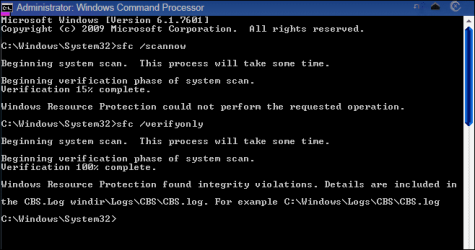
I did sfc verify only and the result is as shown in the screenshot below.Pls tel me if any problem.
 

Attachments

  • sfc verify only.PNG
    sfc verify only.PNG
    7.4 KB · Views: 44

My Computer

Computer Manufacturer/Model Number
Compaq Presario CQ50-130US
OS
Windows 7 professional 32-bit
CPU
Intel(R) Pentium(R)Dual CPU [email protected] 2.00Ghz
Memory
2.00 GB
Monitor(s) Displays
Generic PnP Monitor
Screen Resolution
1280x800
Internet Speed
Lan
I did sfc verify only and the result is as shown in the screenshot below.Pls tel me if any problem.


Upload the cbs.log file and we may be able to.
 

My Computer

Computer Manufacturer/Model Number
HP Pavillion dv-7 1005 Tx
OS
Win 8 Release candidate 8400
CPU
[email protected]
Memory
4 gigs
Graphics Card(s)
Nvidia 9600M
Sound Card
HD built-in
Monitor(s) Displays
17" Wxga
Screen Resolution
1440x900
Cooling
none
Internet Speed
45Mb down 5Mb up

My Computer

Computer Manufacturer/Model Number
Compaq Presario CQ50-130US
OS
Windows 7 professional 32-bit
CPU
Intel(R) Pentium(R)Dual CPU [email protected] 2.00Ghz
Memory
2.00 GB
Monitor(s) Displays
Generic PnP Monitor
Screen Resolution
1280x800
Internet Speed
Lan
The likely paths are shown in the shot you took of the command window.

BTW I checked this and MS say a repair install is advisable, they have a several blogs and forum items in their answers.microsoft.com pages, all of which point to the same answer.
File integrity violations which are not impossible but complicated and lengthy to fix. Sure way is as suggested.
 

My Computer

Computer Manufacturer/Model Number
DIY
OS
Windows 7 home premium x64
CPU
AMD FX-4100 AM3+ 3.6GHz 12MB Black Edition
Motherboard
Asus M5A97 Pro
Memory
Crsair vengeance 12Gb DDR3 1600MHz CL9
Graphics Card(s)
Asus GTX 560 1GB
Sound Card
Realtek onboard
Monitor(s) Displays
Hanns G 1680x1050 native
Hard Drives
OCZ 128Gb Petrol ssd
2x500 Gb Samsung
PSU
OCZ StealthXstream II 500W
Internet Speed
8Mb or better
The likely paths are shown in the shot you took of the command window.

BTW I checked this and MS say a repair install is advisable, they have a several blogs and forum items in their answers.microsoft.com pages, all of which point to the same answer.
File integrity violations which are not impossible but complicated and lengthy to fix. Sure way is as suggested.


It depends on what files could not be fixed. Often times they are not critical to the OS. BTW for more reliable reaults re MS you might want to search technet.

The cbs.log file can be searched for easily.
 

My Computer

Computer Manufacturer/Model Number
HP Pavillion dv-7 1005 Tx
OS
Win 8 Release candidate 8400
CPU
[email protected]
Memory
4 gigs
Graphics Card(s)
Nvidia 9600M
Sound Card
HD built-in
Monitor(s) Displays
17" Wxga
Screen Resolution
1440x900
Cooling
none
Internet Speed
45Mb down 5Mb up
Tank u all for ur help & support in solving my problems.I reinstalled my windows 7 PE 32-bit on 14.04.12.
 

My Computer

Computer Manufacturer/Model Number
Compaq Presario CQ50-130US
OS
Windows 7 professional 32-bit
CPU
Intel(R) Pentium(R)Dual CPU [email protected] 2.00Ghz
Memory
2.00 GB
Monitor(s) Displays
Generic PnP Monitor
Screen Resolution
1280x800
Internet Speed
Lan
Back
Top