

- Local time
- 8:49 PM
- Messages
- 162
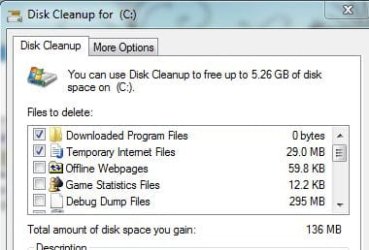
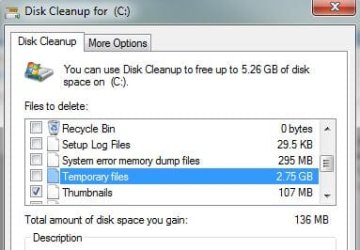
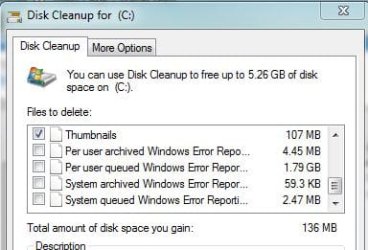
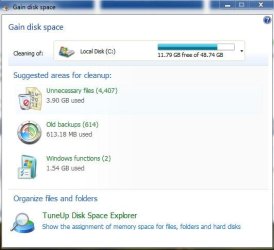
i am planning to get rid of my tuneup utilities but i still have some things to check before uninstalling it. today, i opened the disk cleanup utility provided by windows. it says i could save 135MB of space if i delete the files it recommends. i opened tuneup and it says i could save 3.9GB of space. which one should i believe? i have been an xp user for years and i used tuneup to maintain it and tuneup delivers. that is the reason why i installed in on my 7. but i've searched the forum and read posts and was once even told that 7 does not need it anymore. i did not uninstall my tuneup then but i took note of it. last week, my friend told me he uninstalled his tuneup since it is interfering with his gaming pc. he uninstalled it and his 7 works fine now.
im really now contemplating whether or not to uninstall my copy since he told me his experience with tuneup. just a little background of what i do with my tuneup. the main programs that i use are the gain disk space, defragmenter, 1 click maintenance, live optimization, configure system start and check hard disk for errors. i do not delete things in the registry nor try to defrag it. the only thing that might interfere with the registry is the gain disk space app but im not so sure about that.
of course, i could do all those with the built in programs provided by windows (except live optimization) but it is less of a hassle since it is already found in one place and is a good eye candy. and also, i tried to compare side by side windows defragmenter and tuneup's. on my laptop, i analyzed C using window's defragmenter and said it is 2% defragmeted while a quick scan on tuneup's revealed 7%. i defragmented C using the windows utility first and after a while, reported 0% fragments but i did a quick scan using tuneup and revealed it is still fragmented. i also, tried replicate my process on my desktop but i used tuneup first before windows defragmenter. a quick scan using tuneup revealed 4% of fragmentation and windows 0% fragments.
my process was not scientific at all since both pcs do not have the same hardware and fragmentation level but it just tells me that tunep works better than the utilities provided by windows. as of now, i am still leaning on tuneup utilities. could someone tell me if i should uninstall it or keep it? i accept harsh or gentle feedbacks - just no trolling or whatsoever (not that we have that here) because i might defend my beloved tuneup. i just want to clarify my doubts about the program.
and by the way, i posted snips i dont know if that will help
im really now contemplating whether or not to uninstall my copy since he told me his experience with tuneup. just a little background of what i do with my tuneup. the main programs that i use are the gain disk space, defragmenter, 1 click maintenance, live optimization, configure system start and check hard disk for errors. i do not delete things in the registry nor try to defrag it. the only thing that might interfere with the registry is the gain disk space app but im not so sure about that.
of course, i could do all those with the built in programs provided by windows (except live optimization) but it is less of a hassle since it is already found in one place and is a good eye candy. and also, i tried to compare side by side windows defragmenter and tuneup's. on my laptop, i analyzed C using window's defragmenter and said it is 2% defragmeted while a quick scan on tuneup's revealed 7%. i defragmented C using the windows utility first and after a while, reported 0% fragments but i did a quick scan using tuneup and revealed it is still fragmented. i also, tried replicate my process on my desktop but i used tuneup first before windows defragmenter. a quick scan using tuneup revealed 4% of fragmentation and windows 0% fragments.
my process was not scientific at all since both pcs do not have the same hardware and fragmentation level but it just tells me that tunep works better than the utilities provided by windows. as of now, i am still leaning on tuneup utilities. could someone tell me if i should uninstall it or keep it? i accept harsh or gentle
feedbacks - just no trolling or whatsoever (not that we have that here) because i might defend my beloved tuneup. i just want to clarify my doubts about the program.and by the way, i posted snips i dont know if that will help
Attachments

My Computer
At a glance
7 all the way!core 2 duo (desktop) i5 (laptop)2gb for both machinesnvidia 512mb GS for desktop; hd 5470 for laptop
- Computer Manufacturer/Model Number
- Desktop is a DIY and laptop is an Acer Aspire 4745
- OS
- 7 all the way!
- CPU
- core 2 duo (desktop) i5 (laptop)
- Motherboard
- asus for desktop
- Memory
- 2gb for both machines
- Graphics Card(s)
- nvidia 512mb GS for desktop; hd 5470 for laptop
- Monitor(s) Displays
- 19" AOC 913fw


