Solved Shut down/Restart

Layback Bear

3 Brain Cells
Guru
Gold Member
VIP
Local time
6:14 AM
Messages
24,243
Location
Northern Ohio
What is the difference between Restart and Shut down and starting again with the button on your computer? What I mean is; does the operating system do something different other than I have to push the button on shut down? i.e. after a update does shut down and starting with button on tower do the same thing a hitting restart?
 

My Computer

Computer type
PC/Desktop
Computer Manufacturer/Model Number
Home made Desktop
OS
Windows 10 Pro. 64/ version 1709 Windows 7 Pro/64
CPU
Intel i7-6800K @ 4.3
Motherboard
ASUS X-99 Deluxe II
Memory
Corsair Platinum 16 gig @2400
Graphics Card(s)
EVGA GTX 1070 OC
Monitor(s) Displays
Asus 27" LED LCD/VE278Q
Screen Resolution
1920-1080 or 1280-720 HDMI
Hard Drives
INTEL SSD 730-240 Gb Sata 3.0/
PSU
EVGA Platium 1200W
Case
Phanteks Luxe Tempered Glass 8 fans/ one radiator
Cooling
XSPC/ Water Cooled CPU
Keyboard
Das 4 Professional
Mouse
Logitech M705/MX Anywhere 2-S
Internet Speed
100 mbits
Antivirus
Microsoft Security Essentials/ Malwarebytes Premium 3.0/ SAS
Browser
I.E. 11 default/Firefox/ ISP Time Warner Cable/Spectrum
Other Info
LG BluRay Burner/
Sound system-KLipsch-THX/
Icy Dock ssd Hot Swap bays.
Using the power button on the PC has the potential of disabling Windows permanently.
 

My Computer

Computer Manufacturer/Model Number
* BFK Customs *
OS
W 7 64-bit Ultimate
CPU
Intel Q9550 Yorkfield
Motherboard
ASUS P5Q Pro
Memory
8GB Dominator 8500C5D
Graphics Card(s)
ATI : XFX 5870
Sound Card
Realtek HD Audio 7-1
Monitor(s) Displays
1x 47" LCD HDMI & 3x 26" LCD HDMI
Screen Resolution
1920x1080P & 1920x1200
Hard Drives
1x 80GB Intel X25-M G2 SSD : 1x 500GB & 1x 640GB WD Caviar Black(s)
PSU
Corsair 620HX
Case
Cooler Master RC-690
Cooling
Tuniq Tower 120, 2x 140mm and 3x 120mm case fans
Keyboard
Microsoft 500
Mouse
Razer Diamondback 3G
Internet Speed
14 Mb/s
Other Info
1x Koutech 3Gb/s SATA HDD Hot Swap Rack
When you tell your system to shut down via the Start Orb, Shutdown, Windows correctly closes all open user files, terminates Services in a logical order and does some necessary cleanup to ensure a proper starup next time you turn on your system. As BKF mentioned, using the off button on the system to shut down the system is called a Forced Shutdown and should only be used if Windows freezes up and cannot be shutdown any other way. Also, using the Reset Buttom on the machine to force a reboot is not the proper proceedure either. Use Start Orb, Restart.

Best regards
JohnnyA
 

My Computer

Computer Manufacturer/Model Number
Toshiba C650
OS
Windows Home Premium 64bit
CPU
T61-- 2.0ghz
Motherboard
Toshiba
Memory
4 GB
Graphics Card(s)
On board
Sound Card
On board
Monitor(s) Displays
15.6"
Hard Drives
500 GB
May be I wasn't clear. I do that sometimes. I will try again. Using the Start/shutdown or using the Start/restart. I only use the button on the tower to boot the computer after I have used the Start/shutdown. What is the difference between Start/shutdown and Start restart. I hope this helps.
 

My Computer

Computer type
PC/Desktop
Computer Manufacturer/Model Number
Home made Desktop
OS
Windows 10 Pro. 64/ version 1709 Windows 7 Pro/64
CPU
Intel i7-6800K @ 4.3
Motherboard
ASUS X-99 Deluxe II
Memory
Corsair Platinum 16 gig @2400
Graphics Card(s)
EVGA GTX 1070 OC
Monitor(s) Displays
Asus 27" LED LCD/VE278Q
Screen Resolution
1920-1080 or 1280-720 HDMI
Hard Drives
INTEL SSD 730-240 Gb Sata 3.0/
PSU
EVGA Platium 1200W
Case
Phanteks Luxe Tempered Glass 8 fans/ one radiator
Cooling
XSPC/ Water Cooled CPU
Keyboard
Das 4 Professional
Mouse
Logitech M705/MX Anywhere 2-S
Internet Speed
100 mbits
Antivirus
Microsoft Security Essentials/ Malwarebytes Premium 3.0/ SAS
Browser
I.E. 11 default/Firefox/ ISP Time Warner Cable/Spectrum
Other Info
LG BluRay Burner/
Sound system-KLipsch-THX/
Icy Dock ssd Hot Swap bays.
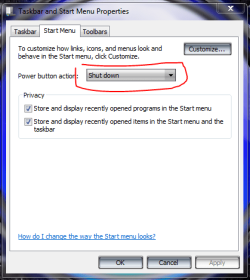
I think it's fair to say that shutting down your PC by holding down the power button for 4-6 sec thus creating a forced shutdown like bare foot and johnnya have explained isn't a good thing but using the power button by just pressing the power button shortly once with the desired settings selected should have no diverse effects.
 

Attachments

  • shutdown button.PNG
    shutdown button.PNG
    20.4 KB · Views: 18

My Computer

Computer type
PC/Desktop
Computer Manufacturer/Model Number
Self Built
OS
Windows 7 Ultimate 64bit
CPU
AMD Phenom Quad core 9950 black edition
Motherboard
Gigabyte
Memory
16Gb
Graphics Card(s)
2x XFX Radeon 5850
Sound Card
PCI Express X-Fi Titanium / Logitech G35
Monitor(s) Displays
2x HP 2410i
Screen Resolution
1920x1080
Hard Drives
2x 500Gb Seagate
1x 300Gb Seagate
1x 1Tb Seagate
2x 1Tb Hitatchi
PSU
Jean Tech Storm 700W
Case
Cooler Master COSMOS S
Cooling
Akasa Evo Blue Pro
Keyboard
Logitech G15
Mouse
Mad Catz M.M.O. 7
Internet Speed
12mb
Using the power button on the PC has the potential of disabling Windows permanently.

BFK. That is a little misleading. On most desktops, unless change by the user, hitting the power button shuts down Windows and then turns off the computer. On notebooks, to my knowledge it can be either what I say above or to put the system into hibernate or sleep mode (Suspend?).

Holding down the power button can turn the system off after a period of time. What that period of time is depends on the system and could create a problem if the time it take for the MB and PSU to see you are holding down the power button is fairly short.

But in any event that is not what the OP asked. He specifically asked "What is the difference between shutting the system down and then turning it back on by hitting the power button and selecting Restart".

To that question the answer is basically nothing. It is only to save you some time
The only difference on my newest build is doing a restart seems to take less time then starting the system with the power button right after it has been shut down or from starting cold. I think because the system knows it is restarting and doesn't do all the POST checks. Or as long of the POST checks when starting when completely off.
 

My Computer

Computer Manufacturer/Model Number
Built be Me
OS
Windows 7 Pro x64
CPU
i5 760
Motherboard
Asus P7P55D-E Pro
Memory
16GB
Graphics Card(s)
Nvidia GTS450
Sound Card
On board
Monitor(s) Displays
Dell 2007WFP Dell 1800FP
Screen Resolution
1680x1050 1280x1024
Hard Drives
Seagate 250GB & 750GB
WD 1TB
PSU
Antec 750
Case
In Win
Cooling
Cooler Master Hyper 212+
Keyboard
IBM
Mouse
MS
May be I wasn't clear. I do that sometimes. I will try again. Using the Start/shutdown or using the Start/restart. I only use the button on the tower to boot the computer after I have used the Start/shutdown. What is the difference between Start/shutdown and Start restart. I hope this helps.

No you were very clear.
Yeah others are reading something that you did not write. Between the lines when there are no lines.
 

My Computer

Computer Manufacturer/Model Number
Built be Me
OS
Windows 7 Pro x64
CPU
i5 760
Motherboard
Asus P7P55D-E Pro
Memory
16GB
Graphics Card(s)
Nvidia GTS450
Sound Card
On board
Monitor(s) Displays
Dell 2007WFP Dell 1800FP
Screen Resolution
1680x1050 1280x1024
Hard Drives
Seagate 250GB & 750GB
WD 1TB
PSU
Antec 750
Case
In Win
Cooling
Cooler Master Hyper 212+
Keyboard
IBM
Mouse
MS
Hey Layback - think I got you this time. Besides the obvious, Shutdown means shutdown - as in I don't want to play with my computer anymore I am going to bed. lol Restart means just that - close all properly and restart back up to my desktop. The only time I have ever used Restart is after Windows has downloaded new updates and needs to shutdown and restart to integrate the changes into the Registry etc. I have also used it after loading some new program or made a change to my system that would require a restart for the change to take affect.

Regards
JohnnyA
 

My Computer

Computer Manufacturer/Model Number
Toshiba C650
OS
Windows Home Premium 64bit
CPU
T61-- 2.0ghz
Motherboard
Toshiba
Memory
4 GB
Graphics Card(s)
On board
Sound Card
On board
Monitor(s) Displays
15.6"
Hard Drives
500 GB
BFK. That is a little misleading. On most desktops, unless change by the user, hitting the power button shuts down Windows and then turns off the computer..


I don't know what PC you're using but with my ASUS board, holding the power button to shut-down the PC or the power restart button, I get a "Windows did not shutdown correctly" message at restart.

My point was it's foolish to use the power button to shut down Windows when there's a correct way to do that.


I have said all I will here, do as you like.
 

My Computer

Computer Manufacturer/Model Number
* BFK Customs *
OS
W 7 64-bit Ultimate
CPU
Intel Q9550 Yorkfield
Motherboard
ASUS P5Q Pro
Memory
8GB Dominator 8500C5D
Graphics Card(s)
ATI : XFX 5870
Sound Card
Realtek HD Audio 7-1
Monitor(s) Displays
1x 47" LCD HDMI & 3x 26" LCD HDMI
Screen Resolution
1920x1080P & 1920x1200
Hard Drives
1x 80GB Intel X25-M G2 SSD : 1x 500GB & 1x 640GB WD Caviar Black(s)
PSU
Corsair 620HX
Case
Cooler Master RC-690
Cooling
Tuniq Tower 120, 2x 140mm and 3x 120mm case fans
Keyboard
Microsoft 500
Mouse
Razer Diamondback 3G
Internet Speed
14 Mb/s
Other Info
1x Koutech 3Gb/s SATA HDD Hot Swap Rack
Using the power button on the PC has the potential of disabling Windows permanently.

Seriously, are you smoking something right now? If you are going to make a statement like that, you should really explain it.

The power button has many different possibilities. If you press it and let go, depending on settings in Control Panel, Power, the computer can shut down, go to sleep, or even restart. There is nothing wrong with using it in this manner.

HOLDING the power button in should only be done in a case where the computer is locked up and cannot be shut down any other way. This cuts power to the computer and *could* cause a problem with the operating system because of data not being written to the hard drive properly.
 

My Computer

Computer Manufacturer/Model Number
Custom
OS
Windows 7 Ultimate RTM (Technet)
CPU
3.00 gigahertz Intel Core2 Duo E8400
Motherboard
ASUSTeK Computer INC. P5K/EPU Rev 1.xx
Memory
4GB
Graphics Card(s)
ATI Radeon X1950 Pro
Sound Card
Built in HD Audio
Monitor(s) Displays
22" Gateway LCD
Screen Resolution
1920 x 1200
Hard Drives
ST3160023A [Hard drive] (160.04 GB) -- drive 0, rev 8.01, ST3500630AS [Hard drive] (500.11 GB) -- drive 2, rev 3.AAK
ST3500630AS [Hard drive] (500.11 GB) -- drive 1, rev 3.AAK
Keyboard
Logitech G11
Mouse
Microsoft Wireless Laser Mouse 5000
Internet Speed
13.44 Mbps
BFK. That is a little misleading. On most desktops, unless change by the user, hitting the power button shuts down Windows and then turns off the computer..


I don't know what PC you're using but with my ASUS board, holding the power button to shut-down the PC or the power restart button, I get a "Windows did not shutdown correctly" message at restart.

My point was it's foolish to use the power button to shut down Windows when there's a correct way to do that.


I have said all I will here, do as you like.

BFK he was NOT asking about holding down the power button. He was asking about shutting down using the Shut Down option in Windows.
QUOTE:
What is the difference between Restart and Shut down and starting again with the button on your computer
END Quote:

On all my PCs if I "PUSH" the power button the computer shuts down Normally, shutting down Windows and turn the PC OFF.
If I HOLD down the power button it takes between 5-10 seconds for that to register as SHUT THE POWER OFF NOW.
That is not Pushing the power button.

EDIT:
Quote BFK
My point was it's foolish to use the power button to shut down Windows when there's a correct way to do that.
End Quote BFK:

The power button can be used to shut the PC down normally and can be the correct way to do that. That changed when ATX boards came out. With AT boards the power switch was wired to the power supply and turn the power off or on to the PSU. It was a 120V switch. With ATX boards the power switch is a momentary contact switch and is wired to the motherboard. Allowing it to do many different things because the motherboard is in control of how it interacts with the OS and PSU.
Of course the power button is NOT the Reset button. That will Reset the motherboard and should never be pushed unless the OS is unresponsive, locked up.
 

My Computer

Computer Manufacturer/Model Number
Built be Me
OS
Windows 7 Pro x64
CPU
i5 760
Motherboard
Asus P7P55D-E Pro
Memory
16GB
Graphics Card(s)
Nvidia GTS450
Sound Card
On board
Monitor(s) Displays
Dell 2007WFP Dell 1800FP
Screen Resolution
1680x1050 1280x1024
Hard Drives
Seagate 250GB & 750GB
WD 1TB
PSU
Antec 750
Case
In Win
Cooling
Cooler Master Hyper 212+
Keyboard
IBM
Mouse
MS
I have a question about Restart vs. Shutdown with certain kinds of Updates.

I had always been told that if you have Updates cued with a "!" on your Shutdown button, it means they need install during boot mode and won't be completed until you Shutdown, since it assumes a simple Restart might interrupt your work too much.

However sometimes I see the "!" go away after a simple restart which installs the Updates, other times I see it remain until a Shutdown itself is done and a big wad are installed.

Which is it? Anyone know for sure? I'm tired of not knowing for sure.
 
I have a question about Restart vs. Shutdown with certain kinds of Updates.

I had always been told that if you have Updates cued with a "!" on your Shutdown button, it means they need install during boot mode and won't be completed until you Shutdown, since it assumes a simple Restart might interrupt your work too much.

However sometimes I see the "!" go away after a simple restart which installs the Updates, other times I see it remain until a Shutdown itself is done and a big wad are installed.

Which is it? Anyone know for sure? I'm tired of not knowing for sure.

As far as I know shutdown, completely turn the PC off, and restart do basically the same exact thing.
They both shut the OS down properly, unloading all drivers and whatnot, saving any files back to the HDD/SSD and start the BIOS POST process.
On my system when I do a restart once the OS has shut down my fans start turning at full speed and the monitor power buttons go yellow until the BIOS starts to load and then the fans go back to the Silent setting I have in the BIOS setup and a short time latter the monitor power buttons go back to green.
That tells me the computer has started just like it does from a cold boot. Only not turning the power off completely from the PSU.
 

My Computer

Computer Manufacturer/Model Number
Built be Me
OS
Windows 7 Pro x64
CPU
i5 760
Motherboard
Asus P7P55D-E Pro
Memory
16GB
Graphics Card(s)
Nvidia GTS450
Sound Card
On board
Monitor(s) Displays
Dell 2007WFP Dell 1800FP
Screen Resolution
1680x1050 1280x1024
Hard Drives
Seagate 250GB & 750GB
WD 1TB
PSU
Antec 750
Case
In Win
Cooling
Cooler Master Hyper 212+
Keyboard
IBM
Mouse
MS
I want to say first; thank you all for hanging in their. Yes I do understand the proper way to restart or shutdown a computer. Is either one better. Do they do the same thing with the operating system other than me walking across the room and pushing the button to reboot. The reason I ask is some times I will get instructions to restart and sometimes I get instructions to reboot. Is their a difference with the operating system. It's my fault for the confusion. With Windows 7 is their a difference between rebooting and restart. For example. In restart I sit their and it does it all by it's self. If I use shutdown off of the Start button I have to walk accross the room and at that time hit the button on the tower to start the computer. I'm trying to make sure that my updates ect. are handled properly by me.
 

My Computer

Computer type
PC/Desktop
Computer Manufacturer/Model Number
Home made Desktop
OS
Windows 10 Pro. 64/ version 1709 Windows 7 Pro/64
CPU
Intel i7-6800K @ 4.3
Motherboard
ASUS X-99 Deluxe II
Memory
Corsair Platinum 16 gig @2400
Graphics Card(s)
EVGA GTX 1070 OC
Monitor(s) Displays
Asus 27" LED LCD/VE278Q
Screen Resolution
1920-1080 or 1280-720 HDMI
Hard Drives
INTEL SSD 730-240 Gb Sata 3.0/
PSU
EVGA Platium 1200W
Case
Phanteks Luxe Tempered Glass 8 fans/ one radiator
Cooling
XSPC/ Water Cooled CPU
Keyboard
Das 4 Professional
Mouse
Logitech M705/MX Anywhere 2-S
Internet Speed
100 mbits
Antivirus
Microsoft Security Essentials/ Malwarebytes Premium 3.0/ SAS
Browser
I.E. 11 default/Firefox/ ISP Time Warner Cable/Spectrum
Other Info
LG BluRay Burner/
Sound system-KLipsch-THX/
Icy Dock ssd Hot Swap bays.
Restart and Reboot are the exact same thing.
There is no real difference between restart/reboot and shut down completely and starting the PC from hitting the power button. The only real difference between those 2 things is with a restart/reboot the power supply never turns off and with the other it does turn power off.
Is one better then the other, No. Is one faster and accomplishes the same thing, Yes.
 

My Computer

Computer Manufacturer/Model Number
Built be Me
OS
Windows 7 Pro x64
CPU
i5 760
Motherboard
Asus P7P55D-E Pro
Memory
16GB
Graphics Card(s)
Nvidia GTS450
Sound Card
On board
Monitor(s) Displays
Dell 2007WFP Dell 1800FP
Screen Resolution
1680x1050 1280x1024
Hard Drives
Seagate 250GB & 750GB
WD 1TB
PSU
Antec 750
Case
In Win
Cooling
Cooler Master Hyper 212+
Keyboard
IBM
Mouse
MS
What is the difference between Restart and Shut down and starting again with the button on your computer? What I mean is; does the operating system do something different other than I have to push the button on shut down? i.e. after a update does shut down and starting with button on tower do the same thing a hitting restart?


Shut down switches off power to the machine. When power is restored,( a "Cold Boot" ), the machine is completely reset and a POST runs.(Power On Self Test). These things are not done on a restart or "Warm Boot".

EDIT: It seems this is no longer true on most modern machines. The machine is completely reset and goes to a POST


A "normal" Windows shutdown flushes all relevant data, saves required data to the system, and then removes all power to the machine. Power to memory (RAM), etc is removed, and all stored data is lost.

A "Restart" or "Warm Boot" flushes data, saves required data to the system, stops program execution and then calls the 'unmaskable interrupt', (Int zero), the pointer is set on the input data bus to the first byte of memory, and this reads BIOS "bootstrap". If devices and memory have not been powered off the boot is a lot faster. This can sometimes cause transient errors, as there is always a small risk of "Data out of bounds" errors.

See edit above!

Simply removing power from the machine will not carry out any flushing or other operations, and there is a risk of damage to the Windows system and the risk of other data problems is greatly increased.

"Logging off" simply flushes data and restarts the shell.

As a general rule, a correct shutdown and a cold boot is the most reliable method.

What happens when you push various buttons depends on how those buttons are set up!

Regards....Mike Connor
 
Last edited:

My Computer

OS
Several, including Windows 7 x64 Ultimate
I have a question about Restart vs. Shutdown with certain kinds of Updates.

I had always been told that if you have Updates cued with a "!" on your Shutdown button, it means they need install during boot mode and won't be completed until you Shutdown, since it assumes a simple Restart might interrupt your work too much.

However sometimes I see the "!" go away after a simple restart which installs the Updates, other times I see it remain until a Shutdown itself is done and a big wad are installed.

Which is it? Anyone know for sure? I'm tired of not knowing for sure.

It depends on the update. Some require a complete shutdown as they can only be installed when Windows is not yet running.

EDIT. The above is apparently incorrect! That being the case, I do not know why some apparently need a shutdown and others don't.


Regards....Mike Connor
 
Last edited:

My Computer

OS
Several, including Windows 7 x64 Ultimate
I have a question about Restart vs. Shutdown with certain kinds of Updates.

I had always been told that if you have Updates cued with a "!" on your Shutdown button, it means they need install during boot mode and won't be completed until you Shutdown, since it assumes a simple Restart might interrupt your work too much.

However sometimes I see the "!" go away after a simple restart which installs the Updates, other times I see it remain until a Shutdown itself is done and a big wad are installed.

Which is it? Anyone know for sure? I'm tired of not knowing for sure.

It depends on the update. Some require a complete shutdown as they can only be installed when Windows is not yet running.

Regards....Mike Connor

Well doesn't a restart completely shut down Windows and then completely restart it? It does on my PCs.
 

My Computer

Computer Manufacturer/Model Number
Built be Me
OS
Windows 7 Pro x64
CPU
i5 760
Motherboard
Asus P7P55D-E Pro
Memory
16GB
Graphics Card(s)
Nvidia GTS450
Sound Card
On board
Monitor(s) Displays
Dell 2007WFP Dell 1800FP
Screen Resolution
1680x1050 1280x1024
Hard Drives
Seagate 250GB & 750GB
WD 1TB
PSU
Antec 750
Case
In Win
Cooling
Cooler Master Hyper 212+
Keyboard
IBM
Mouse
MS
I have a question about Restart vs. Shutdown with certain kinds of Updates.

I had always been told that if you have Updates cued with a "!" on your Shutdown button, it means they need install during boot mode and won't be completed until you Shutdown, since it assumes a simple Restart might interrupt your work too much.

However sometimes I see the "!" go away after a simple restart which installs the Updates, other times I see it remain until a Shutdown itself is done and a big wad are installed.

Which is it? Anyone know for sure? I'm tired of not knowing for sure.

It depends on the update. Some require a complete shutdown as they can only be installed when Windows is not yet running.

Regards....Mike Connor

Well doesn't a restart completely shut down Windows and then completely restart it? It does on my PCs.

Normally yes, but a warm boot does not reset the machine itself. Some things require a complete shutdown. Graphic drivers and other things are not reset on a warm boot. If the drivers are running, they can not be replaced.

EDIT: This is apparently no longer true on modern Windows machines. My apologies if I misled anybody.

Regards....Mike Connor
 
Last edited:

My Computer

OS
Several, including Windows 7 x64 Ultimate
It depends on the update. Some require a complete shutdown as they can only be installed when Windows is not yet running.

Regards....Mike Connor

Well doesn't a restart completely shut down Windows and then completely restart it? It does on my PCs.

Normally yes, but a warm boot does not reset the machine. Some things require a complete shutdown. Graphic drivers and other things are not reset on a warm boot. If the drivers are running, they can not be replaced.

Regards....Mike Connor

You know I have to kinda disagree, at least on my system and any system I have ever used.
When I do a Restart from inside Windows my system goes through all the POST Processes. Screens turn completely off going into power save mode, power buttons turning yellow. Motherboard doing all the checks of RAM, CPU, Chipset and the corresponding MB LED lights doing there thing telling you which check it is doing. Then the power buttons on my monitors turn back to green. Keyboard light flash. Mouse starts to light up. BIOS screen is then displayed listing RAM and other hardware in the system. Then the OS starts with the Windows splash screen.
I would have to say that all hardware is being reset during this process. I wouldn't think anything is retained in RAM or any drivers loaded during this process, especially video drivers. How could it be.
Now if I did a Log Off of Windows, where nothing turns off, and then Logged back on then most everything stored in memory would be retained.

Maybe your system is different then any I have ever used. But in all my years of using a computer a Restart is just that. A complete shutdown of the system, other then the power supply turning off, and then a restarting of all processes including the BIOS POST.
 

My Computer

Computer Manufacturer/Model Number
Built be Me
OS
Windows 7 Pro x64
CPU
i5 760
Motherboard
Asus P7P55D-E Pro
Memory
16GB
Graphics Card(s)
Nvidia GTS450
Sound Card
On board
Monitor(s) Displays
Dell 2007WFP Dell 1800FP
Screen Resolution
1680x1050 1280x1024
Hard Drives
Seagate 250GB & 750GB
WD 1TB
PSU
Antec 750
Case
In Win
Cooling
Cooler Master Hyper 212+
Keyboard
IBM
Mouse
MS
Back
Top