
You are using an out of date browser. It may not display this or other websites correctly.
You should upgrade or use an alternative browser.
You should upgrade or use an alternative browser.
Sleep mode option not available.
- Thread starter Black454
- Start date

- Local time
- 1:07 PM
- Messages
- 16,784
Hi Black,
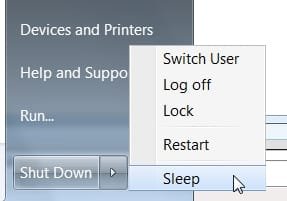
Not sure what you mean - is it not showing here (I disabled hibernation )
Or here
SIW2
Not sure what you mean - is it not showing here (I disabled hibernation )
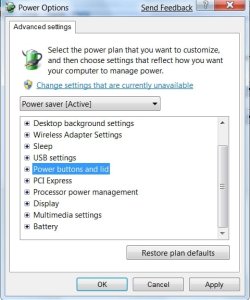
Or here
SIW2
My Computers
System One System Two
-
- Computer type
- PC/Desktop
- OS
- 7 X64
- CPU
- i5 8400
- Motherboard
- gigabyte b365m ds3h
- Memory
- 2x8gb 3200mhz
- Hard Drives
- various
- PSU
- pure power 11 400w cm
- Case
- Coolermaster
- Cooling
- cryorig m9i
-
- Computer type
- PC/Desktop
- OS
- 7x64
- CPU
- g5400
- Motherboard
- ga b365m ds3h
- Memory
- 8gb ddr4 2400
- PSU
- xfx pro 450w

Hello Black454,
Double check your Power Plan settings to see if they are set like the recommended settings for Sleep mode.
Hope this helps,
Shawn
Double check your Power Plan settings to see if they are set like the recommended settings for Sleep mode.
Hope this helps,
Shawn
My Computer
- Computer type
- PC/Desktop
- Computer Manufacturer/Model Number
- Self built custom
- OS
- 64-bit Windows 11 Pro for Workstations
- CPU
- Intel i7-8700K OC'd to 5 GHz
- Motherboard
- ASUS ROG Maximus XI Formula Z390
- Memory
- 64 GB (4x16GB) G.SKILL TridentZ RGB DDR4 3600 MHz
- Graphics Card(s)
- ASUS ROG-STRIX-GTX1080TI-O11G-GAMING
- Sound Card
- Integrated
- Monitor(s) Displays
- 2 x Samsung Odyssey G7 27"
- Screen Resolution
- 2560x1440
- Hard Drives
- 1TB Samsung 990 PRO M.2,
4TB Samsung 990 PRO PRO M.2,
TerraMaster F8 SSD Plus NAS
- PSU
- Seasonic Prime Titanium 850W
- Case
- Thermaltake Core P3
- Cooling
- Corsair Hydro H115i
- Keyboard
- Logitech wireless K800
- Mouse
- Logitech MX Master 4
- Internet Speed
- 2 Gb/s Download and 100 Mb/s Upload
- Antivirus
- Malwarebyte Anti-Malware Premium
- Browser
- Google Chrome
- Other Info
- Logitech Z625 speaker system,
Logitech BRIO 4K Pro webcam,
HP Color LaserJet Pro MFP M477fdn,
APC SMART-UPS RT 1000 XL - SURT1000XLI,
Galaxy S23 Plus phone

also check if hybrid sleep is disabled in the power settings
it might make it possible to go into sleep if you enable it...
it might make it possible to go into sleep if you enable it...
My Computer
- Computer Manufacturer/Model Number
- Tx2500z Tablet Pc/Homemade Server
- OS
- Windows 7 Ult x64(x2), HomePrem x32(x4), Server 08 (+VM), 08 R2 (VM) , SuSe 11.2 (VM), XP 32 (VM)
- CPU
- Turion X2 ultra (oh well came with laptop)/P4 @3.2 (yes P4)
- Motherboard
- IDK HP Motherboard / Intel DG965SS
- Memory
- OCZ Dual Channel 4GB kit/ 1gb Dual Channel
- Graphics Card(s)
- HD 3200 graphics /GMA x3100 (yay for intergrated!!)
- Sound Card
- Realtek HD Audio(mic working, well sort of)/Siig IC-70012
- Monitor(s) Displays
- built-in Hp 12" laptop screen/ Acer 19"
- Screen Resolution
- 1280x800 /1440x900
- Cooling
- All Air Cooled
- Mouse
- Logi MX Rev. /MS Wheel Optical 1.1A /Logitech Optical Mouse
- Internet Speed
- College baby but its still routed through vpn to 1536k...
- Other Info
- love my wacom pen and pressure sensitivity...
wished it worked in 7, SUSE for that matter though
Well I figured out why the sleep mode is greyed out. I have the standard vga driver because their isn't a driver that doesn't lock up windows for my ATI Radeon mobility 7500.
It is there when I try another drive but it always freezes up shortly after booting.
It is there when I try another drive but it always freezes up shortly after booting.
My Computer
- OS
- Windows 7
I have the same problem.
On my Sharp Actius AL 27 laptop (my back up home computer that I don't use very often), the sleep mode is greyed out and disabled. Seems to be one of two things because it used to work fine:
1- I accidentally uninstalled the display driver, and reinstalled it. That didn't seem to fix the problem, but I'm open for suggestions.
2- Also, I used to have XP, installed a new harddrive, and installed W7. I played with a few things during startup with XP, but W7 is different. I'm not sure about the BIOS thing, or ACPI suspend mode. I hit F2 upon startup and enter into setup, but my options are limited.
It's super anoying to shut down and reboot everytime I use this laptop! All I want to do is put it to sleep.
I would love some insight and sugestions!

On my Sharp Actius AL 27 laptop (my back up home computer that I don't use very often), the sleep mode is greyed out and disabled. Seems to be one of two things because it used to work fine:
1- I accidentally uninstalled the display driver, and reinstalled it. That didn't seem to fix the problem, but I'm open for suggestions.
2- Also, I used to have XP, installed a new harddrive, and installed W7. I played with a few things during startup with XP, but W7 is different. I'm not sure about the BIOS thing, or ACPI suspend mode. I hit F2 upon startup and enter into setup, but my options are limited.
It's super anoying to shut down and reboot everytime I use this laptop! All I want to do is put it to sleep.
I would love some insight and sugestions!
My Computer
- Computer Manufacturer/Model Number
- Sharp Actius AL 27
- OS
- Windows 7

- Local time
- 7:07 AM
- Messages
- 5,053
If the sleep mode is greyed out you need to do the following.
1) Update your graphics drivers and chipset drivers.
2) If the above step doesnt solve the problem, restart the computer into the BIOS settings, and go into the Power Management section in the BIOS. Make sure ACPI mode S3 or S1 is enabled. remember, if you have an incompatible video card, then one or more of these states may be unavailable.
1) Update your graphics drivers and chipset drivers.
2) If the above step doesnt solve the problem, restart the computer into the BIOS settings, and go into the Power Management section in the BIOS. Make sure ACPI mode S3 or S1 is enabled. remember, if you have an incompatible video card, then one or more of these states may be unavailable.
Last edited:
My Computer
- Computer Manufacturer/Model Number
- Too many to describe...
- OS
- Windows 7 x64 pro/ Windows 7 x86 Pro/ XP SP3 x86
dannyvocal
New member
- Local time
- 7:07 AM
- Messages
- 1
Best way to fix greyed out Sleep button
If your Sleep button is grayed out and inaccessible, ignore all the other recommendations to go to BIOS, etc. All you have to do is go to Power Options/Edit Plan Settings and you can set when you want the Sleep to start - 1 minute from now, 5 mns from now, 6 hours away. It is true our video card in some laptops can disable the Sleep function but setting when you want the laptop to go to sleep in Edit Plan Settings is the easiest way around this. I usually just set the screen to go off in 5 mns and then the whole computer to go to sleep in an hour, but the choice is yours! Danny
If your Sleep button is grayed out and inaccessible, ignore all the other recommendations to go to BIOS, etc. All you have to do is go to Power Options/Edit Plan Settings and you can set when you want the Sleep to start - 1 minute from now, 5 mns from now, 6 hours away. It is true our video card in some laptops can disable the Sleep function but setting when you want the laptop to go to sleep in Edit Plan Settings is the easiest way around this. I usually just set the screen to go off in 5 mns and then the whole computer to go to sleep in an hour, but the choice is yours! Danny
My Computer
- OS
- Windows 7
not there
It is NOT there and is a graphics adapter issue. Sure, I'd love to simply change the settings, but the option doesn't exist. And that is the issue at hand. Power option are 'hibernate' and 'do nothing' - that's it.
I have the same problem and I work on these. Problem is I took an HP Vista laptop and loaded Win 7 on it. Only the folks at HP don't support this laptop with W7 on it. There are no drivers. THAT is the issue.
It is NOT there and is a graphics adapter issue. Sure, I'd love to simply change the settings, but the option doesn't exist. And that is the issue at hand. Power option are 'hibernate' and 'do nothing' - that's it.
I have the same problem and I work on these. Problem is I took an HP Vista laptop and loaded Win 7 on it. Only the folks at HP don't support this laptop with W7 on it. There are no drivers. THAT is the issue.
My Computer
- Computer Manufacturer/Model Number
- Toshiba Satellite
- OS
- Win 7 32-bit
Well, here's my two cents for what it's worth. I had the very same problem with 2 machines and the fix was the same on both machines. I had no option for Sleep mode anywhere on the computer, and I mean no where. I too had the Standard VGA driver, but updating that didn't seem to fix it. Actually I couldn't update anything because of that error code, 80072EFE, which was fixed with a download that I saw here today in another post. I had an unknown device issue too, that I couldn't get taken care of. Once I got the Windows Update issue taken care of, it went looking for updates and found 147, including Security updates. I downloaded them all and ran them. Once I rebooted the machine, the unknown device was taken care of and so was the updated video- no more Standard VGA driver. That also took care of the 'no Sleep mode' problem. It's right there and working fine now. BTW, this was a new installation. That's why so many updates.
My Computer
- OS
- Windows 7
Similar threads
- Replies
- 9
- Views
- 4K

- Replies
- 19
- Views
- 3K


- Replies
- 8
- Views
- 2K