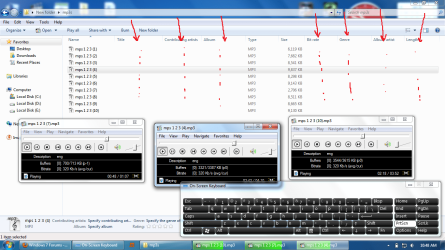
Some of my Mp3 files aren't showing up all properties in my Win 7 Ultimate 64 bit. But some of them are.
Here's a screenshot of what I actually mean:
The explorer should show the missing fields cause these are 100% Ok, playable & non-corrupted Mp3 files, you can see on the screenshot when I played them. Also all fields are visible when I checked those Mp3s on my Windows XP SP3. The artist name, album name, bitrate, genre, title, etc. were all shown on Win XP's explorer.
Any idea what's going on? Am I missing those Mp3s' codec or something...
For obtaining the information about Title, Contributing Artist, Album, Genre, Album artist etc, you are to add those tags. Not sure about the bitrate and length fields.
@Arc: I have installed that software. All fields are visible when I view the tags thru Mp3tag even bitrate and length fields are visible, seems like all tags of those Mp3s are already added before & their tag is: ID3v2.3 (ID3v1 ID3v2.3). But that's a separate software. The fields are still blank on Win 7's explorer. I want the tags on the explorer which is still blank like on the screenshot...
@boohbah: Yes, exactly the same issue. I've followed that and the problem isn't fixed.
The sfc showed that some files can't be repaired. I've tried every single thing that was in your second link...
There is another easy registry fix for this issue without installing additional plugins..windows has the built in ability to show the mp3 tags by itself.....check the below link