Solved Some programs will not recognise internet connection

Hypershock

New member
Local time
4:35 AM
Messages
13
Hi, I'm facing quite a conundrum. Firefox can connect to the internet, but nothing else can: Neither Chrome, nor AVG, nor any other software. I'm unable to upgrade to Windows 10

My problem seems to be identical to this one:
http://www.sevenforums.com/network-...s-will-not-recognize-internet-connection.html , but my knowledge is slightly more basic, and I can't figure out how to change the DNS servers (if my symptoms do indeed represent the same underlying issue).

My IPconfig data is attached.
 

Attachments

My Computer

Computer type
Laptop
Computer Manufacturer/Model Number
Acer 5738PZG
OS
Windows Home Premium 64bit
Browser
Waterfox, Chrome, (Internet explorer)
Most likely offender is probably an improperly configured fireawall, blocking everything but Firefox. Check if Windows firewall is enabled or if any antivirus has a built-in firewall blocking everything.

I don't think it's a DNS problem. After all, a browser can connect and resolve names.
 

My Computer

Computer type
Laptop
Computer Manufacturer/Model Number
Toshiba Sattelite A665-S6092
OS
Windows 7 Ultimate x64
CPU
Intel Core i7-740QM
Memory
8 GB DDR3
Graphics Card(s)
NVIDIA GeForce 330GT
Screen Resolution
1366x768
Hard Drives
Samsung 840 SSD 500GB
1TB USB3 external HD
Cooling
Coolermaster Notepal U3 notebook cooling pad
Internet Speed
3mbps ASDL
Antivirus
ClamWin 0.98.7
Browser
Opera 12.17 x86 (main), Firefox 38 (sec), IE11 (last resort)
I've already tried changing my firewall settings and have also tried turning it off altogether. Neither worked.
 

My Computer

Computer type
Laptop
Computer Manufacturer/Model Number
Acer 5738PZG
OS
Windows Home Premium 64bit
Browser
Waterfox, Chrome, (Internet explorer)
OK...
It's not the firewall. I have that turned off. IE 11 opens, hangs then quits as soon as it stops hanging.
Chrome gives an error saying "DNS_PROBE_FINISHED_NO_INTERNET".
Firefox seems to work fine.
Steam won't open.
Utorrent says "WSA() failed, or you have the incorrect version of WinSock installed" I have tried winsock reset, to no avail. Trying to open Malwarebytes anti-malware results in a pop up saying "The application was unable to start correctly (0xe06d7363). Click OK to close the application".
Spybot - Search & Destroy will scan, but If I try to update a popup says "Error retrieving update info file".
AVG is out of date, and continually creates a pop-up saying "unspecified error occurred in the following avg component(s) avgmfapx.exe". If I try to do a manual update, the same pop-up appears.
When I first tried to upgrade to Windows 10, it said "you can't install windows 10 because your wireless network card doesn't meet upgrade requirements". Now it says "Here's why Windows 10 can't be installed on this PC. There are no supported networking devices."
I tried changing the DNS server to 8.8.8.8 and 8.8.4.4 (as according to http://www.sevenforums.com/network-...s-will-not-recognize-internet-connection.html). Nothing changed. I may have done this step wrong, so If someone asks me to try again, I will.
I have also tried turning off Wi-Fi and using an Ethernet cable. No dice.

The first problem I noticed was being unable to upgrade to Win10. After trying to troubleshoot the problem for myself for a while, I gave up and said "this laptop is 6 years old, might as well get a new one." So I did. But then I realised that due to licensing issues, I need to uninstall software on my old machine before I can use it on my new one. My computer problems mean that the uninstallers on won't connect to the internet and free up the licenses. Please get a sense of how frustrating this is. I put this problem in the too-hard basket, and then it's come back out of the basket to bite me. If there is a temporary work around so that I can properly uninstall my old software I'll be happy. If this problem can actually be fixed and I can return my new purchase and put off getting a new laptop for another year, then all the better.

 

My Computer

Computer type
Laptop
Computer Manufacturer/Model Number
Acer 5738PZG
OS
Windows Home Premium 64bit
Browser
Waterfox, Chrome, (Internet explorer)
Do I need a new network card?
 

My Computer

Computer type
Laptop
Computer Manufacturer/Model Number
Acer 5738PZG
OS
Windows Home Premium 64bit
Browser
Waterfox, Chrome, (Internet explorer)

My Computer

Computer type
Laptop
Computer Manufacturer/Model Number
Employer provided Dell Latitude
OS
W7 Pro SP1 64bit
CPU
i7
Memory
8GB
Graphics Card(s)
Intel HD Graphics
Hard Drives
crappy SSD
Antivirus
Employer mandated Symantec Endpoint Protection
Browser
Pale Moon 64bit, IE11 64bit & Chrome 64bit
Windows defender offline didn't find anything :( and the same internet problems still occur with a clean startup :(
Anything else I can try?
 

My Computer

Computer type
Laptop
Computer Manufacturer/Model Number
Acer 5738PZG
OS
Windows Home Premium 64bit
Browser
Waterfox, Chrome, (Internet explorer)
Completely reset Internet Explorer
http://www.sevenforums.com/tutorials/1222-internet-explorer-reset.html
Be sure to do step 5.

Without opening Internet Explorer:
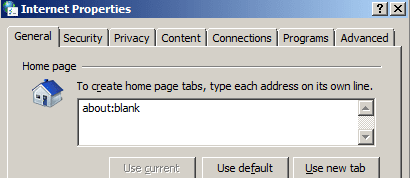
Change the home page for Internet Explorer to be about:blank
You can do that via Start > Control Panel.
Let me know if you need more details.
IE11-about-blank.png


Temporarily disable the service named DNS Client:
http://www.sevenforums.com/tutorials/2495-services-start-disable.html

Restart the computer.

Open Internet Explorer.
If IE hangs, you can stop there and let me know.
If IE does not hang, please continue.

Using Internet Explorer, visit this forum.
Did IE hang?
 

My Computer

Computer type
Laptop
Computer Manufacturer/Model Number
Employer provided Dell Latitude
OS
W7 Pro SP1 64bit
CPU
i7
Memory
8GB
Graphics Card(s)
Intel HD Graphics
Hard Drives
crappy SSD
Antivirus
Employer mandated Symantec Endpoint Protection
Browser
Pale Moon 64bit, IE11 64bit & Chrome 64bit
IE still doesn't work.
 

My Computer

Computer type
Laptop
Computer Manufacturer/Model Number
Acer 5738PZG
OS
Windows Home Premium 64bit
Browser
Waterfox, Chrome, (Internet explorer)
Did it open to the about:blank page?
Did it hang there?

Or did it hang when you tried to surf to this forum?


You can set the service named DNS Client back to Automatic now.
 

My Computer

Computer type
Laptop
Computer Manufacturer/Model Number
Employer provided Dell Latitude
OS
W7 Pro SP1 64bit
CPU
i7
Memory
8GB
Graphics Card(s)
Intel HD Graphics
Hard Drives
crappy SSD
Antivirus
Employer mandated Symantec Endpoint Protection
Browser
Pale Moon 64bit, IE11 64bit & Chrome 64bit
I think hang was the wrong word...
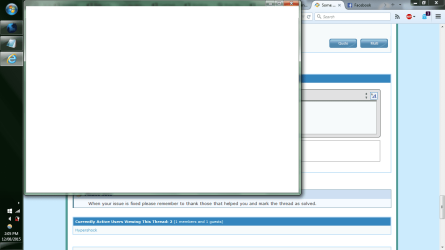
I've attached a screenshot of what IE does when I try to open it. It remains like this for 10-20 seconds and then dies before I can do anything. Resetting IE and disabling the DNS client didn't change this behavior.
 

Attachments

  • internetexplorer.png
    internetexplorer.png
    112.8 KB · Views: 3

My Computer

Computer type
Laptop
Computer Manufacturer/Model Number
Acer 5738PZG
OS
Windows Home Premium 64bit
Browser
Waterfox, Chrome, (Internet explorer)

My Computer

Computer type
Laptop
Computer Manufacturer/Model Number
Employer provided Dell Latitude
OS
W7 Pro SP1 64bit
CPU
i7
Memory
8GB
Graphics Card(s)
Intel HD Graphics
Hard Drives
crappy SSD
Antivirus
Employer mandated Symantec Endpoint Protection
Browser
Pale Moon 64bit, IE11 64bit & Chrome 64bit
Yes. No Add-ons does the same thing.
 

My Computer

Computer type
Laptop
Computer Manufacturer/Model Number
Acer 5738PZG
OS
Windows Home Premium 64bit
Browser
Waterfox, Chrome, (Internet explorer)
Thanks. There were several files which the scan could not repair. I've attached the sfcdetails file if you want to check the details. At the moment I'm trying to download a win7 iso file, but since my copy of windows 7 came with the machine, the Microsoft website isn't accepting my software key. I'll try to source an actual cd and get back to you afterwards.

Or is there a way get the specific files I need without a cd or iso file?
 

Attachments

My Computer

Computer type
Laptop
Computer Manufacturer/Model Number
Acer 5738PZG
OS
Windows Home Premium 64bit
Browser
Waterfox, Chrome, (Internet explorer)
The "problems" mentioned in the SFC results are not really problems.

https://support.microsoft.com/en-us/kb/3068708
The two files are marked as static files in the update. When an advanced user runs the System File Checker Tool (sfc.exe), the files are unintentionally flagged as corrupted. There is no impact or actual corruption on a device that is running this update, and this issue will be fixed in a later service update.

You can ignore those "problems" or uninstall KB3068708 and wait for Microsoft to fix the update.


What security apps do you have installed?
Antivirus?
Malware scanners?
 

My Computer

Computer type
Laptop
Computer Manufacturer/Model Number
Employer provided Dell Latitude
OS
W7 Pro SP1 64bit
CPU
i7
Memory
8GB
Graphics Card(s)
Intel HD Graphics
Hard Drives
crappy SSD
Antivirus
Employer mandated Symantec Endpoint Protection
Browser
Pale Moon 64bit, IE11 64bit & Chrome 64bit
Probably too many.
Spybot - Search & Destroy, which currently runs, but cannot be updated.
Malwarebytes Anti-malware, which creates a popup saying "The application was unable to start correctly (0xe06d7363). Click OK to close the application."
Advanced SystemCare 8 (from IOBit), which runs as normal.
I'm not sure if CCleaner counts as security software, but it runs as normal.
I had AVG, but I kept getting a popup saying "unspecified error occurred in the following avg component(s) avgmfapx.exe". I got the same popup when trying to manually update the virus definitions. like Spybot, it would scan but wouldn't update. I uninstalled AVG before realising that the problem was with my computer, not with AVG.

Edit:
Also windows defender and windows firewall
 
Last edited:

My Computer

Computer type
Laptop
Computer Manufacturer/Model Number
Acer 5738PZG
OS
Windows Home Premium 64bit
Browser
Waterfox, Chrome, (Internet explorer)
~~~
Advanced SystemCare 8 (from IOBit), which runs as normal.
~~~
You can start by uninstalling that one...
...but parts of it might hang around.
 

My Computer

Computer type
Laptop
Computer Manufacturer/Model Number
Employer provided Dell Latitude
OS
W7 Pro SP1 64bit
CPU
i7
Memory
8GB
Graphics Card(s)
Intel HD Graphics
Hard Drives
crappy SSD
Antivirus
Employer mandated Symantec Endpoint Protection
Browser
Pale Moon 64bit, IE11 64bit & Chrome 64bit
You can try scanning with Malwarebytes Chameleon in case an infection is causing these issues. Also try running in Safe Mode (with and without Networking).
 

My Computer

Computer type
PC/Desktop
Computer Manufacturer/Model Number
Custom Build
OS
Windows 7 Ultimate x64 SP1
CPU
AMD Phenom 2 1090T
Motherboard
Gigabyte GA-890FXA-UD5
Memory
2x8GB Kingston HyperX Fury Black 1600Mhz Unganged
Graphics Card(s)
MSI GTX 970 Gaming 4G
Sound Card
Realtek On-Board HD 7.1 Audio / Logitech G35
Monitor(s) Displays
3xAcer GD245HQ
Screen Resolution
1920x1080
Hard Drives
Samsung 850 Pro 512GB SSD - OS /
WD Caviar Black SATA 3 - 1 TBx2 - Dynamic RAID 0 /
WD Caviar Green SATA 2 - 640GBx2 - Dynamic RAID 0 /
WD Caviar Green SATA 2 - 640GB - Internal Backup /
Seagate Barracude SATA 3 - 3TB - External Backup/ Sync
PSU
HighPower 1000W
Case
Cooler Master HAF 932
Cooling
Noctua NH-D14
Keyboard
Logitech G19
Mouse
Logitech G500
Internet Speed
100/4 Mbit Cable (100GB quota)
Antivirus
ZoneAlarm Extreme Security / MBAM Pro / MBAE Free / SAS Free
Browser
IE 11 - Firefox - Chrome
Other Info
Logitech F710/ G27/ G940/ Z5500 // TrackIR 5 // Nvidia 3D Surround Vision
Ok. Iobit is gone.
Still have the same issues in both safe mode and safe mode with networking.
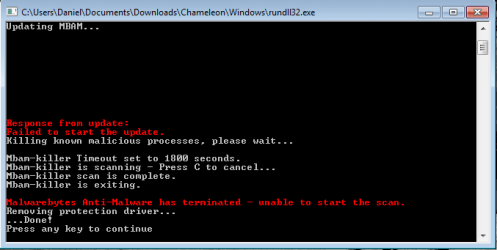
Malwarebytes Chameleon has the same problem (on every mirror) as when I open normal Malwarebytes: I get a popup saying "The application was unable to start correctly (0xe06d7363). Click OK to close the application". (I've attached a screenshot).
After I click OK It says "failed to update" and still tries to scan. (See second screenshot).
 

Attachments

  • app error.png
    app error.png
    155 KB · Views: 1
  • update fail.png
    update fail.png
    15.9 KB · Views: 12

My Computer

Computer type
Laptop
Computer Manufacturer/Model Number
Acer 5738PZG
OS
Windows Home Premium 64bit
Browser
Waterfox, Chrome, (Internet explorer)
Back
Top