Level Date and Time Source Event ID Task Category
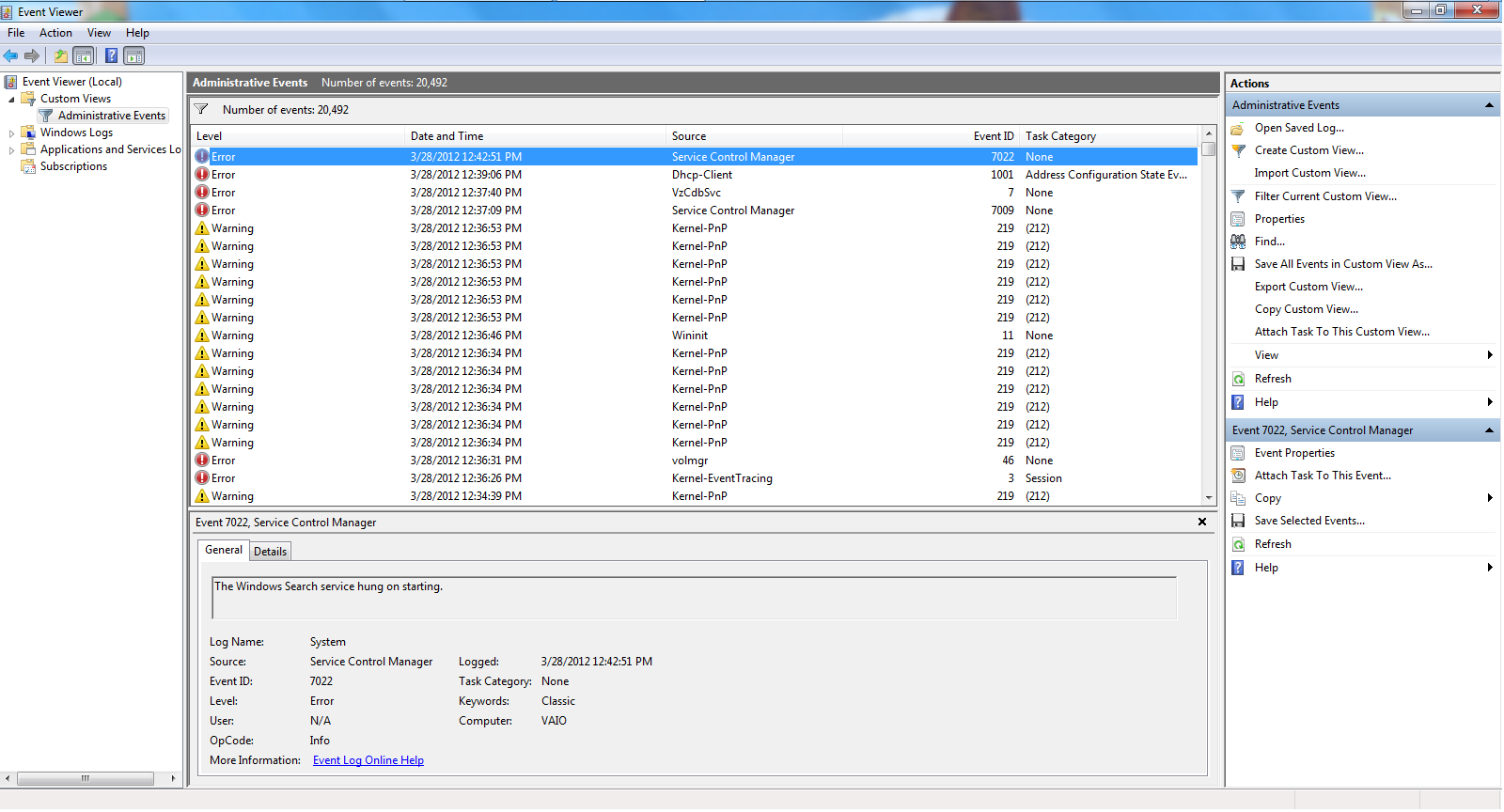
Error 3/28/2012 12:42:51 PM Service Control Manager 7022 None The Windows Search service hung on starting.
Error 3/28/2012 12:39:06 PM Microsoft-Windows-Dhcp-Client 1001 Address Configuration State Event Your computer was not assigned an address from the network (by the DHCP Server) for the Network Card with network address 0x0022FBCED7E7. The following error occurred: 0x79. Your computer will continue to try and obtain an address on its own from the network address (DHCP) server.
Error 3/28/2012 12:37:40 PM VzCdbSvc 7 None Failed to load the plug-in module. (GUID = {56F9312C-C989-4E04-8C23-299DEE3A36F5})(Error code = 0x80042019)
Error 3/28/2012 12:37:09 PM Service Control Manager 7009 None A timeout was reached (30000 milliseconds) while waiting for the Roxio Upnp Server 10 service to connect.
Warning 3/28/2012 12:36:53 PM Microsoft-Windows-Kernel-PnP 219 (212) The driver \Driver\btwavdt failed to load for the device BTHENUM\{84a1e9b8-12ba-4a9c-8ab0-a43784e0d149}_LOCALMFG&0000\7&f09749c&0&000000000000_00000002.
Warning 3/28/2012 12:36:53 PM Microsoft-Windows-Kernel-PnP 219 (212) The driver \Driver\btwl2cap failed to load for the device BTHENUM\{6e0c8f4c-d928-4852-b6b2-f0f0e0d126fa}_LOCALMFG&0000\7&f09749c&0&000000000000_00000002.
Warning 3/28/2012 12:36:53 PM Microsoft-Windows-Kernel-PnP 219 (212) The driver \Driver\btwavdt failed to load for the device BTHENUM\{24df01a9-3e4f-4c9f-9f66-5aa8ab14f8f4}_LOCALMFG&0000\7&f09749c&0&000000000000_00000002.
Warning 3/28/2012 12:36:53 PM Microsoft-Windows-Kernel-PnP 219 (212) The driver \Driver\btwavdt failed to load for the device BTHENUM\{00001112-0000-1000-8000-00805f9b34fb}_VID&0001000f_PID&0000\7&f09749c&0&A0079878F6C0_C00000000.
Warning 3/28/2012 12:36:53 PM Microsoft-Windows-Kernel-PnP 219 (212) The driver \Driver\btwavdt failed to load for the device BTHENUM\{00001112-0000-1000-8000-00805f9b34fb}_VID&00000000_PID&c053\7&f09749c&0&001963C4EC54_C00000000.
Warning 3/28/2012 12:36:53 PM Microsoft-Windows-Kernel-PnP 219 (212) The driver \Driver\btwavdt failed to load for the device BTHENUM\{0000110a-0000-1000-8000-00805f9b34fb}_VID&0001000f_PID&0000\7&f09749c&0&A0079878F6C0_C00000000.
Warning 3/28/2012 12:36:46 PM Microsoft-Windows-Wininit 11 None Custom dynamic link libraries are being loaded for every application. The system administrator should review the list of libraries to ensure they are related to trusted applications.
Warning 3/28/2012 12:36:34 PM Microsoft-Windows-Kernel-PnP 219 (212) The driver \Driver\btwavdt failed to load for the device BTHENUM\{84a1e9b8-12ba-4a9c-8ab0-a43784e0d149}_LOCALMFG&0000\7&f09749c&0&000000000000_00000002.
Warning 3/28/2012 12:36:34 PM Microsoft-Windows-Kernel-PnP 219 (212) The driver \Driver\btwl2cap failed to load for the device BTHENUM\{6e0c8f4c-d928-4852-b6b2-f0f0e0d126fa}_LOCALMFG&0000\7&f09749c&0&000000000000_00000002.
Warning 3/28/2012 12:36:34 PM Microsoft-Windows-Kernel-PnP 219 (212) The driver \Driver\btwavdt failed to load for the device BTHENUM\{24df01a9-3e4f-4c9f-9f66-5aa8ab14f8f4}_LOCALMFG&0000\7&f09749c&0&000000000000_00000002.
Warning 3/28/2012 12:36:34 PM Microsoft-Windows-Kernel-PnP 219 (212) The driver \Driver\btwavdt failed to load for the device BTHENUM\{00001112-0000-1000-8000-00805f9b34fb}_VID&0001000f_PID&0000\7&f09749c&0&A0079878F6C0_C00000000.
Warning 3/28/2012 12:36:34 PM Microsoft-Windows-Kernel-PnP 219 (212) The driver \Driver\btwavdt failed to load for the device BTHENUM\{00001112-0000-1000-8000-00805f9b34fb}_VID&00000000_PID&c053\7&f09749c&0&001963C4EC54_C00000000.
Warning 3/28/2012 12:36:34 PM Microsoft-Windows-Kernel-PnP 219 (212) The driver \Driver\btwavdt failed to load for the device BTHENUM\{0000110a-0000-1000-8000-00805f9b34fb}_VID&0001000f_PID&0000\7&f09749c&0&A0079878F6C0_C00000000.
Error 3/28/2012 12:36:31 PM volmgr 46 None Crash dump initialization failed!
Error 3/28/2012 12:36:26 PM Microsoft-Windows-Kernel-EventTracing 3 Session "Session ""Microsoft Security Client OOBE"" stopped due to the following error: 0xC000000D"
Warning 3/28/2012 12:34:39 PM Microsoft-Windows-Kernel-PnP 219 (212) The driver \Driver\btwavdt failed to load for the device BTHENUM\{84a1e9b8-12ba-4a9c-8ab0-a43784e0d149}_LOCALMFG&0000\7&f09749c&0&000000000000_00000002.
Warning 3/28/2012 12:34:39 PM Microsoft-Windows-Kernel-PnP 219 (212) The driver \Driver\btwl2cap failed to load for the device BTHENUM\{6e0c8f4c-d928-4852-b6b2-f0f0e0d126fa}_LOCALMFG&0000\7&f09749c&0&000000000000_00000002.
Warning 3/28/2012 12:34:39 PM Microsoft-Windows-Kernel-PnP 219 (212) The driver \Driver\btwavdt failed to load for the device BTHENUM\{24df01a9-3e4f-4c9f-9f66-5aa8ab14f8f4}_LOCALMFG&0000\7&f09749c&0&000000000000_00000002.
Warning 3/28/2012 12:34:38 PM Microsoft-Windows-Kernel-PnP 219 (212) The driver \Driver\btwavdt failed to load for the device BTHENUM\{00001112-0000-1000-8000-00805f9b34fb}_VID&0001000f_PID&0000\7&f09749c&0&A0079878F6C0_C00000000.
Warning 3/28/2012 12:34:38 PM Microsoft-Windows-Kernel-PnP 219 (212) The driver \Driver\btwavdt failed to load for the device BTHENUM\{00001112-0000-1000-8000-00805f9b34fb}_VID&00000000_PID&c053\7&f09749c&0&001963C4EC54_C00000000.
Warning 3/28/2012 12:34:38 PM Microsoft-Windows-Kernel-PnP 219 (212) The driver \Driver\btwavdt failed to load for the device BTHENUM\{0000110a-0000-1000-8000-00805f9b34fb}_VID&0001000f_PID&0000\7&f09749c&0&A0079878F6C0_C00000000.
Error 3/28/2012 12:34:33 PM Microsoft-Windows-Kernel-EventTracing 3 Session "Session ""Microsoft Security Client OOBE"" stopped due to the following error: 0xC000000D"
Error 3/28/2012 12:33:45 PM volmgr 46 None Crash dump initialization failed!
Warning 3/27/2012 7:09:50 PM Microsoft-Windows-WLAN-AutoConfig 4001 None "WLAN AutoConfig service has successfully stopped.
"
Warning 3/27/2012 7:09:39 PM Microsoft-Windows-User Profiles Service 1530 None "Windows detected your registry file is still in use by other applications or services. The file will be unloaded now. The applications or services that hold your registry file may not function properly afterwards.
DETAIL -
2 user registry handles leaked from \Registry\User\S-1-5-21-2341445962-973085008-1622953054-1001:
Process 1236 (\Device\HarddiskVolume3\Windows\System32\svchost.exe) has opened key \REGISTRY\USER\S-1-5-21-2341445962-973085008-1622953054-1001\Software\Microsoft\Windows\CurrentVersion\Internet Settings
Process 1236 (\Device\HarddiskVolume3\Windows\System32\svchost.exe) has opened key \REGISTRY\USER\S-1-5-21-2341445962-973085008-1622953054-1001\Software\Policies\Microsoft\Windows\CurrentVersion\Internet Settings
"
Error 3/27/2012 7:09:23 PM Application Hang 1002 (101) "The program firefox.exe version 11.0.0.4454 stopped interacting with Windows and was closed. To see if more information about the problem is available, check the problem history in the Action Center control panel.
Process ID: 1514
Start Time: 01cd0c6dd7e5dcd8
Termination Time: 0
Application Path: C:\Program Files (x86)\Mozilla Firefox\firefox.exe
Report Id: c055eb76-7861-11e1-bfea-0026433e6cd1
"
Error 3/27/2012 5:17:42 PM Microsoft-Windows-Dhcp-Client 1001 Address Configuration State Event Your computer was not assigned an address from the network (by the DHCP Server) for the Network Card with network address 0x0024BE39998C. The following error occurred: 0x79. Your computer will continue to try and obtain an address on its own from the network address (DHCP) server.
Error 3/27/2012 5:17:40 PM Microsoft-Windows-Dhcp-Client 1001 Address Configuration State Event Your computer was not assigned an address from the network (by the DHCP Server) for the Network Card with network address 0x0022FBCED7E7. The following error occurred: 0x79. Your computer will continue to try and obtain an address on its own from the network address (DHCP) server.
Error 3/27/2012 5:15:47 PM Service Control Manager 7034 None The LogMeIn Hamachi Tunneling Engine service terminated unexpectedly. It has done this 1 time(s).
Error 3/27/2012 5:15:37 PM Application Error 1000 (100) "Faulting application name: hamachi-2.exe, version: 2.1.0.166, time stamp: 0x4f4d0312
Faulting module name: ntdll.dll, version: 6.1.7601.17725, time stamp: 0x4ec4aa8e
Exception code: 0xc0000005
Fault offset: 0x000000000004e4b4
Faulting process id: 0x7c8
Faulting application start time: 0x01cd0c4be3c06c8d
Faulting application path: C:\Program Files (x86)\LogMeIn Hamachi\hamachi-2.exe
Faulting module path: C:\Windows\SYSTEM32\ntdll.dll
Report Id: ff237c07-7851-11e1-bfea-0026433e6cd1"
Error 3/27/2012 5:05:01 PM bowser 8003 None The master browser has received a server announcement from the computer VIC-PC that believes that it is the master browser for the domain on transport NetBT_Tcpip_{A5AE3F1C-8FAE-4840-B8FB-A8D8DBE7BF28}. The master browser is stopping or an election is being forced.
Error 3/27/2012 4:57:13 PM Service Control Manager 7030 None The Advanced SystemCare Service 5 service is marked as an interactive service. However, the system is configured to not allow interactive services. This service may not function properly.
Error 3/27/2012 4:09:08 PM volsnap 14 None The shadow copies of volume C: were aborted because of an IO failure on volume C:.
Error 3/27/2012 3:12:10 PM Microsoft-Windows-DistributedCOM 10010 None The server {DC0C2640-1415-4644-875C-6F4D769839BA} did not register with DCOM within the required timeout.
Error 3/27/2012 3:02:37 PM Microsoft-Windows-Dhcp-Client 1001 Address Configuration State Event Your computer was not assigned an address from the network (by the DHCP Server) for the Network Card with network address 0x0022FBCED7E7. The following error occurred: 0x79. Your computer will continue to try and obtain an address on its own from the network address (DHCP) server.
Error 3/27/2012 3:01:20 PM VzCdbSvc 7 None Failed to load the plug-in module. (GUID = {56F9312C-C989-4E04-8C23-299DEE3A36F5})(Error code = 0x80042019)
Error 3/27/2012 3:00:41 PM Microsoft-Windows-Dhcp-Client 1002 Address Configuration State Event The IP address lease 192.168.1.16 for the Network Card with network address 0x0022FBCED7E6 has been denied by the DHCP server 192.168.1.1 (The DHCP Server sent a DHCPNACK message).
Error 3/27/2012 3:00:37 PM Service Control Manager 7009 None A timeout was reached (30000 milliseconds) while waiting for the Roxio Upnp Server 10 service to connect.
Warning 3/27/2012 3:00:22 PM Microsoft-Windows-Kernel-PnP 219 (212) The driver \Driver\btwavdt failed to load for the device BTHENUM\{84a1e9b8-12ba-4a9c-8ab0-a43784e0d149}_LOCALMFG&0000\7&f09749c&0&000000000000_00000002.
Warning 3/27/2012 3:00:22 PM Microsoft-Windows-Kernel-PnP 219 (212) The driver \Driver\btwl2cap failed to load for the device BTHENUM\{6e0c8f4c-d928-4852-b6b2-f0f0e0d126fa}_LOCALMFG&0000\7&f09749c&0&000000000000_00000002.
Warning 3/27/2012 3:00:22 PM Microsoft-Windows-Kernel-PnP 219 (212) The driver \Driver\btwavdt failed to load for the device BTHENUM\{24df01a9-3e4f-4c9f-9f66-5aa8ab14f8f4}_LOCALMFG&0000\7&f09749c&0&000000000000_00000002.
Warning 3/27/2012 3:00:22 PM Microsoft-Windows-Kernel-PnP 219 (212) The driver \Driver\btwavdt failed to load for the device BTHENUM\{00001112-0000-1000-8000-00805f9b34fb}_VID&0001000f_PID&0000\7&f09749c&0&A0079878F6C0_C00000000.
Warning 3/27/2012 3:00:22 PM Microsoft-Windows-Kernel-PnP 219 (212) The driver \Driver\btwavdt failed to load for the device BTHENUM\{00001112-0000-1000-8000-00805f9b34fb}_VID&00000000_PID&c053\7&f09749c&0&001963C4EC54_C00000000.
Warning 3/27/2012 3:00:22 PM Microsoft-Windows-Kernel-PnP 219 (212) The driver \Driver\btwavdt failed to load for the device BTHENUM\{0000110a-0000-1000-8000-00805f9b34fb}_VID&0001000f_PID&0000\7&f09749c&0&A0079878F6C0_C00000000.
Warning 3/27/2012 3:00:12 PM Microsoft-Windows-Wininit 11 None Custom dynamic link libraries are being loaded for every application. The system administrator should review the list of libraries to ensure they are related to trusted applications.
Warning 3/27/2012 3:00:01 PM Microsoft-Windows-Kernel-PnP 219 (212) The driver \Driver\btwavdt failed to load for the device BTHENUM\{84a1e9b8-12ba-4a9c-8ab0-a43784e0d149}_LOCALMFG&0000\7&f09749c&0&000000000000_00000002.
Warning 3/27/2012 3:00:01 PM Microsoft-Windows-Kernel-PnP 219 (212) The driver \Driver\btwl2cap failed to load for the device BTHENUM\{6e0c8f4c-d928-4852-b6b2-f0f0e0d126fa}_LOCALMFG&0000\7&f09749c&0&000000000000_00000002.
Warning 3/27/2012 3:00:01 PM Microsoft-Windows-Kernel-PnP 219 (212) The driver \Driver\btwavdt failed to load for the device BTHENUM\{24df01a9-3e4f-4c9f-9f66-5aa8ab14f8f4}_LOCALMFG&0000\7&f09749c&0&000000000000_00000002.
Warning 3/27/2012 3:00:01 PM Microsoft-Windows-Kernel-PnP 219 (212) The driver \Driver\btwavdt failed to load for the device BTHENUM\{00001112-0000-1000-8000-00805f9b34fb}_VID&0001000f_PID&0000\7&f09749c&0&A0079878F6C0_C00000000.
Warning 3/27/2012 3:00:01 PM Microsoft-Windows-Kernel-PnP 219 (212) The driver \Driver\btwavdt failed to load for the device BTHENUM\{00001112-0000-1000-8000-00805f9b34fb}_VID&00000000_PID&c053\7&f09749c&0&001963C4EC54_C00000000.
Warning 3/27/2012 3:00:01 PM Microsoft-Windows-Kernel-PnP 219 (212) The driver \Driver\btwavdt failed to load for the device BTHENUM\{0000110a-0000-1000-8000-00805f9b34fb}_VID&0001000f_PID&0000\7&f09749c&0&A0079878F6C0_C00000000.
Error 3/27/2012 3:00:00 PM volmgr 46 None Crash dump initialization failed!
Error 3/27/2012 2:59:52 PM Microsoft-Windows-Kernel-EventTracing 3 Session "Session ""Microsoft Security Client OOBE"" stopped due to the following error: 0xC000000D"
Error 3/27/2012 2:59:08 PM volmgr 46 None Crash dump initialization failed!
Warning 3/27/2012 2:58:35 PM Microsoft-Windows-WLAN-AutoConfig 4001 None "WLAN AutoConfig service has successfully stopped.
"
Error 3/27/2012 2:54:11 PM Microsoft-Windows-Dhcp-Client 1001 Address Configuration State Event Your computer was not assigned an address from the network (by the DHCP Server) for the Network Card with network address 0x0026433E6CD1. The following error occurred: 0x79. Your computer will continue to try and obtain an address on its own from the network address (DHCP) server.
Error 3/27/2012 2:52:42 PM MsiInstaller 10005 None Product: WIDCOMM Bluetooth Software -- Internal Error 2318. C:\Program Files\WIDCOMM\Bluetooth Software\BTStackServer.exe
Error 3/27/2012 2:31:24 PM bowser 8003 None The master browser has received a server announcement from the computer VIC-PC that believes that it is the master browser for the domain on transport NetBT_Tcpip_{A5AE3F1C-8FAE-4840-B8FB-A8D8DBE7BF28}. The master browser is stopping or an election is being forced.
Error 3/27/2012 1:15:37 PM VzCdbSvc 7 None Failed to load the plug-in module. (GUID = {56F9312C-C989-4E04-8C23-299DEE3A36F5})(Error code = 0x80042019)
Error 3/27/2012 1:15:14 PM Microsoft-Windows-Dhcp-Client 1001 Address Configuration State Event Your computer was not assigned an address from the network (by the DHCP Server) for the Network Card with network address 0x0022FBCED7E7. The following error occurred: 0x79. Your computer will continue to try and obtain an address on its own from the network address (DHCP) server.
Error 3/27/2012 1:13:30 PM Microsoft-Windows-PrintService 315 Sharing a printer The print spooler failed to share printer HP Photosmart 7760 series with shared resource name HP Photosmart 7760 series. Error 2114. The printer cannot be used by others on the network.
Error 3/27/2012 1:13:30 PM Microsoft-Windows-PrintService 315 Sharing a printer The print spooler failed to share printer HP Photosmart C4400 series with shared resource name HP Photosmart C4400 series. Error 2114. The printer cannot be used by others on the network.
Error 3/27/2012 1:13:29 PM Service Control Manager 7009 None A timeout was reached (30000 milliseconds) while waiting for the Roxio Upnp Server 10 service to connect.
Error 3/27/2012 1:13:22 PM Microsoft-Windows-Dhcp-Client 1002 Address Configuration State Event The IP address lease 192.168.1.15 for the Network Card with network address 0x0022FBCED7E6 has been denied by the DHCP server 192.168.1.1 (The DHCP Server sent a DHCPNACK message).
Warning 3/27/2012 1:13:05 PM Microsoft-Windows-Wininit 11 None Custom dynamic link libraries are being loaded for every application. The system administrator should review the list of libraries to ensure they are related to trusted applications.
Error 3/27/2012 1:12:57 PM volmgr 46 None Crash dump initialization failed!
Error 3/27/2012 1:12:45 PM Microsoft-Windows-Kernel-EventTracing 3 Session "Session ""Microsoft Security Client OOBE"" stopped due to the following error: 0xC000000D"
Error 3/27/2012 1:12:01 PM volmgr 46 None Crash dump initialization failed!
Warning 3/26/2012 11:05:26 PM Microsoft-Windows-WLAN-AutoConfig 4001 None "WLAN AutoConfig service has successfully stopped.
"
Error 3/26/2012 10:38:58 PM Microsoft-Windows-Dhcp-Client 1001 Address Configuration State Event Your computer was not assigned an address from the network (by the DHCP Server) for the Network Card with network address 0x0022FBCED7E7. The following error occurred: 0x79. Your computer will continue to try and obtain an address on its own from the network address (DHCP) server.
Error 3/26/2012 10:37:25 PM VzCdbSvc 7 None Failed to load the plug-in module. (GUID = {56F9312C-C989-4E04-8C23-299DEE3A36F5})(Error code = 0x80042019)
Error 3/26/2012 10:37:01 PM Service Control Manager 7009 None A timeout was reached (30000 milliseconds) while waiting for the Roxio Upnp Server 10 service to connect.
Warning 3/26/2012 10:36:49 PM Microsoft-Windows-Wininit 11 None Custom dynamic link libraries are being loaded for every application. The system administrator should review the list of libraries to ensure they are related to trusted applications.
Error 3/26/2012 10:36:40 PM volmgr 46 None Crash dump initialization failed!
Error 3/26/2012 10:36:28 PM Microsoft-Windows-Kernel-EventTracing 3 Session "Session ""Microsoft Security Client OOBE"" stopped due to the following error: 0xC000000D"
Error 3/26/2012 10:35:47 PM volmgr 46 None Crash dump initialization failed!
Error 3/26/2012 12:33:38 PM Service Control Manager 7000 None "The Distributed Link Tracking Client service failed to start due to the following error:
A system shutdown is in progress."
Error 3/26/2012 12:33:38 PM Service Control Manager 7000 None "The Desktop Window Manager Session Manager service failed to start due to the following error:
A system shutdown is in progress."
Error 3/26/2012 12:33:38 PM Service Control Manager 7001 None "The WLAN AutoConfig service depends on the Extensible Authentication Protocol service which failed to start because of the following error:
A system shutdown is in progress."
Error 3/26/2012 12:33:38 PM Service Control Manager 7000 None "The Extensible Authentication Protocol service failed to start due to the following error:
A system shutdown is in progress."
Error 3/26/2012 12:33:38 PM Service Control Manager 7000 None "The Portable Device Enumerator Service service failed to start due to the following error:
A system shutdown is in progress."
Error 3/26/2012 12:33:38 PM Service Control Manager 7001 None "The Windows Driver Foundation - User-mode Driver Framework service depends on the Plug and Play service which failed to start because of the following error:
A system shutdown is in progress."
Error 3/26/2012 12:33:38 PM Service Control Manager 7000 None "The Plug and Play service failed to start due to the following error:
A system shutdown is in progress."
Error 3/26/2012 12:33:38 PM Service Control Manager 7000 None "The Human Interface Device Access service failed to start due to the following error:
A system shutdown is in progress."
Error 3/26/2012 12:33:11 PM Microsoft Antimalware 2001 None "Microsoft Antimalware has encountered an error trying to update signatures.
New Signature Version:
Previous Signature Version: 1.123.340.0
Update Source: Microsoft Update Server
Update Stage: Search
Source Path:
Microsoft Corporation: Software, Smartphones, Online, Games, Cloud Computing, IT Business Technology, Downloads
Signature Type: AntiVirus
Update Type: Full
User: NT AUTHORITY\SYSTEM
Current Engine Version:
Previous Engine Version: 1.1.8202.0
Error code: 0x8024402c
Error description: An unexpected problem occurred while checking for updates. For information on installing or troubleshooting updates, see Help and Support. "
Error 3/26/2012 12:32:38 PM Service Control Manager 7032 None "The Service Control Manager tried to take a corrective action (Restart the service) after the unexpected termination of the Program Compatibility Assistant Service service, but this action failed with the following error:
An instance of the service is already running."
Warning 3/26/2012 12:31:59 PM Microsoft-Windows-DNS-Client 1014 None Name resolution for the name
www.facebook.com timed out after none of the configured DNS servers responded.
Error 3/26/2012 12:31:38 PM Service Control Manager 7031 None The Windows Driver Foundation - User-mode Driver Framework service terminated unexpectedly. It has done this 1 time(s). The following corrective action will be taken in 120000 milliseconds: Restart the service.
Error 3/26/2012 12:31:38 PM Service Control Manager 7031 None The Portable Device Enumerator Service service terminated unexpectedly. It has done this 1 time(s). The following corrective action will be taken in 120000 milliseconds: Restart the service.
Error 3/26/2012 12:31:38 PM Service Control Manager 7031 None The WLAN AutoConfig service terminated unexpectedly. It has done this 1 time(s). The following corrective action will be taken in 120000 milliseconds: Restart the service.
Error 3/26/2012 12:31:38 PM Service Control Manager 7034 None The Diagnostic System Host service terminated unexpectedly. It has done this 1 time(s).
Error 3/26/2012 12:31:38 PM Service Control Manager 7031 None The Desktop Window Manager Session Manager service terminated unexpectedly. It has done this 1 time(s). The following corrective action will be taken in 120000 milliseconds: Restart the service.
Error 3/26/2012 12:31:38 PM Service Control Manager 7031 None The Distributed Link Tracking Client service terminated unexpectedly. It has done this 1 time(s). The following corrective action will be taken in 120000 milliseconds: Restart the service.
Error 3/26/2012 12:31:38 PM Service Control Manager 7031 None The Superfetch service terminated unexpectedly. It has done this 1 time(s). The following corrective action will be taken in 60000 milliseconds: Restart the service.
Error 3/26/2012 12:31:38 PM Service Control Manager 7031 None The Program Compatibility Assistant Service service terminated unexpectedly. It has done this 1 time(s). The following corrective action will be taken in 60000 milliseconds: Restart the service.
Error 3/26/2012 12:31:38 PM Service Control Manager 7031 None The Network Connections service terminated unexpectedly. It has done this 1 time(s). The following corrective action will be taken in 100 milliseconds: Restart the service.
Error 3/26/2012 12:31:38 PM Service Control Manager 7031 None The HomeGroup Listener service terminated unexpectedly. It has done this 1 time(s). The following corrective action will be taken in 60000 milliseconds: Restart the service.
Error 3/26/2012 12:31:38 PM Service Control Manager 7031 None The Human Interface Device Access service terminated unexpectedly. It has done this 1 time(s). The following corrective action will be taken in 120000 milliseconds: Restart the service.
Error 3/26/2012 12:31:38 PM Service Control Manager 7031 None The Windows Audio Endpoint Builder service terminated unexpectedly. It has done this 1 time(s). The following corrective action will be taken in 60000 milliseconds: Restart the service.
Error 3/26/2012 12:31:11 PM Service Control Manager 7034 None The VAIO Media plus Digital Media Server service terminated unexpectedly. It has done this 1 time(s).
Error 3/26/2012 12:31:02 PM Service Control Manager 7034 None The VAIO Content Metadata Intelligent Analyzing Manager service terminated unexpectedly. It has done this 1 time(s).
Error 3/26/2012 12:30:59 PM Service Control Manager 7034 None The VAIO Media plus Device Searcher service terminated unexpectedly. It has done this 1 time(s).
Error 3/26/2012 12:30:53 PM Service Control Manager 7034 None The VAIO Content Folder Watcher service terminated unexpectedly. It has done this 1 time(s).
Error 3/26/2012 12:30:49 PM Service Control Manager 7034 None The VAIO Media plus Database Manager service terminated unexpectedly. It has done this 1 time(s).
Error 3/26/2012 12:29:41 PM Service Control Manager 7009 None A timeout was reached (30000 milliseconds) while waiting for the Windows Error Reporting Service service to connect.
Error 3/26/2012 12:27:08 PM Service Control Manager 7031 None The Windows Media Player Network Sharing Service service terminated unexpectedly. It has done this 1 time(s). The following corrective action will be taken in 30000 milliseconds: Restart the service.
Error 3/26/2012 12:24:27 PM Microsoft-Windows-Dhcp-Client 1001 Address Configuration State Event Your computer was not assigned an address from the network (by the DHCP Server) for the Network Card with network address 0x0022FBCED7E7. The following error occurred: 0x79. Your computer will continue to try and obtain an address on its own from the network address (DHCP) server.
Error 3/26/2012 12:23:03 PM VzCdbSvc 7 None Failed to load the plug-in module. (GUID = {56F9312C-C989-4E04-8C23-299DEE3A36F5})(Error code = 0x80042019)
Error 3/26/2012 12:22:38 PM Service Control Manager 7009 None A timeout was reached (30000 milliseconds) while waiting for the Roxio Upnp Server 10 service to connect.
Warning 3/26/2012 12:22:22 PM Microsoft-Windows-Wininit 11 None Custom dynamic link libraries are being loaded for every application. The system administrator should review the list of libraries to ensure they are related to trusted applications.
Error 3/26/2012 12:22:13 PM volmgr 46 None Crash dump initialization failed!
Error 3/26/2012 12:22:02 PM Microsoft-Windows-Kernel-EventTracing 3 Session "Session ""Microsoft Security Client OOBE"" stopped due to the following error: 0xC000000D"
Error 3/26/2012 12:21:18 PM volmgr 46 None Crash dump initialization failed!
Warning 3/26/2012 12:25:25 AM Microsoft-Windows-WLAN-AutoConfig 4001 None "WLAN AutoConfig service has successfully stopped.
"
Error 3/26/2012 12:25:16 AM Service Control Manager 7011 None A timeout (30000 milliseconds) was reached while waiting for a transaction response from the SOHCImp service.
Warning 3/26/2012 12:24:27 AM Microsoft-Windows-User Profiles Service 1530 None "Windows detected your registry file is still in use by other applications or services. The file will be unloaded now. The applications or services that hold your registry file may not function properly afterwards.
DETAIL -
1 user registry handles leaked from \Registry\User\S-1-5-21-2341445962-973085008-1622953054-1001:
Process 4992 (\Device\HarddiskVolume3\Program Files (x86)\Mozilla Firefox\firefox.exe) has opened key \REGISTRY\USER\S-1-5-21-2341445962-973085008-1622953054-1001\Software\Microsoft\Windows\CurrentVersion\Internet Settings
"
Here are the errors for the past few days.