Spyhunter on GRUB4DOS at bootup

ritchie52

New member
Local time
12:22 AM
Messages
6
Hi, need help. Whenever I reboot I get this grub4dos screen with 3 choices; spyhunter, windows vista and windows 7 with spyhunter highlighted.
If I don't quickly scroll to windows 7 and enter I get a cycle of dos screens saying stuff about spyhunter then end up back at the grub4dos screen with the 3 choices again. If I don't select windows 7 the process cycles again.
When I select windows 7 I get normal bootup.

I have had Enigma Spyhunter on my computer but have recently uninstalled it and deleted everything I can find on it. But now still have this problem.

Before this my windows 7 system would boot up with no pauses and certainly not stopping at any DOS screens.

Thanks. :huh:
 

My Computer My Computer

Computer type
Laptop
Computer Manufacturer/Model Number
Toshiba Satelite
OS
Windows 7 Home Premium 64bit
Antivirus
Microsoft Security Essentials
Browser
Internet Explorer
Anyone??! :)
 

My Computer My Computer

Computer type
Laptop
Computer Manufacturer/Model Number
Toshiba Satelite
OS
Windows 7 Home Premium 64bit
Antivirus
Microsoft Security Essentials
Browser
Internet Explorer
I don't think anyone knows what spyhunter is.

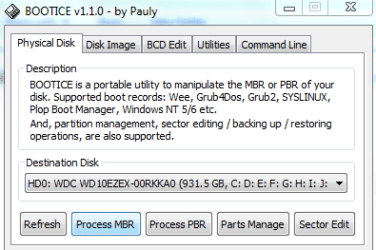
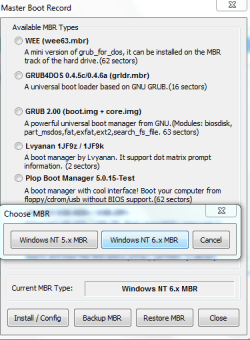
Seems it has inserted a boot menu entry of some kind. Have you installed grub4dos?

If so, just overwrite the mbr with the standard windows mbr NT6 code.

However, if it is a windows boot menu entry, then you can remove it from msconfig, under the Boot tab.
 

My Computers My Computers

System One System Two

  • Computer type
    PC/Desktop
    OS
    7 X64
    CPU
    i5 8400
    Motherboard
    gigabyte b365m ds3h
    Memory
    2x8gb 3200mhz
    Hard Drives
    various
    PSU
    pure power 11 400w cm
    Case
    Coolermaster
    Cooling
    cryorig m9i
  • Computer type
    PC/Desktop
    OS
    7x64
    CPU
    g5400
    Motherboard
    ga b365m ds3h
    Memory
    8gb ddr4 2400
    PSU
    xfx pro 450w
I don't think anyone knows what spyhunter is.

Seems it has inserted a boot menu entry of some kind. Have you installed grub4dos?

If so, just overwrite the mbr with the standard windows mbr NT6 code.

However, if it is a windows boot menu entry, then you can remove it from msconfig, under the Boot tab.

Thanks for that, no I didn't install GRUB4DOS. Spyhunter is from Enigma Software Group, it is a spyware and malware protection application.

Excuse ignorance but could you simplify "overwrite the mbr with the standard windows mbr NT6 code".

I looked in msconfig boot tab, all that was there is Windows 7 (C:\windows):Current OS;Default OS

Thanks :)
 

My Computer My Computer

Computer type
Laptop
Computer Manufacturer/Model Number
Toshiba Satelite
OS
Windows 7 Home Premium 64bit
Antivirus
Microsoft Security Essentials
Browser
Internet Explorer

My Computers My Computers

System One System Two

  • Computer type
    PC/Desktop
    OS
    7 X64
    CPU
    i5 8400
    Motherboard
    gigabyte b365m ds3h
    Memory
    2x8gb 3200mhz
    Hard Drives
    various
    PSU
    pure power 11 400w cm
    Case
    Coolermaster
    Cooling
    cryorig m9i
  • Computer type
    PC/Desktop
    OS
    7x64
    CPU
    g5400
    Motherboard
    ga b365m ds3h
    Memory
    8gb ddr4 2400
    PSU
    xfx pro 450w

My Computer My Computer

Computer type
PC/Desktop
Computer Manufacturer/Model Number
Bruce ... somewhere in his 40's
OS
Windows 7 Ultimate 32bit SP1
CPU
Intel(R) Core(TM)2 Quad CPU @ 2.40GHz, 2400 MHz
Motherboard
INTEL/D975XBX2
Memory
4 GB
Graphics Card(s)
ATI Radeon HD 2600 Pro
Monitor(s) Displays
Samsung SyncMaster 914v
Screen Resolution
1280 x 1024
Hard Drives
2/500GB each ... ST3500630AS ATA Device.
One is not connected
PSU
Rocketfish 700 W
Case
G.Skill Gigabyte Chassis
Keyboard
Standard PS/2 Keyboard
Mouse
Microsoft PS/2 Mouse
Internet Speed
DSL
Antivirus
Avira Internet Security
Browser
IE 11
Other Info
ATI HDMI Audio
ritchie, try this Fix problems with programs that can't be installed or uninstalled
I'm informed about Enigma Spyhunter ---> :rolleyes:
You might look at the last reply on this page, too I cannot UNINSTALL Spy Hunter no matter what I try! - Microsoft Community

If that doesn't work, let me know so we can go about removing this piece of work.

Hi Jacee, i've pretty much removed all of spyhunter and it doesn't show as a program to uninstall with Microsoft Fixit. It just comes up as an option in GRUB4DOS when I reboot. Exactly as I describe in my first post.

This process also leaves a Notepad document in Computer C: saying...... * Scanning 'Host' directory...
Finishing...
spyhunter.fix not found!
 

My Computer My Computer

Computer type
Laptop
Computer Manufacturer/Model Number
Toshiba Satelite
OS
Windows 7 Home Premium 64bit
Antivirus
Microsoft Security Essentials
Browser
Internet Explorer
Let's take a look to see where this problem might be.

Download DDS from one of these links:
DDS.com
DDS.pif
  • Disable any script blocking protection
  • Double click the dds icon to run the tool.
  • When done, DDS will open two (2) logs:
    1. DDS.txt
    2. Attach.txt <--- will be minimized in the task tray
  • Save both reports to your desktop.
Include the contents of both logs in your next post.
The scan will instruct you to post Attach.txt as an attachment.
 

My Computer My Computer

Computer type
PC/Desktop
Computer Manufacturer/Model Number
Bruce ... somewhere in his 40's
OS
Windows 7 Ultimate 32bit SP1
CPU
Intel(R) Core(TM)2 Quad CPU @ 2.40GHz, 2400 MHz
Motherboard
INTEL/D975XBX2
Memory
4 GB
Graphics Card(s)
ATI Radeon HD 2600 Pro
Monitor(s) Displays
Samsung SyncMaster 914v
Screen Resolution
1280 x 1024
Hard Drives
2/500GB each ... ST3500630AS ATA Device.
One is not connected
PSU
Rocketfish 700 W
Case
G.Skill Gigabyte Chassis
Keyboard
Standard PS/2 Keyboard
Mouse
Microsoft PS/2 Mouse
Internet Speed
DSL
Antivirus
Avira Internet Security
Browser
IE 11
Other Info
ATI HDMI Audio
ritchie52,

Is this what you are getting:
https://www.dropbox.com/s/zw2zn7llo1gfxp8/122412102120.jpg

Except, in your case, it has Windows Vista and Windows 7?


:info: Try using EasyBCD to get rid of the GRUB4DOS issue:

Download:
EasyBCD - NeoSmart Technologies
You will need to Register, however, in the name, you can just use initials.

Download the file
Save to the Desktop
Double-click the program to run it.

At the program console, click on: BCD Back-Up Repair
On the next window press: Backup Settings

The settings are backed up to the following file:
C:\Users\Your User Name\Documents\EasyBCD Backup (2013-09-04) (3).bcd

Next, under BCD Management Options, select: Re-create/repair boot files
Press: Perform Action

Restart the computer.

:ar: Is the GRUB4DOS gone?

:info: Please proceed with Jacee's instructions on Post #10, since it is also necessary to remove all the SpyHunter folders/files, and service such as:

C:\bootsqm.dat
C:\Users\kkm\Desktop\SpyHunter.lnk
C:\sh4ldr
C:\Program Files\Enigma Software Group
C:\Windows\System32\Drivers\EsgScanner.sys
C:\Users\kkm\Downloads\SpyHunter-Installer.exe
C:\Program Files\Enigma Software Group\SpyHunter\SH4Service.exe
 
Last edited:

My Computer My Computer

Computer type
PC/Desktop
Computer Manufacturer/Model Number
An ol' eMachines
OS
Windows 7 Home Premium
Internet Speed
Fine for me...I'm retired!
Has anyone figure out a way to get rid of the loop? I have tried WindGrub, EasyBCD and countless other things but I still get the darn bios menu which is stuck in a loop. Any help is greatly appreciated!!
 

My Computer My Computer

Computer type
PC/Desktop
OS
Win64
tre,


Do you have a Windows 7 CD/DVD?
 

My Computer My Computer

Computer type
PC/Desktop
Computer Manufacturer/Model Number
An ol' eMachines
OS
Windows 7 Home Premium
Internet Speed
Fine for me...I'm retired!
grubdos 4 loader at bootup after attempting to use spyhunter

I have done everything above and still have the grubdos loader coming up causing the computer to stay in a reboot loop. spyhunter.fix not found! and then the pc reboot loops
 

My Computer My Computer

Computer type
PC/Desktop
OS
7hpx64
Hi man I got the solution for this bug with GRUB4DOS and Spyhunter....

boot the exactly version of your windows 7(32 or 64) at the first screen click next...
after go to reapair your computer

start prompt

you will see:

x:\Sources/

follow this steps now:

x:\Sources/bootrec /fixmbr (press enter)
the operation was concluded

x:\Sources/bootrec.exe /fixmbr (press enter)
the operation was concluded

now close the prompt and go to the first option, repair your windows startup and follow all the steps...

Its amazing man.....at the end of the process just reboot.....and Vualá....you wont see the **** spyhunter error....
 

My Computer My Computer

Computer type
PC/Desktop
Computer Manufacturer/Model Number
dell
OS
windows 7
CPU
core 2 duo
Motherboard
asus
Memory
8gb
Graphics Card(s)
512
Hard Drives
1tera
Back
Top