SSD Questions

ROBO731

New member
Member
VIP
Local time
8:10 AM
Messages
223
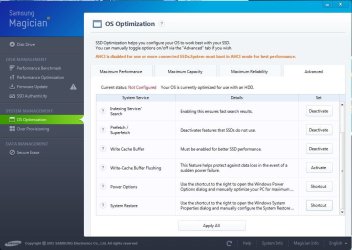
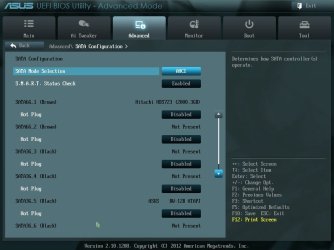
Once again I have some questions about my SSD. I have a 256 GB Samsung 840 Pro SSD. I have my user folders on a 2 TB Seagate SSD. I'm looking to optimize the performance. In my bios, it says that my system boots in AHCI mode (See images). The registry also has the appropriate value set to zero. When I open Samsungs software, SSD Magician it says that I'm not booting in AHCI mode (See images).

My other questions are about OS customization:

  1. This software recommends that I allot 23.8 GB of space for over provisioning. I have plenty of space left on the drive so do you think this would be a good idea or should I adjust the amount?
  2. I have 16 GB worth of RAM. What would be good parameters for my virtual memory or should I just let windows handle it?
  3. Should I deactivate Prefetch/Superfetch?
  4. Should I activate Write-Cache Buffer Flushing?
  5. How should I adjust System Restore?
Some of these settings I can judge for myself, but I'd like to hear other people's opinions on them.


Attachments
  • Advanced.jpg
    Advanced.jpg
    60.5 KB · Views: 21
  • Capture.JPG
    Capture.JPG
    84.6 KB · Views: 18

My Computer

OS
Windows 7 Home Premium x64
CPU
Intel i7-2600K
Motherboard
ASUS Sabertooth Z77
Memory
G.SKILL Ripjaws (16 GB Total)
Graphics Card(s)
EVGA GeForce GTX 560 Ti
Monitor(s) Displays
ASUS
Screen Resolution
1920x1080 (2 Monitors)
Hard Drives
Hitachi GST Deskstar 2 TB (HDD)
Samsung 840 Pro 256 GB (SSD)
PSU
SeaSonic X Series X650 Gold
Case
Antec DF 85
Keyboard
Microsoft SideWinder X4
Mouse
MadCatz M.M.O. 7 & Logitech G35
Internet Speed
50 down
Antivirus
Avast Free, SuperAntiSpyware Free, Malwarebytes Free
Browser
Mozilla Firefox
Once again I have some questions about my SSD. I have a 256 GB Samsung 840 Pro SSD. I have my user folders on a 2 TB Seagate SSD. I'm looking to optimize the performance. In my bios, it says that my system boots in AHCI mode (See images). The registry also has the appropriate value set to zero. When I open Samsungs software, SSD Magician it says that I'm not booting in AHCI mode (See images).

I'm glad to see that it's in AHCI mode.


My other questions are about OS customization:

  1. This software recommends that I allot 23.8 GB of space for over provisioning. I have plenty of space left on the drive so do you think this would be a good idea or should I adjust the amount?
  2. I have 16 GB worth of RAM. What would be good parameters for my virtual memory or should I just let windows handle it?
  3. Should I deactivate Prefetch/Superfetch?
  4. Should I activate Write-Cache Buffer Flushing?
  5. How should I adjust System Restore?
Some of these settings I can judge for myself, but I'd like to hear other people's opinions on them.


  1. I don't know if over-provisioning is necessary, so I'll let someone answer that who has the definitive answer. However, I thought the days of needing to over-provision were long gone.
  2. I recommend disabling the Page File entirely. It will free up about 16GB of space and it will also show you if you really need the Page File.
  3. I recommend disabling both, but I don't remember why. I think it has something to do with those only benefiting hard drives.
  4. You can, but if you have a power failure, then you could lose data (I don't know how much or if it's all of your data, but it sounds risky to me). Therefore, if you have an Uninterruptable Power Supply, then go ahead and enable it. Otherwise, I wouldn't enable it.
  5. I have System Restore disabled, but I would leave it enabled at its default setting if you feel you'd like to be able to use it just in case.
 

My Computer

Computer type
PC/Desktop
Thanks for the suggestions. So do you think that the message from Samsung Magician is wrong? I think it's either wrong or maybe because I also have my HDD.


  1. Okay, I'll wait for someone else to chime in.
  2. I have disabled the page file for the SSD, is there any benefit to enabling a page file on my HDD?
  3. I deactivated prefetch and superfetch. I don't think that SSDs use this feature. How will this affect my HDD?
  4. I have enabled "Write Cache Buffer" which improves performance and I also enabled Write-Cache Buffer Flushing which helps prevent data loss in the event of a power failure.
  5. I forgot that I have already configured System Restore, by turning it off for this drive.
  6. What is the benefit of disabling the Indexing Service/Search?
 

My Computer

OS
Windows 7 Home Premium x64
CPU
Intel i7-2600K
Motherboard
ASUS Sabertooth Z77
Memory
G.SKILL Ripjaws (16 GB Total)
Graphics Card(s)
EVGA GeForce GTX 560 Ti
Monitor(s) Displays
ASUS
Screen Resolution
1920x1080 (2 Monitors)
Hard Drives
Hitachi GST Deskstar 2 TB (HDD)
Samsung 840 Pro 256 GB (SSD)
PSU
SeaSonic X Series X650 Gold
Case
Antec DF 85
Keyboard
Microsoft SideWinder X4
Mouse
MadCatz M.M.O. 7 & Logitech G35
Internet Speed
50 down
Antivirus
Avast Free, SuperAntiSpyware Free, Malwarebytes Free
Browser
Mozilla Firefox
A page file is needed on the C drive to capture Dump files if your system ever crashes and you need that info.
Some programs require a page file or you can get an error.
I always have a 200MB min. page file on C, and a larger one on another non-OS spinner...
Hasn't caused me any problems, and doesn't use too much space imho.
I've never had Win increase the space used from the minimum I set, but that could depend on the programs a person uses...
 

My Computer

Computer type
PC/Desktop
Computer Manufacturer/Model Number
home built
OS
Multi-Boot W7_Pro_x64 W8.1_Pro_x64 W10_Pro_x64 +Linux_VMs +Chromium_VM
CPU
AMD Athlon II x4 620
Motherboard
Gigabyte GA-MA785G-UD3H
Memory
6GB GSkill DDR2 800
Graphics Card(s)
AMD 4670 GPU + AMD 4200 IGP
Sound Card
on board Realtek ALC889A
Monitor(s) Displays
RCA 40" LCD TV, Insignia 32" LCD TV, HP 15" LCD monitor
Screen Resolution
1680 x 1050
Hard Drives
OCZ Vertex 3 120GB,
Samsung F3 1TB (3),
Several others - WD, Seagate, Hitachi, ...
PSU
Corsair 500 W
Case
Rosewill mid tower
Cooling
CM 90mm rifle
Keyboard
Gyration wireless, Logitech wireless, Dell USB wired
Mouse
Gyration wireless, Logitech wireless, V7 USB wired
Internet Speed
Spectrum - 100Mbps D / 10Mbps U
Antivirus
Avast, MBAM3, EMET, WinPatrol
Browser
Pale Moon, Firefox, IE
Other Info
2 multi-boot PC's
Mainly HTPC/Office/Gen purpose (no gaming).
Trendnet USB KVM.
LG DVD burner/Blue Ray Player.
Tray system for removable SATA backup drives.

Not currently OCd, under-volted.
I use Hybrid sleep, rarely re-boot or shutdown.

Hauppauge HD-PVR, Avermedia PCIe TV Tuner, Hauppauge PCI TV Tuner.
Thanks for the suggestions. So do you think that the message from Samsung Magician is wrong? I think it's either wrong or maybe because I also have my HDD.

  1. Okay, I'll wait for someone else to chime in.
  2. I have disabled the page file for the SSD, is there any benefit to enabling a page file on my HDD?
  3. I deactivated prefetch and superfetch. I don't think that SSDs use this feature. How will this affect my HDD?
  4. I have enabled "Write Cache Buffer" which improves performance and I also enabled Write-Cache Buffer Flushing which helps prevent data loss in the event of a power failure.
  5. I forgot that I have already configured System Restore, by turning it off for this drive.
  6. What is the benefit of disabling the Indexing Service/Search?

  1. Cool beans. hehe
  2. If you find that some program needs the Page File, then create a small one on your solid state drive.
  3. I think Prefetch and Superfetch are only for launching programs.
  4. No, enabling Write-Cache Buffer Flushing presents the risk of data loss in the event of a power failure. Disable it to avoid this risk.
  5. Oh, ok. :)
  6. I don't know of any benefit to disabling Indexing/Search. I leave it enabled because of the benefits it provides to the user-friendliness of Windows 7.
 

My Computer

Computer type
PC/Desktop
Your picture of Bios shows you have a Hatchi Hard Drive plugged into Sata port 1 and shows no SSD. The SSD should be in sata port 1 where the Hathci is currently plugged in. I suspect you have an ASMedia controller on the board, and your SSD is plugged in there which may be why it is not showing as AHCI mode. I suggest you set a 1GB (1024MB) page file. With 16GB of ram, I doubt it will be used, but it is required to write dimp files in case of a BSOD. Without a dump file the cause of a BSOD is near impossible to hunt down. The overprovisioning is to allow for more namd to be replaced if/when the nand gets used/damaged. System restore can save you many a headache, I suggest you enable it, but set it's space as 5%. Like TwoCables, I know of no reason to disable Indexing/Search.
 

My Computers

System One System Two

  • Computer type
    PC/Desktop
    Computer Manufacturer/Model Number
    ALWAYS UNDER CONSTRUCTION
    OS
    Windows 11 Pro
    CPU
    Ryzen 9 5900X
    Motherboard
    Asus X570 Crosshair Viii Hero
    Memory
    32GB G Skill DDR4-3600
    Graphics Card(s)
    EVGA RTX 3080 FTW 3 Ultra
    Sound Card
    On Board/Sennheiser PC37X Headset
    Monitor(s) Displays
    3 X Asus 27"
    Screen Resolution
    2560x1440
    Hard Drives
    2 X 1 TB NVME drives
    PSU
    EVGA 850
    Case
    Phanteks Eclipse P400A
    Cooling
    EVGA 280 AIO
    Keyboard
    Logitech G510s/ Logitech G13
    Mouse
    Logitech G502
    Internet Speed
    24/1
    Antivirus
    ESET/MBAM Pro/SAS Pro
    Browser
    Chrome/ Firefox/ Edge
  • Computer type
    Laptop
    System Manufacturer/Model Number
    Dell 16 Plus
    OS
    Windows 11 Pro
    CPU
    Intel Ultra 9 288V
    Memory
    32 GB LPDDR5X 8533
    Monitor(s) Displays
    16" Mini-LED HDR600 Touch 90 Hz
    Screen Resolution
    2560X1600
    Hard Drives
    1 TB NVME
Your picture of Bios shows you have a Hatchi Hard Drive plugged into Sata port 1 and shows no SSD. The SSD should be in sata port 1 where the Hathci is currently plugged in. I suspect you have an ASMedia controller on the board, and your SSD is plugged in there which may be why it is not showing as AHCI mode.

Good catch. For some reason, I read it as this: "SSD Magician it says that I'm booting in AHCI mode (See images)." (that is, I didn't see the word "not").

That changes everything and it tells me that you're correct: the solid state drive is plugged into one of the SATA ports that are controlled by either the Marvell or ASMedia controller (whichever the case may be for this specific ASUS motherboard). It needs to be plugged into one of the brown SATA ports!
 

My Computer

Computer type
PC/Desktop
Just lucky, I guess.
 

My Computers

System One System Two

  • Computer type
    PC/Desktop
    Computer Manufacturer/Model Number
    ALWAYS UNDER CONSTRUCTION
    OS
    Windows 11 Pro
    CPU
    Ryzen 9 5900X
    Motherboard
    Asus X570 Crosshair Viii Hero
    Memory
    32GB G Skill DDR4-3600
    Graphics Card(s)
    EVGA RTX 3080 FTW 3 Ultra
    Sound Card
    On Board/Sennheiser PC37X Headset
    Monitor(s) Displays
    3 X Asus 27"
    Screen Resolution
    2560x1440
    Hard Drives
    2 X 1 TB NVME drives
    PSU
    EVGA 850
    Case
    Phanteks Eclipse P400A
    Cooling
    EVGA 280 AIO
    Keyboard
    Logitech G510s/ Logitech G13
    Mouse
    Logitech G502
    Internet Speed
    24/1
    Antivirus
    ESET/MBAM Pro/SAS Pro
    Browser
    Chrome/ Firefox/ Edge
  • Computer type
    Laptop
    System Manufacturer/Model Number
    Dell 16 Plus
    OS
    Windows 11 Pro
    CPU
    Intel Ultra 9 288V
    Memory
    32 GB LPDDR5X 8533
    Monitor(s) Displays
    16" Mini-LED HDR600 Touch 90 Hz
    Screen Resolution
    2560X1600
    Hard Drives
    1 TB NVME
I have noticed that some strange things happen with the drive, like the option to eject the drive and something which happens at boot which didn't with my HDD. I was going to ask about it, but it looks like you guys hit the nail on the head. I'll adjust next time I shut down.

Thanks for the suggestions. So do you think that the message from Samsung Magician is wrong? I think it's either wrong or maybe because I also have my HDD.

  1. Okay, I'll wait for someone else to chime in.
  2. I have disabled the page file for the SSD, is there any benefit to enabling a page file on my HDD?
  3. I deactivated prefetch and superfetch. I don't think that SSDs use this feature. How will this affect my HDD?
  4. I have enabled "Write Cache Buffer" which improves performance and I also enabled Write-Cache Buffer Flushing which helps prevent data loss in the event of a power failure.
  5. I forgot that I have already configured System Restore, by turning it off for this drive.
  6. What is the benefit of disabling the Indexing Service/Search?

  1. Cool beans. hehe
  2. If you find that some program needs the Page File, then create a small one on your solid state drive.
  3. I think Prefetch and Superfetch are only for launching programs.
  4. No, enabling Write-Cache Buffer Flushing presents the risk of data loss in the event of a power failure. Disable it to avoid this risk.
  5. Oh, ok. :)
  6. I don't know of any benefit to disabling Indexing/Search. I leave it enabled because of the benefits it provides to the user-friendliness of Windows 7.


Well, here's what the software says about Write Cache Buffer and Write-Cache Buffer Flushing:

If you are using the Windows Write-Cache Buffer and experience a loss of power or a device failure, any data stored in the cache memory could be lost or corrupted. Windows Write-Cache Buffer Flushing should be enabled to ensure data integrity. In particular, this feature is important if your SSD is being used in a server application. When using an SSD and HDD together, this feature should also be turned on.

Right now, I have both enabled.

Here's what it says about the Indexing Service/Search:

Windows automatically indexes the contents of data files stored on the disk in order to produce very fast keyword search results.
In addition to taking up extra space on the storage device, this feature requires frequent read/write operations.

However, I like having fast searches so I think I'll keep this enabled.

I've also created a 1 GB page file as essenbe suggested as well as a 1600 MB page file on my HDD and I also adjusting system restore according to your suggestion. I'm not short on space right now so it's not really a big deal.

Thanks for all the help guys.
 

My Computer

OS
Windows 7 Home Premium x64
CPU
Intel i7-2600K
Motherboard
ASUS Sabertooth Z77
Memory
G.SKILL Ripjaws (16 GB Total)
Graphics Card(s)
EVGA GeForce GTX 560 Ti
Monitor(s) Displays
ASUS
Screen Resolution
1920x1080 (2 Monitors)
Hard Drives
Hitachi GST Deskstar 2 TB (HDD)
Samsung 840 Pro 256 GB (SSD)
PSU
SeaSonic X Series X650 Gold
Case
Antec DF 85
Keyboard
Microsoft SideWinder X4
Mouse
MadCatz M.M.O. 7 & Logitech G35
Internet Speed
50 down
Antivirus
Avast Free, SuperAntiSpyware Free, Malwarebytes Free
Browser
Mozilla Firefox
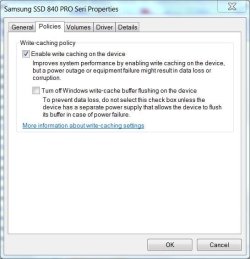
I was confused earlier. The option says "Turn off Windows write-cache buffer flushing on this device". If you enable this, then it turns off write-cache buffer flushing. If you disable it, then write-cache buffer flushing is allowed to stay on.

I was thinking that you wanted to enable this option so that it turns off write-cache buffer flushing which is exactly what you don't want to do. So do not place a check mark on this option.
 

My Computer

Computer type
PC/Desktop
In device manager, expand disk drives, right click on your SSD, select the policies tab. This is the way it should be unless you have a battery backup power source in case of power failure. In either case a power failure can cause data corruption, but without enabling write caching you will suffer serious performance loss. I think it is a bigger corruption problem to check the second box.

z.JPG
 

My Computers

System One System Two

  • Computer type
    PC/Desktop
    Computer Manufacturer/Model Number
    ALWAYS UNDER CONSTRUCTION
    OS
    Windows 11 Pro
    CPU
    Ryzen 9 5900X
    Motherboard
    Asus X570 Crosshair Viii Hero
    Memory
    32GB G Skill DDR4-3600
    Graphics Card(s)
    EVGA RTX 3080 FTW 3 Ultra
    Sound Card
    On Board/Sennheiser PC37X Headset
    Monitor(s) Displays
    3 X Asus 27"
    Screen Resolution
    2560x1440
    Hard Drives
    2 X 1 TB NVME drives
    PSU
    EVGA 850
    Case
    Phanteks Eclipse P400A
    Cooling
    EVGA 280 AIO
    Keyboard
    Logitech G510s/ Logitech G13
    Mouse
    Logitech G502
    Internet Speed
    24/1
    Antivirus
    ESET/MBAM Pro/SAS Pro
    Browser
    Chrome/ Firefox/ Edge
  • Computer type
    Laptop
    System Manufacturer/Model Number
    Dell 16 Plus
    OS
    Windows 11 Pro
    CPU
    Intel Ultra 9 288V
    Memory
    32 GB LPDDR5X 8533
    Monitor(s) Displays
    16" Mini-LED HDR600 Touch 90 Hz
    Screen Resolution
    2560X1600
    Hard Drives
    1 TB NVME
I leave indexing for my SSD off but have it enabled for my 2 spinners. The SSD can work just as fast without it, unless you have some really fancy timing equipment, you won't notice any difference. It will also lessen the read/write cycles.
I leave Super Fetch turned on as well, it takes little space and helps the system open programs faster than without it, even with a SSD. I gleaned this from my own science experiments and from member whs, our SSD guru.
 

My Computer

Computer type
PC/Desktop
Computer Manufacturer/Model Number
Home Built Desktop By DataTech
OS
Windows 7 Ultimate X64 SP1
CPU
Intel i5-2550K, Differing ~4.4-4.8GHz No built in GPU
Motherboard
ASUS P8Z68-V PRO/GEN3
Memory
16GB G.Skill Sniper 1866MHz @ 2133MHz 2x8GB
Graphics Card(s)
ASUS GTX650TIB-DC2OC-2GD5, (650TI Boost)
Sound Card
Onboard Realtek 5-1
Monitor(s) Displays
Samsung P2570HD
Screen Resolution
1920x1080
Hard Drives
Samsung 840 Pro 256GB SSD for OS, 500GB Seagate Constellation (Enterprise drive) for Data
PSU
Corsair HX650W
Case
Inwin Dragon Rider
Cooling
Hyper 212 EVO w/two Noctua fans, push-pull, @1300 RPM
Keyboard
E-Z Eyes, bright yellow keys with large characters
Mouse
steelseries SENSEI Laser Pro Gaming
Internet Speed
48-51Mbs Mbs down, 11 Mbs up Xfinity Cable
Antivirus
Norton Internet Security 2013
Browser
IE 10, Opera, Pale Moon if needed
Other Info
4 case fans, LG BluRay-RE, ASUS DVD-RW, Mr. Fusion power supply, 1.21 gigawatts.
I leave indexing for my SSD off but have it enabled for my 2 spinners. The SSD can work just as fast without it, unless you have some really fancy timing equipment, you won't notice any difference. It will also lessen the read/write cycles.
I leave Super Fetch turned on as well, it takes little space and helps the system open programs faster than without it, even with a SSD. I gleaned this from my own science experiments and from member whs, our SSD guru.

Do you have Prefetch enabled too?
 

My Computer

Computer type
PC/Desktop
I think super fetch replaced pre fetch in w7. I don't even have it listed in Services, so I guess I do not.;)
 

My Computer

Computer type
PC/Desktop
Computer Manufacturer/Model Number
Home Built Desktop By DataTech
OS
Windows 7 Ultimate X64 SP1
CPU
Intel i5-2550K, Differing ~4.4-4.8GHz No built in GPU
Motherboard
ASUS P8Z68-V PRO/GEN3
Memory
16GB G.Skill Sniper 1866MHz @ 2133MHz 2x8GB
Graphics Card(s)
ASUS GTX650TIB-DC2OC-2GD5, (650TI Boost)
Sound Card
Onboard Realtek 5-1
Monitor(s) Displays
Samsung P2570HD
Screen Resolution
1920x1080
Hard Drives
Samsung 840 Pro 256GB SSD for OS, 500GB Seagate Constellation (Enterprise drive) for Data
PSU
Corsair HX650W
Case
Inwin Dragon Rider
Cooling
Hyper 212 EVO w/two Noctua fans, push-pull, @1300 RPM
Keyboard
E-Z Eyes, bright yellow keys with large characters
Mouse
steelseries SENSEI Laser Pro Gaming
Internet Speed
48-51Mbs Mbs down, 11 Mbs up Xfinity Cable
Antivirus
Norton Internet Security 2013
Browser
IE 10, Opera, Pale Moon if needed
Other Info
4 case fans, LG BluRay-RE, ASUS DVD-RW, Mr. Fusion power supply, 1.21 gigawatts.
Prefetch is part of superfetch.
 

My Computers

System One System Two

  • Computer type
    PC/Desktop
    Computer Manufacturer/Model Number
    ALWAYS UNDER CONSTRUCTION
    OS
    Windows 11 Pro
    CPU
    Ryzen 9 5900X
    Motherboard
    Asus X570 Crosshair Viii Hero
    Memory
    32GB G Skill DDR4-3600
    Graphics Card(s)
    EVGA RTX 3080 FTW 3 Ultra
    Sound Card
    On Board/Sennheiser PC37X Headset
    Monitor(s) Displays
    3 X Asus 27"
    Screen Resolution
    2560x1440
    Hard Drives
    2 X 1 TB NVME drives
    PSU
    EVGA 850
    Case
    Phanteks Eclipse P400A
    Cooling
    EVGA 280 AIO
    Keyboard
    Logitech G510s/ Logitech G13
    Mouse
    Logitech G502
    Internet Speed
    24/1
    Antivirus
    ESET/MBAM Pro/SAS Pro
    Browser
    Chrome/ Firefox/ Edge
  • Computer type
    Laptop
    System Manufacturer/Model Number
    Dell 16 Plus
    OS
    Windows 11 Pro
    CPU
    Intel Ultra 9 288V
    Memory
    32 GB LPDDR5X 8533
    Monitor(s) Displays
    16" Mini-LED HDR600 Touch 90 Hz
    Screen Resolution
    2560X1600
    Hard Drives
    1 TB NVME
I think super fetch replaced pre fetch in w7. I don't even have it listed in Services, so I guess I do not.;)

It can be changed in the Registry:

HKEY_LOCAL_MACHINE\SYSTEM\CurrentControlSet\Control\Session Manager\Memory Management\PrefetchParameters

Look for "EnablePrefetcher". 3 is enabled, and 0 is disabled.
 

My Computer

Computer type
PC/Desktop
Yup, it IS enabled, I don't delve into the registry for Services as a matter of practice though. What would values 1 and 2 do?
 

My Computer

Computer type
PC/Desktop
Computer Manufacturer/Model Number
Home Built Desktop By DataTech
OS
Windows 7 Ultimate X64 SP1
CPU
Intel i5-2550K, Differing ~4.4-4.8GHz No built in GPU
Motherboard
ASUS P8Z68-V PRO/GEN3
Memory
16GB G.Skill Sniper 1866MHz @ 2133MHz 2x8GB
Graphics Card(s)
ASUS GTX650TIB-DC2OC-2GD5, (650TI Boost)
Sound Card
Onboard Realtek 5-1
Monitor(s) Displays
Samsung P2570HD
Screen Resolution
1920x1080
Hard Drives
Samsung 840 Pro 256GB SSD for OS, 500GB Seagate Constellation (Enterprise drive) for Data
PSU
Corsair HX650W
Case
Inwin Dragon Rider
Cooling
Hyper 212 EVO w/two Noctua fans, push-pull, @1300 RPM
Keyboard
E-Z Eyes, bright yellow keys with large characters
Mouse
steelseries SENSEI Laser Pro Gaming
Internet Speed
48-51Mbs Mbs down, 11 Mbs up Xfinity Cable
Antivirus
Norton Internet Security 2013
Browser
IE 10, Opera, Pale Moon if needed
Other Info
4 case fans, LG BluRay-RE, ASUS DVD-RW, Mr. Fusion power supply, 1.21 gigawatts.
0 = Disabled
1 = Application launch prefetching enabled
2 = Boot prefetching enabled
3 = Applaunch and Boot enabled (Optimal and Default)

Source

A Guy

Lol, was going to rep all 3 of you, I don't spread it around enough (I know, I spread something pretty good, lol).
 

My Computer

Computer type
PC/Desktop
OS
Windows 10 Home x64
CPU
INTEL Core i5-750 Quad-Core 3.37GHz
Motherboard
ASUS P7P55D
Memory
HyperX Fury Black Series 8GB (2 x 4GB) 1866Mhz
Graphics Card(s)
EVGA GeForce GTX 750 Superclocked 1GB 128-Bit GDDR5
Monitor(s) Displays
LG 32MA68HY 32" IPS
Screen Resolution
1920 x 1080
Hard Drives
Samsung 840 Evo 120GB, SEAGATE 500GB Barracuda® 7200.12, SATA 3 Gb/s, 7200 RPM, 16MB cache
PSU
ANTEC TruePower New TP-550, 80 PLUS, 550W
Case
ANTEC Three Hundred Illusion
Cooling
COOLER MASTER Hyper 212 Plus, 4 x 120mm 1 x 140mm Noctua's
Internet Speed
85 + Mbps
Antivirus
Avast
Browser
Vivaldi
In addition to taking up extra space on the storage device, this feature requires frequent read/write operations.
To ease your worries, more or less any modern SSD will last decades even if you write 3-4 GB on it per day.

The "limited read-writes before the drive fails" are an issue for servers and companies, as both move hundreds of GB per week like they were peanuts.
 

My Computer

Computer type
PC/Desktop
Computer Manufacturer/Model Number
custom built
OS
Win 7 Pro 64-bit 7601
CPU
AMD Phenom 9650 QuadCore, revision DR-B3
Motherboard
ASUS M4A78
Memory
5 GB yes I run 2x 2GB and 1x 1GB, different brand, spank me.
Graphics Card(s)
NVIDIA GeForce 9800 GT 512 Mb, unknown manufacturer.
Sound Card
Crappy Realtek Integrated Audio
Monitor(s) Displays
Fujitsu Siemens P19-3P
Screen Resolution
1280 x 1024 x 32 bits @ 60 Hz Oh yeah, 4:3 rocks!
Hard Drives
(1) MAXTOR S TM3320613AS SATA Disk Device (2) STM35004 18AS SATA Disk Device (3) TOSHIBA USB 2.5"-HDD
PSU
whatever, around 450w
Case
Scavenged from old company PC, 10+ years old
Cooling
CPU fan, GPU fan, case fan, nothing fancy
Keyboard
Microsoft, PS/2, white.
Mouse
Optical, logitec.
Internet Speed
effective max speeds: 70-ish kB/s down 30-ish kB/s up
Antivirus
Avira, free edition.
Browser
Firefox with FXChrome to make it look like Google Chrome :P
Other Info
Was discarded by previous owner due to "horrible performance".
Was running Win Xp from a IDE drive. Yeah. Was a pain.
SATA II drive and Win7 and it zips away! Yay!
Back
Top