SSD Questions

Yeah, I have been treating my solid state drives like hard drives for the most part, and they're still fine even after daily use after almost 5 years now.
 

My Computer

Computer type
PC/Desktop
I've readjusted my settings again. I'm not really concerned with the life of the SSD, I'm sure, as you said that it will be fine for quite some time. I'm striving for performance here. Right now I have a 1 GB Page File on the SSD and a system managed one on my HDD. Indexing and Search are enabled. I re-enabled Prefetch/Superfetch since once again, I'm not as concerned with the lifetime of the drive as I am performance. I adjusted the Write Cache Buffer and Write-Cache Buffer Flushing as esenbe suggested. The program worded it in a confusing way. Having things set the way you advised seems to make the most sense. Also, even if I do lose some data due to power loss, I have all of my user folders on my HDD. I also have system restore set to 5% (11 or so GB) and 23.8 GB allocated for Over Provisioning. I still have plenty of space on the drive, so I can adjust things if I ever need more space. Thanks for all the help guys.
 

My Computer

OS
Windows 7 Home Premium x64
CPU
Intel i7-2600K
Motherboard
ASUS Sabertooth Z77
Memory
G.SKILL Ripjaws (16 GB Total)
Graphics Card(s)
EVGA GeForce GTX 560 Ti
Monitor(s) Displays
ASUS
Screen Resolution
1920x1080 (2 Monitors)
Hard Drives
Hitachi GST Deskstar 2 TB (HDD)
Samsung 840 Pro 256 GB (SSD)
PSU
SeaSonic X Series X650 Gold
Case
Antec DF 85
Keyboard
Microsoft SideWinder X4
Mouse
MadCatz M.M.O. 7 & Logitech G35
Internet Speed
50 down
Antivirus
Avast Free, SuperAntiSpyware Free, Malwarebytes Free
Browser
Mozilla Firefox
ROBO, very good. I adjust mine for the way I like them with a few concessios for what is the best for the SSD. But, for the most part, I do very little configureing. With a very few exceptions, Windows will configure things for you. I have probably 8 SSDs and have done most everything you can do to one, and have had no problems. SSDs are not nearly as fragile as many people think. I think you have a very reasonable set up, and will be happy with the performance.
 

My Computers

System One System Two

  • Computer type
    PC/Desktop
    Computer Manufacturer/Model Number
    ALWAYS UNDER CONSTRUCTION
    OS
    Windows 11 Pro
    CPU
    Ryzen 9 5900X
    Motherboard
    Asus X570 Crosshair Viii Hero
    Memory
    32GB G Skill DDR4-3600
    Graphics Card(s)
    EVGA RTX 3080 FTW 3 Ultra
    Sound Card
    On Board/Sennheiser PC37X Headset
    Monitor(s) Displays
    3 X Asus 27"
    Screen Resolution
    2560x1440
    Hard Drives
    2 X 1 TB NVME drives
    PSU
    EVGA 850
    Case
    Phanteks Eclipse P400A
    Cooling
    EVGA 280 AIO
    Keyboard
    Logitech G510s/ Logitech G13
    Mouse
    Logitech G502
    Internet Speed
    24/1
    Antivirus
    ESET/MBAM Pro/SAS Pro
    Browser
    Chrome/ Firefox/ Edge
  • Computer type
    Laptop
    System Manufacturer/Model Number
    Dell 16 Plus
    OS
    Windows 11 Pro
    CPU
    Intel Ultra 9 288V
    Memory
    32 GB LPDDR5X 8533
    Monitor(s) Displays
    16" Mini-LED HDR600 Touch 90 Hz
    Screen Resolution
    2560X1600
    Hard Drives
    1 TB NVME
You're welcome Robo731, I think you have a good set up.

I am paranoid about read/writes even though the guys say I shouldn't be. :o
My Crucial M4 went from an initial ASSSD score of 780 to 458 in less than a year and Crystal Disk info shows it at 99%. the system still is like a greased streak of sh** though.
 

My Computer

Computer type
PC/Desktop
Computer Manufacturer/Model Number
Home Built Desktop By DataTech
OS
Windows 7 Ultimate X64 SP1
CPU
Intel i5-2550K, Differing ~4.4-4.8GHz No built in GPU
Motherboard
ASUS P8Z68-V PRO/GEN3
Memory
16GB G.Skill Sniper 1866MHz @ 2133MHz 2x8GB
Graphics Card(s)
ASUS GTX650TIB-DC2OC-2GD5, (650TI Boost)
Sound Card
Onboard Realtek 5-1
Monitor(s) Displays
Samsung P2570HD
Screen Resolution
1920x1080
Hard Drives
Samsung 840 Pro 256GB SSD for OS, 500GB Seagate Constellation (Enterprise drive) for Data
PSU
Corsair HX650W
Case
Inwin Dragon Rider
Cooling
Hyper 212 EVO w/two Noctua fans, push-pull, @1300 RPM
Keyboard
E-Z Eyes, bright yellow keys with large characters
Mouse
steelseries SENSEI Laser Pro Gaming
Internet Speed
48-51Mbs Mbs down, 11 Mbs up Xfinity Cable
Antivirus
Norton Internet Security 2013
Browser
IE 10, Opera, Pale Moon if needed
Other Info
4 case fans, LG BluRay-RE, ASUS DVD-RW, Mr. Fusion power supply, 1.21 gigawatts.
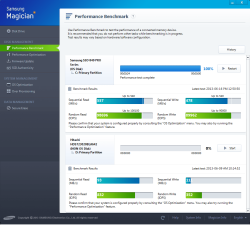
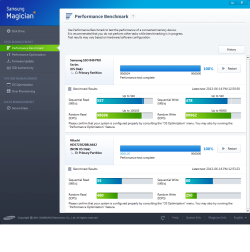
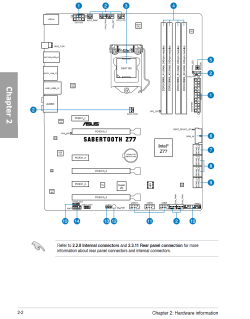
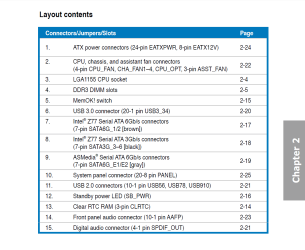
Well with everyone's help I have doubled the performance of the drive (according to Samsung Magician at least) as you can see in the images below (unfortunately I forgot to take an image of what the stats were before this so the images only show what the SSD speeds are now). The results used to be halved for each category. I opened up my case and adjusted my setup a little bit. I have an ASUS Z77 Motherboard by the way. My original SATA port setup had my Seagate HDD in port 1, my ASUS Blu ray drive in port 2, and the Hotswap Bay on the top of my case (Antec DF-85) plugged into E1 (I did this without realizing that ports E1 and E2 aren't Intel ports, but AsMedia ports. I just saw that it was 6 Gb/s and plugged it in, since I'd rather have it in a 6 Gb/s port rather than a 3 Gb/s one).

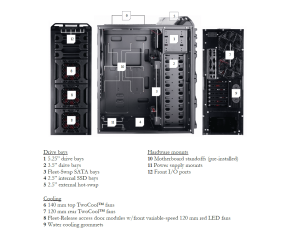
I changed the setup once I got the SSD. The SSD had to be mounted at the bottom of my case because I don't have any 2.5" bays, plenty of 3.5" though. Luckily the case had a place to mount 2.5" drives at the bottom. I had meant to go to Microcenter really quickly and get an adapter so the drive wouldn't be sitting at the bottom where all the dust collects, but I never got around to it (Still haven't :doh:). So I plugged it in anyway. Since the drive is almost touching the bottom of the case, the angled side of the SATA cable couldn't be plugged into it, so the angled side had to be plugged into the Motherboard. It couldn't be plugged into port 1 because it would block port 2. The angled side didn't quite fit right in port 2 because of the case. So what ended up happening was it being plugged into port E2 (I still hadn't notice that it wasn't an intel port). I only had 2 SATA 6 Gb/s cables and I left the one I had been using for the HDD and took the one I was using for the optical drive and used it for the SSD, leaving the optical drive with a 3 Gb/s cable. The HDD remained in port 1, the optical drive got moved to port 3 (since it now has a 3 Gb/s cable), the Hotswap bay remained in port E1 and the SSD got plugged into E2.

Just now, I opened the case. I moved the HDD to port 4 and moved the SSD to port 1. Everything else is the same.

I'm ordering a drive bay adapter now and I'll be able to plug both the SSD and HDD into ports 1 and 2.

As a result of this, my HDD speed has dipped a little, but the SSD Speeds have doubled.

tl;dr: My SSD is faster now.

Thanks for all the help again guys.
 

Attachments

  • Samsung Magician Benchmark Results - 1.png
    Samsung Magician Benchmark Results - 1.png
    61.5 KB · Views: 6
  • Samsung Magician Benchmark Results - 2.png
    Samsung Magician Benchmark Results - 2.png
    55.1 KB · Views: 5
  • ASUS Z77 Layout.png
    ASUS Z77 Layout.png
    44.7 KB · Views: 8
  • ASUS Z77 Layout Contents.png
    ASUS Z77 Layout Contents.png
    45.4 KB · Views: 5
  • Antec DF-85.png
    Antec DF-85.png
    158.4 KB · Views: 6

My Computer

OS
Windows 7 Home Premium x64
CPU
Intel i7-2600K
Motherboard
ASUS Sabertooth Z77
Memory
G.SKILL Ripjaws (16 GB Total)
Graphics Card(s)
EVGA GeForce GTX 560 Ti
Monitor(s) Displays
ASUS
Screen Resolution
1920x1080 (2 Monitors)
Hard Drives
Hitachi GST Deskstar 2 TB (HDD)
Samsung 840 Pro 256 GB (SSD)
PSU
SeaSonic X Series X650 Gold
Case
Antec DF 85
Keyboard
Microsoft SideWinder X4
Mouse
MadCatz M.M.O. 7 & Logitech G35
Internet Speed
50 down
Antivirus
Avast Free, SuperAntiSpyware Free, Malwarebytes Free
Browser
Mozilla Firefox
A quick tip from a ghetto PC assembler. Double-coated tape (adhesive on both sides) can keep the SSD wherever you want it to at a very low price.
 

My Computer

Computer type
PC/Desktop
Computer Manufacturer/Model Number
custom built
OS
Win 7 Pro 64-bit 7601
CPU
AMD Phenom 9650 QuadCore, revision DR-B3
Motherboard
ASUS M4A78
Memory
5 GB yes I run 2x 2GB and 1x 1GB, different brand, spank me.
Graphics Card(s)
NVIDIA GeForce 9800 GT 512 Mb, unknown manufacturer.
Sound Card
Crappy Realtek Integrated Audio
Monitor(s) Displays
Fujitsu Siemens P19-3P
Screen Resolution
1280 x 1024 x 32 bits @ 60 Hz Oh yeah, 4:3 rocks!
Hard Drives
(1) MAXTOR S TM3320613AS SATA Disk Device (2) STM35004 18AS SATA Disk Device (3) TOSHIBA USB 2.5"-HDD
PSU
whatever, around 450w
Case
Scavenged from old company PC, 10+ years old
Cooling
CPU fan, GPU fan, case fan, nothing fancy
Keyboard
Microsoft, PS/2, white.
Mouse
Optical, logitec.
Internet Speed
effective max speeds: 70-ish kB/s down 30-ish kB/s up
Antivirus
Avira, free edition.
Browser
Firefox with FXChrome to make it look like Google Chrome :P
Other Info
Was discarded by previous owner due to "horrible performance".
Was running Win Xp from a IDE drive. Yeah. Was a pain.
SATA II drive and Win7 and it zips away! Yay!

My Computer

OS
Windows 7 Home Premium x64
CPU
Intel i7-2600K
Motherboard
ASUS Sabertooth Z77
Memory
G.SKILL Ripjaws (16 GB Total)
Graphics Card(s)
EVGA GeForce GTX 560 Ti
Monitor(s) Displays
ASUS
Screen Resolution
1920x1080 (2 Monitors)
Hard Drives
Hitachi GST Deskstar 2 TB (HDD)
Samsung 840 Pro 256 GB (SSD)
PSU
SeaSonic X Series X650 Gold
Case
Antec DF 85
Keyboard
Microsoft SideWinder X4
Mouse
MadCatz M.M.O. 7 & Logitech G35
Internet Speed
50 down
Antivirus
Avast Free, SuperAntiSpyware Free, Malwarebytes Free
Browser
Mozilla Firefox
There are also SATA cables straight on both ends. Dust won't harm a SSD.
 

My Computer

Computer type
PC/Desktop
Computer Manufacturer/Model Number
Home Built Desktop By DataTech
OS
Windows 7 Ultimate X64 SP1
CPU
Intel i5-2550K, Differing ~4.4-4.8GHz No built in GPU
Motherboard
ASUS P8Z68-V PRO/GEN3
Memory
16GB G.Skill Sniper 1866MHz @ 2133MHz 2x8GB
Graphics Card(s)
ASUS GTX650TIB-DC2OC-2GD5, (650TI Boost)
Sound Card
Onboard Realtek 5-1
Monitor(s) Displays
Samsung P2570HD
Screen Resolution
1920x1080
Hard Drives
Samsung 840 Pro 256GB SSD for OS, 500GB Seagate Constellation (Enterprise drive) for Data
PSU
Corsair HX650W
Case
Inwin Dragon Rider
Cooling
Hyper 212 EVO w/two Noctua fans, push-pull, @1300 RPM
Keyboard
E-Z Eyes, bright yellow keys with large characters
Mouse
steelseries SENSEI Laser Pro Gaming
Internet Speed
48-51Mbs Mbs down, 11 Mbs up Xfinity Cable
Antivirus
Norton Internet Security 2013
Browser
IE 10, Opera, Pale Moon if needed
Other Info
4 case fans, LG BluRay-RE, ASUS DVD-RW, Mr. Fusion power supply, 1.21 gigawatts.
There are also SATA cables straight on both ends. Dust won't harm a SSD.

Yeah I know. I'll just mount it with the rest of the drive bays anyway, plus I get the extra fan. It's still a bit of a tight fit for the non-angled connector anyway.
 

My Computer

OS
Windows 7 Home Premium x64
CPU
Intel i7-2600K
Motherboard
ASUS Sabertooth Z77
Memory
G.SKILL Ripjaws (16 GB Total)
Graphics Card(s)
EVGA GeForce GTX 560 Ti
Monitor(s) Displays
ASUS
Screen Resolution
1920x1080 (2 Monitors)
Hard Drives
Hitachi GST Deskstar 2 TB (HDD)
Samsung 840 Pro 256 GB (SSD)
PSU
SeaSonic X Series X650 Gold
Case
Antec DF 85
Keyboard
Microsoft SideWinder X4
Mouse
MadCatz M.M.O. 7 & Logitech G35
Internet Speed
50 down
Antivirus
Avast Free, SuperAntiSpyware Free, Malwarebytes Free
Browser
Mozilla Firefox
Back
Top