
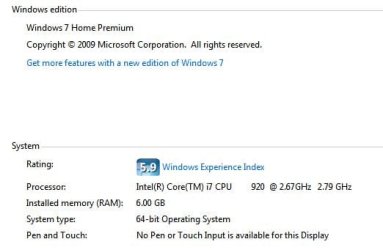
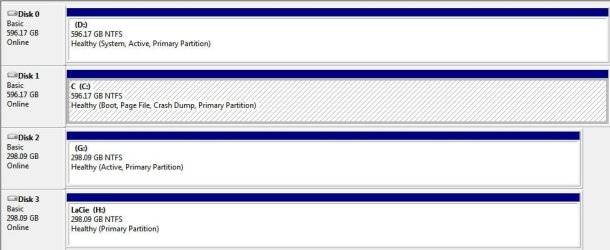
I run a generic box based on the FoxCon Fireblade mobo. There are two internal WD6400 HDs, one with Vista Home Premium installed, the other with Win7 Home Premium. Please see the attached images for system and storage info.
My level of "expertise" is "average user" with abilities to tweak around under guidance from more experienced/educated users.
Ever since I installed Win 7 on the separate drive, this computer has experienced startup problems. With help from this forum, I changed the boot sequence to boot from HD and chose the HD with Win7 as the first device.
The changes seemed to work fine as long as the computer was put to sleep and reawakened or was restarted after installation of updates and new software. When the computer is shutdown and then powered up, it fails to start properly. The sequence takes me from the Fireblade splash screen to the bootloader screen where I can choose between Win 7 and Vista. If I hit Win 7, the next screen goes dark and the computer fails to start. If I choose Vista, the computer starts normally.
After such failure to start with Win7, I have repeatedly experimented with the settings choosing the Win 7 HD as the first boot device, disabling CDROM as a boot device, etc. Every time after such experiments, and after I save and exit the settings, the computer fails to start and a message saying "computer failed to start, insert system disk into cdrom, press any key to continue" appears.
If I go back to the settings and press F7 for "optimal settings" to apply on the page with all the boot devices, boot sequence etc, the computer starts normally and the bootloader page allows me to start with Win 7.
All's well until I shutdown the computer and power it up again. Then, the dark screen mystery begins anew. As I said, the computer acts "normally" if I keep putting it to sleep and awaken it to continue my work.
I am now thinking to physically unplug the Win 7 HD from Port 4 and plug it into Port 1 where the Vista HD is plugged in and leave Vista unplugged
OR
switch ports between the two HD -- Win 7 on 1 and Vista on 4.
Startup Repair finds nothing that it can repair. Using Last Known Good Configuration has no effect either. Restoring to a previous point is not an option since there is no "good" previous point as the problem begun immediately after I installed the second HD with Win 7 on it.
I can't think of anything else.
Any help will be greatly appreciated.
My level of "expertise" is "average user" with abilities to tweak around under guidance from more experienced/educated users.
Ever since I installed Win 7 on the separate drive, this computer has experienced startup problems. With help from this forum, I changed the boot sequence to boot from HD and chose the HD with Win7 as the first device.
The changes seemed to work fine as long as the computer was put to sleep and reawakened or was restarted after installation of updates and new software. When the computer is shutdown and then powered up, it fails to start properly. The sequence takes me from the Fireblade splash screen to the bootloader screen where I can choose between Win 7 and Vista. If I hit Win 7, the next screen goes dark and the computer fails to start. If I choose Vista, the computer starts normally.
After such failure to start with Win7, I have repeatedly experimented with the settings choosing the Win 7 HD as the first boot device, disabling CDROM as a boot device, etc. Every time after such experiments, and after I save and exit the settings, the computer fails to start and a message saying "computer failed to start, insert system disk into cdrom, press any key to continue" appears.
If I go back to the settings and press F7 for "optimal settings" to apply on the page with all the boot devices, boot sequence etc, the computer starts normally and the bootloader page allows me to start with Win 7.
All's well until I shutdown the computer and power it up again. Then, the dark screen mystery begins anew. As I said, the computer acts "normally" if I keep putting it to sleep and awaken it to continue my work.
I am now thinking to physically unplug the Win 7 HD from Port 4 and plug it into Port 1 where the Vista HD is plugged in and leave Vista unplugged
OR
switch ports between the two HD -- Win 7 on 1 and Vista on 4.
Startup Repair finds nothing that it can repair. Using Last Known Good Configuration has no effect either. Restoring to a previous point is not an option since there is no "good" previous point as the problem begun immediately after I installed the second HD with Win 7 on it.
I can't think of anything else.
Any help will be greatly appreciated.
Attachments
My Computer
- OS
- dual boot vista Home Premium Win 7 Home Premium 64 bit


