
CaptainFahim
New member
(Sorry for bad English  )
)
Suddenly yesterday my windows was An error occurred! Windows "explorer.exe" won't running Then I download "explorer.exe" from this "forums" It's worked but it won't running automatically :huh:!
Not only "explorer.exe", but also my all Startup programs won't start automatically including "Avast", "Internet Download Manager", "Realtek HD Audio Manager", "µTorrent", "Desktop Window Manager Session Manager (DWM/Aero-service)" etc :shock:. I checked "msconfig.exe> Startup>" there all good but why I face this problem? Please help me
Here some image

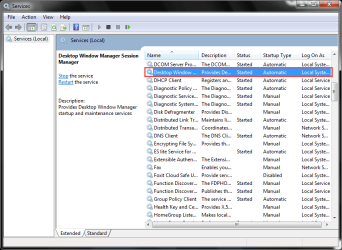
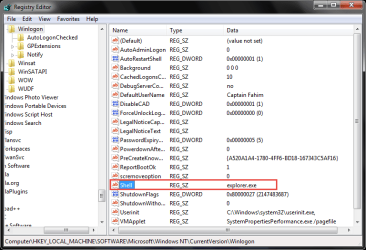
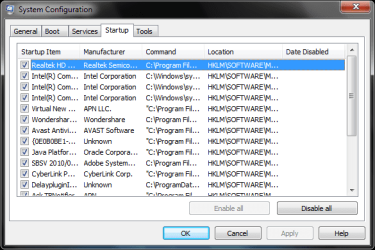
)Suddenly yesterday my windows was An error occurred! Windows "explorer.exe" won't running
Then I download "explorer.exe" from this "forums" It's worked but it won't running automatically :huh:!Not only "explorer.exe", but also my all Startup programs won't start automatically
including "Avast", "Internet Download Manager", "Realtek HD Audio Manager", "µTorrent", "Desktop Window Manager Session Manager (DWM/Aero-service)" etc :shock:. I checked "msconfig.exe> Startup>" there all good but why I face this problem? Please help me Here some image
My Computer
At a glance
Windows 7 Ultimate x32Duel Core2 GB DDR3Internal 782 Mb
- Computer type
- PC/Desktop
- OS
- Windows 7 Ultimate x32
- CPU
- Duel Core
- Motherboard
- Gigabyte
- Memory
- 2 GB DDR3
- Graphics Card(s)
- Internal 782 Mb
- Monitor(s) Displays
- PHILIPS (CRT)
- Screen Resolution
- 1024x768
- Antivirus
- Avast
- Browser
- Firefox


