Startup Repair option

zungul

New member
Member
VIP
Local time
11:52 AM
Messages
176
Startup Repair option - HELP

Hi,

I have some other problems with my computer, but first I tried to fix this using the "Startup Repair" option in the "System Recovery Options."
I started my computer with Windows installation DVD and next I press "repair your computer" it didn't show up my OS, and I was not able to fix anything because I couldn't choose my Windows.
What I supposed to do to fix this problem?
 
Last edited:

My Computer

OS
Windows 7 Ultimate x64
CPU
Intel(R) Core(TM)2 Quad Q6600
Motherboard
ASUS P5K Deluxe/WiFi-AP
Memory
4.00 GB
Graphics Card(s)
NVIDIA GEForce 8800 GTX
Sound Card
SoundMAX Intergrated Digital HD Audio
Monitor(s) Displays
LG Flatron Wide 22"
Hi!

put the dvd back.. and then ..open the command prompt.. diskpart .. select disk 0 ..list part ..
and then select the partition which is the system partition(by select part 1 or Select part 2 etc) .. then type active.. exit, exit ..and restart.. if problem happens again.. put the dvd back and now u'll be able to see windows operating system..chose repair and it might repair.
 

My Computer

Computer type
Laptop
OS
Windows 7 Home Premium
PS you can also do .. list volume.. select volume 1 or 2 .. active ..exit exit
 

My Computer

Computer type
Laptop
OS
Windows 7 Home Premium
Hi,
I discovered another strange thing. I have few hard drives in my computer. When I checked in the "Disk Management" it showed strange thing. It doesn't matter that my HD (C:\) with OS is connected to Sata_0 on the motherboard in Disk Management it shows Sata_2 but when I disconnected my drivers, it shows Sata_0. If I try to connect other drivers again, right away HD (C:\) is connected to different Sata port, even if it did not touch it and still is connected to Sata_0.
I don't know what this thing means, but I think that this is something important.
 

My Computer

OS
Windows 7 Ultimate x64
CPU
Intel(R) Core(TM)2 Quad Q6600
Motherboard
ASUS P5K Deluxe/WiFi-AP
Memory
4.00 GB
Graphics Card(s)
NVIDIA GEForce 8800 GTX
Sound Card
SoundMAX Intergrated Digital HD Audio
Monitor(s) Displays
LG Flatron Wide 22"
Hi, nooruddin76,

I did what you said, and I've got the message:
Virtual Disk Service error:
The specified partition is not a primary or logical volume.

P.S.
My C:\ HD is divided for two partitions and when I used cmd.exe and wrote list part I got two partitions: Partition 0 - Extended and Partition 1 - Logical and I chose Partition 0. Probably, I supposed to choose Partition 1, but I was afraid that Partition 1 is a wrong choice because OS is installed on first partition of my HD.
 

My Computer

OS
Windows 7 Ultimate x64
CPU
Intel(R) Core(TM)2 Quad Q6600
Motherboard
ASUS P5K Deluxe/WiFi-AP
Memory
4.00 GB
Graphics Card(s)
NVIDIA GEForce 8800 GTX
Sound Card
SoundMAX Intergrated Digital HD Audio
Monitor(s) Displays
LG Flatron Wide 22"
do select disk 0
list volume
then see which volume is labeled(last column) as System
chose that volume like:
select vol 1(if 1 is system or sel vol 2, if 2 is sytem vol)
active
exit
exit
restart
 

My Computer

Computer type
Laptop
OS
Windows 7 Home Premium

My Computer

Computer type
PC/Desktop
Computer Manufacturer/Model Number
Home Built Desktop By DataTech
OS
Windows 7 Ultimate X64 SP1
CPU
Intel i5-2550K, Differing ~4.4-4.8GHz No built in GPU
Motherboard
ASUS P8Z68-V PRO/GEN3
Memory
16GB G.Skill Sniper 1866MHz @ 2133MHz 2x8GB
Graphics Card(s)
ASUS GTX650TIB-DC2OC-2GD5, (650TI Boost)
Sound Card
Onboard Realtek 5-1
Monitor(s) Displays
Samsung P2570HD
Screen Resolution
1920x1080
Hard Drives
Samsung 840 Pro 256GB SSD for OS, 500GB Seagate Constellation (Enterprise drive) for Data
PSU
Corsair HX650W
Case
Inwin Dragon Rider
Cooling
Hyper 212 EVO w/two Noctua fans, push-pull, @1300 RPM
Keyboard
E-Z Eyes, bright yellow keys with large characters
Mouse
steelseries SENSEI Laser Pro Gaming
Internet Speed
48-51Mbs Mbs down, 11 Mbs up Xfinity Cable
Antivirus
Norton Internet Security 2013
Browser
IE 10, Opera, Pale Moon if needed
Other Info
4 case fans, LG BluRay-RE, ASUS DVD-RW, Mr. Fusion power supply, 1.21 gigawatts.
Hi nooruddin76,

I chose Partition 0 and this is what I've got:

Virtual Disk Service error:
The specified partition is not a primary or logical volume.
 

My Computer

OS
Windows 7 Ultimate x64
CPU
Intel(R) Core(TM)2 Quad Q6600
Motherboard
ASUS P5K Deluxe/WiFi-AP
Memory
4.00 GB
Graphics Card(s)
NVIDIA GEForce 8800 GTX
Sound Card
SoundMAX Intergrated Digital HD Audio
Monitor(s) Displays
LG Flatron Wide 22"
Hi Britton30,
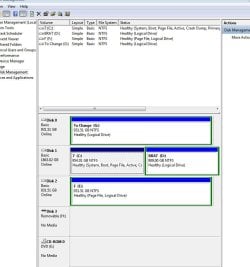
Capture.JPG

The letters of hard drives are showing what kind of order supposed to be connected.
C:\ & D:\ connected to Sata0 supposed to be Disk 0
F:\ connected to Sata2- Disk 2
G:\ which I connected to Sata1 - Disk 1
 
Last edited:

My Computer

OS
Windows 7 Ultimate x64
CPU
Intel(R) Core(TM)2 Quad Q6600
Motherboard
ASUS P5K Deluxe/WiFi-AP
Memory
4.00 GB
Graphics Card(s)
NVIDIA GEForce 8800 GTX
Sound Card
SoundMAX Intergrated Digital HD Audio
Monitor(s) Displays
LG Flatron Wide 22"
Ok..so tell me again what do you desire ? (explain in terms on c, d, e g etc)
 

My Computer

Computer type
Laptop
OS
Windows 7 Home Premium
I don't understand why I connected drive with C: & D: partition to Sata 0 on the motherboard but in the Disk Management it shows as a Disk 1 (Sata 1 port). Why disk with G: partition is connected to Sata 1 port on motherboard but in Disk Management is as a Disk 0?

And my first problem was: when I used the command prompt.. diskpart .. select disk 0 ..list part ..
and then select the partition which is the system partition(by select part 1 or Select part 2 etc) .. then type active..

I selected disk 0, and this is what I've got:

Virtual Disk Service error:
The specified partition is not a primary or logical volume.
 

My Computer

OS
Windows 7 Ultimate x64
CPU
Intel(R) Core(TM)2 Quad Q6600
Motherboard
ASUS P5K Deluxe/WiFi-AP
Memory
4.00 GB
Graphics Card(s)
NVIDIA GEForce 8800 GTX
Sound Card
SoundMAX Intergrated Digital HD Audio
Monitor(s) Displays
LG Flatron Wide 22"
Whether or not the C:\ is Disk 0 makes no difference. I think I see a problem because you have Page File on two separate disks. Why do you have some Logical partitions? I'll ask for someone to look in for you.
 

My Computer

Computer type
PC/Desktop
Computer Manufacturer/Model Number
Home Built Desktop By DataTech
OS
Windows 7 Ultimate X64 SP1
CPU
Intel i5-2550K, Differing ~4.4-4.8GHz No built in GPU
Motherboard
ASUS P8Z68-V PRO/GEN3
Memory
16GB G.Skill Sniper 1866MHz @ 2133MHz 2x8GB
Graphics Card(s)
ASUS GTX650TIB-DC2OC-2GD5, (650TI Boost)
Sound Card
Onboard Realtek 5-1
Monitor(s) Displays
Samsung P2570HD
Screen Resolution
1920x1080
Hard Drives
Samsung 840 Pro 256GB SSD for OS, 500GB Seagate Constellation (Enterprise drive) for Data
PSU
Corsair HX650W
Case
Inwin Dragon Rider
Cooling
Hyper 212 EVO w/two Noctua fans, push-pull, @1300 RPM
Keyboard
E-Z Eyes, bright yellow keys with large characters
Mouse
steelseries SENSEI Laser Pro Gaming
Internet Speed
48-51Mbs Mbs down, 11 Mbs up Xfinity Cable
Antivirus
Norton Internet Security 2013
Browser
IE 10, Opera, Pale Moon if needed
Other Info
4 case fans, LG BluRay-RE, ASUS DVD-RW, Mr. Fusion power supply, 1.21 gigawatts.

My Computer

Computer type
PC/Desktop
Computer Manufacturer/Model Number
Home made Desktop
OS
Windows 10 Pro. 64/ version 1709 Windows 7 Pro/64
CPU
Intel i7-6800K @ 4.3
Motherboard
ASUS X-99 Deluxe II
Memory
Corsair Platinum 16 gig @2400
Graphics Card(s)
EVGA GTX 1070 OC
Monitor(s) Displays
Asus 27" LED LCD/VE278Q
Screen Resolution
1920-1080 or 1280-720 HDMI
Hard Drives
INTEL SSD 730-240 Gb Sata 3.0/
PSU
EVGA Platium 1200W
Case
Phanteks Luxe Tempered Glass 8 fans/ one radiator
Cooling
XSPC/ Water Cooled CPU
Keyboard
Das 4 Professional
Mouse
Logitech M705/MX Anywhere 2-S
Internet Speed
100 mbits
Antivirus
Microsoft Security Essentials/ Malwarebytes Premium 3.0/ SAS
Browser
I.E. 11 default/Firefox/ ISP Time Warner Cable/Spectrum
Other Info
LG BluRay Burner/
Sound system-KLipsch-THX/
Icy Dock ssd Hot Swap bays.
See post #9 Jack. ;)
 

My Computer

Computer type
PC/Desktop
Computer Manufacturer/Model Number
Home Built Desktop By DataTech
OS
Windows 7 Ultimate X64 SP1
CPU
Intel i5-2550K, Differing ~4.4-4.8GHz No built in GPU
Motherboard
ASUS P8Z68-V PRO/GEN3
Memory
16GB G.Skill Sniper 1866MHz @ 2133MHz 2x8GB
Graphics Card(s)
ASUS GTX650TIB-DC2OC-2GD5, (650TI Boost)
Sound Card
Onboard Realtek 5-1
Monitor(s) Displays
Samsung P2570HD
Screen Resolution
1920x1080
Hard Drives
Samsung 840 Pro 256GB SSD for OS, 500GB Seagate Constellation (Enterprise drive) for Data
PSU
Corsair HX650W
Case
Inwin Dragon Rider
Cooling
Hyper 212 EVO w/two Noctua fans, push-pull, @1300 RPM
Keyboard
E-Z Eyes, bright yellow keys with large characters
Mouse
steelseries SENSEI Laser Pro Gaming
Internet Speed
48-51Mbs Mbs down, 11 Mbs up Xfinity Cable
Antivirus
Norton Internet Security 2013
Browser
IE 10, Opera, Pale Moon if needed
Other Info
4 case fans, LG BluRay-RE, ASUS DVD-RW, Mr. Fusion power supply, 1.21 gigawatts.
As Gary said you don't want two page files so I'd turn them off and then back on - but only on C: Virtual Memory Paging File - Change - Vista Forums

Windows may see the drives differently than what you intend by where you plug them in on mobo: http://www.sevenforums.com/hardware-devices/195718-os-disk-not-disk-0-a.html

You are wise to therefore have Logical partitions which cannot have the boot files derailed to them if you do a reinstall or Startup Repair, as can happen if there are any Primary partitions preceding the System partition.

Now, these are issues that we've brought up because we don't yet have a clear understanding of what problems you are having exactly. Please explain them so we can advise you better.

Startup Repair is best used for when Win7 has problems booting. If you have problems with the OS not pertaining to booting it then they might be better addressed with Troubleshooting Steps for Windows 7
 

My Computer

Computer type
Laptop
Computer Manufacturer/Model Number
HP Pavilion dv6-6c10us
OS
x64 (6.3.9600) Win8.1 Pro & soon dual boot x64 (6.1.7601) Win7_SP1 HomePrem
CPU
AMD A6-3420M APU with Radeon(tm) HD Graphics
Motherboard
Hewlett-Packard 1805
Memory
6.00 GB
Graphics Card(s)
AMD Radeon(TM) HD 6520G
Sound Card
(1) AMD High Definition Audio Device (2) IDT High Definiti
Monitor(s) Displays
HP W2072a 20" LCD (1600 x 900) @ 60 Hz
Screen Resolution
1366 x 768 x 32 bits (4294967296 colors) @ 60 Hz
Hard Drives
ST640LM0 00 HM641JI SATA Disk Device
Keyboard
Logitech k520 wireless KB
Mouse
Logitech m320 wireless mouse (bundled with KB)
Internet Speed
15/5 | 54 MB Wireless 'n'
Antivirus
Realtime: Defender or Avast | On-demand: Malwarebytes, ESET
Browser
IE 11 on Win8, IE 10 on win 7
Other Info
Media: [Gimp, Audacity, VLC] || Comm: [WEmail 2012, Skype] || Productivity: [OpenOffice,| Textpad] || Utils: [Sysinternals, cCleaner, Speccy, Defraggler]
Back
Top