Strange and stranger--win7 to XP

DWFII

New member
Member
VIP
Local time
12:52 AM
Messages
116
Location
High desert of Central Oregon
I have a Win7x64 pro system in one building and an XP SP3 system in another.

I had a terrible time getting the network setup and running. I read every tutorial and tried every suggestion posted here...except reformatting my XP system (got that too).

But finally I managed to get it up and running. Although it necessitated changing the XP box so that I had to log on everytime I booted it up.

Everything has been going along swimmingly until about two weeks ago when the mobo on the XP Box went tips up.

So...now I've got a new motherboard, processor, more ram and a new video card. I had the old hard drive with XP on it re-installed (legacy software which I both need and am fond of).

Everything is working perfectly...except! You guessed it the network.

Now here's the strange part: the XP machine still sees the Win 7 machine just like it did. But the Win 7 machine only sees one folder/directory (and sub directories) on the XP machine out of about six or seven that I had enabled for sharing previously. I can share files in both directions. But the Win 7 machine refuses to see the other directories on the XP system.

I have diligently check the sharing settings on all the missing directories to be certain that they are the same as on the one directory that Win 7 see...they are identical. And all of them, including the one directory that is visible, unchanged since before the mobo upgrade.

Obviously the network is still working but Windows 7 is partially blind.

Can anyone tell me what is going on and offer some thoughts as to how to deal with this problem?
 

My Computer My Computer

At a glance

Windows 7 Ultimate x64Intel Core i5 320ghz4gbDDR2 800mhzNvidia Gforce 9800
Computer Manufacturer/Model Number
custom
OS
Windows 7 Ultimate x64
CPU
Intel Core i5 320ghz
Memory
4gbDDR2 800mhz
Graphics Card(s)
Nvidia Gforce 9800
Sound Card
Creative Audigy 2 ZS
Monitor(s) Displays
NEC
Screen Resolution
1280x1024
Hard Drives
500gb ATA
320gb ATA
Seventy views and no one has seen anything like this?
 

My Computer My Computer

At a glance

Windows 7 Ultimate x64Intel Core i5 320ghz4gbDDR2 800mhzNvidia Gforce 9800
Computer Manufacturer/Model Number
custom
OS
Windows 7 Ultimate x64
CPU
Intel Core i5 320ghz
Memory
4gbDDR2 800mhz
Graphics Card(s)
Nvidia Gforce 9800
Sound Card
Creative Audigy 2 ZS
Monitor(s) Displays
NEC
Screen Resolution
1280x1024
Hard Drives
500gb ATA
320gb ATA
Try accessing the share directly, as in \\computer_name_or_ip_address\share_name. Some times the service responsible for listing shares isn't doing what it supposed to do.

zzz2496
 

My Computer My Computer

At a glance

Windows7 Ultimate 64bitIntel Core 2 Quad Q6600DDR2 Adata 4GBNvidia GeForce GTX 285 1024 and Nvidia GeForc...
Computer Manufacturer/Model Number
Self Built
OS
Windows7 Ultimate 64bit
CPU
Intel Core 2 Quad Q6600
Motherboard
Abit IN9-32X-MMAX
Memory
DDR2 Adata 4GB
Graphics Card(s)
Nvidia GeForce GTX 285 1024 and Nvidia GeForce 8800GT 512
Sound Card
Asus Xonar HDAV 1.3
Monitor(s) Displays
Dell 2407WFP and BenQ 2400v and Philips 150v3
Screen Resolution
3840x1200 and 1024x768
Hard Drives
2 WDC 1TB
1 WDC 1.5TB
1 WDC 640GB
1 WDC 320GB
1 Seagate 200GB
PSU
Corsair TX 850W
Case
Cooler Master HAF932
Cooling
Arctic Cooling Freezer Extreme and plenty of fans...
Keyboard
MicrosoftNaturalKeyboard 4000/Apple Alu keyboard/Dinovo mini
Mouse
Logitech G5/MarbleMouseTrackball/PerformanceMX/SpacePilotPRO
Internet Speed
1.5Mbps down/384Kbps up
Other Info
APC SURT 1000XL
Logitech Z-560
Wiimote
Mikrotik Router
Linksys (now Cisco) SD2008 8 port Gigabit switch
Linksys WRT54G (acting as AP)
Apple wireless Aluminium keyboard
Apple Magic Mouse
Xbox360 wired controller
I have a Win7x64 pro system in one building and an XP SP3 system in another.

I had a terrible time getting the network setup and running. I read every tutorial and tried every suggestion posted here...except reformatting my XP system (got that too).

But finally I managed to get it up and running. Although it necessitated changing the XP box so that I had to log on everytime I booted it up.

Everything has been going along swimmingly until about two weeks ago when the mobo on the XP Box went tips up.

So...now I've got a new motherboard, processor, more ram and a new video card. I had the old hard drive with XP on it re-installed (legacy software which I both need and am fond of).

Everything is working perfectly...except! You guessed it the network.

Now here's the strange part: the XP machine still sees the Win 7 machine just like it did. But the Win 7 machine only sees one folder/directory (and sub directories) on the XP machine out of about six or seven that I had enabled for sharing previously. I can share files in both directions. But the Win 7 machine refuses to see the other directories on the XP system.

I have diligently check the sharing settings on all the missing directories to be certain that they are the same as on the one directory that Win 7 see...they are identical. And all of them, including the one directory that is visible, unchanged since before the mobo upgrade.

Obviously the network is still working but Windows 7 is partially blind.

Can anyone tell me what is going on and offer some thoughts as to how to deal with this problem?

Have you tried allowing for sharing using the Security tab? This is sometimes required after changing the drive or moving the drive to a new system.
 

My Computer My Computer

At a glance

Windows 7 Ult, Windows 8.1 Pro,Q9650-4.275GHz, E8600 4.5GHz, E6750-3.8GHzG.Skill PC2 9600 1200Mhz 5 5 5 15 2TGTX480
Computer type
PC/Desktop
Computer Manufacturer/Model Number
Home built
OS
Windows 7 Ult, Windows 8.1 Pro,
CPU
Q9650-4.275GHz, E8600 4.5GHz, E6750-3.8GHz
Motherboard
Evga 780i FTW
Memory
G.Skill PC2 9600 1200Mhz 5 5 5 15 2T
Graphics Card(s)
GTX480
Sound Card
Asus Xonar D2
Monitor(s) Displays
HannsG
Screen Resolution
1680X1050
Hard Drives
GSkill Phoenix Pro 120GB SSD
PSU
ThermalTake Toughpower 1000Watt modular
Case
ThermalTake XaserV
Cooling
Xigmatek S1283
Keyboard
Logitech G15
Mouse
Logitech G9
Internet Speed
T1
Thanks...I've tried that. One of the first things I tried was plugging in the IP address but then I got a prompt for the password.I entered the same password I had been been using to log into the XP box (and the same one that was workingbefore the upgradde) and the Win7 machine rejected the password. So I tried changing the username as well and still no luck.

At which point Win 7 informs me it cannot access the other computer and would I like to "diagnose" the problem. I say yes and I get a message saying I don't have permission to access the share. Yet the settings are identical to the one folder Win 7 can see. I know, I checked it.

But none of this makes any sense really because as long as I am happy with the one directory on the XP box, the Win7 system sees it.

But I'd really rather have access to all the folders I I previously set up for sharing.

Any other ideas?
 

My Computer My Computer

At a glance

Windows 7 Ultimate x64Intel Core i5 320ghz4gbDDR2 800mhzNvidia Gforce 9800
Computer Manufacturer/Model Number
custom
OS
Windows 7 Ultimate x64
CPU
Intel Core i5 320ghz
Memory
4gbDDR2 800mhz
Graphics Card(s)
Nvidia Gforce 9800
Sound Card
Creative Audigy 2 ZS
Monitor(s) Displays
NEC
Screen Resolution
1280x1024
Hard Drives
500gb ATA
320gb ATA
Have you tried allowing for sharing using the Security tab? This is sometimes required after changing the drive or moving the drive to a new system.

Please be more specific...how do I do this?
 

My Computer My Computer

At a glance

Windows 7 Ultimate x64Intel Core i5 320ghz4gbDDR2 800mhzNvidia Gforce 9800
Computer Manufacturer/Model Number
custom
OS
Windows 7 Ultimate x64
CPU
Intel Core i5 320ghz
Memory
4gbDDR2 800mhz
Graphics Card(s)
Nvidia Gforce 9800
Sound Card
Creative Audigy 2 ZS
Monitor(s) Displays
NEC
Screen Resolution
1280x1024
Hard Drives
500gb ATA
320gb ATA
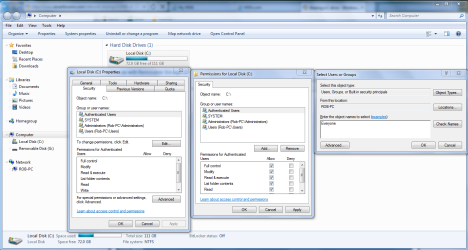
You can try going into the drive's properties and allow for sharing by using the Security tab. You can click on Authenticated users and add "Everyone" to allow Everyone access to the drive or the folders you need to share. If you use the drives security settings it will override the individual folders security settings. This may be different on the XP machine though but I don't have any XP machines to check this on. It might even help to take ownership of the drive from the Win 7 machine.
 

Attachments

  • Sharing C drive with Everyone.PNG
    Sharing C drive with Everyone.PNG
    76.9 KB · Views: 13

My Computer My Computer

At a glance

Windows 7 Ult, Windows 8.1 Pro,Q9650-4.275GHz, E8600 4.5GHz, E6750-3.8GHzG.Skill PC2 9600 1200Mhz 5 5 5 15 2TGTX480
Computer type
PC/Desktop
Computer Manufacturer/Model Number
Home built
OS
Windows 7 Ult, Windows 8.1 Pro,
CPU
Q9650-4.275GHz, E8600 4.5GHz, E6750-3.8GHz
Motherboard
Evga 780i FTW
Memory
G.Skill PC2 9600 1200Mhz 5 5 5 15 2T
Graphics Card(s)
GTX480
Sound Card
Asus Xonar D2
Monitor(s) Displays
HannsG
Screen Resolution
1680X1050
Hard Drives
GSkill Phoenix Pro 120GB SSD
PSU
ThermalTake Toughpower 1000Watt modular
Case
ThermalTake XaserV
Cooling
Xigmatek S1283
Keyboard
Logitech G15
Mouse
Logitech G9
Internet Speed
T1
Chev65 is absolutely correct, assuming that the XP OS was installed on an NTFS volume the access to network shares are governed by both the sharing tab as well as the security tab in the share properties dialog box. They are combined and the most restrictive is applied based on users and associated group membership.
Also I don't know if you mentioned it and I overlooked it or not, but if the XP machine is Home version you might take a look at this article You receive an "Access is denied" error message when you try to access shares on a Windows XP Home Edition-based computer that is connected to a network
And when you are prompt for a username and password you may well have to include the machine name as part of the username entry, like;
XpMachineName\Username
and then the password for that user on the XP machine
 

My Computer My Computer

At a glance

Windows 7 Ultimate 64bitIntel Pentium D 3Ghz4 Gigs PC 6400Nvidia GeForce 8500 GT
Computer Manufacturer/Model Number
PartsIsParts
OS
Windows 7 Ultimate 64bit
CPU
Intel Pentium D 3Ghz
Motherboard
ASRock G31M-S
Memory
4 Gigs PC 6400
Graphics Card(s)
Nvidia GeForce 8500 GT
Sound Card
Realtek High Definition Audio Integrated
Monitor(s) Displays
AOC 19inch X2
Screen Resolution
1024 X 768 (I'm Old)
Hard Drives
Segate ST3160815AS Serial ATAII
Western Digital WD1600AAJA-75PSA0 Serial ATAII
PSU
500 watt..don't know mfg.
Case
Giant Black 4u rackmount I've had for years
Cooling
Stock CPU extra 120s in case
Keyboard
Generic Made in China
Mouse
Logitech USB Optical Scroll
Internet Speed
What ever comcast decides to give me usually 21Mbps up/5mbps
You can try going into the drive's properties and allow for sharing by using the Security tab. You can click on Authenticated users and add "Everyone" to allow Everyone access to the drive or the folders you need to share. If you use the drives security settings it will override the individual folders security settings. This may be different on the XP machine though but I don't have any XP machines to check this on. It might even help to take ownership of the drive from the Win 7 machine.

OK...I did this. I set the drive's security setting to "everyone". No help.

It might even help to take ownership of the drive from the Win 7 machine.

How do you do that?
 

My Computer My Computer

At a glance

Windows 7 Ultimate x64Intel Core i5 320ghz4gbDDR2 800mhzNvidia Gforce 9800
Computer Manufacturer/Model Number
custom
OS
Windows 7 Ultimate x64
CPU
Intel Core i5 320ghz
Memory
4gbDDR2 800mhz
Graphics Card(s)
Nvidia Gforce 9800
Sound Card
Creative Audigy 2 ZS
Monitor(s) Displays
NEC
Screen Resolution
1280x1024
Hard Drives
500gb ATA
320gb ATA
You receive an "Access is denied" error message when you try to access shares on a Windows XP Home Edition-based computer that is connected to a network[/URL]
And when you are prompt for a username and password you may well have to include the machine name as part of the username entry, like;
XpMachineName\Username and then the password for that user on the XP machine

I am using XP pro.

Tried XPmachinename\username and every combination I could think of.

No help.

:banghead:
 

My Computer My Computer

At a glance

Windows 7 Ultimate x64Intel Core i5 320ghz4gbDDR2 800mhzNvidia Gforce 9800
Computer Manufacturer/Model Number
custom
OS
Windows 7 Ultimate x64
CPU
Intel Core i5 320ghz
Memory
4gbDDR2 800mhz
Graphics Card(s)
Nvidia Gforce 9800
Sound Card
Creative Audigy 2 ZS
Monitor(s) Displays
NEC
Screen Resolution
1280x1024
Hard Drives
500gb ATA
320gb ATA
To take ownership of the drive use the link below. This is usually required when changing hardware or moving a drive to a new system. With XP pro it's sometimes required that you disable simple file sharing "first link". It sometimes takes more than one reboot in order for file permissions settings to take hold in XP.

http://support.microsoft.com/kb/304040#turnonfile

Another useful link which explains file and folder permission and security settings for XP. http://support.microsoft.com/kb/307874/en-us

http://www.sevenforums.com/tutorials/1911-take-ownership-shortcut.html
 

My Computer My Computer

At a glance

Windows 7 Ult, Windows 8.1 Pro,Q9650-4.275GHz, E8600 4.5GHz, E6750-3.8GHzG.Skill PC2 9600 1200Mhz 5 5 5 15 2TGTX480
Computer type
PC/Desktop
Computer Manufacturer/Model Number
Home built
OS
Windows 7 Ult, Windows 8.1 Pro,
CPU
Q9650-4.275GHz, E8600 4.5GHz, E6750-3.8GHz
Motherboard
Evga 780i FTW
Memory
G.Skill PC2 9600 1200Mhz 5 5 5 15 2T
Graphics Card(s)
GTX480
Sound Card
Asus Xonar D2
Monitor(s) Displays
HannsG
Screen Resolution
1680X1050
Hard Drives
GSkill Phoenix Pro 120GB SSD
PSU
ThermalTake Toughpower 1000Watt modular
Case
ThermalTake XaserV
Cooling
Xigmatek S1283
Keyboard
Logitech G15
Mouse
Logitech G9
Internet Speed
T1
Back
Top