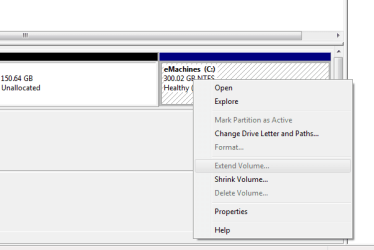
Stretching my C: Partition

TheGrantFitz

Member
Member
Local time
7:04 AM
Messages
12
I've decided to have 7 on another partition with 8. I have 150 GiB open yet the partition refuses to be extended.
Thanks!
 

Attachments

  • Screeen.png
    Screeen.png
    6.2 KB · Views: 8

My Computer My Computer

Computer Manufacturer/Model Number
eMachines
OS
Windows 7 Home Premium x64, Windows 8 Proffesional x64, Windows XP Proffesional x64, Ubuntu 12.10
Memory
4 GB
I'm not sure why you are trying to extend anything.

If you want to install Windows 8 onto that 150.64 GB of unallocated space, you have to make that space into a partition, with a right click.

Or you could shrink your C partition to create unallocated space and then make a partition from that unallocated space.
 

My Computer My Computer

Computer type
PC/Desktop
Computer Manufacturer/Model Number
Ignatz Special; 4 speed manual gearbox; factory air conditioning; one of one
OS
Windows 7 Home Premium SP1, 64-bit
CPU
Intel Skylake i5-6600K, not overclocked
Motherboard
AsRock Z170M Extreme 4, micro ATX
Memory
8 GB HyperX DDR4-2666 (2 x 4 GB)
Graphics Card(s)
none; graphics are integrated on CPU
Sound Card
onboard: Realtek ALC1150; external: USB Behringer UF0-202
Monitor(s) Displays
Dell S2340M 23 inch IPS
Screen Resolution
1600 x 900
Hard Drives
System: Crucial MX100 series SSD, 128 GB;
Data: Samsung Spinpoint 103SJ, 1 TB;
Backup: WD Caviar Green WD30EZRX-00D8PB0, 3 TB
PSU
Rosewill SilentNight 500 watt fanless, semi-modular
Case
Antec Solo II
Cooling
Noctua NH-U12S; Noctua F12 intake, Noctua S12A exhaust
Keyboard
Microsoft 200 6JH-00001 USB
Mouse
Dell or Microsoft optical wired; USB
Antivirus
Microsoft Security Essentials and Malwarebytes Premium
Browser
Pale Moon
Other Info
All fans PWM; speeds at idle: CPU circa 500 rpm; intake circa 600 rpm; exhaust circa 600 rpm; CPU temps 27 idle and 47 C load in a warm room (27 C/81 F) when running Intel Extreme Tuning Utility stress test.
Just be really careful while messing with the disk/partitions in the windows intall UI they are known to mess things up when it comes to disks which are already occupied with files I suggest you back-up to an external HDD or another disk and unplugging it before going forth with it.
 

My Computer My Computer

Computer type
PC/Desktop
OS
Windows 10
CPU
Intel Core i5 3570K
Motherboard
Asus P8Z77V-PRO
Memory
16GB 1600Mhz G.Skill
Graphics Card(s)
Gigabyte GTX 970 G1-Gaming
PSU
Seasonic 1000W Platinum
Case
Fractal Design Define R4
Cooling
Noctua NH-D14
Just be really careful while messing with the disk/partitions in the windows intall UI they are known to mess things up when it comes to disks which are already occupied with files I suggest you back-up to an external HDD or another disk and unplugging it before going forth with it.

Nice to meet you, YoYo155!
I'd like to extend my C: partition, while the last time I tried, I got disastrous results. (backup!!!)

Any working programs?

Thanks, Friend!
 

My Computer My Computer

Computer Manufacturer/Model Number
eMachines
OS
Windows 7 Home Premium x64, Windows 8 Proffesional x64, Windows XP Proffesional x64, Ubuntu 12.10
Memory
4 GB
Nice to meet you, YoYo155!
I'd like to extend my C: partition, while the last time I tried, I got disastrous results. (backup!!!)

Any working programs?

Thanks, Friend!

As ignatzatsonic said you can simply create a new partition using the unallocated space you already have. There's no need to extend you current C:\ partition in order to install Win 8.

As far as software goes Acronis are really good.
 

My Computer My Computer

Computer type
PC/Desktop
OS
Windows 10
CPU
Intel Core i5 3570K
Motherboard
Asus P8Z77V-PRO
Memory
16GB 1600Mhz G.Skill
Graphics Card(s)
Gigabyte GTX 970 G1-Gaming
PSU
Seasonic 1000W Platinum
Case
Fractal Design Define R4
Cooling
Noctua NH-D14
Hello everyone! I got a BSOD and had to reinstall anyways. Thanks, though! :)
 

My Computer My Computer

Computer Manufacturer/Model Number
eMachines
OS
Windows 7 Home Premium x64, Windows 8 Proffesional x64, Windows XP Proffesional x64, Ubuntu 12.10
Memory
4 GB
Back
Top