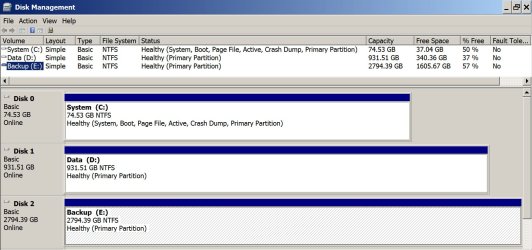
I'm trying to move my OS to a new SSD but up until now I have failed miserably.
I used both AOEMI and Acronis and I get the same result. My SSD will not boot showing the "Bootmgr is missing" black screen.
I've read a lot around these forums and the general opinion is that the Bootmgr is located somewhere else.
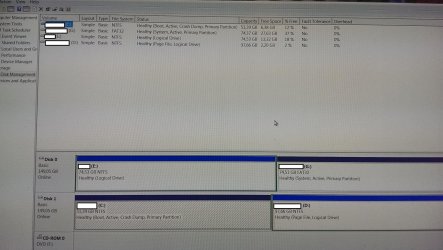
Unfortunately I cannot find a "System Reserved" in Disk Management to include it in my backup/clone.
I have two hard disks and it's probably the cause of the problem.
One is my C: with the OS (Disk 1)
The second is my very old C: which now I use just for data (Disk 0).
If I remove Disk 0 I cannot boot in Windows with just Disk 1.
If I keep Disk 0 and 1 I can only boot when in Bios the IDE (Disk 0) is on top.
My question is this. Is there any way I can create a working backup/clone to my SSD?
A search in My Computer for bootmgr gets me results in G if this is any help.
I tried removing Disk 0 and booting with the Win7 DVD but when I try to repair I get the "This version of System Recovery Options is not compatible with the version of Windows" message.
It's my DVD that used to install windows.
I used both AOEMI and Acronis and I get the same result. My SSD will not boot showing the "Bootmgr is missing" black screen.
I've read a lot around these forums and the general opinion is that the Bootmgr is located somewhere else.
Unfortunately I cannot find a "System Reserved" in Disk Management to include it in my backup/clone.
I have two hard disks and it's probably the cause of the problem.
One is my C: with the OS (Disk 1)
The second is my very old C: which now I use just for data (Disk 0).
If I remove Disk 0 I cannot boot in Windows with just Disk 1.
If I keep Disk 0 and 1 I can only boot when in Bios the IDE (Disk 0) is on top.
My question is this. Is there any way I can create a working backup/clone to my SSD?
A search in My Computer for bootmgr gets me results in G if this is any help.
I tried removing Disk 0 and booting with the Win7 DVD but when I try to repair I get the "This version of System Recovery Options is not compatible with the version of Windows" message.
It's my DVD that used to install windows.
Attachments

My Computer
At a glance
Windows 7 Home Premium 64bit
- OS
- Windows 7 Home Premium 64bit