Solved System migrating and Bootmgr missing

Gurglu

New member
Local time
7:56 AM
Messages
15
I'm trying to move my OS to a new SSD but up until now I have failed miserably.
I used both AOEMI and Acronis and I get the same result. My SSD will not boot showing the "Bootmgr is missing" black screen.
I've read a lot around these forums and the general opinion is that the Bootmgr is located somewhere else.
Unfortunately I cannot find a "System Reserved" in Disk Management to include it in my backup/clone.
I have two hard disks and it's probably the cause of the problem.
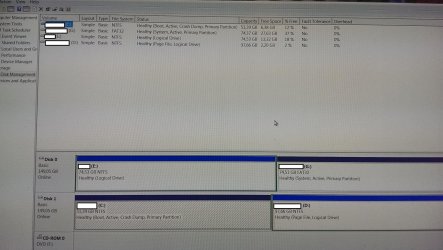
One is my C: with the OS (Disk 1)
The second is my very old C: which now I use just for data (Disk 0).

If I remove Disk 0 I cannot boot in Windows with just Disk 1.
If I keep Disk 0 and 1 I can only boot when in Bios the IDE (Disk 0) is on top.

My question is this. Is there any way I can create a working backup/clone to my SSD?
A search in My Computer for bootmgr gets me results in G if this is any help.
I tried removing Disk 0 and booting with the Win7 DVD but when I try to repair I get the "This version of System Recovery Options is not compatible with the version of Windows" message.
It's my DVD that used to install windows.
 

Attachments
  • 2014-11-13 12.07.10.jpg
    2014-11-13 12.07.10.jpg
    351.7 KB · Views: 5
  • 2014-11-13 12.04.03.jpg
    2014-11-13 12.04.03.jpg
    270 KB · Views: 1

My Computer

OS
Windows 7 Home Premium 64bit
Your boot files are on the G partition on disc 0. That's why you can't boot if disc 0 is disconnected.

I suspect there is more than one way around this, but you could try copying the boot files from G to disc 1, C partition, using EasyBCD, following this tutorial:

http://www.sevenforums.com/tutorials/209885-bootmgr-move-c-easybcd.html

If that succeeds, you should be able to boot with disc 0 disconnected.

System Reserved isn't a requirement. It's normally where boot files are found, but as in your case, boot files can be elsewhere. I don't have a System Reserved either---my boot files are on C.

If you can copy the boot files and operate normally with disc 0 disconnected, you should then be able to clone or image disc 1 to the SSD.
 

My Computer

Computer type
PC/Desktop
Computer Manufacturer/Model Number
Ignatz Special; 4 speed manual gearbox; factory air conditioning; one of one
OS
Windows 7 Home Premium SP1, 64-bit
CPU
Intel Skylake i5-6600K, not overclocked
Motherboard
AsRock Z170M Extreme 4, micro ATX
Memory
8 GB HyperX DDR4-2666 (2 x 4 GB)
Graphics Card(s)
none; graphics are integrated on CPU
Sound Card
onboard: Realtek ALC1150; external: USB Behringer UF0-202
Monitor(s) Displays
Dell S2340M 23 inch IPS
Screen Resolution
1600 x 900
Hard Drives
System: Crucial MX100 series SSD, 128 GB;
Data: Samsung Spinpoint 103SJ, 1 TB;
Backup: WD Caviar Green WD30EZRX-00D8PB0, 3 TB
PSU
Rosewill SilentNight 500 watt fanless, semi-modular
Case
Antec Solo II
Cooling
Noctua NH-U12S; Noctua F12 intake, Noctua S12A exhaust
Keyboard
Microsoft 200 6JH-00001 USB
Mouse
Dell or Microsoft optical wired; USB
Antivirus
Microsoft Security Essentials and Malwarebytes Premium
Browser
Pale Moon
Other Info
All fans PWM; speeds at idle: CPU circa 500 rpm; intake circa 600 rpm; exhaust circa 600 rpm; CPU temps 27 idle and 47 C load in a warm room (27 C/81 F) when running Intel Extreme Tuning Utility stress test.
Your boot files are on the G partition on disc 0. That's why you can't boot if disc 0 is disconnected.

I suspect there is more than one way around this, but you could try copying the boot files from G to disc 1, C partition, using EasyBCD, following this tutorial:

http://www.sevenforums.com/tutorials/209885-bootmgr-move-c-easybcd.html

If that succeeds, you should be able to boot with disc 0 disconnected.

System Reserved isn't a requirement. It's normally where boot files are found, but as in your case, boot files can be elsewhere. I don't have a System Reserved either---my boot files are on C.

If you can copy the boot files and operate normally with disc 0 disconnected, you should then be able to clone or image disc 1 to the SSD.

I'm not currently at home so I'll try it later on and report.
I don't know if I made it clear in my previous post, but I can boot with the SSD as well (the backup/recover process succeeded) but again it needs G.
So I'll check it out and see if this works.
 

My Computer

OS
Windows 7 Home Premium 64bit
I don't know if I made it clear in my previous post, but I can boot with the SSD as well (the backup/recover process succeeded) but again it needs G.

That's what I'd expect.

You apparently cloned disk 1. That specifically excludes partition G and your boot files.

Not sure how you ended up with such a convoluted setup, but you can certainly have C marked as system, boot, page file, active, crash dump, and primary.

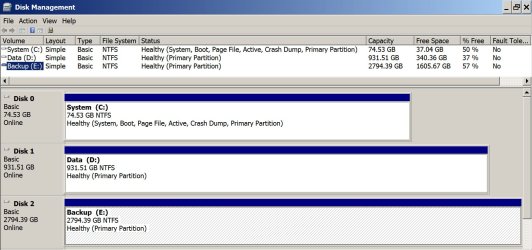
Here's a screen shot of my drives. C is an SSD. Note that I don't have System Reserved.
 

Attachments

  • Untitled-1.jpg
    Untitled-1.jpg
    184.9 KB · Views: 1

My Computer

Computer type
PC/Desktop
Computer Manufacturer/Model Number
Ignatz Special; 4 speed manual gearbox; factory air conditioning; one of one
OS
Windows 7 Home Premium SP1, 64-bit
CPU
Intel Skylake i5-6600K, not overclocked
Motherboard
AsRock Z170M Extreme 4, micro ATX
Memory
8 GB HyperX DDR4-2666 (2 x 4 GB)
Graphics Card(s)
none; graphics are integrated on CPU
Sound Card
onboard: Realtek ALC1150; external: USB Behringer UF0-202
Monitor(s) Displays
Dell S2340M 23 inch IPS
Screen Resolution
1600 x 900
Hard Drives
System: Crucial MX100 series SSD, 128 GB;
Data: Samsung Spinpoint 103SJ, 1 TB;
Backup: WD Caviar Green WD30EZRX-00D8PB0, 3 TB
PSU
Rosewill SilentNight 500 watt fanless, semi-modular
Case
Antec Solo II
Cooling
Noctua NH-U12S; Noctua F12 intake, Noctua S12A exhaust
Keyboard
Microsoft 200 6JH-00001 USB
Mouse
Dell or Microsoft optical wired; USB
Antivirus
Microsoft Security Essentials and Malwarebytes Premium
Browser
Pale Moon
Other Info
All fans PWM; speeds at idle: CPU circa 500 rpm; intake circa 600 rpm; exhaust circa 600 rpm; CPU temps 27 idle and 47 C load in a warm room (27 C/81 F) when running Intel Extreme Tuning Utility stress test.
The reason that the System Boot files were placed on G is because the other hard drives were not unplugged during install of Win7, so it places the System Boot files on the first available Primary partition which in this case is G since boot files cannot go onto a Logical partition.

In addition to moving the boot files to C while marking it Active, then marking G Inactive, I would swap the position of the two disks so that the System partition is always on the first-in-order HD. This way in any future repairs or reinstall the boot files will not be derailed to a preceding Primary partition.
 
EasyBCD worked like a charm. I managed to boot with just the SSD.

@greg, yes that's the reason. Although it has been many years ago, I suppose I didn't unplug the other HDD. Thanks for the advice on unmarking the HDD.

I have some questions regarding sysprep and the use of this SSD in another PC but that's another subject so I will mark it as solved and if I don't find enough info here I'll post a new topic.
Thanks again for the help, sevenforums are great.
 

My Computer

OS
Windows 7 Home Premium 64bit
Back
Top