Solved System Protection is OFF

bawldiggle

GrayGhost2 ret.
Pro User
VIP
Local time
4:36 AM
Messages
895
Location
Australia
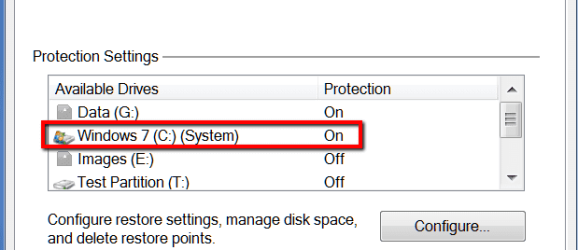
My System in "System Properties" has its "Protection" as OFF
Start > Control Panel > System > System Protection > System Properties (dlg) > System Protection (tab)

my settings.png

I am trying to clean up my Registry after uninstalling "CutePDF"
- three lots of bundleware with one double negative opt-out that I thought I had outsmarted :o
- CutePDF do not supply an "uninstaller" any more for their free CutePDF
- Revouninstaller did not detect any registry items
- CCleaner does not find any of the CutePDF registry entries
- a manual trawl/search has found two keys each with 29 data entries
- created a restore point, as insurance
- disabled the "CutePDF" keys by renaming the keys with a "_obs" affix string
- rebooted and no problems
Q1: Should the "System" protection be Off or ON
- my inclination is to change it to ON
- but I would like to check with those who really know first (no guesses)

I know ... I know ... an image would have been simpler
- but I am not "there" yet ... when my busy meter slows down to insane ;)
 

My Computer My Computer

Computer type
PC/Desktop
Computer Manufacturer/Model Number
Toshiba, Lenovo (laptops) + 4 rigs
OS
XP Pro (x86) | 7 HP (x86) & (x64) | 7 Pro (x64)
It should be on if you want the protection of system restore.
 

My Computer My Computer

Computer type
PC/Desktop
Computer Manufacturer/Model Number
Dell XPS 420
OS
Windows 10, Home Clean Install
CPU
Intel Core2 processsor Q8200(2.33Ghz 1333FSB) Quad Core Tech
Motherboard
Dell
Memory
6 gb
Graphics Card(s)
ATI Radeon 256MB HD3650
Sound Card
Intergrated 7.1 Channel Audio
Monitor(s) Displays
Dell SP2009W 20"
Hard Drives
640 GB Serial ATA Hard drive
Cooling
Fan
Keyboard
Dell USB Keyboard
Mouse
Dell Premium Optical USB
Internet Speed
DSL 2.85
Thanks richc46 for your quick response :)

How could my "System" be OFF ?
- I don't remember ever "playing around" in System Properties
- Brink drummed into me in my early days of Win7 ... "don't fool around with protection"
- I was an XP advocate (not any more though)
 

My Computer My Computer

Computer type
PC/Desktop
Computer Manufacturer/Model Number
Toshiba, Lenovo (laptops) + 4 rigs
OS
XP Pro (x86) | 7 HP (x86) & (x64) | 7 Pro (x64)
That pertains to the 100MB system partition and it should be off. There is no room on that partition for restore points.

See in my PC the C partition is "System" because I moved the bootmgr to C and do not have the 100MB partition. System is where the bootmgr resides. It can even be the recovery partition like on some Dell systems.
 

Attachments

  • 2015-02-23_1857.png
    2015-02-23_1857.png
    7.3 KB · Views: 10

My Computer My Computer

Computer Manufacturer/Model Number
HP, Dell, Gateway, Toshiba - 4 laptops and 2 desktops
OS
Vista, Windows7, Mint Mate, Zorin, Windows 8
CPU
from 1.6GHz Duo to i7
Monitor(s) Displays
2x HP w2207
Hard Drives
5x HDD, 7x SSD, 12x Externals
Keyboard
with trackball - no mices
Mouse
Trackball mice
Internet Speed
DSL 6000
It is fine. The folder you have in the red box does not exist. It is phantom volume.
 

My Computers My Computers

System One System Two

  • Computer type
    PC/Desktop
    OS
    7 X64
    CPU
    i5 8400
    Motherboard
    gigabyte b365m ds3h
    Memory
    2x8gb 3200mhz
    Hard Drives
    various
    PSU
    pure power 11 400w cm
    Case
    Coolermaster
    Cooling
    cryorig m9i
  • Computer type
    PC/Desktop
    OS
    7x64
    CPU
    g5400
    Motherboard
    ga b365m ds3h
    Memory
    8gb ddr4 2400
    PSU
    xfx pro 450w
It is fine. The folder you have in the red box does not exist. It is phantom volume.

That's no phantom. It's my C partition - guaranteed.
 

My Computer My Computer

Computer Manufacturer/Model Number
HP, Dell, Gateway, Toshiba - 4 laptops and 2 desktops
OS
Vista, Windows7, Mint Mate, Zorin, Windows 8
CPU
from 1.6GHz Duo to i7
Monitor(s) Displays
2x HP w2207
Hard Drives
5x HDD, 7x SSD, 12x Externals
Keyboard
with trackball - no mices
Mouse
Trackball mice
Internet Speed
DSL 6000

My Computer My Computer

Computer type
PC/Desktop
Computer Manufacturer/Model Number
Dell XPS 420
OS
Windows 10, Home Clean Install
CPU
Intel Core2 processsor Q8200(2.33Ghz 1333FSB) Quad Core Tech
Motherboard
Dell
Memory
6 gb
Graphics Card(s)
ATI Radeon 256MB HD3650
Sound Card
Intergrated 7.1 Channel Audio
Monitor(s) Displays
Dell SP2009W 20"
Hard Drives
640 GB Serial ATA Hard drive
Cooling
Fan
Keyboard
Dell USB Keyboard
Mouse
Dell Premium Optical USB
Internet Speed
DSL 2.85

My Computer My Computer

Computer Manufacturer/Model Number
HP, Dell, Gateway, Toshiba - 4 laptops and 2 desktops
OS
Vista, Windows7, Mint Mate, Zorin, Windows 8
CPU
from 1.6GHz Duo to i7
Monitor(s) Displays
2x HP w2207
Hard Drives
5x HDD, 7x SSD, 12x Externals
Keyboard
with trackball - no mices
Mouse
Trackball mice
Internet Speed
DSL 6000
Thank you to all for your responses :)

My Toshiba laptop OEM Win7
- I 49% guessed it was the OEM partition (if that is what I might call it) ...
- and 51% ... I didn't want to make a silly move

The laptop is loaded with Toshiba bloat
- one day I want clean install Win7 without the T bloat
- Greg's tutorial is still in my notes of chores to do, when there is nothing else to do

Cheers from 28°C ... blue skies ... ;)
 

My Computer My Computer

Computer type
PC/Desktop
Computer Manufacturer/Model Number
Toshiba, Lenovo (laptops) + 4 rigs
OS
XP Pro (x86) | 7 HP (x86) & (x64) | 7 Pro (x64)
Yeah, Toshiba is the bloat champion. I have one of those too.

Cheers from 27 degrees C and light breeze from the gulf.
 

My Computer My Computer

Computer Manufacturer/Model Number
HP, Dell, Gateway, Toshiba - 4 laptops and 2 desktops
OS
Vista, Windows7, Mint Mate, Zorin, Windows 8
CPU
from 1.6GHz Duo to i7
Monitor(s) Displays
2x HP w2207
Hard Drives
5x HDD, 7x SSD, 12x Externals
Keyboard
with trackball - no mices
Mouse
Trackball mice
Internet Speed
DSL 6000
Back
Top