
System Protection - Turn On or Off

How to Turn System Protection On or Off in Windows 7

   Information
System Restore regularly tracks changes to your computer's system files, and uses a feature called System Protection to create restore points of selected hard disks in your computer. System Protection is turned on by default for the Windows 7 hard disk or partition on your computer.

This will show you how to turn System Protection On or Off for creating System Restore Points for system settings and previous versions (shadow copies) of files in Windows 7. You could also use previous versions (shadow copies) to restore older copies of files and folders.

You can select which disks have System Protection turned on for.

   Note
It is not recommended to turn off system protection for your C: system drive (Windows 7) since it is a great tool to easily undo a mistake, for example one that may have crippled Windows 7, by just doing a system restore to go back to a previous restore point of your system dated before the mistake.
   Warning

  • System Restore doesn't protect FAT32 and other FAT disks because FAT disks don't support the use of shadow copies. Shadow copies contain information about changes to documents and system files. Shadow copies require the NTFS file system. Windows 7 uses the NTFS file system.
  • Turning off System Protection for a disk deletes all restore points for that disk. You cannot restore the disk until you turn on System Protection again and a restore point is created for that disk.


Here's How: 1. Open the Control Panel (Icons View). A) Click on the System icon.

B) Go to step 3.
OR

2. Open the Start Menu. A) Right click on the Computer button and click on Properties.
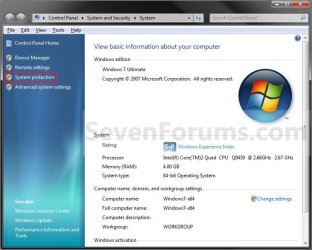
3. Click on the System Protection link. (see screenshot below) System.jpg
4. If prompted by UAC, then click on Yes if administrator or type in the adminstrator's password if standard user.

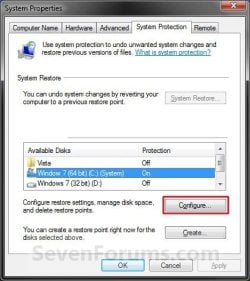
5. Click on the available hard disk drive or partition, that you want to turn System Protection on or off for, to select it. (see screenshot below step 6)
NOTE: Windows 7 should be the C: drive with (System). Under the Protection column, you will see if System Protection is turned On or Off for the available disk.

6. Click on the Configure button. (see screenshot below) System_Properties.jpg
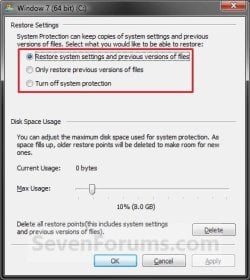
7. To Turn On System Protection for System Settings and Previous Versions of Files A) Dot Restore system settings and previous versions of files. (see screenshot below step 10)
NOTE: This turns on creating restore points and Previous Versions for the selected drive in step 5.

B) Move the Max Usage slider to set the maximum disk space usage you want to be used by system protection on the selected drive letter.

C) Go to step 10.

8. To Turn On System Protection for Only Previous Versions of Files A) Dot Only restore previous versions of files. (see screenshot below step 10)
NOTE: This turns on only Previous Versions for the selected drive in step 5.

B) Move the Max Usage slider to set the maximum disk space usage you want to be used by system protection on the selected drive letter.

C) Go to step 10.
9. To Turn Off System Protection for the Selected Disk A) Dot Turn off system protection. (see screenshot below step 10)
NOTE: This turns off both creating restore points and Previous Versions for the selected drive in step 5.

B) Go to step 10.
10. Click on OK. (see screenshot below) Configure.jpg
11. Repeat steps 5 to 10 if you wanted to turn System Protection on or off for another listed drive.

12. When finished, click on OK. (see screenshot below step 6)
That's it,
Shawn


Last edited:
Good Afternoon "Brink",
I tried to follow the procedure you specified but hit a problem. At instruction 3, I clicked it and got a windows window asking if I am allowing windows to make changes. I clicked "Yes". I then got the Systems Properties window but at the same time got an error window saying "There was an unexpected error in the property page. System Restore encountered an error. Please try to run system restore again. (0x81000203). I did try again but got the same error. If I clear the error window and look at the Properties Window, and under tab System Protection, I note that it stays searching for a drive - but never finds one. I did do a check on "Volumn Shadow Copy". I found it set to "Manual" and switched off. I changed it to "Automatic" and started it. Did a reset and tried again, but the error message etc was still there.
 

My Computer

Computer type
Laptop
Computer Manufacturer/Model Number
Acer 5810TZG
OS
Windows 7 Home Premium 64 bit
CPU
Intel Pentium SU 4100
Motherboard
Intel Centrino 2
Memory
3 GB
Graphics Card(s)
ATI Mobility Radeon HD4330
Sound Card
Not known
Monitor(s) Displays
15.6" 16 9 HD LCD
Screen Resolution
1366 x 768
Hard Drives
320 GB
PSU
What is a PSU
Case
Laptop
Cooling
Fan
Keyboard
Part of laptop
Mouse
Technika wireless
Internet Speed
7 Mb
Antivirus
M.S.E. & Malwarebytes Pro.
Browser
SurfEasy/Chrome/Firefox/Internet Explorer
Other Info
Tiscali ISP
Connection to internet via Wifi or - if none - Vodafone dongle in UK & MIFI with International data sim when abroad
Hello TheSaint, and welcome to Seven Forums.

You might double check using the tutorial below to make sure that System Protection has not been disabled by mistake.

http://www.sevenforums.com/tutorials/81500-system-restore-enable-disable.html

If it is enabled, then download and merge the REG file below to restore the default Parameters registry key for system restore. Afterwards, restart the computer to apply and see if that may help.


Hope this helps,
Shawn
 

Attachments

My Computer

Computer type
PC/Desktop
Computer Manufacturer/Model Number
Self built custom
OS
64-bit Windows 11 Pro for Workstations
CPU
Intel i7-8700K OC'd to 5 GHz
Motherboard
ASUS ROG Maximus XI Formula Z390
Memory
64 GB (4x16GB) G.SKILL TridentZ RGB DDR4 3600 MHz
Graphics Card(s)
ASUS ROG-STRIX-GTX1080TI-O11G-GAMING
Sound Card
Integrated
Monitor(s) Displays
2 x Samsung Odyssey G7 27"
Screen Resolution
2560x1440
Hard Drives
1TB Samsung 990 PRO M.2,
4TB Samsung 990 PRO PRO M.2,
TerraMaster F8 SSD Plus NAS
PSU
Seasonic Prime Titanium 850W
Case
Thermaltake Core P3
Cooling
Corsair Hydro H115i
Keyboard
Logitech wireless K800
Mouse
Logitech MX Master 4
Internet Speed
2 Gb/s Download and 100 Mb/s Upload
Antivirus
Malwarebyte Anti-Malware Premium
Browser
Google Chrome
Other Info
Logitech Z625 speaker system,
Logitech BRIO 4K Pro webcam,
HP Color LaserJet Pro MFP M477fdn,
APC SMART-UPS RT 1000 XL - SURT1000XLI,
Galaxy S23 Plus phone
Dear Shawn,
Thanks for your suggestions (option 1 and 2). Neither solved the problem.
With option 1, I followed your good instructions with ease. However; on going back to the System Properties window, I got the same error message as before, and again, under the protection tab windows was not finding any drives to select from. It should surely have found "C" (my internal HDD)
With option 2. You did not specify how to find the "Local Group Policy Editor". I googled and found that you had to run "gpedit.msc" I tried that but it did not seem to be on the computer (Windows 7 Home Premium 64 bit, using Internet Explorer 9)
Further advice would be welcome
Regards from Ron
 

My Computer

Computer type
Laptop
Computer Manufacturer/Model Number
Acer 5810TZG
OS
Windows 7 Home Premium 64 bit
CPU
Intel Pentium SU 4100
Motherboard
Intel Centrino 2
Memory
3 GB
Graphics Card(s)
ATI Mobility Radeon HD4330
Sound Card
Not known
Monitor(s) Displays
15.6" 16 9 HD LCD
Screen Resolution
1366 x 768
Hard Drives
320 GB
PSU
What is a PSU
Case
Laptop
Cooling
Fan
Keyboard
Part of laptop
Mouse
Technika wireless
Internet Speed
7 Mb
Antivirus
M.S.E. & Malwarebytes Pro.
Browser
SurfEasy/Chrome/Firefox/Internet Explorer
Other Info
Tiscali ISP
Connection to internet via Wifi or - if none - Vodafone dongle in UK & MIFI with International data sim when abroad
I had a link in step 1 of OPTION TWO to help show how to open the Group Policy with more details instead. ;)

Did you try the REG download above to see if that may help?
 

My Computer

Computer type
PC/Desktop
Computer Manufacturer/Model Number
Self built custom
OS
64-bit Windows 11 Pro for Workstations
CPU
Intel i7-8700K OC'd to 5 GHz
Motherboard
ASUS ROG Maximus XI Formula Z390
Memory
64 GB (4x16GB) G.SKILL TridentZ RGB DDR4 3600 MHz
Graphics Card(s)
ASUS ROG-STRIX-GTX1080TI-O11G-GAMING
Sound Card
Integrated
Monitor(s) Displays
2 x Samsung Odyssey G7 27"
Screen Resolution
2560x1440
Hard Drives
1TB Samsung 990 PRO M.2,
4TB Samsung 990 PRO PRO M.2,
TerraMaster F8 SSD Plus NAS
PSU
Seasonic Prime Titanium 850W
Case
Thermaltake Core P3
Cooling
Corsair Hydro H115i
Keyboard
Logitech wireless K800
Mouse
Logitech MX Master 4
Internet Speed
2 Gb/s Download and 100 Mb/s Upload
Antivirus
Malwarebyte Anti-Malware Premium
Browser
Google Chrome
Other Info
Logitech Z625 speaker system,
Logitech BRIO 4K Pro webcam,
HP Color LaserJet Pro MFP M477fdn,
APC SMART-UPS RT 1000 XL - SURT1000XLI,
Galaxy S23 Plus phone
Yes I did try the reg download, but as I said, I still got the same error report.
I will look again at option 2 as soon as I get a few minutes to spare.
 

My Computer

Computer type
Laptop
Computer Manufacturer/Model Number
Acer 5810TZG
OS
Windows 7 Home Premium 64 bit
CPU
Intel Pentium SU 4100
Motherboard
Intel Centrino 2
Memory
3 GB
Graphics Card(s)
ATI Mobility Radeon HD4330
Sound Card
Not known
Monitor(s) Displays
15.6" 16 9 HD LCD
Screen Resolution
1366 x 768
Hard Drives
320 GB
PSU
What is a PSU
Case
Laptop
Cooling
Fan
Keyboard
Part of laptop
Mouse
Technika wireless
Internet Speed
7 Mb
Antivirus
M.S.E. & Malwarebytes Pro.
Browser
SurfEasy/Chrome/Firefox/Internet Explorer
Other Info
Tiscali ISP
Connection to internet via Wifi or - if none - Vodafone dongle in UK & MIFI with International data sim when abroad
Ron,

No need to do OPTION TWO if you tried OPTION ONE. It's the same thing, but just using a different way of doing it.

What antivirus or security program are you using?

As a test, temporarily disable or uninstall it, then test to see if it system restore will work properly.
 

My Computer

Computer type
PC/Desktop
Computer Manufacturer/Model Number
Self built custom
OS
64-bit Windows 11 Pro for Workstations
CPU
Intel i7-8700K OC'd to 5 GHz
Motherboard
ASUS ROG Maximus XI Formula Z390
Memory
64 GB (4x16GB) G.SKILL TridentZ RGB DDR4 3600 MHz
Graphics Card(s)
ASUS ROG-STRIX-GTX1080TI-O11G-GAMING
Sound Card
Integrated
Monitor(s) Displays
2 x Samsung Odyssey G7 27"
Screen Resolution
2560x1440
Hard Drives
1TB Samsung 990 PRO M.2,
4TB Samsung 990 PRO PRO M.2,
TerraMaster F8 SSD Plus NAS
PSU
Seasonic Prime Titanium 850W
Case
Thermaltake Core P3
Cooling
Corsair Hydro H115i
Keyboard
Logitech wireless K800
Mouse
Logitech MX Master 4
Internet Speed
2 Gb/s Download and 100 Mb/s Upload
Antivirus
Malwarebyte Anti-Malware Premium
Browser
Google Chrome
Other Info
Logitech Z625 speaker system,
Logitech BRIO 4K Pro webcam,
HP Color LaserJet Pro MFP M477fdn,
APC SMART-UPS RT 1000 XL - SURT1000XLI,
Galaxy S23 Plus phone
Good Evening Brink,
I am currently using the trial version of AVG Internet security 2011. I'll try disabling or uninstalling it tomorrow. I normally only use the AVG free Anti-virus, along with Super Anti Spyware and Malware bytes (both free versions)
 

My Computer

Computer type
Laptop
Computer Manufacturer/Model Number
Acer 5810TZG
OS
Windows 7 Home Premium 64 bit
CPU
Intel Pentium SU 4100
Motherboard
Intel Centrino 2
Memory
3 GB
Graphics Card(s)
ATI Mobility Radeon HD4330
Sound Card
Not known
Monitor(s) Displays
15.6" 16 9 HD LCD
Screen Resolution
1366 x 768
Hard Drives
320 GB
PSU
What is a PSU
Case
Laptop
Cooling
Fan
Keyboard
Part of laptop
Mouse
Technika wireless
Internet Speed
7 Mb
Antivirus
M.S.E. & Malwarebytes Pro.
Browser
SurfEasy/Chrome/Firefox/Internet Explorer
Other Info
Tiscali ISP
Connection to internet via Wifi or - if none - Vodafone dongle in UK & MIFI with International data sim when abroad
If it still doesn't work afterwards, then you may need to reinstall to fix it since we tried everything else. :(
 

My Computer

Computer type
PC/Desktop
Computer Manufacturer/Model Number
Self built custom
OS
64-bit Windows 11 Pro for Workstations
CPU
Intel i7-8700K OC'd to 5 GHz
Motherboard
ASUS ROG Maximus XI Formula Z390
Memory
64 GB (4x16GB) G.SKILL TridentZ RGB DDR4 3600 MHz
Graphics Card(s)
ASUS ROG-STRIX-GTX1080TI-O11G-GAMING
Sound Card
Integrated
Monitor(s) Displays
2 x Samsung Odyssey G7 27"
Screen Resolution
2560x1440
Hard Drives
1TB Samsung 990 PRO M.2,
4TB Samsung 990 PRO PRO M.2,
TerraMaster F8 SSD Plus NAS
PSU
Seasonic Prime Titanium 850W
Case
Thermaltake Core P3
Cooling
Corsair Hydro H115i
Keyboard
Logitech wireless K800
Mouse
Logitech MX Master 4
Internet Speed
2 Gb/s Download and 100 Mb/s Upload
Antivirus
Malwarebyte Anti-Malware Premium
Browser
Google Chrome
Other Info
Logitech Z625 speaker system,
Logitech BRIO 4K Pro webcam,
HP Color LaserJet Pro MFP M477fdn,
APC SMART-UPS RT 1000 XL - SURT1000XLI,
Galaxy S23 Plus phone
Thanks Brink,
I did disable AVG and try for a "backup now" but it would not do it (error code 0x81000031).
If I have to re-install; how is that achieved? I never had an installatiion disc when I purchased my laptop 6 months ago. However; when I had had the machine a month I did do a back up onto a set of 3 DVDs. It was called "recovery Discs" or "factory default". A month after that I did a further backup on a recently aquired external HDD (WD Elements). This was called "Create System Image". I understand that it is also possible to make or download an emergency repair program which is supposed to fix lots of errors. What do you advise?
 

My Computer

Computer type
Laptop
Computer Manufacturer/Model Number
Acer 5810TZG
OS
Windows 7 Home Premium 64 bit
CPU
Intel Pentium SU 4100
Motherboard
Intel Centrino 2
Memory
3 GB
Graphics Card(s)
ATI Mobility Radeon HD4330
Sound Card
Not known
Monitor(s) Displays
15.6" 16 9 HD LCD
Screen Resolution
1366 x 768
Hard Drives
320 GB
PSU
What is a PSU
Case
Laptop
Cooling
Fan
Keyboard
Part of laptop
Mouse
Technika wireless
Internet Speed
7 Mb
Antivirus
M.S.E. & Malwarebytes Pro.
Browser
SurfEasy/Chrome/Firefox/Internet Explorer
Other Info
Tiscali ISP
Connection to internet via Wifi or - if none - Vodafone dongle in UK & MIFI with International data sim when abroad
Ron,

I would try doing a system image recovery from your system image backup to see if it may have worked properly at the time the image was created first.

The recovery discs that you created are used to do a factory restore of your Windows 7. It's basically a reinstall of Windows 7 back to how it was when you first turned on your laptop.

Before doing either option, be sure to backup anything that you do not want to lose first.
 

My Computer

Computer type
PC/Desktop
Computer Manufacturer/Model Number
Self built custom
OS
64-bit Windows 11 Pro for Workstations
CPU
Intel i7-8700K OC'd to 5 GHz
Motherboard
ASUS ROG Maximus XI Formula Z390
Memory
64 GB (4x16GB) G.SKILL TridentZ RGB DDR4 3600 MHz
Graphics Card(s)
ASUS ROG-STRIX-GTX1080TI-O11G-GAMING
Sound Card
Integrated
Monitor(s) Displays
2 x Samsung Odyssey G7 27"
Screen Resolution
2560x1440
Hard Drives
1TB Samsung 990 PRO M.2,
4TB Samsung 990 PRO PRO M.2,
TerraMaster F8 SSD Plus NAS
PSU
Seasonic Prime Titanium 850W
Case
Thermaltake Core P3
Cooling
Corsair Hydro H115i
Keyboard
Logitech wireless K800
Mouse
Logitech MX Master 4
Internet Speed
2 Gb/s Download and 100 Mb/s Upload
Antivirus
Malwarebyte Anti-Malware Premium
Browser
Google Chrome
Other Info
Logitech Z625 speaker system,
Logitech BRIO 4K Pro webcam,
HP Color LaserJet Pro MFP M477fdn,
APC SMART-UPS RT 1000 XL - SURT1000XLI,
Galaxy S23 Plus phone
Thanks Brink,
Your advice to do a back-up first is interesting as that is what I have been trying to achieve for 2 days - but that was either onto the internal HDD or onto a DVD. I can try onto a USB flash drive or onto my external HDD - but I suspect that as the backup in not working for the internal HDD or DVD; it will also not work on the untried options (unless you have got in mind some other type of backup that I am unaware of?
 

My Computer

Computer type
Laptop
Computer Manufacturer/Model Number
Acer 5810TZG
OS
Windows 7 Home Premium 64 bit
CPU
Intel Pentium SU 4100
Motherboard
Intel Centrino 2
Memory
3 GB
Graphics Card(s)
ATI Mobility Radeon HD4330
Sound Card
Not known
Monitor(s) Displays
15.6" 16 9 HD LCD
Screen Resolution
1366 x 768
Hard Drives
320 GB
PSU
What is a PSU
Case
Laptop
Cooling
Fan
Keyboard
Part of laptop
Mouse
Technika wireless
Internet Speed
7 Mb
Antivirus
M.S.E. & Malwarebytes Pro.
Browser
SurfEasy/Chrome/Firefox/Internet Explorer
Other Info
Tiscali ISP
Connection to internet via Wifi or - if none - Vodafone dongle in UK & MIFI with International data sim when abroad
Sorry, you could just manually copy and post the files (ex: pictures, documents, etc......) directly to your USB flash drive or ext HDD.
 

My Computer

Computer type
PC/Desktop
Computer Manufacturer/Model Number
Self built custom
OS
64-bit Windows 11 Pro for Workstations
CPU
Intel i7-8700K OC'd to 5 GHz
Motherboard
ASUS ROG Maximus XI Formula Z390
Memory
64 GB (4x16GB) G.SKILL TridentZ RGB DDR4 3600 MHz
Graphics Card(s)
ASUS ROG-STRIX-GTX1080TI-O11G-GAMING
Sound Card
Integrated
Monitor(s) Displays
2 x Samsung Odyssey G7 27"
Screen Resolution
2560x1440
Hard Drives
1TB Samsung 990 PRO M.2,
4TB Samsung 990 PRO PRO M.2,
TerraMaster F8 SSD Plus NAS
PSU
Seasonic Prime Titanium 850W
Case
Thermaltake Core P3
Cooling
Corsair Hydro H115i
Keyboard
Logitech wireless K800
Mouse
Logitech MX Master 4
Internet Speed
2 Gb/s Download and 100 Mb/s Upload
Antivirus
Malwarebyte Anti-Malware Premium
Browser
Google Chrome
Other Info
Logitech Z625 speaker system,
Logitech BRIO 4K Pro webcam,
HP Color LaserJet Pro MFP M477fdn,
APC SMART-UPS RT 1000 XL - SURT1000XLI,
Galaxy S23 Plus phone
My Problem is solved. In case what I have found out is of value to other readers; I will summerise my problem and how I solved it.
Neither of my "Create a Restore Point" or my "Backup and Restore" would work. I cured the problem (after 10 days of advice and my own efforts) thus;-
Start - type in "services.msc" - Enter - see long list of services - find "Microsoft Volumn Shadow Copy service" - Right click it and select "Properties" - check that it is not disabled. If it is; change it to "Manual" and Start the Service. Now go further down the list and find "Volumn Shadow Copy service" and set it up in the same way as the "Microsoft" one. Job done - for me anyway!
 

My Computer

Computer type
Laptop
Computer Manufacturer/Model Number
Acer 5810TZG
OS
Windows 7 Home Premium 64 bit
CPU
Intel Pentium SU 4100
Motherboard
Intel Centrino 2
Memory
3 GB
Graphics Card(s)
ATI Mobility Radeon HD4330
Sound Card
Not known
Monitor(s) Displays
15.6" 16 9 HD LCD
Screen Resolution
1366 x 768
Hard Drives
320 GB
PSU
What is a PSU
Case
Laptop
Cooling
Fan
Keyboard
Part of laptop
Mouse
Technika wireless
Internet Speed
7 Mb
Antivirus
M.S.E. & Malwarebytes Pro.
Browser
SurfEasy/Chrome/Firefox/Internet Explorer
Other Info
Tiscali ISP
Connection to internet via Wifi or - if none - Vodafone dongle in UK & MIFI with International data sim when abroad
That's great news. Thank you for posting back with your results. :)
 

My Computer

Computer type
PC/Desktop
Computer Manufacturer/Model Number
Self built custom
OS
64-bit Windows 11 Pro for Workstations
CPU
Intel i7-8700K OC'd to 5 GHz
Motherboard
ASUS ROG Maximus XI Formula Z390
Memory
64 GB (4x16GB) G.SKILL TridentZ RGB DDR4 3600 MHz
Graphics Card(s)
ASUS ROG-STRIX-GTX1080TI-O11G-GAMING
Sound Card
Integrated
Monitor(s) Displays
2 x Samsung Odyssey G7 27"
Screen Resolution
2560x1440
Hard Drives
1TB Samsung 990 PRO M.2,
4TB Samsung 990 PRO PRO M.2,
TerraMaster F8 SSD Plus NAS
PSU
Seasonic Prime Titanium 850W
Case
Thermaltake Core P3
Cooling
Corsair Hydro H115i
Keyboard
Logitech wireless K800
Mouse
Logitech MX Master 4
Internet Speed
2 Gb/s Download and 100 Mb/s Upload
Antivirus
Malwarebyte Anti-Malware Premium
Browser
Google Chrome
Other Info
Logitech Z625 speaker system,
Logitech BRIO 4K Pro webcam,
HP Color LaserJet Pro MFP M477fdn,
APC SMART-UPS RT 1000 XL - SURT1000XLI,
Galaxy S23 Plus phone
Hey Brink, I make a system image on the 1st of each month. Since I do this, I have turned off system protection for both my "C" drive, and also "RECOVERY' (whatever that is) too. Bad idea or good since I do the images?
 

My Computer

OS
Windows 7 Home Premium x64 SP1
Hello DBone,

It depends on your needs. System Images are great if you needed to restore the complete computer or HDD back to how it was when the image was created.

System Protection includes system restore (restore points) and previous versions (shadow copies). It can be very helpful to say do a quick undo of changes made to system files or a installed program that messed things up without having to restore the whole system with a image.

Hope this helps. :)
 

My Computer

Computer type
PC/Desktop
Computer Manufacturer/Model Number
Self built custom
OS
64-bit Windows 11 Pro for Workstations
CPU
Intel i7-8700K OC'd to 5 GHz
Motherboard
ASUS ROG Maximus XI Formula Z390
Memory
64 GB (4x16GB) G.SKILL TridentZ RGB DDR4 3600 MHz
Graphics Card(s)
ASUS ROG-STRIX-GTX1080TI-O11G-GAMING
Sound Card
Integrated
Monitor(s) Displays
2 x Samsung Odyssey G7 27"
Screen Resolution
2560x1440
Hard Drives
1TB Samsung 990 PRO M.2,
4TB Samsung 990 PRO PRO M.2,
TerraMaster F8 SSD Plus NAS
PSU
Seasonic Prime Titanium 850W
Case
Thermaltake Core P3
Cooling
Corsair Hydro H115i
Keyboard
Logitech wireless K800
Mouse
Logitech MX Master 4
Internet Speed
2 Gb/s Download and 100 Mb/s Upload
Antivirus
Malwarebyte Anti-Malware Premium
Browser
Google Chrome
Other Info
Logitech Z625 speaker system,
Logitech BRIO 4K Pro webcam,
HP Color LaserJet Pro MFP M477fdn,
APC SMART-UPS RT 1000 XL - SURT1000XLI,
Galaxy S23 Plus phone
Thank you for the reply! I'm not sure that I would trust the system restore 100% (I'm a bit OCD!) I kind of figure that if something goes that wrong, then I would like to totally undo it with the image. Honestly my computer changes very little from month to month with the exception of program updates. I don't download a lot of programs, and I don't do music or movies. So then it sounds like for me, the system image is the ticket.:)
 

My Computer

OS
Windows 7 Home Premium x64 SP1
Yeah, keeping updated system images is the best protection. :)
 

My Computer

Computer type
PC/Desktop
Computer Manufacturer/Model Number
Self built custom
OS
64-bit Windows 11 Pro for Workstations
CPU
Intel i7-8700K OC'd to 5 GHz
Motherboard
ASUS ROG Maximus XI Formula Z390
Memory
64 GB (4x16GB) G.SKILL TridentZ RGB DDR4 3600 MHz
Graphics Card(s)
ASUS ROG-STRIX-GTX1080TI-O11G-GAMING
Sound Card
Integrated
Monitor(s) Displays
2 x Samsung Odyssey G7 27"
Screen Resolution
2560x1440
Hard Drives
1TB Samsung 990 PRO M.2,
4TB Samsung 990 PRO PRO M.2,
TerraMaster F8 SSD Plus NAS
PSU
Seasonic Prime Titanium 850W
Case
Thermaltake Core P3
Cooling
Corsair Hydro H115i
Keyboard
Logitech wireless K800
Mouse
Logitech MX Master 4
Internet Speed
2 Gb/s Download and 100 Mb/s Upload
Antivirus
Malwarebyte Anti-Malware Premium
Browser
Google Chrome
Other Info
Logitech Z625 speaker system,
Logitech BRIO 4K Pro webcam,
HP Color LaserJet Pro MFP M477fdn,
APC SMART-UPS RT 1000 XL - SURT1000XLI,
Galaxy S23 Plus phone
My Problem is solved. In case what I have found out is of value to other readers; I will summerise my problem and how I solved it.
Neither of my "Create a Restore Point" or my "Backup and Restore" would work. I cured the problem (after 10 days of advice and my own efforts) thus;-
Start - type in "services.msc" - Enter - see long list of services - find "Microsoft Volumn Shadow Copy service" - Right click it and select "Properties" - check that it is not disabled. If it is; change it to "Manual" and Start the Service. Now go further down the list and find "Volumn Shadow Copy service" and set it up in the same way as the "Microsoft" one. Job done - for me anyway!

hey thanks so much for your excellent and detailed help. i was fortunate to go on reading similar threads when i found yours. resolved my problem in a snap. keep it up please and God Bless,
 

My Computer

Computer type
Laptop
Computer Manufacturer/Model Number
Toshiba Satellite C875
OS
Windows 7 Ultimate x64 SP1
CPU
Intel Core i3-3110M CPU @ 2.4GHz, 2 Core (s), 4 Logical Proc
Memory
4.0GB RAM
Graphics Card(s)
Intel HD Graphics 4000
Brink I made everything as in your instructions "How to Turn System Protection On or Off in Windows 7"
But I have problems with a system restore points.
Restore points can only be set manually.
But when I restart or shut down my PC, all restore points are deleted.
I hava Windows 7premium.
I ask for your help and advice.
Thanks Robert
 

My Computer

OS
Windows 7 Ultimate x64
Back
Top