
System Protection - Turn On or Off

How to Turn System Protection On or Off in Windows 7

   Information
System Restore regularly tracks changes to your computer's system files, and uses a feature called System Protection to create restore points of selected hard disks in your computer. System Protection is turned on by default for the Windows 7 hard disk or partition on your computer.

This will show you how to turn System Protection On or Off for creating System Restore Points for system settings and previous versions (shadow copies) of files in Windows 7. You could also use previous versions (shadow copies) to restore older copies of files and folders.

You can select which disks have System Protection turned on for.

   Note
It is not recommended to turn off system protection for your C: system drive (Windows 7) since it is a great tool to easily undo a mistake, for example one that may have crippled Windows 7, by just doing a system restore to go back to a previous restore point of your system dated before the mistake.
   Warning

  • System Restore doesn't protect FAT32 and other FAT disks because FAT disks don't support the use of shadow copies. Shadow copies contain information about changes to documents and system files. Shadow copies require the NTFS file system. Windows 7 uses the NTFS file system.
  • Turning off System Protection for a disk deletes all restore points for that disk. You cannot restore the disk until you turn on System Protection again and a restore point is created for that disk.


Here's How: 1. Open the Control Panel (Icons View). A) Click on the System icon.

B) Go to step 3.
OR

2. Open the Start Menu. A) Right click on the Computer button and click on Properties.
3. Click on the System Protection link. (see screenshot below) System.jpg
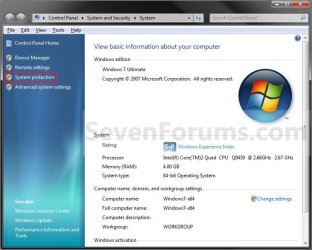
4. If prompted by UAC, then click on Yes if administrator or type in the adminstrator's password if standard user.

5. Click on the available hard disk drive or partition, that you want to turn System Protection on or off for, to select it. (see screenshot below step 6)
NOTE: Windows 7 should be the C: drive with (System). Under the Protection column, you will see if System Protection is turned On or Off for the available disk.

6. Click on the Configure button. (see screenshot below) System_Properties.jpg
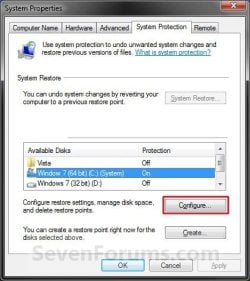
7. To Turn On System Protection for System Settings and Previous Versions of Files A) Dot Restore system settings and previous versions of files. (see screenshot below step 10)
NOTE: This turns on creating restore points and Previous Versions for the selected drive in step 5.

B) Move the Max Usage slider to set the maximum disk space usage you want to be used by system protection on the selected drive letter.

C) Go to step 10.

8. To Turn On System Protection for Only Previous Versions of Files A) Dot Only restore previous versions of files. (see screenshot below step 10)
NOTE: This turns on only Previous Versions for the selected drive in step 5.

B) Move the Max Usage slider to set the maximum disk space usage you want to be used by system protection on the selected drive letter.

C) Go to step 10.
9. To Turn Off System Protection for the Selected Disk A) Dot Turn off system protection. (see screenshot below step 10)
NOTE: This turns off both creating restore points and Previous Versions for the selected drive in step 5.

B) Go to step 10.
10. Click on OK. (see screenshot below) Configure.jpg
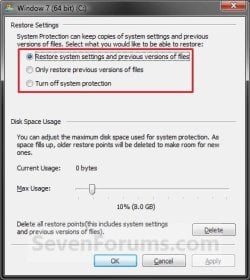
11. Repeat steps 5 to 10 if you wanted to turn System Protection on or off for another listed drive.

12. When finished, click on OK. (see screenshot below step 6)
That's it,
Shawn


Last edited:
Art,

Here's a REG file download below that will do the above for you. You just need to double click on it and approve to merge it. You may need to restart the computer afterwards to apply.
 

Attachments

My Computer

Computer type
PC/Desktop
Computer Manufacturer/Model Number
Self built custom
OS
64-bit Windows 11 Pro for Workstations
CPU
Intel i7-8700K OC'd to 5 GHz
Motherboard
ASUS ROG Maximus XI Formula Z390
Memory
64 GB (4x16GB) G.SKILL TridentZ RGB DDR4 3600 MHz
Graphics Card(s)
ASUS ROG-STRIX-GTX1080TI-O11G-GAMING
Sound Card
Integrated
Monitor(s) Displays
2 x Samsung Odyssey G7 27"
Screen Resolution
2560x1440
Hard Drives
1TB Samsung 990 PRO M.2,
4TB Samsung 990 PRO PRO M.2,
TerraMaster F8 SSD Plus NAS
PSU
Seasonic Prime Titanium 850W
Case
Thermaltake Core P3
Cooling
Corsair Hydro H115i
Keyboard
Logitech wireless K800
Mouse
Logitech MX Master 4
Internet Speed
2 Gb/s Download and 100 Mb/s Upload
Antivirus
Malwarebyte Anti-Malware Premium
Browser
Google Chrome
Other Info
Logitech Z625 speaker system,
Logitech BRIO 4K Pro webcam,
HP Color LaserJet Pro MFP M477fdn,
APC SMART-UPS RT 1000 XL - SURT1000XLI,
Galaxy S23 Plus phone
System Restore Points win7 in dual boot with XP

I was reading about stoping XP deleting the win7 restore points in a dual boot (XP) environment.

I see the "offline" work around, but just wanted to know where are the restore points stored / how are they called / how can I see them ?

In my setting I can see WINXP, and WIN7 disks in both WIN7 environment and WINXP. There was some comment (I may have mis read it) that indicated one or the other OS disk not being visible from the other

Thanks
 

My Computer

Computer Manufacturer/Model Number
OEM
OS
win XP
CPU
AMD 64 X2
Motherboard
ASUS M2NBP-VM CSM
Memory
6 GB
Graphics Card(s)
Nvidia 8400 GS
Sound Card
built-in
Monitor(s) Displays
Generic 17 inches
Hard Drives
1 SATA NTFS (Win XP)
1 PATA FAT32 "SHARED / BACKUP"
PSU
380 W
Cooling
processor + 2 chassis fans
Hello User,

They are stored in a allocated space on your hard drive. You cannot view the files in the actual restore points, or see them in Windows Explorer like other files. However, you can see a list of your available restore points and what they will affect as if you were doing a system restroe usin the tutorial below. You can just cancel before doing a actual system restore to see what you have.

http://www.sevenforums.com/tutorials/700-system-restore.html

Hope this helps,
Shawn
 

My Computer

Computer type
PC/Desktop
Computer Manufacturer/Model Number
Self built custom
OS
64-bit Windows 11 Pro for Workstations
CPU
Intel i7-8700K OC'd to 5 GHz
Motherboard
ASUS ROG Maximus XI Formula Z390
Memory
64 GB (4x16GB) G.SKILL TridentZ RGB DDR4 3600 MHz
Graphics Card(s)
ASUS ROG-STRIX-GTX1080TI-O11G-GAMING
Sound Card
Integrated
Monitor(s) Displays
2 x Samsung Odyssey G7 27"
Screen Resolution
2560x1440
Hard Drives
1TB Samsung 990 PRO M.2,
4TB Samsung 990 PRO PRO M.2,
TerraMaster F8 SSD Plus NAS
PSU
Seasonic Prime Titanium 850W
Case
Thermaltake Core P3
Cooling
Corsair Hydro H115i
Keyboard
Logitech wireless K800
Mouse
Logitech MX Master 4
Internet Speed
2 Gb/s Download and 100 Mb/s Upload
Antivirus
Malwarebyte Anti-Malware Premium
Browser
Google Chrome
Other Info
Logitech Z625 speaker system,
Logitech BRIO 4K Pro webcam,
HP Color LaserJet Pro MFP M477fdn,
APC SMART-UPS RT 1000 XL - SURT1000XLI,
Galaxy S23 Plus phone
Dear Shawn,

I have encountered a problem with my system and is trying to fix it, using System Restore. As some other users here, I can't see the System Protection tab. I apologize, if the following explanation will be somewhat chaotic - i am a bit stressed at the moment - and hope you could give me an advice.

1. Problem
When i try to restore the system, i can see the list of restore points, but after I select one, the system tells me that System Protection must be turned on to continue.

As i've mentioned, System Protection tab is missing, so i can't find a way to turn it on.

2. Circumstances
I am trying to restore the system using Repair System (or is it repair computer?) option from the 'F8 list'. I try to find System Protection tab in Safe Mode. Better to say, I am obliged to. When i boot the system in normal mode, it seems to boot ok, but freezes completely after first 15-30 sec or after first mouse click.

As you can see, I can't make a repair install to fix the problem. And the only disc i have is an upgrade DVD.

3. Problem with OS
The first freezing of the system occured after following actions. I have added a few gadgets to the desktop, then installed Microsoft security essentials and ask it to do a quick scan. While the scan was running (stupid me!!) i started installation of ZoneAlarm free firewall. The freezing occured, when i clicked on one of the newly installed gadgets. The installation of ZA firewall was at 23% at the time.

I had to hold power button for 6 sec. And now, when i boot in normal mode, it freezes again every time.

Already in safe mode i deleted files associated with the firewall from Program Files folder (there was nothing in the installed programs list about it) and tried to uninstall security essentials (apparently you cant in the safe mode).

4. Configuration
I have W7 Ultimate, which (was) running on Fujitsu Siemens Amilo Pro v3545 laptop.


Please, don't hesitate to ask additional information,

Looking forward to hearing from you,

Cheers,
Kirill
 

My Computer

OS
Windows 7
Hello Kirill, and welcome to Seven Forums.

If you have restore points available, then you might be able to do a system restore at boot instead of inside Windows 7 using a restore point dated before this problem.

If that does not work for you, then a repair install may be able to in hopes of avoiding a clean reinstall of Windows 7.

Hope this helps,
Shawn
 

My Computer

Computer type
PC/Desktop
Computer Manufacturer/Model Number
Self built custom
OS
64-bit Windows 11 Pro for Workstations
CPU
Intel i7-8700K OC'd to 5 GHz
Motherboard
ASUS ROG Maximus XI Formula Z390
Memory
64 GB (4x16GB) G.SKILL TridentZ RGB DDR4 3600 MHz
Graphics Card(s)
ASUS ROG-STRIX-GTX1080TI-O11G-GAMING
Sound Card
Integrated
Monitor(s) Displays
2 x Samsung Odyssey G7 27"
Screen Resolution
2560x1440
Hard Drives
1TB Samsung 990 PRO M.2,
4TB Samsung 990 PRO PRO M.2,
TerraMaster F8 SSD Plus NAS
PSU
Seasonic Prime Titanium 850W
Case
Thermaltake Core P3
Cooling
Corsair Hydro H115i
Keyboard
Logitech wireless K800
Mouse
Logitech MX Master 4
Internet Speed
2 Gb/s Download and 100 Mb/s Upload
Antivirus
Malwarebyte Anti-Malware Premium
Browser
Google Chrome
Other Info
Logitech Z625 speaker system,
Logitech BRIO 4K Pro webcam,
HP Color LaserJet Pro MFP M477fdn,
APC SMART-UPS RT 1000 XL - SURT1000XLI,
Galaxy S23 Plus phone
Thanks Shawn,

Actually, it is becoming weird. In the morning i tried to boot the system with the network cable pulled out...and it worked. With no signes of anything unusual. Now, I plugged back the cable, and it continues to run smoothly. In the normal mode of course.

And, surprise surprise, now I do have a System Protection tab, that was missing in the safe mode. Although it was indeed turned off (i dont remember doing so manually).
 

My Computer

OS
Windows 7
Kirill,

That is strange, but I'm happy to hear that things managed to sort themselves out for you.
 

My Computer

Computer type
PC/Desktop
Computer Manufacturer/Model Number
Self built custom
OS
64-bit Windows 11 Pro for Workstations
CPU
Intel i7-8700K OC'd to 5 GHz
Motherboard
ASUS ROG Maximus XI Formula Z390
Memory
64 GB (4x16GB) G.SKILL TridentZ RGB DDR4 3600 MHz
Graphics Card(s)
ASUS ROG-STRIX-GTX1080TI-O11G-GAMING
Sound Card
Integrated
Monitor(s) Displays
2 x Samsung Odyssey G7 27"
Screen Resolution
2560x1440
Hard Drives
1TB Samsung 990 PRO M.2,
4TB Samsung 990 PRO PRO M.2,
TerraMaster F8 SSD Plus NAS
PSU
Seasonic Prime Titanium 850W
Case
Thermaltake Core P3
Cooling
Corsair Hydro H115i
Keyboard
Logitech wireless K800
Mouse
Logitech MX Master 4
Internet Speed
2 Gb/s Download and 100 Mb/s Upload
Antivirus
Malwarebyte Anti-Malware Premium
Browser
Google Chrome
Other Info
Logitech Z625 speaker system,
Logitech BRIO 4K Pro webcam,
HP Color LaserJet Pro MFP M477fdn,
APC SMART-UPS RT 1000 XL - SURT1000XLI,
Galaxy S23 Plus phone
My Win 7 Home Premium came pre-installed on a Toshiba Satellite. I am in the process of configuring options and installing applications, so I want to understand the implications of options. My questions are as follows:

Q1. The Protection Settings section of the System Protection tab of the System Properties window shows two items: the C drive, and something called System. Protection is turned ON for the C drive, but not for System (see screenshot below). What is "System"? Should protection be turned on for System (pro & con)?

moz-screenshot.png


Q2. I created some manual Restore points at key times during installation, but I did not see them among the Restore versions when I restored a previous file. Shouldn't they be listed by the names I gave them during creation? If so, any tips for why they don't appear?

Q3. What determines when automatic Restore points are created? Is that a configurable option?
 

My Computer

Computer Manufacturer/Model Number
Toshiba Satellite L505-S5988
OS
Win 7 Home Premium
CPU
Intel Core 2 Duo T6500 @ 2.10 GHz
Memory
4 GB DDR3
Hard Drives
Toshiba MK3263GSX, 320 GB
Hello Bikengen, and welcome to Seven Forums.

Q1) System sounds like it would either be your OEM Recovery partition (most likely), or the 100 MB System Reserved partition created during the installation of Windows 7. Either way, you would not want to have System Protection turned on for this drive/partition.

Q2) It depends on how old the restore points are, and how much maximum disk space you have allocated for restore points. As space fills up, older restore points will be deleted to make room for new ones.

Q3) By default in Windows 7, System Restore creates a scheduled restore point only if no other restore points have been created in the last 7 days, and before significant system events such as a program or driver installation.

You can make changes to the scheduled tasks for this using this tutorial below. It's the same in Windows 7.

System Restore Task - Change Automatic Restore Point Schedule - Vista Forums

Hope this helps,
Shawn
 

My Computer

Computer type
PC/Desktop
Computer Manufacturer/Model Number
Self built custom
OS
64-bit Windows 11 Pro for Workstations
CPU
Intel i7-8700K OC'd to 5 GHz
Motherboard
ASUS ROG Maximus XI Formula Z390
Memory
64 GB (4x16GB) G.SKILL TridentZ RGB DDR4 3600 MHz
Graphics Card(s)
ASUS ROG-STRIX-GTX1080TI-O11G-GAMING
Sound Card
Integrated
Monitor(s) Displays
2 x Samsung Odyssey G7 27"
Screen Resolution
2560x1440
Hard Drives
1TB Samsung 990 PRO M.2,
4TB Samsung 990 PRO PRO M.2,
TerraMaster F8 SSD Plus NAS
PSU
Seasonic Prime Titanium 850W
Case
Thermaltake Core P3
Cooling
Corsair Hydro H115i
Keyboard
Logitech wireless K800
Mouse
Logitech MX Master 4
Internet Speed
2 Gb/s Download and 100 Mb/s Upload
Antivirus
Malwarebyte Anti-Malware Premium
Browser
Google Chrome
Other Info
Logitech Z625 speaker system,
Logitech BRIO 4K Pro webcam,
HP Color LaserJet Pro MFP M477fdn,
APC SMART-UPS RT 1000 XL - SURT1000XLI,
Galaxy S23 Plus phone
Dear Mr. Brink,
I tried to follow the instructions in this tutorial and came across this hitch:
In Control Panel Items in System when in the left pane I click on System protection, System Properties window opens along with a message box which says:

There was an unexpected error in the property page:
System Restore encountered an error. Please try to run System Restore gain. (0x81000203)
Please close the property page and try again.

When ever I attempted to reopen the same message appears.
Please help.
Thanks
gpedit: "Turn Off System Restore: is not configured.
services: "Mocrosoft Software Shadow copy Provider: is set at Manual.
 
Last edited:

My Computer

Computer Manufacturer/Model Number
Self assembled.
OS
Windows 7 Ultimate x64 Version 6.1.7600 Build 7600
CPU
Intel Core2 Quad Q9650 3.00GHz, 2888 Mgz, 4 Cores, 4 Logica
Motherboard
Intel: DX48BT2
Memory
4x2 (8gb)Corsair DDR3 1333
Graphics Card(s)
ATI:Radeon:4870 GPU (2 nos. Crossfire Disabled)
Sound Card
Maudio:Firewire Solo
Monitor(s) Displays
3 nos LCD AOC
Screen Resolution
1920 x 1080
Hard Drives
2nos: Non Raid: Intel: SSDSA2MH160G2C1
2nos: Seagate 80gb (just connected/enabled)http://www.sevenforums.com/profile.php?do=extra
Added 1 Seagte 250gb.
PSU
Corsair HX1000W Modular
Case
Coolermaster HAF 932
Cooling
Liquid: Coolermaster Aquagate
Keyboard
TVS: mechanical
Mouse
Microsoft:Arc
Internet Speed
download:1.9Mb/s Upload:0.71Mb/s (keeps varying !)
Other Info
just added a BambooFun pen tablet.
Hello Ramesh, and welcome to Seven Forums.

If you have a retail copy of Windows 7, then you can do a repair install that should fix this without losing anything.

Hope this helps,
Shawn
 

My Computer

Computer type
PC/Desktop
Computer Manufacturer/Model Number
Self built custom
OS
64-bit Windows 11 Pro for Workstations
CPU
Intel i7-8700K OC'd to 5 GHz
Motherboard
ASUS ROG Maximus XI Formula Z390
Memory
64 GB (4x16GB) G.SKILL TridentZ RGB DDR4 3600 MHz
Graphics Card(s)
ASUS ROG-STRIX-GTX1080TI-O11G-GAMING
Sound Card
Integrated
Monitor(s) Displays
2 x Samsung Odyssey G7 27"
Screen Resolution
2560x1440
Hard Drives
1TB Samsung 990 PRO M.2,
4TB Samsung 990 PRO PRO M.2,
TerraMaster F8 SSD Plus NAS
PSU
Seasonic Prime Titanium 850W
Case
Thermaltake Core P3
Cooling
Corsair Hydro H115i
Keyboard
Logitech wireless K800
Mouse
Logitech MX Master 4
Internet Speed
2 Gb/s Download and 100 Mb/s Upload
Antivirus
Malwarebyte Anti-Malware Premium
Browser
Google Chrome
Other Info
Logitech Z625 speaker system,
Logitech BRIO 4K Pro webcam,
HP Color LaserJet Pro MFP M477fdn,
APC SMART-UPS RT 1000 XL - SURT1000XLI,
Galaxy S23 Plus phone
Thank you, Shawn, for your prompt, proficient, and complete response. Your tutorials are superb, and yet I appreciate your suggestions for which ones are relevant to a particular question. For example, I would not have assumed that a Vista tutorial would also apply to Win 7.

Re Q3 in my original post (#27), using your tutorial (post #29) I learned that 2 triggers are set; one daily at midnight, and one at startup. However, the Conditions tab shows that neither trigger will act unless the computer has been idle for 10 minutes (keeps checking for up to 23 hours) and ac power is plugged in. Between uses I typically put the computer into hibernate mode (without shutdown/startup) and turn off ac power (to prevent battery overcharge), which explains why very few restore points have been saved.

Re Q2, I am pretty sure the manual restore points I created are within the date range of existing restore points, but I do not see any unique names I gave them. I am still puzzled by that.

One other question; I tried to insert a window snapshot in my original post, but was unsuccessful. A URL appeared, but not the graphic. It works for me in documents and presentations. You and others have inserted those within posts. Any suggestions?
 

My Computer

Computer Manufacturer/Model Number
Toshiba Satellite L505-S5988
OS
Win 7 Home Premium
CPU
Intel Core 2 Duo T6500 @ 2.10 GHz
Memory
4 GB DDR3
Hard Drives
Toshiba MK3263GSX, 320 GB

My Computer

Computer type
PC/Desktop
Computer Manufacturer/Model Number
Self built custom
OS
64-bit Windows 11 Pro for Workstations
CPU
Intel i7-8700K OC'd to 5 GHz
Motherboard
ASUS ROG Maximus XI Formula Z390
Memory
64 GB (4x16GB) G.SKILL TridentZ RGB DDR4 3600 MHz
Graphics Card(s)
ASUS ROG-STRIX-GTX1080TI-O11G-GAMING
Sound Card
Integrated
Monitor(s) Displays
2 x Samsung Odyssey G7 27"
Screen Resolution
2560x1440
Hard Drives
1TB Samsung 990 PRO M.2,
4TB Samsung 990 PRO PRO M.2,
TerraMaster F8 SSD Plus NAS
PSU
Seasonic Prime Titanium 850W
Case
Thermaltake Core P3
Cooling
Corsair Hydro H115i
Keyboard
Logitech wireless K800
Mouse
Logitech MX Master 4
Internet Speed
2 Gb/s Download and 100 Mb/s Upload
Antivirus
Malwarebyte Anti-Malware Premium
Browser
Google Chrome
Other Info
Logitech Z625 speaker system,
Logitech BRIO 4K Pro webcam,
HP Color LaserJet Pro MFP M477fdn,
APC SMART-UPS RT 1000 XL - SURT1000XLI,
Galaxy S23 Plus phone
Hello Ramesh, and welcome to Seven Forums.

If you have a retail copy of Windows 7, then you can do a repair install that should fix this without losing anything.

Hope this helps,
Shawn


Thanks Brink, will try to do this and also post the results.
Regards
RR
 
Last edited by a moderator:

My Computer

Computer Manufacturer/Model Number
Self assembled.
OS
Windows 7 Ultimate x64 Version 6.1.7600 Build 7600
CPU
Intel Core2 Quad Q9650 3.00GHz, 2888 Mgz, 4 Cores, 4 Logica
Motherboard
Intel: DX48BT2
Memory
4x2 (8gb)Corsair DDR3 1333
Graphics Card(s)
ATI:Radeon:4870 GPU (2 nos. Crossfire Disabled)
Sound Card
Maudio:Firewire Solo
Monitor(s) Displays
3 nos LCD AOC
Screen Resolution
1920 x 1080
Hard Drives
2nos: Non Raid: Intel: SSDSA2MH160G2C1
2nos: Seagate 80gb (just connected/enabled)http://www.sevenforums.com/profile.php?do=extra
Added 1 Seagte 250gb.
PSU
Corsair HX1000W Modular
Case
Coolermaster HAF 932
Cooling
Liquid: Coolermaster Aquagate
Keyboard
TVS: mechanical
Mouse
Microsoft:Arc
Internet Speed
download:1.9Mb/s Upload:0.71Mb/s (keeps varying !)
Other Info
just added a BambooFun pen tablet.
I tried to "repair install" with the Window 7 CD and the first option I selected is "System Restore". Restored it to a previous appropriate date.
Still the error is showing.
Secondly I againt performed "Startup Repair", still the error continues to show.
Other option of image recovery is not possible as I do not have any image file created or saved.
Any other way to come out from this error message?
Please.
 

My Computer

Computer Manufacturer/Model Number
Self assembled.
OS
Windows 7 Ultimate x64 Version 6.1.7600 Build 7600
CPU
Intel Core2 Quad Q9650 3.00GHz, 2888 Mgz, 4 Cores, 4 Logica
Motherboard
Intel: DX48BT2
Memory
4x2 (8gb)Corsair DDR3 1333
Graphics Card(s)
ATI:Radeon:4870 GPU (2 nos. Crossfire Disabled)
Sound Card
Maudio:Firewire Solo
Monitor(s) Displays
3 nos LCD AOC
Screen Resolution
1920 x 1080
Hard Drives
2nos: Non Raid: Intel: SSDSA2MH160G2C1
2nos: Seagate 80gb (just connected/enabled)http://www.sevenforums.com/profile.php?do=extra
Added 1 Seagte 250gb.
PSU
Corsair HX1000W Modular
Case
Coolermaster HAF 932
Cooling
Liquid: Coolermaster Aquagate
Keyboard
TVS: mechanical
Mouse
Microsoft:Arc
Internet Speed
download:1.9Mb/s Upload:0.71Mb/s (keeps varying !)
Other Info
just added a BambooFun pen tablet.
Ramesh,

Do you have a retail Windows 7 copy? A repair install (click on link) is not a "System Restore" though.
 

My Computer

Computer type
PC/Desktop
Computer Manufacturer/Model Number
Self built custom
OS
64-bit Windows 11 Pro for Workstations
CPU
Intel i7-8700K OC'd to 5 GHz
Motherboard
ASUS ROG Maximus XI Formula Z390
Memory
64 GB (4x16GB) G.SKILL TridentZ RGB DDR4 3600 MHz
Graphics Card(s)
ASUS ROG-STRIX-GTX1080TI-O11G-GAMING
Sound Card
Integrated
Monitor(s) Displays
2 x Samsung Odyssey G7 27"
Screen Resolution
2560x1440
Hard Drives
1TB Samsung 990 PRO M.2,
4TB Samsung 990 PRO PRO M.2,
TerraMaster F8 SSD Plus NAS
PSU
Seasonic Prime Titanium 850W
Case
Thermaltake Core P3
Cooling
Corsair Hydro H115i
Keyboard
Logitech wireless K800
Mouse
Logitech MX Master 4
Internet Speed
2 Gb/s Download and 100 Mb/s Upload
Antivirus
Malwarebyte Anti-Malware Premium
Browser
Google Chrome
Other Info
Logitech Z625 speaker system,
Logitech BRIO 4K Pro webcam,
HP Color LaserJet Pro MFP M477fdn,
APC SMART-UPS RT 1000 XL - SURT1000XLI,
Galaxy S23 Plus phone
Excellent tutorial, Shawn.

If I recall correctly, in Windows XP there was a window one could bring up that listed the restore points, which could then be selectively deleted. Does Windows 7 have such a feature? I saw only the option to delete them all. Thanks.
 

My Computer

Computer type
PC/Desktop
Computer Manufacturer/Model Number
Dell Studio XPS 8100, Dell XPS 15 laptop
OS
Windows 10 Home, 64 bit
CPU
Intel Core i7 860 @ 2.8 GHz
Motherboard
Dell 0T568R (CPU1)
Memory
8.0 GB Dual Channel DDR3 @ 664 MHz (9-9-9-24)
Graphics Card(s)
nVidia GeForce GTS 240
Sound Card
M-Audio Delta Audiophile 2496
Monitor(s) Displays
Dell 2407WFP
Screen Resolution
1920x1200
Hard Drives
977 GB Western Digital WDC WD1001FAES-75W7A0 (SCSI)
Antivirus
Windows Defender, MalwareBytes Anti-Malware, AdwCleaner
Browser
Firefox, occasionally IE and Edge
Other Info
Mozilla Firefox, Mozilla Thunderbird. Western Digital Passport 250 GB external HD, two Mushkin Enhanced Mulholland 32GB USB flash drives, AKG K240 Studio headphones, Asus AC-1900 dual band wireless router.

My Computer

Computer type
PC/Desktop
Computer Manufacturer/Model Number
Self built custom
OS
64-bit Windows 11 Pro for Workstations
CPU
Intel i7-8700K OC'd to 5 GHz
Motherboard
ASUS ROG Maximus XI Formula Z390
Memory
64 GB (4x16GB) G.SKILL TridentZ RGB DDR4 3600 MHz
Graphics Card(s)
ASUS ROG-STRIX-GTX1080TI-O11G-GAMING
Sound Card
Integrated
Monitor(s) Displays
2 x Samsung Odyssey G7 27"
Screen Resolution
2560x1440
Hard Drives
1TB Samsung 990 PRO M.2,
4TB Samsung 990 PRO PRO M.2,
TerraMaster F8 SSD Plus NAS
PSU
Seasonic Prime Titanium 850W
Case
Thermaltake Core P3
Cooling
Corsair Hydro H115i
Keyboard
Logitech wireless K800
Mouse
Logitech MX Master 4
Internet Speed
2 Gb/s Download and 100 Mb/s Upload
Antivirus
Malwarebyte Anti-Malware Premium
Browser
Google Chrome
Other Info
Logitech Z625 speaker system,
Logitech BRIO 4K Pro webcam,
HP Color LaserJet Pro MFP M477fdn,
APC SMART-UPS RT 1000 XL - SURT1000XLI,
Galaxy S23 Plus phone
Hi Shawn. CCleaner. Maybe that's where I saw it. Thanks.

Just tried it. CCleaner lists only four restore points! I guess Windows 7 deletes old ones anyway!
 

My Computer

Computer type
PC/Desktop
Computer Manufacturer/Model Number
Dell Studio XPS 8100, Dell XPS 15 laptop
OS
Windows 10 Home, 64 bit
CPU
Intel Core i7 860 @ 2.8 GHz
Motherboard
Dell 0T568R (CPU1)
Memory
8.0 GB Dual Channel DDR3 @ 664 MHz (9-9-9-24)
Graphics Card(s)
nVidia GeForce GTS 240
Sound Card
M-Audio Delta Audiophile 2496
Monitor(s) Displays
Dell 2407WFP
Screen Resolution
1920x1200
Hard Drives
977 GB Western Digital WDC WD1001FAES-75W7A0 (SCSI)
Antivirus
Windows Defender, MalwareBytes Anti-Malware, AdwCleaner
Browser
Firefox, occasionally IE and Edge
Other Info
Mozilla Firefox, Mozilla Thunderbird. Western Digital Passport 250 GB external HD, two Mushkin Enhanced Mulholland 32GB USB flash drives, AKG K240 Studio headphones, Asus AC-1900 dual band wireless router.
You're welcome Art. Yeah, it will delete old restore points automatically to make room for new ones when the set storage size has been reached.
 

My Computer

Computer type
PC/Desktop
Computer Manufacturer/Model Number
Self built custom
OS
64-bit Windows 11 Pro for Workstations
CPU
Intel i7-8700K OC'd to 5 GHz
Motherboard
ASUS ROG Maximus XI Formula Z390
Memory
64 GB (4x16GB) G.SKILL TridentZ RGB DDR4 3600 MHz
Graphics Card(s)
ASUS ROG-STRIX-GTX1080TI-O11G-GAMING
Sound Card
Integrated
Monitor(s) Displays
2 x Samsung Odyssey G7 27"
Screen Resolution
2560x1440
Hard Drives
1TB Samsung 990 PRO M.2,
4TB Samsung 990 PRO PRO M.2,
TerraMaster F8 SSD Plus NAS
PSU
Seasonic Prime Titanium 850W
Case
Thermaltake Core P3
Cooling
Corsair Hydro H115i
Keyboard
Logitech wireless K800
Mouse
Logitech MX Master 4
Internet Speed
2 Gb/s Download and 100 Mb/s Upload
Antivirus
Malwarebyte Anti-Malware Premium
Browser
Google Chrome
Other Info
Logitech Z625 speaker system,
Logitech BRIO 4K Pro webcam,
HP Color LaserJet Pro MFP M477fdn,
APC SMART-UPS RT 1000 XL - SURT1000XLI,
Galaxy S23 Plus phone
Back
Top