
System Repair Disc - Create

How to Create a Windows 7 System Repair Disc

   Information
This will show you how to create a Windows 7 system repair disc to be able to use to boot to system recovery options to help recover your Windows 7 installation if you don't have a Windows installation disc, can't find your Windows installation disc, or can't access the recovery options provided by your computer manufacturer.

A system repair disc is not able to install Windows 7.

   Note
If you are unable to boot your Windows 7 to create a Windows 7 System Repair Disc, then you could create it on another computer to use on your computer.

   Warning

  • A system repair disc is not the same as a OEM factory recovery/restore disc.
  • A system repair disc is not an installation disc. You cannot do a repair install or install Windows 7 with a system repair disc.
  • A system repair disc can only be used to repair Windows 7 through the system recovery options.
  • 32-bit System Repair Disc can only be created on a 32-bit Windows 7.
  • 64-bit System Repair Disc can only be created on a 64-bit Windows 7.
  • 32-bit System Repair Disc can only be used to repair a 32-bit Windows 7.
  • 64-bit System Repair Disc can only be used to repair a 64-bit Windows 7.

:note: For Windows 10, see the following link - System Repair Disc - Create in Windows 10 - Windows 10 Tutorials

EXAMPLE: System Recovery Options
NOTE: Using the System Repair Disc that you have created below, you can boot to the system recovery options screen below.
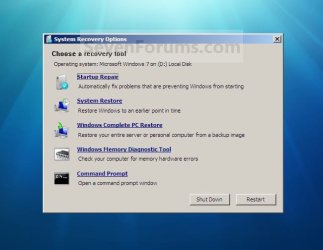
System_Recovery_Options.jpg


Here's How:
1. Open the Start Menu, then type recdisc.exe in the search box and press Enter.
A) Go to step 3.
OR

2. Open the Control Panel (icons view), and click on the Backup and Restore icon.
A) Click on the Create a System repair disc link in the left blue pane. (See screenshot below)
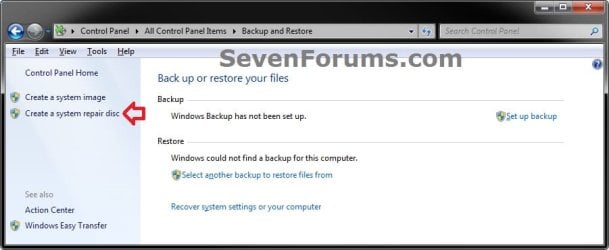
Backup_and_Restore.jpg
3. Insert a blank unformatted CD or DVD into your CD/DVD drive and click on the Create disc button. (See screenshot below)
NOTE: If you are prompted to insert a Windows installation disc, it means that the files needed to create the system repair disc cannot be found on your computer. Insert a Windows 7 installation disc.
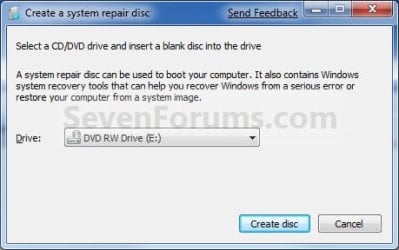
Step1.jpg
4. It will now start creating the System Repair Disc. (See screenshot below)
NOTE: If a AutoPlay window pops up, just close it.
Step2.jpg
5. When it's finished, click on the Close button. (See screenshot below)
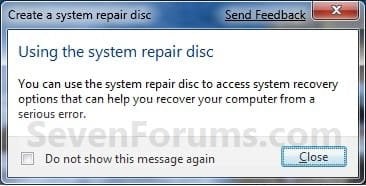
Step3.jpg
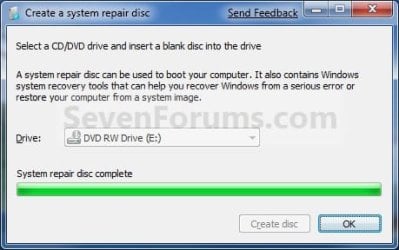
6. Click on OK. (See screenshot below)
Step4.jpg
7. Remove and label your new Windows 7 System Repair Disc from the CD/DVD drive.

   Tip
If you would like to create a bootable System Repair USB flash drive, then you could use the free program ImgBurn to create an ISO file with this Windows 7 System Repair Disc (DVD), then use the Part 1 section in the tutorial below to extract the ISO file to a USB flash drive.

Windows 7 USB/DVD Download Tool


That's it,
Shawn


Last edited:
System repair disc creation in Win 7 64 bit

I get this message.
System repair disc could not be created. The parameter is incorrect(0x80070057)
Can anyone advise in simple term please.
 

My Computer

Computer Manufacturer/Model Number
Acer 7741G
OS
Windows 7 home premium 64bit
CPU
Intel core i3-330M
Memory
4GB DDR3
Graphics Card(s)
ATI mobility radeon HD 5470
Monitor(s) Displays
17.3 HD+ LED LCD
Hard Drives
500GB HDD
Case
Laptop
Hello Birdbb, and welcome to Seven Forums.

As a test, enable the built-in Administrator on your computer, log in to it, then see if you are able to create a System Repair Disc.

Hope this helps,
Shawn
 

My Computer

Computer type
PC/Desktop
Computer Manufacturer/Model Number
Self built custom
OS
64-bit Windows 11 Pro for Workstations
CPU
Intel i7-8700K OC'd to 5 GHz
Motherboard
ASUS ROG Maximus XI Formula Z390
Memory
64 GB (4x16GB) G.SKILL TridentZ RGB DDR4 3600 MHz
Graphics Card(s)
ASUS ROG-STRIX-GTX1080TI-O11G-GAMING
Sound Card
Integrated
Monitor(s) Displays
2 x Samsung Odyssey G7 27"
Screen Resolution
2560x1440
Hard Drives
1TB Samsung 990 PRO M.2,
4TB Samsung 990 PRO PRO M.2,
TerraMaster F8 SSD Plus NAS
PSU
Seasonic Prime Titanium 850W
Case
Thermaltake Core P3
Cooling
Corsair Hydro H115i
Keyboard
Logitech wireless K800
Mouse
Logitech MX Master 4
Internet Speed
2 Gb/s Download and 100 Mb/s Upload
Antivirus
Malwarebyte Anti-Malware Premium
Browser
Google Chrome
Other Info
Logitech Z625 speaker system,
Logitech BRIO 4K Pro webcam,
HP Color LaserJet Pro MFP M477fdn,
APC SMART-UPS RT 1000 XL - SURT1000XLI,
Galaxy S23 Plus phone
If you are using an oem machine - you may not be able to create a system repair disc in the normal way.

You may need to create the oem recovery discs instead ( hopefully you have already done that).
 

My Computers

System One System Two

  • Computer type
    PC/Desktop
    OS
    7 X64
    CPU
    i5 8400
    Motherboard
    gigabyte b365m ds3h
    Memory
    2x8gb 3200mhz
    Hard Drives
    various
    PSU
    pure power 11 400w cm
    Case
    Coolermaster
    Cooling
    cryorig m9i
  • Computer type
    PC/Desktop
    OS
    7x64
    CPU
    g5400
    Motherboard
    ga b365m ds3h
    Memory
    8gb ddr4 2400
    PSU
    xfx pro 450w
Thanks to Shawn and SIW2. I tried to enable the built in administrator but got a system 5 error?. My machine is an OEM laptop and I do have a set of recovery discs prepared by the vendor. I should like to know why this prevents being able to create repair disc and also the meaning of "parameter is incorrect (0x80070057)" if, that is, not beyond my level.
Birdbb
 

My Computer

Computer Manufacturer/Model Number
Acer 7741G
OS
Windows 7 home premium 64bit
CPU
Intel core i3-330M
Memory
4GB DDR3
Graphics Card(s)
ATI mobility radeon HD 5470
Monitor(s) Displays
17.3 HD+ LED LCD
Hard Drives
500GB HDD
Case
Laptop
Birdbb,

It's most likely due to you have a factory OEM version of Windows 7 installed for why you cannot create a System Repair Disc on your computer. If you like you could create a System Repair Disc on a friends installed retail copy of 64-bit Windows 7 Home Premium to be able to use on your computer as well. Due note that you cannot install Windows 7 with a System Repair Disc since it is not a installatoin disc, but only a disc to use to boot to the System Recovery Options screen with.


The link below from Acer can help show you to create a set of Acer factory recovery discs to be able to use to do a factory reinstall of your Windows 7 with.

Acer Support: Frequently Asked Questions list for Recovery media and Restoring a system to factory load
 

My Computer

Computer type
PC/Desktop
Computer Manufacturer/Model Number
Self built custom
OS
64-bit Windows 11 Pro for Workstations
CPU
Intel i7-8700K OC'd to 5 GHz
Motherboard
ASUS ROG Maximus XI Formula Z390
Memory
64 GB (4x16GB) G.SKILL TridentZ RGB DDR4 3600 MHz
Graphics Card(s)
ASUS ROG-STRIX-GTX1080TI-O11G-GAMING
Sound Card
Integrated
Monitor(s) Displays
2 x Samsung Odyssey G7 27"
Screen Resolution
2560x1440
Hard Drives
1TB Samsung 990 PRO M.2,
4TB Samsung 990 PRO PRO M.2,
TerraMaster F8 SSD Plus NAS
PSU
Seasonic Prime Titanium 850W
Case
Thermaltake Core P3
Cooling
Corsair Hydro H115i
Keyboard
Logitech wireless K800
Mouse
Logitech MX Master 4
Internet Speed
2 Gb/s Download and 100 Mb/s Upload
Antivirus
Malwarebyte Anti-Malware Premium
Browser
Google Chrome
Other Info
Logitech Z625 speaker system,
Logitech BRIO 4K Pro webcam,
HP Color LaserJet Pro MFP M477fdn,
APC SMART-UPS RT 1000 XL - SURT1000XLI,
Galaxy S23 Plus phone
Birdbb,

It's most likely due to you have a factory OEM version of Windows 7 installed for why you cannot create a System Repair Disc on your computer. If you like you could create a System Repair Disc on a friends installed retail copy of 64-bit Windows 7 Home Premium to be able to use on your computer as well. Due note that you cannot install Windows 7 with a System Repair Disc since it is not a installatoin disc, but only a disc to use to boot to the System Recovery Options screen with.


The link below from Acer can help show you to create a set of Acer factory recovery discs to be able to use to do a factory reinstall of your Windows 7 with.

Acer Support: Frequently Asked Questions list for Recovery media and Restoring a system to factory load

Is Windows installation disk required mostly during a System Recovery Disk creation in windows 7? Please help sir.

Please answer my query.
What if I dont have installation disk and asked for one to create recovery CD?
 
Last edited by a moderator:

My Computer

Computer Manufacturer/Model Number
Assembled it myself.
OS
Windows 7 Ultimate 32bit
CPU
Pentium Dual-Core E5500 @2.88Ghz
Motherboard
PSI-Express
Memory
2 GB (1GB+1GB)
Graphics Card(s)
256 MB Intel HD Graphics Card (In-Built :()
Sound Card
In-Built
Monitor(s) Displays
HD
Screen Resolution
1280X1024p
Hard Drives
250 GB
40 GB
Case
FronTech (Old)
Cooling
In-Built Fan
Keyboard
iBall Classuque
Mouse
HCL USB Mouse
Internet Speed
2 Mbps
Hello Selena, and welcome to Seven Forums.

First, to just make sure that we are on the same page, are you wanting to create a set of factory recovery discs to use to reinstall Windows 7 back to factory default with, or are you wanting to create a actual "System Repair Disc" as in the tutorial to be able to boot to the "System Recovery Options" screen with?

A "System Repair Disc" cannot and will not be able to install Windows 7.
 

My Computer

Computer type
PC/Desktop
Computer Manufacturer/Model Number
Self built custom
OS
64-bit Windows 11 Pro for Workstations
CPU
Intel i7-8700K OC'd to 5 GHz
Motherboard
ASUS ROG Maximus XI Formula Z390
Memory
64 GB (4x16GB) G.SKILL TridentZ RGB DDR4 3600 MHz
Graphics Card(s)
ASUS ROG-STRIX-GTX1080TI-O11G-GAMING
Sound Card
Integrated
Monitor(s) Displays
2 x Samsung Odyssey G7 27"
Screen Resolution
2560x1440
Hard Drives
1TB Samsung 990 PRO M.2,
4TB Samsung 990 PRO PRO M.2,
TerraMaster F8 SSD Plus NAS
PSU
Seasonic Prime Titanium 850W
Case
Thermaltake Core P3
Cooling
Corsair Hydro H115i
Keyboard
Logitech wireless K800
Mouse
Logitech MX Master 4
Internet Speed
2 Gb/s Download and 100 Mb/s Upload
Antivirus
Malwarebyte Anti-Malware Premium
Browser
Google Chrome
Other Info
Logitech Z625 speaker system,
Logitech BRIO 4K Pro webcam,
HP Color LaserJet Pro MFP M477fdn,
APC SMART-UPS RT 1000 XL - SURT1000XLI,
Galaxy S23 Plus phone
Thank you for replying back, sir.
I wanted to know under what conditions is a Original Installation disk is needed in process of creating just a recovery disk in windows 7,
knowing that wndows 7 wont be recovered, installed afterwards by that recovery disk.

Do windows asks for installation disk when a hidden windows image couldn't be found on hard drive, as I read in post, that windows installation on a computer for first time creates a hidden windows image which then can be used in these sort of situations.
 

My Computer

Computer Manufacturer/Model Number
Assembled it myself.
OS
Windows 7 Ultimate 32bit
CPU
Pentium Dual-Core E5500 @2.88Ghz
Motherboard
PSI-Express
Memory
2 GB (1GB+1GB)
Graphics Card(s)
256 MB Intel HD Graphics Card (In-Built :()
Sound Card
In-Built
Monitor(s) Displays
HD
Screen Resolution
1280X1024p
Hard Drives
250 GB
40 GB
Case
FronTech (Old)
Cooling
In-Built Fan
Keyboard
iBall Classuque
Mouse
HCL USB Mouse
Internet Speed
2 Mbps
Selena,

You will not need your Windows 7 installation disc to be able to create a "System Repair Disc" from within your currently installed Windows 7. If need be, you could also create a "System Repair Disc" on another 32-bit Windows 7 and be able to use it on your 32-bit Windows 7 computer as well. :)
 

My Computer

Computer type
PC/Desktop
Computer Manufacturer/Model Number
Self built custom
OS
64-bit Windows 11 Pro for Workstations
CPU
Intel i7-8700K OC'd to 5 GHz
Motherboard
ASUS ROG Maximus XI Formula Z390
Memory
64 GB (4x16GB) G.SKILL TridentZ RGB DDR4 3600 MHz
Graphics Card(s)
ASUS ROG-STRIX-GTX1080TI-O11G-GAMING
Sound Card
Integrated
Monitor(s) Displays
2 x Samsung Odyssey G7 27"
Screen Resolution
2560x1440
Hard Drives
1TB Samsung 990 PRO M.2,
4TB Samsung 990 PRO PRO M.2,
TerraMaster F8 SSD Plus NAS
PSU
Seasonic Prime Titanium 850W
Case
Thermaltake Core P3
Cooling
Corsair Hydro H115i
Keyboard
Logitech wireless K800
Mouse
Logitech MX Master 4
Internet Speed
2 Gb/s Download and 100 Mb/s Upload
Antivirus
Malwarebyte Anti-Malware Premium
Browser
Google Chrome
Other Info
Logitech Z625 speaker system,
Logitech BRIO 4K Pro webcam,
HP Color LaserJet Pro MFP M477fdn,
APC SMART-UPS RT 1000 XL - SURT1000XLI,
Galaxy S23 Plus phone
If you had an oem preinstalled version of windows - you may not be able to use recdisc.exe to make a recovery disc.

You will have winre somewhere - but not where recdisc expects it to be.
 

My Computers

System One System Two

  • Computer type
    PC/Desktop
    OS
    7 X64
    CPU
    i5 8400
    Motherboard
    gigabyte b365m ds3h
    Memory
    2x8gb 3200mhz
    Hard Drives
    various
    PSU
    pure power 11 400w cm
    Case
    Coolermaster
    Cooling
    cryorig m9i
  • Computer type
    PC/Desktop
    OS
    7x64
    CPU
    g5400
    Motherboard
    ga b365m ds3h
    Memory
    8gb ddr4 2400
    PSU
    xfx pro 450w
I think this is just for repairing disc and nothing else.
Any way great tutorial.Thanks
 

My Computer

OS
Windows 7
Hello Katherine,

That would be correct. :)
 

My Computer

Computer type
PC/Desktop
Computer Manufacturer/Model Number
Self built custom
OS
64-bit Windows 11 Pro for Workstations
CPU
Intel i7-8700K OC'd to 5 GHz
Motherboard
ASUS ROG Maximus XI Formula Z390
Memory
64 GB (4x16GB) G.SKILL TridentZ RGB DDR4 3600 MHz
Graphics Card(s)
ASUS ROG-STRIX-GTX1080TI-O11G-GAMING
Sound Card
Integrated
Monitor(s) Displays
2 x Samsung Odyssey G7 27"
Screen Resolution
2560x1440
Hard Drives
1TB Samsung 990 PRO M.2,
4TB Samsung 990 PRO PRO M.2,
TerraMaster F8 SSD Plus NAS
PSU
Seasonic Prime Titanium 850W
Case
Thermaltake Core P3
Cooling
Corsair Hydro H115i
Keyboard
Logitech wireless K800
Mouse
Logitech MX Master 4
Internet Speed
2 Gb/s Download and 100 Mb/s Upload
Antivirus
Malwarebyte Anti-Malware Premium
Browser
Google Chrome
Other Info
Logitech Z625 speaker system,
Logitech BRIO 4K Pro webcam,
HP Color LaserJet Pro MFP M477fdn,
APC SMART-UPS RT 1000 XL - SURT1000XLI,
Galaxy S23 Plus phone
I can't make my own System repair disc.
 

Attachments

  • can't make system repair disc.PNG
    can't make system repair disc.PNG
    7.3 KB · Views: 528

My Computer

Computer type
Laptop
Computer Manufacturer/Model Number
Acer Aspire 4755G
OS
Windows 7 Home Premium 64bit OEM
CPU
Intel core i5-2430M @2,4GHz (Quad Core)
Motherboard
Acer Aspire 4755G
Memory
RAM 8GB DDR3 (Dual Channel)
Graphics Card(s)
nVidia GeForce GT 540M 2,7GB , Intel Graphics 4096MB
Sound Card
Realtek High Definition Audio
Monitor(s) Displays
Internal Monitor
Screen Resolution
1366*768
Hard Drives
WDC WD6400BPVT-22HXZT1 (640GB)
Keyboard
Default Keyboard
Mouse
Optical Mouse
Internet Speed
~10 Mbps
Antivirus
Microsoft Security Essentials
Browser
Google Chrome
Other Info
This is my second laptop after my old notebook that broke because file system is corrupted and I can't recover it.
Hi Papin,

That is because you have an oem machine ( Other Equipment Manufacturer , e.g. Acer).

On some oem machines you cannot use microsoft repair disc creator from the original operating system.

If you installed windows 8 - you can try booting into that and see if you can make windows 8 repair disc.
 

My Computers

System One System Two

  • Computer type
    PC/Desktop
    OS
    7 X64
    CPU
    i5 8400
    Motherboard
    gigabyte b365m ds3h
    Memory
    2x8gb 3200mhz
    Hard Drives
    various
    PSU
    pure power 11 400w cm
    Case
    Coolermaster
    Cooling
    cryorig m9i
  • Computer type
    PC/Desktop
    OS
    7x64
    CPU
    g5400
    Motherboard
    ga b365m ds3h
    Memory
    8gb ddr4 2400
    PSU
    xfx pro 450w
OEM = Original Equipment Manufacturer.
 

My Computer

Computer Manufacturer/Model Number
DIY
OS
W7x64 Pro, SuSe 12.1/** W7 x64 Pro, XP MCE
CPU
Phenom II 1090T w/Noctua NH-D14 /**4400+ X2 w/CM Hyper TX 3
Motherboard
ASRock 890FX Deluxe 4/**A8N-SLI
Memory
2 x 2GB Patriot PGS34g1600LLKA/**4x1GB Corsair VS
Graphics Card(s)
EVGA GTX460 SC/**EVGA 8800GTS
Sound Card
Asus Xonar D2X/**Xonar D1
Monitor(s) Displays
Acer X233H, Dell E152FPc /**LG M237-WD
Screen Resolution
1920x1080 & 1024x768/**1980x1080
Hard Drives
WDC 2TB, 1.5TB, 1TB, 500GB,Seagate 500GB , Maxtor 80GB /**500GB Seagate & WDC 1TB Black
PSU
CM RS600 w/ APC BX1000G/**Antec 500 TP w/ APC BX1000
Case
HAF922/**Antec 1040IIB
Cooling
3x200mm, 1x140 and 1x120mm/**5x80mm fans
Keyboard
Logitech Media USB/**Saitek Eclipse
Mouse
Cordless Trackman Wheel/**Ditto
Internet Speed
3.3Mbps
Other Info
SB 560 5.1 w/ Sennheiser RS140/**Creative T20 speakers, Dvico FusionHDTV7 Gold RT, Cisco E3000, HP 5510V AIO, Linksys E3000, Belkin F5U237 hub and **F5D8055 adapter
(** = 2nd rig)
Yeah, you're right.
I don't want to, because in my HDD, have Recovery disc
 

Attachments

  • recovery partition.PNG
    recovery partition.PNG
    6.5 KB · Views: 221

My Computer

Computer type
Laptop
Computer Manufacturer/Model Number
Acer Aspire 4755G
OS
Windows 7 Home Premium 64bit OEM
CPU
Intel core i5-2430M @2,4GHz (Quad Core)
Motherboard
Acer Aspire 4755G
Memory
RAM 8GB DDR3 (Dual Channel)
Graphics Card(s)
nVidia GeForce GT 540M 2,7GB , Intel Graphics 4096MB
Sound Card
Realtek High Definition Audio
Monitor(s) Displays
Internal Monitor
Screen Resolution
1366*768
Hard Drives
WDC WD6400BPVT-22HXZT1 (640GB)
Keyboard
Default Keyboard
Mouse
Optical Mouse
Internet Speed
~10 Mbps
Antivirus
Microsoft Security Essentials
Browser
Google Chrome
Other Info
This is my second laptop after my old notebook that broke because file system is corrupted and I can't recover it.
Following the directions, I get the exact same message as the first post. It doesn't even try to look at the DVD drive.

Does not work for me. Problem stays the same.
 
Last edited by a moderator:

My Computer

OS
Windows 7 64-bit
What first post?

The first post in the thread says Thank you Shawn.:confused:
 

My Computers

System One System Two

  • Computer type
    PC/Desktop
    OS
    7 X64
    CPU
    i5 8400
    Motherboard
    gigabyte b365m ds3h
    Memory
    2x8gb 3200mhz
    Hard Drives
    various
    PSU
    pure power 11 400w cm
    Case
    Coolermaster
    Cooling
    cryorig m9i
  • Computer type
    PC/Desktop
    OS
    7x64
    CPU
    g5400
    Motherboard
    ga b365m ds3h
    Memory
    8gb ddr4 2400
    PSU
    xfx pro 450w
I believe that was the last post. The original post stated the problem, that Win 7 would not create a repair disc, with the message "The parameter is incorrect. (0x80070057)"
 

My Computer

OS
Windows 7 64-bit
Back
Top
