
System Repair Disc - Create

How to Create a Windows 7 System Repair Disc

   Information
This will show you how to create a Windows 7 system repair disc to be able to use to boot to system recovery options to help recover your Windows 7 installation if you don't have a Windows installation disc, can't find your Windows installation disc, or can't access the recovery options provided by your computer manufacturer.

A system repair disc is not able to install Windows 7.

   Note
If you are unable to boot your Windows 7 to create a Windows 7 System Repair Disc, then you could create it on another computer to use on your computer.

   Warning

  • A system repair disc is not the same as a OEM factory recovery/restore disc.
  • A system repair disc is not an installation disc. You cannot do a repair install or install Windows 7 with a system repair disc.
  • A system repair disc can only be used to repair Windows 7 through the system recovery options.
  • 32-bit System Repair Disc can only be created on a 32-bit Windows 7.
  • 64-bit System Repair Disc can only be created on a 64-bit Windows 7.
  • 32-bit System Repair Disc can only be used to repair a 32-bit Windows 7.
  • 64-bit System Repair Disc can only be used to repair a 64-bit Windows 7.

:note: For Windows 10, see the following link - System Repair Disc - Create in Windows 10 - Windows 10 Tutorials

EXAMPLE: System Recovery Options
NOTE: Using the System Repair Disc that you have created below, you can boot to the system recovery options screen below.
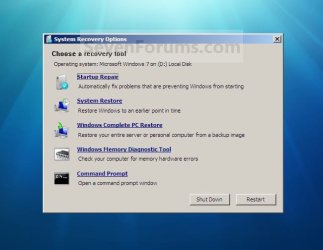
System_Recovery_Options.jpg


Here's How:
1. Open the Start Menu, then type recdisc.exe in the search box and press Enter.
A) Go to step 3.
OR

2. Open the Control Panel (icons view), and click on the Backup and Restore icon.
A) Click on the Create a System repair disc link in the left blue pane. (See screenshot below)
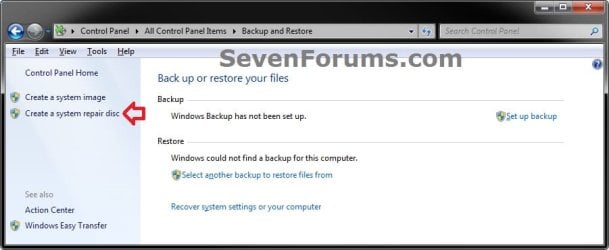
Backup_and_Restore.jpg
3. Insert a blank unformatted CD or DVD into your CD/DVD drive and click on the Create disc button. (See screenshot below)
NOTE: If you are prompted to insert a Windows installation disc, it means that the files needed to create the system repair disc cannot be found on your computer. Insert a Windows 7 installation disc.
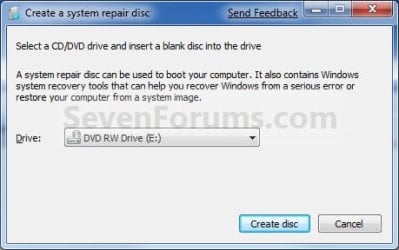
Step1.jpg
4. It will now start creating the System Repair Disc. (See screenshot below)
NOTE: If a AutoPlay window pops up, just close it.
Step2.jpg
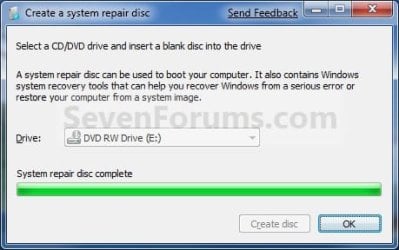
5. When it's finished, click on the Close button. (See screenshot below)
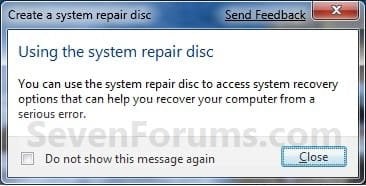
Step3.jpg
6. Click on OK. (See screenshot below)
Step4.jpg
7. Remove and label your new Windows 7 System Repair Disc from the CD/DVD drive.

   Tip
If you would like to create a bootable System Repair USB flash drive, then you could use the free program ImgBurn to create an ISO file with this Windows 7 System Repair Disc (DVD), then use the Part 1 section in the tutorial below to extract the ISO file to a USB flash drive.

Windows 7 USB/DVD Download Tool


That's it,
Shawn


Last edited:
I tried doing that but it says that the info needed is not on the hard drive and i didn't get a disc with the laptop. what are my options.
 

My Computer

OS
windows7
Hello Freeon, and welcome to Seven Forums.

I'm assuming that you have a OEM Windows 7 that came preinstalled on your laptop when you bought it.

At what point in the steps did it give your this? What was the exact complete message that it gave you?
 

My Computer

Computer type
PC/Desktop
Computer Manufacturer/Model Number
Self built custom
OS
64-bit Windows 11 Pro for Workstations
CPU
Intel i7-8700K OC'd to 5 GHz
Motherboard
ASUS ROG Maximus XI Formula Z390
Memory
64 GB (4x16GB) G.SKILL TridentZ RGB DDR4 3600 MHz
Graphics Card(s)
ASUS ROG-STRIX-GTX1080TI-O11G-GAMING
Sound Card
Integrated
Monitor(s) Displays
2 x Samsung Odyssey G7 27"
Screen Resolution
2560x1440
Hard Drives
1TB Samsung 990 PRO M.2,
4TB Samsung 990 PRO PRO M.2,
TerraMaster F8 SSD Plus NAS
PSU
Seasonic Prime Titanium 850W
Case
Thermaltake Core P3
Cooling
Corsair Hydro H115i
Keyboard
Logitech wireless K800
Mouse
Logitech MX Master 4
Internet Speed
2 Gb/s Download and 100 Mb/s Upload
Antivirus
Malwarebyte Anti-Malware Premium
Browser
Google Chrome
Other Info
Logitech Z625 speaker system,
Logitech BRIO 4K Pro webcam,
HP Color LaserJet Pro MFP M477fdn,
APC SMART-UPS RT 1000 XL - SURT1000XLI,
Galaxy S23 Plus phone
Yes windows came preinstalled. When i click on create disk I get the following message. Insert windows installation disc. The files needed to create a system repair disc were not found on this computer. You can still create a system repair disc if you have a windows installation disc.
 

My Computer

OS
windows7
Hello Rakcs,

Unfortunately this method will only let you create one using a DVD. However, you can create a Windows 7 installation USB key to use to do the same thing with instead from your Windows 7 ISO file.

Hope this helps,
Shawn

Shawn

My new notebook does not have a CD/DVD drive. Can I create a Windows 7 System Repair Disk directly to a USB key or external HDD without first burning an image to a cd/dvd and then copying that image to a USB key?

If so, can you advise how to do this or point me to a tutorial.

Thanks.
 

My Computer

Computer Manufacturer/Model Number
Acer Aspire 1810TZ
OS
Windows 7
CPU
Intel Pentium processor SU4100
Memory
3 GB

My Computer

Computer type
PC/Desktop
Computer Manufacturer/Model Number
Self built custom
OS
64-bit Windows 11 Pro for Workstations
CPU
Intel i7-8700K OC'd to 5 GHz
Motherboard
ASUS ROG Maximus XI Formula Z390
Memory
64 GB (4x16GB) G.SKILL TridentZ RGB DDR4 3600 MHz
Graphics Card(s)
ASUS ROG-STRIX-GTX1080TI-O11G-GAMING
Sound Card
Integrated
Monitor(s) Displays
2 x Samsung Odyssey G7 27"
Screen Resolution
2560x1440
Hard Drives
1TB Samsung 990 PRO M.2,
4TB Samsung 990 PRO PRO M.2,
TerraMaster F8 SSD Plus NAS
PSU
Seasonic Prime Titanium 850W
Case
Thermaltake Core P3
Cooling
Corsair Hydro H115i
Keyboard
Logitech wireless K800
Mouse
Logitech MX Master 4
Internet Speed
2 Gb/s Download and 100 Mb/s Upload
Antivirus
Malwarebyte Anti-Malware Premium
Browser
Google Chrome
Other Info
Logitech Z625 speaker system,
Logitech BRIO 4K Pro webcam,
HP Color LaserJet Pro MFP M477fdn,
APC SMART-UPS RT 1000 XL - SURT1000XLI,
Galaxy S23 Plus phone
Yea thanks for the info. It reminded me to create the DVD because I had forgot :D Anyway thanks ;)
 
Last edited:

My Computer

Computer Manufacturer/Model Number
HP Pavilion Case
OS
Windows 7 Pro x64
CPU
AMD Athlon 64 x2 Dual Core Processor 5000+ 2.60 GHz
Motherboard
Pegatron - Violet 3.02
Memory
8 Gig
Graphics Card(s)
GeForce GT 240
Sound Card
Realtek HD
Monitor(s) Displays
26 Inch and 19 Inch Dual Monitor
Screen Resolution
1920 X 1200 -- 1440 X 900
Hard Drives
Internal 500 GB Sata Drive and 1TB Hatachi External HD & 1TB Western Digital Network Drive
PSU
550 Watts
Case
HP Pavilion
Cooling
4" and 5" Fans
Keyboard
Logitech Solar K750
Mouse
Microsoft Wireless 3500
Internet Speed
50 Meg Fibre Optic Cable Broadband
Other Info
Samsung DP-U350 - 23" Touch Screen PC
You're welcome Wrams. :)
 

My Computer

Computer type
PC/Desktop
Computer Manufacturer/Model Number
Self built custom
OS
64-bit Windows 11 Pro for Workstations
CPU
Intel i7-8700K OC'd to 5 GHz
Motherboard
ASUS ROG Maximus XI Formula Z390
Memory
64 GB (4x16GB) G.SKILL TridentZ RGB DDR4 3600 MHz
Graphics Card(s)
ASUS ROG-STRIX-GTX1080TI-O11G-GAMING
Sound Card
Integrated
Monitor(s) Displays
2 x Samsung Odyssey G7 27"
Screen Resolution
2560x1440
Hard Drives
1TB Samsung 990 PRO M.2,
4TB Samsung 990 PRO PRO M.2,
TerraMaster F8 SSD Plus NAS
PSU
Seasonic Prime Titanium 850W
Case
Thermaltake Core P3
Cooling
Corsair Hydro H115i
Keyboard
Logitech wireless K800
Mouse
Logitech MX Master 4
Internet Speed
2 Gb/s Download and 100 Mb/s Upload
Antivirus
Malwarebyte Anti-Malware Premium
Browser
Google Chrome
Other Info
Logitech Z625 speaker system,
Logitech BRIO 4K Pro webcam,
HP Color LaserJet Pro MFP M477fdn,
APC SMART-UPS RT 1000 XL - SURT1000XLI,
Galaxy S23 Plus phone
Volume of system repair discs ?

Thank you.But I cannot create a windows 7 system repair discs with one CD 700 Mb.The laptop show the CD isn't blank and ....finish.My CD haven't any data ?Format again is unsucessfully
 

My Computer

OS
windows 7
Unable to create repair disk

Hi
Followed the tutorial but am unable to create repair disk.
always get the same message , attaching the screenshot....
though I have a Win 7 installation DVD, wanted this repair disk just for emergency..
thanks in advance
 

Attachments

  • Sys Image Error.JPG
    Sys Image Error.JPG
    46.2 KB · Views: 1,432

My Computer

OS
win 7
Hello Santro,

No worries. You can use OPTION TWO in the tutorial to download and create one instead then. :)
 

My Computer

Computer type
PC/Desktop
Computer Manufacturer/Model Number
Self built custom
OS
64-bit Windows 11 Pro for Workstations
CPU
Intel i7-8700K OC'd to 5 GHz
Motherboard
ASUS ROG Maximus XI Formula Z390
Memory
64 GB (4x16GB) G.SKILL TridentZ RGB DDR4 3600 MHz
Graphics Card(s)
ASUS ROG-STRIX-GTX1080TI-O11G-GAMING
Sound Card
Integrated
Monitor(s) Displays
2 x Samsung Odyssey G7 27"
Screen Resolution
2560x1440
Hard Drives
1TB Samsung 990 PRO M.2,
4TB Samsung 990 PRO PRO M.2,
TerraMaster F8 SSD Plus NAS
PSU
Seasonic Prime Titanium 850W
Case
Thermaltake Core P3
Cooling
Corsair Hydro H115i
Keyboard
Logitech wireless K800
Mouse
Logitech MX Master 4
Internet Speed
2 Gb/s Download and 100 Mb/s Upload
Antivirus
Malwarebyte Anti-Malware Premium
Browser
Google Chrome
Other Info
Logitech Z625 speaker system,
Logitech BRIO 4K Pro webcam,
HP Color LaserJet Pro MFP M477fdn,
APC SMART-UPS RT 1000 XL - SURT1000XLI,
Galaxy S23 Plus phone
As always spot on, thanks for this I will now create my recovery disk and then I am trouble free atlast...;)

Thanks for the tut.
 

My Computer

Computer Manufacturer/Model Number
HP Pavilion Case
OS
Windows 7 Pro x64
CPU
AMD Athlon 64 x2 Dual Core Processor 5000+ 2.60 GHz
Motherboard
Pegatron - Violet 3.02
Memory
8 Gig
Graphics Card(s)
GeForce GT 240
Sound Card
Realtek HD
Monitor(s) Displays
26 Inch and 19 Inch Dual Monitor
Screen Resolution
1920 X 1200 -- 1440 X 900
Hard Drives
Internal 500 GB Sata Drive and 1TB Hatachi External HD & 1TB Western Digital Network Drive
PSU
550 Watts
Case
HP Pavilion
Cooling
4" and 5" Fans
Keyboard
Logitech Solar K750
Mouse
Microsoft Wireless 3500
Internet Speed
50 Meg Fibre Optic Cable Broadband
Other Info
Samsung DP-U350 - 23" Touch Screen PC
You're welcome Wrams.
 

My Computer

Computer type
PC/Desktop
Computer Manufacturer/Model Number
Self built custom
OS
64-bit Windows 11 Pro for Workstations
CPU
Intel i7-8700K OC'd to 5 GHz
Motherboard
ASUS ROG Maximus XI Formula Z390
Memory
64 GB (4x16GB) G.SKILL TridentZ RGB DDR4 3600 MHz
Graphics Card(s)
ASUS ROG-STRIX-GTX1080TI-O11G-GAMING
Sound Card
Integrated
Monitor(s) Displays
2 x Samsung Odyssey G7 27"
Screen Resolution
2560x1440
Hard Drives
1TB Samsung 990 PRO M.2,
4TB Samsung 990 PRO PRO M.2,
TerraMaster F8 SSD Plus NAS
PSU
Seasonic Prime Titanium 850W
Case
Thermaltake Core P3
Cooling
Corsair Hydro H115i
Keyboard
Logitech wireless K800
Mouse
Logitech MX Master 4
Internet Speed
2 Gb/s Download and 100 Mb/s Upload
Antivirus
Malwarebyte Anti-Malware Premium
Browser
Google Chrome
Other Info
Logitech Z625 speaker system,
Logitech BRIO 4K Pro webcam,
HP Color LaserJet Pro MFP M477fdn,
APC SMART-UPS RT 1000 XL - SURT1000XLI,
Galaxy S23 Plus phone
Just a final bit of info which no one has mentioned.
The total size of the data burnt was 142mb.
So you certainly don't need a blank DVD for this, a CD will do the job fine.
 

My Computer

Computer Manufacturer/Model Number
AMD Athlon 64 3200+, Lenovo G560 i3
OS
Windows 7 Ultimate, Ubuntu
Motherboard
Gigabyte K8T8000
Memory
DDR 2Gb (!)
Graphics Card(s)
6600GT
Monitor(s) Displays
MultiMonitor (2) LCD
Hard Drives
Old Seagate 75
Big Western Digital
Samsung 500Gb pulled out of an external drive and installed
Ext: Maxtor (Firewire), 1Gb Lacie (Samsung)
Mouse
Logitech MX620 Cordless
Thanks for the info. Nice!! ;)
 

My Computer

Computer Manufacturer/Model Number
HP Pavilion Case
OS
Windows 7 Pro x64
CPU
AMD Athlon 64 x2 Dual Core Processor 5000+ 2.60 GHz
Motherboard
Pegatron - Violet 3.02
Memory
8 Gig
Graphics Card(s)
GeForce GT 240
Sound Card
Realtek HD
Monitor(s) Displays
26 Inch and 19 Inch Dual Monitor
Screen Resolution
1920 X 1200 -- 1440 X 900
Hard Drives
Internal 500 GB Sata Drive and 1TB Hatachi External HD & 1TB Western Digital Network Drive
PSU
550 Watts
Case
HP Pavilion
Cooling
4" and 5" Fans
Keyboard
Logitech Solar K750
Mouse
Microsoft Wireless 3500
Internet Speed
50 Meg Fibre Optic Cable Broadband
Other Info
Samsung DP-U350 - 23" Touch Screen PC
Hi,

I'm genuine Windows 7 Ultimate Retail Copy DVD pack owner from yesterday.

My question is if I restore my windows7 by using the method 2, Am I need to Re-Activate the copy again ?

Yes, I have the full installation disc but don't want to use those original DVD now & then cause I'm worried about damaging my disc.

How many time a Retail Copy user eligible to activate his copy online ? (I read the whole tutorial of this forum 'How to activate windows in phone').

Please anyone.....Thanks in advance.
 

My Computer

Computer type
PC/Desktop
Computer Manufacturer/Model Number
Assembled by Self
OS
Windows 7 Ultimate x64/Windows 7 Home Premium x64 OEM Sony/Windows 7 Home Basic x64 OEM Sony
CPU
Intel i3 3220
Motherboard
Gigabyte GA-B75-D3H
Memory
G.Skill RipjawsX DDR3 8GB 1600 Mhz
Graphics Card(s)
XFX Geoforce 250 GTS 1GB DDR3
Sound Card
Assus Xonar-DX 7.1 Channel Sound Card
Monitor(s) Displays
Dell ST2220L 22" LCD, Samsung C550 40" LCD
Hard Drives
SATA Internal ::- Seagate Barracuda 1TB 7200.12,Western Digital 500GB Green,Seagate 250GB 7200.9

320GB FreeAgent Go USB External/500GB FreeAgent Go USB External/500GB FreeAgent GoFlex USB External/ADATA SH02 1TB USB External/Verbatim 1TB External
PSU
Crossair 550 VX
Case
Cooler Master Gladiator 600
Cooling
CoolerMaster Hyper212
Keyboard
Logitech MK 250 Wireless Keyboard
Mouse
Logitech MK 250 Wireless Mouse
Antivirus
Avira Antivirus / Comodo Free Firewall
Browser
Google Chrome
Other Info
Mobile Solution>>
Sony VIAO SVE11115ENB
AMD E2-1800 1.7 Ghz
500 GB Seagate 5400 rpm
3GB DDR3 RAM 1333Mhz
AMD Radeon™ HD 7340 Graphics


Peripherals :-
BSNL DNA-A201BEI Modem,ASUS RT-N16 Gigabit Router,Netgear WG111v3 USB Wi-Fi Adopter,HP-F370 OfficeJet,Logitech X-540 5.1 Speaker,Klipsch Promedia 2.1,Genious HF-1800a 2.0.
Hi,

I'm genuine Windows 7 Ultimate Retail Copy DVD pack owner from yesterday.

My question is if I restore my windows7 by using the method 2, Am I need to Re-Activate the copy again ?

Yes, I have the full installation disc but don't want to use those original DVD now & then cause I'm worried about damaging my disc.

How many time a Retail Copy user eligible to activate his copy online ? (I read the whole tutorial of this forum 'How to activate windows in phone').

Please anyone.....Thanks in advance.
Welcome!

Downloading the ISO and burning it to a CD is the same as creating one manually in Windows. You should not need to reactivate, but if you do, and it does not accept your key, activate by telephone.
 

My Computer

Computer Manufacturer/Model Number
Custom
OS
Windows 7 Professional x64
CPU
Intel i7 2600K OC'd @ 4620 MHz
Motherboard
Asus P8Z68-V Pro
Memory
16GB GSkill Sniper 2133 Mhz (4x4GB)
Graphics Card(s)
EVGA GeForce GTX 480 SuperClocked+
Sound Card
Realtek High Definition Audio
Monitor(s) Displays
2x Acer S273HLbmii 27"
Screen Resolution
2 x 1920x1080
Hard Drives
64GB Crucial M4 SSD

Storage: Hitachi 1TB 5400RPM, Samsung 1.5TB 5400RPM
PSU
Corsair HW Series 750w (modular)
Case
Cooler Master HAF 932 Advanced Blue Edition
Cooling
CM Hyper 212+ CPU cooler, 3x 230mm + 1x 140mm case fans
Keyboard
Logitech MK320 (wireless)
Mouse
Logitech MK320 (wireless)
Internet Speed
30 Mb/s : 2 Mb/s
Thank You Sir clearing my doubts.....

But I also want to know is there any specific info/documentation page about this:

How many time a Retail Copy user eligible to activate his copy online ?

Like quota or anything....etc

After reading the tutorial in this forum, I feel it very cumbersome job to Activate copy via phone.
 

My Computer

Computer type
PC/Desktop
Computer Manufacturer/Model Number
Assembled by Self
OS
Windows 7 Ultimate x64/Windows 7 Home Premium x64 OEM Sony/Windows 7 Home Basic x64 OEM Sony
CPU
Intel i3 3220
Motherboard
Gigabyte GA-B75-D3H
Memory
G.Skill RipjawsX DDR3 8GB 1600 Mhz
Graphics Card(s)
XFX Geoforce 250 GTS 1GB DDR3
Sound Card
Assus Xonar-DX 7.1 Channel Sound Card
Monitor(s) Displays
Dell ST2220L 22" LCD, Samsung C550 40" LCD
Hard Drives
SATA Internal ::- Seagate Barracuda 1TB 7200.12,Western Digital 500GB Green,Seagate 250GB 7200.9

320GB FreeAgent Go USB External/500GB FreeAgent Go USB External/500GB FreeAgent GoFlex USB External/ADATA SH02 1TB USB External/Verbatim 1TB External
PSU
Crossair 550 VX
Case
Cooler Master Gladiator 600
Cooling
CoolerMaster Hyper212
Keyboard
Logitech MK 250 Wireless Keyboard
Mouse
Logitech MK 250 Wireless Mouse
Antivirus
Avira Antivirus / Comodo Free Firewall
Browser
Google Chrome
Other Info
Mobile Solution>>
Sony VIAO SVE11115ENB
AMD E2-1800 1.7 Ghz
500 GB Seagate 5400 rpm
3GB DDR3 RAM 1333Mhz
AMD Radeon™ HD 7340 Graphics


Peripherals :-
BSNL DNA-A201BEI Modem,ASUS RT-N16 Gigabit Router,Netgear WG111v3 USB Wi-Fi Adopter,HP-F370 OfficeJet,Logitech X-540 5.1 Speaker,Klipsch Promedia 2.1,Genious HF-1800a 2.0.
I'm not sure about that one. I haven't seen any definite numbers. All I know is that sometimes activation online is successful, and sometimes you need to call.
 

My Computer

Computer Manufacturer/Model Number
Custom
OS
Windows 7 Professional x64
CPU
Intel i7 2600K OC'd @ 4620 MHz
Motherboard
Asus P8Z68-V Pro
Memory
16GB GSkill Sniper 2133 Mhz (4x4GB)
Graphics Card(s)
EVGA GeForce GTX 480 SuperClocked+
Sound Card
Realtek High Definition Audio
Monitor(s) Displays
2x Acer S273HLbmii 27"
Screen Resolution
2 x 1920x1080
Hard Drives
64GB Crucial M4 SSD

Storage: Hitachi 1TB 5400RPM, Samsung 1.5TB 5400RPM
PSU
Corsair HW Series 750w (modular)
Case
Cooler Master HAF 932 Advanced Blue Edition
Cooling
CM Hyper 212+ CPU cooler, 3x 230mm + 1x 140mm case fans
Keyboard
Logitech MK320 (wireless)
Mouse
Logitech MK320 (wireless)
Internet Speed
30 Mb/s : 2 Mb/s
Back
Top