SYSTEM_SERVICE_EXCEPTION BSOD after PC rebuild

Hey,

I did as you asked but I’m still getting errors :(

Here’s what’s happened in chronological order:

Firstly, I tried to retrieve a CHKDSK log that was made a few weeks ago. After switching my PC on, I got as far as seeing the list of drivers/files being loaded for Safe Mode before a BSOD flashed on screen. I did get chance to write it down (or blink) before my PC then auto-restarted. Its dump files are attached to this post with the title: UNKNOWN BSOD.

I managed to get the CHKDSK log on my second attempt at entering Safe Mode. I couldn’t get the code to work for PowerShell that would save the log as a .txt file, so I did it manually from within Event Viewer. I also copied the description of the log to a .txt file. These files are attached to this post and are dated 2013.10.25. The scan didn’t find anything wrong with my HDD.

Shortly after booting Windows up normally and reaching the desktop, a MEMORY_MANAGEMENT BSOD appeared. Its dump files are attached to this post with the date 2013.11.03. After retrieving these files with the SF Diagnostic Tool from Safe Mode, I booted Windows up normally and reached the desktop. Soon after this, an error message saying that: “Catalyst Control Center: Host Application has stopped working”. I dismissed this message and a stop error message then appeared. I think it mentioned “MMDrive” and “load”. I couldn’t write it down as within a few seconds a BSOD flashed briefly on-screen, which too vanished suddenly as my PC auto-restarted. This blue-screen’s dump files are attached to this post with the title: ANOTHER UNKNOWN BSOD.

I was able to get a second CHKDSK scan to run but this time using the elevated command prompt. The test came back negative for errors. Its log and a copied description of the results in a .txt file are attached. I’ve also included a folder called LocaleMetaData that appeared after saving the first CHKDSK log. Another version didn’t appear after saving the second log though, so I’ve included it in case it’s important.

When I came around to getting the log files sometime after the scan, I switched my PC on and tried to boot into Safe Mode. However, I found that it wouldn’t load further than the motherboard’s POST screen. I was probably pressing F8 as the screen appeared though, if this is a factor.

I rebooted my PC and this time found that I could get past the POST screen but my PC wouldn’t load past a black screen with a flashing white underscore style cursor in the top left hand side. After rebooting again, I was able to get to Safe Mode to retrieve the log files.

I then ran SeaTools for DOS’ Long Scan, which came back negative. A photo of the on-screen results is attached to this post. I also re-seated the HDD’s SATA and power cables in the drive itself and the connections to the motherboard and PSU.

A screenshot from Crystal Disk Info is attached to this post. The “Reallocated Sectors Count” that was flagged has been mentioned in one of my previous Seven Forums threads. When I first saw it, I Googled it and read that it would only be an issue if the figure changes. The figure was 100 when I first saw it approximately a year ago and it hasn’t changed since. I did reset the count the last time I installed Crystal Disk Info but I guess this has been undone!

Everything seemed stable after re-seating the cables but I have had more problems. In fact they happened, when using my PC to listen to YouTube videos whilst writing up the first draft of this reply to your post. Firstly, the Flash plug-in crashed. I refreshed the page and the music continued. Then, the music turned into a buzzing/humming noise. A MEMORY_MANAGEMENT BSOD then appeared. Its dump files are dated 2013.11.04 and, like the rest, are attached to this post.

Please help!
 

My Computer My Computer

At a glance

Windows 7 Home Premium 64-bitIntel Quad Core i5-3570K CPU 3.40GHz 6Mb L3 C...Crucial Ballistix 8GB (4GB x2) DDR3Sapphire Radeon HD 7870 GHz Edition - 2 GB GDDR5
Computer type
PC/Desktop
Computer Manufacturer/Model Number
N/A - Self Built
OS
Windows 7 Home Premium 64-bit
CPU
Intel Quad Core i5-3570K CPU 3.40GHz 6Mb L3 Cache
Motherboard
Gigabyte GA-Z77-D3H (rev 1.1)
Memory
Crucial Ballistix 8GB (4GB x2) DDR3
Graphics Card(s)
Sapphire Radeon HD 7870 GHz Edition - 2 GB GDDR5
Sound Card
Onboard motherboard
Monitor(s) Displays
ViewSonic VX2336S
Screen Resolution
1920 x 1080
Hard Drives
1.5 Tb Seagate Barracuda ST31500341AS 3.5" SATA II
PSU
Corsair Professional Series AX750 750W Modular PSU - 80plus
Case
Corsair Vengeance Series C70
Cooling
Standard Case Fans
Keyboard
ThermalTake TT eSports Meka Mech Keyboard KB-MEK007UK
Mouse
Logitech G400 Optical Gaming Mouse
Antivirus
Microsoft Security Essentials
Browser
Firefox 22.0
Other Info
My cat's name is Mittens
I still think it's a hardware fault due to the failing worker during the Prime95 test and CDI S.M.A.R.T warning.
But it's worth enabling Driver Verifier just in case I'm missing something.

Arc said:
Driver Verifier - Enable and Disable
Run Driver Verifier for 24 hours or the occurrence of the next crash, whichever is earlier.

   Information
Why Driver Verifier:
It puts a stress on the drivers, ans so it makes the unstable drivers crash. Hopefully the driver that crashes is recorded in the memory dump.

How Can we know that DV is enabled:
It will make the system bit of slow, laggy.

   Warning
Before enabling DV, make it sure that you have earlier System restore points made in your computer. You can check it easily by using CCleaner looking at Tools > System Restore.

If there is no points, make a System Restore Point manually before enabling DV.

   Tip


Let us know the results, with the subsequent crash dumps, if any.
 

My Computer My Computer

At a glance

Windows 10Intel Core i5 3570K16GB 1600Mhz G.SkillGigabyte GTX 970 G1-Gaming
Computer type
PC/Desktop
OS
Windows 10
CPU
Intel Core i5 3570K
Motherboard
Asus P8Z77V-PRO
Memory
16GB 1600Mhz G.Skill
Graphics Card(s)
Gigabyte GTX 970 G1-Gaming
PSU
Seasonic 1000W Platinum
Case
Fractal Design Define R4
Cooling
Noctua NH-D14
Success! I think!

But first... in chronological order:

I booted my PC up normally and a blue-screen error appeared. I couldn't make out what it said, but it's dump files attached to this post with the title: UNKNOWN BSOD.

After leaving Safe Mode, I booted my PC up normally and manually created a System Restore point. I then enabled Driver Verifier and rebooted my system as advised. On booting up normally, my computer worked fine. I was able to browse the internet and listen to videos on YouTube for an hour or so without a problem. To tease out some errors, I restarted my PC. Shortly after starting Firefox I was told that it was applying updates. It started OK though. I then received an error message saying that: "Desktop Manager has stopped working". Shortly after this, Firefox crashed. After restarting, it crashed again within the space of a few minutes. This time though, when I chose the "Restart Firefox" option in the Mozilla Crash Reporter, Firefox didn't restart. It did say that the crash report was submitted successfully though. After leaving my PC for a while a blue-screen appeared. It was an IRQL_NOT_LESS_OR_EQUAL BSOD and I think a driver was mentioned. I can't be sure, as it was only on-screen for a while, but its crash dump is attached to this post.

I hope it helps!
 

My Computer My Computer

At a glance

Windows 7 Home Premium 64-bitIntel Quad Core i5-3570K CPU 3.40GHz 6Mb L3 C...Crucial Ballistix 8GB (4GB x2) DDR3Sapphire Radeon HD 7870 GHz Edition - 2 GB GDDR5
Computer type
PC/Desktop
Computer Manufacturer/Model Number
N/A - Self Built
OS
Windows 7 Home Premium 64-bit
CPU
Intel Quad Core i5-3570K CPU 3.40GHz 6Mb L3 Cache
Motherboard
Gigabyte GA-Z77-D3H (rev 1.1)
Memory
Crucial Ballistix 8GB (4GB x2) DDR3
Graphics Card(s)
Sapphire Radeon HD 7870 GHz Edition - 2 GB GDDR5
Sound Card
Onboard motherboard
Monitor(s) Displays
ViewSonic VX2336S
Screen Resolution
1920 x 1080
Hard Drives
1.5 Tb Seagate Barracuda ST31500341AS 3.5" SATA II
PSU
Corsair Professional Series AX750 750W Modular PSU - 80plus
Case
Corsair Vengeance Series C70
Cooling
Standard Case Fans
Keyboard
ThermalTake TT eSports Meka Mech Keyboard KB-MEK007UK
Mouse
Logitech G400 Optical Gaming Mouse
Antivirus
Microsoft Security Essentials
Browser
Firefox 22.0
Other Info
My cat's name is Mittens
Hi thanks for the new dumps :) .
It all comes back to my initial analysis back in page #1.

Both bug checks show signs of an infection. We have two ways of dealing with that, one is to completely
wipe the drive without backing up any data what so ever I am going to assume that is the less preferable
option the other option is to take more aggressive methods in scanning for the culprits.

Which one do you prefer?
 

My Computer My Computer

At a glance

Windows 10Intel Core i5 3570K16GB 1600Mhz G.SkillGigabyte GTX 970 G1-Gaming
Computer type
PC/Desktop
OS
Windows 10
CPU
Intel Core i5 3570K
Motherboard
Asus P8Z77V-PRO
Memory
16GB 1600Mhz G.Skill
Graphics Card(s)
Gigabyte GTX 970 G1-Gaming
PSU
Seasonic 1000W Platinum
Case
Fractal Design Define R4
Cooling
Noctua NH-D14
Ha! You were right! The more aggressive scan, please! :)

My HDD is split into two partitions btw. Partition C is the Windows 7 installation whereas partition D is my "backup" drive; it contains all of my files from this PC and my old one. Should it come to formatting the drive, would both partitions need to go?
 

My Computer My Computer

At a glance

Windows 7 Home Premium 64-bitIntel Quad Core i5-3570K CPU 3.40GHz 6Mb L3 C...Crucial Ballistix 8GB (4GB x2) DDR3Sapphire Radeon HD 7870 GHz Edition - 2 GB GDDR5
Computer type
PC/Desktop
Computer Manufacturer/Model Number
N/A - Self Built
OS
Windows 7 Home Premium 64-bit
CPU
Intel Quad Core i5-3570K CPU 3.40GHz 6Mb L3 Cache
Motherboard
Gigabyte GA-Z77-D3H (rev 1.1)
Memory
Crucial Ballistix 8GB (4GB x2) DDR3
Graphics Card(s)
Sapphire Radeon HD 7870 GHz Edition - 2 GB GDDR5
Sound Card
Onboard motherboard
Monitor(s) Displays
ViewSonic VX2336S
Screen Resolution
1920 x 1080
Hard Drives
1.5 Tb Seagate Barracuda ST31500341AS 3.5" SATA II
PSU
Corsair Professional Series AX750 750W Modular PSU - 80plus
Case
Corsair Vengeance Series C70
Cooling
Standard Case Fans
Keyboard
ThermalTake TT eSports Meka Mech Keyboard KB-MEK007UK
Mouse
Logitech G400 Optical Gaming Mouse
Antivirus
Microsoft Security Essentials
Browser
Firefox 22.0
Other Info
My cat's name is Mittens
I though so :) .
I believe it won't come to that but if that is true both would need to be deleted.

Please scan for possible infection and file corruption, perform the scans in the order they appear in.

  • Download TDSS-Killer and scan for rootkits. <This has already been complete, but it's so short I don't feel bad asking you to do it again. Please upload the TDSSKILLER log which will be located in the C:\ partition once you boot back in normal mode.


  • Download AdwCleaner, it might ask you to download an updated version, do so. launch the program and click the Scan button, once it's finished go through the Folders tab and Files tab and see if it has detected any personally important files that you want to keep for now will deal with those later. Please upload the log file which will be created after removal procedure in a folder C:\AdwCleaner, if you are unable to find the log file simply launch AdwCleaner again and click the Report button.

  • Download Malwarebytes and DON'T activate the trail (uncheck the box at the end of the installation)

  • Follow this tutorial on how to use the SFC/ SCANNOW tool in Windows. See OPTION THREE in-order to upload the CBS log file.
 

My Computer My Computer

At a glance

Windows 10Intel Core i5 3570K16GB 1600Mhz G.SkillGigabyte GTX 970 G1-Gaming
Computer type
PC/Desktop
OS
Windows 10
CPU
Intel Core i5 3570K
Motherboard
Asus P8Z77V-PRO
Memory
16GB 1600Mhz G.Skill
Graphics Card(s)
Gigabyte GTX 970 G1-Gaming
PSU
Seasonic 1000W Platinum
Case
Fractal Design Define R4
Cooling
Noctua NH-D14
Hey,

I ran those scans like you asked. One of them even found something!

In the descriptions below, please assume that I ran the scans in Safe Mode unless otherwise stated. Here's what has happened:

TDSSKiller

I ran a standard scan in Safe Mode and it found no results. I then set it to perform every type of scan. I had to boot my PC normally to calibrate TDSSKiller to run a scan with the "Loaded Modules" option selected. When I reached the desktop, I started the scan. During the scan I got an error message saying: "Windows Explorer has stopped working" and whether I would like to send information on it to Microsoft. I chose to do so and shortly after this the error message and reporting prompt re-appeared. This time Windows Explorer closed down though. All that was visible was the TDSSKiller window and the wallpaper on the desktop. The scan showed no results.


Kaspersky Rescue Disk

I installed the .ISO to my USB stick using Kaspersky's installer but when I booted from it, I found that I couldn't connect to the internet to update the program's definitions. So, I Googled the problem and found a solution that involved updating the definitions without booting from the flash drive. The KRD ran fine although the program seemed slightly buggy and there was some extra text when it first booted up. The website with this information on is here: Update your Kaspersky Rescue Disk automatically | Ghacks I mention this in case you feel the program's integrity is compromised.

I set KRD to check every drive. The scan came back negative. I couldn't find a log and from what I made of the online help there isn't one created automatically unless something is found. Or unless you tell it to create logs on non-critical events, which I didn't.

AdwCleaner

I actually found a result from this scan. It was a registry key and it was removed successfully.


Malwarebytes Anti-Malware

I ran a full scan and it found no results.


sfc /SCANNOW

I ran this five times using an elevated command prompt in Windows. All scans came back negative. The log file that is attached is for the last scan. I've attached a photo of the summaries of all five scans.


I've not tried to use my PC in normal mode since the result was found in AdwCleaner. What do you think of the scan results?

P.S. Ok, so the photo of the sfc /SCANNOW results is upside down :P I'm sure you can turn it the right way up though!
 

My Computer My Computer

At a glance

Windows 7 Home Premium 64-bitIntel Quad Core i5-3570K CPU 3.40GHz 6Mb L3 C...Crucial Ballistix 8GB (4GB x2) DDR3Sapphire Radeon HD 7870 GHz Edition - 2 GB GDDR5
Computer type
PC/Desktop
Computer Manufacturer/Model Number
N/A - Self Built
OS
Windows 7 Home Premium 64-bit
CPU
Intel Quad Core i5-3570K CPU 3.40GHz 6Mb L3 Cache
Motherboard
Gigabyte GA-Z77-D3H (rev 1.1)
Memory
Crucial Ballistix 8GB (4GB x2) DDR3
Graphics Card(s)
Sapphire Radeon HD 7870 GHz Edition - 2 GB GDDR5
Sound Card
Onboard motherboard
Monitor(s) Displays
ViewSonic VX2336S
Screen Resolution
1920 x 1080
Hard Drives
1.5 Tb Seagate Barracuda ST31500341AS 3.5" SATA II
PSU
Corsair Professional Series AX750 750W Modular PSU - 80plus
Case
Corsair Vengeance Series C70
Cooling
Standard Case Fans
Keyboard
ThermalTake TT eSports Meka Mech Keyboard KB-MEK007UK
Mouse
Logitech G400 Optical Gaming Mouse
Antivirus
Microsoft Security Essentials
Browser
Firefox 22.0
Other Info
My cat's name is Mittens
I've actually just had a SYSTEM_SERVICE_EXCEPTION BSOD when I just booted my PC up normally. It appeared around the point where Windows is loading and it says "Please wait..." and "Welcome". I had just plugged my headphones into the case though, which would normally trigger a prompt from VIA ADECK if I was on the desktop. This prompt would normally ask me whether I wanted to use my headphones as headphones or as a microphone.

The dump files of the blue-screen are attached. Please let me know what you think!
 

My Computer My Computer

At a glance

Windows 7 Home Premium 64-bitIntel Quad Core i5-3570K CPU 3.40GHz 6Mb L3 C...Crucial Ballistix 8GB (4GB x2) DDR3Sapphire Radeon HD 7870 GHz Edition - 2 GB GDDR5
Computer type
PC/Desktop
Computer Manufacturer/Model Number
N/A - Self Built
OS
Windows 7 Home Premium 64-bit
CPU
Intel Quad Core i5-3570K CPU 3.40GHz 6Mb L3 Cache
Motherboard
Gigabyte GA-Z77-D3H (rev 1.1)
Memory
Crucial Ballistix 8GB (4GB x2) DDR3
Graphics Card(s)
Sapphire Radeon HD 7870 GHz Edition - 2 GB GDDR5
Sound Card
Onboard motherboard
Monitor(s) Displays
ViewSonic VX2336S
Screen Resolution
1920 x 1080
Hard Drives
1.5 Tb Seagate Barracuda ST31500341AS 3.5" SATA II
PSU
Corsair Professional Series AX750 750W Modular PSU - 80plus
Case
Corsair Vengeance Series C70
Cooling
Standard Case Fans
Keyboard
ThermalTake TT eSports Meka Mech Keyboard KB-MEK007UK
Mouse
Logitech G400 Optical Gaming Mouse
Antivirus
Microsoft Security Essentials
Browser
Firefox 22.0
Other Info
My cat's name is Mittens
Edit:
I didn't see you posting #28, I will give my thoughts about it later on.
By the way you can disable Driver Verifier now - http://www.sevenforums.com/tutorials/101379-driver-verifier-enable-disable.html


Well at this point I'm a bit baffled :confused:, I was almost positive we would find an infection!
Your bug checks are consistent when it comes to MpFilter.sys and NTFS which are most commonly
due to security oriented software. The thing that I'm most curious about is the fact that you only have
Malwarebytes and MSSE which I have never encountered them causing an issue.
I was about to suggest to go for a clean install (and yes you can backup your data since it's clean),
and install programs one by one in manageable chunks of time until we find the culprit, but instead I want you to try something I rarely suggest.

Uninstall Microsoft Security Essentials and Malwarebytes.


And install AVG Free and see how the machine handles itself over the course of a few days.
   Note
During the installation process the wizard will ask you to install 4-5 more extensions of AVG
including additional laguages, the check-boxes will be pre checked! uncheck them all and proceed with the installation.
 

My Computer My Computer

At a glance

Windows 10Intel Core i5 3570K16GB 1600Mhz G.SkillGigabyte GTX 970 G1-Gaming
Computer type
PC/Desktop
OS
Windows 10
CPU
Intel Core i5 3570K
Motherboard
Asus P8Z77V-PRO
Memory
16GB 1600Mhz G.Skill
Graphics Card(s)
Gigabyte GTX 970 G1-Gaming
PSU
Seasonic 1000W Platinum
Case
Fractal Design Define R4
Cooling
Noctua NH-D14
Hey,

Here is another update on my PC and some more blue-screen dump files!

09/11/2013

After booting my PC up normally, I uninstalled Malwarebytes Anti-Malware using the tool that you recommended. I then booted into Safe Mode with the intention of uninstalling Microsoft Security Essentials but was told that I had to do that in the normal Windows mode. Upon reaching the desktop after booting up normally, I got a "Windows Desktop Manager has stopped working" error followed by one for Windows Explorer with the same problem. During this time, I was rushing to uninstall MSE before a BSOD was triggered. It wasn't quick enough though as a SYSTEM_SERVICE_EXCEPTION blue-screen appeared and my PC auto-restarted.

After retrieving those dump files from Safe Mode, I was able to boot my PC up normally and successfully remove MSE. I then installed AVG using the Custom branch of the installation wizard. I unchecked every additional feature inc. additional languages, browser protection, email scanner and an application showing AVG's real-time protection status. Was that what you meant?

I then restarted my PC to finalise AVG's installation. As it was booting up, between the POST screen and the "Please wait..." Windows screen, a BSOD appeared and my PC auto-restarted. I didn't see what the blue-screen error said but I was able to retrieve the dump files from Safe Mode. They're attached to this post as UNKNOWN BSOD.

12/11/2013

I booted my PC up normally but before reaching the desktop my PC auto-restarted. I booted into Safe Mode and retrieved some dump files using the Seven Forums Diagnostic Tool just in case a BSOD had been generated. I suspect one was as its size is different from the other dump files. I've attached it to this post as "SF_12-11-2013 - Possibly a new BSOD. Could be an old one".

Whilst in Safe Mode I tried to run a full scan using AVG as while I was installing the program I wasn't running any kind of virus or spyware protection. The program started up, but it said that it could only do so using "Command Line". I started a full scan but after every entry it scanned, it said that it was "Locked. Unable to scan", or words to that effect. Do you know how I could get round this?

After this bout in Safe Mode, I returned to Windows' normal mode and everything seemed stable. There were slight wobbles when signing in to Steam though. Initially I couldn't login as it said the Steam network was unavailable and after managing to sign in sometime later, Firefox crashed immediately afterwards. It restarted and ran fine after this though. After an hour or so of browsing the internet, I turned Driver Verifier off and shut down my PC.

And this is where I am now. I'll report back after using my PC for a few more days. Could you let me know what you think of these BSODs and what's wrong with AVG? Thanks
 

My Computer My Computer

At a glance

Windows 7 Home Premium 64-bitIntel Quad Core i5-3570K CPU 3.40GHz 6Mb L3 C...Crucial Ballistix 8GB (4GB x2) DDR3Sapphire Radeon HD 7870 GHz Edition - 2 GB GDDR5
Computer type
PC/Desktop
Computer Manufacturer/Model Number
N/A - Self Built
OS
Windows 7 Home Premium 64-bit
CPU
Intel Quad Core i5-3570K CPU 3.40GHz 6Mb L3 Cache
Motherboard
Gigabyte GA-Z77-D3H (rev 1.1)
Memory
Crucial Ballistix 8GB (4GB x2) DDR3
Graphics Card(s)
Sapphire Radeon HD 7870 GHz Edition - 2 GB GDDR5
Sound Card
Onboard motherboard
Monitor(s) Displays
ViewSonic VX2336S
Screen Resolution
1920 x 1080
Hard Drives
1.5 Tb Seagate Barracuda ST31500341AS 3.5" SATA II
PSU
Corsair Professional Series AX750 750W Modular PSU - 80plus
Case
Corsair Vengeance Series C70
Cooling
Standard Case Fans
Keyboard
ThermalTake TT eSports Meka Mech Keyboard KB-MEK007UK
Mouse
Logitech G400 Optical Gaming Mouse
Antivirus
Microsoft Security Essentials
Browser
Firefox 22.0
Other Info
My cat's name is Mittens
I'll see what others have to say about this persistent issue, but before I do please verify that you are not overclocked.
Usually the !sysinfo cpuspeed command is sufficient to to dump the speed of the CPU at the time of the crash.
When I apply it to your dumps I get the following:
Please verify using the UEFI (BIOS) your target turbo clock and voltage setting, and while you're there
apply the equivalent of the Optimized Defaults of your motherboard.
 
Last edited:

My Computer My Computer

At a glance

Windows 10Intel Core i5 3570K16GB 1600Mhz G.SkillGigabyte GTX 970 G1-Gaming
Computer type
PC/Desktop
OS
Windows 10
CPU
Intel Core i5 3570K
Motherboard
Asus P8Z77V-PRO
Memory
16GB 1600Mhz G.Skill
Graphics Card(s)
Gigabyte GTX 970 G1-Gaming
PSU
Seasonic 1000W Platinum
Case
Fractal Design Define R4
Cooling
Noctua NH-D14
Thanks for being willing to ask others about the problem. It's good to know that you're so determined to help me! :)

I haven't dug around inside the motherboard's settings yet but I will do tomorrow.

As for my PC being over-clocked, I haven't done it myself but it has struck a chord. I remember seeing somewhere about either my motherboard or CPU having some kind of performance enhancing ability. It could just be technobabble on their part but after looking through the CPU's manual I saw this mentioned: Intel® Turbo Boost Technology?On-Demand Processor Performance

It seems to boost performance automatically. This seems clearer in this post: Intel turbo boost useless function ? [Solved] - Intel - CPUs They even say that it raises temperatures.

Please excuse my ignorance, but could this be part of the problem?
 

My Computer My Computer

At a glance

Windows 7 Home Premium 64-bitIntel Quad Core i5-3570K CPU 3.40GHz 6Mb L3 C...Crucial Ballistix 8GB (4GB x2) DDR3Sapphire Radeon HD 7870 GHz Edition - 2 GB GDDR5
Computer type
PC/Desktop
Computer Manufacturer/Model Number
N/A - Self Built
OS
Windows 7 Home Premium 64-bit
CPU
Intel Quad Core i5-3570K CPU 3.40GHz 6Mb L3 Cache
Motherboard
Gigabyte GA-Z77-D3H (rev 1.1)
Memory
Crucial Ballistix 8GB (4GB x2) DDR3
Graphics Card(s)
Sapphire Radeon HD 7870 GHz Edition - 2 GB GDDR5
Sound Card
Onboard motherboard
Monitor(s) Displays
ViewSonic VX2336S
Screen Resolution
1920 x 1080
Hard Drives
1.5 Tb Seagate Barracuda ST31500341AS 3.5" SATA II
PSU
Corsair Professional Series AX750 750W Modular PSU - 80plus
Case
Corsair Vengeance Series C70
Cooling
Standard Case Fans
Keyboard
ThermalTake TT eSports Meka Mech Keyboard KB-MEK007UK
Mouse
Logitech G400 Optical Gaming Mouse
Antivirus
Microsoft Security Essentials
Browser
Firefox 22.0
Other Info
My cat's name is Mittens
I'm personally involved in this already:D!
That ability is normal and a part of any intel CPU, the setting it's set at is what we need to verify
still at the default and yours should be at 3400MHz or 3.4GHz.
 

My Computer My Computer

At a glance

Windows 10Intel Core i5 3570K16GB 1600Mhz G.SkillGigabyte GTX 970 G1-Gaming
Computer type
PC/Desktop
OS
Windows 10
CPU
Intel Core i5 3570K
Motherboard
Asus P8Z77V-PRO
Memory
16GB 1600Mhz G.Skill
Graphics Card(s)
Gigabyte GTX 970 G1-Gaming
PSU
Seasonic 1000W Platinum
Case
Fractal Design Define R4
Cooling
Noctua NH-D14
Thanks! :)

I took these photos of the BIOS after I reset its settings to the Optimised Defaults. Is this the information that you wanted?
 

My Computer My Computer

At a glance

Windows 7 Home Premium 64-bitIntel Quad Core i5-3570K CPU 3.40GHz 6Mb L3 C...Crucial Ballistix 8GB (4GB x2) DDR3Sapphire Radeon HD 7870 GHz Edition - 2 GB GDDR5
Computer type
PC/Desktop
Computer Manufacturer/Model Number
N/A - Self Built
OS
Windows 7 Home Premium 64-bit
CPU
Intel Quad Core i5-3570K CPU 3.40GHz 6Mb L3 Cache
Motherboard
Gigabyte GA-Z77-D3H (rev 1.1)
Memory
Crucial Ballistix 8GB (4GB x2) DDR3
Graphics Card(s)
Sapphire Radeon HD 7870 GHz Edition - 2 GB GDDR5
Sound Card
Onboard motherboard
Monitor(s) Displays
ViewSonic VX2336S
Screen Resolution
1920 x 1080
Hard Drives
1.5 Tb Seagate Barracuda ST31500341AS 3.5" SATA II
PSU
Corsair Professional Series AX750 750W Modular PSU - 80plus
Case
Corsair Vengeance Series C70
Cooling
Standard Case Fans
Keyboard
ThermalTake TT eSports Meka Mech Keyboard KB-MEK007UK
Mouse
Logitech G400 Optical Gaming Mouse
Antivirus
Microsoft Security Essentials
Browser
Firefox 22.0
Other Info
My cat's name is Mittens
Yes thank you :), It looks to be in order.
BTW I don't know if you noticed back in post #29 you posted while I was posting so I posted
mine a couple of minutes after yours so I immediately edited and added asking you to disable Driver Verifier.
Edit:
I didn't see you posting #28, I will give my thoughts about it later on.
By the way you can disable Driver Verifier now - http://www.sevenforums.com/tutorials/101379-driver-verifier-enable-disable.html

So you went through the entire removal and installation with DV enabled.
Hey,

Here is another update on my PC and some more blue-screen dump files!

09/11/2013

After booting my PC up normally, I uninstalled Malwarebytes Anti-Malware using the tool that you recommended. I then booted into Safe Mode with the intention of uninstalling Microsoft Security Essentials but was told that I had to do that in the normal Windows mode. Upon reaching the desktop after booting up normally, I got a "Windows Desktop Manager has stopped working" error followed by one for Windows Explorer with the same problem. During this time, I was rushing to uninstall MSE before a BSOD was triggered. It wasn't quick enough though as a SYSTEM_SERVICE_EXCEPTION blue-screen appeared and my PC auto-restarted.

After retrieving those dump files from Safe Mode, I was able to boot my PC up normally and successfully remove MSE. I then installed AVG using the Custom branch of the installation wizard. I unchecked every additional feature inc. additional languages, browser protection, email scanner and an application showing AVG's real-time protection status. Was that what you meant?

I then restarted my PC to finalise AVG's installation. As it was booting up, between the POST screen and the "Please wait..." Windows screen, a BSOD appeared and my PC auto-restarted. I didn't see what the blue-screen error said but I was able to retrieve the dump files from Safe Mode. They're attached to this post as UNKNOWN BSOD.

12/11/2013

I booted my PC up normally but before reaching the desktop my PC auto-restarted. I booted into Safe Mode and retrieved some dump files using the Seven Forums Diagnostic Tool just in case a BSOD had been generated. I suspect one was as its size is different from the other dump files. I've attached it to this post as "SF_12-11-2013 - Possibly a new BSOD. Could be an old one".

Whilst in Safe Mode I tried to run a full scan using AVG as while I was installing the program I wasn't running any kind of virus or spyware protection. The program started up, but it said that it could only do so using "Command Line". I started a full scan but after every entry it scanned, it said that it was "Locked. Unable to scan", or words to that effect. Do you know how I could get round this?

After this bout in Safe Mode, I returned to Windows' normal mode and everything seemed stable. There were slight wobbles when signing in to Steam though. Initially I couldn't login as it said the Steam network was unavailable and after managing to sign in sometime later, Firefox crashed immediately afterwards. It restarted and ran fine after this though. After an hour or so of browsing the internet, I turned Driver Verifier off and shut down my PC.

And this is where I am now. I'll report back after using my PC for a few more days. Could you let me know what you think of these BSODs and what's wrong with AVG? Thanks

DV will almost always find something.
As of now how are things going with AVG?
 

My Computer My Computer

At a glance

Windows 10Intel Core i5 3570K16GB 1600Mhz G.SkillGigabyte GTX 970 G1-Gaming
Computer type
PC/Desktop
OS
Windows 10
CPU
Intel Core i5 3570K
Motherboard
Asus P8Z77V-PRO
Memory
16GB 1600Mhz G.Skill
Graphics Card(s)
Gigabyte GTX 970 G1-Gaming
PSU
Seasonic 1000W Platinum
Case
Fractal Design Define R4
Cooling
Noctua NH-D14
I'm not entirely sure how it's going with AVG tbh! I just seem to be getting different problems!

The second time I booted up my PC there was a problem with its protection that it said that it could resolve itself. After a reboot it was fine though. I don't seem to be getting the "[Insert name here] has stopped working" errors now but during this attempt to turn my PC on, it struggled to reach the desktop.

After switching my PC on it managed to get past the POST screen, then auto-restarted. It then got past the POST screen and up to the initial Windows screen before auto-restarting again. As it started up this time I reached a black screen with white lettering saying that Windows or my computer has recovered from an unexpected and would I like to start Windows normally or use Startup Repair. I chose Startup Repair but didn't choose the option to use System Restore. After letting Startup Repair run for a bit, I got the error message:

StartRep.exe - Application Error
The instruction at 0xfa1f45b5 referenced memory at 0xffffffff. The memory could not be read.

Click on OK to terminate the program.

After clearing the message, System Recovery Options loaded with options for Startup Repair, Windows Memory Diagnostic, Command Prompt etc. I tried Startup Repair again, also again, didn't choose System Restore. Shortly afterwards the following message appeared:

Startup Repair
Startup Repair cannot repair this computer automatically.

It gave me a choice to send more information about this problem, which I took. I then shut down the PC then turned it back on again. This time it booted up fine. It did spawn a message saying that "Windows has recovered from an unexpected shutdown" and that it was sending information. After this window cleared, I noticed Windows Update run briefly. My PC has been stable for the past hour or so.

After reaching the desktop, I ran the SF Diagnostic Tool and collected some dump files in case at least one came up from the failed startup attempts. Its files are attached.

Would Driver Verifier being enabled have affected the removal of MSE or MBAM? Is that why you mentioned it?

***UPDATE***
I've just had a "Desktop Manager has stopped working" message. I guess that they're not gone!
 
Last edited:

My Computer My Computer

At a glance

Windows 7 Home Premium 64-bitIntel Quad Core i5-3570K CPU 3.40GHz 6Mb L3 C...Crucial Ballistix 8GB (4GB x2) DDR3Sapphire Radeon HD 7870 GHz Edition - 2 GB GDDR5
Computer type
PC/Desktop
Computer Manufacturer/Model Number
N/A - Self Built
OS
Windows 7 Home Premium 64-bit
CPU
Intel Quad Core i5-3570K CPU 3.40GHz 6Mb L3 Cache
Motherboard
Gigabyte GA-Z77-D3H (rev 1.1)
Memory
Crucial Ballistix 8GB (4GB x2) DDR3
Graphics Card(s)
Sapphire Radeon HD 7870 GHz Edition - 2 GB GDDR5
Sound Card
Onboard motherboard
Monitor(s) Displays
ViewSonic VX2336S
Screen Resolution
1920 x 1080
Hard Drives
1.5 Tb Seagate Barracuda ST31500341AS 3.5" SATA II
PSU
Corsair Professional Series AX750 750W Modular PSU - 80plus
Case
Corsair Vengeance Series C70
Cooling
Standard Case Fans
Keyboard
ThermalTake TT eSports Meka Mech Keyboard KB-MEK007UK
Mouse
Logitech G400 Optical Gaming Mouse
Antivirus
Microsoft Security Essentials
Browser
Firefox 22.0
Other Info
My cat's name is Mittens
Well the last bug check blames avgldx64.sys which is a part of AVG, the reason I'm noting this is again
a security oriented software / driver that is being blamed for the crash.
I strongly recommend a clean install eliminating possible eluding corruption.
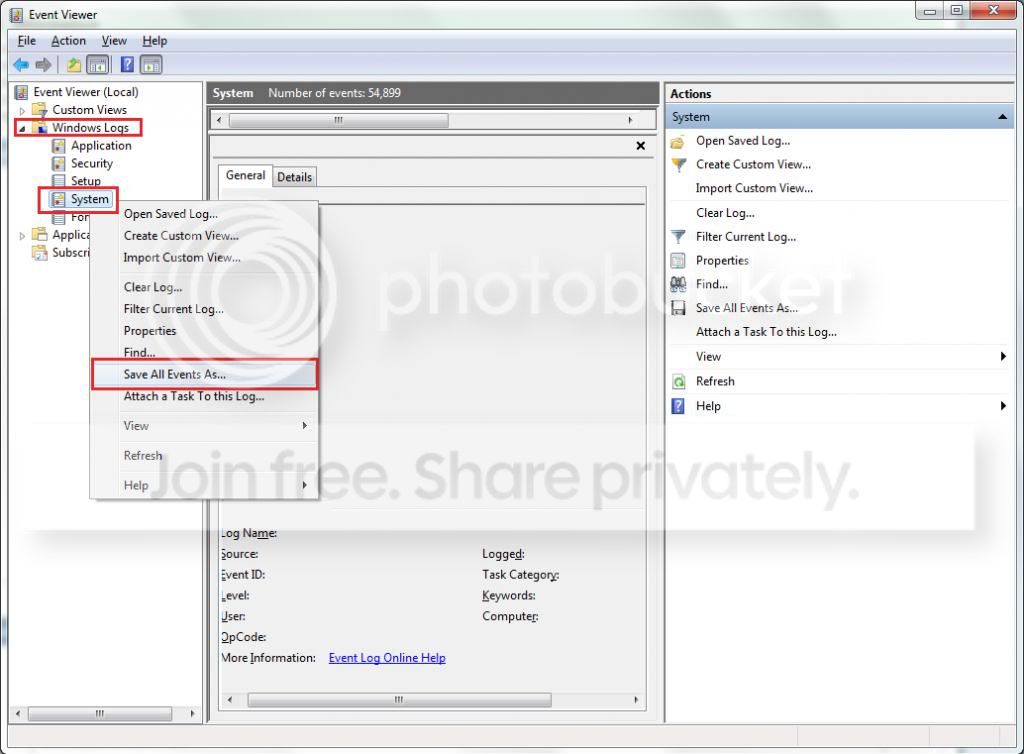
But before you wipe the system please export and upload your system event log.

  1. :orb: Start > type eventvwr > hit Enter.
  2. Toggle open the triangle to the left of Windows Logs, right-click on system and choose Save All Events As...
  3. syseventvwrlog1_zps5b0a5395.jpg
  4. A dialogue box will pop up asking you to name the file and select the save directory, name the file the same as your Seven Forums user-name and save it to the desktop.
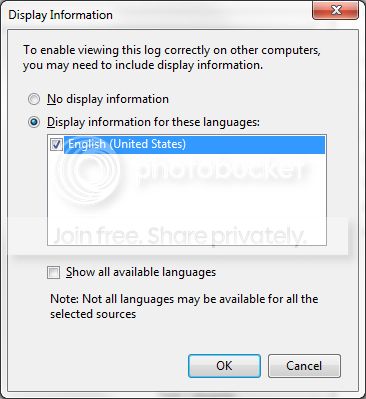
  5. A second dialogue box will appear asking you to select the Display Information, select Display information for these languages and check the box next to English (if you don't have English automatically offered check the box at the bottom to display additional languages - Show all available languages and check English).
  6. syseventvwrlog2_zpsdafa4dba.jpg
  7. Wait a few moments until the cursor returns to normal. The file will now be on your desktop (given it's the directory it was saved to) UserName.evtx, next to it there will be a folder called LocaleMetaData select both the .evtx file as well as the folder and compress them using Winrar / 7zip and attach it in your next post.

Backup your personal files then follow this tutorial.

  • http://www.sevenforums.com/tutorials/1649-clean-install-windows-7-a.html
  • After installation install only the drivers and Microsoft Security Essentials and see how thing go for a couple of days. This includes not installing things like Java, shockwave, Flash player.
  • Then copy your backed up data back again give it a couple of days and feel the situation of the system.
  • If all going great slowly install you important software one at a time with long enough gaps in between to give the system a chance (hopefully not of course) to crash or somehow go into a hissy fit.
   Note
If during any stage of the the procedure above (after the clean install) an abnormal behavior happens to occur, i.e. complete system crash (BSOD) / Generally unstable Operating System STOP undo your last step(s) and observe the situation and try again.


Please keep updating as things progress :) .
 

My Computer My Computer

At a glance

Windows 10Intel Core i5 3570K16GB 1600Mhz G.SkillGigabyte GTX 970 G1-Gaming
Computer type
PC/Desktop
OS
Windows 10
CPU
Intel Core i5 3570K
Motherboard
Asus P8Z77V-PRO
Memory
16GB 1600Mhz G.Skill
Graphics Card(s)
Gigabyte GTX 970 G1-Gaming
PSU
Seasonic 1000W Platinum
Case
Fractal Design Define R4
Cooling
Noctua NH-D14
Hey,

Here's the list of Windows' System Logs from my PC.

I scanned my PC with AVG just after my last post and it found 2 infections. I can't retrieve the log of what they were but I've still had errors saying that Desktop Manager and Windows Explorer have stopped working since removing the infections though.


I have some questions when it comes to performing a full re-install of Windows 7.
  • Can I run Windows Update?
  • Is there a preferred order to install the drivers, like chipset drivers first? Should these be installed before Windows Update? That is if you want me to run it.
  • Is it an issue if my personal files are stored on a separate partition on the HDD?
Please let me know what you think :)
 

My Computer My Computer

At a glance

Windows 7 Home Premium 64-bitIntel Quad Core i5-3570K CPU 3.40GHz 6Mb L3 C...Crucial Ballistix 8GB (4GB x2) DDR3Sapphire Radeon HD 7870 GHz Edition - 2 GB GDDR5
Computer type
PC/Desktop
Computer Manufacturer/Model Number
N/A - Self Built
OS
Windows 7 Home Premium 64-bit
CPU
Intel Quad Core i5-3570K CPU 3.40GHz 6Mb L3 Cache
Motherboard
Gigabyte GA-Z77-D3H (rev 1.1)
Memory
Crucial Ballistix 8GB (4GB x2) DDR3
Graphics Card(s)
Sapphire Radeon HD 7870 GHz Edition - 2 GB GDDR5
Sound Card
Onboard motherboard
Monitor(s) Displays
ViewSonic VX2336S
Screen Resolution
1920 x 1080
Hard Drives
1.5 Tb Seagate Barracuda ST31500341AS 3.5" SATA II
PSU
Corsair Professional Series AX750 750W Modular PSU - 80plus
Case
Corsair Vengeance Series C70
Cooling
Standard Case Fans
Keyboard
ThermalTake TT eSports Meka Mech Keyboard KB-MEK007UK
Mouse
Logitech G400 Optical Gaming Mouse
Antivirus
Microsoft Security Essentials
Browser
Firefox 22.0
Other Info
My cat's name is Mittens
I have some questions when it comes to performing a full re-install of Windows 7.
  • Can I run Windows Update?
  • Is there a preferred order to install the drivers, like chipset drivers first? Should these be installed before Windows Update? That is if you want me to run it.
  • Is it an issue if my personal files are stored on a separate partition on the HDD?
Please let me know what you think :)

Hello :).
If you're asking about performing a Windows update after the installation , then yes but after the drivers.

There is, I install the drivers in this order:

  1. Chipset.
  2. Network.
  3. Sound.
  4. Graphics.
  5. USB 3.0 .
  6. Any remaining drivers, usually some are by Intel and expansion cards.
It's not an issue at all but things can go wrong, o to be extra safe I would make sure they are
backed up externally (as they should be anyway).


Good luck!


My Computer My Computer

At a glance

Windows 10Intel Core i5 3570K16GB 1600Mhz G.SkillGigabyte GTX 970 G1-Gaming
Computer type
PC/Desktop
OS
Windows 10
CPU
Intel Core i5 3570K
Motherboard
Asus P8Z77V-PRO
Memory
16GB 1600Mhz G.Skill
Graphics Card(s)
Gigabyte GTX 970 G1-Gaming
PSU
Seasonic 1000W Platinum
Case
Fractal Design Define R4
Cooling
Noctua NH-D14
Thanks for that :)

I did as you asked and performed a clean install of Windows 7 and installed the drivers. And I have errors! Here's what's happened:

Ok, yesterday I deleted the original partition with the old Windows 7 install on it and created another partition, where I installed this new install. The PC booted up to the desktop fine, so I installed the chipset drivers from the Gigabyte website. I restarted my PC when prompted. I even restarted my PC after the Intel Management Engine Interface driver just to see if there were any problems. There weren't.

I then installed MSE but then removed it since I changed my mind about going on the internet. One step at a time and all that! The LAN drivers installed fine but it was the updated install that you suggested to me over the one from the Gigabyte website. I disabled my T-Link internet adapter thing so I couldn't connect to the internet. I restarted my PC as prompted and it booted up fine. I then turned off my PC.

Today, I booted up my PC and it was, again, fine. I installed the audio drivers, restarted as prompted and it booted up fine. I did the same with the on-board graphics drivers as my graphics card is still not installed in the case. Restarted PC as prompted and it was fine.

Next came the USB 3.0 drivers. Both installed without a problem. I did have to restart my PC after the Intel installer though but my PC restarted without incident.

And now for the problem one: The Intel Rapid Start Technology driver! It's found in the "SATA/RAID or AHCI" category in the Drivers section for Windows 7 64-bit on the Gigabyte website for my motherboard. When I ran the installer a "Windows Explorer has stopped working" message appeared, as did a stop error saying:

Error
This computer does not meet the minimum requirements for installing the software

The installer then closed itself. I then rebooted my PC to see if any errors occurred. A few minutes after reaching the desktop, a "Windows Explorer has stopped working" message flashed up shortly followed by "Windows Explorer is restarting". Both messages then disappeared. I then turned my PC off and came straight on here.

I don't know how to undo this last action though because I'm assuming that the drivers didn't install, unless there's a temp file somewhere, but I don't know where to find that.

Chances are, I would have actually tried to install this driver every time I reinstalled Windows, as I doubt I would have remembered which one wouldn't work. Thinking about it, IRST shouldn't run on my motherboard in its present state as there is no dedicated SSD installed. The entry is even disabled in the BIOS. I'll need to check but I'm pretty sure that I'm not using the fifth SATA port on the motherboard, which is disabled when an IRST SSD is installed. So, that shouldn't be an issue.

I'm guessing that it has something to do with this IRST driver as after the amount of times I restarted my PC, which normally triggers errors, one just happened to show up after I ran this installer.

Please let me know what you think!

P.S. There's also a driver for a boot disk in the same category on the Gigabyte website as the IRST driver. I just thought I'd mention this in case it's relevant. I'd rather say too much than not enough!
 

My Computer My Computer

At a glance

Windows 7 Home Premium 64-bitIntel Quad Core i5-3570K CPU 3.40GHz 6Mb L3 C...Crucial Ballistix 8GB (4GB x2) DDR3Sapphire Radeon HD 7870 GHz Edition - 2 GB GDDR5
Computer type
PC/Desktop
Computer Manufacturer/Model Number
N/A - Self Built
OS
Windows 7 Home Premium 64-bit
CPU
Intel Quad Core i5-3570K CPU 3.40GHz 6Mb L3 Cache
Motherboard
Gigabyte GA-Z77-D3H (rev 1.1)
Memory
Crucial Ballistix 8GB (4GB x2) DDR3
Graphics Card(s)
Sapphire Radeon HD 7870 GHz Edition - 2 GB GDDR5
Sound Card
Onboard motherboard
Monitor(s) Displays
ViewSonic VX2336S
Screen Resolution
1920 x 1080
Hard Drives
1.5 Tb Seagate Barracuda ST31500341AS 3.5" SATA II
PSU
Corsair Professional Series AX750 750W Modular PSU - 80plus
Case
Corsair Vengeance Series C70
Cooling
Standard Case Fans
Keyboard
ThermalTake TT eSports Meka Mech Keyboard KB-MEK007UK
Mouse
Logitech G400 Optical Gaming Mouse
Antivirus
Microsoft Security Essentials
Browser
Firefox 22.0
Other Info
My cat's name is Mittens
Back
Top