Hey,
I did as you asked but I’m still getting errors
Here’s what’s happened in chronological order:
Firstly, I tried to retrieve a CHKDSK log that was made a few weeks ago. After switching my PC on, I got as far as seeing the list of drivers/files being loaded for Safe Mode before a BSOD flashed on screen. I did get chance to write it down (or blink) before my PC then auto-restarted. Its dump files are attached to this post with the title: UNKNOWN BSOD.
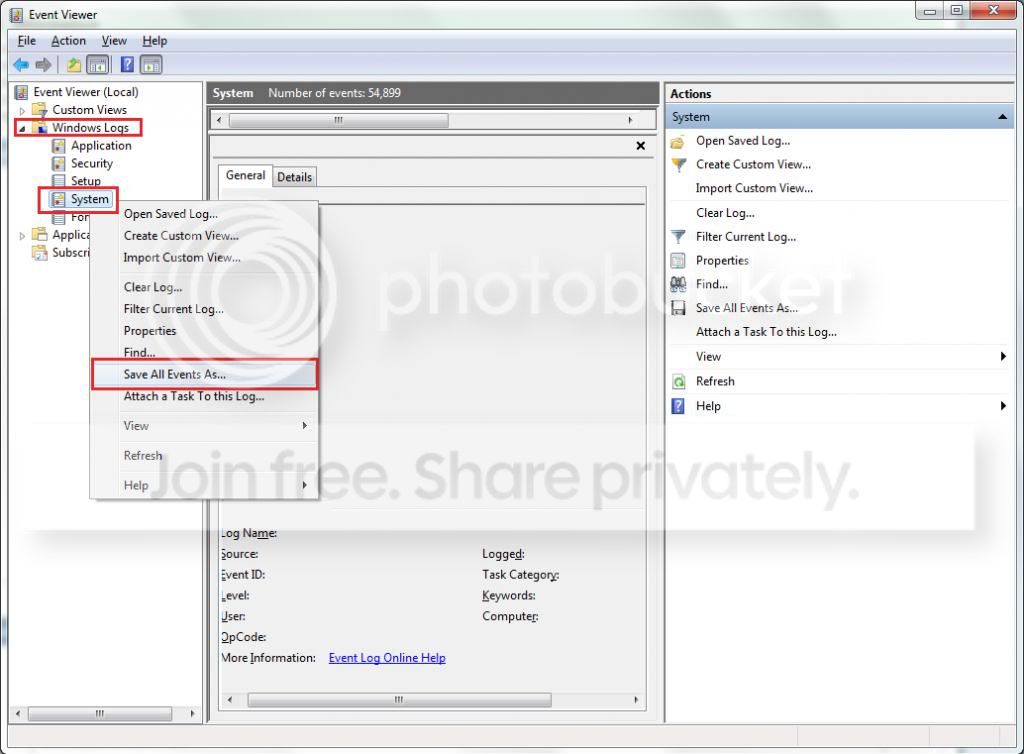
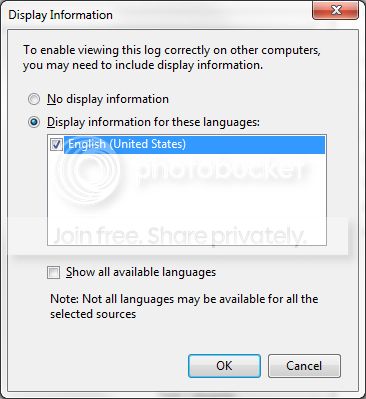
I managed to get the CHKDSK log on my second attempt at entering Safe Mode. I couldn’t get the code to work for PowerShell that would save the log as a .txt file, so I did it manually from within Event Viewer. I also copied the description of the log to a .txt file. These files are attached to this post and are dated 2013.10.25. The scan didn’t find anything wrong with my HDD.
Shortly after booting Windows up normally and reaching the desktop, a MEMORY_MANAGEMENT BSOD appeared. Its dump files are attached to this post with the date 2013.11.03. After retrieving these files with the SF Diagnostic Tool from Safe Mode, I booted Windows up normally and reached the desktop. Soon after this, an error message saying that: “Catalyst Control Center: Host Application has stopped working”. I dismissed this message and a stop error message then appeared. I think it mentioned “MMDrive” and “load”. I couldn’t write it down as within a few seconds a BSOD flashed briefly on-screen, which too vanished suddenly as my PC auto-restarted. This blue-screen’s dump files are attached to this post with the title: ANOTHER UNKNOWN BSOD.
I was able to get a second CHKDSK scan to run but this time using the elevated command prompt. The test came back negative for errors. Its log and a copied description of the results in a .txt file are attached. I’ve also included a folder called LocaleMetaData that appeared after saving the first CHKDSK log. Another version didn’t appear after saving the second log though, so I’ve included it in case it’s important.
When I came around to getting the log files sometime after the scan, I switched my PC on and tried to boot into Safe Mode. However, I found that it wouldn’t load further than the motherboard’s POST screen. I was probably pressing F8 as the screen appeared though, if this is a factor.
I rebooted my PC and this time found that I could get past the POST screen but my PC wouldn’t load past a black screen with a flashing white underscore style cursor in the top left hand side. After rebooting again, I was able to get to Safe Mode to retrieve the log files.
I then ran SeaTools for DOS’ Long Scan, which came back negative. A photo of the on-screen results is attached to this post. I also re-seated the HDD’s SATA and power cables in the drive itself and the connections to the motherboard and PSU.
A screenshot from Crystal Disk Info is attached to this post. The “Reallocated Sectors Count” that was flagged has been mentioned in one of my previous Seven Forums threads. When I first saw it, I Googled it and read that it would only be an issue if the figure changes. The figure was 100 when I first saw it approximately a year ago and it hasn’t changed since. I did reset the count the last time I installed Crystal Disk Info but I guess this has been undone!
Everything seemed stable after re-seating the cables but I have had more problems. In fact they happened, when using my PC to listen to YouTube videos whilst writing up the first draft of this reply to your post. Firstly, the Flash plug-in crashed. I refreshed the page and the music continued. Then, the music turned into a buzzing/humming noise. A MEMORY_MANAGEMENT BSOD then appeared. Its dump files are dated 2013.11.04 and, like the rest, are attached to this post.
Please help!
I did as you asked but I’m still getting errors
Here’s what’s happened in chronological order:
Firstly, I tried to retrieve a CHKDSK log that was made a few weeks ago. After switching my PC on, I got as far as seeing the list of drivers/files being loaded for Safe Mode before a BSOD flashed on screen. I did get chance to write it down (or blink) before my PC then auto-restarted. Its dump files are attached to this post with the title: UNKNOWN BSOD.
I managed to get the CHKDSK log on my second attempt at entering Safe Mode. I couldn’t get the code to work for PowerShell that would save the log as a .txt file, so I did it manually from within Event Viewer. I also copied the description of the log to a .txt file. These files are attached to this post and are dated 2013.10.25. The scan didn’t find anything wrong with my HDD.
Shortly after booting Windows up normally and reaching the desktop, a MEMORY_MANAGEMENT BSOD appeared. Its dump files are attached to this post with the date 2013.11.03. After retrieving these files with the SF Diagnostic Tool from Safe Mode, I booted Windows up normally and reached the desktop. Soon after this, an error message saying that: “Catalyst Control Center: Host Application has stopped working”. I dismissed this message and a stop error message then appeared. I think it mentioned “MMDrive” and “load”. I couldn’t write it down as within a few seconds a BSOD flashed briefly on-screen, which too vanished suddenly as my PC auto-restarted. This blue-screen’s dump files are attached to this post with the title: ANOTHER UNKNOWN BSOD.
I was able to get a second CHKDSK scan to run but this time using the elevated command prompt. The test came back negative for errors. Its log and a copied description of the results in a .txt file are attached. I’ve also included a folder called LocaleMetaData that appeared after saving the first CHKDSK log. Another version didn’t appear after saving the second log though, so I’ve included it in case it’s important.
When I came around to getting the log files sometime after the scan, I switched my PC on and tried to boot into Safe Mode. However, I found that it wouldn’t load further than the motherboard’s POST screen. I was probably pressing F8 as the screen appeared though, if this is a factor.
I rebooted my PC and this time found that I could get past the POST screen but my PC wouldn’t load past a black screen with a flashing white underscore style cursor in the top left hand side. After rebooting again, I was able to get to Safe Mode to retrieve the log files.
I then ran SeaTools for DOS’ Long Scan, which came back negative. A photo of the on-screen results is attached to this post. I also re-seated the HDD’s SATA and power cables in the drive itself and the connections to the motherboard and PSU.
A screenshot from Crystal Disk Info is attached to this post. The “Reallocated Sectors Count” that was flagged has been mentioned in one of my previous Seven Forums threads. When I first saw it, I Googled it and read that it would only be an issue if the figure changes. The figure was 100 when I first saw it approximately a year ago and it hasn’t changed since. I did reset the count the last time I installed Crystal Disk Info but I guess this has been undone!
Everything seemed stable after re-seating the cables but I have had more problems. In fact they happened, when using my PC to listen to YouTube videos whilst writing up the first draft of this reply to your post. Firstly, the Flash plug-in crashed. I refreshed the page and the music continued. Then, the music turned into a buzzing/humming noise. A MEMORY_MANAGEMENT BSOD then appeared. Its dump files are dated 2013.11.04 and, like the rest, are attached to this post.
Please help!
My Computer
At a glance
Windows 7 Home Premium 64-bitIntel Quad Core i5-3570K CPU 3.40GHz 6Mb L3 C...Crucial Ballistix 8GB (4GB x2) DDR3Sapphire Radeon HD 7870 GHz Edition - 2 GB GDDR5
- Computer type
- PC/Desktop
- Computer Manufacturer/Model Number
- N/A - Self Built
- OS
- Windows 7 Home Premium 64-bit
- CPU
- Intel Quad Core i5-3570K CPU 3.40GHz 6Mb L3 Cache
- Motherboard
- Gigabyte GA-Z77-D3H (rev 1.1)
- Memory
- Crucial Ballistix 8GB (4GB x2) DDR3
- Graphics Card(s)
- Sapphire Radeon HD 7870 GHz Edition - 2 GB GDDR5
- Sound Card
- Onboard motherboard
- Monitor(s) Displays
- ViewSonic VX2336S
- Screen Resolution
- 1920 x 1080
- Hard Drives
- 1.5 Tb Seagate Barracuda ST31500341AS 3.5" SATA II
- PSU
- Corsair Professional Series AX750 750W Modular PSU - 80plus
- Case
- Corsair Vengeance Series C70
- Cooling
- Standard Case Fans
- Keyboard
- ThermalTake TT eSports Meka Mech Keyboard KB-MEK007UK
- Mouse
- Logitech G400 Optical Gaming Mouse
- Antivirus
- Microsoft Security Essentials
- Browser
- Firefox 22.0
- Other Info
- My cat's name is Mittens

 .
. I'm sure you can turn it the right way up though!
 , I was almost positive we would find an infection!
 !
! rb: Start > type eventvwr > hit Enter.