
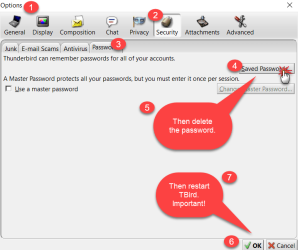
I can't remember if I've posted this. [FONT="]I've always been able to get into my Thunderbird email program just by clicking on the TB icon in the taskbar. Suddenly, the box pops up requiring the ATT/TB email password. Please let me have your advice how to remove the password requirement and just logon again. As always, thanks ever so much for your help. ellenc[/FONT]
My Computer
- Computer Manufacturer/Model Number
- Dell Inspiron 546
- OS
- Windows 7 Professional
- CPU
- 2.70gigahertz AMD Athlon 7750 Dual-Core
- Motherboard
- Dell, Inc. 0F896N A02
- Memory
- 3328 Megabytes Usable Installed Memory
- Graphics Card(s)
- ATI Radcon HD 3200 Graphics
- Monitor(s) Displays
- Dell E1709W 17,2" monitor
- Hard Drives
- 309.54G usable hard drive capacity
161.25G hard drive free space
Seagate FreeAgent Go 500G external drive
Seagate FreeAgent Go 160G external drive
Maxtor One Touch 250G external drive



 basically you are totally responsible for organising and backing up your email data and you are really limited to checking your mail from one system.
