
Thunderbird password box

ellenc

New member
Member
VIP
Local time
5:58 AM
Messages
147
I can't remember if I've posted this. [FONT=&quot]I've always been able to get into my Thunderbird email program just by clicking on the TB icon in the taskbar. Suddenly, the box pops up requiring the ATT/TB email password. Please let me have your advice how to remove the password requirement and just logon again. As always, thanks ever so much for your help. ellenc[/FONT]
 

My Computer

Computer Manufacturer/Model Number
Dell Inspiron 546
OS
Windows 7 Professional
CPU
2.70gigahertz AMD Athlon 7750 Dual-Core
Motherboard
Dell, Inc. 0F896N A02
Memory
3328 Megabytes Usable Installed Memory
Graphics Card(s)
ATI Radcon HD 3200 Graphics
Monitor(s) Displays
Dell E1709W 17,2" monitor
Hard Drives
309.54G usable hard drive capacity
161.25G hard drive free space
Seagate FreeAgent Go 500G external drive
Seagate FreeAgent Go 160G external drive
Maxtor One Touch 250G external drive
Hi, ellenc:

We could better assist you if we knew the following:

Are you referring to a Thunderbird Master Password, or to a password for an individual email account?

I will take a guess that you refer to the latter.
If that's the case, then it's possible that, at some point, your ATT mail server may have been down.
When this happens, as explained here:

Thunderbird will forget your password and will keep asking you to re-enter it till it connects to the server or until you Cancel, whichever comes first. Sometimes when a server comes back up after a connection failure, Thunderbird will never log in to the server no matter what you enter.
1. Before proceeding, ensure that you have on hand the correct password for the email account in question.
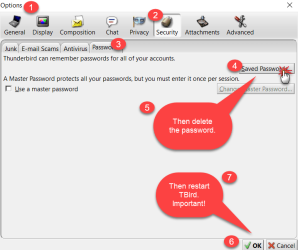
2. Delete the perfectly good password in TB: "Tools -> Options -> Passwords -> Saved Passwords -> Show Passwords" -> delete the password for the account.
3. Restart TB -- VERY IMPORTANT
4. The next time Thunderbird prompts you for the password, enter it, and check the checkbox to save the password using the password manager.

Please let us know if this helps to resolve your issue.
If not, then I may have misunderstood the problem or there is something else going on (e.g. your email account now has some sort of two-factor authentication or another password-related issue).

Thanks,
MM
 

Attachments

  • TB-PW-2016-12-23_3-05-52.png
    TB-PW-2016-12-23_3-05-52.png
    28.5 KB · Views: 1

My Computer

Computer type
PC/Desktop
Computer Manufacturer/Model Number
Dell Studio XPS 8500
OS
OEM Windows 7 Ult (x64) SP1
CPU
Intel Core-i7 3770 @ 3.4 GHz
Motherboard
"Dell" branded
Memory
16 GB DDR3 SDRAM @ 1333 MHz
Graphics Card(s)
NVidia GeForce GT620 1 GB
Sound Card
THX TruStudio PC
Monitor(s) Displays
Dell U2410 Full HD
Hard Drives
2.0 TB SATA2 @ 7200 RPM
PSU
350W
Keyboard
MS 4000 Ergon - Wired
Mouse
Logitech Anywhere MX
Internet Speed
Cable HSI w/Turbo (router)
Antivirus
KIS-MBAM Premium-MBAE Premium
Browser
Fx (current version); IE
Other Info
And a Win7/64 Pro laptop; And a Win10/64 Pro desktop.
Forgot to show you this weird msg I'm getting.
 

My Computer

Computer Manufacturer/Model Number
Dell Inspiron 546
OS
Windows 7 Professional
CPU
2.70gigahertz AMD Athlon 7750 Dual-Core
Motherboard
Dell, Inc. 0F896N A02
Memory
3328 Megabytes Usable Installed Memory
Graphics Card(s)
ATI Radcon HD 3200 Graphics
Monitor(s) Displays
Dell E1709W 17,2" monitor
Hard Drives
309.54G usable hard drive capacity
161.25G hard drive free space
Seagate FreeAgent Go 500G external drive
Seagate FreeAgent Go 160G external drive
Maxtor One Touch 250G external drive
Forgot to show you this weird msg I'm getting.

Sorry, but there's no attachment.

Did you see my earlier reply and this question, by any chance?

Are you referring to a Thunderbird Master Password, or to a password for an individual email account?
If you are referring to an email account password problem, please let us know if the suggestions posted help to resolve it.

If you are referring instead to a MASTER PASSWORD problem or if the proposed solution does not work, please let us know.

Thanks,
MM
 

My Computer

Computer type
PC/Desktop
Computer Manufacturer/Model Number
Dell Studio XPS 8500
OS
OEM Windows 7 Ult (x64) SP1
CPU
Intel Core-i7 3770 @ 3.4 GHz
Motherboard
"Dell" branded
Memory
16 GB DDR3 SDRAM @ 1333 MHz
Graphics Card(s)
NVidia GeForce GT620 1 GB
Sound Card
THX TruStudio PC
Monitor(s) Displays
Dell U2410 Full HD
Hard Drives
2.0 TB SATA2 @ 7200 RPM
PSU
350W
Keyboard
MS 4000 Ergon - Wired
Mouse
Logitech Anywhere MX
Internet Speed
Cable HSI w/Turbo (router)
Antivirus
KIS-MBAM Premium-MBAE Premium
Browser
Fx (current version); IE
Other Info
And a Win7/64 Pro laptop; And a Win10/64 Pro desktop.
TB passsword

forgot to tell you that I''m using the original ATT/Yahoo email account to receive and send messages. It's working OK but I hate it; miss Thunderbird. (Got email from Yahoo the other day that they have been breached, big time!)
 

My Computer

Computer Manufacturer/Model Number
Dell Inspiron 546
OS
Windows 7 Professional
CPU
2.70gigahertz AMD Athlon 7750 Dual-Core
Motherboard
Dell, Inc. 0F896N A02
Memory
3328 Megabytes Usable Installed Memory
Graphics Card(s)
ATI Radcon HD 3200 Graphics
Monitor(s) Displays
Dell E1709W 17,2" monitor
Hard Drives
309.54G usable hard drive capacity
161.25G hard drive free space
Seagate FreeAgent Go 500G external drive
Seagate FreeAgent Go 160G external drive
Maxtor One Touch 250G external drive
Hi:

Yes, Yahoo announced a week or so ago that there was another, massive security breach back in 2013.
If you don't need it, it's probably advisable to completely delete (terminate) one's yahoo! account, as many security experts now suggest.

Having said that, it's hard to assist you with your Thunderbird issue if you cannot please answer the few simple questions we have asked, or if you cannot tell us whether you have tried the suggestions we made.

Thank you again,
MM
 

My Computer

Computer type
PC/Desktop
Computer Manufacturer/Model Number
Dell Studio XPS 8500
OS
OEM Windows 7 Ult (x64) SP1
CPU
Intel Core-i7 3770 @ 3.4 GHz
Motherboard
"Dell" branded
Memory
16 GB DDR3 SDRAM @ 1333 MHz
Graphics Card(s)
NVidia GeForce GT620 1 GB
Sound Card
THX TruStudio PC
Monitor(s) Displays
Dell U2410 Full HD
Hard Drives
2.0 TB SATA2 @ 7200 RPM
PSU
350W
Keyboard
MS 4000 Ergon - Wired
Mouse
Logitech Anywhere MX
Internet Speed
Cable HSI w/Turbo (router)
Antivirus
KIS-MBAM Premium-MBAE Premium
Browser
Fx (current version); IE
Other Info
And a Win7/64 Pro laptop; And a Win10/64 Pro desktop.
Thunderbird password

I have uninstalled ATT/Yahoo/Thunderbird and have set up a gmail account. It's great! Please know that your help is very much appreciated. ellenc
 

My Computer

Computer Manufacturer/Model Number
Dell Inspiron 546
OS
Windows 7 Professional
CPU
2.70gigahertz AMD Athlon 7750 Dual-Core
Motherboard
Dell, Inc. 0F896N A02
Memory
3328 Megabytes Usable Installed Memory
Graphics Card(s)
ATI Radcon HD 3200 Graphics
Monitor(s) Displays
Dell E1709W 17,2" monitor
Hard Drives
309.54G usable hard drive capacity
161.25G hard drive free space
Seagate FreeAgent Go 500G external drive
Seagate FreeAgent Go 160G external drive
Maxtor One Touch 250G external drive
Hi,
Yep gmail is the best I've run across :)
 

My Computer

Computer type
PC/Desktop
Computer Manufacturer/Model Number
Custom assembled by me :}
OS
Win-7-Pro64bit 7-H-Prem-64bit
CPU
i7-5930K 2nd i9-9940x both water blocked VRM's too
Motherboard
ASUS SABERTOOTH X99 2nd ASUS x299 Apex
Memory
Trident-z 3200C14 2nd Trident-z 3600C16
Graphics Card(s)
EVGA 1080ti ftw3 2nd Titan Xp both water blocked
Sound Card
Built-in Realtek
Monitor(s) Displays
1-AOC G2460PG 24"G-Sync 144Hz/ 2nd 1-ASUS VG248QE 24" 144Hz
Screen Resolution
1920 x 1080 144Hz
Hard Drives
2-Samsung M.2 Evo & Evo Plus
2-Samsung 850 EVO 500GB SSD's/ 3-2.5 W.D. Black 1tb-&3-1tb/3-3.5 WD Black 1tb hdd's
PSU
EVGA SuperNOVA 1000-P2 2nd 1200-P2
Case
2-Corsair Obsidian Series 450D Black ATX Mid Tower
Cooling
Custom water loops
Keyboard
Logitech G710+/ 2nd Logitech G910
Mouse
2-RedDragon M901 Perdition 16400 dpi Gaming mouse = wired
Internet Speed
Comcast Ping 19ms 89.31mbps download speed 6.12mbps upload
Antivirus
Malwarebytes Pro/ Superantispyware Pro
Browser
FireFox & Pale moon
Other Info
2nd ASUS X299 Apex/Intel i9-9940x with Custom water loop/7H-Prem-x64/Corsair 450D case/Ram Trident-z 3600C16 4x8gb / Samsung970Evo plus 500gb SSD/Dual ssd EZ swap evo/PSU EVGA SuperNova 1200w-P2 80+Platinum/GPU Titan Xp /8-ML-140 on push-pull on 2-280GTX rads
Hi:

gmail is a webmail service = apple
Thunderbird is an email client = orange (although it can of course be configured to include any webmail account (gmail, yahoo, etc.), ISP email accounts, Exchange accounts, etc.)

If you only need to access your emails from the gmail web interface, then you should be all set.
If you wish to download and store messages "locally" (on your computer vs. on the gmail servers), then you'll need some sort of email client, either Thunderbird or an alternative.

But, if you're happy, then that's all that matters.

Cheers,
MM
 

My Computer

Computer type
PC/Desktop
Computer Manufacturer/Model Number
Dell Studio XPS 8500
OS
OEM Windows 7 Ult (x64) SP1
CPU
Intel Core-i7 3770 @ 3.4 GHz
Motherboard
"Dell" branded
Memory
16 GB DDR3 SDRAM @ 1333 MHz
Graphics Card(s)
NVidia GeForce GT620 1 GB
Sound Card
THX TruStudio PC
Monitor(s) Displays
Dell U2410 Full HD
Hard Drives
2.0 TB SATA2 @ 7200 RPM
PSU
350W
Keyboard
MS 4000 Ergon - Wired
Mouse
Logitech Anywhere MX
Internet Speed
Cable HSI w/Turbo (router)
Antivirus
KIS-MBAM Premium-MBAE Premium
Browser
Fx (current version); IE
Other Info
And a Win7/64 Pro laptop; And a Win10/64 Pro desktop.
Gmail has the option of both the older POP3 email sytem where all the mails are downloaded to the local hard drive, and the newer IMAP system where the mails are actually held on Gmail's servers and you use a client to look at them (gmail is in this case a client,(Web Based) as well as the actual email system).

The advantage of the POP3 method is that your mails are always stored on your system, the disadvantage is that your mails are always stored on your system ;) basically you are totally responsible for organising and backing up your email data and you are really limited to checking your mail from one system.

With IMAP you can access your mail from anywhere in the world from any device that can access the internet and any changes you make will be available on any other device you use, instanly, I often check my emails on the move using my Cell Phone and any actions performed are available in Thunderbird when I get home. Also Google will back-up all your files and your attachments on a regular basis so your data is safe. the disadvantage is that you need an Internet connection to access your mail.

As you have stated your fondness for Thunderbird you will be pleased to Know that Thunderbird can work seamlessly with Gmail in either of the modes available,

I would personally suggest that you go the IMAP route unless your internet is poor and chargeable, (metered). Thunderbird is also fully capable of handling the google calendar and by the use of add-ons many other useful day to day organisational tasks
 
Last edited:

My Computers

System One System Two

  • Computer type
    PC/Desktop
    Computer Manufacturer/Model Number
    ChillBlast - Custom to my design
    OS
    Windows 11 Pro x64 [Latest Release and Release Preview]
    CPU
    Ryzen 9 5950X, 3.8 - 5.2 MHz
    Motherboard
    Asus Prime X570-Pro
    Memory
    64GB [2 x 32GB] DDR4 3200MHz
    Graphics Card(s)
    4GB NVIDIA GEFORCE GTX 1650 Ti
    Sound Card
    On-board SPDIF to 5.1 System + HDMI [5.1 system]
    Monitor(s) Displays
    32" UHD 32 Bit HDR Monitor + 43" UHD 4K 32Bit HDR TV
    Screen Resolution
    2 x 3840 x 2160 @60Hz
    Hard Drives
    1TB M2 SSD OS, 500GB Fast Access SSD, 2 x 8TB Data + Various Externals from 1TB to 4TB, 10TB NAS
    PSU
    NZXT C750 80 PLUS Gold 750W Modular PSU
    Case
    Workstation Case [Matt Black]
    Cooling
    NZXT Kraken X63 280mm CPU Cooler +2x Quiet Case fans
    Keyboard
    Logitech Wireless MX Keys & K400 + others
    Mouse
    Logitech Wireless MX Master 3S
    Internet Speed
    920 MB Down 50 MB Up
    Antivirus
    BitDefender Total Security Pro
    Browser
    Chrome (always run latest Non-Beta)
    Other Info
    Also run ...
    Laptop - Quad 8GB - Windows 10 Pro x64
    Nexus 7 Android tablet x2
    Samsung 10.2" tablet
    Blackview TAB 8 4G Android Tablet c/w Keyboard
    Wacom Intuos Pro Medium Pen Pad
    Wacom Intuos Pro Small Pen Pad
    Wacom Expresskeys Remote
    Loopdeck+ Graphics Controller
    Shuttle Pro v2 Control
  • Computer type
    Laptop
    System Manufacturer/Model Number
    Dell XPS 17 10750H
    OS
    Windows 11 Pro x64 Latest RP
    CPU
    Intel I7 10750H 5.0GHz
    Motherboard
    Dell XPS
    Memory
    32GB [2x16GB] DDR4 2933 MHz
    Graphics Card(s)
    nVidia GTX1650Ti 4 GB GDDR6
    Sound Card
    Stock [Realtek] 4 Speaker
    Monitor(s) Displays
    17" IPS UHD+ Infinity Edge Touchscreen
    Screen Resolution
    3840 x 2400
    Hard Drives
    2TB M2 NVMe, 4TB External + various 500GB & 1TB External NVMe (also have access to spinner HDD from
    PSU
    Stock
    Case
    Stock XPS Aluminium & Carbon Fibre
    Cooling
    Stock - Active Fan Control
    Keyboard
    Backlit + Various Logitech
    Mouse
    Stock Track Pad + Logitech MX Trackball
    Internet Speed
    72 MB Down 18MB Up
    Browser
    Chrome
    Other Info
    Also run ...
    Laptop - Quad 8GB - Windows 10 Pro x64
    Nexus 7 Android tablet x2
    10.2" tablet
    Sony Z3 Android Smartphone
    Wacom Intuos Pro Medium Pen Pad
    Wacom Intuos Pro Small Pen Pad
    Wacom Expresskeys Remote
    Loopdeck+ Graphics Controller
    Shuttle Pro v2 Control Pad
    10TB NAS
^^ Excellent info. Thanks for clarification. ^^

Gmail has the option of both the older POP3 email sytem where all the mails are downloaded to the local hard drive,

Yes, of course one can access both POP3 and IMAP messages from gmail's own web service.

But does it not still require the use of some sort of email client (Thunderbird or Outlook or any of a number of alternatives) in order to download/store/compose email messages on the local computer???
Without an email client, the only way to access messages (or to write/send them) is via the gmail web interface.
I assume that -- because the OP had been using TB -- she was looking to *fix* TB, not to replace the local email client with a web service.:confused:

Perhaps we are talking about different things?
Or am I missing something??:confused:


and the newer IMAP system where the mails are actually held on Gmail's servers and you use a client to look at them (gmail is in this case a client,(Web Based) as well as the actual email system).

The advantage of the POP3 method is that your mails are always stored on your system, the disadvantage is that your mails are always stored on your system ;) basically you are totally responsible for organising and backing up your email data and you are really limited to checking your mail from one system.

With IMAP you can access your mail from anywhere in the world from any device that can access the internet and any changes you make will be available on any other device you use, instanly, I often check my emails on the move using my Cell Phone and any actions performed are available in Thunderbird when I get home. Also Google will back-up all your files and your attachments on a regular basis so your data is safe. the disadvantage is that you need an Internet connection to access your mail.
There are advantages and disadvantages to both POP3 and IMAP.
The choice really depends on how the user accesses and works with email, I suppose.

As you have stated your fondness for Thunderbird you will be pleased to Know that Thunderbird can work seamlessly with Gmail in either of the modes available,
Yes, I have both IMAP and POP3 gmail accounts (as well as ISP mail accounts) in Thunderbird on different systems.

I would personally suggest that you go the IMAP route unless your internet is poor and chargeable, (metered). Thunderbird is also fully capable of handling the google calendar and by the use of add-ons many other useful day to day organisational tasks
Good point!
There is also a Lightning calendar feature/add-on for TB.

Oh, well.
I expect that the problems with TB were fixable.
But the OP seems to be satisfied with her solution.

That is good enough for me.

Cheers,
MM
 

My Computer

Computer type
PC/Desktop
Computer Manufacturer/Model Number
Dell Studio XPS 8500
OS
OEM Windows 7 Ult (x64) SP1
CPU
Intel Core-i7 3770 @ 3.4 GHz
Motherboard
"Dell" branded
Memory
16 GB DDR3 SDRAM @ 1333 MHz
Graphics Card(s)
NVidia GeForce GT620 1 GB
Sound Card
THX TruStudio PC
Monitor(s) Displays
Dell U2410 Full HD
Hard Drives
2.0 TB SATA2 @ 7200 RPM
PSU
350W
Keyboard
MS 4000 Ergon - Wired
Mouse
Logitech Anywhere MX
Internet Speed
Cable HSI w/Turbo (router)
Antivirus
KIS-MBAM Premium-MBAE Premium
Browser
Fx (current version); IE
Other Info
And a Win7/64 Pro laptop; And a Win10/64 Pro desktop.
The POP3 option does indeed require a client

The main reason for choice between POP3 and IMAP is I feel down to the quality / availability of a reasonable Internet connection, an intermittent connection points toward the POP3 but any decent modern access is ideally served by IMAP especially due to the use of multiple devices these days. There is of course the often given reason of security as the mails are stored locally but as they have already travelled through the mail server this is less of a factor than is made out

Lightning is now a standard part of Thunderbird.

I actually feed my POP3 accounts through a gmail account to take advantage of Googles spam and security filters - I can create a "Throwaway account for use on sites that require it for access etc, tell Gmail to monitor and fetch mail from it and simply close any account that gets too much spam ;), although I generally handle spammy product news type emails using rules, in either gmail or Thunderbird
 

My Computers

System One System Two

  • Computer type
    PC/Desktop
    Computer Manufacturer/Model Number
    ChillBlast - Custom to my design
    OS
    Windows 11 Pro x64 [Latest Release and Release Preview]
    CPU
    Ryzen 9 5950X, 3.8 - 5.2 MHz
    Motherboard
    Asus Prime X570-Pro
    Memory
    64GB [2 x 32GB] DDR4 3200MHz
    Graphics Card(s)
    4GB NVIDIA GEFORCE GTX 1650 Ti
    Sound Card
    On-board SPDIF to 5.1 System + HDMI [5.1 system]
    Monitor(s) Displays
    32" UHD 32 Bit HDR Monitor + 43" UHD 4K 32Bit HDR TV
    Screen Resolution
    2 x 3840 x 2160 @60Hz
    Hard Drives
    1TB M2 SSD OS, 500GB Fast Access SSD, 2 x 8TB Data + Various Externals from 1TB to 4TB, 10TB NAS
    PSU
    NZXT C750 80 PLUS Gold 750W Modular PSU
    Case
    Workstation Case [Matt Black]
    Cooling
    NZXT Kraken X63 280mm CPU Cooler +2x Quiet Case fans
    Keyboard
    Logitech Wireless MX Keys & K400 + others
    Mouse
    Logitech Wireless MX Master 3S
    Internet Speed
    920 MB Down 50 MB Up
    Antivirus
    BitDefender Total Security Pro
    Browser
    Chrome (always run latest Non-Beta)
    Other Info
    Also run ...
    Laptop - Quad 8GB - Windows 10 Pro x64
    Nexus 7 Android tablet x2
    Samsung 10.2" tablet
    Blackview TAB 8 4G Android Tablet c/w Keyboard
    Wacom Intuos Pro Medium Pen Pad
    Wacom Intuos Pro Small Pen Pad
    Wacom Expresskeys Remote
    Loopdeck+ Graphics Controller
    Shuttle Pro v2 Control
  • Computer type
    Laptop
    System Manufacturer/Model Number
    Dell XPS 17 10750H
    OS
    Windows 11 Pro x64 Latest RP
    CPU
    Intel I7 10750H 5.0GHz
    Motherboard
    Dell XPS
    Memory
    32GB [2x16GB] DDR4 2933 MHz
    Graphics Card(s)
    nVidia GTX1650Ti 4 GB GDDR6
    Sound Card
    Stock [Realtek] 4 Speaker
    Monitor(s) Displays
    17" IPS UHD+ Infinity Edge Touchscreen
    Screen Resolution
    3840 x 2400
    Hard Drives
    2TB M2 NVMe, 4TB External + various 500GB & 1TB External NVMe (also have access to spinner HDD from
    PSU
    Stock
    Case
    Stock XPS Aluminium & Carbon Fibre
    Cooling
    Stock - Active Fan Control
    Keyboard
    Backlit + Various Logitech
    Mouse
    Stock Track Pad + Logitech MX Trackball
    Internet Speed
    72 MB Down 18MB Up
    Browser
    Chrome
    Other Info
    Also run ...
    Laptop - Quad 8GB - Windows 10 Pro x64
    Nexus 7 Android tablet x2
    10.2" tablet
    Sony Z3 Android Smartphone
    Wacom Intuos Pro Medium Pen Pad
    Wacom Intuos Pro Small Pen Pad
    Wacom Expresskeys Remote
    Loopdeck+ Graphics Controller
    Shuttle Pro v2 Control Pad
    10TB NAS
^^ Indeed, indeed. ^^

Excellent info.
Yep, I had forgotten that Lightning is now part of TB.
Thanks for the reminder.

Yeah, most of my ISP and webmail accounts are set up for POP3 (from the old days).
But I use Mailwasher Pro to preview/quick reply/quick forward messages on the servers, which is almost like having an IMAP setup.
I periodically d/l messages into TB on one or the other system.
So, I have the best of both worlds, to some extent.;)

Cheers,
MM
 

My Computer

Computer type
PC/Desktop
Computer Manufacturer/Model Number
Dell Studio XPS 8500
OS
OEM Windows 7 Ult (x64) SP1
CPU
Intel Core-i7 3770 @ 3.4 GHz
Motherboard
"Dell" branded
Memory
16 GB DDR3 SDRAM @ 1333 MHz
Graphics Card(s)
NVidia GeForce GT620 1 GB
Sound Card
THX TruStudio PC
Monitor(s) Displays
Dell U2410 Full HD
Hard Drives
2.0 TB SATA2 @ 7200 RPM
PSU
350W
Keyboard
MS 4000 Ergon - Wired
Mouse
Logitech Anywhere MX
Internet Speed
Cable HSI w/Turbo (router)
Antivirus
KIS-MBAM Premium-MBAE Premium
Browser
Fx (current version); IE
Other Info
And a Win7/64 Pro laptop; And a Win10/64 Pro desktop.
Back
Top