Solved To superfetch or not?

AnnJ

New member
Member
Local time
3:32 PM
Messages
25
Hi... new here and have learned lots and lots!
I have a new computer (Mar 2011) and after reading everything here about installing the SP1, I bit the bullet. Everything went smoothly.
The next day I noticed my boot time went from 45 sec to 95. From posts here, I waited 5 days to see if things "settled" down and no change. Sooooo.... I looked at the events logs and noticed the following events that occurred during the SP1 installation....

(info) superfetch service was changed from auto start to demand start....
(info) superfetch service entered the stopped state and finally....
(error) the superfetch service terminated with the following error "The service has not been started"
Subsequent boot-ups events make no mention of superfetch.

I do not know if superfetch was enabled prior to the SP installation and now am trying to get my boot time back to a reasonable time. Should I enable superfetch? The current status is "manual".

I've read everything on this forum about superfetch and notice some say that with a lot of ram, 8GB, it is not needed and won't help. My applications seem to open without much delay but this boot time is driving me nuts!

Ran malware bytes and ccleaner = o problems
Disabled most entries in msconfig start-up
I'm holding up on installing windows updates (29 of em now) so that this problem gets fixed first. :)

Appreciate any help.......
Ann
 

My Computer My Computer

Computer Manufacturer/Model Number
Dell Studio XPS 7100
OS
Windows 7 Professional x 64 SP1
CPU
AMD Phenom II 1090 Processor 3.2 GHZ
Memory
8GB
Graphics Card(s)
ATI radeon 5670
Sound Card
X-Fi Extreme Audio PCle - Harmon Kardon speakers HK395 2.1
Monitor(s) Displays
Dell 24-in wide ST2420L
Screen Resolution
1920 X 1080
Hard Drives
1TB Serial ATA2 7200 RPM
PSU
460W
Case
MINI TOWER DELL
Mouse
USB 6 BUTTON LASER MOUSE
Superfetch should have been enabled - Automatic (Delayed Start) in Services by default with a new installation of Windows.

The only reason to have Superfetch disabled, would be if you had an SSD. And even then, it's 50/50 on if it should be disabled or enabled with an SSD.

If you just have a HDD then it should be enabled - Automatic (Delayed Start).
 

My Computer My Computer

Computer type
PC/Desktop
Computer Manufacturer/Model Number
Airbot 2.0
OS
Windows 7 Ultimate x64 SP1
CPU
Core i7 920 (D0) @ 4Ghz, *26c idle *65c full load on air
Motherboard
Asus P6X58D Premium - Sata 6Gb/s - USB 3.0
Memory
12GB DDR3 Corsair Dominator -CMD12GX3M6A1600C8 at 1600MHz
Graphics Card(s)
Zotac Geforce GTX 770
Sound Card
ASUS Xonar D2X
Monitor(s) Displays
1 LG 24" Flatron W2453V-PF 1 Samsung 24" P2450H both 2ms RT
Screen Resolution
1920x1080@60hz
Hard Drives
1 Samsung 250GB 840 Evo SSD
1 OCZ Vertex2 180GB SSD
1 TB Samsung Spinpoint F1 7200RPM 32MB cache
2 500GB WD Caviar Blacks 7200RPM 32MB cache (WD5001AALS)

Pioneer DVD Burner DVR-S18M
PSU
Corsair HX1000W
Case
Cooler Master HAF 932
Cooling
Case Fans *3 230mm, *1 140mm/CPU - *Tuniq Tower 120 Extreme
Keyboard
Logitech Wireless MK700
Mouse
Logitech Wireless MK700
Internet Speed
DL 15 Mbps UL 0.98 Mbps
Antivirus
None
Browser
Firefox Nightly
Other Info
Processor-7.7 *RAM- 7.9 *Graphics-7.9 *Gaming Graphics- 7.9 *SSD- 7.8 W.E.I final score= 7.7
*Phone- LG Nexus 5
Yes, SuperFetch always on. Unless you have an SSD and follow Intels recommendation to turn it off. I honestly don't understand why Intel wants it off. As RAM is certainly faster than any SSD.
 

My Computer My Computer

Computer Manufacturer/Model Number
Self-Built in July 2009
OS
Windows 7 Ultimate x64
CPU
Intel Q9550 2.83Ghz OC'd to 3.40Ghz
Motherboard
Gigabyte GA-EP45-UD3R rev. 1.1, F12 BIOS
Memory
8GB G.Skill PI DDR2-800, 4-4-4-12 timings
Graphics Card(s)
EVGA 1280MB Nvidia GeForce GTX570
Sound Card
Realtek ALC899A 8 channel onboard audio
Monitor(s) Displays
23" Acer x233H
Screen Resolution
1920x1080
Hard Drives
Intel X25-M 80GB Gen 2 SSD
Western Digital 1TB Caviar Black, 32MB cache. WD1001FALS
PSU
Corsair 620HX modular
Case
Antec P182
Cooling
stock
Keyboard
ABS M1 Mechanical
Mouse
Logitech G9 Laser Mouse
Internet Speed
15/2 cable modem
Other Info
Windows and Linux enthusiast. Logitech G35 Headset.
Thank you! Can't get over the quick response time!!!
I'll enable it and see what happens after a few start-ups. Keeping fingers crossed.....

Ann
 

My Computer My Computer

Computer Manufacturer/Model Number
Dell Studio XPS 7100
OS
Windows 7 Professional x 64 SP1
CPU
AMD Phenom II 1090 Processor 3.2 GHZ
Memory
8GB
Graphics Card(s)
ATI radeon 5670
Sound Card
X-Fi Extreme Audio PCle - Harmon Kardon speakers HK395 2.1
Monitor(s) Displays
Dell 24-in wide ST2420L
Screen Resolution
1920 X 1080
Hard Drives
1TB Serial ATA2 7200 RPM
PSU
460W
Case
MINI TOWER DELL
Mouse
USB 6 BUTTON LASER MOUSE
For a test I would disable Superfetch and see whether that improves boot time. But especially with a HDD, you can only loose in the long run if you keep it disabled.
 

My Computer My Computer

Computer Manufacturer/Model Number
HP, Dell, Gateway, Toshiba - 4 laptops and 2 desktops
OS
Vista, Windows7, Mint Mate, Zorin, Windows 8
CPU
from 1.6GHz Duo to i7
Monitor(s) Displays
2x HP w2207
Hard Drives
5x HDD, 7x SSD, 12x Externals
Keyboard
with trackball - no mices
Mouse
Trackball mice
Internet Speed
DSL 6000
Not sure why Superfetch would even play in with affecting boot time. Being that it's set at "Delayed Start".
 

My Computer My Computer

Computer type
PC/Desktop
Computer Manufacturer/Model Number
Airbot 2.0
OS
Windows 7 Ultimate x64 SP1
CPU
Core i7 920 (D0) @ 4Ghz, *26c idle *65c full load on air
Motherboard
Asus P6X58D Premium - Sata 6Gb/s - USB 3.0
Memory
12GB DDR3 Corsair Dominator -CMD12GX3M6A1600C8 at 1600MHz
Graphics Card(s)
Zotac Geforce GTX 770
Sound Card
ASUS Xonar D2X
Monitor(s) Displays
1 LG 24" Flatron W2453V-PF 1 Samsung 24" P2450H both 2ms RT
Screen Resolution
1920x1080@60hz
Hard Drives
1 Samsung 250GB 840 Evo SSD
1 OCZ Vertex2 180GB SSD
1 TB Samsung Spinpoint F1 7200RPM 32MB cache
2 500GB WD Caviar Blacks 7200RPM 32MB cache (WD5001AALS)

Pioneer DVD Burner DVR-S18M
PSU
Corsair HX1000W
Case
Cooler Master HAF 932
Cooling
Case Fans *3 230mm, *1 140mm/CPU - *Tuniq Tower 120 Extreme
Keyboard
Logitech Wireless MK700
Mouse
Logitech Wireless MK700
Internet Speed
DL 15 Mbps UL 0.98 Mbps
Antivirus
None
Browser
Firefox Nightly
Other Info
Processor-7.7 *RAM- 7.9 *Graphics-7.9 *Gaming Graphics- 7.9 *SSD- 7.8 W.E.I final score= 7.7
*Phone- LG Nexus 5
Not sure why Superfetch would even play in with affecting boot time. Being that it's set at "Delayed Start".

Agreed, I've never tested SuperFetch with boot times. It doesn't make sense. It should happen after the bootup.
 

My Computer My Computer

Computer Manufacturer/Model Number
Self-Built in July 2009
OS
Windows 7 Ultimate x64
CPU
Intel Q9550 2.83Ghz OC'd to 3.40Ghz
Motherboard
Gigabyte GA-EP45-UD3R rev. 1.1, F12 BIOS
Memory
8GB G.Skill PI DDR2-800, 4-4-4-12 timings
Graphics Card(s)
EVGA 1280MB Nvidia GeForce GTX570
Sound Card
Realtek ALC899A 8 channel onboard audio
Monitor(s) Displays
23" Acer x233H
Screen Resolution
1920x1080
Hard Drives
Intel X25-M 80GB Gen 2 SSD
Western Digital 1TB Caviar Black, 32MB cache. WD1001FALS
PSU
Corsair 620HX modular
Case
Antec P182
Cooling
stock
Keyboard
ABS M1 Mechanical
Mouse
Logitech G9 Laser Mouse
Internet Speed
15/2 cable modem
Other Info
Windows and Linux enthusiast. Logitech G35 Headset.
Another idea: Run this great program ( http://www.soluto.com/ ). Then you will know exactly which process takes how much time during boot. You will also be able to manage those processes (delay, kill)
 

My Computer My Computer

Computer Manufacturer/Model Number
HP, Dell, Gateway, Toshiba - 4 laptops and 2 desktops
OS
Vista, Windows7, Mint Mate, Zorin, Windows 8
CPU
from 1.6GHz Duo to i7
Monitor(s) Displays
2x HP w2207
Hard Drives
5x HDD, 7x SSD, 12x Externals
Keyboard
with trackball - no mices
Mouse
Trackball mice
Internet Speed
DSL 6000
Hi... new here and have learned lots and lots!
I have a new computer (Mar 2011) and after reading everything here about installing the SP1, I bit the bullet. Everything went smoothly.
The next day I noticed my boot time went from 45 sec to 95. From posts here, I waited 5 days to see if things "settled" down and no change. Sooooo.... I looked at the events logs and noticed the following events that occurred during the SP1 installation....

(info) superfetch service was changed from auto start to demand start....
(info) superfetch service entered the stopped state and finally....
(error) the superfetch service terminated with the following error "The service has not been started"
Subsequent boot-ups events make no mention of superfetch.

I do not know if superfetch was enabled prior to the SP installation and now am trying to get my boot time back to a reasonable time. Should I enable superfetch? The current status is "manual".

I've read everything on this forum about superfetch and notice some say that with a lot of ram, 8GB, it is not needed and won't help. My applications seem to open without much delay but this boot time is driving me nuts!

Ran malware bytes and ccleaner = o problems
Disabled most entries in msconfig start-up
I'm holding up on installing windows updates (29 of em now) so that this problem gets fixed first. :)

Appreciate any help.......
Ann

Apparently MS changed superfetch from Automatic to Manual with SP1 (mine is manual with sp1). So no problem there.

If you run services.msc from the search bar, is superfetch enabled and set to Manual? If yes, so far, so good. If som, then try starting the service. Did it start? Then you are OK. If not, further debugging is required.
 

My Computer My Computer

Computer type
PC/Desktop
Computer Manufacturer/Model Number
Home built (GeneO industries)/Model 4
OS
Windows 10 Pro. EFI boot partition, full EFI boot
CPU
i7 4770k 4.4GHz (44-44-43-43 turbo) @ 1.248V
Motherboard
ASUS Maximus VI Hero
Memory
16GB (8GBx2) @2200 MHz G.skill Sniper 10-11-10-30-1, 1.6V
Graphics Card(s)
MSI GTX 970 Gaming 4G
Sound Card
Onboard SupremeFX Audio
Monitor(s) Displays
NEC Spectraview 2490WUXi-SV
Screen Resolution
1920 x 1200
Hard Drives
Samsung 850 Pro 256GB (OS), Samsung 2x 128GB 840 Pro SSD in RAID0, 3x WD Blue 6Gb/s 1TB RAID0, WD 2TB Black external USB 3.0, 2TB WD20EARS Green external USB 3.0, 2x 500GB Seagate and 1 750 GB external USB, 1x 350GB external USB3
PSU
Seasonic X-850 (2012 KM3 model)
Case
Fractal Design Define R4
Cooling
NH-D14, NF-F12, NF-A15; NF-P14, NF-P12,NF-A14, S12A PWM
Keyboard
Cooler Master Storm Quickfire Rapid - Brown
Mouse
Logitech G602
Internet Speed
126.4 Mb/s down, 24.3 Mb/s up
Other Info
USB 3.0 x8 , SATA III x8, eSATA, USB 2.0 x6. Samsung DVD R/W drive.

WEI: CPU 7.8, Memory 7.9, Graphics 7.9, Disk 7.9
Not sure why Superfetch would even play in with affecting boot time. Being that it's set at "Delayed Start".

Mine is set to manual after SP1. I believe it used to be automatic. I don;t believe it was ever delayed start.
Superfetch does thereadyboot boot optimization as well.
 

My Computer My Computer

Computer type
PC/Desktop
Computer Manufacturer/Model Number
Home built (GeneO industries)/Model 4
OS
Windows 10 Pro. EFI boot partition, full EFI boot
CPU
i7 4770k 4.4GHz (44-44-43-43 turbo) @ 1.248V
Motherboard
ASUS Maximus VI Hero
Memory
16GB (8GBx2) @2200 MHz G.skill Sniper 10-11-10-30-1, 1.6V
Graphics Card(s)
MSI GTX 970 Gaming 4G
Sound Card
Onboard SupremeFX Audio
Monitor(s) Displays
NEC Spectraview 2490WUXi-SV
Screen Resolution
1920 x 1200
Hard Drives
Samsung 850 Pro 256GB (OS), Samsung 2x 128GB 840 Pro SSD in RAID0, 3x WD Blue 6Gb/s 1TB RAID0, WD 2TB Black external USB 3.0, 2TB WD20EARS Green external USB 3.0, 2x 500GB Seagate and 1 750 GB external USB, 1x 350GB external USB3
PSU
Seasonic X-850 (2012 KM3 model)
Case
Fractal Design Define R4
Cooling
NH-D14, NF-F12, NF-A15; NF-P14, NF-P12,NF-A14, S12A PWM
Keyboard
Cooler Master Storm Quickfire Rapid - Brown
Mouse
Logitech G602
Internet Speed
126.4 Mb/s down, 24.3 Mb/s up
Other Info
USB 3.0 x8 , SATA III x8, eSATA, USB 2.0 x6. Samsung DVD R/W drive.

WEI: CPU 7.8, Memory 7.9, Graphics 7.9, Disk 7.9
whs.....
Thanks for the Soluto info... downloading now!
Ann
 

My Computer My Computer

Computer Manufacturer/Model Number
Dell Studio XPS 7100
OS
Windows 7 Professional x 64 SP1
CPU
AMD Phenom II 1090 Processor 3.2 GHZ
Memory
8GB
Graphics Card(s)
ATI radeon 5670
Sound Card
X-Fi Extreme Audio PCle - Harmon Kardon speakers HK395 2.1
Monitor(s) Displays
Dell 24-in wide ST2420L
Screen Resolution
1920 X 1080
Hard Drives
1TB Serial ATA2 7200 RPM
PSU
460W
Case
MINI TOWER DELL
Mouse
USB 6 BUTTON LASER MOUSE
Yes SP1 automatically changed it to manual... I'm assuming because I never looked at it before installing SP1. I called Dell yesterday to see if it was enabled or disabled at the factory and the response was too stupid to bear repeating here! They're hardware guys and to get an answer I would have to pay $40 to their software department. New machine... simple question, no? :)

Thanks,
Ann
 

My Computer My Computer

Computer Manufacturer/Model Number
Dell Studio XPS 7100
OS
Windows 7 Professional x 64 SP1
CPU
AMD Phenom II 1090 Processor 3.2 GHZ
Memory
8GB
Graphics Card(s)
ATI radeon 5670
Sound Card
X-Fi Extreme Audio PCle - Harmon Kardon speakers HK395 2.1
Monitor(s) Displays
Dell 24-in wide ST2420L
Screen Resolution
1920 X 1080
Hard Drives
1TB Serial ATA2 7200 RPM
PSU
460W
Case
MINI TOWER DELL
Mouse
USB 6 BUTTON LASER MOUSE
Yes SP1 automatically changed it to manual... I'm assuming because I never looked at it before installing SP1. I called Dell yesterday to see if it was enabled or disabled at the factory and the response was too stupid to bear repeating here! They're hardware guys and to get an answer I would have to pay $40 to their software department. New machine... simple question, no? :)

Thanks,
Ann
What a bunch of morons.

PS: Let us know what you found with Soluto. I would be interested to know what really increased your boot time. If it were Superfetch, that would be strange.
 

My Computer My Computer

Computer Manufacturer/Model Number
HP, Dell, Gateway, Toshiba - 4 laptops and 2 desktops
OS
Vista, Windows7, Mint Mate, Zorin, Windows 8
CPU
from 1.6GHz Duo to i7
Monitor(s) Displays
2x HP w2207
Hard Drives
5x HDD, 7x SSD, 12x Externals
Keyboard
with trackball - no mices
Mouse
Trackball mice
Internet Speed
DSL 6000
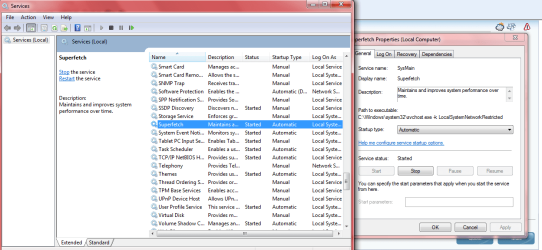
Just FYI

I have all updates and SP1 installed.

Superfetch is Auto with my HDD's. I haven't touched it just went looking after reading the last few posts.

So I would say if SP1 changed it on some machines it wasn't supposed to.
 

Attachments

  • Superfetch.PNG
    Superfetch.PNG
    44.6 KB · Views: 144

My Computer My Computer

Computer Manufacturer/Model Number
Hopalong/ Godzilla
OS
Windows7 Pro 64bit SP-1; Windows XP Pro 32bit
CPU
Intel Core i7-870 Lynnfield 2.93GHz LGA 1156 95W Quad-Core
Motherboard
ASUS P7P55D-E PRO
Memory
8GB@1400MHz Crucial Ballistix DDR3-1600 4x2GB
Graphics Card(s)
ASUS ENGTX460 DirectCU/2DI/1GD5 1GB 256-bit GDDR5
Sound Card
VIA Onboard
Monitor(s) Displays
Asus VS248H-P 24"; Samsung SyncMaster 941BW 19"ws
Screen Resolution
1920x1080; 1440x900
Hard Drives
Samsung 830 120GB SSD
Intel 320 120GB SSD
Western Digital Caviar Black WD7501AALS 750GB 7200 RPM SATA 3.0Gb/s
Western Digital Caviar Black WD6401AALS 640GB 7200 RPM SATA 3.0Gb/s
PSU
COOLER MASTER Silent Pro RS850-AMBAJ3-US 850W Modular
Case
COOLER MASTER HAF 932 RC-932-KKN5-GP Black
Cooling
Scythe "Mugen-2 Rev.B" (2 ScytheKaze-Jyuni PWM fans)
Keyboard
Logitech K-320
Mouse
Kensington
Antivirus
Avast Inernet Suite
Browser
IE 9 ; Chrome
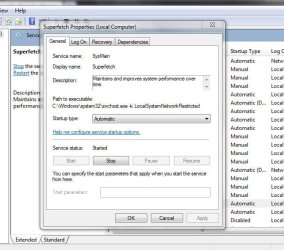
Hmmm. Same here, always been set to auto. SP1 didn't change
anything in regards to Superfetch. Have to agree with Mr. X

Capture.JPG
 

My Computer My Computer

Computer type
PC/Desktop
Computer Manufacturer/Model Number
Acer M5641
OS
Windows 7 Home Premium 64bit
CPU
Q6600
Motherboard
Nvidia MCP73PV
Memory
4GB.
Graphics Card(s)
Sapphire Vapor-X 5750
Sound Card
XFI Extreem music
Monitor(s) Displays
Acer X223W
Screen Resolution
1680x1050
Hard Drives
WD10 02FAEX
WD64 00AAKS
PSU
stock 450w
Case
acer
Cooling
stock
Keyboard
Microsoft Digital Media Pro.
Mouse
Logitech MX620
Internet Speed
49.51Mbs down 4.98Mbs up 17.6ms ping
Antivirus
MSE
Browser
Waterfox
Other Info
Shaw Cable
Netgear R6200
Hi....
Update.....
I've booted x2 since I've enabled superfetch. No change 1st time. 8 seconds shaved this morning. I know it will take a few boots for this to settle in.... so... I'm starting to do the happy dance!

Will let you know tomorrow if I get further improvement. Then, I'm going to run Soluto to hopefully get this problem fixed.
I did notice this morning that IE8 opened instantly whereas it normally took 2-3 seconds on 1st opening of the day.
Ann
 

My Computer My Computer

Computer Manufacturer/Model Number
Dell Studio XPS 7100
OS
Windows 7 Professional x 64 SP1
CPU
AMD Phenom II 1090 Processor 3.2 GHZ
Memory
8GB
Graphics Card(s)
ATI radeon 5670
Sound Card
X-Fi Extreme Audio PCle - Harmon Kardon speakers HK395 2.1
Monitor(s) Displays
Dell 24-in wide ST2420L
Screen Resolution
1920 X 1080
Hard Drives
1TB Serial ATA2 7200 RPM
PSU
460W
Case
MINI TOWER DELL
Mouse
USB 6 BUTTON LASER MOUSE
My machine is back to pre SP1... hooray! Enabling superfetch was the fix and I thank you for your input. I'm going to use Soluto now and see if I can get it better still :)

Thanks
Ann
 

My Computer My Computer

Computer Manufacturer/Model Number
Dell Studio XPS 7100
OS
Windows 7 Professional x 64 SP1
CPU
AMD Phenom II 1090 Processor 3.2 GHZ
Memory
8GB
Graphics Card(s)
ATI radeon 5670
Sound Card
X-Fi Extreme Audio PCle - Harmon Kardon speakers HK395 2.1
Monitor(s) Displays
Dell 24-in wide ST2420L
Screen Resolution
1920 X 1080
Hard Drives
1TB Serial ATA2 7200 RPM
PSU
460W
Case
MINI TOWER DELL
Mouse
USB 6 BUTTON LASER MOUSE
Mine was on Manual (Win7 x64 + SP1). Making it automatic solved my issue (so far) ;)
Thanks for the tips.
 

My Computer My Computer

OS
Windows 7 Ultimate x64
CPU
Intel i2600k
Motherboard
Gigabyte - GA - Z68X-UD4-B3
Memory
8Gig Corsair
Graphics Card(s)
EVGA Geforce 580 1536Meg
Sound Card
Realtek (on motherboard)
Monitor(s) Displays
HP LP3065
Hard Drives
Corsair Series 3 SSD 120 Gig
WD black 2TB
PSU
Corsair 750 Silver
Case
Corsair 600T
Cooling
Corsair H50 (Water based)
Keyboard
Logitec G15
Internet Speed
24 DSL
Back
Top