
You are using an out of date browser. It may not display this or other websites correctly.
You should upgrade or use an alternative browser.
You should upgrade or use an alternative browser.
Touchpad settings
- Thread starter crew51m
- Start date

Go into mouse settings, they are in there.
~Lordbob
~Lordbob
My Computer
- Computer Manufacturer/Model Number
- Hera
- OS
- Windows 7 Ultimate x64, Mint 9
- CPU
- Intel i5-2500k
- Motherboard
- ASUS P8P67 Pro
- Memory
- 2x 4Gb Corsair VENGEANCE DDR3-1600
- Graphics Card(s)
- NVidia GeForce N260GTX Twin Frozr
- Sound Card
- Realtek HD OnBoard Audio
- Monitor(s) Displays
- ASUS 24" Monitor
- Screen Resolution
- 1920x1080
- Hard Drives
- G.SKILL Phoenix Series 60GB SATA II MLC Internal Solid State Drive (SSD)
SAMSUNG Spinpoint F3R 1TB 7200 RPM 32MB Cache SATA II
- PSU
- Cooler Master Real Power Pro 750W
- Case
- Cooler Master Haf 932
- Cooling
- Fans
- Keyboard
- Razer Tarantula
- Mouse
- Razer Lachesis
- Internet Speed
- not fast enough
Turn down mouse sensitivity, it works for touchpad too.
~Lordbob
~Lordbob
My Computer
- Computer Manufacturer/Model Number
- Hera
- OS
- Windows 7 Ultimate x64, Mint 9
- CPU
- Intel i5-2500k
- Motherboard
- ASUS P8P67 Pro
- Memory
- 2x 4Gb Corsair VENGEANCE DDR3-1600
- Graphics Card(s)
- NVidia GeForce N260GTX Twin Frozr
- Sound Card
- Realtek HD OnBoard Audio
- Monitor(s) Displays
- ASUS 24" Monitor
- Screen Resolution
- 1920x1080
- Hard Drives
- G.SKILL Phoenix Series 60GB SATA II MLC Internal Solid State Drive (SSD)
SAMSUNG Spinpoint F3R 1TB 7200 RPM 32MB Cache SATA II
- PSU
- Cooler Master Real Power Pro 750W
- Case
- Cooler Master Haf 932
- Cooling
- Fans
- Keyboard
- Razer Tarantula
- Mouse
- Razer Lachesis
- Internet Speed
- not fast enough
I have exactly the same issue (Samsung Notebook NP-R70) . . the touchapad is soooo sensitive its driving me bonkers.
Apologies for being completely dim, but where is the mouse sensitivity adjustment ?
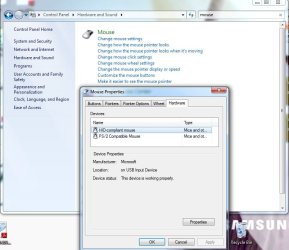
Under HARDWARE, MOUSE, I've a dialogue with adjustments for BUTTON, POINTERS, WHEEL and a tab for HARDWARE, but I don't see any dialogue for sensitivity adjustment.
It appears Win7 has configured the Touchpad as a PS2 mouse. When not on the move I use a USB wireless mouse rather than the Touchpad, but of course all you have to do is look at the Touchpad and it sends the mouse out of sight.
I tried typing in "Touchpad sensitivity" into MS Help . . .and provided MS with feedback on the usefulness of what the search returns ;-/
Much appreciate your thoughts


Apologies for being completely dim, but where is the mouse sensitivity adjustment ?
Under HARDWARE, MOUSE, I've a dialogue with adjustments for BUTTON, POINTERS, WHEEL and a tab for HARDWARE, but I don't see any dialogue for sensitivity adjustment.
It appears Win7 has configured the Touchpad as a PS2 mouse. When not on the move I use a USB wireless mouse rather than the Touchpad, but of course all you have to do is look at the Touchpad and it sends the mouse out of sight.
I tried typing in "Touchpad sensitivity" into MS Help . . .and provided MS with feedback on the usefulness of what the search returns ;-/
Much appreciate your thoughts
Attachments
My Computer
- Computer Manufacturer/Model Number
- Samsung NP-R70
- OS
- Windows 7
VCator, it should just be either sensitivity settings, or acceleration settings. The option should be under Pointer options I believe.
~Lordbob
~Lordbob
My Computer
- Computer Manufacturer/Model Number
- Hera
- OS
- Windows 7 Ultimate x64, Mint 9
- CPU
- Intel i5-2500k
- Motherboard
- ASUS P8P67 Pro
- Memory
- 2x 4Gb Corsair VENGEANCE DDR3-1600
- Graphics Card(s)
- NVidia GeForce N260GTX Twin Frozr
- Sound Card
- Realtek HD OnBoard Audio
- Monitor(s) Displays
- ASUS 24" Monitor
- Screen Resolution
- 1920x1080
- Hard Drives
- G.SKILL Phoenix Series 60GB SATA II MLC Internal Solid State Drive (SSD)
SAMSUNG Spinpoint F3R 1TB 7200 RPM 32MB Cache SATA II
- PSU
- Cooler Master Real Power Pro 750W
- Case
- Cooler Master Haf 932
- Cooling
- Fans
- Keyboard
- Razer Tarantula
- Mouse
- Razer Lachesis
- Internet Speed
- not fast enough

Hi there
on a laptop you can DISABLE the touchpad completely on boot -- I'm not a great fan of touchpads - and on my laptop if I don't disable the touchpad I get the cursor randomly jumping all over the place making data entry almost impossible.
What you do is to download the generic SYNAPTICS touch pad driver - this will work on pretty well on all laptops.
On install you get settings such as display options on boot where you can alter the options for that session etc etc. including disabling the wretched thing completely.
You can also set it so you don't see the options at start up as well.
Drivers | Synaptics
cheers
jimbo
on a laptop you can DISABLE the touchpad completely on boot -- I'm not a great fan of touchpads - and on my laptop if I don't disable the touchpad I get the cursor randomly jumping all over the place making data entry almost impossible.
What you do is to download the generic SYNAPTICS touch pad driver - this will work on pretty well on all laptops.
On install you get settings such as display options on boot where you can alter the options for that session etc etc. including disabling the wretched thing completely.
You can also set it so you don't see the options at start up as well.
Drivers | Synaptics
cheers
jimbo
My Computer
- Computer type
- PC/Desktop
- Computer Manufacturer/Model Number
- Custom built, several laptops HP/ASUS
- OS
- Linux CENTOS 7 / various Windows OS'es and servers
- CPU
- Intel i7 Intel i5
- Memory
- 8GB, 16GB
- Graphics Card(s)
- On Motherboard
- Sound Card
- Realtek HD audio
- Monitor(s) Displays
- Apple Cinema display, Samsung LCD
- Screen Resolution
- 1920 X 1080
- Hard Drives
- 4 X 1TB SATA
- Mouse
- Toshiba wireless laser
- Internet Speed
- > 20MB up

Hi there
That's what we're here for.
I had horrible problems myself with this stuff too - by passing on info it makes it easier for everyone else too.
Cheers
jimbo
That's what we're here for.
I had horrible problems myself with this stuff too - by passing on info it makes it easier for everyone else too.
Cheers
jimbo
My Computer
- Computer type
- PC/Desktop
- Computer Manufacturer/Model Number
- Custom built, several laptops HP/ASUS
- OS
- Linux CENTOS 7 / various Windows OS'es and servers
- CPU
- Intel i7 Intel i5
- Memory
- 8GB, 16GB
- Graphics Card(s)
- On Motherboard
- Sound Card
- Realtek HD audio
- Monitor(s) Displays
- Apple Cinema display, Samsung LCD
- Screen Resolution
- 1920 X 1080
- Hard Drives
- 4 X 1TB SATA
- Mouse
- Toshiba wireless laser
- Internet Speed
- > 20MB up
Check for changes and reload ALPS driver
I had the same condition occur. I was frustrated because I could not access any touchpad features. Upon further investigation, I found the Microsoft's PS2 mouse software had been installed inadvertently. So I when into the driver tab and changed the driver back to the ALPS. Restart... problem solved. Now by going to the Mouse configuration through the Control Panel, I was able to change the settings - uncheck the 'tapping' box. Problem solved... no more jumping around the screen and inadvertent text changes/deletions.
I had the same condition occur. I was frustrated because I could not access any touchpad features. Upon further investigation, I found the Microsoft's PS2 mouse software had been installed inadvertently. So I when into the driver tab and changed the driver back to the ALPS. Restart... problem solved. Now by going to the Mouse configuration through the Control Panel, I was able to change the settings - uncheck the 'tapping' box. Problem solved... no more jumping around the screen and inadvertent text changes/deletions.
My Computer
- OS
- Windows Home Premium
Just watched a YouTube video saying you should shut off TAPPING feature; as the tapping makes the touchpad sensitive. He's speaking about his Fujitsu T730 Tablet PC; yet it worked for my ASUS.http://youtu.be/fWYPALyDbqw
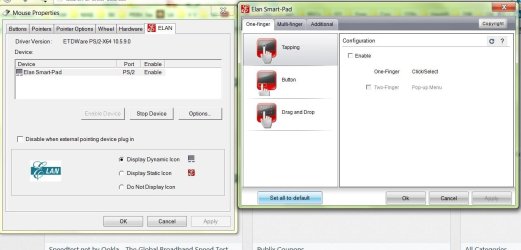
From my system tray I selected the icon that looks like the monitor; right clicked the PROPERTY OF TOUCH PAD; select ELAN tab; OPTIONS tab; ONE FINGER tab; TAPPING tab; and remove the checkmarks.
Made a world of difference.
From my system tray I selected the icon that looks like the monitor; right clicked the PROPERTY OF TOUCH PAD; select ELAN tab; OPTIONS tab; ONE FINGER tab; TAPPING tab; and remove the checkmarks.
Made a world of difference.
Last edited:
My Computer
- Computer type
- Laptop
- Computer Manufacturer/Model Number
- Toshiba
- OS
- Windows 7, 64 bit

Looks like it,
Mouse properties should show a section for your touchpad settings,

Open it and all the settings will be listed,

Mouse properties should show a section for your touchpad settings,
Open it and all the settings will be listed,
My Computer
- Computer type
- PC/Desktop
- Computer Manufacturer/Model Number
- Custom assembled by me :}
- OS
- Win-7-Pro64bit 7-H-Prem-64bit
- CPU
- i7-5930K 2nd i9-9940x both water blocked VRM's too
- Motherboard
- ASUS SABERTOOTH X99 2nd ASUS x299 Apex
- Memory
- Trident-z 3200C14 2nd Trident-z 3600C16
- Graphics Card(s)
- EVGA 1080ti ftw3 2nd Titan Xp both water blocked
- Sound Card
- Built-in Realtek
- Monitor(s) Displays
- 1-AOC G2460PG 24"G-Sync 144Hz/ 2nd 1-ASUS VG248QE 24" 144Hz
- Screen Resolution
- 1920 x 1080 144Hz
- Hard Drives
- 2-Samsung M.2 Evo & Evo Plus
2-Samsung 850 EVO 500GB SSD's/ 3-2.5 W.D. Black 1tb-&3-1tb/3-3.5 WD Black 1tb hdd's
- PSU
- EVGA SuperNOVA 1000-P2 2nd 1200-P2
- Case
- 2-Corsair Obsidian Series 450D Black ATX Mid Tower
- Cooling
- Custom water loops
- Keyboard
- Logitech G710+/ 2nd Logitech G910
- Mouse
- 2-RedDragon M901 Perdition 16400 dpi Gaming mouse = wired
- Internet Speed
- Comcast Ping 19ms 89.31mbps download speed 6.12mbps upload
- Antivirus
- Malwarebytes Pro/ Superantispyware Pro
- Browser
- FireFox & Pale moon
- Other Info
- 2nd ASUS X299 Apex/Intel i9-9940x with Custom water loop/7H-Prem-x64/Corsair 450D case/Ram Trident-z 3600C16 4x8gb / Samsung970Evo plus 500gb SSD/Dual ssd EZ swap evo/PSU EVGA SuperNova 1200w-P2 80+Platinum/GPU Titan Xp /8-ML-140 on push-pull on 2-280GTX rads
My Computer
- Computer type
- Laptop
- Computer Manufacturer/Model Number
- Toshiba
- OS
- Windows 7, 64 bit
You should be able to see more options under your Additional section/ your on One finger,
Cheers.
Cheers.
My Computer
- Computer type
- PC/Desktop
- Computer Manufacturer/Model Number
- Custom assembled by me :}
- OS
- Win-7-Pro64bit 7-H-Prem-64bit
- CPU
- i7-5930K 2nd i9-9940x both water blocked VRM's too
- Motherboard
- ASUS SABERTOOTH X99 2nd ASUS x299 Apex
- Memory
- Trident-z 3200C14 2nd Trident-z 3600C16
- Graphics Card(s)
- EVGA 1080ti ftw3 2nd Titan Xp both water blocked
- Sound Card
- Built-in Realtek
- Monitor(s) Displays
- 1-AOC G2460PG 24"G-Sync 144Hz/ 2nd 1-ASUS VG248QE 24" 144Hz
- Screen Resolution
- 1920 x 1080 144Hz
- Hard Drives
- 2-Samsung M.2 Evo & Evo Plus
2-Samsung 850 EVO 500GB SSD's/ 3-2.5 W.D. Black 1tb-&3-1tb/3-3.5 WD Black 1tb hdd's
- PSU
- EVGA SuperNOVA 1000-P2 2nd 1200-P2
- Case
- 2-Corsair Obsidian Series 450D Black ATX Mid Tower
- Cooling
- Custom water loops
- Keyboard
- Logitech G710+/ 2nd Logitech G910
- Mouse
- 2-RedDragon M901 Perdition 16400 dpi Gaming mouse = wired
- Internet Speed
- Comcast Ping 19ms 89.31mbps download speed 6.12mbps upload
- Antivirus
- Malwarebytes Pro/ Superantispyware Pro
- Browser
- FireFox & Pale moon
- Other Info
- 2nd ASUS X299 Apex/Intel i9-9940x with Custom water loop/7H-Prem-x64/Corsair 450D case/Ram Trident-z 3600C16 4x8gb / Samsung970Evo plus 500gb SSD/Dual ssd EZ swap evo/PSU EVGA SuperNova 1200w-P2 80+Platinum/GPU Titan Xp /8-ML-140 on push-pull on 2-280GTX rads

Stupid Touchpads
I was just given a Toshiba Satellite Pro C650 (I'm a laptop noob).
It took stupid amounts of time to install Windows, as I could not get the Windows installer disc to correctly partition the SSD.
I couldn't determine if the version of GParted on my Ubuntu 10 disc supported "Advanced Format".
Linux Mint doesn't seem to have a useful GUI tool for disc partitioning (the default one is totally useless).
I would have used GParted, but my external HDD with LM17 + GParted was unavailable (as I was scanning it in an attempt to recover some deleted files).
It seems that the touchpad was interpreting my swipes as double taps (whenever it was most inconvenient for me).
Eventually the double taps resulted in Windows being installed on a tiny partition I had created for Linux.
Just to confirm the info in this thread:
It's impossible to adjust the touchpad settings without installing a driver, despite the fact that the touchpad is running without one at the moment?
I was just given a Toshiba Satellite Pro C650 (I'm a laptop noob).
It took stupid amounts of time to install Windows, as I could not get the Windows installer disc to correctly partition the SSD.
I couldn't determine if the version of GParted on my Ubuntu 10 disc supported "Advanced Format".
Linux Mint doesn't seem to have a useful GUI tool for disc partitioning (the default one is totally useless).
I would have used GParted, but my external HDD with LM17 + GParted was unavailable (as I was scanning it in an attempt to recover some deleted files).
It seems that the touchpad was interpreting my swipes as double taps (whenever it was most inconvenient for me).
Eventually the double taps resulted in Windows being installed on a tiny partition I had created for Linux.
Just to confirm the info in this thread:
It's impossible to adjust the touchpad settings without installing a driver, despite the fact that the touchpad is running without one at the moment?
My Computer
- Computer type
- PC/Desktop
- Computer Manufacturer/Model Number
- n/a
- OS
- W7 Ultimate SP1, LM19.2 MATE, W10 Home 1703, W10 Pro 1703 VM, #All 64 bit
- CPU
- AMD Phenom II x6 1100T, 3.3 GHz
- Motherboard
- ASUS M4A88T-M/USB3 (AM3)
- Memory
- 12GB DDR3 1333 G-Skill (4GB x 2), G-Skill (2GB x 2)
- Graphics Card(s)
- NVIDIA GeForce GTX 660
- Sound Card
- Realtek?
- Monitor(s) Displays
- Samsung S23B350
- Screen Resolution
- 1920x1080
- Hard Drives
- WD Green 2TB (SATA), WD Green 3TB (SATA), WD Blue 4TB (SATA), WD Blue 6TB (SATA)
- PSU
- Cooler Master
- Case
- Antec GX300 Tower
- Cooling
- 3x Antec TRICOOL 120mm Fans
- Mouse
- Wired Optical
- Internet Speed
- DSL
- Antivirus
- Avast
- Browser
- Pale Moon (64 bit)
- Other Info
- 2018-12-27 Upgraded HDDs
2015-12-10 Upgraded case, graphics card, storage
2015-08-15 Upgraded motherboard & RAM
2015-07-15 Upgraded LM17.1 to LM17.2
sensitivity of mouse cursor
By sensitivity, do you mean when the cursor cross over the box, or hovers over the box, the action is taken like one has clicked on enter? Drives me crazy when the mouse rolls over a box and the PC takes that as an approval click. How can I fix this annoying 0problem?
By sensitivity, do you mean when the cursor cross over the box, or hovers over the box, the action is taken like one has clicked on enter? Drives me crazy when the mouse rolls over a box and the PC takes that as an approval click. How can I fix this annoying 0problem?
My Computer
- Computer type
- PC/Desktop
- Computer Manufacturer/Model Number
- HP p6 Pavilion
- OS
- win 7 - 64
- CPU
- Intel(R) Pentium(R) CPU G860 @ 3.00GH2
- Motherboard
- Foxconn 2ABF
- Memory
- 6G
- Graphics Card(s)
- Intel(R) HD Graphics
- Sound Card
- (1) Realtek High Definition Audio (2) USB Audio Device
- Antivirus
- norton security suite
- Browser
- IE 11.0.9600,16428
Similar threads
- Replies
- 3
- Views
- 11K


- Replies
- 6
- Views
- 1K

- Replies
- 6
- Views
- 3K
