Solved Trying to enlarge my partition containing my Windows 7 Home 64-bit OS

Sorry about the mention of a "D" drive it was a typo and there is no way to Edit once you posted it.
Just in passing... on all of your own posts there is an EDIT button at the bottom. You can always go back in after you've pushed the "submit reply" button to post something, and edit it after-the-fact.

Just push the EDIT button and you'll be presented with the post, and you can make any change you want, and then push "submit reply" and your edited content will be re-posted to replace the original text.
 

My Computer My Computer

At a glance

Windows 7 Pro x64 (1), Win7 Pro X64 (2)i5-3350p 3.1Ghz/6MB-cache (1); E8400 3.0Ghz/6...8GB PC3-12800 DDR3 (1); 4GB PC3-10600 DDR3 (2)ATI HD7750 (1), (see TV cards); ATI R7 250 (2)
Computer type
PC/Desktop
Computer Manufacturer/Model Number
Home-built, two systems (1) and (2)
OS
Windows 7 Pro x64 (1), Win7 Pro X64 (2)
CPU
i5-3350p 3.1Ghz/6MB-cache (1); E8400 3.0Ghz/6MB-cache (2)
Motherboard
ASUS P8Z77-V Pro (1); ASUS P5Q3 (2)
Memory
8GB PC3-12800 DDR3 (1); 4GB PC3-10600 DDR3 (2)
Graphics Card(s)
ATI HD7750 (1), (see TV cards); ATI R7 250 (2)
Sound Card
Realtek ALC892 HD Audio (1); Realtek ALC1200 HD Audio (2)
Monitor(s) Displays
Eizo HD2441W LCD, Eizo S2433W (1); Eizo 24" S2433W (2)
Screen Resolution
1920x1200, 1920x1200 (1); 1920x1200 (2)
Hard Drives
(1) 1TB SATA-II (7200RPM), 2x2TB SATA-III (7200RPM), 250GB SATA-III (10000RPM) for OS; 2x2TB external USB 3.0

(2) 320GB SATA-II (7200RPM), 750GB SATA-II (7200RPM), 150GB SATA-II (10000RPM) for OS; 2TB external USB 3.0
PSU
Nesteq ECS-6001 600W (1); Nesteq ECS-5001 500W (2)
Case
Acousti-Case 360 (1) and (2)
Cooling
Noctua NH-U12P SE2 for CPU, 2x120mm case fans (1) and (2)
Keyboard
IBM PS/2 (1) and (2)
Mouse
Logitech MX Revolution wireless (1); Microsoft wired (2)
Internet Speed
100mbps down / 10mbps up
Antivirus
Microsoft Security Essentials; Malwarebyte Anti-Malware Pro
Browser
Firefox
Other Info
Ceton InfiniTV 4-tuner cablecard-enabled TV card as well as Hauppauge HVR-2250 OTA/ATSC 2-tuner TV card in (1), running under Win7 WMC
I an mot interested in migrating anything EXCEPT the OS which at the most would fill 18GB. Can you tell me how to find JUST the OS files?

Traditional clones and images encompass the ENTIRE occupied space on the partition in question---over 900 GB on C in this case.

However, in the back of my mind, I think I have heard of a certain specialized app that can clone JUST portions of a partition.

I am not positive about that nor do I know how well it works.

Someone like Gregrocker or SIW2 can probably name the application if it exists---maybe something from Paragon?

I assume you have no way of temporarily moving your personal data files from C to some other drive so you could then directly shrink C to a much smaller size?
 

My Computer My Computer

At a glance

Windows 7 Home Premium SP1, 64-bitIntel Skylake i5-6600K, not overclocked8 GB HyperX DDR4-2666 (2 x 4 GB)none; graphics are integrated on CPU
Computer type
PC/Desktop
Computer Manufacturer/Model Number
Ignatz Special; 4 speed manual gearbox; factory air conditioning; one of one
OS
Windows 7 Home Premium SP1, 64-bit
CPU
Intel Skylake i5-6600K, not overclocked
Motherboard
AsRock Z170M Extreme 4, micro ATX
Memory
8 GB HyperX DDR4-2666 (2 x 4 GB)
Graphics Card(s)
none; graphics are integrated on CPU
Sound Card
onboard: Realtek ALC1150; external: USB Behringer UF0-202
Monitor(s) Displays
Dell S2340M 23 inch IPS
Screen Resolution
1600 x 900
Hard Drives
System: Crucial MX100 series SSD, 128 GB;
Data: Samsung Spinpoint 103SJ, 1 TB;
Backup: WD Caviar Green WD30EZRX-00D8PB0, 3 TB
PSU
Rosewill SilentNight 500 watt fanless, semi-modular
Case
Antec Solo II
Cooling
Noctua NH-U12S; Noctua F12 intake, Noctua S12A exhaust
Keyboard
Microsoft 200 6JH-00001 USB
Mouse
Dell or Microsoft optical wired; USB
Antivirus
Microsoft Security Essentials and Malwarebytes Premium
Browser
Pale Moon
Other Info
All fans PWM; speeds at idle: CPU circa 500 rpm; intake circa 600 rpm; exhaust circa 600 rpm; CPU temps 27 idle and 47 C load in a warm room (27 C/81 F) when running Intel Extreme Tuning Utility stress test.
If you want only the OS installed on the 30 gigs SSD partition then why migrate just the OS from a 900 gigs partition. Why not clean install the OS on the SSD partition?

But before doing anything please check if it is legal to have two copies of the OS running from one installation CD with the same product key.


QUOTE=ignatzatsonic;1705637]
I an mot interested in migrating anything EXCEPT the OS which at the most would fill 18GB. Can you tell me how to find JUST the OS files?

Traditional clones and images encompass the ENTIRE occupied space on the partition in question---over 900 GB on C in this case.

However, in the back of my mind, I think I have heard of a certain specialized app that can clone JUST portions of a partition.

I am not positive about that nor do I know how well it works.

Someone like Gregrocker or SIW2 can probably name the application if it exists---maybe something from Paragon?

I assume you have no way of temporarily moving your personal data files from C to some other drive so you could then directly shrink C to a much smaller size?[/QUOTE]
 

My Computer My Computer

At a glance

Windows 7 Pro with SP1 32bit2 gigs of RAMIntel(R) 82845G/GL/GE/PE/GV Graphics Controller
Computer Manufacturer/Model Number
Custom Built
OS
Windows 7 Pro with SP1 32bit
Motherboard
Intel D845GVS1 X86-based PC
Memory
2 gigs of RAM
Graphics Card(s)
Intel(R) 82845G/GL/GE/PE/GV Graphics Controller
Sound Card
Realtek AC'97 Audio
Monitor(s) Displays
Samsung SyncMaster 931BF Black 19" LCD Monitor
Screen Resolution
1280X960
Hard Drives
1. SAMSUNG SP0822N ATA Device ~ 80 GigaBytes

2. Seagate FreeAgent Go USB Device ~ 500 GigaBytes
Keyboard
COMPAQ Standard PS/2 Keyboard
Mouse
iBall Laser Precise Speedster
Internet Speed
4 mb/sec
I took the time to write up detailed steps to recover the Win7 System boot files into the SSD which were ignored so I'm not going to write up the multiple steps required to clone or image over Win7 on the HD to the SSD until you are sure this is what you want to do.

Had there been decent interaction about the steps previously given you would have also learned that you always have the option to clean reinstall factory preinstalled Win7 with the Product Key on the COA sticker, following these steps to get a perfect OEM reinstall: Reinstalling Windows 7

Here is the installer ISO download: http://msft.digitalrivercontent.net/win/X17-58997.iso Windows 7 Home Premium x64 English

Burn to DVD or write to flash stick using this tool: Windows 7 USB-DVD Download Tool

You can also use the Dell Recovery Disks to reinstall your factory image to the SSD, but it will include the factory bloatware and thus is a comparatively inferior install - as is the installation on your HD.
 
Greg, im sorry, but your detailed explanations...

...were still way over my level of knowledge. I did not know what to do with those
Everything I tried did not work, and think I did report my progress (or lack of thereof)
I am sorry you feel like you do.

If I had the full install disk of Windows I wouldnt even started the thread.

Thank you

Note:
I do have the recovery 2 disks I burned when I first got the PC but it is not working now.
Maybe the process im trying is not the correct one.
 

My Computer My Computer

At a glance

Windows 7 Home Premium 64 bitAMD A10-7870K + onboard Radeon HD Graphics16 GB in 2 slots: 2 x 8GB Kingston Hyper Blu ...Nvidia GT 740 GT SC 4 GB GDRR5 + onboard Rade...
Computer type
PC/Desktop
Computer Manufacturer/Model Number
Custom Built
OS
Windows 7 Home Premium 64 bit
CPU
AMD A10-7870K + onboard Radeon HD Graphics
Motherboard
ASUS A88XM-E
Memory
16 GB in 2 slots: 2 x 8GB Kingston Hyper Blu DDR3 1600Mhz
Graphics Card(s)
Nvidia GT 740 GT SC 4 GB GDRR5 + onboard Radeon HD Graphics
Sound Card
Realtek
Monitor(s) Displays
Dell W2309 16:9 Aspect ratio
Hard Drives
Drive 0: Intel 320 Series 160GB
Drive 1: WD Caviar Black 2TB Sata 2 (no OS installed on it))

External Enclosure USB 2.0 or eSata Interfaces linked to the Desktop PC contain 4 mechanical HDDs for total storage cap
PSU
Corsair RM 550 Modular
Case
Antec P70
Cooling
N/A
Internet Speed
1000 (*UP TO) Mbps Download 50 Mbps Upload (*UP TO)
Antivirus
Active online AVG and Avira -
Browser
Most current Firefox and/or Waterfox alternatively
Other Info
Periodic Scans of the 2 hardware Drives with Malwarebytes, SuperMalwarebytes and Spybot and Destroy
Let us know how the clean reinstall goes then. Reinstalling Windows 7

You did report more information after I first gave you the steps which caused me to adapt them, but I never heard back after that. This is an interactive process and if you will work with us we will always help you get it resolved.
 
Update of SSD partitioning and OS installation current status

This is how things have progressed:
a. I was able to reformat drive with free Acronis from WD by writing zeros over it.
b. Create a 35GB partition.
c. Fresh install of Windows 7 Home 64-bit on that partition : (C)
d. Create a New Volume with the rest of the space left on same disk: (D) disk

Now all I have left to do is:
e. load my software hopefully on the (D) disk
f. create a mirror copy on one of my external disks sitting on the SansDigital tower raid enclosure

Now. i need some clarification over an issue.
Without yet having access to Intel Smart Technology cause my current motherboard does not have that capacity. I would still like to use the SSD to access the Software Programs but leave everything stored on the HDDs.
If I boot the PC from the SSD, can I then open all the software (which I would have installed on every one of the 6 drives -i.e: 5 HDD + the SDD-) either from the SSD and/or the HDDs? ... Or if you boot from the SSD all you do during the session would have to be run on the SSD? . . . I am confused over that.
I have installed every piece of software on every disk only cause i do not know better. maybe now that I have explained what it is I would like to do you could tell me how to do it in a simpler way.

Regarding the re-install of the OS I will call the issue -initiated with the thread- to have been successfully solved.

Thank you all for your contributions.

Note:
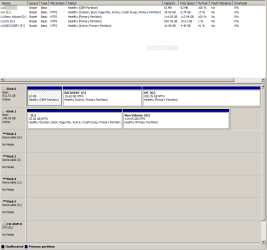
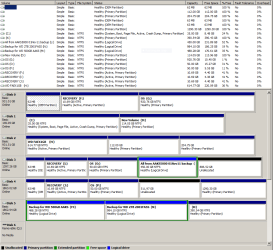
I will now attach 2 views of the Disk management screen. Please note that when I used the snipping tool the PC was booted to the SSD Drive (disk C at the time in slot 1 in of the PC tower case)

A. the SSD + 1 HDD inside the Desktop Case and ...
B. every one of the 5 HDD (4 external) + the SSD
 

Attachments

  • Internal Drives.PNG
    Internal Drives.PNG
    17.3 KB · Views: 10
  • All 6 Drives.PNG
    All 6 Drives.PNG
    33.4 KB · Views: 14

My Computer My Computer

At a glance

Windows 7 Home Premium 64 bitAMD A10-7870K + onboard Radeon HD Graphics16 GB in 2 slots: 2 x 8GB Kingston Hyper Blu ...Nvidia GT 740 GT SC 4 GB GDRR5 + onboard Rade...
Computer type
PC/Desktop
Computer Manufacturer/Model Number
Custom Built
OS
Windows 7 Home Premium 64 bit
CPU
AMD A10-7870K + onboard Radeon HD Graphics
Motherboard
ASUS A88XM-E
Memory
16 GB in 2 slots: 2 x 8GB Kingston Hyper Blu DDR3 1600Mhz
Graphics Card(s)
Nvidia GT 740 GT SC 4 GB GDRR5 + onboard Radeon HD Graphics
Sound Card
Realtek
Monitor(s) Displays
Dell W2309 16:9 Aspect ratio
Hard Drives
Drive 0: Intel 320 Series 160GB
Drive 1: WD Caviar Black 2TB Sata 2 (no OS installed on it))

External Enclosure USB 2.0 or eSata Interfaces linked to the Desktop PC contain 4 mechanical HDDs for total storage cap
PSU
Corsair RM 550 Modular
Case
Antec P70
Cooling
N/A
Internet Speed
1000 (*UP TO) Mbps Download 50 Mbps Upload (*UP TO)
Antivirus
Active online AVG and Avira -
Browser
Most current Firefox and/or Waterfox alternatively
Other Info
Periodic Scans of the 2 hardware Drives with Malwarebytes, SuperMalwarebytes and Spybot and Destroy
Why make the C drive so small? I would use the full SSD to install the Programs to C since they write registry keys which integrate them into the OS, and should be kept on C for imaging purposes.

As C fills up you can offload select User folders to your fastest HD to see how it performs: User Folders - Change Default Location

Why do you have 3 Recovery partitions on your HD's that are each marked Active? Never seen that before.
 
thank you for responding greg,
I am not sure if what i say now would respond to your questions, but maybe if I tell you a bit of my thinking and how much i dont know about this, you may be able to suggest better ways to do it.
I know that SDDs have limited life span. Although Intel claims in its specifications that the million hours they project the average time between median breakdown time I calculated them to be between 136 and 137 years of 24 hours a day during the 365 days of continuous operation. This unit is an Intel 320 Series. While they claim this kind of longevity they are only willing to offer a 5 year warranty. Quite an interesting dichotomy. But we all know that talk is cheap when it comes to marketing falsehoods.
Now having said that, I will try to preserve the life of the SSD for as long as I can, so I will try to use it minimally just to boot and also to open programs. So my question from my last post stands. Is there presently a way for me to get PC and Software started and then, use the mechanical HDDs to run all my programs? If so how do i have to organize my data in the mechanical drives?

I havent been able yet to clearly isolate a backup copy of everything on a HDD, that is OS.... Software and Data. I have heard stories about how 'not easy' it is to retrieve a clone/mirror copy should the main HDD crashed or data got corrupted or lost.

So, one of my strategies has been to load the OS on several HDDs...so in case of failure i just take one out and replace it with another disk ready to be used..
Is that the answer to your question about having 3 Recovery partitions on 3 different HDDs and marked as "active'?
Does Active mean that the OS is loaded on the partition reading 'active'?
Your question about why I have the OS on the SSD on a 35GB partition when the SSD has 150GB available for use makes me rethink about the reason for even partitioning drives. I remember vaguely that there were some practical reasons to have partitions, as in not placing all the eggs on just one basket (partition) maybe I have been misinformed all these years about partitioning or not partitioning drives. I thought it had to do with how much search for reading and writing the platters have to do if you have all in one partition or on different partitions.

Please feel free to indicate what to read if there are tutorials on all of this.

I am retired and on a limited fixed income. I have a 2 year old PC which in another couple of years maybe would be obsolete. The SSD which i bought on Black Friday at the cost of 1 dollar per GiGABYTE is the first piece of what I deem will have to be my last computer, so this time around I am researching to put tpgether quality elements cause I feel it will be the last computer i will ever own and/or use.

I understand Intel will be bringing Ivy Bridge processors in another year or so and that the 8Z68 Motherboards support Intel's SRT technology which will allow the SSD to act as a giant cache to accelerate the speed of Mechanical HDD.
Excerpt from Asus P8Z68-V PRO/GEN3Fully PCI-Express 3.0 Ready, Intel Z68 motherboard.
QUOTEIntel® Smart Response Technology SSD Speed with HDD Capacity
Intel® Smart Response Technology boosts overall system performance. It uses an installed fast SSD (min 18.6GB available capacity) as a cache for frequently accessed data. Harness the combination of SSD-like performance and response with hard drive capacity, that's 4X faster than a HDD-only system.

UNQUOTE


In a disjointed fashion, these are some of my thoughts and reasons. I try to make decisions and act on them in a logical way with the very limited knowledge and financial resources to keep as current with the PC as I am able to afford. Being now in my late 60's I still need, appreciate and enjoy a general purpose non gaming fast and reliable computer.

Thank you for sharing your time and knowledge

With the current available technology and if I would be already decided to put together a Desktop PC I would probably be assembling the following components:
a.- Corsair Obsidian 650 D Mid Tower
or Fractal (one of 2 models)
b.- Seasonic S1 2II 620W EPS12V 20/24 PinATX
or Antec 500W ATX12V80Plus Bronze EARTHWATTS GREEN
c.- Asus P8Z68- V Pr GEN3 Z68 (integrated audio and Graphics)
or ASRock Z68 Extreme Gen3 ATX Intel
d.- Intel Core i5 2500K Quad Core Unlocked Processor Overclocked to 4GHZ
e.- G-Skill F3-10666CL7D-4GBECO Eco PC3-10666 4GB 2 x 2GB.
f.- Samsung SH-S243D/BEBE 24X Black DVD Writer SATA OEM
g.- Syba SY-USB-FDD External USB 1.44MB Floppy Drive
h.- nGear Flash Card Reader 3.5 Internal USB Black CF/SM/SDHC/MMC/MS/HD(NG-35INT-BK-CR)\
i.- ASUS PCE-N15 300Mbps 802.11B/G/N
j.- Microsoft Windows 7 Home Ed. 64BIT SP1 DVD OEM
k.- Hauppage Dual TV tuner with i/r remote control
l.- Intel 320 Series 160GB + 5 other HDD's for a total of 7TB

Prices of a to k both inclusive before tax would be between C$890 and C$951 depending which motherboard I chose (ASUS $195, ASRock $134)
Please also note that the 3 aternative products in a. b. and c. have lower prices.

Please feel free to comment on my choices given my computer usage. Again it is general computing, spreadsheets, chat online, web browsing, watch and record TV,e-mail, VOIP internet via Yahoo messenger and/or Skype.

Thank you again
 
Last edited:

My Computer My Computer

At a glance

Windows 7 Home Premium 64 bitAMD A10-7870K + onboard Radeon HD Graphics16 GB in 2 slots: 2 x 8GB Kingston Hyper Blu ...Nvidia GT 740 GT SC 4 GB GDRR5 + onboard Rade...
Computer type
PC/Desktop
Computer Manufacturer/Model Number
Custom Built
OS
Windows 7 Home Premium 64 bit
CPU
AMD A10-7870K + onboard Radeon HD Graphics
Motherboard
ASUS A88XM-E
Memory
16 GB in 2 slots: 2 x 8GB Kingston Hyper Blu DDR3 1600Mhz
Graphics Card(s)
Nvidia GT 740 GT SC 4 GB GDRR5 + onboard Radeon HD Graphics
Sound Card
Realtek
Monitor(s) Displays
Dell W2309 16:9 Aspect ratio
Hard Drives
Drive 0: Intel 320 Series 160GB
Drive 1: WD Caviar Black 2TB Sata 2 (no OS installed on it))

External Enclosure USB 2.0 or eSata Interfaces linked to the Desktop PC contain 4 mechanical HDDs for total storage cap
PSU
Corsair RM 550 Modular
Case
Antec P70
Cooling
N/A
Internet Speed
1000 (*UP TO) Mbps Download 50 Mbps Upload (*UP TO)
Antivirus
Active online AVG and Avira -
Browser
Most current Firefox and/or Waterfox alternatively
Other Info
Periodic Scans of the 2 hardware Drives with Malwarebytes, SuperMalwarebytes and Spybot and Destroy
I would get the most value out of the SSD by running the OS and programs from it.

At first I'd keep the User folders on the SSD but as you need space link them to another HD: User Folders - Change Default Location

There's no reason to load the OS onto several HD's as it could cause problems. The modern way to do this is to save a Win7 backup image to another HD or externally so that you can reimage the SSD in 20 minutes if Win7 becomes irreparable. Backup Complete Computer - Create an Image Backup

The Recovery partitions you can see on the HD are marked Active which means they are set up to boot to run Recovery from a hotkey, so I'm assuming they're left over from a factory preinstalled OS. Unless you wanted to run one to Recover it's HD to factory condition, I would delete them and recover the space then rely on Win7 backup imaging for future recovery.

You can use free Partition Wizard bootable CD to delete the Recovery partitions and Resize adjacent partitions into the space.
 
I have installed every piece of software on every disk only cause i do not know better.

I can't imagine why you should install your software on every disk you have.

The second picture in post 27 is the most convoluted and unnecessarily complex set of drives and partitions I have ever seen on this forum.

I am unclear about what you are trying to accomplish with those 21 partitions spread across 6 drives. It's a mess.

Can you write 4 or 5 simple sentences that explain your need for 6 drives and 21 partitions? Why have you done this, in simple terms?

You are grossly exaggerating the fragility of SSDs. Are you similarly worried about the fragility of your spinning hard drives, which may well all fail before your SSD?

Put Windows and applications on the SSD, most likely using a single partition. No need to install the applications on all drives.

Find out how much total storage space you need for the original versions of your data. Put that data on one spinning hard drive partition if it will fit there.

Back up this data partition to another spinning drive.

Back up your SSD with its OS and applications to a spinning hard drive via an image made with Macrium, EaseUS, or Acronis.

I can't imagine that whatever you think you are accomplishing cannot be done much more simply, with less confusion and far fewer partitions.

Unless you are knee deep in video and need multiple terabytes of storage space, you shouldn't need over 3 or 4 hard drives total for the entire system, including OS, applications, data, data backups, and OS backups. And likely no more than 5 or 6 partitions, rather than 21.
 

My Computer My Computer

At a glance

Windows 7 Home Premium SP1, 64-bitIntel Skylake i5-6600K, not overclocked8 GB HyperX DDR4-2666 (2 x 4 GB)none; graphics are integrated on CPU
Computer type
PC/Desktop
Computer Manufacturer/Model Number
Ignatz Special; 4 speed manual gearbox; factory air conditioning; one of one
OS
Windows 7 Home Premium SP1, 64-bit
CPU
Intel Skylake i5-6600K, not overclocked
Motherboard
AsRock Z170M Extreme 4, micro ATX
Memory
8 GB HyperX DDR4-2666 (2 x 4 GB)
Graphics Card(s)
none; graphics are integrated on CPU
Sound Card
onboard: Realtek ALC1150; external: USB Behringer UF0-202
Monitor(s) Displays
Dell S2340M 23 inch IPS
Screen Resolution
1600 x 900
Hard Drives
System: Crucial MX100 series SSD, 128 GB;
Data: Samsung Spinpoint 103SJ, 1 TB;
Backup: WD Caviar Green WD30EZRX-00D8PB0, 3 TB
PSU
Rosewill SilentNight 500 watt fanless, semi-modular
Case
Antec Solo II
Cooling
Noctua NH-U12S; Noctua F12 intake, Noctua S12A exhaust
Keyboard
Microsoft 200 6JH-00001 USB
Mouse
Dell or Microsoft optical wired; USB
Antivirus
Microsoft Security Essentials and Malwarebytes Premium
Browser
Pale Moon
Other Info
All fans PWM; speeds at idle: CPU circa 500 rpm; intake circa 600 rpm; exhaust circa 600 rpm; CPU temps 27 idle and 47 C load in a warm room (27 C/81 F) when running Intel Extreme Tuning Utility stress test.
Thank you all for your contributions, my issue is now solved
 

My Computer My Computer

At a glance

Windows 7 Home Premium 64 bitAMD A10-7870K + onboard Radeon HD Graphics16 GB in 2 slots: 2 x 8GB Kingston Hyper Blu ...Nvidia GT 740 GT SC 4 GB GDRR5 + onboard Rade...
Computer type
PC/Desktop
Computer Manufacturer/Model Number
Custom Built
OS
Windows 7 Home Premium 64 bit
CPU
AMD A10-7870K + onboard Radeon HD Graphics
Motherboard
ASUS A88XM-E
Memory
16 GB in 2 slots: 2 x 8GB Kingston Hyper Blu DDR3 1600Mhz
Graphics Card(s)
Nvidia GT 740 GT SC 4 GB GDRR5 + onboard Radeon HD Graphics
Sound Card
Realtek
Monitor(s) Displays
Dell W2309 16:9 Aspect ratio
Hard Drives
Drive 0: Intel 320 Series 160GB
Drive 1: WD Caviar Black 2TB Sata 2 (no OS installed on it))

External Enclosure USB 2.0 or eSata Interfaces linked to the Desktop PC contain 4 mechanical HDDs for total storage cap
PSU
Corsair RM 550 Modular
Case
Antec P70
Cooling
N/A
Internet Speed
1000 (*UP TO) Mbps Download 50 Mbps Upload (*UP TO)
Antivirus
Active online AVG and Avira -
Browser
Most current Firefox and/or Waterfox alternatively
Other Info
Periodic Scans of the 2 hardware Drives with Malwarebytes, SuperMalwarebytes and Spybot and Destroy
in response to Ignatzatdsonic:

I am sorry I have tried all my life to be succint but I have concluded that im incapable of doing that so I will explain myself as briefly as I can.
1. a solid backup strategy eludes me. I have tried but I think I am unable to grasp it. I know the theory, I think I have the tools but I was not yet able to backup and ensure that it is easily retrievable.
2. I have downloaded.Acronis free for Western Digital HDD owners, Easeus Todo Backup, Macrium Reflect, Paragon Backup and Recovery 2010 Free (Plus the Windows 7 backup utility).
I have tried to create the 'capsule' in Paragon to back up everything including OS Software and Data, so I did not have to mess with different parts.
So failing all that, I decided to go the disk redundancy way and have several large HDD.
3. Lately I decided to prepare myself for my next and last computer, I am in my late 60's so i bought a SSD to prepare myself to use Intel's SRT with a future PC that runs on a Z68 MOBO with Ivy Bridge when it is launched to use the speed of the SSD and speed up the HDDs too (with the SSD acting as cache).
I have tons of videos, TV shows on my large HDDs which I want to keep. Tried to upload to cloud to save space on my HDD but unloadable cause of the sheer individual file size.

I would like to rely on free cloud space as I know of a place that offers 50GB of free space per account but as most other places it wont let you upload larger than 2 GB files. Free FTP does not seem to exist, at least I havent found it yet. So im stuck to saving and keeping those videos on the HDDs.

Other than eliminating excessive number of partitions, do you now have any other suggestions?

Thank you.
 

My Computer My Computer

At a glance

Windows 7 Home Premium 64 bitAMD A10-7870K + onboard Radeon HD Graphics16 GB in 2 slots: 2 x 8GB Kingston Hyper Blu ...Nvidia GT 740 GT SC 4 GB GDRR5 + onboard Rade...
Computer type
PC/Desktop
Computer Manufacturer/Model Number
Custom Built
OS
Windows 7 Home Premium 64 bit
CPU
AMD A10-7870K + onboard Radeon HD Graphics
Motherboard
ASUS A88XM-E
Memory
16 GB in 2 slots: 2 x 8GB Kingston Hyper Blu DDR3 1600Mhz
Graphics Card(s)
Nvidia GT 740 GT SC 4 GB GDRR5 + onboard Radeon HD Graphics
Sound Card
Realtek
Monitor(s) Displays
Dell W2309 16:9 Aspect ratio
Hard Drives
Drive 0: Intel 320 Series 160GB
Drive 1: WD Caviar Black 2TB Sata 2 (no OS installed on it))

External Enclosure USB 2.0 or eSata Interfaces linked to the Desktop PC contain 4 mechanical HDDs for total storage cap
PSU
Corsair RM 550 Modular
Case
Antec P70
Cooling
N/A
Internet Speed
1000 (*UP TO) Mbps Download 50 Mbps Upload (*UP TO)
Antivirus
Active online AVG and Avira -
Browser
Most current Firefox and/or Waterfox alternatively
Other Info
Periodic Scans of the 2 hardware Drives with Malwarebytes, SuperMalwarebytes and Spybot and Destroy
What was the problem with Acronis free WD version? It works fine every time for me and many others who use it here with our help. Simply install and save the Win7 backup image to external, make the boot disk if you ever need to recover it.

Likewise Win7 Backup Imaging couldn't be easier to save a backup image and will offer to make the System Repair Disk for you. Saving both of these utilities' images will give you more than adequate backup.

External HD's are very inexpensive right now - less than $50 for 500gb if you shop.
 
I`ll throw my 2 cents in and show you 1 way of doing it. Now mind you this is just an easy and simple way to backup my entire system after I have it the way I want it and all my data files, pictures, videos etc. on just 2 physical drives.

First off, the whole purpose of using a SSD is for it`s speed (correct) ? By throwing this over here (system reserved) that over there ( the OS itself ) you are defeating this, yes ? And how do you power that thing ? With a hydro-electric dam :shock: Just kidding;)

Breaking up a drive in so many partitions just wears them out sooo much faster, especially if you leave them running 24/7. Believe me I`ve replaced 100`s. And thats just in people`s home pcs and not my job.

This disk management shot shows my OS , updates, and all my programs installed on 1 drive ( I set it active b4 I install ) not always, but in this example, so I can do easy disk images whenever I want. Everything else goes on the D: drive , data files , pictures, videos, etc. all my programs if I need to reinstall any, etc. So if something should ever happen to my image backups or God forbid I just get bored, I spend an hour reinstalling and everything is right there on my D: drive. And of course I have externals. Just trying to show you a sense of order. Like I said this is just a very simple strategy that has worked for me for years.
 
Last edited:

My Computer My Computer

At a glance

Windows 10 Pro x64Intel Core i7 6700KGSkill TridentZ RGB 16GB 3600 16-16-16-36EVGA GTX 980 Ti SC x2
Computer type
PC/Desktop
Computer Manufacturer/Model Number
Skylake Special #666
OS
Windows 10 Pro x64
CPU
Intel Core i7 6700K
Motherboard
Asus Sabertooth Z170 Mark 1
Memory
GSkill TridentZ RGB 16GB 3600 16-16-16-36
Graphics Card(s)
EVGA GTX 980 Ti SC x2
Sound Card
Realtek High Definition
Monitor(s) Displays
AOC G2460PG
Screen Resolution
1920 x 1080 144Hz
Hard Drives
Samsung 860 Pro 256GB, Seagate Barracuda 4TB x2
PSU
EVGA 1000 P2, EVGA White Custom Braided Cables
Case
Corsair Vengeance C70 Gunmetal Black
Cooling
Corsair H100i v2, Corsair ML120 x2, Thermal Grizzly Kryonaut
Keyboard
Logitech G910 Orion Spectrum
Mouse
Logitech G700s
Internet Speed
Verizon Fios Quantum Gateway 75/75
Antivirus
Windows Defender, Malwarebytes Free 3.8.3
Browser
Chrome
Other Info
Corsair SP120 x4, LG Blu-ray Drive, Durabrand HT-395 100 Watt Dolby Digital Amp, Corsair H2100 Wireless 7.1 Headset
thank you greg for all the help and re your post a few minutes ago ...

If by external you mean an external enclosure like Western Digital My Book or others as such, I prefer to stay away from them. The only Hard Drive that ever died on me was a WD 500 GB that came in one of those. I removed it from it and was srtill dead.
Regardless I have enough external space in 2x 2 TB ea. + 1x1.5 Tb + 2x1 TB ea. + 1 500GB.

I will try again with the info you are now giving to me.

Also. I will initiate a new thread about Windows 7 capabilities on all the management issues I do have.

Thank you again
 

My Computer My Computer

At a glance

Windows 7 Home Premium 64 bitAMD A10-7870K + onboard Radeon HD Graphics16 GB in 2 slots: 2 x 8GB Kingston Hyper Blu ...Nvidia GT 740 GT SC 4 GB GDRR5 + onboard Rade...
Computer type
PC/Desktop
Computer Manufacturer/Model Number
Custom Built
OS
Windows 7 Home Premium 64 bit
CPU
AMD A10-7870K + onboard Radeon HD Graphics
Motherboard
ASUS A88XM-E
Memory
16 GB in 2 slots: 2 x 8GB Kingston Hyper Blu DDR3 1600Mhz
Graphics Card(s)
Nvidia GT 740 GT SC 4 GB GDRR5 + onboard Radeon HD Graphics
Sound Card
Realtek
Monitor(s) Displays
Dell W2309 16:9 Aspect ratio
Hard Drives
Drive 0: Intel 320 Series 160GB
Drive 1: WD Caviar Black 2TB Sata 2 (no OS installed on it))

External Enclosure USB 2.0 or eSata Interfaces linked to the Desktop PC contain 4 mechanical HDDs for total storage cap
PSU
Corsair RM 550 Modular
Case
Antec P70
Cooling
N/A
Internet Speed
1000 (*UP TO) Mbps Download 50 Mbps Upload (*UP TO)
Antivirus
Active online AVG and Avira -
Browser
Most current Firefox and/or Waterfox alternatively
Other Info
Periodic Scans of the 2 hardware Drives with Malwarebytes, SuperMalwarebytes and Spybot and Destroy
to AddRAM:

In your case you have 2 mechanical drives, is that what i see in your C and D drives?

No SSD right?
Regarding partitions, maybe all I have read ended up confusing me. From what I understood Ithought that keeping the OS in one partition and maybe all other software on a second and all Data on a third was the strategy when someone has just one HDD.
You seem to indicate that if just one partition inlcuded all 3 the disk would spin less. Am I understanding what you said?
So then what good purpose would serve to create more than one partition?

Why have people been creating multiple partitions for?

I would like to see your views on this.

Thank you
 

My Computer My Computer

At a glance

Windows 7 Home Premium 64 bitAMD A10-7870K + onboard Radeon HD Graphics16 GB in 2 slots: 2 x 8GB Kingston Hyper Blu ...Nvidia GT 740 GT SC 4 GB GDRR5 + onboard Rade...
Computer type
PC/Desktop
Computer Manufacturer/Model Number
Custom Built
OS
Windows 7 Home Premium 64 bit
CPU
AMD A10-7870K + onboard Radeon HD Graphics
Motherboard
ASUS A88XM-E
Memory
16 GB in 2 slots: 2 x 8GB Kingston Hyper Blu DDR3 1600Mhz
Graphics Card(s)
Nvidia GT 740 GT SC 4 GB GDRR5 + onboard Radeon HD Graphics
Sound Card
Realtek
Monitor(s) Displays
Dell W2309 16:9 Aspect ratio
Hard Drives
Drive 0: Intel 320 Series 160GB
Drive 1: WD Caviar Black 2TB Sata 2 (no OS installed on it))

External Enclosure USB 2.0 or eSata Interfaces linked to the Desktop PC contain 4 mechanical HDDs for total storage cap
PSU
Corsair RM 550 Modular
Case
Antec P70
Cooling
N/A
Internet Speed
1000 (*UP TO) Mbps Download 50 Mbps Upload (*UP TO)
Antivirus
Active online AVG and Avira -
Browser
Most current Firefox and/or Waterfox alternatively
Other Info
Periodic Scans of the 2 hardware Drives with Malwarebytes, SuperMalwarebytes and Spybot and Destroy
Keep the OS and Programs on C since Programs write themselves into Registry Keys so are integrated into the OS until they are uninstalled. It doesn't matter whether you have the 100mb System Reserved partition or not - hardly worth a second thought.

The benefit of separating out your User folders to another partition is so that it keeps the OS/Programs image smaller for imaging purposes. If Win7 becomes irreparable simply reimage the OS partition in 20 minutes and the latest data set will be waiting, safe and current in it's own partition.
 
2. I have downloaded.Acronis free for Western Digital HDD owners, Easeus Todo Backup, Macrium Reflect, Paragon Backup and Recovery 2010 Free (Plus the Windows 7 backup utility).


3. i bought a SSD to prepare myself to use Intel's SRT with a future PC that runs on a Z68 MOBO with Ivy Bridge when it is launched to use the speed of the SSD and speed up the HDDs too (with the SSD acting as cache).


I have tons of videos, TV shows on my large HDDs which I want to keep. Tried to upload to cloud to save space on my HDD but unloadable cause of the sheer individual file size.

I would like to rely on free cloud space as I know of a place that offers 50GB of free space per account but as most other places it wont let you upload larger than 2 GB files. Free FTP does not seem to exist, at least I havent found it yet. So im stuck to saving and keeping those videos on the HDDs.

Here are my specific suggestions:

Pick just one or two of those backup programs, not 4. Macrium and EaseUS are probably the easiest to use.

The Ivy Bridge/Z68 idea is all well and good, but you need to focus on simplicity. I wouldn't bother with the idea of using the SSD as cache. Just plan on putting Windows and ALL of your applications on the SSD. DON'T install applications anywhere other than the SSD drive, which will be C.

Sit down with a pencil and piece of paper. Add up the total space required for ALL of your data. How many GB is this, excluding "backups"?? I mean just for the original versions.

Don't use more than 1 partition on any single drive unless you have a very strong and over-riding reason. I can't imagine a strong enough reason in your case. Think in terms of FOLDERS, not partitions.

Somewhere, you got the idea that multiple partitions were necessarily superior for some reason. Ditch that idea. Period.

Ideally, you would have C for operating system and programs, D for data, and E for backups. Three partitions, not 21. You may need more than 3 if your original data will not fit on any one single drive. But not 21.

The first thing you need to do is to come up with a GB total for all of your data---movies, mp3s, and whatever else it may be. And then try to put that data on as few partitions as possible.

After you have done that, start thinking about a backup strategy.

I would not make an image of anything except C. Just use ordinary file-by-file backup programs for your data partitions.

The "cloud" is problematic for backing up large amounts of data, as you have found. I'd think in terms of backing it up on my own hard drives instead, but you first have to know how much data you have.
 

My Computer My Computer

At a glance

Windows 7 Home Premium SP1, 64-bitIntel Skylake i5-6600K, not overclocked8 GB HyperX DDR4-2666 (2 x 4 GB)none; graphics are integrated on CPU
Computer type
PC/Desktop
Computer Manufacturer/Model Number
Ignatz Special; 4 speed manual gearbox; factory air conditioning; one of one
OS
Windows 7 Home Premium SP1, 64-bit
CPU
Intel Skylake i5-6600K, not overclocked
Motherboard
AsRock Z170M Extreme 4, micro ATX
Memory
8 GB HyperX DDR4-2666 (2 x 4 GB)
Graphics Card(s)
none; graphics are integrated on CPU
Sound Card
onboard: Realtek ALC1150; external: USB Behringer UF0-202
Monitor(s) Displays
Dell S2340M 23 inch IPS
Screen Resolution
1600 x 900
Hard Drives
System: Crucial MX100 series SSD, 128 GB;
Data: Samsung Spinpoint 103SJ, 1 TB;
Backup: WD Caviar Green WD30EZRX-00D8PB0, 3 TB
PSU
Rosewill SilentNight 500 watt fanless, semi-modular
Case
Antec Solo II
Cooling
Noctua NH-U12S; Noctua F12 intake, Noctua S12A exhaust
Keyboard
Microsoft 200 6JH-00001 USB
Mouse
Dell or Microsoft optical wired; USB
Antivirus
Microsoft Security Essentials and Malwarebytes Premium
Browser
Pale Moon
Other Info
All fans PWM; speeds at idle: CPU circa 500 rpm; intake circa 600 rpm; exhaust circa 600 rpm; CPU temps 27 idle and 47 C load in a warm room (27 C/81 F) when running Intel Extreme Tuning Utility stress test.
Back
Top