Unable to boot, error 0xc0000428

doughnut

New member
Local time
5:32 PM
Messages
14
Hello all,

My computer (Dell Latitude D830, running Windows 7 Enterprise 32-bit) won't boot. The situation arose after a BSOD incident, but I have been trying for months to fix it and think I'm getting close. The auto-recovery tool on the install disc has not been able to fix anything. I have searched quite a bit on sevenforums for my error below but haven't found a solution that works for me.

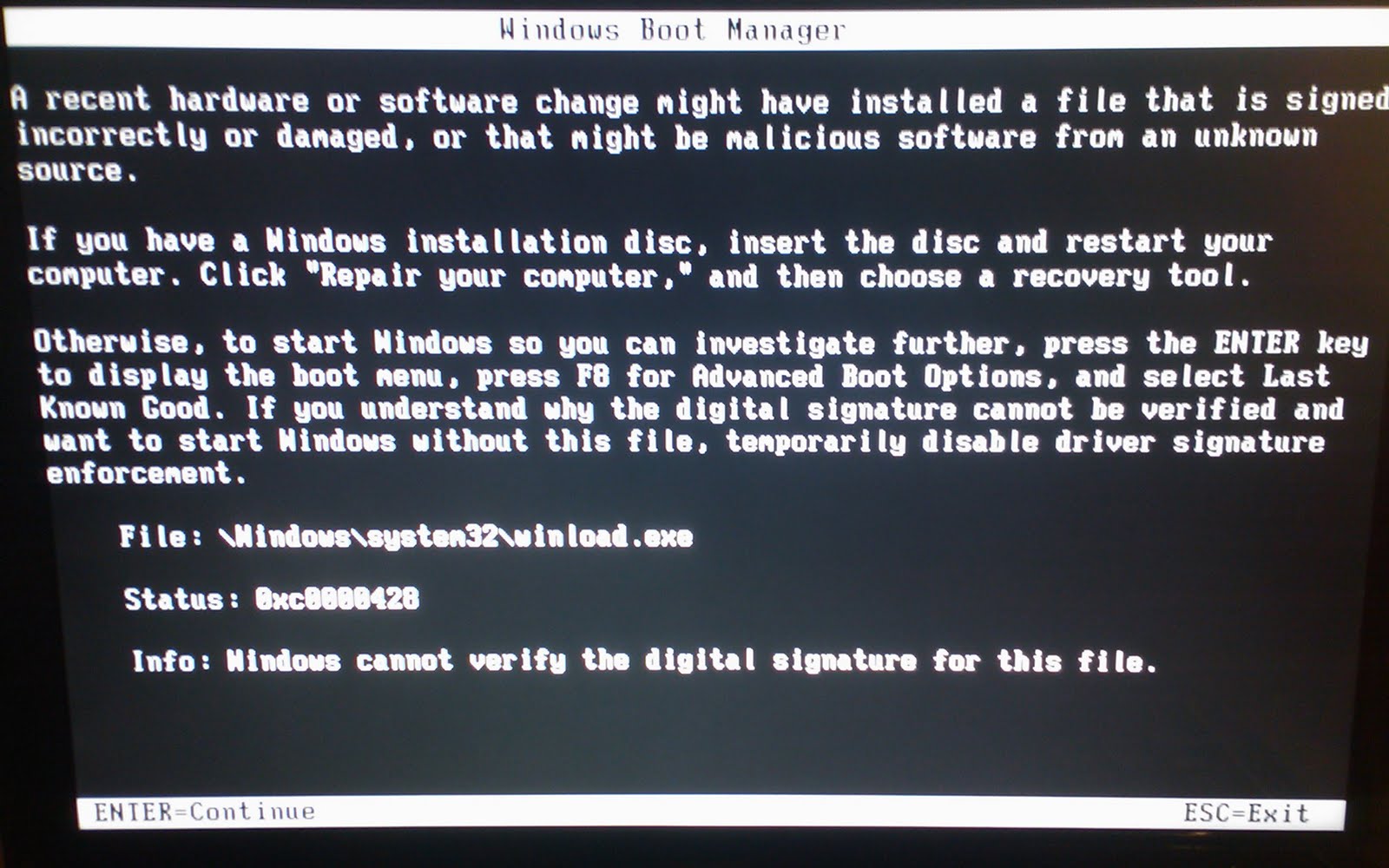
Currently, upon booting I get error code 0xc0000428 for \Windows\system32\winload.exe. This screenshot is identical to mine:
pic3za.jpg


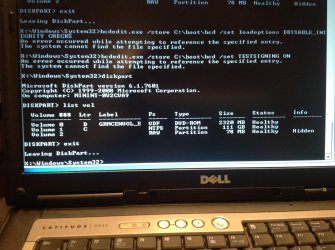
I am unable to get past this screen, so tried using the command line on my installation disc to try and disable driver signature enforcement. I navigated to \Windows\System32 (where bcdedit.exe lives, not sure if that was necessary) and tried these commands:

bcdedit.exe -set loadoptions DDISABLE_INTEGRITY_CHECKS
bcdedit.exe -set TESTSIGNING ON

both return the same:
"An error occurred while attempting to reference the specified entry.
The system cannot find the file specified."

I also tried
sfc /scannow

which returns
"There is a system repair pending which requires reboot to complete. Restart Windows and run sfc again."

Restarting of course just puts me back to square one.

I even tried to force the scan by using SFC /SCANNOW /OFFBOOTDIR=C:\ /OFFWINDIR=C:\Windows

which produces "Windows Resource Protection did not find any integrity violations." Does anyone have any tips on where to go from here?
 
Last edited by a moderator:

My Computer My Computer

OS
Windows 7 Enterprise 32-bit
Have you reported this problem to your I.T. Department? They might be able to help you.
 

My Computer My Computer

Computer type
PC/Desktop
Computer Manufacturer/Model Number
Home made Desktop
OS
Windows 10 Pro. 64/ version 1709 Windows 7 Pro/64
CPU
Intel i7-6800K @ 4.3
Motherboard
ASUS X-99 Deluxe II
Memory
Corsair Platinum 16 gig @2400
Graphics Card(s)
EVGA GTX 1070 OC
Monitor(s) Displays
Asus 27" LED LCD/VE278Q
Screen Resolution
1920-1080 or 1280-720 HDMI
Hard Drives
INTEL SSD 730-240 Gb Sata 3.0/
PSU
EVGA Platium 1200W
Case
Phanteks Luxe Tempered Glass 8 fans/ one radiator
Cooling
XSPC/ Water Cooled CPU
Keyboard
Das 4 Professional
Mouse
Logitech M705/MX Anywhere 2-S
Internet Speed
100 mbits
Antivirus
Microsoft Security Essentials/ Malwarebytes Premium 3.0/ SAS
Browser
I.E. 11 default/Firefox/ ISP Time Warner Cable/Spectrum
Other Info
LG BluRay Burner/
Sound system-KLipsch-THX/
Icy Dock ssd Hot Swap bays.
Code:
bcdedit.exe /store [B][COLOR=red]C[/COLOR][/B]:\boot\bcd  /set  loadoptions DDISABLE_INTEGRITY_CHECKS
bcdedit.exe /store [B][COLOR=red]C[/COLOR][/B]:\boot\bcd   /set  TESTSIGNING ON

replace C with your actual boot disk letter!
 

My Computer My Computer

Computer type
Laptop
Computer Manufacturer/Model Number
ACER ASPIRE 5742G
OS
Microsoft Windows 7 Home Premium 64-bits 7601 Multiprocessor Free Service Pack 1
CPU
Intel(R) Core(TM) i3 CPU M 370 @ 2.40GHz
Motherboard
Acer Aspire 5742G
Memory
4,00 GB
Graphics Card(s)
ATI Mobility Radeon HD 5400 Series
Sound Card
(1) AMD High Definition Audio Device (2) Realtek High Defi
Screen Resolution
1366 x 768 x 32 bits (4294967296 colors) @ 60 Hz
Hard Drives
WDC WD5000BEVT-22ZAT0
Because you are using Windows 7 Enterprise I highly recommend contacting your IT Department before changing anything.
 

My Computer My Computer

Computer type
PC/Desktop
Computer Manufacturer/Model Number
Home made Desktop
OS
Windows 10 Pro. 64/ version 1709 Windows 7 Pro/64
CPU
Intel i7-6800K @ 4.3
Motherboard
ASUS X-99 Deluxe II
Memory
Corsair Platinum 16 gig @2400
Graphics Card(s)
EVGA GTX 1070 OC
Monitor(s) Displays
Asus 27" LED LCD/VE278Q
Screen Resolution
1920-1080 or 1280-720 HDMI
Hard Drives
INTEL SSD 730-240 Gb Sata 3.0/
PSU
EVGA Platium 1200W
Case
Phanteks Luxe Tempered Glass 8 fans/ one radiator
Cooling
XSPC/ Water Cooled CPU
Keyboard
Das 4 Professional
Mouse
Logitech M705/MX Anywhere 2-S
Internet Speed
100 mbits
Antivirus
Microsoft Security Essentials/ Malwarebytes Premium 3.0/ SAS
Browser
I.E. 11 default/Firefox/ ISP Time Warner Cable/Spectrum
Other Info
LG BluRay Burner/
Sound system-KLipsch-THX/
Icy Dock ssd Hot Swap bays.
Ah, thank you very much, Kaktussoft! I will try that later tonight when I'm home and see if that fixes the issue.

Layback Bear, I appreciate the input. Although I'm using Enterprise, it's actually a personal computer. I have the license to use it through my university. So I get to mess around with these fun things as much as I want! :)
 

My Computer My Computer

OS
Windows 7 Enterprise 32-bit

My Computer My Computer

Computer type
Laptop
Computer Manufacturer/Model Number
ACER ASPIRE 5742G
OS
Microsoft Windows 7 Home Premium 64-bits 7601 Multiprocessor Free Service Pack 1
CPU
Intel(R) Core(TM) i3 CPU M 370 @ 2.40GHz
Motherboard
Acer Aspire 5742G
Memory
4,00 GB
Graphics Card(s)
ATI Mobility Radeon HD 5400 Series
Sound Card
(1) AMD High Definition Audio Device (2) Realtek High Defi
Screen Resolution
1366 x 768 x 32 bits (4294967296 colors) @ 60 Hz
Hard Drives
WDC WD5000BEVT-22ZAT0
Attached to this post is a screenshot of my output for both your suggestions. My disk partitions appear healthy and the changes to the bcd commands didn't seem to change anything. Is my syntax correct for those? Or do I need to be in a different directory? The C: drive is definitely my booting partition.
 

Attachments

  • IMG_0004.jpg
    IMG_0004.jpg
    486.7 KB · Views: 43

My Computer My Computer

OS
Windows 7 Enterprise 32-bit
Code:
diskpart
sel  vol  c
det  part
Is that partition active?

Code:
bcdedit/store  c:\boot\bcd  /enum  all

Code:
bcdedit/enum all

Code:
dir  c:\boot\bcd
dir /ahs  c:\boot\bcd
post output
 

My Computer My Computer

Computer type
Laptop
Computer Manufacturer/Model Number
ACER ASPIRE 5742G
OS
Microsoft Windows 7 Home Premium 64-bits 7601 Multiprocessor Free Service Pack 1
CPU
Intel(R) Core(TM) i3 CPU M 370 @ 2.40GHz
Motherboard
Acer Aspire 5742G
Memory
4,00 GB
Graphics Card(s)
ATI Mobility Radeon HD 5400 Series
Sound Card
(1) AMD High Definition Audio Device (2) Realtek High Defi
Screen Resolution
1366 x 768 x 32 bits (4294967296 colors) @ 60 Hz
Hard Drives
WDC WD5000BEVT-22ZAT0
In win7 recovery environment:
Code:
c:
attrib -h -s bootmgr
ren bootmgr bootmgr.old
If both commands succeed succesfully bootmgr file c:\bootmgr isn't there anymore. But it's there with name bootmgr.old (just to keep it)

Now reboot to recovery environment again and perform a startup repair. Your winload.exe and bootmgr are out of sync for some unknown reason. Startup repair puts a fresh copy of bootmgr on C. Try to boot normally afterwards

What did you do just prior to problem appeared? such problem can appear if you install win8
 

My Computer My Computer

Computer type
Laptop
Computer Manufacturer/Model Number
ACER ASPIRE 5742G
OS
Microsoft Windows 7 Home Premium 64-bits 7601 Multiprocessor Free Service Pack 1
CPU
Intel(R) Core(TM) i3 CPU M 370 @ 2.40GHz
Motherboard
Acer Aspire 5742G
Memory
4,00 GB
Graphics Card(s)
ATI Mobility Radeon HD 5400 Series
Sound Card
(1) AMD High Definition Audio Device (2) Realtek High Defi
Screen Resolution
1366 x 768 x 32 bits (4294967296 colors) @ 60 Hz
Hard Drives
WDC WD5000BEVT-22ZAT0
Code:
diskpart
sel  vol  c
det  part
Is that partition active?

Code:
bcdedit/store  c:\boot\bcd  /enum  all
Code:
bcdedit/enum all
Code:
dir  c:\boot\bcd
dir /ahs  c:\boot\bcd
post output

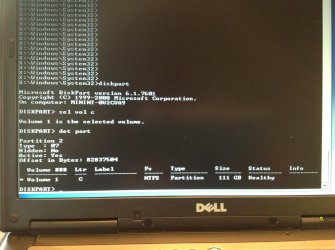
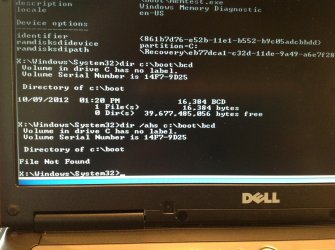
Here are screenshots of the output. The partition is listed as active. I couldn't fit the actual commands for
Code:
bcdedit/store  c:\boot\bcd  /enum  all
Code:
bcdedit/enum all
on the screenshots of their output, but the attachments follow the order of your suggestions and they produce the same output anyway. I will respond to your most recent post about bootmgr as soon as I'm home again. Thank you so much!
 

Attachments

  • sel vol c.jpg
    sel vol c.jpg
    476.6 KB · Views: 24
  • bcdedit-store c.jpg
    bcdedit-store c.jpg
    505.8 KB · Views: 17
  • bcdedit-enum all.jpg
    bcdedit-enum all.jpg
    526.2 KB · Views: 15
  • dir.jpg
    dir.jpg
    482.6 KB · Views: 22

My Computer My Computer

OS
Windows 7 Enterprise 32-bit
dir /ahs c:\boot\bcd

output as well

Sorry i didn't see it!
dir c:\boot\bcd
gave output... file is there.
 

My Computer My Computer

Computer type
Laptop
Computer Manufacturer/Model Number
ACER ASPIRE 5742G
OS
Microsoft Windows 7 Home Premium 64-bits 7601 Multiprocessor Free Service Pack 1
CPU
Intel(R) Core(TM) i3 CPU M 370 @ 2.40GHz
Motherboard
Acer Aspire 5742G
Memory
4,00 GB
Graphics Card(s)
ATI Mobility Radeon HD 5400 Series
Sound Card
(1) AMD High Definition Audio Device (2) Realtek High Defi
Screen Resolution
1366 x 768 x 32 bits (4294967296 colors) @ 60 Hz
Hard Drives
WDC WD5000BEVT-22ZAT0
In win7 recovery environment:
Code:
c:
attrib -h -s bootmgr
ren bootmgr bootmgr.old
If both commands succeed succesfully bootmgr file c:\bootmgr isn't there anymore. But it's there with name bootmgr.old (just to keep it)

Now reboot to recovery environment again and perform a startup repair. Your winload.exe and bootmgr are out of sync for some unknown reason. Startup repair puts a fresh copy of bootmgr on C. Try to boot normally afterwards

What did you do just prior to problem appeared? such problem can appear if you install win8
You'r using a win7 install dvd or win7 system repair disk... correct? Did you rename bootmgr already?
 

My Computer My Computer

Computer type
Laptop
Computer Manufacturer/Model Number
ACER ASPIRE 5742G
OS
Microsoft Windows 7 Home Premium 64-bits 7601 Multiprocessor Free Service Pack 1
CPU
Intel(R) Core(TM) i3 CPU M 370 @ 2.40GHz
Motherboard
Acer Aspire 5742G
Memory
4,00 GB
Graphics Card(s)
ATI Mobility Radeon HD 5400 Series
Sound Card
(1) AMD High Definition Audio Device (2) Realtek High Defi
Screen Resolution
1366 x 768 x 32 bits (4294967296 colors) @ 60 Hz
Hard Drives
WDC WD5000BEVT-22ZAT0
Yes, I am using a Windows 7 install disk. I just now renamed the bootmgr to bootmgr.old and tried the startup repair - it said it successfully repaired the bootmgr file. I'm still greeted with the same error (0xc0000428) for the same file (\Windows\system32\winload.exe).

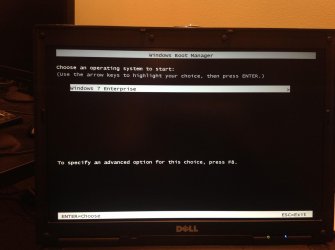
Now, though, hitting Enter to continue past the error screen will at least take me to the Windows Boot Manager (screenshot attached). But hitting either Enter or F8 at this screen takes me back to the error page.

Here's the backstory of how the computer crashed in the first place:
I was moving a file from the C: drive to an external hard drive when it originally blue-screened. Unfortunately, I didn't note the exact error here. But upon restarting,
I was presented with error 0xc0000225 and still unable to boot. I got my installation disk and tried the automatic repair tool,
but it didn't find any issues. I followed some tips in this thread:
http://www.sevenforums.com/installation-setup/178280-error-0xc0000225-boot.html

and decided to try these instructions posted in it for repairing the BCD.
Use the Bootrec.exe tool in the Windows Recovery Environment to troubleshoot and repair startup issues in Windows

I believe I successfully rebuilt the BCD store, based on this article and my interactions with the command line:
How To Rebuild the BCD in Windows

At this point, I had reached the 0xc0000428 error page and have been unable to get past it.
 

Attachments

  • photo.jpg
    photo.jpg
    246.5 KB · Views: 13

My Computer My Computer

OS
Windows 7 Enterprise 32-bit
"I was moving a file from the C: drive to an external hard drive when it originally blue-screened. Unfortunately, I didn't note the exact error here."=>just a for win7 unimportant file? So not a dll or exe?

Code:
chkdsk/f c:
[B][COLOR=red]No errors? if errors and repaired.. run it again. No errors now?[/COLOR][/B]

Code:
bootsect /nt60  C: /force
bootsect /nt60 C: /force /mbr
[B][COLOR=#ff0000]Now you have a fresh mbr and a fresh volume boot record. Commands succeed succefully?[/COLOR][/B]

Code:
attrib -h -s  c:\bootmgr
del  c:\bootmgr
attrib -h -s  c:\boot\bcd
del  c:\boot\bcd
[B][COLOR=red]Now bootmenu and bootmgr are gone. All commands work?[/COLOR][/B]

Now reboot form the dvd and do http://www.sevenforums.com/tutorials/681-startup-repair.html
do it 3 times with boots in between!

tipsmall.png
Tip

Sometimes it may take running a startup repair (3) separate times with restarting the computer after each time before it fully fixes the startup issue.


My Computer My Computer

Computer type
Laptop
Computer Manufacturer/Model Number
ACER ASPIRE 5742G
OS
Microsoft Windows 7 Home Premium 64-bits 7601 Multiprocessor Free Service Pack 1
CPU
Intel(R) Core(TM) i3 CPU M 370 @ 2.40GHz
Motherboard
Acer Aspire 5742G
Memory
4,00 GB
Graphics Card(s)
ATI Mobility Radeon HD 5400 Series
Sound Card
(1) AMD High Definition Audio Device (2) Realtek High Defi
Screen Resolution
1366 x 768 x 32 bits (4294967296 colors) @ 60 Hz
Hard Drives
WDC WD5000BEVT-22ZAT0
Did you move C-partition with any partition tools?

File: \Boot\BCD
Status: 0xc0000225


Means normally that it can't find the partition with the operation system. Reason can be:
-you changed th disk signature (very unlikely)
-you moved the OS-partition. (The start-point of the partition changed)

Did Status: 0xc0000225 also say it was referring to \boot\bcd?
 

My Computer My Computer

Computer type
Laptop
Computer Manufacturer/Model Number
ACER ASPIRE 5742G
OS
Microsoft Windows 7 Home Premium 64-bits 7601 Multiprocessor Free Service Pack 1
CPU
Intel(R) Core(TM) i3 CPU M 370 @ 2.40GHz
Motherboard
Acer Aspire 5742G
Memory
4,00 GB
Graphics Card(s)
ATI Mobility Radeon HD 5400 Series
Sound Card
(1) AMD High Definition Audio Device (2) Realtek High Defi
Screen Resolution
1366 x 768 x 32 bits (4294967296 colors) @ 60 Hz
Hard Drives
WDC WD5000BEVT-22ZAT0
Hey Kaktussoft,

I was out of town these last few days, I will be trying out your most recent suggestions later tonight. I will update this post with results. Thank you very much for all your help!
 

My Computer My Computer

OS
Windows 7 Enterprise 32-bit
Hey Kaktussoft,

I apologize for the huge delay in updating this thread, I really hope you're still available to take a look at the issues.

So I ran all the commands from your last set of suggestions (post #14):

Code:
chkdsk/f c:
[B][COLOR=red]No errors? if errors and repaired.. run it again. No errors now?[/COLOR][/B]

Code:
bootsect /nt60  C: /force
bootsect /nt60 C: /force /mbr
[B][COLOR=#ff0000]Now you have a fresh mbr and a fresh volume boot record. Commands succeed succefully?[/COLOR][/B]

Code:
attrib -h -s  c:\bootmgr
del  c:\bootmgr
attrib -h -s  c:\boot\bcd
del  c:\boot\bcd
[B][COLOR=red]Now bootmenu and bootmgr are gone. All commands work?[/COLOR][/B]

And yes, all the commands worked. I then ran Startup Repair from the DVD three times with a complete reboot in between. The auto-repair found an issue the first time, then nothing the second and third.

So now, my computer boots into the Win7 System Recovery Options dialog - even without the recovery DVD inserted (I'm definitely booting from my HDD). Startup Repair finds no issues here, but I am stuck booting into the Recovery Options. In the "choose a recovery tool" menu, it does at least say:

"Operating system: Windows 7 Enterprise (recovered) on (C: ) Local Disk"

To answer your questions from post #15 -

Did you move C-partition with any partition tools?

File: \Boot\BCD
Status: 0xc0000225

Means normally that it can't find the partition with the operation system. Reason can be:
-you changed th disk signature (very unlikely)
-you moved the OS-partition. (The start-point of the partition changed)

Did Status: 0xc0000225 also say it was referring to \boot\bcd?

I have not moved the C-partition in several years. And unfortunately I am not sure if my original error code, Status: 0xc0000225 said it was referring to \boot\bcd. I neglected to record that but am hoping it's insignificant since that error code has long passed.

Do you have any further suggestions? Thanks again!
 

My Computer My Computer

OS
Windows 7 Enterprise 32-bit
It boots to recovery environment form disk. Quite normal if it finds an error on boot. Do following commands as well

Code:
bcdedit/enum all

Post screenshot. Most likely a few
 

My Computer My Computer

Computer type
Laptop
Computer Manufacturer/Model Number
ACER ASPIRE 5742G
OS
Microsoft Windows 7 Home Premium 64-bits 7601 Multiprocessor Free Service Pack 1
CPU
Intel(R) Core(TM) i3 CPU M 370 @ 2.40GHz
Motherboard
Acer Aspire 5742G
Memory
4,00 GB
Graphics Card(s)
ATI Mobility Radeon HD 5400 Series
Sound Card
(1) AMD High Definition Audio Device (2) Realtek High Defi
Screen Resolution
1366 x 768 x 32 bits (4294967296 colors) @ 60 Hz
Hard Drives
WDC WD5000BEVT-22ZAT0
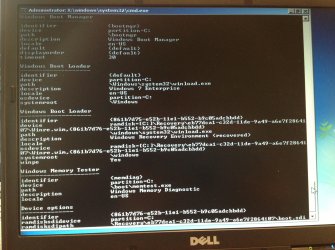
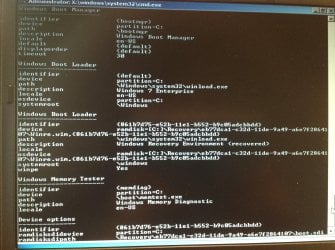
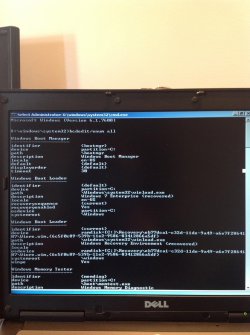
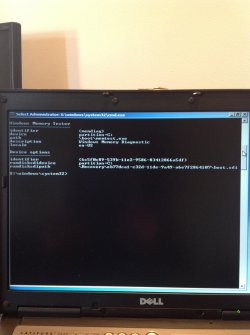
Here's the output from
Code:
bcdedit/enum all
I don't see any error messages in it, but I could easily be missing something? Anyway, there are two screenshots to capture the full output.
 

Attachments

  • IMG_0059.jpg
    IMG_0059.jpg
    405.3 KB · Views: 13
  • IMG_0060.jpg
    IMG_0060.jpg
    338.5 KB · Views: 8

My Computer My Computer

OS
Windows 7 Enterprise 32-bit
Here's the output from
Code:
bcdedit/enum all
I don't see any error messages in it, but I could easily be missing something? Anyway, there are two screenshots to capture the full output.
bcdedit output is fine. System tries to boot to "win7 enterprise". That fails so it recovers to windows recovery environment.

What error message if you boot normally? Force a normal boot
 

My Computer My Computer

Computer type
Laptop
Computer Manufacturer/Model Number
ACER ASPIRE 5742G
OS
Microsoft Windows 7 Home Premium 64-bits 7601 Multiprocessor Free Service Pack 1
CPU
Intel(R) Core(TM) i3 CPU M 370 @ 2.40GHz
Motherboard
Acer Aspire 5742G
Memory
4,00 GB
Graphics Card(s)
ATI Mobility Radeon HD 5400 Series
Sound Card
(1) AMD High Definition Audio Device (2) Realtek High Defi
Screen Resolution
1366 x 768 x 32 bits (4294967296 colors) @ 60 Hz
Hard Drives
WDC WD5000BEVT-22ZAT0
Back
Top