
You are using an out of date browser. It may not display this or other websites correctly.
You should upgrade or use an alternative browser.
You should upgrade or use an alternative browser.
Unable to boot, error 0xc0000428
- Thread starter doughnut
- Start date
You default boot entry is win7 but now you boot in windows recovery environment. No option to boot normally on boot?
To deactivate the recovery. To enable it again:
Code:
bcdedit /set {default} recoveryenabled no
Code:
bcdedit /set {default} recoveryenabled yesMy Computer
- Computer type
- Laptop
- Computer Manufacturer/Model Number
- ACER ASPIRE 5742G
- OS
- Microsoft Windows 7 Home Premium 64-bits 7601 Multiprocessor Free Service Pack 1
- CPU
- Intel(R) Core(TM) i3 CPU M 370 @ 2.40GHz
- Motherboard
- Acer Aspire 5742G
- Memory
- 4,00 GB
- Graphics Card(s)
- ATI Mobility Radeon HD 5400 Series
- Sound Card
- (1) AMD High Definition Audio Device (2) Realtek High Defi
- Screen Resolution
- 1366 x 768 x 32 bits (4294967296 colors) @ 60 Hz
- Hard Drives
- WDC WD5000BEVT-22ZAT0
You default boot entry is win7 but now you boot in windows recovery environment. No option to boot normally on boot?
Code:bcdedit /set {default} recoveryenabled no
There was no option to boot normally when rebooting. I used the above code to deactivate the recovery environment, which did at least force the normal boot sequence. But now I am running into the same issue I had near the start of the thread - File \Windows\system32\winload.exe, error 0xc0000428, "Windows cannot verify the digital signature for this file." I have attached a screenshot of this.
Hitting Enter to continue takes me to the usual boot menu, but pressing Enter to continue or F8 for more options takes me right back to the error screen. I have also attached a screenshot of this.
Any other thoughts on how to disable driver signature enforcement? (the suggestion on the first screenshot).
Attachments


My Computer
- OS
- Windows 7 Enterprise 32-bit

- Local time
- 4:20 PM
- Messages
- 50,634
This has been going on for four months. May I suggest you use some of the modern automated repair options which allow most of those we help to have their problems solved in a day or two? Troubleshooting Windows 7 Failure to Start
Last edited:
Thanks, gregrocker. I have tried nearly everything on that list and am still stuck. I'll probably just end up copying everything on the C:/ drive to an external drive and do a fresh installation of Windows. I really, really appreciate all the help you guys have given me on sevenforums!
My Computer
- OS
- Windows 7 Enterprise 32-bit

Darn I was waiting for what the fix was other than a clean install.
My Computer
- Computer type
- PC/Desktop
- Computer Manufacturer/Model Number
- Home made Desktop
- OS
- Windows 10 Pro. 64/ version 1709 Windows 7 Pro/64
- CPU
- Intel i7-6800K @ 4.3
- Motherboard
- ASUS X-99 Deluxe II
- Memory
- Corsair Platinum 16 gig @2400
- Graphics Card(s)
- EVGA GTX 1070 OC
- Monitor(s) Displays
- Asus 27" LED LCD/VE278Q
- Screen Resolution
- 1920-1080 or 1280-720 HDMI
- Hard Drives
- INTEL SSD 730-240 Gb Sata 3.0/
- PSU
- EVGA Platium 1200W
- Case
- Phanteks Luxe Tempered Glass 8 fans/ one radiator
- Cooling
- XSPC/ Water Cooled CPU
- Keyboard
- Das 4 Professional
- Mouse
- Logitech M705/MX Anywhere 2-S
- Internet Speed
- 100 mbits
- Antivirus
- Microsoft Security Essentials/ Malwarebytes Premium 3.0/ SAS
- Browser
- I.E. 11 default/Firefox/ ISP Time Warner Cable/Spectrum
- Other Info
- LG BluRay Burner/
Sound system-KLipsch-THX/
Icy Dock ssd Hot Swap bays.
Well, I'm still open to suggestions if anyone's got any. As a reminder, the current status is error code 0xc0000428, as in post #23 of this current thread (link below).
http://www.sevenforums.com/general-discussion/257299-unable-boot-error-0xc0000428-3.html#post2272767
http://www.sevenforums.com/general-discussion/257299-unable-boot-error-0xc0000428-3.html#post2272767
My Computer
- OS
- Windows 7 Enterprise 32-bit
- Local time
- 4:20 PM
- Messages
- 50,634
Did you confirm the System Reserved (preferred) or Win7 partition was Partition Marked Active then run Startup Repair - Run up to 3 Separate Times?
Note that I did not say "run Startup Repair" but gave you a very specific way that it must be set up first and then run repeatedly with reboots.
This is the most important thing you can do to try to repair it. All repair fixes and commands are automated therein and should be run during three separate Startup Repair attempts.
It was appalling to me that this was not suggested in four months time trying all of those commands.
Note that I did not say "run Startup Repair" but gave you a very specific way that it must be set up first and then run repeatedly with reboots.
This is the most important thing you can do to try to repair it. All repair fixes and commands are automated therein and should be run during three separate Startup Repair attempts.
It was appalling to me that this was not suggested in four months time trying all of those commands.
Last edited:
Well, this is a very late response but I saw my defunct laptop sitting there and decided to give it another go.
Long story short - SOLVED!
Before this last try at it, its status was as I said in post #23:
Unable to boot, error 0xc0000428
Gregrocker, I believed I had followed all the instructions in Startup Repair - Run up to 3 Separate Times. According to one of my previous posts (here, post #10) I had checked to see if the correct partition was active and it definitely WAS then, as per the screenshots in that post. I had run Startup Repair 3 times with restarts in between, many times.
Anyway, I followed your second link to Mark Partition Active and decided to mark the correct partition again. From the previous screenshots (here, again - post #10) you can see that Partition 2 was active. But I set Partition 2 to be active again anyway, and my next reboot succeeded.
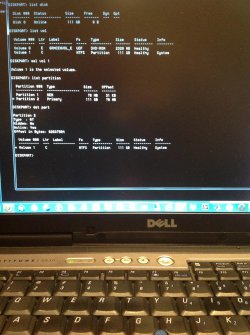
I've attached a screenshot of my working computer's current output from diskpart. To me it appears that the same partition is active now (and it works) as was active back in post #10 (when it didn't work). If you can find any discrepancies, please let me know! I'm not sure at all why my latest actions worked, since I don't think they changed anything. Perhaps there was some action I took between post #10 and now that cleared the original issue but marked the incorrect active partition. I unfortunately did not look at the active partition immediately before re-declaring partition 2 as active again.
But I would like to once again say THANK YOU to all who contributed to this thread. All contributions were helpful and I learned a lot about the various stages of Windows' boot process. I hope that this thread will help someone else in the future.
Long story short - SOLVED!
Before this last try at it, its status was as I said in post #23:
Unable to boot, error 0xc0000428
Gregrocker, I believed I had followed all the instructions in Startup Repair - Run up to 3 Separate Times. According to one of my previous posts (here, post #10) I had checked to see if the correct partition was active and it definitely WAS then, as per the screenshots in that post. I had run Startup Repair 3 times with restarts in between, many times.
Anyway, I followed your second link to Mark Partition Active and decided to mark the correct partition again. From the previous screenshots (here, again - post #10) you can see that Partition 2 was active. But I set Partition 2 to be active again anyway, and my next reboot succeeded.
I've attached a screenshot of my working computer's current output from diskpart. To me it appears that the same partition is active now (and it works) as was active back in post #10 (when it didn't work). If you can find any discrepancies, please let me know! I'm not sure at all why my latest actions worked, since I don't think they changed anything. Perhaps there was some action I took between post #10 and now that cleared the original issue but marked the incorrect active partition. I unfortunately did not look at the active partition immediately before re-declaring partition 2 as active again.
But I would like to once again say THANK YOU to all who contributed to this thread. All contributions were helpful and I learned a lot about the various stages of Windows' boot process. I hope that this thread will help someone else in the future.
Attachments
My Computer
- OS
- Windows 7 Enterprise 32-bit
- Local time
- 4:20 PM
- Messages
- 50,634
Please post back a screenshot of Disk Management - Post a Screen Capture Image - Windows 7 Forums.
I see you have a tiny OEM partition at the beginning of the HD sitting on the boot sector. Does this mean you still have the corrupt factory preinstall with all the bloatware that throttles and ruins Win7? If so I would strongly consider a Clean Reinstall - Factory OEM Windows 7 to enjoy the OS's native performance. Be sure to delete all partitions during booted install. Everything you need is in the blue link.
I see you have a tiny OEM partition at the beginning of the HD sitting on the boot sector. Does this mean you still have the corrupt factory preinstall with all the bloatware that throttles and ruins Win7? If so I would strongly consider a Clean Reinstall - Factory OEM Windows 7 to enjoy the OS's native performance. Be sure to delete all partitions during booted install. Everything you need is in the blue link.
timbrwlf56
New member
- Local time
- 4:20 PM
- Messages
- 1
Hello, I thought I'd drop in my two cents of something that unexpectedly and surprisingly worked for me regarding this error. In my case I was working on a client machine who was browsing the internet and suddenly got a shutdown notice, and then on reboot had what looked like a corrupted BCD. Long story short, after several attempts with the Windows Startup Repair, and a mind-violating number of go rounds with manual BCD editors, chkdsk, combofix (just for the heck of it), checking partition settings, completely reformatting the boot partition, more /fixboot and /fixmbr than anyone needs in a lifetime, and swapping in different copies of winload.exe and registry backup files, I too was left stuck with the 0xc0000428 error. I could pop in a Hirams disc and bypass the windows boot loader and boot to the OS just fine though.
Before I had started this whole process of BCD / winload.exe fixes I made a ghost duplicate of the drive to a second drive so at least I'd have my original starting point and I could safely go hog wild with repair attempts. On a whim as a last resort I popped the ghosted drive in the system, popped in the Windows disc and ran the Windows Startup Repair, and after a few runs to my surprise it repaired successfully and everything was right as rain again, the system would boot like normal.
Why this worked? I have no idea, perhaps something at a low level got chongered on the original drive some how, data in a region of the drive that it couldn't access, geometry setting off by a bit? Who knows. Maybe this will save someone else the madness I and so many other people have experienced
Before I had started this whole process of BCD / winload.exe fixes I made a ghost duplicate of the drive to a second drive so at least I'd have my original starting point and I could safely go hog wild with repair attempts. On a whim as a last resort I popped the ghosted drive in the system, popped in the Windows disc and ran the Windows Startup Repair, and after a few runs to my surprise it repaired successfully and everything was right as rain again, the system would boot like normal.
Why this worked? I have no idea, perhaps something at a low level got chongered on the original drive some how, data in a region of the drive that it couldn't access, geometry setting off by a bit? Who knows. Maybe this will save someone else the madness I and so many other people have experienced
My Computer
- Computer type
- PC/Desktop
- Computer Manufacturer/Model Number
- Acer
- OS
- Windows 7 Home Premium 64 bit
- CPU
- C-60
- Motherboard
- Acer
- Memory
- 4 GB DDR3
- Graphics Card(s)
- Radeon
- Hard Drives
- Kingston SSD 90 GB
- Antivirus
- Eset
- Browser
- Chrome
Here's a screenshot of my current Disk Management.
I don't think I have any bloatware sitting on my installation; I've been running a barebones version of Windows 7 Enterprise I get through my university. That tiny partition at the front is some vestige from the original installation of Windows XP that came with the computer, I think. But it could also be from me playing around with dual-booting a few years ago; I was running both Windows and Ubuntu. It's only 78 MB - do you really think it's causing any trouble?
I don't think I have any bloatware sitting on my installation; I've been running a barebones version of Windows 7 Enterprise I get through my university. That tiny partition at the front is some vestige from the original installation of Windows XP that came with the computer, I think. But it could also be from me playing around with dual-booting a few years ago; I was running both Windows and Ubuntu. It's only 78 MB - do you really think it's causing any trouble?
Attachments

Last edited:
My Computer
- OS
- Windows 7 Enterprise 32-bit
- Local time
- 4:20 PM
- Messages
- 50,634
The point of my question was if you have factory preinstalled Win7 which is the worst install you can have.
I gave you the steps to get a perfect reinstall when you're ready.
I gave you the steps to get a perfect reinstall when you're ready.
hi Kaktussoft,
atiXOOOO42
hallo,
Ive got the same problem winoad.exe and status 0XC0000428
i think you are the only one in this universe except balmer who can help me ? Please help... I am going bazurk
atiXOOOO42
hallo,
Ive got the same problem winoad.exe and status 0XC0000428
i think you are the only one in this universe except balmer who can help me ? Please help... I am going bazurk
My Computer
- Computer type
- PC/Desktop
- Computer Manufacturer/Model Number
- packard Bell
- OS
- w7 ul
OMFG. Please someone help me with this. Im trying to fresh install win 8.1. All my previous attempt led me to completely deleting the previous OS (win 7) so Im stuck with this recovery error 0xc0000428. Ive memorized this error number. Thats how long ive been at this. Please help me T_T
[SOLVED] OMFGGGG I fixed it. Idk what worked. Im good with computers but Im not an adept. I just followed the run start up 3 times thing. Marked just one partition and voila. Idk if thats what specifically made it work. I know after I did that it worked. Thank you internet. I was on the brink of insanity. I love you. God bless you. May your children prosper. Okay im done ^_^
[SOLVED] OMFGGGG I fixed it. Idk what worked. Im good with computers but Im not an adept. I just followed the run start up 3 times thing. Marked just one partition and voila. Idk if thats what specifically made it work. I know after I did that it worked. Thank you internet. I was on the brink of insanity. I love you. God bless you. May your children prosper. Okay im done ^_^
Last edited:
My Computer
- Computer type
- PC/Desktop
- OS
- windows 7x64
Similar threads

- Replies
- 6
- Views
- 3K

- Replies
- 2
- Views
- 2K

- Replies
- 1
- Views
- 2K
