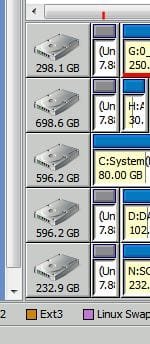
Unallocated 7.84 mb space materializes (from Outer Space?)

Puddin Man

New member
Local time
11:18 AM
Messages
63
Hi,

I went to a lot of trouble to consolidate the 100 mb (BCD/bitlocker etc) partition that Win7 unexpectedly created when I installed 7 some months ago.

Since then I've configured a 7/XP as multi-boot system and thought it was stable. C: stored 7, D: stored XP, and there were 2 additional partitions.

Tonight Partition Wizard (bootable) tells me there is an unallocated 7.84 mb logical partition occupying sectors 0-16064. Neither 7 nor XP reports the existence of this space.

Definite details about the origin of such a storage mystery would be much appreciated.

Thx,
P
 

My Computer My Computer

At a glance

Win7 Home Prem. 64 OEMIntel i5-650G. Skill Ripjaws 4gb<None>
Computer Manufacturer/Model Number
White Box
OS
Win7 Home Prem. 64 OEM
CPU
Intel i5-650
Motherboard
Asus P7H55D-M EVO
Memory
G. Skill Ripjaws 4gb
Graphics Card(s)
<None>
Sound Card
On-board Realtec
Monitor(s) Displays
Asus 10" LCD
Hard Drives
2 Samsung Spin-point 500 gb
PSU
Corsair 400w
Case
Antec
Cooling
5 fans + Std Intel cpu
Sounds like a partition alignment problem, as sectors 0-16064 are normally the first track on a hard disk.

Update on V4 progression

Did you ever have a Linux partition on that computer?
 

My Computer My Computer

At a glance

Windows 7 64 Bit Home Premium SP1i7-3820GSkill F3-14900CL9Q - 16GBEVGA GeForce GTX660 - Driver 352.86
Computer type
PC/Desktop
Computer Manufacturer/Model Number
Home Built - Jan 2013
OS
Windows 7 64 Bit Home Premium SP1
CPU
i7-3820
Motherboard
Asus P9X79-PRO - Bios 4608
Memory
GSkill F3-14900CL9Q - 16GB
Graphics Card(s)
EVGA GeForce GTX660 - Driver 352.86
Sound Card
On board Realtek ALC898
Monitor(s) Displays
Acer S271HL
Screen Resolution
1920 x 1080
Hard Drives
#1- Samsung 840 Pro Series
#2- Western Digital WD1002FAEX Sata3 Black
#3- Western Digital WD1002FAEX Sata3 Black
PSU
Corsair CMPSU-850TX-V2 - 850 watt (by Seasonic)
Case
Corsair Obsidian 550D
Cooling
Standard 3 120mm case fans, Cooler Master Hyper 212 EVO
Keyboard
MS KC-0405
Mouse
Intellimouse 5-button
Internet Speed
56 Mbits/Sec (on a good day)
Antivirus
Avast & Malwarebytes
Browser
Firefox
Other Info
Asus DVD - DRW-24B1ST 24X
Sounds like a partition alignment problem, as sectors 0-16064 are normally the first track on a hard disk.

Update on V4 progression

Did you ever have a Linux partition on that computer?
Never.

I built the system last May. Installed W7-64 Home Prem. , then XP (multi-boot), and added 2 data partitions. A second identical HD stores a bit-for-bit copy of what is on the first.

P
 

My Computer My Computer

At a glance

Win7 Home Prem. 64 OEMIntel i5-650G. Skill Ripjaws 4gb<None>
Computer Manufacturer/Model Number
White Box
OS
Win7 Home Prem. 64 OEM
CPU
Intel i5-650
Motherboard
Asus P7H55D-M EVO
Memory
G. Skill Ripjaws 4gb
Graphics Card(s)
<None>
Sound Card
On-board Realtec
Monitor(s) Displays
Asus 10" LCD
Hard Drives
2 Samsung Spin-point 500 gb
PSU
Corsair 400w
Case
Antec
Cooling
5 fans + Std Intel cpu
I *think* Partition Wizard (Bootable CD) will correct that. Although I have not done so personally.
 

My Computer My Computer

At a glance

Windows 7 64 Bit Home Premium SP1i7-3820GSkill F3-14900CL9Q - 16GBEVGA GeForce GTX660 - Driver 352.86
Computer type
PC/Desktop
Computer Manufacturer/Model Number
Home Built - Jan 2013
OS
Windows 7 64 Bit Home Premium SP1
CPU
i7-3820
Motherboard
Asus P9X79-PRO - Bios 4608
Memory
GSkill F3-14900CL9Q - 16GB
Graphics Card(s)
EVGA GeForce GTX660 - Driver 352.86
Sound Card
On board Realtek ALC898
Monitor(s) Displays
Acer S271HL
Screen Resolution
1920 x 1080
Hard Drives
#1- Samsung 840 Pro Series
#2- Western Digital WD1002FAEX Sata3 Black
#3- Western Digital WD1002FAEX Sata3 Black
PSU
Corsair CMPSU-850TX-V2 - 850 watt (by Seasonic)
Case
Corsair Obsidian 550D
Cooling
Standard 3 120mm case fans, Cooler Master Hyper 212 EVO
Keyboard
MS KC-0405
Mouse
Intellimouse 5-button
Internet Speed
56 Mbits/Sec (on a good day)
Antivirus
Avast & Malwarebytes
Browser
Firefox
Other Info
Asus DVD - DRW-24B1ST 24X
Windows XP leaves a very small unallocated space on the hard drive during its install. Its reserved for data related to making the partition part of a dynamic disk. If memory serves me right its around 8 megs on my XP PC. It also doesn't show up in Disk management on my XP PC but I know its there.
 

My Computer My Computer

At a glance

Windows 10 Education 64 bitAMD Phenom II X4 980 Black Edition Deneb 3.7GHz8GB 4GBx2 Kingston PC10600 DDR3 1333 MemoryZotac NVIDIA Geforce GT640 2 Gig DDR3 PCIe
Computer type
PC/Desktop
Computer Manufacturer/Model Number
Home Built
OS
Windows 10 Education 64 bit
CPU
AMD Phenom II X4 980 Black Edition Deneb 3.7GHz
Motherboard
Asus M4N68T-M V2 µATX Motherboard
Memory
8GB 4GBx2 Kingston PC10600 DDR3 1333 Memory
Graphics Card(s)
Zotac NVIDIA Geforce GT640 2 Gig DDR3 PCIe
Sound Card
VIA VT1708s High Definition Audio 8-channel Onboard
Monitor(s) Displays
22" LG E2242 1080p and 2 19" I-INC AG191D
Screen Resolution
1280x1024 - 1920x1080 - 1280x1024
Hard Drives
Crucial M100 256 GB SSD and 500 GB WD Blue SATA
PSU
Thermaltake TR 620
Case
Power Up Black ATX Mid-Tower Case
Cooling
Stock heatsink and fan
Keyboard
Logitech Wireless K350 Wave
Mouse
Logitech Wireless M570 Trackman Wheel
Internet Speed
80 Mbps Down 30 Mbps Up
Antivirus
Windows Defender
Browser
Internet Explorer 11
Other Info
HP DVD1040e Lightscribe - External USB2
So Alpha - best for OP to leave it alone?
 

My Computer My Computer

At a glance

Windows 7 64 Bit Home Premium SP1i7-3820GSkill F3-14900CL9Q - 16GBEVGA GeForce GTX660 - Driver 352.86
Computer type
PC/Desktop
Computer Manufacturer/Model Number
Home Built - Jan 2013
OS
Windows 7 64 Bit Home Premium SP1
CPU
i7-3820
Motherboard
Asus P9X79-PRO - Bios 4608
Memory
GSkill F3-14900CL9Q - 16GB
Graphics Card(s)
EVGA GeForce GTX660 - Driver 352.86
Sound Card
On board Realtek ALC898
Monitor(s) Displays
Acer S271HL
Screen Resolution
1920 x 1080
Hard Drives
#1- Samsung 840 Pro Series
#2- Western Digital WD1002FAEX Sata3 Black
#3- Western Digital WD1002FAEX Sata3 Black
PSU
Corsair CMPSU-850TX-V2 - 850 watt (by Seasonic)
Case
Corsair Obsidian 550D
Cooling
Standard 3 120mm case fans, Cooler Master Hyper 212 EVO
Keyboard
MS KC-0405
Mouse
Intellimouse 5-button
Internet Speed
56 Mbits/Sec (on a good day)
Antivirus
Avast & Malwarebytes
Browser
Firefox
Other Info
Asus DVD - DRW-24B1ST 24X
Alpha is dead on , I would leave it alone :)
 

My Computer My Computer

At a glance

Ultimate 71055T @ 3.716g CorsairHD5770
Computer Manufacturer/Model Number
MSI
OS
Ultimate 7
CPU
1055T @ 3.7
Motherboard
MSI
Memory
16g Corsair
Graphics Card(s)
HD5770
Sound Card
Onboard
Monitor(s) Displays
FLat 23
Hard Drives
SSD 64g Kingston
500 Gig Western
PSU
850 Thermaltake
I always just left it, its only ~8 megs. I couldn't be bothered loading a third party partitioning app just to get ride of it. Once you installed XP it was out of site out of mind anyway. I just noticed that during the XP install, even if created a new partition, there was always this little bit left over. That got me curious so I did some digging to figure out what it was for. I don't think anything would happen if you recovered that space, unless you tried to setup a dynamic disk. Thats not something I think to many people do these days. Its up to you if you want to nuke it, just don't blame me if bad things happen. ;)
 

My Computer My Computer

At a glance

Windows 10 Education 64 bitAMD Phenom II X4 980 Black Edition Deneb 3.7GHz8GB 4GBx2 Kingston PC10600 DDR3 1333 MemoryZotac NVIDIA Geforce GT640 2 Gig DDR3 PCIe
Computer type
PC/Desktop
Computer Manufacturer/Model Number
Home Built
OS
Windows 10 Education 64 bit
CPU
AMD Phenom II X4 980 Black Edition Deneb 3.7GHz
Motherboard
Asus M4N68T-M V2 µATX Motherboard
Memory
8GB 4GBx2 Kingston PC10600 DDR3 1333 Memory
Graphics Card(s)
Zotac NVIDIA Geforce GT640 2 Gig DDR3 PCIe
Sound Card
VIA VT1708s High Definition Audio 8-channel Onboard
Monitor(s) Displays
22" LG E2242 1080p and 2 19" I-INC AG191D
Screen Resolution
1280x1024 - 1920x1080 - 1280x1024
Hard Drives
Crucial M100 256 GB SSD and 500 GB WD Blue SATA
PSU
Thermaltake TR 620
Case
Power Up Black ATX Mid-Tower Case
Cooling
Stock heatsink and fan
Keyboard
Logitech Wireless K350 Wave
Mouse
Logitech Wireless M570 Trackman Wheel
Internet Speed
80 Mbps Down 30 Mbps Up
Antivirus
Windows Defender
Browser
Internet Explorer 11
Other Info
HP DVD1040e Lightscribe - External USB2
I appreciate your responses, and have heard of the dynamic-disk thingness before, but ...

The problem is not what to do with the 7.84 mb space, but rather determining where it came from.

Around 06-01-2010 I installed Win7 and was amazed to find it had written the first partition of 100mb (BCD, bitlocker, etc). It cost lots of time to find out what it was and consolidate it into the functional Win7 partition. Acute Heartburn!

By 08-11 I was certain that I wouldn't place primary reliance on Win7, so I spent lots of time learning about Win7/XP multi-boot, then installed XP as the 2nd partition. It did not create the 7.84 mb space.

The thing is, I need total control of what is stored on my HD's in order to specify and execute my backup strategy. I suppose I'm kinda "old school" in that it flat-out boggles my poor brain that *any* software product would write some unknown and unspecified (to the user) storage entity to a HD. Even worse that it would hide it from common program facilities like "Disk Management".

So, I'm just after control. Where did it come from? How can I prevent it from re-appearing?

Thanks,
P
 

My Computer My Computer

At a glance

Win7 Home Prem. 64 OEMIntel i5-650G. Skill Ripjaws 4gb<None>
Computer Manufacturer/Model Number
White Box
OS
Win7 Home Prem. 64 OEM
CPU
Intel i5-650
Motherboard
Asus P7H55D-M EVO
Memory
G. Skill Ripjaws 4gb
Graphics Card(s)
<None>
Sound Card
On-board Realtec
Monitor(s) Displays
Asus 10" LCD
Hard Drives
2 Samsung Spin-point 500 gb
PSU
Corsair 400w
Case
Antec
Cooling
5 fans + Std Intel cpu
SYMPTOMS
During Setup, if you choose to create a partition that uses the remaining space on a disk, you cannot use the maximum space available on the disk.

For example, if you choose to create a 4096-MB partition on a disk that has only 4096 MB available, the actual partition that is created may be 4095 MB or less in size.

CAUSE
Some space at the end of the disk is reserved by Setup in case you later want to upgrade the disk to a dynamic disk. Dynamic disk information is saved at the end of the disk. The amount that is reserved is a minimum of one cylinder, or 1MB, whichever is greater. One cylinder can be up to 8MB, depending on drive geometry and translation.
 

My Computer My Computer

At a glance

Ultimate 71055T @ 3.716g CorsairHD5770
Computer Manufacturer/Model Number
MSI
OS
Ultimate 7
CPU
1055T @ 3.7
Motherboard
MSI
Memory
16g Corsair
Graphics Card(s)
HD5770
Sound Card
Onboard
Monitor(s) Displays
FLat 23
Hard Drives
SSD 64g Kingston
500 Gig Western
PSU
850 Thermaltake
...
CAUSE
Some space at the end of the disk is reserved by Setup in case you later want to upgrade the disk to a dynamic disk. ...

From the orig. post:

>Tonight Partition Wizard (bootable) tells me there is an unallocated 7.84 mb logical partition occupying sectors 0-16064. Neither 7 nor XP reports the existence of this space.

At the beginning of the disk (not the end).

I tried GParted in case Part. Wiz. was inaccurate. Same result.

Breakdown of space on disk device:

Unallocated ----- 7.84 mb
SS1_P1_W7] ------- 78 gb - Win7
SS1_P2_XP] ------- 80 ---- XP
SS1_P3_Data] ----- 80 ---- New Data
Unallocated ----- 204
SS1_WDP2_W2K_PRD - 23 ---- Old Data

All is per my design except the 7.84 mb.

P
 
Last edited:

My Computer My Computer

At a glance

Win7 Home Prem. 64 OEMIntel i5-650G. Skill Ripjaws 4gb<None>
Computer Manufacturer/Model Number
White Box
OS
Win7 Home Prem. 64 OEM
CPU
Intel i5-650
Motherboard
Asus P7H55D-M EVO
Memory
G. Skill Ripjaws 4gb
Graphics Card(s)
<None>
Sound Card
On-board Realtec
Monitor(s) Displays
Asus 10" LCD
Hard Drives
2 Samsung Spin-point 500 gb
PSU
Corsair 400w
Case
Antec
Cooling
5 fans + Std Intel cpu
Hello mate.


Sometime when using Partition Wizard to resize an existing partition the slider slips at one end or the other and leaves a small unallocated space and it doesn't get noticed until after the operation is complete, at least that has been my experience.

I've been all through this many times while working with the Partition Wizard program; you can reclaim the space using PW into an existing partition if you choose with no ill effects.

I'm aware you have removed/reclaimed the SysResv partition but there is documentation on the method to use with Partition Wizard; have a look at Option Two of this tutorial at the link below and be sure to post back with any further questions you may have and to keep us informed.


Partition Wizard : Use the Bootable CD
 

My Computer My Computer

At a glance

W 7 64-bit UltimateIntel Q9550 Yorkfield8GB Dominator 8500C5DATI : XFX 5870
Computer Manufacturer/Model Number
* BFK Customs *
OS
W 7 64-bit Ultimate
CPU
Intel Q9550 Yorkfield
Motherboard
ASUS P5Q Pro
Memory
8GB Dominator 8500C5D
Graphics Card(s)
ATI : XFX 5870
Sound Card
Realtek HD Audio 7-1
Monitor(s) Displays
1x 47" LCD HDMI & 3x 26" LCD HDMI
Screen Resolution
1920x1080P & 1920x1200
Hard Drives
1x 80GB Intel X25-M G2 SSD : 1x 500GB & 1x 640GB WD Caviar Black(s)
PSU
Corsair 620HX
Case
Cooler Master RC-690
Cooling
Tuniq Tower 120, 2x 140mm and 3x 120mm case fans
Keyboard
Microsoft 500
Mouse
Razer Diamondback 3G
Internet Speed
14 Mb/s
Other Info
1x Koutech 3Gb/s SATA HDD Hot Swap Rack
It appears to happen with Acronis Disk Director also. Only my system partition seems to have escaped. I've just left them in place...it's never been a problem here:

8mb Partitions.JPG
 

My Computer My Computer

At a glance

Win7U 64 RTMQ95508GB GskillASUS|EAH4850/HTDI/1GD3/A
OS
Win7U 64 RTM
CPU
Q9550
Motherboard
GA-EP45-UD3R
Memory
8GB Gskill
Graphics Card(s)
ASUS|EAH4850/HTDI/1GD3/A
Sound Card
xfi Plat
Monitor(s) Displays
Dell 2405fpw
Screen Resolution
1920x1200
Hard Drives
Seagate & WD sata Drives
PSU
Antec
Case
Antec
Keyboard
MS Natural Ergonomic 4000
Mouse
Logitech MX610 USB Cordless
Hello mate.

Sometime when using Partition Wizard to resize an existing partition the slider slips at one end or the other and leaves a small unallocated space and it doesn't get noticed until after the operation is complete, at least that has been my experience.

Your experience. Not mine.

I've been all through this many times while working with the Partition Wizard program; you can reclaim the space using PW into an existing partition if you choose with no ill effects.

That's not the issue.

I'm aware you have removed/reclaimed the SysResv partition but there is documentation on the method to use with Partition Wizard; have a look at Option Two of this tutorial at the link below and be sure to post back with any further questions you may have and to keep us informed.

Partition Wizard : Use the Bootable CD

I probably followed your Step Two (or something very similar) when I consolidated. My finger didn't slip. There was no unallocated space before my Win7 partition when I finished. This consolidation was done last summer.

No offence, but nothing in your response is relevant to my little problem.

Is it possible that Win7 is doing something unpredictable/illogical that y'all are -not- familiar with?

P
 

My Computer My Computer

At a glance

Win7 Home Prem. 64 OEMIntel i5-650G. Skill Ripjaws 4gb<None>
Computer Manufacturer/Model Number
White Box
OS
Win7 Home Prem. 64 OEM
CPU
Intel i5-650
Motherboard
Asus P7H55D-M EVO
Memory
G. Skill Ripjaws 4gb
Graphics Card(s)
<None>
Sound Card
On-board Realtec
Monitor(s) Displays
Asus 10" LCD
Hard Drives
2 Samsung Spin-point 500 gb
PSU
Corsair 400w
Case
Antec
Cooling
5 fans + Std Intel cpu
It appears to happen with Acronis Disk Director also. Only my system partition seems to have escaped. I've just left them in place...it's never been a problem here:

View attachment 137532
Your screenshot was truncated: I can see only a small part of it.

You have 4 of them? All are exactly 7.84 mb? Preceding what kind of partitions? Etc, etc.

Would like to see the full
screenshot.

Thanks,
P
 

My Computer My Computer

At a glance

Win7 Home Prem. 64 OEMIntel i5-650G. Skill Ripjaws 4gb<None>
Computer Manufacturer/Model Number
White Box
OS
Win7 Home Prem. 64 OEM
CPU
Intel i5-650
Motherboard
Asus P7H55D-M EVO
Memory
G. Skill Ripjaws 4gb
Graphics Card(s)
<None>
Sound Card
On-board Realtec
Monitor(s) Displays
Asus 10" LCD
Hard Drives
2 Samsung Spin-point 500 gb
PSU
Corsair 400w
Case
Antec
Cooling
5 fans + Std Intel cpu
Quote from the SSD alignment tutorial:

"If you install Windows7 on a brand new SSD, you need not make any special arrangements because the Windows7 installer will do the alignment for you. For Vista you are lucky because the start sector happens to match a SSD page. For XP the start sector is 126 which would be in the middle of a SSD page, thus a prior alignment is required. "

Is that what you're talking about? I don't have XP anymore, so I can't confirm that this is indeed your 7 MB (why are you at all worried about 7 MB, if you don't mind my asking?)

I have just installed Windows 7 on my new SSD. This is a multi-boot, so sure enough the installer has created a "System Reserved" partition (about 100 MB), while of course the rest of the drive is formatted to a single partition. Supposedly this system reserved partition is needed for the proper functioning of the multi-boot. I am sure I can get rid of it, but I don't think it's worth my time.

So my advice - leave these small chunks alone and move on.
 

My Computer My Computer

At a glance

Windows 7 Ultimate (x64)Q66008 GBATI Radeon HD 2600 XT
Computer Manufacturer/Model Number
Dell Inspiron 530
OS
Windows 7 Ultimate (x64)
CPU
Q6600
Memory
8 GB
Graphics Card(s)
ATI Radeon HD 2600 XT
Monitor(s) Displays
Samsung Syncmaster P2450
Screen Resolution
1920x1080
Hard Drives
Samsung HD103UJ
Samsung HD501LJ
Internet Speed
25 Mb/s
Oh you want a manufactured issue, well have at it.
 

My Computer My Computer

At a glance

W 7 64-bit UltimateIntel Q9550 Yorkfield8GB Dominator 8500C5DATI : XFX 5870
Computer Manufacturer/Model Number
* BFK Customs *
OS
W 7 64-bit Ultimate
CPU
Intel Q9550 Yorkfield
Motherboard
ASUS P5Q Pro
Memory
8GB Dominator 8500C5D
Graphics Card(s)
ATI : XFX 5870
Sound Card
Realtek HD Audio 7-1
Monitor(s) Displays
1x 47" LCD HDMI & 3x 26" LCD HDMI
Screen Resolution
1920x1080P & 1920x1200
Hard Drives
1x 80GB Intel X25-M G2 SSD : 1x 500GB & 1x 640GB WD Caviar Black(s)
PSU
Corsair 620HX
Case
Cooler Master RC-690
Cooling
Tuniq Tower 120, 2x 140mm and 3x 120mm case fans
Keyboard
Microsoft 500
Mouse
Razer Diamondback 3G
Internet Speed
14 Mb/s
Other Info
1x Koutech 3Gb/s SATA HDD Hot Swap Rack
...
CAUSE
Some space at the end of the disk is reserved by Setup in case you later want to upgrade the disk to a dynamic disk. ...

From the orig. post:

>Tonight Partition Wizard (bootable) tells me there is an unallocated 7.84 mb logical partition occupying sectors 0-16064. Neither 7 nor XP reports the existence of this space.

At the beginning of the disk (not the end).

I tried GParted in case Part. Wiz. was inaccurate. Same result.

Breakdown of space on disk device:

Unallocated ----- 7.84 mb
SS1_P1_W7] ------- 78 gb - Win7
SS1_P2_XP] ------- 80 ---- XP
SS1_P3_Data] ----- 80 ---- New Data
Unallocated ----- 204
SS1_WDP2_W2K_PRD - 23 ---- Old Data

All is per my design except the 7.84 mb.

P


YOUR making a huge deal out of something every XP install does , has done , and always will do ..

alphanumeric in post 5 answered your question ,, I also posted an answer that was in line with his. But for some reason your not accepting it or not reading peoples replies.

If you want a answer worded different then those we posted go to windows web site and start searching as well as google and search there , because the answer is is about as hard to find as air :D

Some disk space is reserved by Setup in case you later want to upgrade the disk to a dynamic disk. Dynamic disk information is saved at the end of the disk. The amount that is reserved is a minimum of one cylinder, or 1MB, whichever is greater. One cylinder can be up to 8MB, depending on drive geometry and translation
 

My Computer My Computer

At a glance

Ultimate 71055T @ 3.716g CorsairHD5770
Computer Manufacturer/Model Number
MSI
OS
Ultimate 7
CPU
1055T @ 3.7
Motherboard
MSI
Memory
16g Corsair
Graphics Card(s)
HD5770
Sound Card
Onboard
Monitor(s) Displays
FLat 23
Hard Drives
SSD 64g Kingston
500 Gig Western
PSU
850 Thermaltake
Blow it off, or rant, or <whatever>, it makes no difference.

No explanation given here fits all the facts.

To repeat:

Breakdown of space on disk device:

Unallocated ----- 7.84 mb
SS1_P1_W7] ------- 78 gb - Windows 7
SS1_P2_XP] ------- 80 ---- XP
SS1_P3_Data] ----- 80 ---- New Data
Unallocated ----- 204
SS1_WDP2_W2K_PRD - 23 ---- Old Data

All is per my design except the 7.84 mb. The config of disk 2 is the same as disk 1.

Running Partition Wizard bootable CD, I delete SS2_P1_W7 78.08 gb, and copy SS1_P1_W7 (exact same size and data) in its place.

The result is reported as 78.08 gb, and the 7.84 is no longer reported.

As if it wasn't really there in the first place.

Y'all don't even blink when your systems do something unpredictable like this. It's very likely to come back and bite ya where it counts some day. :-(

P
 

My Computer My Computer

At a glance

Win7 Home Prem. 64 OEMIntel i5-650G. Skill Ripjaws 4gb<None>
Computer Manufacturer/Model Number
White Box
OS
Win7 Home Prem. 64 OEM
CPU
Intel i5-650
Motherboard
Asus P7H55D-M EVO
Memory
G. Skill Ripjaws 4gb
Graphics Card(s)
<None>
Sound Card
On-board Realtec
Monitor(s) Displays
Asus 10" LCD
Hard Drives
2 Samsung Spin-point 500 gb
PSU
Corsair 400w
Case
Antec
Cooling
5 fans + Std Intel cpu
As far as my systems go, its not unpredictable. I know what it is, what its for, and why its there. Same deal for the 100 mb system reserved partition Windows 7 puts in place. Your unallocated chunk is just at the front of the drive instead of the end of the drive. Likely because you installed windows 7 then windows XP instead of the other way around. Either way its "Unallocated" space, meaning there is nothing in there. Its unpartitioned, unformatted space on the hard drive. IMHO your making a mountain out of a mole hill.
 

My Computer My Computer

At a glance

Windows 10 Education 64 bitAMD Phenom II X4 980 Black Edition Deneb 3.7GHz8GB 4GBx2 Kingston PC10600 DDR3 1333 MemoryZotac NVIDIA Geforce GT640 2 Gig DDR3 PCIe
Computer type
PC/Desktop
Computer Manufacturer/Model Number
Home Built
OS
Windows 10 Education 64 bit
CPU
AMD Phenom II X4 980 Black Edition Deneb 3.7GHz
Motherboard
Asus M4N68T-M V2 µATX Motherboard
Memory
8GB 4GBx2 Kingston PC10600 DDR3 1333 Memory
Graphics Card(s)
Zotac NVIDIA Geforce GT640 2 Gig DDR3 PCIe
Sound Card
VIA VT1708s High Definition Audio 8-channel Onboard
Monitor(s) Displays
22" LG E2242 1080p and 2 19" I-INC AG191D
Screen Resolution
1280x1024 - 1920x1080 - 1280x1024
Hard Drives
Crucial M100 256 GB SSD and 500 GB WD Blue SATA
PSU
Thermaltake TR 620
Case
Power Up Black ATX Mid-Tower Case
Cooling
Stock heatsink and fan
Keyboard
Logitech Wireless K350 Wave
Mouse
Logitech Wireless M570 Trackman Wheel
Internet Speed
80 Mbps Down 30 Mbps Up
Antivirus
Windows Defender
Browser
Internet Explorer 11
Other Info
HP DVD1040e Lightscribe - External USB2
Back
Top