mp5
New member
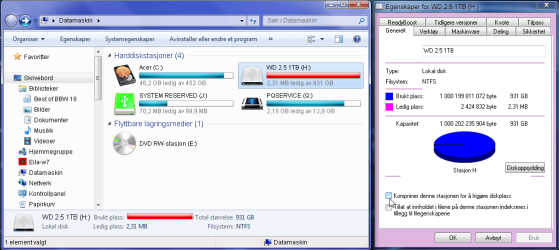
I have an 1TB external hard drive with no free space left, and contains only one visible file; Locker.flk - created by using Folder Lock. (Windows 7 Home Premium 64bit)
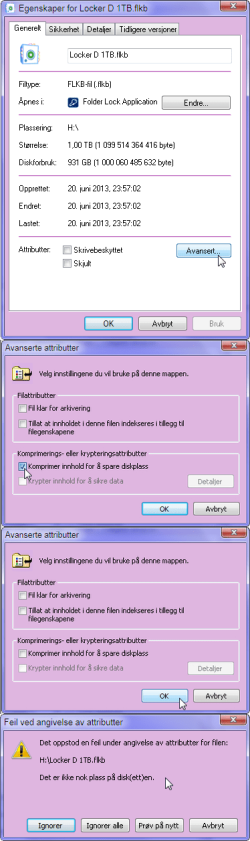
I was just curious to see if the "Compress or Encrypt files" in "Advanced Attributes" would make any difference, so I ticked off the box to "Compress content to save disk space".
When I then clicked "Apply" I got an Windows error message saying "Disk full, not enough space to complete the task"
But when I go back to see attributes settings it now has the box ticked - indicating compression IS activated, despite the error message.
No matter what I do, I can't undo it. "Disk full, not enough space..."
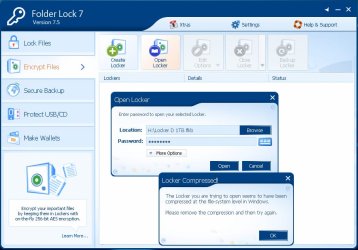
The main problem is that when I try to access my locked files using Folder Lock, it says;
"The Locker seems to be compressed at the file-system level in Windows. Please remove the compression, and try again!
- Windows won't let me undo the compression (that never happened), and until this gets undone Folder Lock will keep my files locked...
3 weeks ago I lost the main drive I used to store i.e. ALL family photos. Now this happens to the backup of that drive. I'm starting to feel sick...
I was just curious to see if the "Compress or Encrypt files" in "Advanced Attributes" would make any difference, so I ticked off the box to "Compress content to save disk space".
When I then clicked "Apply" I got an Windows error message saying "Disk full, not enough space to complete the task"
But when I go back to see attributes settings it now has the box ticked - indicating compression IS activated, despite the error message.
No matter what I do, I can't undo it. "Disk full, not enough space..."
The main problem is that when I try to access my locked files using Folder Lock, it says;
"The Locker seems to be compressed at the file-system level in Windows. Please remove the compression, and try again!
- Windows won't let me undo the compression (that never happened), and until this gets undone Folder Lock will keep my files locked...
3 weeks ago I lost the main drive I used to store i.e. ALL family photos. Now this happens to the backup of that drive. I'm starting to feel sick...
Last edited:
My Computer
- Computer type
- Laptop
- Computer Manufacturer/Model Number
- Acer Aspire TimelineX 5820TG
- OS
- Windows 7 Home Premium 64bit
- CPU
- Intel Core i5-460M
- Motherboard
- Acer JM51_CP
- Memory
- 8GB
- Graphics Card(s)
- Radeon Mobility HD5650
- Hard Drives
- System: 500GB
External: 1TB, 3TB
- Internet Speed
- 100/10Mbps
- Antivirus
- Avast
- Browser
- Firefox




 This is explained in my