Undo NTFS compression

mp5

New member
Local time
4:37 PM
Messages
12
Location
Oslo, Norway
I have an 1TB external hard drive with no free space left, and contains only one visible file; Locker.flk - created by using Folder Lock. (Windows 7 Home Premium 64bit)
I was just curious to see if the "Compress or Encrypt files" in "Advanced Attributes" would make any difference, so I ticked off the box to "Compress content to save disk space".
When I then clicked "Apply" I got an Windows error message saying "Disk full, not enough space to complete the task"
But when I go back to see attributes settings it now has the box ticked - indicating compression IS activated, despite the error message.
No matter what I do, I can't undo it. "Disk full, not enough space..."

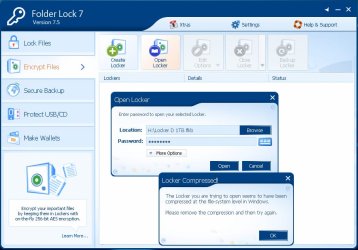
The main problem is that when I try to access my locked files using Folder Lock, it says;
"The Locker seems to be compressed at the file-system level in Windows. Please remove the compression, and try again!

- Windows won't let me undo the compression (that never happened), and until this gets undone Folder Lock will keep my files locked... :confused:

3 weeks ago I lost the main drive I used to store i.e. ALL family photos. Now this happens to the backup of that drive. I'm starting to feel sick... :sick:
 
Last edited:

My Computer

Computer type
Laptop
Computer Manufacturer/Model Number
Acer Aspire TimelineX 5820TG
OS
Windows 7 Home Premium 64bit
CPU
Intel Core i5-460M
Motherboard
Acer JM51_CP
Memory
8GB
Graphics Card(s)
Radeon Mobility HD5650
Hard Drives
System: 500GB
External: 1TB, 3TB
Internet Speed
100/10Mbps
Antivirus
Avast
Browser
Firefox
Creating a registry entry...

(Short version of post above - without the yada yada...)

How do I create a registry entry that disables NTFS compression on a drive?
 

My Computer

Computer type
Laptop
Computer Manufacturer/Model Number
Acer Aspire TimelineX 5820TG
OS
Windows 7 Home Premium 64bit
CPU
Intel Core i5-460M
Motherboard
Acer JM51_CP
Memory
8GB
Graphics Card(s)
Radeon Mobility HD5650
Hard Drives
System: 500GB
External: 1TB, 3TB
Internet Speed
100/10Mbps
Antivirus
Avast
Browser
Firefox
filled up

1TB is an awfull lot of data, how did you transfer the data to it???

sounds more like a virus to me.

Please download MalwareBytes and run on both your Comp and your external hard drive.

When you DL malwarebytes please uncheck the 30 day trial.
And enable the rootkit scan in the scan options.

In Folder Lock (not an MS prog) are there any option to dissable.

Roy
 

My Computer

Computer type
PC/Desktop
Computer Manufacturer/Model Number
medionl/Aspire 6930G/acer x55a
OS
W7 home premium 32bit/W7HP 64bit/w10 tp insider ring
CPU
E5300 dual core
Motherboard
medion MS7366
Memory
3gb
Graphics Card(s)
Nvidia Geforce 7100 Nforce 630i
Monitor(s) Displays
avixc
Internet Speed
n (isp resticted to 72)
Antivirus
mse/pands
Browser
palemoon
Other Info
Belkin Fd7050 n USB using Railink RT2870 drivers, more upto date
It's a ext. USB drive used as a backup for a few years. Folder Lock have created a "vault", that when closed are always the same size, and does not reflect actual amount of data on the disk.
(It's about 2-300GB free space inside)

It is clean, scanned with MalwareBytes. The drive has been used exclusively to store personal and family photo+video.

What did you mean disable...?
-You mean disable protection/ or un-locking the files with Folder Lock?
The problem is FL can't do anything until drive looses its compressed -status!
 

My Computer

Computer type
Laptop
Computer Manufacturer/Model Number
Acer Aspire TimelineX 5820TG
OS
Windows 7 Home Premium 64bit
CPU
Intel Core i5-460M
Motherboard
Acer JM51_CP
Memory
8GB
Graphics Card(s)
Radeon Mobility HD5650
Hard Drives
System: 500GB
External: 1TB, 3TB
Internet Speed
100/10Mbps
Antivirus
Avast
Browser
Firefox
Dissable

All AntiVirus and a lot of other Security/Encription programmes have the facility to dissable/stop parts of the program, either totally or for a certain amount of time.
Allowing you to do anything you cant usually do, or run other AV's mostly

Open folder lock> select options> security??- dissable, see whats there.

Dont use it myself but the above are standard.

Roy
 

My Computer

Computer type
PC/Desktop
Computer Manufacturer/Model Number
medionl/Aspire 6930G/acer x55a
OS
W7 home premium 32bit/W7HP 64bit/w10 tp insider ring
CPU
E5300 dual core
Motherboard
medion MS7366
Memory
3gb
Graphics Card(s)
Nvidia Geforce 7100 Nforce 630i
Monitor(s) Displays
avixc
Internet Speed
n (isp resticted to 72)
Antivirus
mse/pands
Browser
palemoon
Other Info
Belkin Fd7050 n USB using Railink RT2870 drivers, more upto date
Only option is to uninstall program, but that does leave files the way they're now - hidden in the "vault", which is a .flkb -file.
So uninstalling is only an option if I were able to move files from there to another disk first!
 

My Computer

Computer type
Laptop
Computer Manufacturer/Model Number
Acer Aspire TimelineX 5820TG
OS
Windows 7 Home Premium 64bit
CPU
Intel Core i5-460M
Motherboard
Acer JM51_CP
Memory
8GB
Graphics Card(s)
Radeon Mobility HD5650
Hard Drives
System: 500GB
External: 1TB, 3TB
Internet Speed
100/10Mbps
Antivirus
Avast
Browser
Firefox
Version 7

If your using FL7 then theres an awfull lot more options than that!!!
 

My Computer

Computer type
PC/Desktop
Computer Manufacturer/Model Number
medionl/Aspire 6930G/acer x55a
OS
W7 home premium 32bit/W7HP 64bit/w10 tp insider ring
CPU
E5300 dual core
Motherboard
medion MS7366
Memory
3gb
Graphics Card(s)
Nvidia Geforce 7100 Nforce 630i
Monitor(s) Displays
avixc
Internet Speed
n (isp resticted to 72)
Antivirus
mse/pands
Browser
palemoon
Other Info
Belkin Fd7050 n USB using Railink RT2870 drivers, more upto date
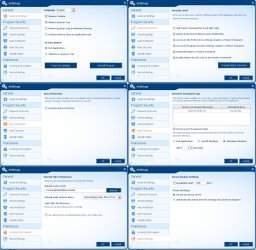
Yes, this is all the option!
 

Attachments

  • FLoptions.jpg
    FLoptions.jpg
    244.5 KB · Views: 4

My Computer

Computer type
Laptop
Computer Manufacturer/Model Number
Acer Aspire TimelineX 5820TG
OS
Windows 7 Home Premium 64bit
CPU
Intel Core i5-460M
Motherboard
Acer JM51_CP
Memory
8GB
Graphics Card(s)
Radeon Mobility HD5650
Hard Drives
System: 500GB
External: 1TB, 3TB
Internet Speed
100/10Mbps
Antivirus
Avast
Browser
Firefox
And this is how it looks when I try to open my files, and where I'm stuck:
 

Attachments

  • FLerror.jpg
    FLerror.jpg
    69 KB · Views: 0

My Computer

Computer type
Laptop
Computer Manufacturer/Model Number
Acer Aspire TimelineX 5820TG
OS
Windows 7 Home Premium 64bit
CPU
Intel Core i5-460M
Motherboard
Acer JM51_CP
Memory
8GB
Graphics Card(s)
Radeon Mobility HD5650
Hard Drives
System: 500GB
External: 1TB, 3TB
Internet Speed
100/10Mbps
Antivirus
Avast
Browser
Firefox
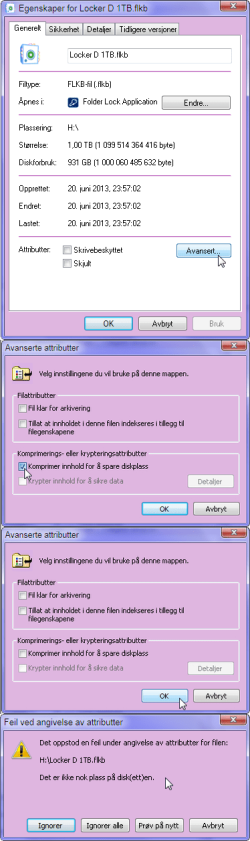
I'm not too sturdy in English, so I add some Windows screenshots for better illustrating my problem:

  1. Right click on file, select properties,
  2. select show advanced file attributes,
  3. deselects "Compress to save space"
  4. Clicks OK..
  5. ..and then I get the system error message:
"An error occurred while setting file attributes. There is not enough disk space"
 

Attachments

  • Error.png
    Error.png
    56 KB · Views: 2
Last edited:

My Computer

Computer type
Laptop
Computer Manufacturer/Model Number
Acer Aspire TimelineX 5820TG
OS
Windows 7 Home Premium 64bit
CPU
Intel Core i5-460M
Motherboard
Acer JM51_CP
Memory
8GB
Graphics Card(s)
Radeon Mobility HD5650
Hard Drives
System: 500GB
External: 1TB, 3TB
Internet Speed
100/10Mbps
Antivirus
Avast
Browser
Firefox
properties

Have you changed the default option here, according to your screenshot drive should be H.

Roy
 

Attachments

  • ntfs.PNG
    ntfs.PNG
    52.6 KB · Views: 1

My Computer

Computer type
PC/Desktop
Computer Manufacturer/Model Number
medionl/Aspire 6930G/acer x55a
OS
W7 home premium 32bit/W7HP 64bit/w10 tp insider ring
CPU
E5300 dual core
Motherboard
medion MS7366
Memory
3gb
Graphics Card(s)
Nvidia Geforce 7100 Nforce 630i
Monitor(s) Displays
avixc
Internet Speed
n (isp resticted to 72)
Antivirus
mse/pands
Browser
palemoon
Other Info
Belkin Fd7050 n USB using Railink RT2870 drivers, more upto date
Thank you Roy, for taking time helping out with my problem!

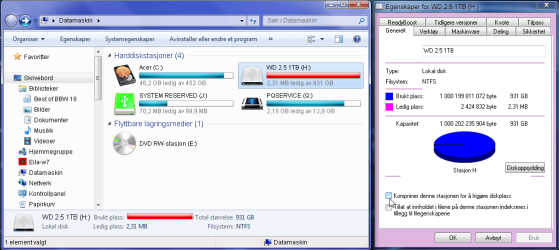
Yes, I have tried changing attributes for drive H, in addition to the single file on the drive.
Compression for H can be set ON/OFF without getting Windows error message.
(Tried both options: Only H, and H incl. folders/ files)
However, the box is always unchecked when I go back to see properties status.

Properties for the .flkb file on drive H remains stuck with a checked box, I get a Windows error message when trying to disable.

The :devil: paradox is that Windows never started the compression process in the first place, it only marked the file as if!
 

Attachments

  • H.png
    H.png
    42.7 KB · Views: 2
Last edited:

My Computer

Computer type
Laptop
Computer Manufacturer/Model Number
Acer Aspire TimelineX 5820TG
OS
Windows 7 Home Premium 64bit
CPU
Intel Core i5-460M
Motherboard
Acer JM51_CP
Memory
8GB
Graphics Card(s)
Radeon Mobility HD5650
Hard Drives
System: 500GB
External: 1TB, 3TB
Internet Speed
100/10Mbps
Antivirus
Avast
Browser
Firefox
whats here

What settings here,

Roy
 

Attachments

  • attr.PNG
    attr.PNG
    125.1 KB · Views: 3

My Computer

Computer type
PC/Desktop
Computer Manufacturer/Model Number
medionl/Aspire 6930G/acer x55a
OS
W7 home premium 32bit/W7HP 64bit/w10 tp insider ring
CPU
E5300 dual core
Motherboard
medion MS7366
Memory
3gb
Graphics Card(s)
Nvidia Geforce 7100 Nforce 630i
Monitor(s) Displays
avixc
Internet Speed
n (isp resticted to 72)
Antivirus
mse/pands
Browser
palemoon
Other Info
Belkin Fd7050 n USB using Railink RT2870 drivers, more upto date
I have this squirrelled away, maybe it will help:


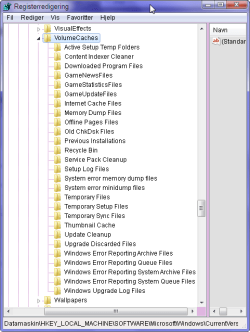
Compression is sometimes turned on by disk cleanup, to prevent this from happening again delete this registry key:

HKEY_LOCAL_MACHINE\SOFTWARE\Microsoft\Windows\
CurrentVersion\Explorer\VolumeCaches\Compress old files

You can export the key before deleting it, just in case you want it back. Disable compression from disk properties or use the following command:

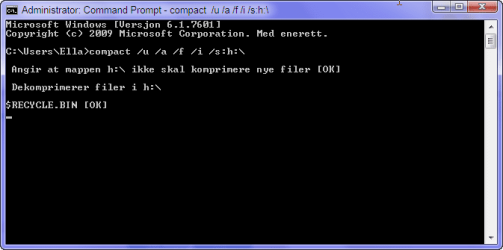
compact /u /a /f /i /s:c:\

Change c:\ to the letter assigned to the drive you are working with.
 

My Computer

Computer type
PC/Desktop
Computer Manufacturer/Model Number
Lenovo IdeaCenter 450
OS
Windows 10 Pro X64
CPU
Intel Quad Core i7-4770 @ 3.4Ghz
Memory
16.0GB PC3-12800 DDR3 SDRAM 1600 MHz
Graphics Card(s)
Intel Integrated HD Graphics
Sound Card
Realtek HD Audio
Monitor(s) Displays
HP 22" LCD
Screen Resolution
1680 x 1050
Hard Drives
250GB Samsung EVO SATA-3 SSD
2TB Seagate ST2000DM001 SATA-2
1.5TB Seagate ST3150041AS SATA
Keyboard
Dell USB
Mouse
Lenovo USB
Internet Speed
Cable via Road Runner 3MB Upload, 30MB Download
Antivirus
Windows Defender, MBAM Pro, MBAE
Browser
Seamonkey
Other Info
UEFI/GPT
PLDS DVD-RW DH16AERSH

Attachments

  • snap0702689.png
    snap0702689.png
    41.7 KB · Views: 16

My Computer

Computer type
Laptop
Computer Manufacturer/Model Number
Acer Aspire TimelineX 5820TG
OS
Windows 7 Home Premium 64bit
CPU
Intel Core i5-460M
Motherboard
Acer JM51_CP
Memory
8GB
Graphics Card(s)
Radeon Mobility HD5650
Hard Drives
System: 500GB
External: 1TB, 3TB
Internet Speed
100/10Mbps
Antivirus
Avast
Browser
Firefox
I'm surly no expert but is it possible that their isn't enough room on the drive to decompress it?
The picture only shows 2.1MB free space.
 

My Computer

Computer type
PC/Desktop
Computer Manufacturer/Model Number
Home made Desktop
OS
Windows 10 Pro. 64/ version 1709 Windows 7 Pro/64
CPU
Intel i7-6800K @ 4.3
Motherboard
ASUS X-99 Deluxe II
Memory
Corsair Platinum 16 gig @2400
Graphics Card(s)
EVGA GTX 1070 OC
Monitor(s) Displays
Asus 27" LED LCD/VE278Q
Screen Resolution
1920-1080 or 1280-720 HDMI
Hard Drives
INTEL SSD 730-240 Gb Sata 3.0/
PSU
EVGA Platium 1200W
Case
Phanteks Luxe Tempered Glass 8 fans/ one radiator
Cooling
XSPC/ Water Cooled CPU
Keyboard
Das 4 Professional
Mouse
Logitech M705/MX Anywhere 2-S
Internet Speed
100 mbits
Antivirus
Microsoft Security Essentials/ Malwarebytes Premium 3.0/ SAS
Browser
I.E. 11 default/Firefox/ ISP Time Warner Cable/Spectrum
Other Info
LG BluRay Burner/
Sound system-KLipsch-THX/
Icy Dock ssd Hot Swap bays.
I have this squirrelled away, maybe it will help:


Compression is sometimes turned on by disk cleanup, to prevent this from happening again delete this registry key:

HKEY_LOCAL_MACHINE\SOFTWARE\Microsoft\Windows\
CurrentVersion\Explorer\VolumeCaches\Compress old files

You can export the key before deleting it, just in case you want it back. Disable compression from disk properties or use the following command:

compact /u /a /f /i /s:c:\


Change c:\ to the letter assigned to the drive you are working with.


  • I was me that unfortunately tried to turn on compression! :o This is explained in my first post!
    But Windows aborted immediately with an error message; Not enough space!
    So main issue is Windows marked the file's properties with "compression ON" and now refuses to turn it off for the same reason; Not enough space!

  • I don't have that registry key! Don't know how or why it disappeared..

  • I ran your suggested command. It does not say OK for the Locker -file yet, but I guess the blinking cursor means it's working on it?
    It's been running for a two hours now.. Since the Locker -file is not really compressed physically, I would've thought it go rather quick!?
 

Attachments

  • snap0702685.png
    snap0702685.png
    13.8 KB · Views: 14
  • snap0702690.png
    snap0702690.png
    9.6 KB · Views: 14
Last edited:

My Computer

Computer type
Laptop
Computer Manufacturer/Model Number
Acer Aspire TimelineX 5820TG
OS
Windows 7 Home Premium 64bit
CPU
Intel Core i5-460M
Motherboard
Acer JM51_CP
Memory
8GB
Graphics Card(s)
Radeon Mobility HD5650
Hard Drives
System: 500GB
External: 1TB, 3TB
Internet Speed
100/10Mbps
Antivirus
Avast
Browser
Firefox
I'm surly no expert but is it possible that their isn't enough room on the drive to decompress it?
The picture only shows 2.1MB free space.

It is NOT enough space for decompression, but thing is nothing has ever been compressed!
Please read my first post! :)

Thanks...
 
Last edited:

My Computer

Computer type
Laptop
Computer Manufacturer/Model Number
Acer Aspire TimelineX 5820TG
OS
Windows 7 Home Premium 64bit
CPU
Intel Core i5-460M
Motherboard
Acer JM51_CP
Memory
8GB
Graphics Card(s)
Radeon Mobility HD5650
Hard Drives
System: 500GB
External: 1TB, 3TB
Internet Speed
100/10Mbps
Antivirus
Avast
Browser
Firefox
There is an 'Uncompress' method of the CIM_Directory WMI object. It's worth a shot...

Enter these lines in a PowerShell shell.
Code:
$folder = (gwmi -q "SELECT * FROM CIM_Directory Where Name='[COLOR=red]C:\\folder\\to\\uncompress[/COLOR]'")
$folder.Uncompress()
 

My Computer

Computer type
PC/Desktop
OS
Windows 10, Windows 8.1 Pro, Windows 7 Professional, OS X El Capitan
Back
Top